---
title: "TiDB Zero Downtime Under Availability Zone Failure"
version: "v2"
status: "GA"
description: "This hands-on lab demonstrates how to achieve zero downtime for a database during a data center or availability zone failure. Thanks to TiDB's distributed architecture, failures at the data center or Availability Zone level don't need to trigger a server-side failover and let the database clients wait on the failover to complete. Instead, database clients can seamlessly connect to the available TiDB server instances, ensuring continuous business operations. Should such disasters occur, the application can set an operation timeout by their business requirements. Unlike traditional systems, TiDB doesn't require server-side failover to complete before the database client can reconnect."
---
# TiDB Zero Downtime Under Availability Zone Failure
## Overview
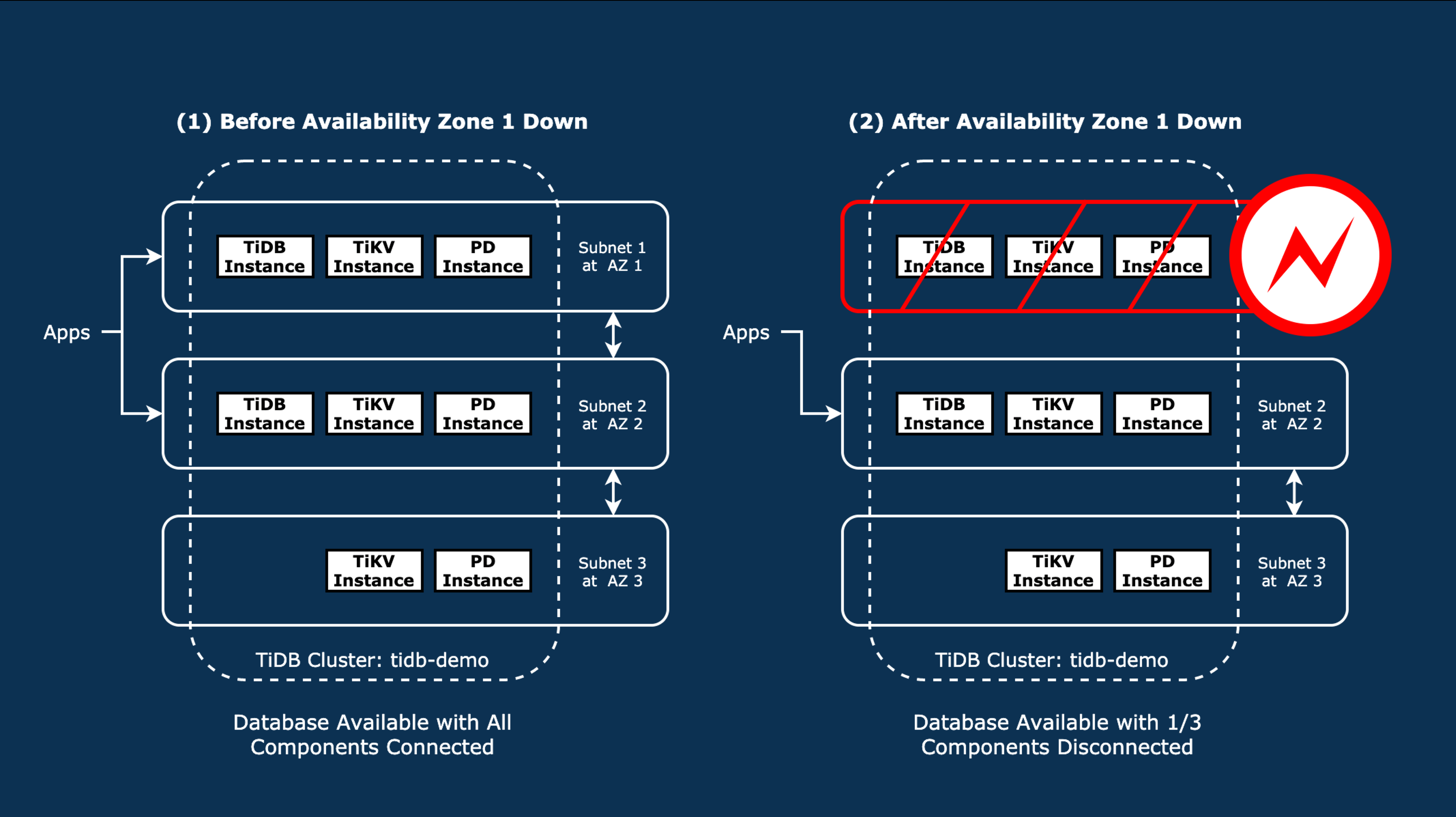
In this lab, the TiDB cluster is deployed across three Availability Zones, each corresponding to a subnet.
You will simulate a network blackout in Subnet 1. This will disconnect one TiDB server, one TiKV server, and one PD server from the cluster.
Infrastructure failures do not require server-side failover as database clients automatically connect to the remaining TiDB server instances.
### Duration
+ This lab should take you approximately 60 minutes to complete.
### Tasks
+ Review the TiDB cluster status and topology.
+ Blockade the network communication for an entire availability zone.
+ Observe and verify that the TiDB cluster is able to maintain functionality even in the event of an entire availability zone being inaccessible.
> [!TIP]
> Click **Start** to launch the lab environment.
> Once the environment is ready, select **Next** on the bottom toolbar to advance to **Module 1**.
> And, follow the step-by-step lab guide to connect to the hands-on environment and begin your tasks.
## Module 1: Deploy A TiDB Cluster Across Three Availability Zones
### Step 1. SSH login to node ${LAB:HOST_MONITOR1_PUBLIC_IP}
+ Open three SSH connections to your lab virtual machine, by clicking:
+ [Terminal 1](ssh://monitor1-ssh#1)
+ [Terminal 2](ssh://monitor1-ssh#2)
+ [Terminal 3](ssh://monitor1-ssh#3)
+ You will now have three active terminal sessions.
+ The banner displayed after logging in appears as follows.
```output
, #_
~\_ ####_ Amazon Linux 2
~~ \_#####\
~~ \###|
~~ \#/ ___
~~ V~' '->
~~~ / A newer version of Amazon Linux is available!
~~._. _/
_/ _/ Amazon Linux 2023, GA and supported until 2028-03-15.
_/m/' https://aws.amazon.com/linux/amazon-linux-2023/
```
### Step 2. Start the TiDB cluster across multiple Availability Zones
+ In [Terminal 1](ssh://monitor1-ssh#1), review the provisioned cluster topology YAML.
```bash
cat nine-nodes.yaml
```
```output
global:
user: "ec2-user"
ssh_port: 22
deploy_dir: "/tidb-deploy"
data_dir: "/tidb-data"
arch: "amd64"
server_configs:
pd:
replication.max-replicas: 3
pd_servers:
- host: 10.90.3.145
client_port: 2379
peer_port: 2380
advertise_client_addr: "http://54.203.147.80:2379"
- host: 10.90.1.184
client_port: 2379
peer_port: 2380
advertise_client_addr: "http://34.221.154.223:2379"
- host: 10.90.2.106
client_port: 2379
peer_port: 2380
advertise_client_addr: "http://35.86.165.210:2379"
tidb_servers:
- host: 10.90.1.177
port: 4000
status_port: 10080
deploy_dir: /tidb-deploy/tidb-4000
log_dir: /tidb-deploy/tidb-4000/log
- host: 10.90.2.16
port: 4000
status_port: 10080
deploy_dir: /tidb-deploy/tidb-4000
log_dir: /tidb-deploy/tidb-4000/log
tikv_servers:
- host: 10.90.3.115
port: 20160
status_port: 20180
- host: 10.90.2.143
port: 20160
status_port: 20180
- host: 10.90.1.247
port: 20160
status_port: 20180
monitoring_servers:
- host: 10.90.4.92
grafana_servers:
- host: 10.90.4.92
alertmanager_servers:
- host: 10.90.4.92
```
+ Fix system configurations in order to deploy a TiDB cluster.
```bash
tiup mirror set tidb-community-server-${LAB:TIDB_VERSION}-linux-amd64
tiup cluster check nine-nodes.yaml \
--user ec2-user \
-i /home/ec2-user/.ssh/pe-class-key-${LAB:REGION_NAME}.pem \
--apply
```
```output
.
.
.
+ Try to apply changes to fix failed checks
- Applying changes on 10.90.3.145 ... ⠧ Sysctl: host=10.90.3.145 vm.swappiness = 0
+ Try to apply changes to fix failed checks
- Applying changes on 10.90.3.145 ... ⠇ Sysctl: host=10.90.3.145 vm.swappiness = 0
+ Try to apply changes to fix failed checks
+ Try to apply changes to fix failed checks
- Applying changes on 10.90.3.145 ... Done
+ Try to apply changes to fix failed checks
- Applying changes on 10.90.3.145 ... Done
+ Try to apply changes to fix failed checks
- Applying changes on 10.90.3.145 ... Done
- Applying changes on 10.90.2.106 ... Done
- Applying changes on 10.90.2.143 ... Done
- Applying changes on 10.90.1.177 ... Done
- Applying changes on 10.90.1.184 ... Done
- Applying changes on 10.90.3.115 ... Done
- Applying changes on 10.90.1.247 ... Done
- Applying changes on 10.90.2.16 ... Done
- Applying changes on 10.90.4.92 ... Done
```
+ Deploy a TiDB cluster.
```bash
tiup cluster deploy tidb-demo ${LAB:TIDB_VERSION} ./nine-nodes.yaml \
--user ec2-user \
-i /home/ec2-user/.ssh/pe-class-key-${LAB:REGION_NAME}.pem \
--yes
```
```output
.
.
.
Cluster `tidb-demo` deployed successfully, you can start it with command: `tiup cluster start tidb-demo --init`
```
+ Start the deployed TiDB cluster.
```bash
tiup cluster start tidb-demo
```
```output
.
.
.
Started cluster `tidb-demo` successfully
```
### Step 3. Verify the status of the TiDB cluster
+ The cluster's key components are distributed across three subnets - 10.90.1.0/24, 10.90.2.0/24, and 10.90.3.0/24 - with each subnet mapped to a separate Availability Zone for high availability.
+ The cluster includes 3 PD servers, 3 TiKV servers, and 2 TiDB servers.
+ Pay particular attention to subnet 10.90.1.0/24, which hosts a PD server, a TiDB server, and a TiKV server.
+ While the IP addresses in your environment and sample output may vary, the subnet configuration remains consistent.
```bash
tiup cluster display tidb-demo
```
```output
Cluster type: tidb
Cluster name: tidb-demo
Cluster version: v${LAB:TIDB_VERSION}
Deploy user: ec2-user
SSH type: builtin
Dashboard URL: http://35.86.135.34:2379/dashboard
Grafana URL: http://10.90.4.7:3000
ID Role Host Ports OS/Arch Status Data Dir Deploy Dir
-- ---- ---- ----- ------- ------ -------- ----------
10.90.4.7:9093 alertmanager 10.90.4.7 9093/9094 linux/x86_64 Up /tidb-data/alertmanager-9093 /tidb-deploy/alertmanager-9093
10.90.4.7:3000 grafana 10.90.4.7 3000 linux/x86_64 Up - /tidb-deploy/grafana-3000
10.90.1.110:2379 pd 10.90.1.110 2379/2380 linux/x86_64 Up /tidb-data/pd-2379 /tidb-deploy/pd-2379
10.90.2.63:2379 pd 10.90.2.63 2379/2380 linux/x86_64 Up /tidb-data/pd-2379 /tidb-deploy/pd-2379
10.90.3.162:2379 pd 10.90.3.162 2379/2380 linux/x86_64 Up|L /tidb-data/pd-2379 /tidb-deploy/pd-2379
10.90.4.7:9090 prometheus 10.90.4.7 9090/12020 linux/x86_64 Up /tidb-data/prometheus-9090 /tidb-deploy/prometheus-9090
10.90.1.116:4000 tidb 10.90.1.116 4000/10080 linux/x86_64 Up - /tidb-deploy/tidb-4000
10.90.2.15:4000 tidb 10.90.2.15 4000/10080 linux/x86_64 Up - /tidb-deploy/tidb-4000
10.90.1.35:20160 tikv 10.90.1.35 20160/20180 linux/x86_64 Up /tidb-data/tikv-20160 /tidb-deploy/tikv-20160
10.90.2.138:20160 tikv 10.90.2.138 20160/20180 linux/x86_64 Up /tidb-data/tikv-20160 /tidb-deploy/tikv-20160
10.90.3.220:20160 tikv 10.90.3.220 20160/20180 linux/x86_64 Up /tidb-data/tikv-20160 /tidb-deploy/tikv-20160
Total nodes: 11
```
## Module 2: Start The Read And Write Workloads
### Step 1. Create a table for test purposes
+ In [Terminal 2](ssh://monitor1-ssh#2), connect to one of the TiDB server instances, create a testing table, and exit to the terminal.
```bash
mysql -h ${HOST_DB1_PRIVATE_IP} -P 4000 -uroot
```
```sql
DROP TABLE IF EXISTS test.dummy;
CREATE TABLE test.dummy (
id INT AUTO_INCREMENT PRIMARY KEY,
name VARCHAR(80), event JSON);
EXIT;
```
### Step 2. Apply the INSERT workload
+ In [Terminal 2](ssh://monitor1-ssh#2), run the sample Java program to initiate the INSERT workload.
+ The program connects to a TiDB server instance using two workers to execute INSERT operations. If the connected TiDB server loses connectivity, the program will automatically switch to another available TiDB server. The output displays the private IP addresses of the TiDB servers handling the INSERT requests — there should be two. Leave the workload running and proceed to the next step.
```bash
cd scripts
javac -cp .:misc/mysql-connector-java-5.1.36-bin.jar DemoJdbcEndlessInsertDummyCSP.java
java -cp .:misc/mysql-connector-java-5.1.36-bin.jar DemoJdbcEndlessInsertDummyCSP
```
```output
Worker 2 -> TiDB:Thu May 09 07:05:33 UTC 2024 at 10.90.1.116
Worker 1 -> TiDB:Thu May 09 07:05:33 UTC 2024 at 10.90.2.15
Worker 1 -> TiDB:Thu May 09 07:05:34 UTC 2024 at 10.90.1.116
Worker 2 -> TiDB:Thu May 09 07:05:34 UTC 2024 at 10.90.2.15
Worker 1 -> TiDB:Thu May 09 07:05:35 UTC 2024 at 10.90.2.15
Worker 2 -> TiDB:Thu May 09 07:05:35 UTC 2024 at 10.90.1.116
Worker 1 -> TiDB:Thu May 09 07:05:36 UTC 2024 at 10.90.1.116
...
```
### Step 3. Apply the sample QUERY workload
+ In [Terminal 3](ssh://monitor1-ssh#3), run the script below. The script attempts to connect to two TiDB server instances to execute queries. If one TiDB server fails or is unable to respond, the script automatically switches to another available instance. Note that the TiDB server instances are given only 1 second to respond to connection requests, a setting similar to the Java program in Step 2. The output will show the row count in the test.dummy table steadily increasing. Leave the workload running and proceed to the next step.
```bash
qdb1(){
mysql -h ${HOST_DB1_PRIVATE_IP} -P 4000 -uroot --connect-timeout 1 2>/dev/null << EOF
SELECT COUNT(event) FROM test.dummy;
EOF
}
qdb2(){
mysql -h ${HOST_DB2_PRIVATE_IP} -P 4000 -uroot --connect-timeout 1 2>/dev/null << EOF
SELECT COUNT(event) FROM test.dummy;
EOF
}
query1(){
echo;
date;
qdb1 || qdb2
sleep 2;
}
query2(){
echo;
date;
qdb2 || qdb1
sleep 2;
}
while true; do
query1;
query2;
done;
```
```output
Mon May 13 05:27:33 UTC 2024
COUNT(event)
2608
Mon May 13 05:27:35 UTC 2024
COUNT(event)
2612
Mon May 13 05:27:37 UTC 2024
COUNT(event)
2616
Mon May 13 05:27:39 UTC 2024
COUNT(event)
2620
...
```
### Step 4. Verify that the TiKV Region replicas setting is configured to three
+ Return to [Terminal 1](ssh://monitor1-ssh#1), and verify that the TiKV Region replicas setting is configured to three. This ensures that if one of the TiKV servers is lost due to a data center or Availability Zone failure, the remaining two TiKV servers can continue to operate normally.
```bash
mysql -h ${HOST_DB1_PRIVATE_IP} -P 4000 -uroot
```
```sql
SHOW CONFIG WHERE type='pd' AND name='replication.max-replicas';
EXIT
```
```output
+------+---------------------+--------------------------+-------+
| Type | Instance | Name | Value |
+------+---------------------+--------------------------+-------+
| pd | 52.13.86.218:2379 | replication.max-replicas | 3 |
| pd | 34.212.25.193:2379 | replication.max-replicas | 3 |
| pd | 34.222.233.112:2379 | replication.max-replicas | 3 |
+------+---------------------+--------------------------+-------+
3 rows in set (0.02 sec)
Bye
```
## Module 3: Isolate The Subnet 1 In Availability Zone 1
### Step 1. Simulate a complete Availability Zone failure in Availability Zone 1
+ Return to [Terminal 1](ssh://monitor1-ssh#1) and execute the script to simulate a complete Availability Zone failure by blocking subnet `demo-subnet-1` (subnet 10.90.1.0/24 in Availability Zone 1).
```bash
VPC_ID=`aws ec2 describe-vpcs \
--filters "Name=tag:Name,Values=user_unique_tag" \
--query "Vpcs[0].VpcId" \
--output text \
--region ${LAB:REGION_CODE}`
SUBNET_ID=`aws ec2 describe-subnets \
--filters "Name=vpc-id,Values=${VPC_ID}" "Name=tag:Name,Values=demo-subnet-1" \
--query "Subnets[0].SubnetId" \
--output text \
--region ${LAB:REGION_CODE}`
CAGE_NACL_ID=`aws ec2 describe-network-acls \
--filters "Name=vpc-id,Values=${VPC_ID}" "Name=default,Values=false" "Name=tag:Name,Values=cage" \
--query "NetworkAcls[0].NetworkAclId" \
--output text \
--region ${LAB:REGION_CODE}`
ASSOC_ID=`aws ec2 describe-network-acls \
--filters "Name=vpc-id,Values=${VPC_ID}" "Name=default,Values=true" \
--query "NetworkAcls[0].Associations" \
--output text \
--region ${LAB:REGION_CODE} | grep ${SUBNET_ID} | awk -F" " '{print $1}'`
aws ec2 replace-network-acl-association \
--association-id ${ASSOC_ID} \
--network-acl-id ${CAGE_NACL_ID} \
--region ${LAB:REGION_CODE}
```
```output
{
"NewAssociationId": "aclassoc-0402a6103febf799f"
}
```
### Step 2. Verify that several components are disconnected
+ In [Terminal 1](ssh://monitor1-ssh#1), check the cluster status again to verify that several components, including PD, TiDB and TiKV servers are disconnected/isolated because of the Availability Zone failure.
+ In the sample output, the impacted servers are `10.90.1.208:2379 pd`, `10.90.1.247:4000 tidb`, and `10.90.1.122:20160 tikv`. Therefore, one-third of the cluster components have lost connection.
```bash
tiup cluster display tidb-demo
```
```output
Cluster type: tidb
Cluster name: tidb-demo
Cluster version: v${LAB:TIDB_VERSION}
Deploy user: ec2-user
SSH type: builtin
Dashboard URL: http://52.13.86.218:2379/dashboard
Grafana URL: http://10.90.4.74:3000
ID Role Host Ports OS/Arch Status Data Dir Deploy Dir
-- ---- ---- ----- ------- ------ -------- ----------
10.90.4.74:9093 alertmanager 10.90.4.74 9093/9094 linux/x86_64 Up /tidb-data/alertmanager-9093 /tidb-deploy/alertmanager-9093
10.90.4.74:3000 grafana 10.90.4.74 3000 linux/x86_64 Up - /tidb-deploy/grafana-3000
10.90.1.208:2379 pd 10.90.1.208 2379/2380 linux/x86_64 Down /tidb-data/pd-2379 /tidb-deploy/pd-2379
10.90.2.39:2379 pd 10.90.2.39 2379/2380 linux/x86_64 Up|L /tidb-data/pd-2379 /tidb-deploy/pd-2379
10.90.3.68:2379 pd 10.90.3.68 2379/2380 linux/x86_64 Up /tidb-data/pd-2379 /tidb-deploy/pd-2379
10.90.4.74:9090 prometheus 10.90.4.74 9090/12020 linux/x86_64 Up /tidb-data/prometheus-9090 /tidb-deploy/prometheus-9090
10.90.1.247:4000 tidb 10.90.1.247 4000/10080 linux/x86_64 Down - /tidb-deploy/tidb-4000
10.90.2.33:4000 tidb 10.90.2.33 4000/10080 linux/x86_64 Up - /tidb-deploy/tidb-4000
10.90.1.122:20160 tikv 10.90.1.122 20160/20180 linux/x86_64 Disconnected /tidb-data/tikv-20160 /tidb-deploy/tikv-20160
10.90.2.5:20160 tikv 10.90.2.5 20160/20180 linux/x86_64 Up /tidb-data/tikv-20160 /tidb-deploy/tikv-20160
10.90.3.14:20160 tikv 10.90.3.14 20160/20180 linux/x86_64 Up /tidb-data/tikv-20160 /tidb-deploy/tikv-20160
Total nodes: 11
```
### Step 3. Verify that your INSERT and QUERY workloads are still running
+ In [Terminal 2](ssh://monitor1-ssh#2) and [Terminal 3](ssh://monitor1-ssh#3), verify that your sample INSERT/QUERY workloads are still running. Note that the INSERT and QUERY workloads are working with only one TiDB server instance now.
```output
Worker 1 -> TiDB:Mon May 13 05:51:52 UTC 2024 at 10.90.2.33
Worker 2 -> TiDB:Mon May 13 05:51:52 UTC 2024 at 10.90.2.33
Worker 1 -> TiDB:Mon May 13 05:51:53 UTC 2024 at 10.90.2.33
Worker 2 -> TiDB:Mon May 13 05:51:53 UTC 2024 at 10.90.2.33
Worker 1 -> TiDB:Mon May 13 05:51:54 UTC 2024 at 10.90.2.33
...
```
```output
Mon May 13 05:51:51 UTC 2024
COUNT(event)
5481
Mon May 13 05:51:54 UTC 2024
COUNT(event)
5485
...
```
### Step 4. Restore the connectivity for Availability Zone 1
+ In [Terminal 1](ssh://monitor1-ssh#1), run the scripts to restore connectivity for `demo-subnet-1`. In a real-world scenario, this step is typically unnecessary. If the issue in the Availability Zone is quickly resolved, the disconnected components automatically rejoin the cluster once the network is restored. If the problem persists due to prolonged Availability Zone or data center issues, you can mitigate the impact by scaling out new components in the remaining Availability Zones and evicting the disconnected ones. Regardless of the approach, TiDB ensures uninterrupted business operations.
For more advanced TiDB skills, visit [https://tidb.io/education/](https://tidb.io/education/).
```bash
VPC_ID=`aws ec2 describe-vpcs \
--filters "Name=tag:Name,Values=user_unique_tag" \
--query "Vpcs[0].VpcId" \
--output text \
--region ${LAB:REGION_CODE}`
SUBNET_ID=`aws ec2 describe-subnets \
--filters "Name=vpc-id,Values=${VPC_ID}" "Name=tag:Name,Values=demo-subnet-1" \
--query "Subnets[0].SubnetId" \
--output text \
--region ${LAB:REGION_CODE}`
DEFAULT_NACL_ID=`aws ec2 describe-network-acls \
--filters "Name=vpc-id,Values=${VPC_ID}" "Name=default,Values=true" \
--query "NetworkAcls[0].NetworkAclId" \
--output text \
--region ${LAB:REGION_CODE}`
ASSOC_ID=`aws ec2 describe-network-acls \
--filters "Name=vpc-id,Values=${VPC_ID}" "Name=default,Values=false" \
--query "NetworkAcls[0].Associations" \
--output text \
--region ${LAB:REGION_CODE} | grep ${SUBNET_ID} | awk -F" " '{print $1}'`
aws ec2 replace-network-acl-association \
--association-id ${ASSOC_ID} \
--network-acl-id ${DEFAULT_NACL_ID} \
--region ${LAB:REGION_CODE}
```
```output
{
"NewAssociationId": "aclassoc-0df1e05cfc70356a8"
}
```
### Step 5. Verify that all cluster components are synchronized
+ Verify the cluster status to ensure that the previously disconnected components are now synchronized.
```bash
tiup cluster display tidb-demo
```
```output
Cluster type: tidb
Cluster name: tidb-demo
Cluster version: v${LAB:TIDB_VERSION}
Deploy user: ec2-user
SSH type: builtin
Dashboard URL: http://52.13.86.218:2379/dashboard
Grafana URL: http://10.90.4.74:3000
ID Role Host Ports OS/Arch Status Data Dir Deploy Dir
-- ---- ---- ----- ------- ------ -------- ----------
10.90.4.74:9093 alertmanager 10.90.4.74 9093/9094 linux/x86_64 Up /tidb-data/alertmanager-9093 /tidb-deploy/alertmanager-9093
10.90.4.74:3000 grafana 10.90.4.74 3000 linux/x86_64 Up - /tidb-deploy/grafana-3000
10.90.1.208:2379 pd 10.90.1.208 2379/2380 linux/x86_64 Up /tidb-data/pd-2379 /tidb-deploy/pd-2379
10.90.2.39:2379 pd 10.90.2.39 2379/2380 linux/x86_64 Up|L /tidb-data/pd-2379 /tidb-deploy/pd-2379
10.90.3.68:2379 pd 10.90.3.68 2379/2380 linux/x86_64 Up /tidb-data/pd-2379 /tidb-deploy/pd-2379
10.90.4.74:9090 prometheus 10.90.4.74 9090/12020 linux/x86_64 Up /tidb-data/prometheus-9090 /tidb-deploy/prometheus-9090
10.90.1.247:4000 tidb 10.90.1.247 4000/10080 linux/x86_64 Up - /tidb-deploy/tidb-4000
10.90.2.33:4000 tidb 10.90.2.33 4000/10080 linux/x86_64 Up - /tidb-deploy/tidb-4000
10.90.1.122:20160 tikv 10.90.1.122 20160/20180 linux/x86_64 Up /tidb-data/tikv-20160 /tidb-deploy/tikv-20160
10.90.2.5:20160 tikv 10.90.2.5 20160/20180 linux/x86_64 Up /tidb-data/tikv-20160 /tidb-deploy/tikv-20160
10.90.3.14:20160 tikv 10.90.3.14 20160/20180 linux/x86_64 Up /tidb-data/tikv-20160 /tidb-deploy/tikv-20160
Total nodes: 11
```
+ Press Ctrl+C in [Terminal 2](ssh://monitor1-ssh#2) and [Terminal 3](ssh://monitor1-ssh#3) to stop both workloads.
## Conclusion
Thanks to TiDB's distributed architecture, failures at the data center or Availability Zone level don't need to trigger a server-side failover and let the database clients wait on the failover to complete. Instead, database clients can seamlessly connect to the available TiDB server instances, ensuring continuous business operations. Should such disasters occur, the application can set an operation timeout by their business requirements. Unlike traditional systems, TiDB doesn't require server-side failover to complete before the database client or server-side proxy can re-connect.
```hbsptform
{
"ui": {
"titleLevel": 3
},
"portalId": "4466002",
"formId": "89fa8368-eba1-4b84-b91e-eb9eb6613ddf",
"region": "na1",
"sfdcCampaignId": "701RC00000VqCODYA3"
}
```