---
title: "TiDB Cluster Sizing and Data Migration"
version: "v2"
status: "INTERNAL-GA"
description: "The TiDB Cluster Sizing Tool is designed for both TiDB Cloud Dedicated and TiDB Self-Managed environments. Before using it, we recommend saving it as a separate file, as it is read-only on Lark. It is available for PingCAP professionals and partners."
---
# TiDB Cluster Sizing and Data Migration
## Overview
The TiDB Cluster Sizing Tool is designed for both TiDB Cloud Dedicated and TiDB Self-Managed environments. Before using it, we recommend saving it as a separate file, as it is read-only on Lark. It is available for PingCAP professionals and partners.
Note the highlighted portion in the screenshot about TiDB and TiKV nodes configuration, the practice will use the same configuration for the lab TiDB cluster.
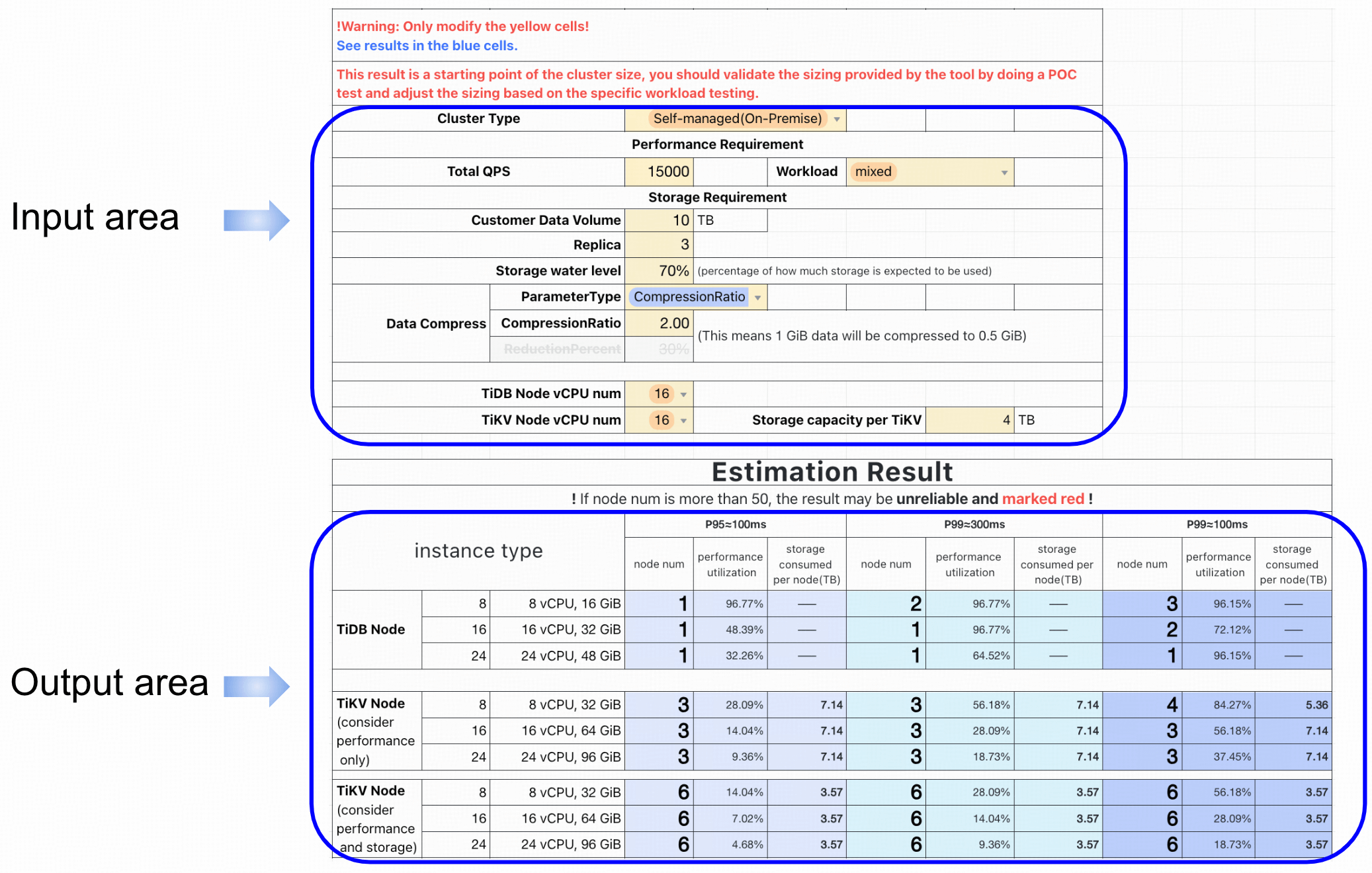
+ Storage Layer
+ [Need input] Replica Count: Default is 3 replicas.
+ [Need input] Storage per TiKV: Each TiKV node has a maximum storage capacity limit, 4TB.
+ [Need input] Compression Ratio: Data is usually compressed in TiDB. An estimated value is 40%.
+ [Need input] Storage Capacity Threshold (Storage Water Level): For healthy system operation and to avoid storage overload, administrators usually define an storage usage alert threshold like 80%.
+ SQL Layer
+ [Need input] Total QPS: The total desired QPS of the TiDB cluster.
+ [Defined by test result] QPS per Node: The QPS a single node can handle under certain latency requirements.
+ [Defined by test result] Performance Attenuation Coefficient: As the number of nodes increases, individual node performance may degrade due to network latency, resource contention, etc.
### Duration
+ This lab should take you approximately 90 minutes to complete.
### Source Data Volume Vs. TiKV Server Count
The minimum number of TiKV servers = `CEIL(Existing Data Size x Compression Ratio / Capacity Threshold / TiKV Node Storage Space) x Replica Number`
### Performance Requirements Vs. TiKV and TiDB Server Count
The minimum number of TiDB/TiKV servers = `CEIL(Total QPS / QPS per Node x (1 - Performance Attenuation Coefficient))`
### Tasks
+ Estimate TiDB storage layer size based on the existing MySQL database volume.
+ Migrate MySQL database to TiDB cluster and verify the TiDB storage layer estimation.
+ Estimate TiDB and TiKV size based on the existing workload.
+ Observe the performance improvement after a scaling out operation.
> [!TIP]
> Click Start to launch the lab environment.
> Once the environment is ready, select **Next** on the bottom toolbar to advance to **Module 1**.
> And, follow the step-by-step lab guide to connect to the hands-on environment and begin your tasks.
## Module 1: Size The TiDB Storage Layer Based On The Existing MySQL Database Volume
### Step 1. Log into a Linux machine
+ Click here - [Terminal 1](ssh://monitor1-ssh#1) to open a new terminal connected to the lab machine, then, connect to a MySQL server and run queries to retrieve data size of the `sbtest` database on it.
+ The banner after you logged in:
```output
, #_
~\_ ####_ Amazon Linux 2
~~ \_#####\
~~ \###|
~~ \#/ ___
~~ V~' '->
~~~ / A newer version of Amazon Linux is available!
~~._. _/
_/ _/ Amazon Linux 2023, GA and supported until 2028-03-15.
_/m/' https://aws.amazon.com/linux/amazon-linux-2023/
```
### Step 2. Get a data volume overview of the existing MySQL database
+ Connect to MySQL server node. If prompted, answer `yes`.
```bash
ssh -i /home/ec2-user/.ssh/pe-class-key-${LAB:REGION_NAME}.pem rocky@${HOST_MYSQL1_PRIVATE_IP}
```
```output
Last login: Thu Aug 1 11:58:47 2024 from 10.90.4.90
[rocky@ip-10-90-1-235 ~]$
```
+ Connect to MySQL server as database user `root`.
```bash
mysql -h localhost -P 3306 -u root -pq1w2e3R4_ --connect-expired-password
```
```output
mysql>
```
+ Verify the tables and data in `sbtest` database. The `sbtest` database was already populated by Sysbench.
```sql
SHOW DATABASES;
```
```output
+--------------------+
| Database |
+--------------------+
| information_schema |
| mysql |
| performance_schema |
| sbtest |
| sys |
+--------------------+
5 rows in set (0.01 sec)
```
```sql
SHOW TABLES FROM sbtest;
```
```output
+------------------+
| Tables_in_sbtest |
+------------------+
| sbtest1 |
| sbtest2 |
| sbtest3 |
| sbtest4 |
| sbtest5 |
| sbtest6 |
+------------------+
6 rows in set (0.00 sec)
```
+ Review the schema and row count of table `sbtest.sbtest1`, it's similar to `sbtest2`, `sbtest3`, `sbtest4`, `sbtest5`, and `sbtest6`. It should take you about 1 minute.
```sql
DESC sbtest.sbtest1;
```
```output
+-------+-----------+------+-----+---------+----------------+
| Field | Type | Null | Key | Default | Extra |
+-------+-----------+------+-----+---------+----------------+
| id | int | NO | PRI | NULL | auto_increment |
| k | int | NO | MUL | 0 | |
| c | char(120) | NO | | | |
| pad | char(60) | NO | | | |
+-------+-----------+------+-----+---------+----------------+
4 rows in set (0.00 sec)
```
```sql
SELECT COUNT(id) FROM sbtest.sbtest1;
```
```output
+-----------+
| COUNT(id) |
+-----------+
| 10000000 |
+-----------+
1 row in set (32.49 sec)
```
+ Execute `ANALYZE` command on database `sbtest`.
```sql
ANALYZE TABLE sbtest.sbtest1, sbtest.sbtest2, sbtest.sbtest3, sbtest.sbtest4, sbtest.sbtest5, sbtest.sbtest6;
```
```output
+----------------+---------+----------+----------+
| Table | Op | Msg_type | Msg_text |
+----------------+---------+----------+----------+
| sbtest.sbtest1 | analyze | status | OK |
| sbtest.sbtest2 | analyze | status | OK |
| sbtest.sbtest3 | analyze | status | OK |
| sbtest.sbtest4 | analyze | status | OK |
| sbtest.sbtest5 | analyze | status | OK |
| sbtest.sbtest6 | analyze | status | OK |
+----------------+---------+----------+----------+
6 rows in set (40.95 sec)
```
+ Get data size. The data size of `sbtest` database should be around `13.43GB`.
```sql
SELECT CONCAT(ROUND(SUM((data_length + index_length)/1024/1024/1024),2), 'GB') AS data
FROM information_schema.tables
WHERE table_schema='sbtest';
```
```output
+---------+
| data |
+---------+
| 13.43GB |
+---------+
1 row in set (0.00 sec)
```
+ Verify the data size by using OS commands. Retrieve the `datadir` path of `sbtest` database.
```sql
SHOW GLOBAL VARIABLES LIKE "%datadir%";
```
```output
+---------------+-----------------+
| Variable_name | Value |
+---------------+-----------------+
| datadir | /var/lib/mysql/ |
+---------------+-----------------+
1 row in set (0.00 sec)
```
+ Exit to OS prompt.
```sql
EXIT
```
```output
bye
```
+ List the data files of tables in `sbtest` database. The total data size should be around `14GB`.
```bash
sudo ls -lh /var/lib/mysql/sbtest
```
```output
total 14G
-rw-r-----. 1 mysql mysql 2.3G Jul 23 06:22 sbtest1.ibd
-rw-r-----. 1 mysql mysql 2.3G Jul 23 06:22 sbtest2.ibd
-rw-r-----. 1 mysql mysql 2.3G Jul 23 06:22 sbtest3.ibd
-rw-r-----. 1 mysql mysql 2.3G Jul 23 06:22 sbtest4.ibd
-rw-r-----. 1 mysql mysql 2.3G Jul 23 06:22 sbtest5.ibd
-rw-r-----. 1 mysql mysql 2.3G Jul 23 06:22 sbtest6.ibd
```
### Step 3. Estimate the storage volume for TiDB
+ We use the result of the SQL query as the size of `sbtest` in MySQL database. This is the data volume input of the sizing tool, which is `13.43GB`.
+ Estimate the storage size of `sbtest` database in TiDB by using the Sizing Tool.
+ Calculate data size by using the formula: `TiKV Data Volume = (Existing Data Size) x (Compression Ratio) x (Number of Replicas in TiKV)`. The compression ratio varies depending on different data types and content. The compression ratio cannot be calculated in advance. It can only be determined after the data is actually imported into the TiKV cluster. Remember to consider using a range of 35% to 50% as a starting point.
+ Estimated TiKV Data Volume = `(Existing Data Size) x (Compression Ratio) x (Number of Replicas in TiKV)`
+ Estimated TiKV Data Volume = `(13.43 GB) x (35% ~ 50%) x (3)`
+ Estimated TiKV Data Volume = `14.10 GB ~ 20.15 GB`
+ The data storage required in TiKV is estimated to be between 14.10 GB and 20.15 GB. You will verify it later after the migration steps.
## Module 2: Migrate The Sample Database From MySQL To TiDB
### Step 1. Connect to the TiUP Control Machine
+ Click here - [Terminal 2](ssh://monitor1-ssh#2) to connect to the TiUP Control Machine.
+ The banner after you logged in:
```output
, #_
~\_ ####_ Amazon Linux 2
~~ \_#####\
~~ \###|
~~ \#/ ___
~~ V~' '->
~~~ / A newer version of Amazon Linux is available!
~~._. _/
_/ _/ Amazon Linux 2023, GA and supported until 2028-03-15.
_/m/' https://aws.amazon.com/linux/amazon-linux-2023/
```
### Step 2. Create a in MySQL for migration purpose
+ Create a dedicated user `dm_user` on MySQL for migration purpose. If prompted by SSH command, answer `yes`.
```bash
ssh -i /home/ec2-user/.ssh/pe-class-key-${LAB:REGION_NAME}.pem rocky@${HOST_MYSQL1_PRIVATE_IP}
```
```output
[rocky@ip-10-90-1-38 ~]$
```
```bash
X=q1w2e3R4_
mysql -h localhost -P 3306 -uroot -p$X --connect-expired-password << EOF
DROP USER IF EXISTS dm_user@'%';
CREATE USER dm_user@'%' IDENTIFIED BY 'q1w2e3R4_';
GRANT ALL PRIVILEGES ON *.* TO dm_user@'%';
EXIT
EOF
```
```output
mysql: [Warning] Using a password on the command line interface can be insecure.
```
+ Exit to TiUP Control Machine.
```bash
exit
```
```output
logout
Connection to 10.90.1.38 closed.
```
### Step 2. Deploy and Start a TiDB cluster
+ Review the provisioned cluster topology YAML.
```bash
cat topology.yaml
```
```output
global:
user: "ec2-user"
ssh_port: 22
deploy_dir: "/tidb-deploy"
data_dir: "/tidb-data"
arch: "amd64"
server_configs:
pd:
replication.max-replicas: 3
pd_servers:
- host: 10.90.2.11
client_port: 2379
peer_port: 2380
advertise_client_addr: "http://34.221.120.15:2379"
tidb_servers:
- host: 10.90.1.173
port: 4000
status_port: 10080
deploy_dir: /tidb-deploy/tidb-4000
log_dir: /tidb-deploy/tidb-4000/log
tikv_servers:
- host: 10.90.1.233
port: 20160
status_port: 20180
- host: 10.90.1.79
port: 20160
status_port: 20180
- host: 10.90.1.242
port: 20160
status_port: 20180
monitoring_servers:
- host: 10.90.4.90
grafana_servers:
- host: 10.90.4.90
alertmanager_servers:
- host: 10.90.4.90
tiproxy_servers:
- host: 10.90.4.90
```
+ Fix system configurations in order to deploy a TiDB cluster.
```bash
~/.tiup/bin/tiup mirror set tidb-community-server-tidb_version-linux-amd64
~/.tiup/bin/tiup cluster check topology.yaml \
--user ec2-user \
-i /home/ec2-user/.ssh/pe-class-key-${LAB:REGION_NAME}.pem \
--apply
```
```output
.
.
.
+ Try to apply changes to fix failed checks
+ Try to apply changes to fix failed checks
- Applying changes on 10.90.2.239 ... ⠴ Sysctl: host=10.90.2.239 vm.swappiness = 0
- Applying changes on 10.90.1.190 ... ⠴ Sysctl: host=10.90.1.190 vm.swappiness = 0
- Applying changes on 10.90.1.233 ... ⠴ Sysctl: host=10.90.1.233 vm.swappiness = 0
+ Try to apply changes to fix failed checks
+ Try to apply changes to fix failed checks
- Applying changes on 10.90.2.239 ... Done
- Applying changes on 10.90.1.190 ... Done
- Applying changes on 10.90.1.233 ... Done
- Applying changes on 10.90.1.136 ... Done
- Applying changes on 10.90.1.42 ... Done
- Applying changes on 10.90.4.231 ... Done
```
+ Deploy a TiDB cluster.
```bash
~/.tiup/bin/tiup cluster deploy tidb-demo tidb_version ./topology.yaml \
--user ec2-user \
-i /home/ec2-user/.ssh/pe-class-key-${LAB:REGION_NAME}.pem \
--yes
```
```output
...
Cluster `tidb-demo` deployed successfully, you can start it with command: `tiup cluster start tidb-demo --init`
```
+ Start the deployed TiDB cluster.
```bash
~/.tiup/bin/tiup cluster start tidb-demo
```
```output
...
Started cluster `tidb-demo` successfully
```
+ Check the TiDB cluster status. Note that there is one TiDB server and three TiKV servers in `tidb-demo` TiDB cluster, and the `TiProxy` is deployed on the same node with `Alert Manager`, `Grafana`, and `Prometheus`.
```bash
~/.tiup/bin/tiup cluster display tidb-demo
```
```output
Cluster type: tidb
Cluster name: tidb-demo
Cluster version: v6.5.9
Deploy user: ec2-user
SSH type: builtin
Dashboard URL: http://34.221.120.15:2379/dashboard
Grafana URL: http://10.90.4.90:3000
ID Role Host Ports OS/Arch Status Data Dir Deploy Dir
-- ---- ---- ----- ------- ------ -------- ----------
10.90.4.90:9093 alertmanager 10.90.4.90 9093/9094 linux/x86_64 Up /tidb-data/alertmanager-9093 /tidb-deploy/alertmanager-9093
10.90.4.90:3000 grafana 10.90.4.90 3000 linux/x86_64 Up - /tidb-deploy/grafana-3000
10.90.2.11:2379 pd 10.90.2.11 2379/2380 linux/x86_64 Up|L /tidb-data/pd-2379 /tidb-deploy/pd-2379
10.90.4.90:9090 prometheus 10.90.4.90 9090/12020 linux/x86_64 Up /tidb-data/prometheus-9090 /tidb-deploy/prometheus-9090
10.90.1.173:4000 tidb 10.90.1.173 4000/10080 linux/x86_64 Up - /tidb-deploy/tidb-4000
10.90.1.233:20160 tikv 10.90.1.233 20160/20180 linux/x86_64 Up /tidb-data/tikv-20160 /tidb-deploy/tikv-20160
10.90.1.242:20160 tikv 10.90.1.242 20160/20180 linux/x86_64 Up /tidb-data/tikv-20160 /tidb-deploy/tikv-20160
10.90.1.79:20160 tikv 10.90.1.79 20160/20180 linux/x86_64 Up /tidb-data/tikv-20160 /tidb-deploy/tikv-20160
10.90.4.90:6000 tiproxy 10.90.4.90 6000/3080 linux/x86_64 Up - /tidb-deploy/tiproxy-6000
Total nodes: 9
```
### Step 3. Prepare TiDB for migration purpose
+ Create a dedicated user `dm_user` on TiDB for migration purpose.
```bash
mysql -h ${HOST_DB1_PRIVATE_IP} -P 4000 -uroot << 'EOF'
DROP USER IF EXISTS dm_user@'%';
CREATE USER dm_user@'%' identified by 'q1w2e3R4_';
GRANT ALL PRIVILEGES ON *.* TO dm_user@'%';
EXIT
EOF
```
+ Create the target database `sbtest` and its empty tables on TiDB. Note that column `id` is set to `AUTO_RANDOM` instead of `AUTO_INCREMENT`. `AUTO_RANDOM` is a TiDB specific feature to avoid the hotspot performance issues, to learn more about `AUTO_RANDOM` please enroll yourself to the self-paced workshop [TiDB Workshop for MySQL Users](https://eng.edu.pingcap.com/catalog/info/id:231).
```bash
mysql -h ${HOST_DB1_PRIVATE_IP} -P 4000 -uroot << 'EOF'
CREATE DATABASE sbtest;
CREATE TABLE `sbtest`.`sbtest1` (
`id` bigint NOT NULL AUTO_RANDOM,
`k` int NOT NULL DEFAULT '0',
`c` char(120) NOT NULL DEFAULT '',
`pad` char(60) NOT NULL DEFAULT '',
PRIMARY KEY (`id`),
KEY `k_1` (`k`)
) ENGINE=InnoDB DEFAULT CHARSET=utf8mb4 COLLATE=utf8mb4_0900_ai_ci;
CREATE TABLE `sbtest`.`sbtest2` (
`id` bigint NOT NULL AUTO_RANDOM,
`k` int NOT NULL DEFAULT '0',
`c` char(120) NOT NULL DEFAULT '',
`pad` char(60) NOT NULL DEFAULT '',
PRIMARY KEY (`id`),
KEY `k_1` (`k`)
) ENGINE=InnoDB DEFAULT CHARSET=utf8mb4 COLLATE=utf8mb4_0900_ai_ci;
CREATE TABLE `sbtest`.`sbtest3` (
`id` bigint NOT NULL AUTO_RANDOM,
`k` int NOT NULL DEFAULT '0',
`c` char(120) NOT NULL DEFAULT '',
`pad` char(60) NOT NULL DEFAULT '',
PRIMARY KEY (`id`),
KEY `k_1` (`k`)
) ENGINE=InnoDB DEFAULT CHARSET=utf8mb4 COLLATE=utf8mb4_0900_ai_ci;
CREATE TABLE `sbtest`.`sbtest4` (
`id` bigint NOT NULL AUTO_RANDOM,
`k` int NOT NULL DEFAULT '0',
`c` char(120) NOT NULL DEFAULT '',
`pad` char(60) NOT NULL DEFAULT '',
PRIMARY KEY (`id`),
KEY `k_1` (`k`)
) ENGINE=InnoDB DEFAULT CHARSET=utf8mb4 COLLATE=utf8mb4_0900_ai_ci;
CREATE TABLE `sbtest`.`sbtest5` (
`id` bigint NOT NULL AUTO_RANDOM,
`k` int NOT NULL DEFAULT '0',
`c` char(120) NOT NULL DEFAULT '',
`pad` char(60) NOT NULL DEFAULT '',
PRIMARY KEY (`id`),
KEY `k_1` (`k`)
) ENGINE=InnoDB DEFAULT CHARSET=utf8mb4 COLLATE=utf8mb4_0900_ai_ci;
CREATE TABLE `sbtest`.`sbtest6` (
`id` bigint NOT NULL AUTO_RANDOM,
`k` int NOT NULL DEFAULT '0',
`c` char(120) NOT NULL DEFAULT '',
`pad` char(60) NOT NULL DEFAULT '',
PRIMARY KEY (`id`),
KEY `k_1` (`k`)
) ENGINE=InnoDB DEFAULT CHARSET=utf8mb4 COLLATE=utf8mb4_0900_ai_ci;
SET GLOBAL allow_auto_random_explicit_insert = true;
USE sbtest;
SHOW TABLES;
EXIT
EOF
```
```output
Tables_in_sbtest
sbtest1
sbtest2
sbtest3
sbtest4
sbtest5
sbtest6
```
### Step 4. Deploy the TiDB Data Migration cluster
+ Install TiDB Data Migration components.
```bash
~/.tiup/bin/tiup install dm dmctl:vtidb_version dm-master:vtidb_version dm-worker:vtidb_version
```
```bash
~/.tiup/bin/tiup list --verbose | grep dm
```
```output
dm pingcap v1.15.1,v1.16.0 linux/amd64 Data Migration Platform manager
dm-master pingcap v8.0.0,vtidb_version linux/amd64 dm-master component of Data Migration Platform.
dm-worker pingcap v8.0.0,vtidb_version linux/amd64 dm-worker component of Data Migration Platform.
dmctl pingcap v6.5.1,v6.5.9,v7.5.0,vtidb_version linux/amd64 dmctl component of Data Migration Platform.
```
+ The TiDB Data Migration cluster topology configuration file has already provisioned for you. Review the configuration, no changes are needed.
```bash
cat dm-topology.yaml
```
```output
global:
user: "ec2-user"
ssh_port: 22
deploy_dir: "/tidb-deploy"
data_dir: "/tidb-data"
arch: "amd64"
master_servers:
- host: 10.90.4.191
worker_servers:
- host: 10.90.3.49
- host: 10.90.3.71
- host: 10.90.3.135
monitoring_servers:
- host: 10.90.1.7
grafana_servers:
- host: 10.90.1.7
alertmanager_servers:
- host: 10.90.1.7
```
+ Deploy and start the TiDB Data Migration cluster - `dm-test`.
```bash
~/.tiup/bin/tiup dm deploy dm-test vtidb_version ./dm-topology.yaml \
--user ec2-user \
-i /home/ec2-user/.ssh/pe-class-key-${LAB:REGION_NAME}.pem \
--yes
```
```output
Starting component dm: /home/ec2-user/.tiup/components/dm/v1.16.0/tiup-dm deploy dm-test vtidb_version ./dm-topology.yaml --user ec2-user -i /home/ec2-user/.ssh/pe-class-key-${LAB:REGION_NAME}.pem --yes
+ Detect CPU Arch Name
- Detecting node 10.90.4.191 Arch info ... Done
- Detecting node 10.90.3.49 Arch info ... Done
- Detecting node 10.90.3.71 Arch info ... Done
- Detecting node 10.90.3.135 Arch info ... Done
- Detecting node 10.90.1.7 Arch info ... Done
...
Cluster `dm-test` deployed successfully, you can start it with command: `tiup dm start dm-test`
```
+ Start the TiDB Data Migration cluster - `dm-test`.
```bash
~/.tiup/bin/tiup dm start dm-test
```
```output
Starting component dm: /home/ec2-user/.tiup/components/dm/v1.16.0/tiup-dm start dm-test
Starting cluster dm-test...
+ [ Serial ] - SSHKeySet: privateKey=/home/ec2-user/.tiup/storage/dm/clusters/dm-test/ssh/id_rsa, publicKey=/home/ec2-user/.tiup/storage/dm/clusters/dm-test/ssh/id_rsa.pub
+ [Parallel] - UserSSH: user=ec2-user, host=10.90.1.7
+ [Parallel] - UserSSH: user=ec2-user, host=10.90.3.71
+ [Parallel] - UserSSH: user=ec2-user, host=10.90.1.7
+ [Parallel] - UserSSH: user=ec2-user, host=10.90.4.191
+ [Parallel] - UserSSH: user=ec2-user, host=10.90.1.7
+ [Parallel] - UserSSH: user=ec2-user, host=10.90.3.49
+ [Parallel] - UserSSH: user=ec2-user, host=10.90.3.135
+ [ Serial ] - StartCluster
Starting component dm-master
Starting instance 10.90.4.191:8261
Start instance 10.90.4.191:8261 success
Starting component dm-worker
Starting instance 10.90.3.135:8262
Starting instance 10.90.3.49:8262
Starting instance 10.90.3.71:8262
Start instance 10.90.3.135:8262 success
Start instance 10.90.3.71:8262 success
Start instance 10.90.3.49:8262 success
Starting component prometheus
Starting instance 10.90.1.7:9090
Start instance 10.90.1.7:9090 success
Starting component grafana
Starting instance 10.90.1.7:3000
Start instance 10.90.1.7:3000 success
Starting component alertmanager
Starting instance 10.90.1.7:9093
Start instance 10.90.1.7:9093 success
Started cluster `dm-test` successfully
```
+ Confirm the status of TiDB Data Migration cluster is up and running.
```bash
tiup dm display dm-test
```
```output
Starting component dm: /home/ec2-user/.tiup/components/dm/v1.16.0/tiup-dm display dm-test
Cluster type: dm
Cluster name: dm-test
Cluster version: vtidb_version
Deploy user: ec2-user
SSH type: builtin
Grafana URL: http://10.90.3.188:3000
ID Role Host Ports OS/Arch Status Data Dir Deploy Dir
-- ---- ---- ----- ------- ------ -------- ----------
10.90.3.188:9093 alertmanager 10.90.3.188 9093/9094 linux/x86_64 Up /tidb-data/alertmanager-9093 /tidb-deploy/alertmanager-9093
10.90.4.196:8261 dm-master 10.90.4.196 8261/8291 linux/x86_64 Healthy|L /tidb-data/dm-master-8261 /tidb-deploy/dm-master-8261
10.90.4.196:8262 dm-worker 10.90.4.196 8262 linux/x86_64 Free /tidb-data/dm-worker-8262 /tidb-deploy/dm-worker-8262
10.90.3.188:3000 grafana 10.90.3.188 3000 linux/x86_64 Up - /tidb-deploy/grafana-3000
10.90.3.188:9090 prometheus 10.90.3.188 9090 linux/x86_64 Up /tidb-data/prometheus-9090 /tidb-deploy/prometheus-9090
Total nodes: 5
```
### Step 5. Set up the migration task source configuration
+ Create task source configuration.
```bash
cat << EOF > mysql-source-conf1.yaml
source-id: "mysql-replica-01"
from:
host: "${HOST_MYSQL1_PRIVATE_IP}"
port: 3306
user: "dm_user"
password: "q1w2e3R4_"
EOF
cat mysql-source-conf1.yaml
```
```output
source-id: "mysql-replica-01"
from:
host: "10.90.1.135"
port: 3306
user: "dm_user"
password: "q1w2e3R4_"
```
+ Set the MySQL instance as the migration source, and verify that the source can be recognized by TiDB Data Migration cluster.
```bash
~/.tiup/bin/tiup dmctl:vtidb_version \
--master-addr=${HOST_MONITOR1_PRIVATE_IP}:8261 operate-source create mysql-source-conf1.yaml
```
```output
Starting component dmctl: /home/ec2-user/.tiup/components/dmctl/vtidb_version/dmctl/dmctl --master-addr=10.90.4.66:8261 operate-source create mysql-source-conf1.yaml
{
"result": true,
"msg": "",
"sources": [
{
"result": true,
"msg": "",
"source": "mysql-replica-01",
"worker": "dm-10.90.3.187-8262"
}
]
}
```
```bash
~/.tiup/bin/tiup dmctl:vtidb_version \
--master-addr=${HOST_MONITOR1_PRIVATE_IP}:8261 get-config source mysql-replica-01
```
```output
Starting component dmctl: /home/ec2-user/.tiup/components/dmctl/vtidb_version/dmctl/dmctl --master-addr=10.90.4.66:8261 get-config source mysql-replica-01
{
"result": true,
"msg": "",
"cfg": "enable: true\nenable-gtid: false\nauto-fix-gtid: false\nrelay-dir: relay-dir\nmeta-dir: \"\"\nflavor: mysql\ncharset: \"\"\nenable-relay: false\nrelay-binlog-name: \"\"\nrelay-binlog-gtid: \"\"\nsource-id: mysql-replica-01\nfrom:\n host: 10.90.1.135\n port: 3306\n user: dm_user\n password: '******'\n max-allowed-packet: null\n session: {}\n security: null\npurge:\n interval: 3600\n expires: 0\n remain-space: 15\nchecker:\n check-enable: true\n backoff-rollback: 5m0s\n backoff-max: 5m0s\n check-interval: 5s\n backoff-min: 1s\n backoff-jitter: true\n backoff-factor: 2\nserver-id: 429530419\ntracer: {}\ncase-sensitive: false\nfilters: []\n"
}
```
```bash
~/.tiup/bin/tiup dmctl:vtidb_version \
--master-addr=${HOST_MONITOR1_PRIVATE_IP}:8261 operate-source show
```
```output
Starting component dmctl: /home/ec2-user/.tiup/components/dmctl/vtidb_version/dmctl/dmctl --master-addr=10.90.4.66:8261 operate-source show
{
"result": true,
"msg": "",
"sources": [
{
"result": true,
"msg": "",
"source": "mysql-replica-01",
"worker": "dm-10.90.3.187-8262"
}
]
}
```
### Step 6. Create the migration task configuration and start the migration task
+ The migration task will migrate database `sbtest` from MySQL server to TiDB cluster.
+ Generate the migration task configuration.
```bash
cat << EOF > dm-task.yaml
name: "dm-task"
task-mode: all
ignore-checking-items: ["auto_increment_ID"]
target-database:
host: "${HOST_DB1_PRIVATE_IP}"
port: 4000
user: "dm_user"
password: "q1w2e3R4_"
mysql-instances:
- source-id: "mysql-replica-01"
route-rules: ["instance-1-user-schema-rule"]
block-allow-list: "rule_1"
mydumper-config-name: "global"
loader-config-name: "global"
routes:
instance-1-user-schema-rule:
schema-pattern: "sbtest"
target-schema: "sbtest"
block-allow-list:
rule_1:
do-dbs: ["sbtest"]
mydumpers:
global:
threads: 32
chunk-filesize: 64
loaders:
global:
pool-size: 8
import-mode: "physical"
pd-addr: "${HOST_PD1_PRIVATE_IP}:2379"
EOF
cat dm-task.yaml
```
```output
name: "dm-task"
task-mode: all
ignore-checking-items: ["auto_increment_ID"]
...
loaders:
global:
pool-size: 32
import-mode: "physical"
```
+ Pre-check the migration task. The message should be `pre-check is passed`.
```bash
~/.tiup/bin/tiup dmctl:vtidb_version \
--master-addr=${HOST_MONITOR1_PRIVATE_IP}:8261 check-task ./dm-task.yaml
```
```output
Starting component dmctl: /home/ec2-user/.tiup/components/dmctl/vtidb_version/dmctl/dmctl --master-addr=10.90.4.235:8261 check-task ./dm-task.yaml
{
"result": true,
"msg": "pre-check is passed. "
}
```
+ Start the migration task and check the progress of the migration.
+ The migration task contains 3 sub-task units: `Dump`, `Load`, and `Sync`.
```bash
~/.tiup/bin/tiup dmctl:vtidb_version \
--master-addr=${HOST_MONITOR1_PRIVATE_IP}:8261 start-task ./dm-task.yaml
```
```output
Starting component dmctl: /home/ec2-user/.tiup/components/dmctl/vtidb_version/dmctl/dmctl --master-addr=10.90.4.66:8261 start-task ./dm-task.yaml
{
"result": true,
"msg": "",
"sources": [
{
"result": true,
"msg": "",
"source": "mysql-replica-01",
"worker": "dm-10.90.3.187-8262"
}
],
"checkResult": "pre-check is passed. "
}
```
### Step 7. Check the migration progress
+ Check the migration progress by using `query-status` action multiple times. Note the `stage`, `unit` and `progress` attributes in the `subTaskStatus`.
+ Use the `watch` command to monitor the progress of the whole task. Base on the lab environment configuration (since it is not a PoC, we use low-end servers for hands-on labs), it may take around 8 minutes (Dump: 4min, Load: 4min ). Time to grab a cup of coffee.
+ Unit `Dump`, stage `Running`:
```bash
watch -n 1 -d ./.tiup/bin/tiup dmctl:vtidb_version --master-addr=${HOST_MONITOR1_PRIVATE_IP}:8261 query-status ./dm-task.yaml
```
```output
Starting component dmctl: /home/ec2-user/.tiup/components/dmctl/vtidb_version/dmctl/dmctl --master-addr=10.90.4.235:8261 query-status ./dm-task.yaml
{
"result": true,
"msg": "",
"sources": [
{
"result": true,
"msg": "",
"sourceStatus": {
"source": "mysql-replica-01",
"worker": "dm-10.90.1.147-8262",
"result": null,
"relayStatus": null
},
"subTaskStatus": [
{
"name": "dm-task",
"stage": "Running",
"unit": "Dump",
"result": null,
"unresolvedDDLLockID": "",
"dump": {
"totalTables": "6",
"completedTables": 3,
"finishedBytes": 7949200595,
"finishedRows": 39359277,
"estimateTotalRows": 59224808,
"bps": "57472325",
"progress": "64.63 %"
},
"validation": null
}
]
}
]
}
```
+ Unit `Load`, stage `Running`:
```output
Starting component dmctl: /home/ec2-user/.tiup/components/dmctl/vtidb_version/dmctl/dmctl --master-addr=10.90.4.196:8261 query-status ./dm-task.yaml
{
"result": true,
"msg": "",
"sources": [
{
"result": true,
"msg": "",
"sourceStatus": {
"source": "mysql-replica-01",
"worker": "dm-10.90.4.196-8262",
"result": null,
"relayStatus": null
},
"subTaskStatus": [
{
"name": "dm-task",
"stage": "Running",
"unit": "Load",
"result": null,
"unresolvedDDLLockID": "",
"load": {
"finishedBytes": "5307344924",
"totalBytes": "8161057816",
"progress": "65.03 %",
"metaBinlog": "(binlog.000008, 157240317)",
"metaBinlogGTID": "",
"bps": "62882221"
},
"validation": null
}
]
}
]
}
```
+ Unit `Sync`, stage `Running`. Note the target TiDB and the source MySQL are synced.
```output
Starting component dmctl: /home/ec2-user/.tiup/components/dmctl/vtidb_version/dmctl/dmctl --master-addr=10.90.4.196:8261 query-status ./dm-task.yaml
{
"result": true,
"msg": "",
"sources": [
{
"result": true,
"msg": "",
"sourceStatus": {
"source": "mysql-replica-01",
"worker": "dm-10.90.4.196-8262",
"result": null,
"relayStatus": null
},
"subTaskStatus": [
{
"name": "dm-task",
"stage": "Running",
"unit": "Sync",
"result": null,
"unresolvedDDLLockID": "",
"sync": {
"totalEvents": "19767046",
"totalTps": "21118",
"recentTps": "0",
"masterBinlog": "(binlog.000011, 706201359)",
"masterBinlogGtid": "",
"syncerBinlog": "(binlog.000011, 706201359)",
"syncerBinlogGtid": "00000000-0000-0000-0000-000000000000:0",
"blockingDDLs": [
],
"unresolvedGroups": [
],
"synced": true,
"binlogType": "remote",
"secondsBehindMaster": "0",
"blockDDLOwner": "",
"conflictMsg": "",
"totalRows": "19767046",
"totalRps": "21118",
"recentRps": "0"
},
"validation": null
}
]
}
]
}
```
+ Press Ctrl+C to stop the `watch` command when the `Sync` unit reaches `"synced": true`.
### Step 8. Verify the TiDB storage layer sizing estimation
+ There are 3 methods to get the data volume of `sbtest` database in TiDB.
+ Method 1: Retrieve data size by executing SQL. The result only contains the data volume of `sbtest` database.
+ Connect to MySQL, and run the data size query.
```bash
mysql -h ${HOST_MONITOR1_PRIVATE_IP} -P 6000 -uroot
```
```output
mysql>
```
+ Analyze all the tables of `sbtest` database.
```sql
ANALYZE TABLE sbtest.sbtest1, sbtest.sbtest2, sbtest.sbtest3, sbtest.sbtest4, sbtest.sbtest5, sbtest.sbtest6;
```
```output
Query OK, 0 rows affected, 6 warnings (22.93 sec)
```
+ Get data size by retrieving the system table.
```sql
SELECT db_name, SUM(approximate_size)/1024 size_GB
FROM information_schema.TIKV_REGION_STATUS
WHERE db_name='sbtest'
GROUP BY db_name;
```
```output
+---------+---------+
| db_name | size_GB |
+---------+---------+
| sbtest | 17.3232 |
+---------+---------+
1 row in set (0.01 sec)
```
+ Method 2: Check data files storage by using OS command. The data volume result contains not only the `sbtest` database, but also other metadata.
+ Exit to OS prompt.
```sql
EXIT
```
```output
logout
Connection to 10.90.1.132 closed.
```
+ Get data directory of TiKV nodes.
```bash
~/.tiup/bin/tiup cluster display tidb-demo
```
```output
Cluster type: tidb
Cluster name: tidb-demo
Cluster version: vtidb_version
Deploy user: ec2-user
SSH type: builtin
Dashboard URL: http://34.217.88.220:2379/dashboard
Grafana URL: http://10.90.4.32:3000
ID Role Host Ports OS/Arch Status Data Dir Deploy Dir
-- ---- ---- ----- ------- ------ -------- ----------
10.90.4.32:9093 alertmanager 10.90.4.32 9093/9094 linux/x86_64 Up /tidb-data/alertmanager-9093 /tidb-deploy/alertmanager-9093
10.90.4.32:3000 grafana 10.90.4.32 3000 linux/x86_64 Up - /tidb-deploy/grafana-3000
10.90.2.124:2379 pd 10.90.2.124 2379/2380 linux/x86_64 Up|L /tidb-data/pd-2379 /tidb-deploy/pd-2379
10.90.4.32:9090 prometheus 10.90.4.32 9090/12020 linux/x86_64 Up /tidb-data/prometheus-9090 /tidb-deploy/prometheus-9090
10.90.1.176:4000 tidb 10.90.1.176 4000/10080 linux/x86_64 Up - /tidb-deploy/tidb-4000
10.90.3.108:20160 tikv 10.90.3.108 20160/20180 linux/x86_64 Up /tidb-data/tikv-20160 /tidb-deploy/tikv-20160
10.90.3.32:20160 tikv 10.90.3.32 20160/20180 linux/x86_64 Up /tidb-data/tikv-20160 /tidb-deploy/tikv-20160
10.90.3.93:20160 tikv 10.90.3.93 20160/20180 linux/x86_64 Up /tidb-data/tikv-20160 /tidb-deploy/tikv-20160
Total nodes: 8
```
+ Connect to one of the TiKV nodes and calculate the data storage size.
```bash
ssh -i /home/ec2-user/.ssh/pe-class-key-${LAB:REGION_NAME}.pem ec2-user@${HOST_KV1_PRIVATE_IP}
```
```output
Last login: Tue Jul 23 05:45:15 2024
, #_
~\_ ####_ Amazon Linux 2
~~ \_#####\
~~ \###| AL2 End of Life is 2025-06-30.
~~ \#/ ___
~~ V~' '->
~~~ / A newer version of Amazon Linux is available!
~~._. _/
_/ _/ Amazon Linux 2023, GA and supported until 2028-03-15.
_/m/' https://aws.amazon.com/linux/amazon-linux-2023/
8 package(s) needed for security, out of 27 available
Run "sudo yum update" to apply all updates.
```
```bash
sudo du -h /tidb-data/tikv-20160/db --max-depth=0
```
```output
6.0G /tidb-data/tikv-20160/db
```
+ Method 3: Check grafana to get data volume. The data volume result contains not only `sbtest` database, but also other metadata.
+ Log in to the Grafana Dashboard by using username `admin` and password `admin`, find `tidb-demo-TiKV-Summary - Server - Store size`.
+ You will get the data size of the tikv cluster is `6.6GB x 3 = 19.8GB`.
### Module 2 Summary
In Step 8, the results from all three methods are close to the estimation in Module 1.
## Module 3: Size The TiDB And TiKV Based On The Existing Workload
### Note
+ In this practice, you will use `sysbench` to apply a test the workload, which is a read workload with 18,000 QPS.
### Step 1. Prepare the `sysbench` environment
+ Open [Terminal 3](ssh://monitor1-ssh#3), connect to the TiUP Control Machine.
+ The banner after you logged in:
```output
, #_
~\_ ####_ Amazon Linux 2
~~ \_#####\
~~ \###|
~~ \#/ ___
~~ V~' '->
~~~ / A newer version of Amazon Linux is available!
~~._. _/
_/ _/ Amazon Linux 2023, GA and supported until 2028-03-15.
_/m/' https://aws.amazon.com/linux/amazon-linux-2023/
```
+ Set up the `sysbench` configuration.
```bash
cat << EOF > sysbench_config
mysql-host=${HOST_MONITOR1_PRIVATE_IP}
mysql-port=6000
mysql-user=root
mysql-password=
mysql-db=sbtest
time=120
threads=14
report-interval=5
EOF
cat sysbench_config
```
```output
mysql-host=10.90.1.190
mysql-port=6000
mysql-user=root
mysql-password=
mysql-db=sbtest
time=120
threads=14
report-interval=5
```
### Step 2. Apply the test workload
+ Start `sysbench` test.
```bash
sysbench \
--config-file=sysbench_config oltp_read_only \
--tables=6 \
--table-size=10000000 run
```
```output
sysbench 1.0.17 (using bundled LuaJIT 2.1.0-beta2)
Running the test with following options:
Number of threads: 14
Report intermediate results every 5 second(s)
Initializing random number generator from current time
Initializing worker threads...
Threads started!
[ 5s ] thds: 14 tps: 1203.22 qps: 19280.38 (r/w/o: 16871.13/0.00/2409.25) lat (ms,95%): 14.46 err/s: 0.00 reconn/s: 0.00
...
[ 120s ] thds: 14 tps: 1224.00 qps: 19581.56 (r/w/o: 17133.37/0.00/2448.20) lat (ms,95%): 13.95 err/s: 0.00 reconn/s: 0.00
SQL statistics:
queries performed:
read: 2048564
write: 0
other: 292652
total: 2341216
transactions: 146326 (1219.27 per sec.)
queries: 2341216 (19508.27 per sec.)
ignored errors: 0 (0.00 per sec.)
reconnects: 0 (0.00 per sec.)
General statistics:
total time: 120.0102s
total number of events: 146326
Latency (ms):
min: 9.18
avg: 11.48
max: 29.71
95th percentile: 13.95
sum: 1679913.22
Threads fairness:
events (avg/stddev): 10451.8571/163.05
execution time (avg/stddev): 119.9938/0.00
```
### Step 3. Analyze the baseline
+ Gather the QPS, latency and TiDB resource utilization:
+ QPS is: 19,508.27 per sec
+ P95 latency is: 13.95ms
+ Resource utilization. Switch to the Grafana Dashboard, find `tidb-demo-Performance-Overview - Performance Overview`, you can find `TiDB CPU` & `TiKV CPU/IO MBps`:
+ tidb CPU(Max): ≈ 6.1vc/8vc ≈ 76%
+ tikv CPU(Max): ≈ 1.5vc/8vc ≈ 19%
+ TiDB Cluster Sizing Tool Estimation result:
+ Size: tidb(8vc/16GiB) x 1, tikv(8vc/32GiB) x 3
+ QPS: 18,000
+ Resource utilization: tidb ≈ 95.24%, tikv ≈ 21.43%

+ We can see that the `sysbench` result is a little better than the tool's estimation. The sizing tool is built based on TiDB 6.x, we are testing by using TiDB tidb_version.
### Step 4. Scale out the TiDB SQL layer
+ Scale out the TiDB SQL layer by adding one TiDB server to SQL layer. Verify the QPS is increased.
+ Review the scale-out configuration file.
```bash
cat scale-out-tidb.yaml
```
```output
tidb_servers:
- host: 10.90.2.188
port: 4000
status_port: 10080
deploy_dir: /tidb-deploy/tidb-4000
log_dir: /tidb-deploy/tidb-4000/log
```
+ Scale out one new tidb-server.
```bash
~/.tiup/bin/tiup cluster scale-out tidb-demo scale-out-tidb.yaml \
--user ec2-user \
-i ~/.ssh/pe-class-key-${LAB:REGION_NAME}.pem \
-y
```
```output
...
Scaled cluster `tidb-demo` out successfully
```
+ Check TiDB cluster. Verify there are two tidb-server in the TiDB cluster.
```bash
~/.tiup/bin/tiup cluster display tidb-demo
```
```output
Cluster type: tidb
Cluster name: tidb-demo
Cluster version: v8.1.0
Deploy user: ec2-user
SSH type: builtin
Dashboard URL: http://35.89.229.27:2379/dashboard
Grafana URL: http://10.90.4.39:3000
ID Role Host Ports OS/Arch Status Data Dir Deploy Dir
-- ---- ---- ----- ------- ------ -------- ----------
10.90.4.39:9093 alertmanager 10.90.4.39 9093/9094 linux/x86_64 Up /tidb-data/alertmanager-9093 /tidb-deploy/alertmanager-9093
10.90.4.39:3000 grafana 10.90.4.39 3000 linux/x86_64 Up - /tidb-deploy/grafana-3000
10.90.2.182:2379 pd 10.90.2.182 2379/2380 linux/x86_64 Up|L /tidb-data/pd-2379 /tidb-deploy/pd-2379
10.90.4.39:9090 prometheus 10.90.4.39 9090/12020 linux/x86_64 Up /tidb-data/prometheus-9090 /tidb-deploy/prometheus-9090
10.90.2.253:4000 tidb 10.90.2.253 4000/10080 linux/x86_64 Up - /tidb-deploy/tidb-4000
10.90.2.92:4000 tidb 10.90.2.92 4000/10080 linux/x86_64 Up - /tidb-deploy/tidb-4000
10.90.3.122:20160 tikv 10.90.3.122 20160/20180 linux/x86_64 Up /tidb-data/tikv-20160 /tidb-deploy/tikv-20160
10.90.3.153:20160 tikv 10.90.3.153 20160/20180 linux/x86_64 Up /tidb-data/tikv-20160 /tidb-deploy/tikv-20160
10.90.3.5:20160 tikv 10.90.3.5 20160/20180 linux/x86_64 Up /tidb-data/tikv-20160 /tidb-deploy/tikv-20160
10.90.4.39:6000 tiproxy 10.90.4.39 6000/3080 linux/x86_64 Up - /tidb-deploy/tiproxy-6000
Total nodes: 10
```
+ Confirm that there are two TiDB servers connected to TiProxy now. Log in Grafana Dashboard, find `tidb-demo-TiProxy-Summary - Backend`, you can find there are two tidb-server in the `Ping Backend Duration` panel.
### Step 5. Scale out the sysbench workload
+ Increase `sysbench` threads to 28
```bash
cat << EOF > sysbench_config
mysql-host=${HOST_MONITOR1_PRIVATE_IP}
mysql-port=6000
mysql-user=root
mysql-password=
mysql-db=sbtest
time=120
threads=28
report-interval=5
EOF
cat sysbench_config
```
```output
mysql-host=10.90.1.190
mysql-port=6000
mysql-user=root
mysql-password=
mysql-db=sbtest
time=120
threads=28
report-interval=5
```
+ Start `sysbench` test again.
```bash
sysbench \
--config-file=sysbench_config oltp_read_only \
--tables=6 \
--table-size=10000000 run
```
```output
sysbench 1.0.17 (using bundled LuaJIT 2.1.0-beta2)
Running the test with following options:
Number of threads: 28
Report intermediate results every 5 second(s)
Initializing random number generator from current time
Initializing worker threads...
Threads started!
[ 5s ] thds: 28 tps: 2272.50 qps: 36408.77 (r/w/o: 31858.37/0.00/4550.40) lat (ms,95%): 15.00 err/s: 0.00 reconn/s: 0.00
...
[ 120s ] thds: 28 tps: 2301.17 qps: 36810.07 (r/w/o: 32208.13/0.00/4601.93) lat (ms,95%): 14.73 err/s: 0.00 reconn/s: 0.00
SQL statistics:
queries performed:
read: 3861368
write: 0
other: 551624
total: 4412992
transactions: 275812 (2298.15 per sec.)
queries: 4412992 (36770.39 per sec.)
ignored errors: 0 (0.00 per sec.)
reconnects: 0 (0.00 per sec.)
General statistics:
total time: 120.0136s
total number of events: 275812
Latency (ms):
min: 9.41
avg: 12.18
max: 41.35
95th percentile: 14.73
sum: 3359870.50
Threads fairness:
events (avg/stddev): 9850.4286/324.02
execution time (avg/stddev): 119.9954/0.00
```
### Step 6. Analyze the result of scaling out
+ Check the QPS, latency and TiDB resource utilization:
+ QPS is: 36,770.39 per sec
+ P95 latency is: 14.73ms
+ Resource utilization. Switch to the Grafana Dashboard, find `tidb-demo-Performance-Overview - Performance Overview`, you can find `TiDB CPU` & `TiKV CPU/IO MBps`:
+ tidb CPU(Max): ≈ 6vc/8vc ≈ 75%
+ tikv CPU(Max): ≈ 2.8vc/8vc ≈ 35%
+ TiDB Cluster Sizing Tool Estimation result:
+ Size: tidb(8vc/16GiB) x 2, tikv(8vc/32GiB) x 3
+ QPS: 36,000
+ Resource utilization: tidb ≈ 95.24%, tikv ≈ 42.86%

+ We can see that the `sysbench` result is a little better than the tool's estimation. Note that the sizing tool is built based on TiDB 6.x, we are testing by using TiDB tidb_version.
## Conclusion
TiDB Cluster Sizing Tool can help you estimate the number of cluster nodes when creating TiDB cluster for Self-Managed and TiDB Cloud Dedicated. Based on the testing conducted, we've found that the tool's estimation closely approximates the actual requirements. However, the `sysbench` results indicate better performance than the tool's estimation. This discrepancy arises because the lab uses TiDB version tidb_version, while the estimation tool is based on version v6.x.
```hbsptform
{
"ui": {
"titleLevel": 3
},
"portalId": "4466002",
"formId": "89fa8368-eba1-4b84-b91e-eb9eb6613ddf",
"region": "na1",
"sfdcCampaignId": "701RC00000VqCODYA3"
}
```