---
title: 'TiKV 源码解析系列文章(十三)MVCC 数据读取'
date: '2019-09-03T00:00:00+08:00'
status: publish
permalink: /blog/tikv-source-code-reading-13
author:
- 施闻轩
- 施闻轩
- 施闻轩
excerpt: 本文将介绍数据读取的流程。
type: post
id: 2792
category:
- 产品技术解读
tag:
- 'TiKV 源码解析'
- 社区
post_format: []
profile:
- 施闻轩
algolia_posts_post_records_count:
- '2'
---
在 [《TiKV 源码解析系列文章(十二)分布式事务》](https://cn.pingcap.com/blog/tikv-source-code-reading-12/) 中,我们介绍了如何在满足事务特性的要求下进行数据写入。本文将介绍数据读取的流程。由于顺序扫(Forward Scan)比较具有代表性,因此本文只介绍顺序扫的流程,而不会介绍点查或逆序扫。点查是顺序扫的简化,相信读者理解了顺序扫的流程后能自己想出点查的实现,而逆序扫与顺序扫也比较类似,主要区别在于从后向前扫,稍复杂一些,相信大家在阅读本文后,也能自己对照着代码读懂逆序扫的实现。
数据格式
----
首先回忆一下事务写入完成后,[在 RocksDB 层面存储的具体是什么样的数据](https://tikv.org/deep-dive/distributed-transaction/percolator/#percolator-in-tikv):
|---|
|-----|
| | Lock | | `user_key` | | `lock_info` | |
| | Default | | `{user_key}{start_ts}` | | `user_value` | |
| | Write | | `{user_key}{commit_ts}` | | `write_info` | |
其中:
- 为了消除歧义,约定 User Key (`user_key`) 指 TiKV Client(如 TiDB)所写入的或所要读取的 Key,User Value (`user_value`) 指 User Key 对应的 Value。
- `lock_info` 包含 lock type、primary key、timestamp、ttl 等信息,见 [`src/storage/mvcc/lock.rs`](https://github.com/tikv/tikv/blob/1924a32376b7823c3faa0795f53e836e65eb9ff0/src/storage/mvcc/lock.rs)。
- `write_info` 包含 write type、start\_ts 等信息,见 [`src/storage/mvcc/write.rs`](https://github.com/tikv/tikv/blob/1924a32376b7823c3faa0795f53e836e65eb9ff0/src/storage/mvcc/write.rs)。
事务样例
----
为了便于大家理解代码,我们假设 TiKV Client 之前进行了下面这些事务:
|---|
|-----|
| | \#1 | | 0x01 | | 0x03 | | `PUT foo => foo_value`, `PUT bar => bar_value` | |
| | \#2 | | 0x11 | | 0x13 | | `PUT foo => foo_value2`, `PUT box => box_value` | |
| | \#3 | | 0x21 | | 0x23 | | `DELETE abc` | |
| | \#4 | | 0x31 | | 0x33 | | `DELETE box` | |
> 注意,TiDB 向 TiKV 写入的 Key(及上面的 user\_key)并不会长成 foo、abc、box 这样,而大部分会是 `tXXXXXXXX_rXXXXXXXX` 或 `tXXXXXXXX_iXXXXXXXX` 的格式。但 Key 的格式并不影响 TiKV 的逻辑处理,所以我们这里仅采用简化的 Key 作为样例。Value 同理。
每个事务 Prewrite 并 Commit 完毕后,落到 RocksDB 上的数据类似于这样:
- 事务 #1: |---|
|-----|
| | `{foo}{0x03}` | | type=PUT, start\_ts=0x01 | | `{foo}{0x01}` | | `foo_value` | |
| | `{bar}{0x03}` | | type=PUT, start\_ts=0x01 | | `{bar}{0x01}` | | `bar_value` | |
- 事务 #2: |---|
|-----|
| | `{foo}{0x13}` | | type=PUT, start\_ts=0x11 | | `{foo}{0x11}` | | `foo_value2` | |
| | `{box}{0x13}` | | type=PUT, start\_ts=0x11 | | `{box}{0x11}` | | `box_value` | |
- 事务 #3: |---|
|-----|
| | `{abc}{0x23}` | | type=DELETE, start\_ts=0x21 | | | |
- 事务 #4: |---|
|-----|
| | `{box}{0x33}` | | type=DELETE, start\_ts=0x31 | | | |
实际在 RocksDB 中存储的数据与上面表格里写的略微不一样,主要区别有:
1. TiKV Raft 层会修改实际写入 RocksDB 的 Key(例如增加前缀 `z`)以便进行数据区分。对于 MVCC 和事务来说这个操作是透明的,因此我们先忽略这个。
2. User Key 会被按照 Memory Comparable Encoding 方式进行编码,编码算法是以 8 字节为单位进行 Padding。这个操作确保了我们在 User Key 后面追加 `start_ts` 或 `commit_ts` 之后实际写入的 Key 能保持与 User Key 具有相同的顺序。 例如,假设我们依次写入 `abc`、`abc\x00..\x00` 两个 User Key,在不进行 Padding 的情况下:
|---|
|-----|
| | `abc` | | 0x05 | | `abc\x00\x00..\x05` | |
| | `abc\x00..\x00` | | 0x10 | | `abc\x00\x00..\x00\x00\x00..\x10` | |
可见,User Key 顺序是 `abc < abc\x00..\x00`,但写入的 Key 顺序却是 `abc\x00\x00..\x05 > abc\x00\x00..\x00\x00\x00..\x10`。显然,在这之后,我们若想要有序地扫数据就会面临巨大的挑战。因此需要对 User Key 进行编码:
Example 1:
```text
User Key: abc
Encoded: abc\x00\x00\x00\x00\x00\xFA
^^^ ^^^^
Key Pad=5
^^^^^^^^^^^^^^^^^^^^
Padding
```
Example 2:
```text
User Key: abc\x00\x00\x00\x00\x00\x00\x00\x00
Encoded[0..9]: abc\x00\x00\x00\x00\x00\xFF
^^^^^^^^^^^^^^^^^^^^^^^
Key[0..8]
^^^^
Pad=0
Encoded[9..]: \x00\x00\x00\x00\x00\x00\x00\x00\xFA
^^^^^^^^^^^^ ^^^^
Key[8..11] Pad=5
^^^^^^^^^^^^^^^^^^^^
Padding
```
编码后的 Key 无论后面再追加什么 8 字节的 Timestamp,都能保持原来的顺序。
3. TiKV 在 Key 中存储的 Timestamp(无论是 `start_ts` 还是 `commit_ts`)都是 Timestamp 取反后的结果,其目的是让较新的数据(即 Timestamp 比较大的数据)排列在较老的数据(即 Timestamp 比较小的数据)前面。扫数据的流程利用了这个特性优化性能,继续阅读本文可以有所感受。后面本文中关于时间戳的部分将写作 `{!ts}` 来反映这个取反操作。
4. TiKV 对较小(<= 64 字节)的 User Value 会进行优化,不存储在 Default CF 中,而是直接内嵌在 Lock Info 或 Write Info 中,从而加快这类 User Key 的扫的效率及写入效率。我们这个示例先暂且忽略这个优化,就当成 User Value 都很长没有进行内嵌。
顺序扫
---
顺序扫的代码位于 [`src/storage/mvcc/reader/scanner/forward.rs`](https://github.com/tikv/tikv/blob/1924a32376b7823c3faa0795f53e836e65eb9ff0/src/storage/mvcc/reader/scanner/forward.rs)。顺序扫的定义是给定 `scan_ts`、可选的下界 `lower_bound` 与可选的上界 `upper_bound`,需要依次知道在 `[lower_bound, upper_bound)` 范围内所有满足 `scan_ts`(即最新 `commit_ts <= scan_ts`)的数据。扫的过程中可以随时中止,不需要扫出范围内所有数据。
以「事务样例」为例,假设其所有事务都 Commit 后:
- scan\_ts = 0x00 顺序扫 `[-∞, +∞)` 可依次扫出:(空)。
- scan\_ts = 0x05 顺序扫 `[-∞, +∞)` 可依次扫出:`bar => bar_value`、`foo => foo_value`。
- scan\_ts = 0x12 顺序扫 `[-∞, +∞)`,可依次扫出 `bar => bar_value`、`foo => foo_value`。
- scan\_ts = 0x15 顺序扫 `[-∞, +∞)` 可依次扫出:`bar => bar_value`、`box => box_value`、`foo => foo_value2`。
- scan\_ts = 0x35 顺序扫 `[-∞, +∞)` 可依次扫出:`bar => bar_value`、`foo => foo_value2`。
- scan\_ts = 0x05 顺序扫 `[c, +∞)` 可依次扫出:`foo => foo_value`。
假设「事务样例」中事务 #1 已 Commit 而事务 #2 已 Prewrite 未 Commit,此时:
- scan\_ts = 0x05 顺序扫 `[-∞, +∞)`,可依次扫出:`bar => bar_value`、`foo => foo_value`。
- scan\_ts = 0x12 顺序扫 `[-∞, +∞)`,会先扫出 `bar => bar_value`,若还要继续扫应当返回 `box` 的锁冲突。TiDB 拿到这个错误后会等锁、清锁并重试。
顺序扫流程
-----
根据上面所说的顺序扫定义及例子,在不考虑锁冲突的情况下,可以想出一个最简单的实现思路就是不断将 Write CF 的 Cursor 从 `lower_bound` 往后移动,对于各个 User Key 跳过它 `commit_ts > scan_ts` 的版本,采纳第一个 `commit_ts <= scan_ts` 的版本,根据版本 Write Info 从 Default CF 中获取 Value,即可组成返回给上层的 KV 对。
这个思路很简单,但无法处理锁冲突。在有锁冲突的情况下,顺序扫只应当对扫到的数据处理锁冲突,没扫到的数据即使有锁,也不应该影响无冲突数据的正常扫(例如用户的 SQL 中有 limit)。由于不同 User Key(及同一个 User Key 的不同版本)都可能同时散落在 Write CF 与 Lock CF 中,因此 **TiKV 的思路类似于归并排序**:同时移动 Write CF Cursor 与 Lock CF Cursor,在移动过程中这两个 Cursor 可能对应了不同的 User Key,较小的那个就是要优先处理的 User Key。如果这个 User Key 是 Lock CF 中的,说明可能遇到了锁冲突,需要返回失败或忽略。如果这个 User Key 是 Write CF 中的,说明有多版本可以供读取,需要找到最近的一个满足 `scan_ts` 要求的版本信息 Write Info,根据其内部记载的 `start_ts` 再从 Default CF 中获取 Value,从而组成 KV 对返回给上层。
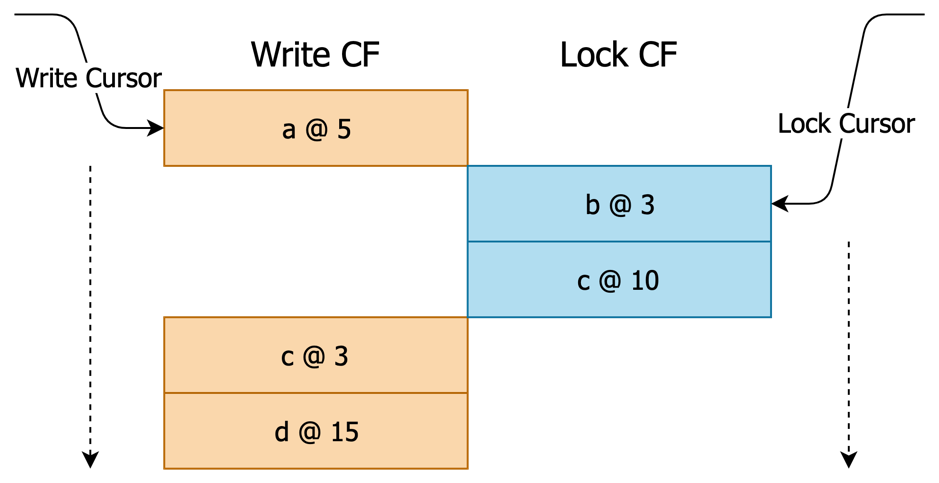图 1 TiKV 扫数据算法示意
单次迭代的具体流程为:
### 步骤 1.
首次迭代:将 Lock 及 Write CF Cursor Seek 到 `lower_bound` 处。此时它们各自指向了第一个 `>= lower_bound` 的 Key。
```rust
if !self.is_started {
if self.cfg.lower_bound.is_some() {
self.write_cursor.seek(
self.cfg.lower_bound.as_ref().unwrap(),
...,
)?;
self.lock_cursor.seek(
self.cfg.lower_bound.as_ref().unwrap(),
...,
)?;
} else {
self.write_cursor.seek_to_first(...);
self.lock_cursor.seek_to_first(...);
}
self.is_started = true;
}
```
### 步骤 2.
Lock Cursor 和 Write Cursor 分别指向的 Key 可能对应不同的 User Key(也可能指向空,代表该 CF 已没有更多数据)。比较 Lock Cursor 与 Write Cursor 可得出第一个遇到的 User Key:
```rust
let w_key = if self.write_cursor.valid()? {
Some(self.write_cursor.key(...))
} else {
None
};
let l_key = if self.lock_cursor.valid()? {
Some(self.lock_cursor.key(...))
} else {
None
};
match (w_key, l_key) { ... }
```
#### 分支 2.1.
Write Cursor 指向空,Lock Cursor 指向空:说明两个 CF 都扫完了,该直接结束了。
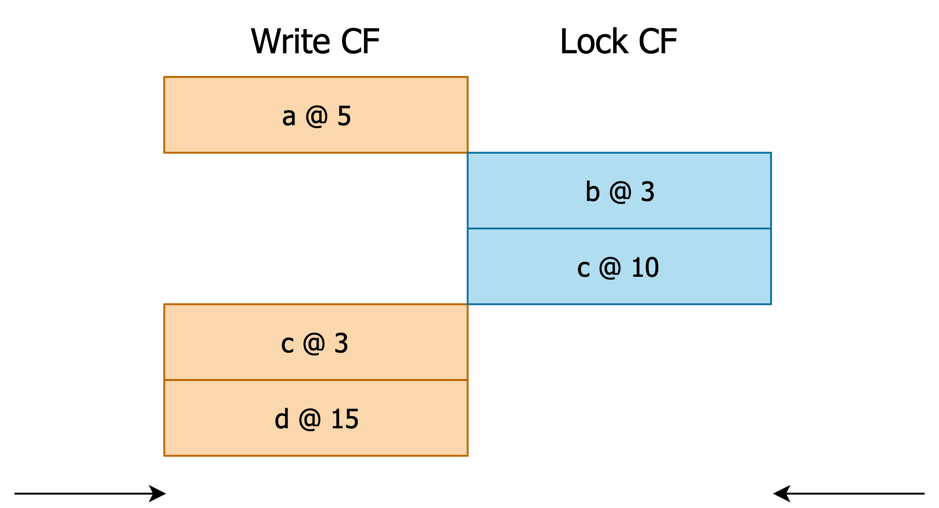图 2 进入本分支的一种情况,若 Seek 的是 e,则处于 Write Cursor 和 Lock Cursor 都指向空的状态
```rust
(current_user_key_slice, has_write, has_lock) = match (w_key, l_key) {
(None, None) => {
// Both cursors yield `None`: we know that there is nothing remaining.
return Ok(None);
}
...
}
```
#### 分支 2.2.
Write Cursor 指向某个值 `w_key`,Lock Cursor 指向空:说明存在一个 `User Key = w_key` 的 Write Info,且没有任何 `>= Start Key` 的 Lock Info。`w_key` 即为第一个遇到的 User Key。
```rust
(current_user_key_slice, has_write, has_lock) = match (w_key, l_key) {
...
(Some(k), None) => {
// Write cursor yields something but lock cursor yields `None`:
// We need to further step write cursor to our desired version
(Key::truncate_ts_for(k)?, true, false)
}
...
}
```
#### 分支 2.3.
Write Cursor 指向空,Lock Cursor 指向某个值 `l_key`:说明存在一个 `User Key = l_key` 的 Lock Info。`l_key` 即是第一个遇到的 User Key。
```rust
(current_user_key_slice, has_write, has_lock) = match (w_key, l_key) {
...
(None, Some(k)) => {
// Write cursor yields `None` but lock cursor yields something:
// In RC, it means we got nothing.
// In SI, we need to check if the lock will cause conflict.
(k, false, true)
}
...
}
```
#### 分支 2.4.
Write Cursor 指向某个值 `w_key`,Lock Cursor 指向某个值 `l_key`:说明存在一个 `User Key = l_key` 的 Lock Info、存在一个 `User Key = w_key` 的 Write Info。`l_key` 与 `w_key` 中小的那个是第一个遇到的 User Key。
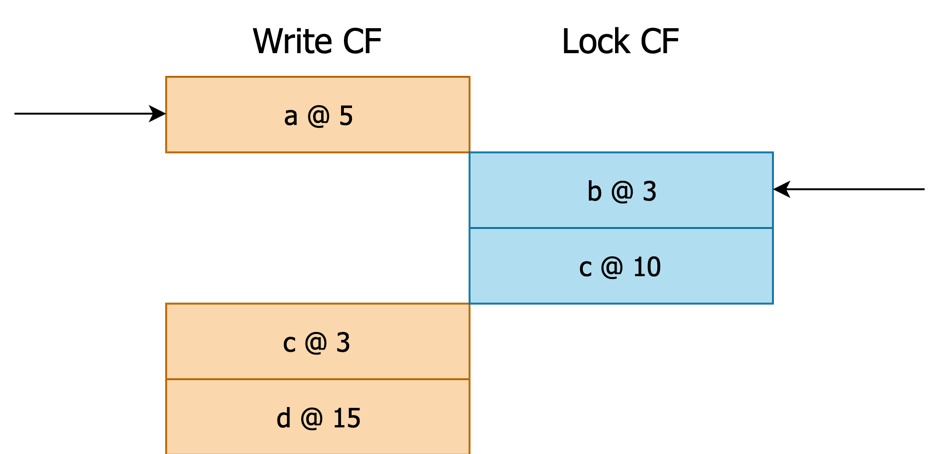图 3 进入本分支的一种情况,若 Seek 的是 a,则处于 Write Cursor 和 Lock Cursor 都指向某个值的状态
```rust
(current_user_key_slice, has_write, has_lock) = match (w_key, l_key) {
...
(Some(wk), Some(lk)) => {
let write_user_key = Key::truncate_ts_for(wk)?;
match write_user_key.cmp(lk) {
Ordering::Less => {
// Write cursor user key < lock cursor, it means the lock of the
// current key that write cursor is pointing to does not exist.
(write_user_key, true, false)
}
Ordering::Greater => {
// Write cursor user key > lock cursor, it means we got a lock of a
// key that does not have a write. In SI, we need to check if the
// lock will cause conflict.
(lk, false, true)
}
Ordering::Equal => {
// Write cursor user key == lock cursor, it means the lock of the
// current key that write cursor is pointing to *exists*.
(lk, true, true)
}
}
}
}
```
### 步骤 3.
如果在步骤 2 中,第一个遇到的 User Key 来自于 Lock,则:
#### 步骤 3.1.
检查 Lock Info 是否有效,例如需要忽略 `start_ts > scan_ts` 的 lock。
```rust
let lock = {
let lock_value = self.lock_cursor.value(...);
Lock::parse(lock_value)?
};
match super::util::check_lock(¤t_user_key, self.cfg.ts, &lock)? {
CheckLockResult::NotLocked => {}
CheckLockResult::Locked(e) => result = Err(e),
CheckLockResult::Ignored(ts) => get_ts = ts,
}
```
> 我们一般以当前的时间构造 scan\_ts,为什么实际看到的似乎是“未来”的 lock?原因是这个读请求可能来自于一个早期开始的事务,或这个请求被网络阻塞了一会儿,或者我们正在[读取历史数据](https://docs.pingcap.com/zh/tidb/stable/read-historical-data)。
#### 步骤 3.2.
将 Lock Cursor 往后移动一个 Key,以便下次迭代可以直接从新的 Lock 继续。此时 Lock Cursor 指向下一个 Lock(也可能指向空)。
#### 步骤 3.3.
在 3.1 步骤中检查下来有效的话报错返回这个 Lock,TiDB 后续需要进行清锁操作。
### 步骤 4.
如果在步骤 2 中,第一个遇到的 User Key 来自于 Write:
> 注:Lock Cursor 与 Write Cursor 可能一起指向了同一个 User Key 的不同版本。由于我们只想忽略锁对应的版本而不是想忽略这整个 User Key,因此此时步骤 3 和步骤 4 都会被执行,如下图所示。
>
> 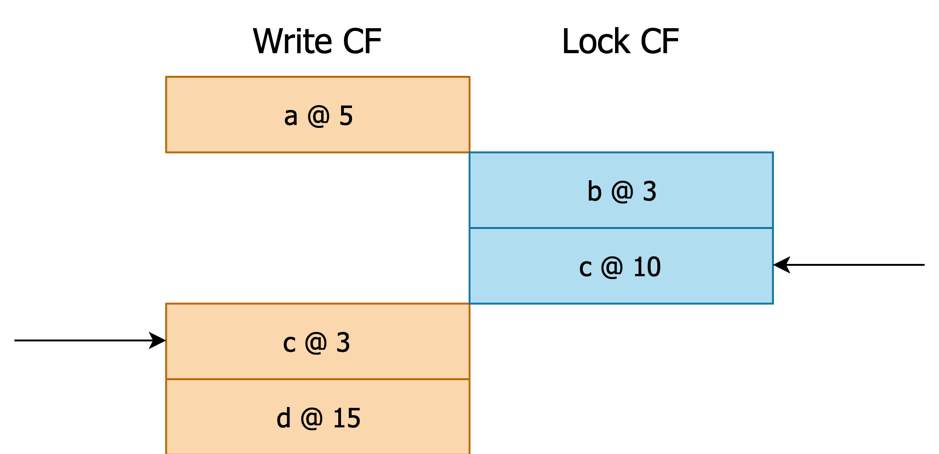图 4 一种 User Cursor 和 Lock Cursor 具有相同 User Key 的情况,Seek 的是 c
走到了目前这一步,说明我们需要从 Write Info 中读取 User Key 满足 `scan_ts` 的记录。需要注意,此时 User Key 可能是存在 Lock 的,但已被判定为应当忽略。
#### 步骤 4.1.
将 Write Cursor Seek 到 `{w_key}{!scan_ts}` 处(注:参见「事务样例」中区别 3,时间戳存储时取了反,因此这里及本文其余部分都以 `!` 标记取反操作)。如果版本数很少(同时这也符合绝大多数场景),那么这个要 Seek 的 Key 很可能非常靠近当前位置。在这个情况下为了避免较大的 Seek 开销,TiKV 采取先 `next` 若干次再 `seek` 的策略:
```rust
// Try to iterate to `${user_key}_${ts}`. We first `next()` for a few times,
// and if we have not reached where we want, we use `seek()`.
// Whether we have *not* reached where we want by `next()`.
let mut needs_seek = true;
for i in 0..SEEK_BOUND {
if i > 0 {
self.write_cursor.next(...);
if !self.write_cursor.valid()? {
// Key space ended.
return Ok(None);
}
}
{
let current_key = self.write_cursor.key(...);
if !Key::is_user_key_eq(current_key, user_key.as_encoded().as_slice()) {
// Meet another key.
*met_next_user_key = true;
return Ok(None);
}
if Key::decode_ts_from(current_key)? <= ts {
// Founded, don't need to seek again.
needs_seek = false;
break;
}
}
}
// If we have not found `${user_key}_${ts}` in a few `next()`, directly `seek()`.
if needs_seek {
// `user_key` must have reserved space here, so its clone has reserved space too. So no
// reallocation happens in `append_ts`.
self.write_cursor
.seek(&user_key.clone().append_ts(ts), ...)?;
if !self.write_cursor.valid()? {
// Key space ended.
return Ok(None);
}
let current_key = self.write_cursor.key(...);
if !Key::is_user_key_eq(current_key, user_key.as_encoded().as_slice()) {
// Meet another key.
*met_next_user_key = true;
return Ok(None);
}
}
```
#### 步骤 4.2.
`w_key` 可能没有任何 `commit_ts <= scan_ts` 的记录,因此 Seek `{w_key}{!scan_ts}` 时可能直接越过了当前 User Key 进入下一个 `w_key`,因此需要先判断一下现在 Write Cursor 对应的 User Key 是否仍然是 `w_key`。如果是的话,说明这是我们找到的最大符合 `scan_ts` 的版本(Write Info)了,我们就可以依据该版本直接确定数据内容。若版本中包含的类型是 `DELETE`,说明在这个版本下 `w_key` 或者说 User Key 已被删除,那么我们就当做它不存在;否则如果类型是 `PUT`,就可以按照版本中存储的 `start_ts` 在 Default CF 中直接取得 User Value:Get `{w_key}{!start_ts}`。
另一方面,如果这一步 Seek 到了下一个 `w_key`,我们就不能采信这个新的 `w_key`,什么也不做,回到步骤 2,因为这个新的 `w_key` 可能比 `l_key` 大了,需要先重新看一下 `l_key` 的情况。
```rust
// Now we must have reached the first key >= `${user_key}_${ts}`. However, we may
// meet `Lock` or `Rollback`. In this case, more versions needs to be looked up.
loop {
let write = Write::parse(self.write_cursor.value(...))?;
self.statistics.write.processed += 1;
match write.write_type {
WriteType::Put => return Ok(Some(self.load_data_by_write(write, user_key)?)),
WriteType::Delete => return Ok(None),
WriteType::Lock | WriteType::Rollback => {
// Continue iterate next `write`.
}
}
...
}
```
#### 步骤 4.3.
此时我们已经知道了 `w_key`(即 User Key)符合 `scan_ts` 版本要求的 Value。为了能允许后续进一步迭代到下一个 `w_key`,我们需要移动 Write Cursor 跳过当前 `w_key` 剩余所有版本。跳过的方法是 Seek `{w_key}{\xFF..\xFF}`,此时 Write Cursor 指向第一个 `>= {w_key}{\xFF..\xFF}` 的 Key,也就是下一个 `w_key`。
```rust
fn move_write_cursor_to_next_user_key(&mut self, current_user_key: &Key) -> Result<()> {
for i in 0..SEEK_BOUND {
if i > 0 {
self.write_cursor.next(...);
}
if !self.write_cursor.valid()? {
// Key space ended. We are done here.
return Ok(());
}
{
let current_key = self.write_cursor.key(...);
if !Key::is_user_key_eq(current_key, current_user_key.as_encoded().as_slice()) {
// Found another user key. We are done here.
return Ok(());
}
}
}
// We have not found another user key for now, so we directly `seek()`.
// After that, we must pointing to another key, or out of bound.
// `current_user_key` must have reserved space here, so its clone has reserved space too.
// So no reallocation happens in `append_ts`.
self.write_cursor.internal_seek(
¤t_user_key.clone().append_ts(0),
...,
)?;
Ok(())
}
```
#### 步骤 4.4.
依据之前取得的 User Value 返回 (User Key, User Value)。
### 步骤 5.
如果没有扫到值,回到 2。
样例解释
----
上面的步骤可能过于枯燥,接下来结合「事务样例」看一下流程。假设现在样例中的事务 #1 已递交而事务 #2 prewrite 完毕但还没 commit,则这几个样例事务在 RocksDB 存储的数据类似于如下所示:
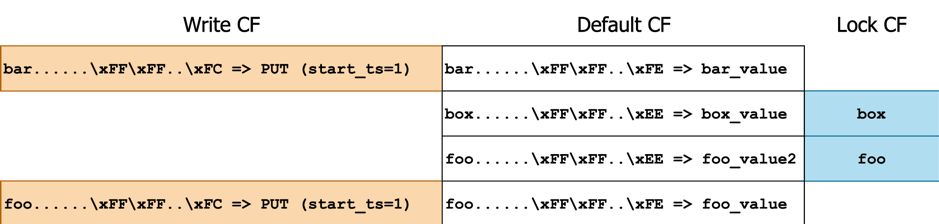图 5 样例事务在 RocksDB 的存储数据
现在尝试以 scan\_ts = 0x05 顺序扫 `[-∞, +∞)`。
- 执行步骤 1:首次迭代:将 Lock 及 Write CF Cursor Seek 到 `lower_bound` 处。 图 6 执行完毕后各个 Cursor 位置示意
- 执行步骤 2:对比 Lock Cursor 与 Write Cursor,进入分支 2.4。
- 执行分支 2.4:Write Cursor 指向 `bar`,Lock Cursor 指向 `box`,User Key 为 `bar`。
- 执行步骤 3:User Key = bar 不来自于 Lock,跳过。
- 执行步骤 4:User Key = bar 来自于 Write,继续。
- 执行步骤 4.1:Seek `{w_key}{!scan_ts}`,即 Seek `bar......\xFF\xFF..\xFA`。Write Cursor 仍然是当前位置。 图 7 执行完毕后各个 Cursor 位置示意
- 执行步骤 4.2:此时 Write Key 指向 bar 与 User Key 相同,因此依据 `PUT (start_ts=1)` 从 Default CF 中获取到 `value = bar_value`。
- 执行步骤 4.3:移动 Write Cursor 跳过当前 `bar` 剩余所有版本,即 Seek `bar......\xFF\xFF..\xFF`: 图 8 执行完毕后各个 Cursor 位置示意
- 执行步骤 4.4:对外返回 Key Value 对 `(bar, bar_value)`。
- 若外部只需要 1 个 KV 对(例如 limit = 1),此时就可以停止了,若外部还要继续获取更多 KV 对,则重新开始执行步骤 1。
- 执行步骤 1:不是首次迭代,跳过。
- 执行步骤 2:对比 Lock Cursor 与 Write Cursor,进入分支 2.4。
- 执行分支 2.4:Write Cursor 指向 `foo`,Lock Cursor 指向 `box`,User Key 为 `box`。 图 9 执行完毕后各个 Cursor 位置示意
- 执行步骤 3:User Key = box 来自于 Lock,继续。
- 执行步骤 3.1:检查 Lock Info。Lock 的 ts 为 0x11,`scan_ts` 为 0x05,忽略这个 Lock 不返回锁冲突错误。
- 执行步骤 3.2:将 Lock Cursor 往后移动一个 Key。 图 10 执行完毕后各个 Cursor 位置示意
- 执行步骤 4:User Key = box 不来自于 Write,跳过,回到步骤 2。
- 执行步骤 2:对比 Lock Cursor 与 Write Cursor,进入分支 2.4。
- 执行分支 2.4:Write Cursor 指向 `foo`,Lock Cursor 指向 `foo`,User Key 为 `foo`。 图 11 执行完毕后各个 Cursor 位置示意
- 执行步骤 3:User Key = foo 来自于 Lock,继续。与之前类似,锁被忽略,且 Lock Cursor 往后移动。 图 12 执行完毕后各个 Cursor 位置示意
- 执行步骤 4:User Key = foo 同样来自于 Write,继续。
- 执行步骤 4.1:Seek `{w_key}{!scan_ts}`,即 Seek `foo......\xFF\xFF..\xFA`。Write Cursor 仍然是当前位置。
- 执行步骤 4.2:此时 Write Key 指向 foo 与 User Key 相同,因此依据 `PUT (start_ts=1)` 从 Default CF 中获取到 `value = foo_value`。
- 执行步骤 4.3:移动 Write Cursor 跳过当前 `foo` 剩余所有版本,即 Seek `foo......\xFF\xFF..\xFF`: 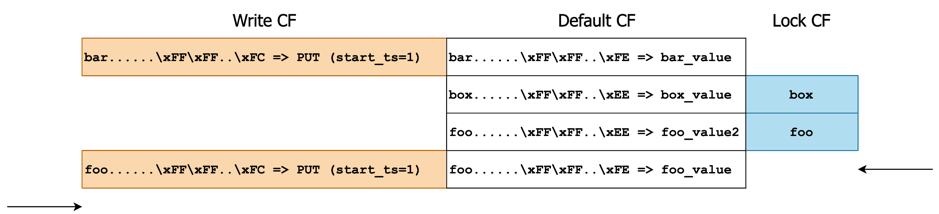图 13 执行完毕后各个 Cursor 位置示意
- 执行步骤 4.4:对外返回 Key Value 对 `(foo, foo_value)`。
- 若外部选择继续扫,则继续回到步骤 1。
- 执行步骤 1:不是首次迭代,跳过。
- 执行步骤 2:对比 Lock Cursor 与 Write Cursor,进入分支 2.1。 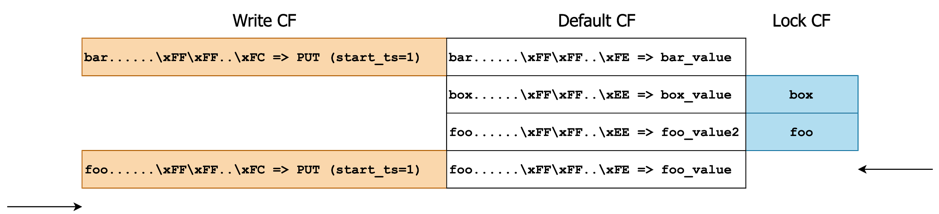图 14 执行完毕后各个 Cursor 位置示意
- 执行步骤 2.1:Write Cursor 和 Lock Cursor 都指向空,没有更多数据了。
总结
--
以上就是 MVCC 顺序扫数据代码的解析,点查和逆序扫流程与其类似,并且代码注释很详细,大家可以自主阅读理解。下篇文章我们会详细介绍悲观事务的代码实现。
> 点击查看更多 [TiKV 源码解析系列文章](https://cn.pingcap.com/blog/tag/tikv-source-code-analysis/)