# Creating a TiDB Playground Cluster
### Overview
+ In these exercises, you create a TiDB cluster using the TiUP Playground on your laptop.
+ The Playground cluster type is designed for testing purposes only and is helpful in enabling developers to better understand the TiDB interfaces at no additional cost.
 ### Notes
+ Your environment may be different with these exercises, including but not limited to `IP address`, `port number`, `username`, `password`, `directory` and the estimated elapsed time for exercise scripts.
+ The `$` in your terminal window is an OS prompt.
+ The "`tidb>`" or "`mysql>`" in your terminal window is SQL command prompt.
+ These exercises can be run on a single machine, such as your laptop.
+ These exercises are designed for TiUP Playground. It is crucial to note that the TiDB Playground cluster is not designed for production purposes.
### Assumptions
+ You are using macOS or Linux.
+ You have [git](https://git-scm.com/) installed.
+ You have the `mysql` command line client installed.
### Duration
+ This exercise should take you approximately 10 minutes to complete.
### Tasks
1. Clone the scripts repository.
2. Review the exercise scripts and make sure that you understand them.
3. Create a TiUP Playground TiDB sandbox cluster.
4. Understand how to clean up the TiUP Playground sandbox cluster.
### Solution
1. Clone the demo repository from `GitHub`.
```
$ git clone https://github.com/pingcap/tidb-course-201-lab.git
Cloning into 'tidb-course-201-lab'...
...
```
2. Change the current working directory to `scripts/` and verify two scripts.
Change the working directory to `tidb-course-201-lab/scripts`.
```
$ cd tidb-course-201-lab/scripts
```
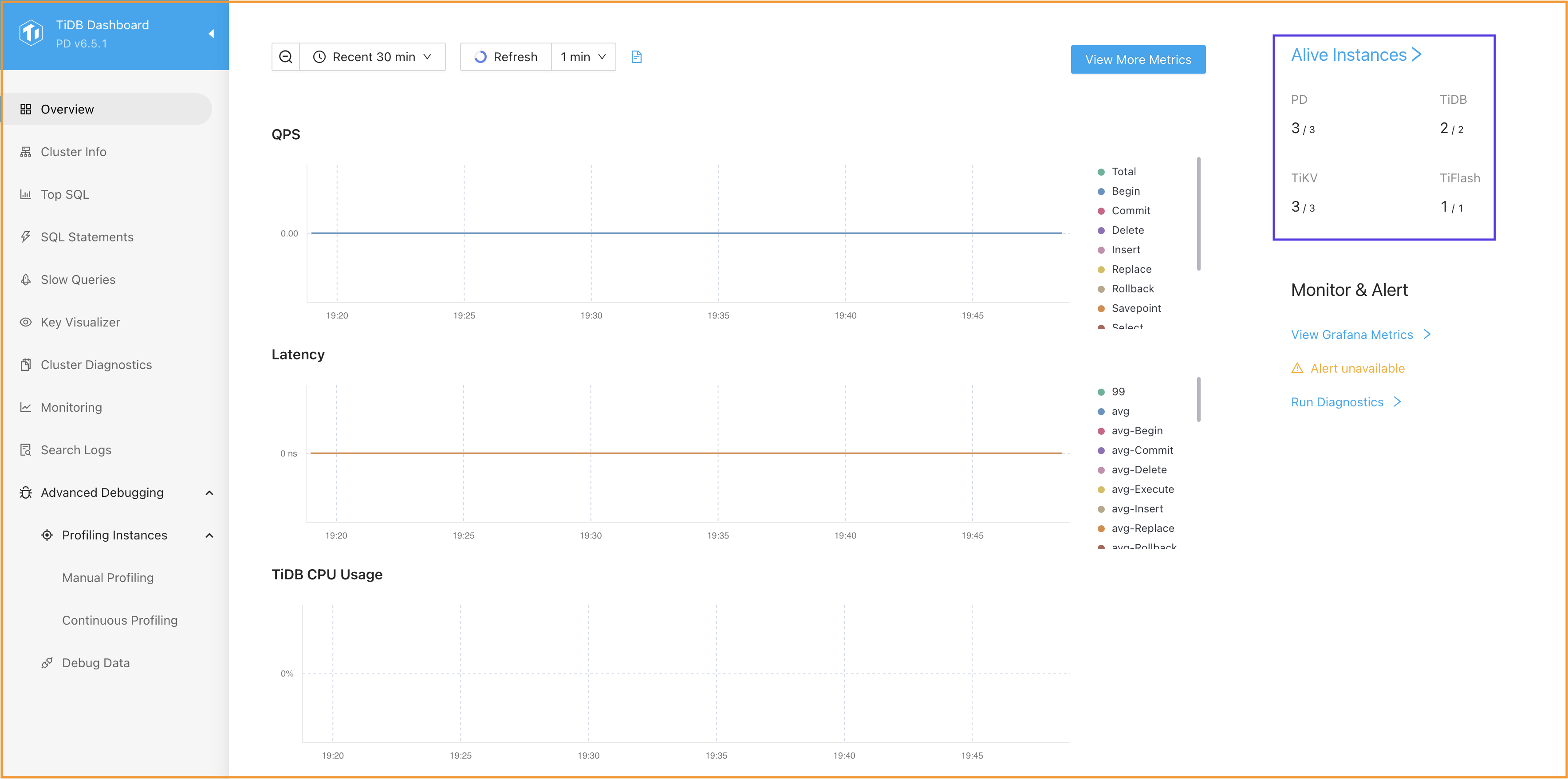
Review the script `playground-start-demo.sh`, as running it will initiate a TiDB Playground cluster with 10 instances (3 PD server instances, 3 TiKV server instances, 2 TiDB server instances, and 1 TiFlash server instance). The directory tag for the Playground is `demo` and the port number for the first Placement Driver server is `5379`.
```
$ cat playground-start-demo.sh
#!/bin/bash
~/.tiup/bin/tiup playground v6.5.1 \
--tag demo \
--db 2 \
--pd 3 \
--kv 3 \
--tiflash 1 \
--pd.port 5379
```
Review the script `playground-check.sh`, which displays the simplified status of instances for the TiDB Playground cluster.
```
$ cat playground-check.sh
#!/bin/bash
~/.tiup/bin/tiup playground display
```
3. Launch a TiDB Playground cluster and establish a connection to the TiDB server instance within the cluster.
Download and install TiUP utility, and receive the results shown.
```
$ curl --proto '=https' --tlsv1.2 -sSf https://tiup-mirrors.pingcap.com/install.sh | sh
...
Shell profile: /Users/username/.zshrc
Installed path: /Users/username/.tiup/bin/tiup
===============================================
Have a try: tiup playground
===============================================
```
Launch a local TiDB Playground cluster using the provided script and view the results. If you enter `Ctrl-C`, your Playground cluster will exit.
```
$ ./playground-start-demo.sh
...
To view the dashboard: http://127.0.0.1:5379/dashboard
PD client endpoints: [127.0.0.1:5379 127.0.0.1:5380 127.0.0.1:5381]
To view the Prometheus: http://127.0.0.1:59227
To view the Grafana: http://127.0.0.1:59252
```
Open a new terminal window to verify the status of the TiDB Playground cluster and display the resulting information.
```
$ cd tidb-course-201-lab/scripts
$ ./playground-check.sh
...
Pid Role Uptime
--- ---- ------
11473 pd 3m4.584159125s
11474 pd 3m4.563855125s
11475 pd 3m4.550561s
11476 tikv 3m3.560119667s
11477 tikv 3m3.540240667s
11478 tikv 3m3.52733175s
11480 tidb 3m2.545229042s
11481 tidb 3m2.533429333s
11502 tiflash 2m54.914668834s
```
Establish the connection to TiDB server instance on port 4000 as user `root`.
```
$ cat connect-4000.sh
#!/bin/bash
export MYSQL_PS1="tidb:4000> "
mysql -h 127.0.0.1 -P 4000 -u root
```
```
$ ./connect-4000.sh
...
tidb:4000>
```
Run a simple query, the result you obtain may differ from the output.
```sql
SELECT TIDB_VERSION()\G
```
```
tidb:4000> SELECT TIDB_VERSION()\G
*************************** 1. row ***************************
TIDB_VERSION(): Release Version: v6.5.1
Edition: Community
Git Commit Hash: 4084b077d615f9dc0a41cf2e30bc6e1a02332df2
Git Branch: heads/refs/tags/v6.5.1
UTC Build Time: 2023-03-07 16:04:47
GoVersion: go1.19.5
Race Enabled: false
TiKV Min Version: 6.2.0-alpha
Check Table Before Drop: false
Store: tikv
1 row in set (0.00 sec)
```
Close the connection.
```
tidb:4000> exit;
Bye
```
Establish the connection to TiDB server instance on port 4001 as user `root`.
```
$ cat connect-4001.sh
#!/bin/bash
export MYSQL_PS1="tidb:4001> "
mysql -h 127.0.0.1 -P 4001 -u root
```
```
$ ./connect-4001.sh
...
tidb:4001>
```
Run a simple query, the result you obtain may differ from the output.
```sql
SELECT TIDB_VERSION()\G
```
```
tidb:4001> SELECT TIDB_VERSION()\G
*************************** 1. row ***************************
TIDB_VERSION(): Release Version: v6.5.1
Edition: Community
Git Commit Hash: 4084b077d615f9dc0a41cf2e30bc6e1a02332df2
Git Branch: heads/refs/tags/v6.5.1
UTC Build Time: 2023-03-07 16:04:47
GoVersion: go1.19.5
Race Enabled: false
TiKV Min Version: 6.2.0-alpha
Check Table Before Drop: false
Store: tikv
1 row in set (0.00 sec)
```
Close the connection.
```
tidb:4001> exit;
Bye
```
Verify the `demo` directory as it contains the complete file structure of your TiDB Playground cluster.
```
$ find ~/.tiup/data/demo -maxdepth 1
/Users/username/.tiup/data/demo
/Users/username/.tiup/data/demo/tikv-0
/Users/username/.tiup/data/demo/tikv-1
/Users/username/.tiup/data/demo/pd-1
/Users/username/.tiup/data/demo/pd-0
/Users/username/.tiup/data/demo/tidb-2
/Users/username/.tiup/data/demo/grafana
/Users/username/.tiup/data/demo/dsn
/Users/username/.tiup/data/demo/tiup_process_meta
/Users/username/.tiup/data/demo/tikv-2
/Users/username/.tiup/data/demo/pd-2
/Users/username/.tiup/data/demo/prometheus
/Users/username/.tiup/data/demo/port
/Users/username/.tiup/data/demo/tidb-1
/Users/username/.tiup/data/demo/tiflash-0
/Users/username/.tiup/data/demo/tidb-0
```
4. To access the monitoring dashboard, open your browser and enter `http://127.0.0.1:5379/dashboard`.
You may be automatically directed to the correct address and port that provides the dashboard service. The port number for the service in this case is `5380`.
### Notes
+ Your environment may be different with these exercises, including but not limited to `IP address`, `port number`, `username`, `password`, `directory` and the estimated elapsed time for exercise scripts.
+ The `$` in your terminal window is an OS prompt.
+ The "`tidb>`" or "`mysql>`" in your terminal window is SQL command prompt.
+ These exercises can be run on a single machine, such as your laptop.
+ These exercises are designed for TiUP Playground. It is crucial to note that the TiDB Playground cluster is not designed for production purposes.
### Assumptions
+ You are using macOS or Linux.
+ You have [git](https://git-scm.com/) installed.
+ You have the `mysql` command line client installed.
### Duration
+ This exercise should take you approximately 10 minutes to complete.
### Tasks
1. Clone the scripts repository.
2. Review the exercise scripts and make sure that you understand them.
3. Create a TiUP Playground TiDB sandbox cluster.
4. Understand how to clean up the TiUP Playground sandbox cluster.
### Solution
1. Clone the demo repository from `GitHub`.
```
$ git clone https://github.com/pingcap/tidb-course-201-lab.git
Cloning into 'tidb-course-201-lab'...
...
```
2. Change the current working directory to `scripts/` and verify two scripts.
Change the working directory to `tidb-course-201-lab/scripts`.
```
$ cd tidb-course-201-lab/scripts
```
Review the script `playground-start-demo.sh`, as running it will initiate a TiDB Playground cluster with 10 instances (3 PD server instances, 3 TiKV server instances, 2 TiDB server instances, and 1 TiFlash server instance). The directory tag for the Playground is `demo` and the port number for the first Placement Driver server is `5379`.
```
$ cat playground-start-demo.sh
#!/bin/bash
~/.tiup/bin/tiup playground v6.5.1 \
--tag demo \
--db 2 \
--pd 3 \
--kv 3 \
--tiflash 1 \
--pd.port 5379
```
Review the script `playground-check.sh`, which displays the simplified status of instances for the TiDB Playground cluster.
```
$ cat playground-check.sh
#!/bin/bash
~/.tiup/bin/tiup playground display
```
3. Launch a TiDB Playground cluster and establish a connection to the TiDB server instance within the cluster.
Download and install TiUP utility, and receive the results shown.
```
$ curl --proto '=https' --tlsv1.2 -sSf https://tiup-mirrors.pingcap.com/install.sh | sh
...
Shell profile: /Users/username/.zshrc
Installed path: /Users/username/.tiup/bin/tiup
===============================================
Have a try: tiup playground
===============================================
```
Launch a local TiDB Playground cluster using the provided script and view the results. If you enter `Ctrl-C`, your Playground cluster will exit.
```
$ ./playground-start-demo.sh
...
To view the dashboard: http://127.0.0.1:5379/dashboard
PD client endpoints: [127.0.0.1:5379 127.0.0.1:5380 127.0.0.1:5381]
To view the Prometheus: http://127.0.0.1:59227
To view the Grafana: http://127.0.0.1:59252
```
Open a new terminal window to verify the status of the TiDB Playground cluster and display the resulting information.
```
$ cd tidb-course-201-lab/scripts
$ ./playground-check.sh
...
Pid Role Uptime
--- ---- ------
11473 pd 3m4.584159125s
11474 pd 3m4.563855125s
11475 pd 3m4.550561s
11476 tikv 3m3.560119667s
11477 tikv 3m3.540240667s
11478 tikv 3m3.52733175s
11480 tidb 3m2.545229042s
11481 tidb 3m2.533429333s
11502 tiflash 2m54.914668834s
```
Establish the connection to TiDB server instance on port 4000 as user `root`.
```
$ cat connect-4000.sh
#!/bin/bash
export MYSQL_PS1="tidb:4000> "
mysql -h 127.0.0.1 -P 4000 -u root
```
```
$ ./connect-4000.sh
...
tidb:4000>
```
Run a simple query, the result you obtain may differ from the output.
```sql
SELECT TIDB_VERSION()\G
```
```
tidb:4000> SELECT TIDB_VERSION()\G
*************************** 1. row ***************************
TIDB_VERSION(): Release Version: v6.5.1
Edition: Community
Git Commit Hash: 4084b077d615f9dc0a41cf2e30bc6e1a02332df2
Git Branch: heads/refs/tags/v6.5.1
UTC Build Time: 2023-03-07 16:04:47
GoVersion: go1.19.5
Race Enabled: false
TiKV Min Version: 6.2.0-alpha
Check Table Before Drop: false
Store: tikv
1 row in set (0.00 sec)
```
Close the connection.
```
tidb:4000> exit;
Bye
```
Establish the connection to TiDB server instance on port 4001 as user `root`.
```
$ cat connect-4001.sh
#!/bin/bash
export MYSQL_PS1="tidb:4001> "
mysql -h 127.0.0.1 -P 4001 -u root
```
```
$ ./connect-4001.sh
...
tidb:4001>
```
Run a simple query, the result you obtain may differ from the output.
```sql
SELECT TIDB_VERSION()\G
```
```
tidb:4001> SELECT TIDB_VERSION()\G
*************************** 1. row ***************************
TIDB_VERSION(): Release Version: v6.5.1
Edition: Community
Git Commit Hash: 4084b077d615f9dc0a41cf2e30bc6e1a02332df2
Git Branch: heads/refs/tags/v6.5.1
UTC Build Time: 2023-03-07 16:04:47
GoVersion: go1.19.5
Race Enabled: false
TiKV Min Version: 6.2.0-alpha
Check Table Before Drop: false
Store: tikv
1 row in set (0.00 sec)
```
Close the connection.
```
tidb:4001> exit;
Bye
```
Verify the `demo` directory as it contains the complete file structure of your TiDB Playground cluster.
```
$ find ~/.tiup/data/demo -maxdepth 1
/Users/username/.tiup/data/demo
/Users/username/.tiup/data/demo/tikv-0
/Users/username/.tiup/data/demo/tikv-1
/Users/username/.tiup/data/demo/pd-1
/Users/username/.tiup/data/demo/pd-0
/Users/username/.tiup/data/demo/tidb-2
/Users/username/.tiup/data/demo/grafana
/Users/username/.tiup/data/demo/dsn
/Users/username/.tiup/data/demo/tiup_process_meta
/Users/username/.tiup/data/demo/tikv-2
/Users/username/.tiup/data/demo/pd-2
/Users/username/.tiup/data/demo/prometheus
/Users/username/.tiup/data/demo/port
/Users/username/.tiup/data/demo/tidb-1
/Users/username/.tiup/data/demo/tiflash-0
/Users/username/.tiup/data/demo/tidb-0
```
4. To access the monitoring dashboard, open your browser and enter `http://127.0.0.1:5379/dashboard`.
You may be automatically directed to the correct address and port that provides the dashboard service. The port number for the service in this case is `5380`.
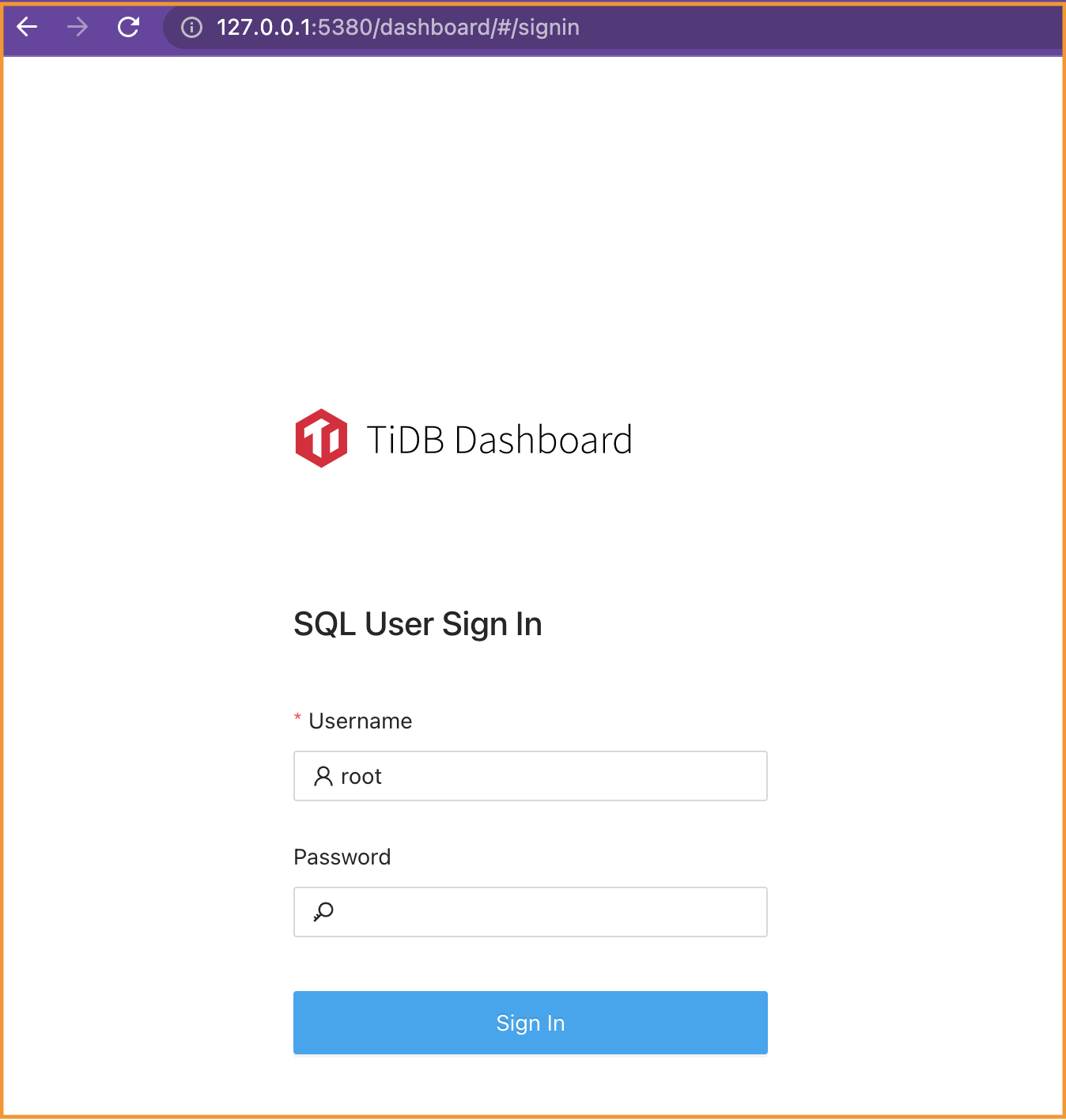 For the TiDB Playground cluster, the login credentials is username `root` with empty password. On the `Overview` page, make sure that the instance types and counts match your expectations.
 5. (optional) If you need to clean up the TiDB Playground cluster, you can do so.
Go to the terminal where you previously ran `playground-start-demo.sh`. The screen might look like this.
```
...
CLUSTER START SUCCESSFULLY, Enjoy it ^-^
...
To view the dashboard: http://127.0.0.1:5379/dashboard
PD client endpoints: [127.0.0.1:5379 127.0.0.1:5380 127.0.0.1:5381]
To view the Prometheus: http://127.0.0.1:59227
To view the Grafana: http://127.0.0.1:59252
```
Press `Ctrl-C` once to abort the TiDB Playground cluster. All PD, TiKV, TiDB, and TiFlash server instances will be terminated.
```
^CPlayground receive signal: interrupt
Got signal interrupt (Component: playground ; PID: 47472)
...
Wait pd(47473) to quit...
Wait pd(47474) to quit...
Wait pd(47475) to quit...
tikv quit
```
To delete all the Playground files that have a prefix of `demo` in their tag, execute the command `tiup clean demo`.
```
$ ~/.tiup/bin/tiup clean demo
Clean instance of `playground`, directory: /Users/username/.tiup/data/demo
```
## End of Exercises
5. (optional) If you need to clean up the TiDB Playground cluster, you can do so.
Go to the terminal where you previously ran `playground-start-demo.sh`. The screen might look like this.
```
...
CLUSTER START SUCCESSFULLY, Enjoy it ^-^
...
To view the dashboard: http://127.0.0.1:5379/dashboard
PD client endpoints: [127.0.0.1:5379 127.0.0.1:5380 127.0.0.1:5381]
To view the Prometheus: http://127.0.0.1:59227
To view the Grafana: http://127.0.0.1:59252
```
Press `Ctrl-C` once to abort the TiDB Playground cluster. All PD, TiKV, TiDB, and TiFlash server instances will be terminated.
```
^CPlayground receive signal: interrupt
Got signal interrupt (Component: playground ; PID: 47472)
...
Wait pd(47473) to quit...
Wait pd(47474) to quit...
Wait pd(47475) to quit...
tikv quit
```
To delete all the Playground files that have a prefix of `demo` in their tag, execute the command `tiup clean demo`.
```
$ ~/.tiup/bin/tiup clean demo
Clean instance of `playground`, directory: /Users/username/.tiup/data/demo
```
## End of Exercises