# Enjoying Zero Downtime with TiDB
### Overview
+ During these exercises, you will gain practical experience with TiDB's zero downtime capabilities, whether they are planned scale-in and scale-out operations or unplanned system failures.
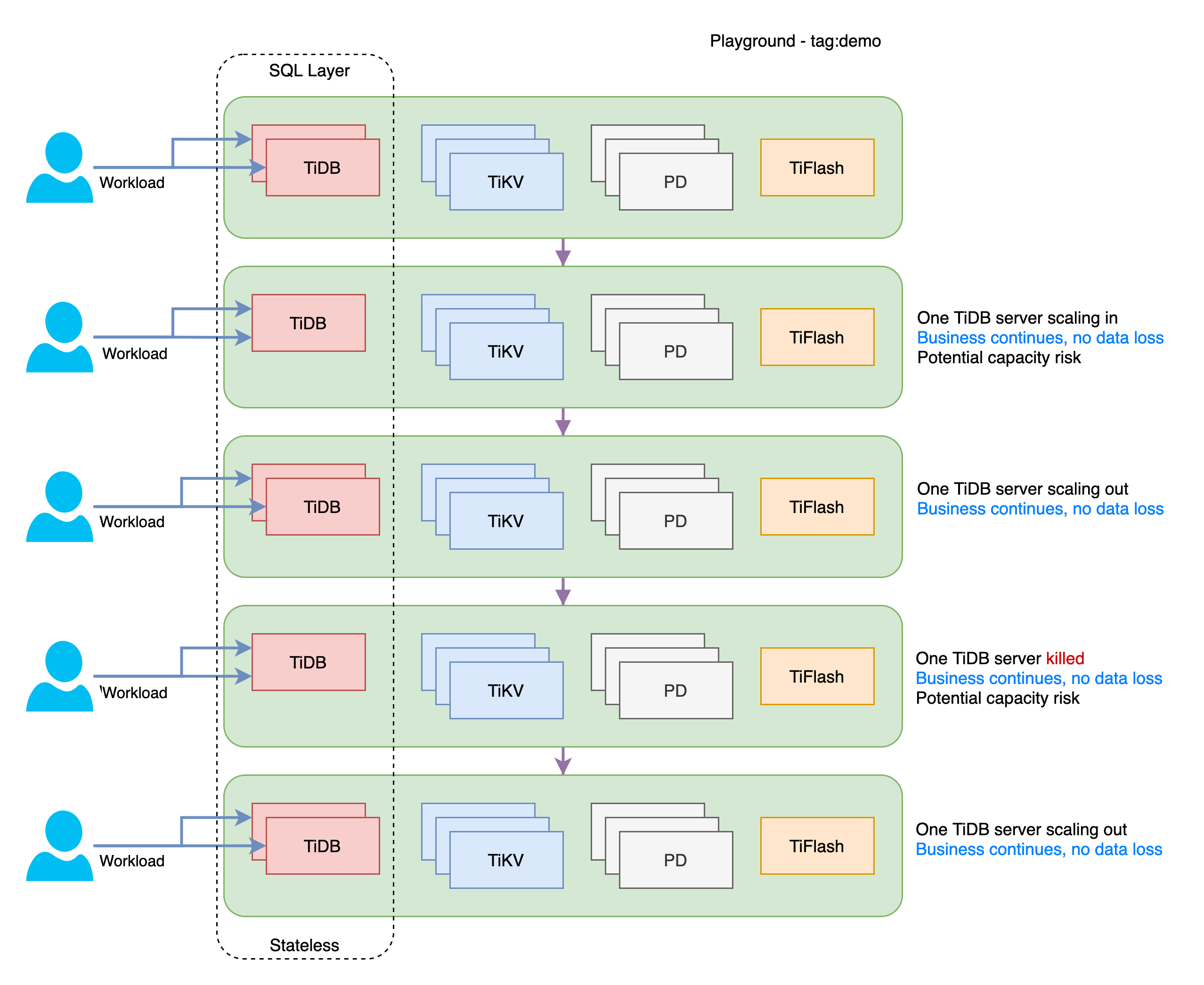
+ In Exercise 1, your business will remain operational in the event of database SQL layer (TiDB server) instances failure.
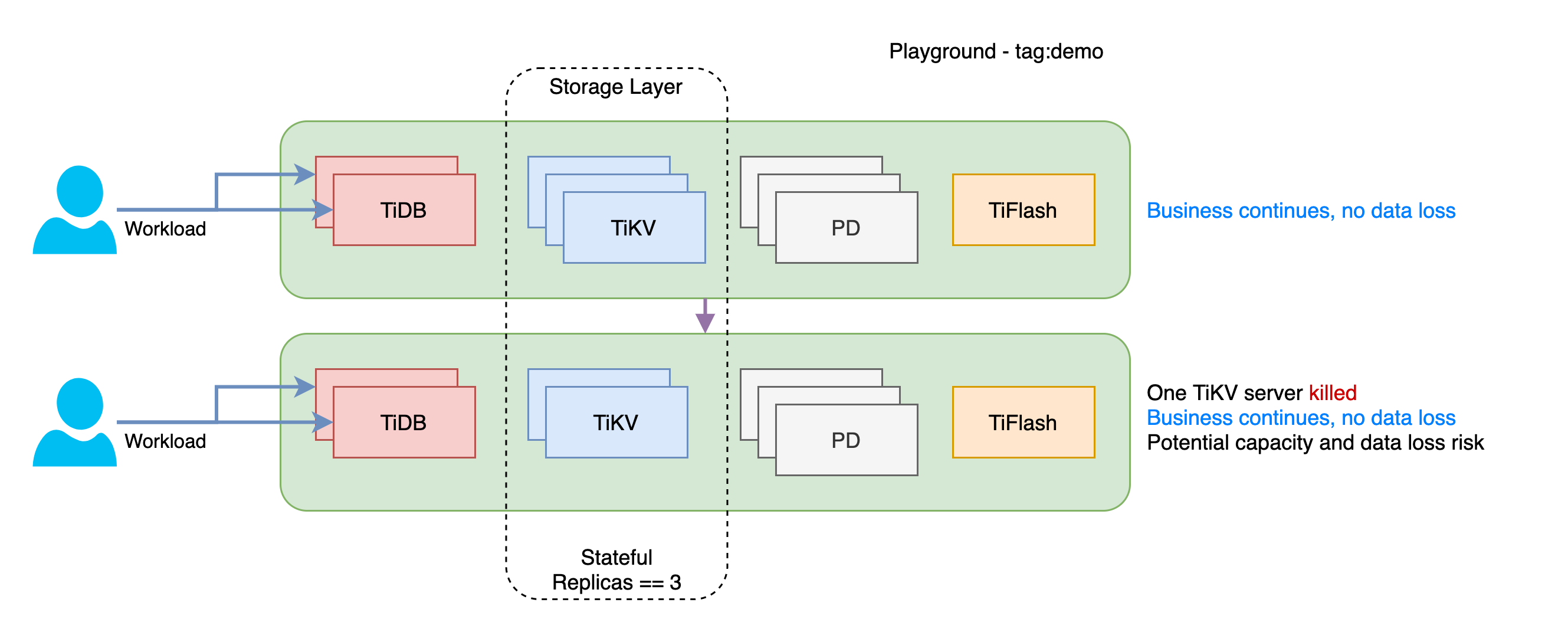
+ In Exercise 2, your business will remain operational after a database storage layer (TiKV server) instance failure.
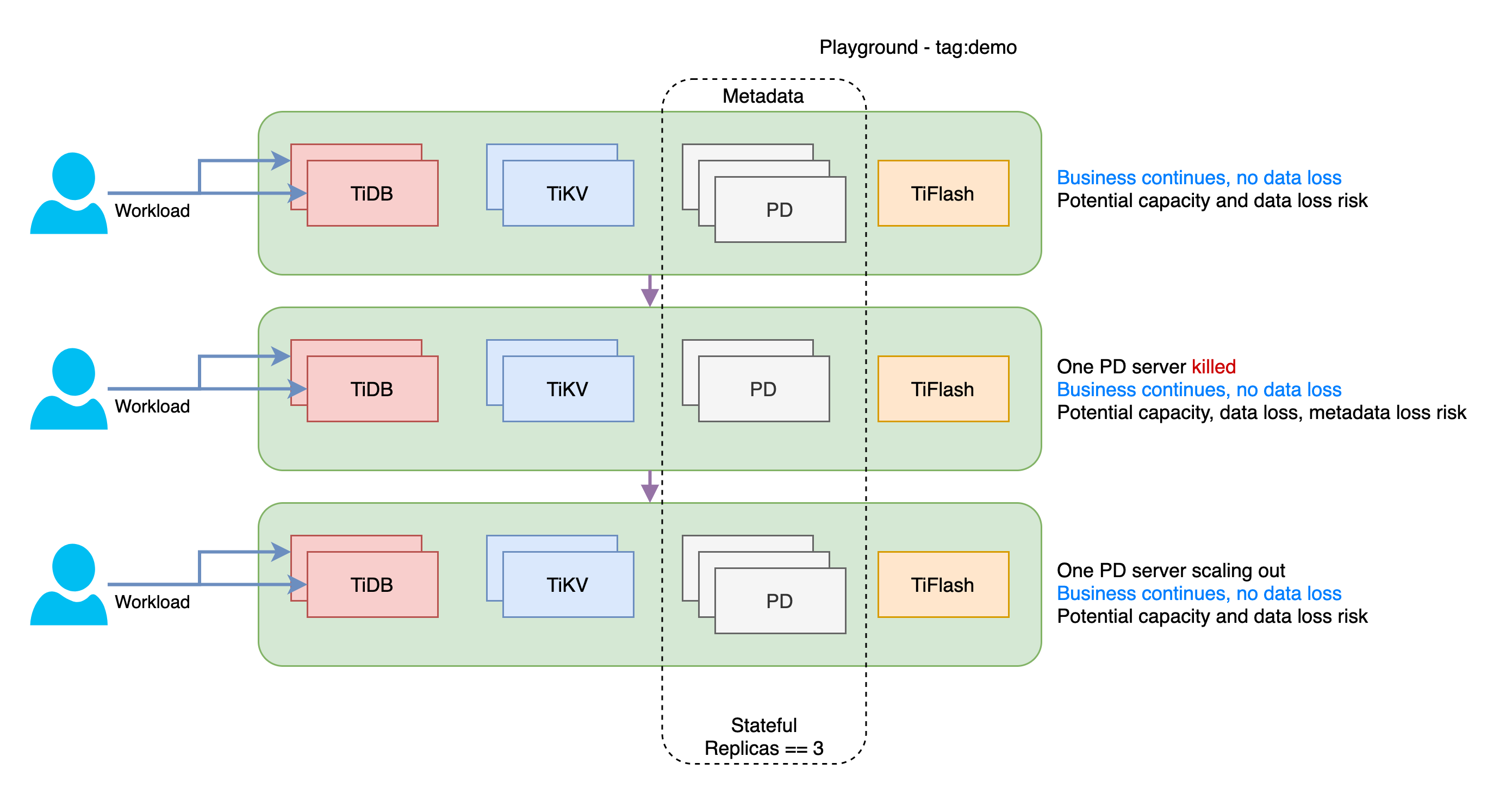
+ In Exercise 3, your business operations are not affected even if there is a failure in the database metadata layer (Placement Driver) instance.
### Notes
+ Some of the steps require that you type commands in two different terminal windows. You might find it convenient to launch two terminals and keep them open for the duration of the exercises.
+ Your environment may be different with these exercises, including but not limited to `IP`, `port`, `username`, `password` and `directory`.
+ The `$` in the terminal window is an OS prompt.
+ The "`tidb>`" or "`mysql>`" in the terminal window is SQL command prompt.
+ These exercises can be run on a single machine, such as a laptop.
### Assumptions
+ You are using macOS or Linux.
+ You have cloned the [lab repository](https://github.com/pingcap/tidb-course-201-lab.git).
+ You have completed Exercises - Creating a TiDB Playground Cluster.
+ You have [JDK 8 or later](https://docs.oracle.com/javase/8/docs/technotes/guides/install/install_overview.html) installed.
## Exercise 1: SQL Layer Instance Failover Showcase
 ### Duration
+ This exercise should take you approximately 15 minutes to complete.
### Tasks
1. Create a table within the `test` schema.
2. Initiate a Java workload to insert rows into the created table.
3. Scale-in and scale-out at the SQL layer.
4. Intentionally terminate a SQL layer (TiDB server) instance within TiDB Playground cluster.
5. Verify that the Java workload remains unaffected.
6. Add a healthy SQL Layer instance back (scale-out) to the TiDB Playground cluster.
### Solution
1. Log in as the user `root` and make sure the region max replicas is set to 3.
```
$ cd tidb-course-201-lab/scripts/
$ ./connect-4000.sh
```
```sql
SET CONFIG PD `replication.max-replicas`=3;
SELECT SLEEP(1);
SHOW CONFIG WHERE type='pd' AND name='replication.max-replicas';
```
```
tidb:4000> SET CONFIG PD `replication.max-replicas`=3;
Query OK, 0 rows affected (0.47 sec)
tidb:4000> SELECT SLEEP(1);
+----------+
| SLEEP(1) |
+----------+
| 0 |
+----------+
1 row in set (1.01 sec)
tidb:4000> SHOW CONFIG WHERE type='pd' AND name='replication.max-replicas';
+------+----------------+--------------------------+-------+
| Type | Instance | Name | Value |
+------+----------------+--------------------------+-------+
| pd | 127.0.0.1:5380 | replication.max-replicas | 3 |
| pd | 127.0.0.1:5379 | replication.max-replicas | 3 |
| pd | 127.0.0.1:5381 | replication.max-replicas | 3 |
+------+----------------+--------------------------+-------+
3 rows in set (0.02 sec)
```
2. To review the status of the TiDB Playground cluster, open a new terminal and execute the script `playground-check.sh`. It is important to take note of the status of TiDB server instances.
```
$ ./playground-check.sh
...
Pid Role Uptime
--- ---- ------
...
2760 tidb 33m21.006866672s
2761 tidb 33m20.948299789s
...
```
3. Initiate the workload by executing `02-demo-jdbc-endless-insert-dummy.sh`. This script invokes a dummy Java program which simulates hypothetical click stream events. The program consists of two concurrent threads, namely `worker1` and `worker2`, both of them can connect to two TiDB server instances in the TiDB Playground cluster in a round robin fashion. It is important to note that no tables have been created for this Java program, and hence, it cannot execute any tasks successfully on either TiDB servers (port 4000 and port 4001).
Review the script.
```
$ cat 02-demo-jdbc-endless-insert-dummy.sh
#!/bin/bash
# Run ./02-demo-jdbc-endless-insert-dummy.sh
rm -f DemoJdbcEndlessInsertDummyV3.class
javac -cp .:misc/mysql-connector-java-5.1.36-bin.jar DemoJdbcEndlessInsertDummyV3.java
sleep 1
java -cp .:misc/mysql-connector-java-5.1.36-bin.jar DemoJdbcEndlessInsertDummyV3 $*
```
Execute the workload script and ensure to keep this terminal window open for the remaining steps of the exercises.
```
$ ./02-demo-jdbc-endless-insert-dummy.sh
Error - Worker 2 - TiDB Server (port:4001) Table 'test.dummy' doesn't exist at Sat Apr 15 20:43:27 CST 2023
Error - Worker 1 - TiDB Server (port:4000) Table 'test.dummy' doesn't exist at Sat Apr 15 20:43:27 CST 2023
Error - Worker 1 - TiDB Server (port:4001) Table 'test.dummy' doesn't exist at Sat Apr 15 20:43:27 CST 2023
Error - Worker 2 - TiDB Server (port:4000) Table 'test.dummy' doesn't exist at Sat Apr 15 20:43:27 CST 2023
Error - Worker 1 - TiDB Server (port:4000) Table 'test.dummy' doesn't exist at Sat Apr 15 20:43:27 CST 2023
Error - Worker 2 - TiDB Server (port:4001) Table 'test.dummy' doesn't exist at Sat Apr 15 20:43:28 CST 2023
Error - Worker 2 - TiDB Server (port:4000) Table 'test.dummy' doesn't exist at Sat Apr 15 20:43:28 CST 2023
...
```
4. Go back to the MySQL CLI program, create a table named `dummy` under `test` schema. By the way, it shows that TiDB supports `JSON` data type as well.
```sql
DROP TABLE IF EXISTS test.dummy;
CREATE TABLE test.dummy (id INT AUTO_INCREMENT PRIMARY KEY, name VARCHAR(80), event JSON);
```
```
tidb:4000> DROP TABLE IF EXISTS test.dummy;
Query OK, 0 rows affected, 1 warning (0.00 sec)
tidb:4000> CREATE TABLE test.dummy (id INT AUTO_INCREMENT PRIMARY KEY, name VARCHAR(80), event JSON);
Query OK, 0 rows affected (0.59 sec)
```
5. Verify that the program has started functioning properly on the Java workload terminal window. Note that in the sample Java program, short connections are used for demonstration purposes. However, it's important to keep in mind that this practice is not the generally recommended approach for JDBC-based applications.
```
Error - Worker 2 - TiDB Server (port:4000) Table 'test.dummy' doesn't exist at Sat Apr 15 20:52:17 CST 2023
Error - Worker 2 - TiDB Server (port:4001) Table 'test.dummy' doesn't exist at Sat Apr 15 20:52:17 CST 2023
Error - Worker 1 - TiDB Server (port:4000) Table 'test.dummy' doesn't exist at Sat Apr 15 20:52:17 CST 2023
Error - Worker 1 - TiDB Server (port:4001) Table 'test.dummy' doesn't exist at Sat Apr 15 20:52:17 CST 2023
Worker 2 - TiDB Server (port:4000) - INSERTING INTO test.dummy at Sat Apr 15 20:52:18 CST 2023
Worker 1 - TiDB Server (port:4000) - INSERTING INTO test.dummy at Sat Apr 15 20:52:18 CST 2023
Worker 1 - TiDB Server (port:4001) - INSERTING INTO test.dummy at Sat Apr 15 20:52:18 CST 2023
Worker 2 - TiDB Server (port:4001) - INSERTING INTO test.dummy at Sat Apr 15 20:52:19 CST 2023
Worker 1 - TiDB Server (port:4000) - INSERTING INTO test.dummy at Sat Apr 15 20:52:19 CST 2023
Worker 2 - TiDB Server (port:4000) - INSERTING INTO test.dummy at Sat Apr 15 20:52:19 CST 2023
Worker 1 - TiDB Server (port:4001) - INSERTING INTO test.dummy at Sat Apr 15 20:52:19 CST 2023
Worker 2 - TiDB Server (port:4001) - INSERTING INTO test.dummy at Sat Apr 15 20:52:20 CST 2023
Worker 2 - TiDB Server (port:4000) - INSERTING INTO test.dummy at Sat Apr 15 20:52:20 CST 2023
Worker 1 - TiDB Server (port:4000) - INSERTING INTO test.dummy at Sat Apr 15 20:52:20 CST 2023
```
6. Go back to the MySQL CLI program, verify that the number of rows in the `test.dummy` table is increasing.
```sql
SELECT name, MAX(id), COUNT(event) FROM test.dummy GROUP BY name ORDER BY name;
SELECT SLEEP(1);
SELECT name, MAX(id), COUNT(event) FROM test.dummy GROUP BY name ORDER BY name;
```
```
tidb:4000> SELECT name, MAX(id), COUNT(event) FROM test.dummy GROUP BY name ORDER BY name;
+---------+---------+--------------+
| name | MAX(id) | COUNT(event) |
+---------+---------+--------------+
| worker1 | 30676 | 683 |
| worker2 | 30677 | 672 |
+---------+---------+--------------+
2 rows in set (0.01 sec)
tidb:4000> SELECT SLEEP(1);
+----------+
| SLEEP(1) |
+----------+
| 0 |
+----------+
1 row in set (1.00 sec)
tidb:4000> SELECT name, MAX(id), COUNT(event) FROM test.dummy GROUP BY name ORDER BY name;
+---------+---------+--------------+
| name | MAX(id) | COUNT(event) |
+---------+---------+--------------+
| worker1 | 30679 | 687 |
| worker2 | 30680 | 674 |
+---------+---------+--------------+
2 rows in set (0.01 sec)
```
7. Open a new terminal window and run script `02-1-planned-scale-in-tidb-server.sh` to scale-in the SQL layer by removing one TiDB server instance. Suppose you have determined that it is unnecessary to maintain two servers, a single TiDB server can manage all workloads effectively.
Review the planned scale-in script.
```
$ cd tidb-course-201-lab/scripts/
$ cat 02-1-planned-scale-in-tidb-server.sh
#!/bin/bash
# Scale-in the first TiDB server (its port should be 4000)
TIDB_SERVER_1_PID=`~/.tiup/bin/tiup playground display 2>/dev/null | grep -i tidb | sort -g | head -n 1 | awk -F" " '{print $1}'`
~/.tiup/bin/tiup playground scale-in --pid ${TIDB_SERVER_1_PID}
~/.tiup/bin/tiup playground display
```
Execute the planned scale-in script.
```
$ ./02-1-planned-scale-in-tidb-server.sh
...
Pid Role Uptime
--- ---- ------
...
2761 tidb 1h29m16.989845496s
...
```
8. While observing the terminal window running the Java workload, it can be noted that both `worker1` and `worker2` are now on `TiDB Server (port:4001)`.
```
...
Worker 1 - TiDB Server (port:4001) - INSERTING INTO test.dummy at Sat Apr 15 21:06:49 CST 2023
Worker 2 - TiDB Server (port:4001) - INSERTING INTO test.dummy at Sat Apr 15 21:06:50 CST 2023
Worker 1 - TiDB Server (port:4001) - INSERTING INTO test.dummy at Sat Apr 15 21:06:51 CST 2023
Worker 2 - TiDB Server (port:4001) - INSERTING INTO test.dummy at Sat Apr 15 21:06:51 CST 2023
Worker 1 - TiDB Server (port:4001) - INSERTING INTO test.dummy at Sat Apr 15 21:06:51 CST 2023
Worker 2 - TiDB Server (port:4001) - INSERTING INTO test.dummy at Sat Apr 15 21:06:51 CST 2023
Worker 2 - TiDB Server (port:4001) - INSERTING INTO test.dummy at Sat Apr 15 21:06:51 CST 2023
Worker 1 - TiDB Server (port:4001) - INSERTING INTO test.dummy at Sat Apr 15 21:06:51 CST 2023
Worker 1 - TiDB Server (port:4001) - INSERTING INTO test.dummy at Sat Apr 15 21:06:51 CST 2023
Worker 1 - TiDB Server (port:4001) - INSERTING INTO test.dummy at Sat Apr 15 21:06:51 CST 2023
Worker 1 - TiDB Server (port:4001) - INSERTING INTO test.dummy at Sat Apr 15 21:06:51 CST 2023
Worker 2 - TiDB Server (port:4001) - INSERTING INTO test.dummy at Sat Apr 15 21:06:52 CST 2023
...
```
9. Connect to the remaining TiDB server instance via port `4001` to verify that the number of rows in the `test.dummy` table is still increasing, the workload is still running. An interesting observation would be the return values of the `MAX(id)` column, which could be the same between two queries while the `COUNT(event)` value is increasing. However, regardless of the situation, the subsequent steps of the exercise will not be affected. For information about the `AUTO_INCREMENT` behavior in a distributed environment of TiDB, enroll in the free workshop - [TiDB Workshop for MySQL Users](https://pingcap.com/education) to learn more.
```
$ ./connect-4001.sh
```
```sql
SELECT name, MAX(id), COUNT(event) FROM test.dummy GROUP BY name ORDER BY name;
SELECT SLEEP(1);
SELECT name, MAX(id), COUNT(event) FROM test.dummy GROUP BY name ORDER BY name;
```
```
tidb:4001> SELECT name, MAX(id), COUNT(event) FROM test.dummy GROUP BY name ORDER BY name;
+---------+---------+--------------+
| name | MAX(id) | COUNT(event) |
+---------+---------+--------------+
| worker1 | 33009 | 2359 |
| worker2 | 33010 | 2352 |
+---------+---------+--------------+
2 rows in set (0.05 sec)
tidb:4001> SELECT SLEEP(1);
+----------+
| SLEEP(1) |
+----------+
| 0 |
+----------+
1 row in set (1.00 sec)
tidb:4001> SELECT name, MAX(id), COUNT(event) FROM test.dummy GROUP BY name ORDER BY name;
+---------+---------+--------------+
| name | MAX(id) | COUNT(event) |
+---------+---------+--------------+
| worker1 | 33014 | 2362 |
| worker2 | 33013 | 2353 |
+---------+---------+--------------+
2 rows in set (0.01 sec)
```
10. What is the current status? Are there any potential risks? If the workload increases or a single TiDB server cannot meet high availability requirements, it is insufficient to rely on a single server to handle the workload and meet the desired high availability SLA. To address this challenge, an additional TiDB server should be added to the cluster. In actual practice, the required number of TiDB server instances should be determined based on the SQL workload of the system.
Review the scale-out script.
```
$ cat ./02-2-planned-scale-out-tidb-server.sh
#!/bin/bash
# Scale-out one TiDB server
~/.tiup/bin/tiup playground scale-out --db 1
~/.tiup/bin/tiup playground display
```
Execute the script to scale-out the SQL layer by adding one TiDB server.
```
$ ./02-2-planned-scale-out-tidb-server.sh
...
Pid Role Uptime
--- ---- ------
...
2761 tidb 1h43m49.828035701s
7192 tidb 6.022653957s
...
```
11. While observing the terminal window running the Java workload, it can be noted that `worker1` and `worker2` are now using `TiDB Server (port:4000)` and `TiDB Server (port:4001)` again.
```
...
Worker 2 - TiDB Server (port:4000) - INSERTING INTO test.dummy at Sat Apr 15 21:46:25 CST 2023
Worker 1 - TiDB Server (port:4001) - INSERTING INTO test.dummy at Sat Apr 15 21:46:26 CST 2023
Worker 2 - TiDB Server (port:4001) - INSERTING INTO test.dummy at Sat Apr 15 21:46:26 CST 2023
Worker 1 - TiDB Server (port:4000) - INSERTING INTO test.dummy at Sat Apr 15 21:46:27 CST 2023
Worker 2 - TiDB Server (port:4000) - INSERTING INTO test.dummy at Sat Apr 15 21:46:27 CST 2023
Worker 1 - TiDB Server (port:4001) - INSERTING INTO test.dummy at Sat Apr 15 21:46:27 CST 2023
Worker 1 - TiDB Server (port:4000) - INSERTING INTO test.dummy at Sat Apr 15 21:46:27 CST 2023
Worker 1 - TiDB Server (port:4001) - INSERTING INTO test.dummy at Sat Apr 15 21:46:27 CST 2023
Worker 2 - TiDB Server (port:4001) - INSERTING INTO test.dummy at Sat Apr 15 21:46:28 CST 2023
Worker 2 - TiDB Server (port:4000) - INSERTING INTO test.dummy at Sat Apr 15 21:46:28 CST 2023
Worker 1 - TiDB Server (port:4000) - INSERTING INTO test.dummy at Sat Apr 15 21:46:28 CST 2023
Worker 2 - TiDB Server (port:4001) - INSERTING INTO test.dummy at Sat Apr 15 21:46:29 CST 2023
```
12. So far, the planned scale-in and scale-out the SQL layer had been practiced. Execute script `02-3-unplanned-destroy-tidb-server.sh` to simulate a unplanned TiDB server system failure.
Review the troublemaker script.
```
$ cat 02-3-unplanned-destroy-tidb-server.sh
#!/bin/bash
# Kill one TiDB server instance.
TIDB_SERVER_1_PID=`~/.tiup/bin/tiup playground display 2>/dev/null | grep -i tidb | sort -g -r | head -n 1 | awk -F" " '{print $1}'`
kill -9 ${TIDB_SERVER_1_PID}
~/.tiup/bin/tiup playground display
```
Execute the script to forcibly terminate a single instance of TiDB server.
```
$ ./02-3-unplanned-destroy-tidb-server.sh
Pid Role Uptime
--- ---- ------
...
2761 tidb 2h13m30.567709922s
7192 tidb signal: killed
```
13. Verify that `worker1` and `worker2` are now working on single TiDB server only, again. And, the number of rows in the `test.dummy` table is still increasing, the workload is still running.
Observe on the Java workload terminal window.
```
...
Worker 1 - TiDB Server (port:4001) - INSERTING INTO test.dummy at Sat Apr 15 21:53:57 CST 2023
Worker 2 - TiDB Server (port:4001) - INSERTING INTO test.dummy at Sat Apr 15 21:53:58 CST 2023
Worker 1 - TiDB Server (port:4001) - INSERTING INTO test.dummy at Sat Apr 15 21:53:58 CST 2023
Worker 2 - TiDB Server (port:4001) - INSERTING INTO test.dummy at Sat Apr 15 21:53:58 CST 2023
Worker 1 - TiDB Server (port:4001) - INSERTING INTO test.dummy at Sat Apr 15 21:53:58 CST 2023
```
```sql
SELECT name, MAX(id), COUNT(event) FROM test.dummy GROUP BY name ORDER BY name;
SELECT SLEEP(1);
SELECT name, MAX(id), COUNT(event) FROM test.dummy GROUP BY name ORDER BY name;
```
```
tidb:4001> SELECT name, MAX(id), COUNT(event) FROM test.dummy GROUP BY name ORDER BY name;
+---------+---------+--------------+
| name | MAX(id) | COUNT(event) |
+---------+---------+--------------+
| worker1 | 63431 | 7351 |
| worker2 | 63432 | 7338 |
+---------+---------+--------------+
2 rows in set (0.05 sec)
tidb:4001> SELECT SLEEP(1);
+----------+
| SLEEP(1) |
+----------+
| 0 |
+----------+
1 row in set (1.00 sec)
tidb:4001> SELECT name, MAX(id), COUNT(event) FROM test.dummy GROUP BY name ORDER BY name;
+---------+---------+--------------+
| name | MAX(id) | COUNT(event) |
+---------+---------+--------------+
| worker1 | 63431 | 7355 |
| worker2 | 63432 | 7341 |
+---------+---------+--------------+
2 rows in set (0.03 sec)
```
14. Execute the script `02-4-recover-capacity-tidb-server.sh` to clean up the dead TiDB server and add one TiDB server back to the cluster to recover the SQL layer TiDB servers capacity to 2.
Review the script.
```
$ cat 02-4-recover-capacity-tidb-server.sh
#!/bin/bash
# Clean killed TiDB servers, should be only 1 TiDB server need to be cleaned as per the exercise workflow. However, this routine will clean all killed TiDB servers.
for PID in `~/.tiup/bin/tiup playground display 2>/dev/null | egrep -i '(killed|exit)' | grep -i tidb | sort -g -r | awk -F" " '{print $1}'`; do
~/.tiup/bin/tiup playground scale-in --pid ${PID}
done;
sleep 3;
# Scale-out 1 TiDB server
~/.tiup/bin/tiup playground scale-out --db 1
~/.tiup/bin/tiup playground display
```
Execute the script.
```
$ ./02-4-recover-capacity-tidb-server.sh
...
To connect new added TiDB: mysql --comments --host 127.0.0.1 --port 4000 -u root -p (no password)
...
Pid Role Uptime
--- ---- ------
...
2761 tidb 2h29m58.446768313s
9234 tidb 6.138662531s
...
```
15. Verify that `worker1` and `worker2` are now working on two TiDB servers again. And, the number of rows in the `test.dummy` table is still increasing, the workload is still running.
```
...
Worker 1 - TiDB Server (port:4000) - INSERTING INTO test.dummy at Sat Apr 15 22:30:11 CST 2023
Worker 2 - TiDB Server (port:4001) - INSERTING INTO test.dummy at Sat Apr 15 22:30:11 CST 2023
Worker 1 - TiDB Server (port:4001) - INSERTING INTO test.dummy at Sat Apr 15 22:30:11 CST 2023
Worker 1 - TiDB Server (port:4000) - INSERTING INTO test.dummy at Sat Apr 15 22:30:11 CST 2023
Worker 1 - TiDB Server (port:4001) - INSERTING INTO test.dummy at Sat Apr 15 22:30:12 CST 2023
Worker 2 - TiDB Server (port:4000) - INSERTING INTO test.dummy at Sat Apr 15 22:30:12 CST 2023
```
```sql
SELECT name, MAX(id), COUNT(event) FROM test.dummy GROUP BY name ORDER BY name;
SELECT SLEEP(1);
SELECT name, MAX(id), COUNT(event) FROM test.dummy GROUP BY name ORDER BY name;
```
```
tidb:4000> SELECT name, MAX(id), COUNT(event) FROM test.dummy GROUP BY name ORDER BY name;
+---------+---------+--------------+
| name | MAX(id) | COUNT(event) |
+---------+---------+--------------+
| worker1 | 90482 | 9145 |
| worker2 | 90481 | 9133 |
+---------+---------+--------------+
2 rows in set (0.02 sec)
tidb:4000> SELECT SLEEP(1);
+----------+
| SLEEP(1) |
+----------+
| 0 |
+----------+
1 row in set (1.00 sec)
tidb:4000> SELECT name, MAX(id), COUNT(event) FROM test.dummy GROUP BY name ORDER BY name;
+---------+---------+--------------+
| name | MAX(id) | COUNT(event) |
+---------+---------+--------------+
| worker1 | 90484 | 9146 |
| worker2 | 90483 | 9135 |
+---------+---------+--------------+
2 rows in set (0.02 sec)
```
16. Again, there has been no obvious negative impact on the Java workload because it implements a reconnect logic. So far, we have experienced a "planned" SQL layer scale-in followed by a scale-out, an "unplanned" SQL layer instance failure (a hard scale-in) and followed by a scale-out. In production, TiDB servers are typically deployed behind a load balancer to avoid the need for clients to be aware of the specific connection details for each TiDB server. Even better, PingCAP provides [TiProxy](https://github.com/pingcap/TiProxy) which makes sure the persistence of the connection and service discovery, allowing for seamless handling of unplanned outages and planned scale-in of TiDB servers without disconnecting the client. Moreover, both load balancer and TiProxy come pre-configured in the [TiDB Cloud Dedicated and Serverless](https://tidbcloud.com/free-trial/?utm_source=edu&utm_medium=referral&utm_campaign=201.1.E2). You can get more detailed information from PingCAP professionals through the provided [link](https://www.pingcap.com/demo/?utm_source=edu&utm_medium=referral&utm_campaign=201.1.E2).
## Exercise 2: Storage Layer Instance Failover Showcase
### Duration
+ This exercise should take you approximately 15 minutes to complete.
### Tasks
1. Create a table within the `test` schema.
2. Initiate a Java workload to insert rows into the created table.
3. Scale-in and scale-out at the SQL layer.
4. Intentionally terminate a SQL layer (TiDB server) instance within TiDB Playground cluster.
5. Verify that the Java workload remains unaffected.
6. Add a healthy SQL Layer instance back (scale-out) to the TiDB Playground cluster.
### Solution
1. Log in as the user `root` and make sure the region max replicas is set to 3.
```
$ cd tidb-course-201-lab/scripts/
$ ./connect-4000.sh
```
```sql
SET CONFIG PD `replication.max-replicas`=3;
SELECT SLEEP(1);
SHOW CONFIG WHERE type='pd' AND name='replication.max-replicas';
```
```
tidb:4000> SET CONFIG PD `replication.max-replicas`=3;
Query OK, 0 rows affected (0.47 sec)
tidb:4000> SELECT SLEEP(1);
+----------+
| SLEEP(1) |
+----------+
| 0 |
+----------+
1 row in set (1.01 sec)
tidb:4000> SHOW CONFIG WHERE type='pd' AND name='replication.max-replicas';
+------+----------------+--------------------------+-------+
| Type | Instance | Name | Value |
+------+----------------+--------------------------+-------+
| pd | 127.0.0.1:5380 | replication.max-replicas | 3 |
| pd | 127.0.0.1:5379 | replication.max-replicas | 3 |
| pd | 127.0.0.1:5381 | replication.max-replicas | 3 |
+------+----------------+--------------------------+-------+
3 rows in set (0.02 sec)
```
2. To review the status of the TiDB Playground cluster, open a new terminal and execute the script `playground-check.sh`. It is important to take note of the status of TiDB server instances.
```
$ ./playground-check.sh
...
Pid Role Uptime
--- ---- ------
...
2760 tidb 33m21.006866672s
2761 tidb 33m20.948299789s
...
```
3. Initiate the workload by executing `02-demo-jdbc-endless-insert-dummy.sh`. This script invokes a dummy Java program which simulates hypothetical click stream events. The program consists of two concurrent threads, namely `worker1` and `worker2`, both of them can connect to two TiDB server instances in the TiDB Playground cluster in a round robin fashion. It is important to note that no tables have been created for this Java program, and hence, it cannot execute any tasks successfully on either TiDB servers (port 4000 and port 4001).
Review the script.
```
$ cat 02-demo-jdbc-endless-insert-dummy.sh
#!/bin/bash
# Run ./02-demo-jdbc-endless-insert-dummy.sh
rm -f DemoJdbcEndlessInsertDummyV3.class
javac -cp .:misc/mysql-connector-java-5.1.36-bin.jar DemoJdbcEndlessInsertDummyV3.java
sleep 1
java -cp .:misc/mysql-connector-java-5.1.36-bin.jar DemoJdbcEndlessInsertDummyV3 $*
```
Execute the workload script and ensure to keep this terminal window open for the remaining steps of the exercises.
```
$ ./02-demo-jdbc-endless-insert-dummy.sh
Error - Worker 2 - TiDB Server (port:4001) Table 'test.dummy' doesn't exist at Sat Apr 15 20:43:27 CST 2023
Error - Worker 1 - TiDB Server (port:4000) Table 'test.dummy' doesn't exist at Sat Apr 15 20:43:27 CST 2023
Error - Worker 1 - TiDB Server (port:4001) Table 'test.dummy' doesn't exist at Sat Apr 15 20:43:27 CST 2023
Error - Worker 2 - TiDB Server (port:4000) Table 'test.dummy' doesn't exist at Sat Apr 15 20:43:27 CST 2023
Error - Worker 1 - TiDB Server (port:4000) Table 'test.dummy' doesn't exist at Sat Apr 15 20:43:27 CST 2023
Error - Worker 2 - TiDB Server (port:4001) Table 'test.dummy' doesn't exist at Sat Apr 15 20:43:28 CST 2023
Error - Worker 2 - TiDB Server (port:4000) Table 'test.dummy' doesn't exist at Sat Apr 15 20:43:28 CST 2023
...
```
4. Go back to the MySQL CLI program, create a table named `dummy` under `test` schema. By the way, it shows that TiDB supports `JSON` data type as well.
```sql
DROP TABLE IF EXISTS test.dummy;
CREATE TABLE test.dummy (id INT AUTO_INCREMENT PRIMARY KEY, name VARCHAR(80), event JSON);
```
```
tidb:4000> DROP TABLE IF EXISTS test.dummy;
Query OK, 0 rows affected, 1 warning (0.00 sec)
tidb:4000> CREATE TABLE test.dummy (id INT AUTO_INCREMENT PRIMARY KEY, name VARCHAR(80), event JSON);
Query OK, 0 rows affected (0.59 sec)
```
5. Verify that the program has started functioning properly on the Java workload terminal window. Note that in the sample Java program, short connections are used for demonstration purposes. However, it's important to keep in mind that this practice is not the generally recommended approach for JDBC-based applications.
```
Error - Worker 2 - TiDB Server (port:4000) Table 'test.dummy' doesn't exist at Sat Apr 15 20:52:17 CST 2023
Error - Worker 2 - TiDB Server (port:4001) Table 'test.dummy' doesn't exist at Sat Apr 15 20:52:17 CST 2023
Error - Worker 1 - TiDB Server (port:4000) Table 'test.dummy' doesn't exist at Sat Apr 15 20:52:17 CST 2023
Error - Worker 1 - TiDB Server (port:4001) Table 'test.dummy' doesn't exist at Sat Apr 15 20:52:17 CST 2023
Worker 2 - TiDB Server (port:4000) - INSERTING INTO test.dummy at Sat Apr 15 20:52:18 CST 2023
Worker 1 - TiDB Server (port:4000) - INSERTING INTO test.dummy at Sat Apr 15 20:52:18 CST 2023
Worker 1 - TiDB Server (port:4001) - INSERTING INTO test.dummy at Sat Apr 15 20:52:18 CST 2023
Worker 2 - TiDB Server (port:4001) - INSERTING INTO test.dummy at Sat Apr 15 20:52:19 CST 2023
Worker 1 - TiDB Server (port:4000) - INSERTING INTO test.dummy at Sat Apr 15 20:52:19 CST 2023
Worker 2 - TiDB Server (port:4000) - INSERTING INTO test.dummy at Sat Apr 15 20:52:19 CST 2023
Worker 1 - TiDB Server (port:4001) - INSERTING INTO test.dummy at Sat Apr 15 20:52:19 CST 2023
Worker 2 - TiDB Server (port:4001) - INSERTING INTO test.dummy at Sat Apr 15 20:52:20 CST 2023
Worker 2 - TiDB Server (port:4000) - INSERTING INTO test.dummy at Sat Apr 15 20:52:20 CST 2023
Worker 1 - TiDB Server (port:4000) - INSERTING INTO test.dummy at Sat Apr 15 20:52:20 CST 2023
```
6. Go back to the MySQL CLI program, verify that the number of rows in the `test.dummy` table is increasing.
```sql
SELECT name, MAX(id), COUNT(event) FROM test.dummy GROUP BY name ORDER BY name;
SELECT SLEEP(1);
SELECT name, MAX(id), COUNT(event) FROM test.dummy GROUP BY name ORDER BY name;
```
```
tidb:4000> SELECT name, MAX(id), COUNT(event) FROM test.dummy GROUP BY name ORDER BY name;
+---------+---------+--------------+
| name | MAX(id) | COUNT(event) |
+---------+---------+--------------+
| worker1 | 30676 | 683 |
| worker2 | 30677 | 672 |
+---------+---------+--------------+
2 rows in set (0.01 sec)
tidb:4000> SELECT SLEEP(1);
+----------+
| SLEEP(1) |
+----------+
| 0 |
+----------+
1 row in set (1.00 sec)
tidb:4000> SELECT name, MAX(id), COUNT(event) FROM test.dummy GROUP BY name ORDER BY name;
+---------+---------+--------------+
| name | MAX(id) | COUNT(event) |
+---------+---------+--------------+
| worker1 | 30679 | 687 |
| worker2 | 30680 | 674 |
+---------+---------+--------------+
2 rows in set (0.01 sec)
```
7. Open a new terminal window and run script `02-1-planned-scale-in-tidb-server.sh` to scale-in the SQL layer by removing one TiDB server instance. Suppose you have determined that it is unnecessary to maintain two servers, a single TiDB server can manage all workloads effectively.
Review the planned scale-in script.
```
$ cd tidb-course-201-lab/scripts/
$ cat 02-1-planned-scale-in-tidb-server.sh
#!/bin/bash
# Scale-in the first TiDB server (its port should be 4000)
TIDB_SERVER_1_PID=`~/.tiup/bin/tiup playground display 2>/dev/null | grep -i tidb | sort -g | head -n 1 | awk -F" " '{print $1}'`
~/.tiup/bin/tiup playground scale-in --pid ${TIDB_SERVER_1_PID}
~/.tiup/bin/tiup playground display
```
Execute the planned scale-in script.
```
$ ./02-1-planned-scale-in-tidb-server.sh
...
Pid Role Uptime
--- ---- ------
...
2761 tidb 1h29m16.989845496s
...
```
8. While observing the terminal window running the Java workload, it can be noted that both `worker1` and `worker2` are now on `TiDB Server (port:4001)`.
```
...
Worker 1 - TiDB Server (port:4001) - INSERTING INTO test.dummy at Sat Apr 15 21:06:49 CST 2023
Worker 2 - TiDB Server (port:4001) - INSERTING INTO test.dummy at Sat Apr 15 21:06:50 CST 2023
Worker 1 - TiDB Server (port:4001) - INSERTING INTO test.dummy at Sat Apr 15 21:06:51 CST 2023
Worker 2 - TiDB Server (port:4001) - INSERTING INTO test.dummy at Sat Apr 15 21:06:51 CST 2023
Worker 1 - TiDB Server (port:4001) - INSERTING INTO test.dummy at Sat Apr 15 21:06:51 CST 2023
Worker 2 - TiDB Server (port:4001) - INSERTING INTO test.dummy at Sat Apr 15 21:06:51 CST 2023
Worker 2 - TiDB Server (port:4001) - INSERTING INTO test.dummy at Sat Apr 15 21:06:51 CST 2023
Worker 1 - TiDB Server (port:4001) - INSERTING INTO test.dummy at Sat Apr 15 21:06:51 CST 2023
Worker 1 - TiDB Server (port:4001) - INSERTING INTO test.dummy at Sat Apr 15 21:06:51 CST 2023
Worker 1 - TiDB Server (port:4001) - INSERTING INTO test.dummy at Sat Apr 15 21:06:51 CST 2023
Worker 1 - TiDB Server (port:4001) - INSERTING INTO test.dummy at Sat Apr 15 21:06:51 CST 2023
Worker 2 - TiDB Server (port:4001) - INSERTING INTO test.dummy at Sat Apr 15 21:06:52 CST 2023
...
```
9. Connect to the remaining TiDB server instance via port `4001` to verify that the number of rows in the `test.dummy` table is still increasing, the workload is still running. An interesting observation would be the return values of the `MAX(id)` column, which could be the same between two queries while the `COUNT(event)` value is increasing. However, regardless of the situation, the subsequent steps of the exercise will not be affected. For information about the `AUTO_INCREMENT` behavior in a distributed environment of TiDB, enroll in the free workshop - [TiDB Workshop for MySQL Users](https://pingcap.com/education) to learn more.
```
$ ./connect-4001.sh
```
```sql
SELECT name, MAX(id), COUNT(event) FROM test.dummy GROUP BY name ORDER BY name;
SELECT SLEEP(1);
SELECT name, MAX(id), COUNT(event) FROM test.dummy GROUP BY name ORDER BY name;
```
```
tidb:4001> SELECT name, MAX(id), COUNT(event) FROM test.dummy GROUP BY name ORDER BY name;
+---------+---------+--------------+
| name | MAX(id) | COUNT(event) |
+---------+---------+--------------+
| worker1 | 33009 | 2359 |
| worker2 | 33010 | 2352 |
+---------+---------+--------------+
2 rows in set (0.05 sec)
tidb:4001> SELECT SLEEP(1);
+----------+
| SLEEP(1) |
+----------+
| 0 |
+----------+
1 row in set (1.00 sec)
tidb:4001> SELECT name, MAX(id), COUNT(event) FROM test.dummy GROUP BY name ORDER BY name;
+---------+---------+--------------+
| name | MAX(id) | COUNT(event) |
+---------+---------+--------------+
| worker1 | 33014 | 2362 |
| worker2 | 33013 | 2353 |
+---------+---------+--------------+
2 rows in set (0.01 sec)
```
10. What is the current status? Are there any potential risks? If the workload increases or a single TiDB server cannot meet high availability requirements, it is insufficient to rely on a single server to handle the workload and meet the desired high availability SLA. To address this challenge, an additional TiDB server should be added to the cluster. In actual practice, the required number of TiDB server instances should be determined based on the SQL workload of the system.
Review the scale-out script.
```
$ cat ./02-2-planned-scale-out-tidb-server.sh
#!/bin/bash
# Scale-out one TiDB server
~/.tiup/bin/tiup playground scale-out --db 1
~/.tiup/bin/tiup playground display
```
Execute the script to scale-out the SQL layer by adding one TiDB server.
```
$ ./02-2-planned-scale-out-tidb-server.sh
...
Pid Role Uptime
--- ---- ------
...
2761 tidb 1h43m49.828035701s
7192 tidb 6.022653957s
...
```
11. While observing the terminal window running the Java workload, it can be noted that `worker1` and `worker2` are now using `TiDB Server (port:4000)` and `TiDB Server (port:4001)` again.
```
...
Worker 2 - TiDB Server (port:4000) - INSERTING INTO test.dummy at Sat Apr 15 21:46:25 CST 2023
Worker 1 - TiDB Server (port:4001) - INSERTING INTO test.dummy at Sat Apr 15 21:46:26 CST 2023
Worker 2 - TiDB Server (port:4001) - INSERTING INTO test.dummy at Sat Apr 15 21:46:26 CST 2023
Worker 1 - TiDB Server (port:4000) - INSERTING INTO test.dummy at Sat Apr 15 21:46:27 CST 2023
Worker 2 - TiDB Server (port:4000) - INSERTING INTO test.dummy at Sat Apr 15 21:46:27 CST 2023
Worker 1 - TiDB Server (port:4001) - INSERTING INTO test.dummy at Sat Apr 15 21:46:27 CST 2023
Worker 1 - TiDB Server (port:4000) - INSERTING INTO test.dummy at Sat Apr 15 21:46:27 CST 2023
Worker 1 - TiDB Server (port:4001) - INSERTING INTO test.dummy at Sat Apr 15 21:46:27 CST 2023
Worker 2 - TiDB Server (port:4001) - INSERTING INTO test.dummy at Sat Apr 15 21:46:28 CST 2023
Worker 2 - TiDB Server (port:4000) - INSERTING INTO test.dummy at Sat Apr 15 21:46:28 CST 2023
Worker 1 - TiDB Server (port:4000) - INSERTING INTO test.dummy at Sat Apr 15 21:46:28 CST 2023
Worker 2 - TiDB Server (port:4001) - INSERTING INTO test.dummy at Sat Apr 15 21:46:29 CST 2023
```
12. So far, the planned scale-in and scale-out the SQL layer had been practiced. Execute script `02-3-unplanned-destroy-tidb-server.sh` to simulate a unplanned TiDB server system failure.
Review the troublemaker script.
```
$ cat 02-3-unplanned-destroy-tidb-server.sh
#!/bin/bash
# Kill one TiDB server instance.
TIDB_SERVER_1_PID=`~/.tiup/bin/tiup playground display 2>/dev/null | grep -i tidb | sort -g -r | head -n 1 | awk -F" " '{print $1}'`
kill -9 ${TIDB_SERVER_1_PID}
~/.tiup/bin/tiup playground display
```
Execute the script to forcibly terminate a single instance of TiDB server.
```
$ ./02-3-unplanned-destroy-tidb-server.sh
Pid Role Uptime
--- ---- ------
...
2761 tidb 2h13m30.567709922s
7192 tidb signal: killed
```
13. Verify that `worker1` and `worker2` are now working on single TiDB server only, again. And, the number of rows in the `test.dummy` table is still increasing, the workload is still running.
Observe on the Java workload terminal window.
```
...
Worker 1 - TiDB Server (port:4001) - INSERTING INTO test.dummy at Sat Apr 15 21:53:57 CST 2023
Worker 2 - TiDB Server (port:4001) - INSERTING INTO test.dummy at Sat Apr 15 21:53:58 CST 2023
Worker 1 - TiDB Server (port:4001) - INSERTING INTO test.dummy at Sat Apr 15 21:53:58 CST 2023
Worker 2 - TiDB Server (port:4001) - INSERTING INTO test.dummy at Sat Apr 15 21:53:58 CST 2023
Worker 1 - TiDB Server (port:4001) - INSERTING INTO test.dummy at Sat Apr 15 21:53:58 CST 2023
```
```sql
SELECT name, MAX(id), COUNT(event) FROM test.dummy GROUP BY name ORDER BY name;
SELECT SLEEP(1);
SELECT name, MAX(id), COUNT(event) FROM test.dummy GROUP BY name ORDER BY name;
```
```
tidb:4001> SELECT name, MAX(id), COUNT(event) FROM test.dummy GROUP BY name ORDER BY name;
+---------+---------+--------------+
| name | MAX(id) | COUNT(event) |
+---------+---------+--------------+
| worker1 | 63431 | 7351 |
| worker2 | 63432 | 7338 |
+---------+---------+--------------+
2 rows in set (0.05 sec)
tidb:4001> SELECT SLEEP(1);
+----------+
| SLEEP(1) |
+----------+
| 0 |
+----------+
1 row in set (1.00 sec)
tidb:4001> SELECT name, MAX(id), COUNT(event) FROM test.dummy GROUP BY name ORDER BY name;
+---------+---------+--------------+
| name | MAX(id) | COUNT(event) |
+---------+---------+--------------+
| worker1 | 63431 | 7355 |
| worker2 | 63432 | 7341 |
+---------+---------+--------------+
2 rows in set (0.03 sec)
```
14. Execute the script `02-4-recover-capacity-tidb-server.sh` to clean up the dead TiDB server and add one TiDB server back to the cluster to recover the SQL layer TiDB servers capacity to 2.
Review the script.
```
$ cat 02-4-recover-capacity-tidb-server.sh
#!/bin/bash
# Clean killed TiDB servers, should be only 1 TiDB server need to be cleaned as per the exercise workflow. However, this routine will clean all killed TiDB servers.
for PID in `~/.tiup/bin/tiup playground display 2>/dev/null | egrep -i '(killed|exit)' | grep -i tidb | sort -g -r | awk -F" " '{print $1}'`; do
~/.tiup/bin/tiup playground scale-in --pid ${PID}
done;
sleep 3;
# Scale-out 1 TiDB server
~/.tiup/bin/tiup playground scale-out --db 1
~/.tiup/bin/tiup playground display
```
Execute the script.
```
$ ./02-4-recover-capacity-tidb-server.sh
...
To connect new added TiDB: mysql --comments --host 127.0.0.1 --port 4000 -u root -p (no password)
...
Pid Role Uptime
--- ---- ------
...
2761 tidb 2h29m58.446768313s
9234 tidb 6.138662531s
...
```
15. Verify that `worker1` and `worker2` are now working on two TiDB servers again. And, the number of rows in the `test.dummy` table is still increasing, the workload is still running.
```
...
Worker 1 - TiDB Server (port:4000) - INSERTING INTO test.dummy at Sat Apr 15 22:30:11 CST 2023
Worker 2 - TiDB Server (port:4001) - INSERTING INTO test.dummy at Sat Apr 15 22:30:11 CST 2023
Worker 1 - TiDB Server (port:4001) - INSERTING INTO test.dummy at Sat Apr 15 22:30:11 CST 2023
Worker 1 - TiDB Server (port:4000) - INSERTING INTO test.dummy at Sat Apr 15 22:30:11 CST 2023
Worker 1 - TiDB Server (port:4001) - INSERTING INTO test.dummy at Sat Apr 15 22:30:12 CST 2023
Worker 2 - TiDB Server (port:4000) - INSERTING INTO test.dummy at Sat Apr 15 22:30:12 CST 2023
```
```sql
SELECT name, MAX(id), COUNT(event) FROM test.dummy GROUP BY name ORDER BY name;
SELECT SLEEP(1);
SELECT name, MAX(id), COUNT(event) FROM test.dummy GROUP BY name ORDER BY name;
```
```
tidb:4000> SELECT name, MAX(id), COUNT(event) FROM test.dummy GROUP BY name ORDER BY name;
+---------+---------+--------------+
| name | MAX(id) | COUNT(event) |
+---------+---------+--------------+
| worker1 | 90482 | 9145 |
| worker2 | 90481 | 9133 |
+---------+---------+--------------+
2 rows in set (0.02 sec)
tidb:4000> SELECT SLEEP(1);
+----------+
| SLEEP(1) |
+----------+
| 0 |
+----------+
1 row in set (1.00 sec)
tidb:4000> SELECT name, MAX(id), COUNT(event) FROM test.dummy GROUP BY name ORDER BY name;
+---------+---------+--------------+
| name | MAX(id) | COUNT(event) |
+---------+---------+--------------+
| worker1 | 90484 | 9146 |
| worker2 | 90483 | 9135 |
+---------+---------+--------------+
2 rows in set (0.02 sec)
```
16. Again, there has been no obvious negative impact on the Java workload because it implements a reconnect logic. So far, we have experienced a "planned" SQL layer scale-in followed by a scale-out, an "unplanned" SQL layer instance failure (a hard scale-in) and followed by a scale-out. In production, TiDB servers are typically deployed behind a load balancer to avoid the need for clients to be aware of the specific connection details for each TiDB server. Even better, PingCAP provides [TiProxy](https://github.com/pingcap/TiProxy) which makes sure the persistence of the connection and service discovery, allowing for seamless handling of unplanned outages and planned scale-in of TiDB servers without disconnecting the client. Moreover, both load balancer and TiProxy come pre-configured in the [TiDB Cloud Dedicated and Serverless](https://tidbcloud.com/free-trial/?utm_source=edu&utm_medium=referral&utm_campaign=201.1.E2). You can get more detailed information from PingCAP professionals through the provided [link](https://www.pingcap.com/demo/?utm_source=edu&utm_medium=referral&utm_campaign=201.1.E2).
## Exercise 2: Storage Layer Instance Failover Showcase
 ### Duration
+ This exercise should take you approximately 10 minutes to complete.
### Tasks
1. Terminate a TiKV server forcefully.
2. Verify that the Java workload remains unaffected.
### Solution
1. Execute the script `playground-check.sh` to review the TiDB Playground cluster status. There should be 3 TiKV servers.
```
$ ./playground-check.sh
...
Pid Role Uptime
--- ---- ------
2754 pd 2h47m33.055713498s
2755 pd 2h47m32.998182468s
2756 pd 2h47m32.932384756s
2757 tikv 2h47m32.863143492s
2758 tikv 2h47m32.79121259s
2759 tikv 2h47m32.731007068s
2761 tidb 2h47m32.607392002s
9234 tidb 17m40.299286264s
2794 tiflash 2h46m35.83098919s
```
2. The storage layer (TiKV servers) in TiDB, like its SQL layer counterpart, is equipped to perform scale-in and scale-out operations. What's more, the transparent nature of horizontal scaling and system failover recovery at the storage layer for the database client application is made possible by the SQL layer. To simulate the failure of a TiKV node loss, simply execute the `02-6-unplanned-destroy-tikv-server.sh` script.
Note that one TiKV server was terminated forcefully by running the following script.
```
$ ./02-6-unplanned-destroy-tikv-server.sh
...
Pid Role Uptime
--- ---- ------
...
2757 tikv signal: killed
2758 tikv 2h54m57.742433044s
2759 tikv 2h54m57.682216051s
...
```
3. Observe that there is no impact to the sample workload.
`worker1` and `worker2` are working on both TiDB servers. If by chance, the TiKV server that you have just terminated happened to be the Raft Leader of the data Region which the workload is currently inserting into, then you may notice a pause for a single digit seconds.
```
Worker 1 - TiDB Server (port:4000) - INSERTING INTO test.dummy at Sat Apr 15 22:51:38 CST 2023
Worker 2 - TiDB Server (port:4000) - INSERTING INTO test.dummy at Sat Apr 15 22:51:38 CST 2023
Worker 2 - TiDB Server (port:4001) - INSERTING INTO test.dummy at Sat Apr 15 22:51:38 CST 2023
Worker 1 - TiDB Server (port:4001) - INSERTING INTO test.dummy at Sat Apr 15 22:51:39 CST 2023
Worker 2 - TiDB Server (port:4000) - INSERTING INTO test.dummy at Sat Apr 15 22:51:39 CST 2023
Worker 1 - TiDB Server (port:4000) - INSERTING INTO test.dummy at Sat Apr 15 22:51:39 CST 2023
Worker 2 - TiDB Server (port:4001) - INSERTING INTO test.dummy at Sat Apr 15 22:51:40 CST 2023
Worker 2 - TiDB Server (port:4000) - INSERTING INTO test.dummy at Sat Apr 15 22:51:40 CST 2023
Worker 1 - TiDB Server (port:4001) - INSERTING INTO test.dummy at Sat Apr 15 22:51:40 CST 2023
```
Verify that rows in table `test.dummy` are being populated. You can establish a connection using either `connect-4000.sh` or `connect-4001.sh` - both are effective options.
```sql
tidb:4000> SELECT name, MAX(id), COUNT(event) FROM test.dummy GROUP BY name ORDER BY name;
tidb:4000> SELECT SLEEP(1);
tidb:4000> SELECT name, MAX(id), COUNT(event) FROM test.dummy GROUP BY name ORDER BY name;
```
```
tidb:4000> SELECT name, MAX(id), COUNT(event) FROM test.dummy GROUP BY name ORDER BY name;
+---------+---------+--------------+
| name | MAX(id) | COUNT(event) |
+---------+---------+--------------+
| worker1 | 93341 | 12047 |
| worker2 | 93342 | 11950 |
+---------+---------+--------------+
2 rows in set (0.12 sec)
tidb:4000> SELECT SLEEP(1);
+----------+
| SLEEP(1) |
+----------+
| 0 |
+----------+
1 row in set (1.00 sec)
tidb:4000> SELECT name, MAX(id), COUNT(event) FROM test.dummy GROUP BY name ORDER BY name;
+---------+---------+--------------+
| name | MAX(id) | COUNT(event) |
+---------+---------+--------------+
| worker1 | 93345 | 12050 |
| worker2 | 93344 | 11952 |
+---------+---------+--------------+
2 rows in set (0.03 sec)
```
4. Evaluate the current status. 3 replicas are on 2 TiKV servers. Are there any potential risks? Although the business has not been interrupted, since the `replication.max-replicas` is 3, the TiDB Playground cluster cannot afford to lose one more TiKV server or it will be data loss, the storage layer needs to have at least 3 members by adding a new one. However, a real TiDB cluster is required to comprehensively demonstrate the management of the storage layer, which is beyond the scope of this course, and it also requires additional skills. Therefore, it is recommended to attend the instructor-led training - [TiDB Administration](https://www.pingcap.com/education/) to acquire advanced skills and knowledge in managing TiDB clusters. Alternatively, there is another recommended approach, which is to use [TiDB Cloud Serverless or Dedicated](https://tidbcloud.com/free-trial/?utm_source=edu&utm_medium=referral&utm_campaign=201.1.E2), a fully managed TiDB service in the cloud. You can visit [play.tidbcloud.com](https://play.tidbcloud.com/?utm_source=edu&utm_medium=referral&utm_campaign=201.1.E2) to get an overview of all the advantages offered by TiDB Cloud Serverless.
5. Discard the failed TiKV store by executing `02-6-discard-failed-tikv-server.sh`.
```
$ ./02-6-discard-failed-tikv-server.sh
...
tikv will be stop when tombstone
```
6. So far, there has been no impact and no data loss on the Java workload. We have experienced an "unplanned" TiKV instance failure (a hard scale-in). It is important to note again that in a production environment, the Playground should not be utilized.
## Exercise 3: Metadata Layer Instance Failover Showcase
### Duration
+ This exercise should take you approximately 10 minutes to complete.
### Tasks
1. Terminate a TiKV server forcefully.
2. Verify that the Java workload remains unaffected.
### Solution
1. Execute the script `playground-check.sh` to review the TiDB Playground cluster status. There should be 3 TiKV servers.
```
$ ./playground-check.sh
...
Pid Role Uptime
--- ---- ------
2754 pd 2h47m33.055713498s
2755 pd 2h47m32.998182468s
2756 pd 2h47m32.932384756s
2757 tikv 2h47m32.863143492s
2758 tikv 2h47m32.79121259s
2759 tikv 2h47m32.731007068s
2761 tidb 2h47m32.607392002s
9234 tidb 17m40.299286264s
2794 tiflash 2h46m35.83098919s
```
2. The storage layer (TiKV servers) in TiDB, like its SQL layer counterpart, is equipped to perform scale-in and scale-out operations. What's more, the transparent nature of horizontal scaling and system failover recovery at the storage layer for the database client application is made possible by the SQL layer. To simulate the failure of a TiKV node loss, simply execute the `02-6-unplanned-destroy-tikv-server.sh` script.
Note that one TiKV server was terminated forcefully by running the following script.
```
$ ./02-6-unplanned-destroy-tikv-server.sh
...
Pid Role Uptime
--- ---- ------
...
2757 tikv signal: killed
2758 tikv 2h54m57.742433044s
2759 tikv 2h54m57.682216051s
...
```
3. Observe that there is no impact to the sample workload.
`worker1` and `worker2` are working on both TiDB servers. If by chance, the TiKV server that you have just terminated happened to be the Raft Leader of the data Region which the workload is currently inserting into, then you may notice a pause for a single digit seconds.
```
Worker 1 - TiDB Server (port:4000) - INSERTING INTO test.dummy at Sat Apr 15 22:51:38 CST 2023
Worker 2 - TiDB Server (port:4000) - INSERTING INTO test.dummy at Sat Apr 15 22:51:38 CST 2023
Worker 2 - TiDB Server (port:4001) - INSERTING INTO test.dummy at Sat Apr 15 22:51:38 CST 2023
Worker 1 - TiDB Server (port:4001) - INSERTING INTO test.dummy at Sat Apr 15 22:51:39 CST 2023
Worker 2 - TiDB Server (port:4000) - INSERTING INTO test.dummy at Sat Apr 15 22:51:39 CST 2023
Worker 1 - TiDB Server (port:4000) - INSERTING INTO test.dummy at Sat Apr 15 22:51:39 CST 2023
Worker 2 - TiDB Server (port:4001) - INSERTING INTO test.dummy at Sat Apr 15 22:51:40 CST 2023
Worker 2 - TiDB Server (port:4000) - INSERTING INTO test.dummy at Sat Apr 15 22:51:40 CST 2023
Worker 1 - TiDB Server (port:4001) - INSERTING INTO test.dummy at Sat Apr 15 22:51:40 CST 2023
```
Verify that rows in table `test.dummy` are being populated. You can establish a connection using either `connect-4000.sh` or `connect-4001.sh` - both are effective options.
```sql
tidb:4000> SELECT name, MAX(id), COUNT(event) FROM test.dummy GROUP BY name ORDER BY name;
tidb:4000> SELECT SLEEP(1);
tidb:4000> SELECT name, MAX(id), COUNT(event) FROM test.dummy GROUP BY name ORDER BY name;
```
```
tidb:4000> SELECT name, MAX(id), COUNT(event) FROM test.dummy GROUP BY name ORDER BY name;
+---------+---------+--------------+
| name | MAX(id) | COUNT(event) |
+---------+---------+--------------+
| worker1 | 93341 | 12047 |
| worker2 | 93342 | 11950 |
+---------+---------+--------------+
2 rows in set (0.12 sec)
tidb:4000> SELECT SLEEP(1);
+----------+
| SLEEP(1) |
+----------+
| 0 |
+----------+
1 row in set (1.00 sec)
tidb:4000> SELECT name, MAX(id), COUNT(event) FROM test.dummy GROUP BY name ORDER BY name;
+---------+---------+--------------+
| name | MAX(id) | COUNT(event) |
+---------+---------+--------------+
| worker1 | 93345 | 12050 |
| worker2 | 93344 | 11952 |
+---------+---------+--------------+
2 rows in set (0.03 sec)
```
4. Evaluate the current status. 3 replicas are on 2 TiKV servers. Are there any potential risks? Although the business has not been interrupted, since the `replication.max-replicas` is 3, the TiDB Playground cluster cannot afford to lose one more TiKV server or it will be data loss, the storage layer needs to have at least 3 members by adding a new one. However, a real TiDB cluster is required to comprehensively demonstrate the management of the storage layer, which is beyond the scope of this course, and it also requires additional skills. Therefore, it is recommended to attend the instructor-led training - [TiDB Administration](https://www.pingcap.com/education/) to acquire advanced skills and knowledge in managing TiDB clusters. Alternatively, there is another recommended approach, which is to use [TiDB Cloud Serverless or Dedicated](https://tidbcloud.com/free-trial/?utm_source=edu&utm_medium=referral&utm_campaign=201.1.E2), a fully managed TiDB service in the cloud. You can visit [play.tidbcloud.com](https://play.tidbcloud.com/?utm_source=edu&utm_medium=referral&utm_campaign=201.1.E2) to get an overview of all the advantages offered by TiDB Cloud Serverless.
5. Discard the failed TiKV store by executing `02-6-discard-failed-tikv-server.sh`.
```
$ ./02-6-discard-failed-tikv-server.sh
...
tikv will be stop when tombstone
```
6. So far, there has been no impact and no data loss on the Java workload. We have experienced an "unplanned" TiKV instance failure (a hard scale-in). It is important to note again that in a production environment, the Playground should not be utilized.
## Exercise 3: Metadata Layer Instance Failover Showcase
 ### Duration
+ This exercise should take you approximately 10 minutes to complete.
### Tasks
1. Terminate one of the Placement Drivers forcibly to simulate a system failure.
2. Verify that the system failure is transparent to the Java workload.
3. Restore the number of Placement Driver instances to 3 by adding a new one to replace the failed instance.
### Solution
1. To simulate a failure of a Placement Driver instance, you can execute the `02-7-unplanned-destroy-pd-server.sh` script, which will reduce the active Placement Driver instances from 3 to 2. It should be noted that in the previous Exercise 2-2, one TiKV server was kept down. By failing one additional Placement Driver server, it is possible to simulate a failure at the availability zone (data center) level, resulting in the loss of one Placement Driver server and one TiKV server at the same time. Fortunately, even in this scenario, TiDB is able to continue serving the business seamlessly as long as the majority of components at each layer remain operational. There may be a slight pause of at most a few seconds (if the disaster affects the Leaders), while the cloud provider may take several minutes or hours to fix their issue.
```
$ ./02-7-unplanned-destroy-pd-server.sh
...
Pid Role Uptime
--- ---- ------
2754 pd signal: killed
2755 pd 3h25m38.538802911s
2756 pd 3h25m38.472993959s
2757 tikv signal: killed
2758 tikv 3h25m38.331398029s
2759 tikv 3h25m38.271188632s
2761 tidb 3h25m38.147573414s
9234 tidb 55m45.839467817s
2794 tiflash 3h24m41.37116303s
```
2. Check and confirm that the Java workload remains unaffected. It is important to note that if you were fortunate enough to terminate the Leader Placement Driver in the preceding step, the workload may experience a slight pause for several seconds, which signifies the onset of failover. The sample workload involves the rapid execution of many small transactions, which require many TSO requests to the PD leader. Enrolling in the free course titled [TiDB Essentials for DBA](https://pingcap.com/education/) can help you gain comprehensive knowledge about the major components, such as Placement Driver, TiKV server, and TiDB server, as well as the TSO. This course offers an in-depth dive into the subject matter.
Verify that rows in table `test.dummy` are being populated. You can establish a connection using either `connect-4000.sh` or `connect-4001.sh` - both are effective options.
```sql
SELECT name, MAX(id), COUNT(event) FROM test.dummy GROUP BY name ORDER BY name;
SELECT SLEEP(1);
SELECT name, MAX(id), COUNT(event) FROM test.dummy GROUP BY name ORDER BY name;
```
```
tidb:4000> SELECT name, MAX(id), COUNT(event) FROM test.dummy GROUP BY name ORDER BY name;
+---------+---------+--------------+
| name | MAX(id) | COUNT(event) |
+---------+---------+--------------+
| worker1 | 97242 | 15948 |
| worker2 | 97241 | 15849 |
+---------+---------+--------------+
2 rows in set (0.11 sec)
tidb:4000> SELECT SLEEP(1);
+----------+
| SLEEP(1) |
+----------+
| 0 |
+----------+
1 row in set (1.00 sec)
tidb:4000> SELECT name, MAX(id), COUNT(event) FROM test.dummy GROUP BY name ORDER BY name;
+---------+---------+--------------+
| name | MAX(id) | COUNT(event) |
+---------+---------+--------------+
| worker1 | 97243 | 15951 |
| worker2 | 97244 | 15850 |
+---------+---------+--------------+
2 rows in set (0.03 sec)
```
3. Currently, there is one Leader and two Followers distributed among two Placement Driver instances. If another Placement Driver instance were to fail, the Raft consensus algorithm would be disrupted. Simply execute the `02-8-recover-capacity-pd-server.sh` script to recover the active Placement Driver instances to 3 again.
```
$ ./02-8-recover-capacity-pd-server.sh
...
Pid Role Uptime
--- ---- ------
2755 pd 3h40m11.836368008s
2756 pd 3h40m11.770562606s
12310 pd 2.227006522s
...
```
4. Terminate the Java workload by pressing `Ctrl-C`.
```
Worker 2 - TiDB Server (port:4001) - INSERTING INTO test.dummy at Sat Apr 15 23:36:43 CST 2023
Worker 2 - TiDB Server (port:4000) - INSERTING INTO test.dummy at Sat Apr 15 23:36:43 CST 2023
Worker 1 - TiDB Server (port:4000) - INSERTING INTO test.dummy at Sat Apr 15 23:36:44 CST 2023
Worker 1 - TiDB Server (port:4001) - INSERTING INTO test.dummy at Sat Apr 15 23:36:44 CST 2023
^C
```
5. Terminate the TiDB Playground cluster and clean all data.
Go to the terminal where you previously ran `playground-start-demo.sh`. Press `Ctrl-C`.
```
^CPlayground receive signal: interrupt
...
```
Clean the Playground data.
```
$ ~/.tiup/bin/tiup clean demo
Clean instance of `playground`, directory: /Users/username/.tiup/data/demo
```
## Conclusion
TiDB is purposefully designed to eliminate both planned and unplanned downtimes. It supports online scaling-in/out at every level of the component, along with online rolling updates and online DDL. Its built-in self-healing ability is enabled at the compute, storage, and metadata layers, ensuring business continuity even when faced with software failures, hardware malfunctions, or availability zone (data center) outages. In addition, users can enjoy these benefits on [TiDB Cloud](https://tidbcloud.com/free-trial/?utm_source=edu&utm_medium=referral&utm_campaign=201.1.E2) with no additional setup. Enroll the free course [TiDB Workshop for MySQL Users](https://www.pingcap.com/education/) and the instructor-led training [TiDB Administration](https://www.pingcap.com/education/) to learn online rolling updates, online DDL, disaster resilience deployment on a real TiDB cluster and more.
## End of Exercises
### Duration
+ This exercise should take you approximately 10 minutes to complete.
### Tasks
1. Terminate one of the Placement Drivers forcibly to simulate a system failure.
2. Verify that the system failure is transparent to the Java workload.
3. Restore the number of Placement Driver instances to 3 by adding a new one to replace the failed instance.
### Solution
1. To simulate a failure of a Placement Driver instance, you can execute the `02-7-unplanned-destroy-pd-server.sh` script, which will reduce the active Placement Driver instances from 3 to 2. It should be noted that in the previous Exercise 2-2, one TiKV server was kept down. By failing one additional Placement Driver server, it is possible to simulate a failure at the availability zone (data center) level, resulting in the loss of one Placement Driver server and one TiKV server at the same time. Fortunately, even in this scenario, TiDB is able to continue serving the business seamlessly as long as the majority of components at each layer remain operational. There may be a slight pause of at most a few seconds (if the disaster affects the Leaders), while the cloud provider may take several minutes or hours to fix their issue.
```
$ ./02-7-unplanned-destroy-pd-server.sh
...
Pid Role Uptime
--- ---- ------
2754 pd signal: killed
2755 pd 3h25m38.538802911s
2756 pd 3h25m38.472993959s
2757 tikv signal: killed
2758 tikv 3h25m38.331398029s
2759 tikv 3h25m38.271188632s
2761 tidb 3h25m38.147573414s
9234 tidb 55m45.839467817s
2794 tiflash 3h24m41.37116303s
```
2. Check and confirm that the Java workload remains unaffected. It is important to note that if you were fortunate enough to terminate the Leader Placement Driver in the preceding step, the workload may experience a slight pause for several seconds, which signifies the onset of failover. The sample workload involves the rapid execution of many small transactions, which require many TSO requests to the PD leader. Enrolling in the free course titled [TiDB Essentials for DBA](https://pingcap.com/education/) can help you gain comprehensive knowledge about the major components, such as Placement Driver, TiKV server, and TiDB server, as well as the TSO. This course offers an in-depth dive into the subject matter.
Verify that rows in table `test.dummy` are being populated. You can establish a connection using either `connect-4000.sh` or `connect-4001.sh` - both are effective options.
```sql
SELECT name, MAX(id), COUNT(event) FROM test.dummy GROUP BY name ORDER BY name;
SELECT SLEEP(1);
SELECT name, MAX(id), COUNT(event) FROM test.dummy GROUP BY name ORDER BY name;
```
```
tidb:4000> SELECT name, MAX(id), COUNT(event) FROM test.dummy GROUP BY name ORDER BY name;
+---------+---------+--------------+
| name | MAX(id) | COUNT(event) |
+---------+---------+--------------+
| worker1 | 97242 | 15948 |
| worker2 | 97241 | 15849 |
+---------+---------+--------------+
2 rows in set (0.11 sec)
tidb:4000> SELECT SLEEP(1);
+----------+
| SLEEP(1) |
+----------+
| 0 |
+----------+
1 row in set (1.00 sec)
tidb:4000> SELECT name, MAX(id), COUNT(event) FROM test.dummy GROUP BY name ORDER BY name;
+---------+---------+--------------+
| name | MAX(id) | COUNT(event) |
+---------+---------+--------------+
| worker1 | 97243 | 15951 |
| worker2 | 97244 | 15850 |
+---------+---------+--------------+
2 rows in set (0.03 sec)
```
3. Currently, there is one Leader and two Followers distributed among two Placement Driver instances. If another Placement Driver instance were to fail, the Raft consensus algorithm would be disrupted. Simply execute the `02-8-recover-capacity-pd-server.sh` script to recover the active Placement Driver instances to 3 again.
```
$ ./02-8-recover-capacity-pd-server.sh
...
Pid Role Uptime
--- ---- ------
2755 pd 3h40m11.836368008s
2756 pd 3h40m11.770562606s
12310 pd 2.227006522s
...
```
4. Terminate the Java workload by pressing `Ctrl-C`.
```
Worker 2 - TiDB Server (port:4001) - INSERTING INTO test.dummy at Sat Apr 15 23:36:43 CST 2023
Worker 2 - TiDB Server (port:4000) - INSERTING INTO test.dummy at Sat Apr 15 23:36:43 CST 2023
Worker 1 - TiDB Server (port:4000) - INSERTING INTO test.dummy at Sat Apr 15 23:36:44 CST 2023
Worker 1 - TiDB Server (port:4001) - INSERTING INTO test.dummy at Sat Apr 15 23:36:44 CST 2023
^C
```
5. Terminate the TiDB Playground cluster and clean all data.
Go to the terminal where you previously ran `playground-start-demo.sh`. Press `Ctrl-C`.
```
^CPlayground receive signal: interrupt
...
```
Clean the Playground data.
```
$ ~/.tiup/bin/tiup clean demo
Clean instance of `playground`, directory: /Users/username/.tiup/data/demo
```
## Conclusion
TiDB is purposefully designed to eliminate both planned and unplanned downtimes. It supports online scaling-in/out at every level of the component, along with online rolling updates and online DDL. Its built-in self-healing ability is enabled at the compute, storage, and metadata layers, ensuring business continuity even when faced with software failures, hardware malfunctions, or availability zone (data center) outages. In addition, users can enjoy these benefits on [TiDB Cloud](https://tidbcloud.com/free-trial/?utm_source=edu&utm_medium=referral&utm_campaign=201.1.E2) with no additional setup. Enroll the free course [TiDB Workshop for MySQL Users](https://www.pingcap.com/education/) and the instructor-led training [TiDB Administration](https://www.pingcap.com/education/) to learn online rolling updates, online DDL, disaster resilience deployment on a real TiDB cluster and more.
## End of Exercises