# Exercises 14: Resource Control and Database Consolidation (Experimental)
### Overview
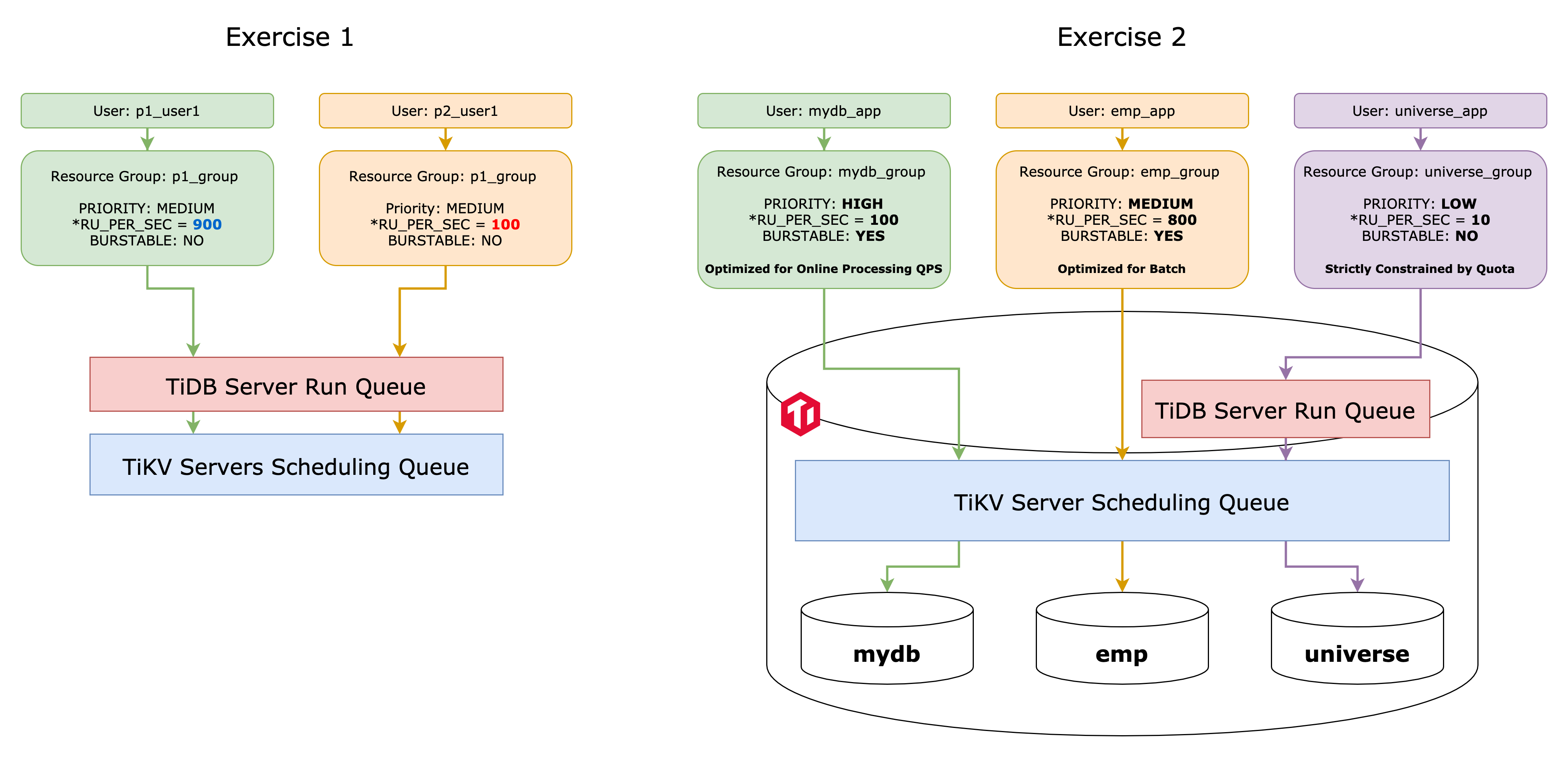
+ By completing these exercises, you will gain experience in working with resource control, which is one of the multi-tenant friendly features of TiDB. This particular feature enables you to implement resource isolation for database users and applications.
+ In Exercise 14-1, you practice resource control by managing request quotas.
+ In Exercise 14-2, you practice resource control by managing request priorities in case the system becomes overloaded.
+ In Exercise 14-3, you practice consolidating data and workloads from multiple MySQL-compatible databases and implement resource isolation and Quality of Service measures among them. You will need to apply the skills you have acquired in exercises 14-1 and 14-2, along with utilizing an additional feature called the `BURSTABLE` setting in the resource group to successfully complete this exercise.
 ### Notes
+ The resource control feature is available in TiDB version **7.0.0** or later.
+ Some of the steps require that you type commands in two or more different terminal windows. You might find it convenient to launch two or more terminals and keep them open for the duration of the exercises.
+ Your environment may be different with these exercises, including but not limited to `IP address`, `port number`, `username`, `password`, `directory` and the estimated eslapsed time for exercise scripts.
+ The `$` sign in your terminal window is the OS prompt.
+ The "`tidb>`" or "`mysql>`" in your terminal window is SQL command prompt.
+ These exercises can be run on a single machine, such as your laptop.
+ These exercises are designed for `TiUP Playground`. It is crucial to note that `TiUP Playground` must not be utilized for production purposes.
### Assumptions
+ You have completed the exercises 1.
+ You are using macOS or Linux.
+ To complete exercises 14-2 and 14-3, it is necessary to have Java SE Development Kit installed.
+ You have cloned the [lab repository from Github](https://github.com/pingcap/tidb-course-201-lab.git).
## Exercise 14-1: Managing Request Quota
### Notes
+ The resource control feature is available in TiDB version **7.0.0** or later.
+ Some of the steps require that you type commands in two or more different terminal windows. You might find it convenient to launch two or more terminals and keep them open for the duration of the exercises.
+ Your environment may be different with these exercises, including but not limited to `IP address`, `port number`, `username`, `password`, `directory` and the estimated eslapsed time for exercise scripts.
+ The `$` sign in your terminal window is the OS prompt.
+ The "`tidb>`" or "`mysql>`" in your terminal window is SQL command prompt.
+ These exercises can be run on a single machine, such as your laptop.
+ These exercises are designed for `TiUP Playground`. It is crucial to note that `TiUP Playground` must not be utilized for production purposes.
### Assumptions
+ You have completed the exercises 1.
+ You are using macOS or Linux.
+ To complete exercises 14-2 and 14-3, it is necessary to have Java SE Development Kit installed.
+ You have cloned the [lab repository from Github](https://github.com/pingcap/tidb-course-201-lab.git).
## Exercise 14-1: Managing Request Quota
 ### Overview
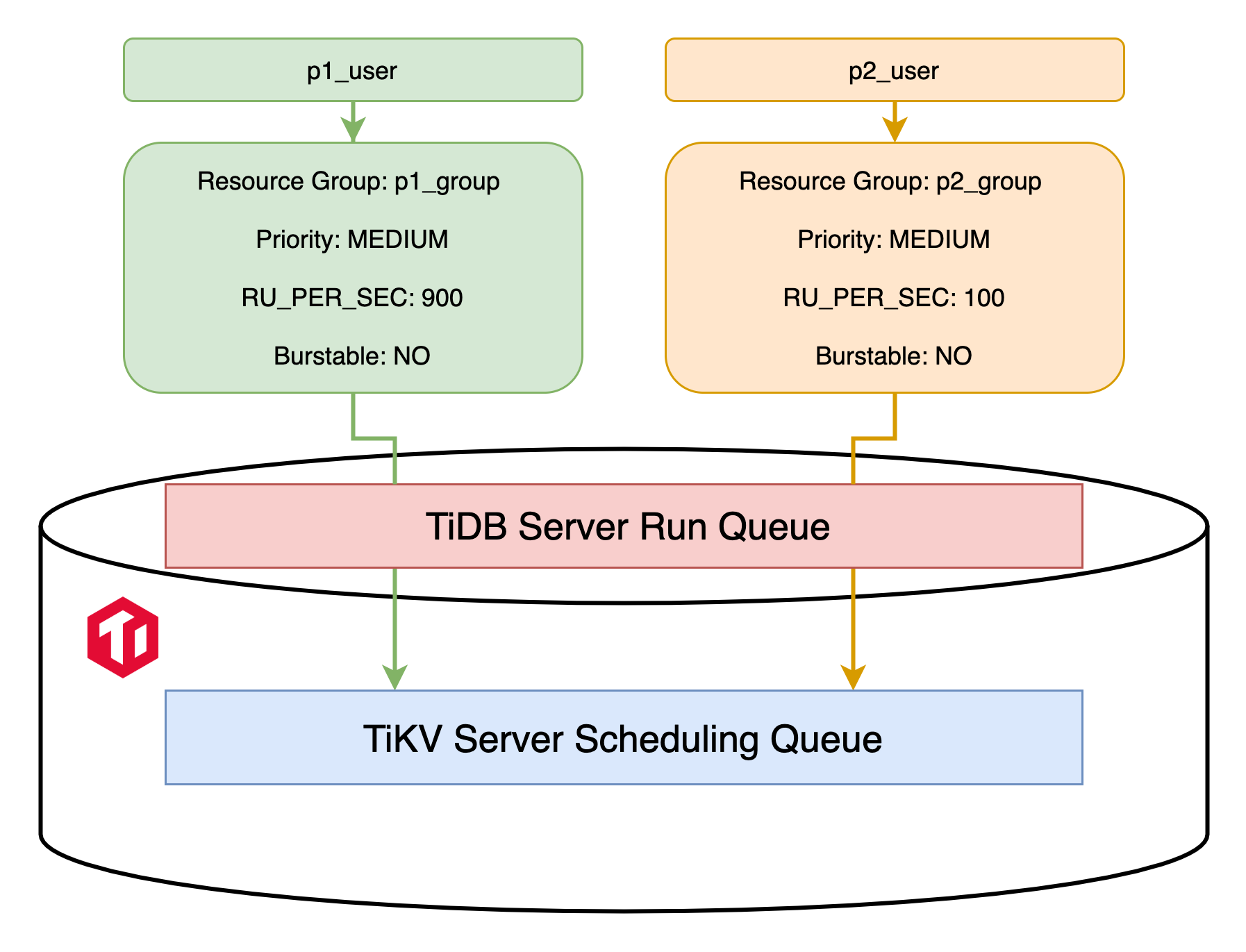
+ In this exercise, you become familiar with the `RU (Request Unit)` concept and SQL layer (TiDB server) request throttling by using the `RU_PER_SEC` attribute in resource group.
+ You create a TiDB Playground cluster with a new tag `classroom-e14` for this exercise.
### Duration
+ This exercise should take you approximately 10 minutes to complete.
### Tasks
1. Terminate the `classroom` Playground cluster if it is still running.
2. Deploy a new Playground cluster tagged with `classroom-e14` with a specific version of TiDB that supports resource control feature.
3. Turn on the resource control feature for TiDB servers.
4. Create new users, new resource groups, and assign those users to the resources groups respectively.
5. Verify that the resource control quota settings had taken effect on user sessions.
### Solutions
1. Terminate the `classroom` Playground cluster if it is still running.
Go to the terminal where you previously executed `playground-start.sh`. The screen might look like this:
```
...
To view the dashboard: http://127.0.0.1:2379/dashboard
PD client endpoints: [127.0.0.1:2379 127.0.0.1:2382 127.0.0.1:2384]
To view the Prometheus: http://127.0.0.1:9090
To view the Grafana: http://127.0.0.1:3000
```
Press `Ctrl + C` once to abort the entire Playground clusters. All PD, TiKV, TiDB, and TiFlash instances will be terminated:
```
^CPlayground receive signal: interrupt
Got signal interrupt (Component: playground ; PID: 47472)
...
tikv quit
```
2. Under the `tidb-course-201-lab/scripts` directory, run script `playground-start-e14.sh` to deploy a new Playground cluster tagged with `classroom-e14`.
```
$ ./playground-start-e14-1.sh
```
3. On another terminal, Under the `tidb-course-201-lab/scripts` directory, run script `connect-4000.sh` to log in TiDB as user `root`, enable resource control for TiDB servers layer by setting global system variable `tidb_enable_resource_control` to `ON`.
```
$ ./connect-4000.sh
```
```sql
SET GLOBAL tidb_enable_resource_control=ON;
```
```
tidb:4000> SET GLOBAL tidb_enable_resource_control=ON;
Query OK, 0 rows affected (0.06 sec)
```
4. Verify that the resource control feature is enabled at both TiDB server and TiKV server layers.
```sql
SHOW GLOBAL VARIABLES LIKE 'tidb_enable_resource_control';
SHOW CONFIG WHERE type='tikv' AND name='resource-control.enabled';
```
```
tidb:4000> SHOW GLOBAL VARIABLES LIKE 'tidb_enable_resource_control';
+------------------------------+-------+
| Variable_name | Value |
+------------------------------+-------+
| tidb_enable_resource_control | ON |
+------------------------------+-------+
1 row in set (0.00 sec)
tidb:4000> SHOW CONFIG WHERE type='tikv' AND name='resource-control.enabled';
+------+-----------------+--------------------------+-------+
| Type | Instance | Name | Value |
+------+-----------------+--------------------------+-------+
| tikv | 127.0.0.1:20160 | resource-control.enabled | true |
+------+-----------------+--------------------------+-------+
1 row in set (0.01 sec)
```
5. Create a resource group named `p1_group` with the `RU` backfill rate per second `900`. And, assign new database user `p1_user` to it. `RU` stands for `Request Unit`, TiDB server uses it to support its token bucket algorithm to set up the resource quota. Check the documentation for more details - [`RU`](https://docs.pingcap.com/tidb/v6.6/tidb-resource-control#what-is-request-unit-ru).
```sql
DROP RESOURCE GROUP IF EXISTS p1_group;
CREATE RESOURCE GROUP p1_group RU_PER_SEC 900;
CREATE USER p1_user IDENTIFIED BY 'tidb' RESOURCE GROUP p1_group;
GRANT CREATE, DROP, SELECT, UPDATE, INSERT, REFERENCES on *.* to p1_user;
```
```
tidb:4000> DROP RESOURCE GROUP IF EXISTS p1_group;
Query OK, 0 rows affected (0.65 sec)
tidb:4000> CREATE RESOURCE GROUP p1_group RU_PER_SEC 900;
Query OK, 0 rows affected (0.62 sec)
tidb:4000> CREATE USER p1_user IDENTIFIED BY 'tidb' RESOURCE GROUP p1_group;
Query OK, 0 rows affected (0.19 sec)
tidb:4000> GRANT CREATE, DROP, SELECT, UPDATE, INSERT on *.* to p1_user;
Query OK, 0 rows affected (0.08 sec)
```
6. Create a resource group named `p2_group` with the `RU` backfill rate per second `100`. And, assign new database user `p2_user` to it.
```sql
DROP RESOURCE GROUP IF EXISTS p2_group;
CREATE RESOURCE GROUP p2_group RU_PER_SEC 100;
CREATE USER p2_user IDENTIFIED BY 'tidb' RESOURCE GROUP p2_group;
GRANT CREATE, DROP, SELECT, UPDATE, INSERT, REFERENCES on *.* to p2_user;
SELECT name, ru_per_sec, priority, burstable FROM information_schema.resource_groups;
SELECT user, host, user_attributes FROM mysql.user WHERE user LIKE 'p%';
```
```
tidb:4000> DROP RESOURCE GROUP IF EXISTS p2_group;
Query OK, 0 rows affected (0.65 sec)
tidb:4000> CREATE RESOURCE GROUP p2_group RU_PER_SEC 100;
Query OK, 0 rows affected (0.69 sec)
tidb:4000> CREATE USER p2_user IDENTIFIED BY 'tidb' RESOURCE GROUP p2_group;
Query OK, 0 rows affected (0.16 sec)
tidb:4000> GRANT CREATE, DROP, SELECT, UPDATE, INSERT on *.* to p2_user;
Query OK, 0 rows affected (0.12 sec)
tidb:4000> SELECT name, ru_per_sec, priority, burstable FROM information_schema.resource_groups;
+----------+------------+----------+-----------+
| name | ru_per_sec | priority | burstable |
+----------+------------+----------+-----------+
| default | UNLIMITED | MEDIUM | YES |
| p1_group | 900 | MEDIUM | NO |
| p2_group | 100 | MEDIUM | NO |
+----------+------------+----------+-----------+
3 rows in set (0.00 sec)
tidb:4000> SELECT user, host, user_attributes FROM mysql.user WHERE user LIKE 'p%';
+---------+------+--------------------------------+
| user | host | user_attributes |
+---------+------+--------------------------------+
| p1_user | % | {"resource_group": "p1_group"} |
| p2_user | % | {"resource_group": "p2_group"} |
+---------+------+--------------------------------+
2 rows in set (0.03 sec)
tidb:4000> exit;
Bye
$
```
7. Verify that user `p2_user` belonging to the resource group `p2_group` is queued up while executing the sample workload since the `RU` configuration is too low for their requirements in step 5.
Under the `tidb-course-201-lab/scripts` directory, log in TiDB cluster as user `p2_user`, recreate the `universe` schema again for testing purpose.
```
$ mysql -h 127.0.0.1 -P 4000 -u p2_user -ptidb
tidb:4000>
```
```sql
SELECT USER();
SOURCE universe.sql
```
```
mysql> SELECT USER();
+-------------------+
| user() |
+-------------------+
| p2_user@127.0.0.1 |
+-------------------+
1 row in set (0.00 sec)
tidb:4000> SOURCE universe.sql
Query OK, 0 rows affected (0.00 sec)
...
Records: 2 Duplicates: 0 Warnings: 0
```
Run `SOURCE double-planets.sql` for about **8 times**, observe that when the output prints **`Query OK, 1280 rows affected`**, it should take **more than 3** seconds. And, the system is not even under heavy load yet, this constrained quality of service for user `p2_user` is expected as a result of resource control. Users in resource group `p2_group` can not consume much CPU and IO resources on TiDB servers, because their `RU` backfill generation rate is only 100 per second.
```sql
SOURCE double-planets.sql
```
```
mysql> SOURCE double-planets.sql
Query OK, 1280 rows affected (4.53 sec)
Records: 1280 Duplicates: 0 Warnings: 0
```
```
mysql> exit;
Bye
$
```
8. Verify that user `p1_user` belonging to the resource group `p1_group` can run the workload with better performance, under the same conditions, because the `RU` setting is suffient in step 4.
Log in TiDB cluster as user `p1_user`, recreate the `universe` schema again for testing purpose.
```
$ mysql -h 127.0.0.1 -P 4000 -u p1_user -ptidb
tidb:4000>
```
```sql
SELECT USER();
SOURCE universe.sql
```
```
mysql> SELECT USER();
+--------------------+
| user() |
+--------------------+
| p1_user@127.0.0.1 |
+--------------------+
1 row in set (0.00 sec)
tidb:4000> SOURCE universe.sql
Query OK, 0 rows affected (0.00 sec)
...
Records: 2 Duplicates: 0 Warnings: 0
```
Run `SOURCE double-planets.sql` for about **6 times** again, observe that when the output prints **`Query OK, 1280 rows affected`**, it should take **less than 1** second to execute the SQL statement to complete. The good performance for user `p1_user` is also expected as a result of resource control.
```sql
SOURCE double-planets.sql
```
```
mysql> SOURCE double-planets.sql
Query OK, 1280 rows affected (0.06 sec)
Records: 1280 Duplicates: 0 Warnings: 0
```
```
mysql> exit;
Bye
$
```
## Exercise 14-2: Managing Request Priorities In Case The System Becomes Overloaded
### Overview
+ In this exercise, you become familiar with the `RU (Request Unit)` concept and SQL layer (TiDB server) request throttling by using the `RU_PER_SEC` attribute in resource group.
+ You create a TiDB Playground cluster with a new tag `classroom-e14` for this exercise.
### Duration
+ This exercise should take you approximately 10 minutes to complete.
### Tasks
1. Terminate the `classroom` Playground cluster if it is still running.
2. Deploy a new Playground cluster tagged with `classroom-e14` with a specific version of TiDB that supports resource control feature.
3. Turn on the resource control feature for TiDB servers.
4. Create new users, new resource groups, and assign those users to the resources groups respectively.
5. Verify that the resource control quota settings had taken effect on user sessions.
### Solutions
1. Terminate the `classroom` Playground cluster if it is still running.
Go to the terminal where you previously executed `playground-start.sh`. The screen might look like this:
```
...
To view the dashboard: http://127.0.0.1:2379/dashboard
PD client endpoints: [127.0.0.1:2379 127.0.0.1:2382 127.0.0.1:2384]
To view the Prometheus: http://127.0.0.1:9090
To view the Grafana: http://127.0.0.1:3000
```
Press `Ctrl + C` once to abort the entire Playground clusters. All PD, TiKV, TiDB, and TiFlash instances will be terminated:
```
^CPlayground receive signal: interrupt
Got signal interrupt (Component: playground ; PID: 47472)
...
tikv quit
```
2. Under the `tidb-course-201-lab/scripts` directory, run script `playground-start-e14.sh` to deploy a new Playground cluster tagged with `classroom-e14`.
```
$ ./playground-start-e14-1.sh
```
3. On another terminal, Under the `tidb-course-201-lab/scripts` directory, run script `connect-4000.sh` to log in TiDB as user `root`, enable resource control for TiDB servers layer by setting global system variable `tidb_enable_resource_control` to `ON`.
```
$ ./connect-4000.sh
```
```sql
SET GLOBAL tidb_enable_resource_control=ON;
```
```
tidb:4000> SET GLOBAL tidb_enable_resource_control=ON;
Query OK, 0 rows affected (0.06 sec)
```
4. Verify that the resource control feature is enabled at both TiDB server and TiKV server layers.
```sql
SHOW GLOBAL VARIABLES LIKE 'tidb_enable_resource_control';
SHOW CONFIG WHERE type='tikv' AND name='resource-control.enabled';
```
```
tidb:4000> SHOW GLOBAL VARIABLES LIKE 'tidb_enable_resource_control';
+------------------------------+-------+
| Variable_name | Value |
+------------------------------+-------+
| tidb_enable_resource_control | ON |
+------------------------------+-------+
1 row in set (0.00 sec)
tidb:4000> SHOW CONFIG WHERE type='tikv' AND name='resource-control.enabled';
+------+-----------------+--------------------------+-------+
| Type | Instance | Name | Value |
+------+-----------------+--------------------------+-------+
| tikv | 127.0.0.1:20160 | resource-control.enabled | true |
+------+-----------------+--------------------------+-------+
1 row in set (0.01 sec)
```
5. Create a resource group named `p1_group` with the `RU` backfill rate per second `900`. And, assign new database user `p1_user` to it. `RU` stands for `Request Unit`, TiDB server uses it to support its token bucket algorithm to set up the resource quota. Check the documentation for more details - [`RU`](https://docs.pingcap.com/tidb/v6.6/tidb-resource-control#what-is-request-unit-ru).
```sql
DROP RESOURCE GROUP IF EXISTS p1_group;
CREATE RESOURCE GROUP p1_group RU_PER_SEC 900;
CREATE USER p1_user IDENTIFIED BY 'tidb' RESOURCE GROUP p1_group;
GRANT CREATE, DROP, SELECT, UPDATE, INSERT, REFERENCES on *.* to p1_user;
```
```
tidb:4000> DROP RESOURCE GROUP IF EXISTS p1_group;
Query OK, 0 rows affected (0.65 sec)
tidb:4000> CREATE RESOURCE GROUP p1_group RU_PER_SEC 900;
Query OK, 0 rows affected (0.62 sec)
tidb:4000> CREATE USER p1_user IDENTIFIED BY 'tidb' RESOURCE GROUP p1_group;
Query OK, 0 rows affected (0.19 sec)
tidb:4000> GRANT CREATE, DROP, SELECT, UPDATE, INSERT on *.* to p1_user;
Query OK, 0 rows affected (0.08 sec)
```
6. Create a resource group named `p2_group` with the `RU` backfill rate per second `100`. And, assign new database user `p2_user` to it.
```sql
DROP RESOURCE GROUP IF EXISTS p2_group;
CREATE RESOURCE GROUP p2_group RU_PER_SEC 100;
CREATE USER p2_user IDENTIFIED BY 'tidb' RESOURCE GROUP p2_group;
GRANT CREATE, DROP, SELECT, UPDATE, INSERT, REFERENCES on *.* to p2_user;
SELECT name, ru_per_sec, priority, burstable FROM information_schema.resource_groups;
SELECT user, host, user_attributes FROM mysql.user WHERE user LIKE 'p%';
```
```
tidb:4000> DROP RESOURCE GROUP IF EXISTS p2_group;
Query OK, 0 rows affected (0.65 sec)
tidb:4000> CREATE RESOURCE GROUP p2_group RU_PER_SEC 100;
Query OK, 0 rows affected (0.69 sec)
tidb:4000> CREATE USER p2_user IDENTIFIED BY 'tidb' RESOURCE GROUP p2_group;
Query OK, 0 rows affected (0.16 sec)
tidb:4000> GRANT CREATE, DROP, SELECT, UPDATE, INSERT on *.* to p2_user;
Query OK, 0 rows affected (0.12 sec)
tidb:4000> SELECT name, ru_per_sec, priority, burstable FROM information_schema.resource_groups;
+----------+------------+----------+-----------+
| name | ru_per_sec | priority | burstable |
+----------+------------+----------+-----------+
| default | UNLIMITED | MEDIUM | YES |
| p1_group | 900 | MEDIUM | NO |
| p2_group | 100 | MEDIUM | NO |
+----------+------------+----------+-----------+
3 rows in set (0.00 sec)
tidb:4000> SELECT user, host, user_attributes FROM mysql.user WHERE user LIKE 'p%';
+---------+------+--------------------------------+
| user | host | user_attributes |
+---------+------+--------------------------------+
| p1_user | % | {"resource_group": "p1_group"} |
| p2_user | % | {"resource_group": "p2_group"} |
+---------+------+--------------------------------+
2 rows in set (0.03 sec)
tidb:4000> exit;
Bye
$
```
7. Verify that user `p2_user` belonging to the resource group `p2_group` is queued up while executing the sample workload since the `RU` configuration is too low for their requirements in step 5.
Under the `tidb-course-201-lab/scripts` directory, log in TiDB cluster as user `p2_user`, recreate the `universe` schema again for testing purpose.
```
$ mysql -h 127.0.0.1 -P 4000 -u p2_user -ptidb
tidb:4000>
```
```sql
SELECT USER();
SOURCE universe.sql
```
```
mysql> SELECT USER();
+-------------------+
| user() |
+-------------------+
| p2_user@127.0.0.1 |
+-------------------+
1 row in set (0.00 sec)
tidb:4000> SOURCE universe.sql
Query OK, 0 rows affected (0.00 sec)
...
Records: 2 Duplicates: 0 Warnings: 0
```
Run `SOURCE double-planets.sql` for about **8 times**, observe that when the output prints **`Query OK, 1280 rows affected`**, it should take **more than 3** seconds. And, the system is not even under heavy load yet, this constrained quality of service for user `p2_user` is expected as a result of resource control. Users in resource group `p2_group` can not consume much CPU and IO resources on TiDB servers, because their `RU` backfill generation rate is only 100 per second.
```sql
SOURCE double-planets.sql
```
```
mysql> SOURCE double-planets.sql
Query OK, 1280 rows affected (4.53 sec)
Records: 1280 Duplicates: 0 Warnings: 0
```
```
mysql> exit;
Bye
$
```
8. Verify that user `p1_user` belonging to the resource group `p1_group` can run the workload with better performance, under the same conditions, because the `RU` setting is suffient in step 4.
Log in TiDB cluster as user `p1_user`, recreate the `universe` schema again for testing purpose.
```
$ mysql -h 127.0.0.1 -P 4000 -u p1_user -ptidb
tidb:4000>
```
```sql
SELECT USER();
SOURCE universe.sql
```
```
mysql> SELECT USER();
+--------------------+
| user() |
+--------------------+
| p1_user@127.0.0.1 |
+--------------------+
1 row in set (0.00 sec)
tidb:4000> SOURCE universe.sql
Query OK, 0 rows affected (0.00 sec)
...
Records: 2 Duplicates: 0 Warnings: 0
```
Run `SOURCE double-planets.sql` for about **6 times** again, observe that when the output prints **`Query OK, 1280 rows affected`**, it should take **less than 1** second to execute the SQL statement to complete. The good performance for user `p1_user` is also expected as a result of resource control.
```sql
SOURCE double-planets.sql
```
```
mysql> SOURCE double-planets.sql
Query OK, 1280 rows affected (0.06 sec)
Records: 1280 Duplicates: 0 Warnings: 0
```
```
mysql> exit;
Bye
$
```
## Exercise 14-2: Managing Request Priorities In Case The System Becomes Overloaded
 ### Overview
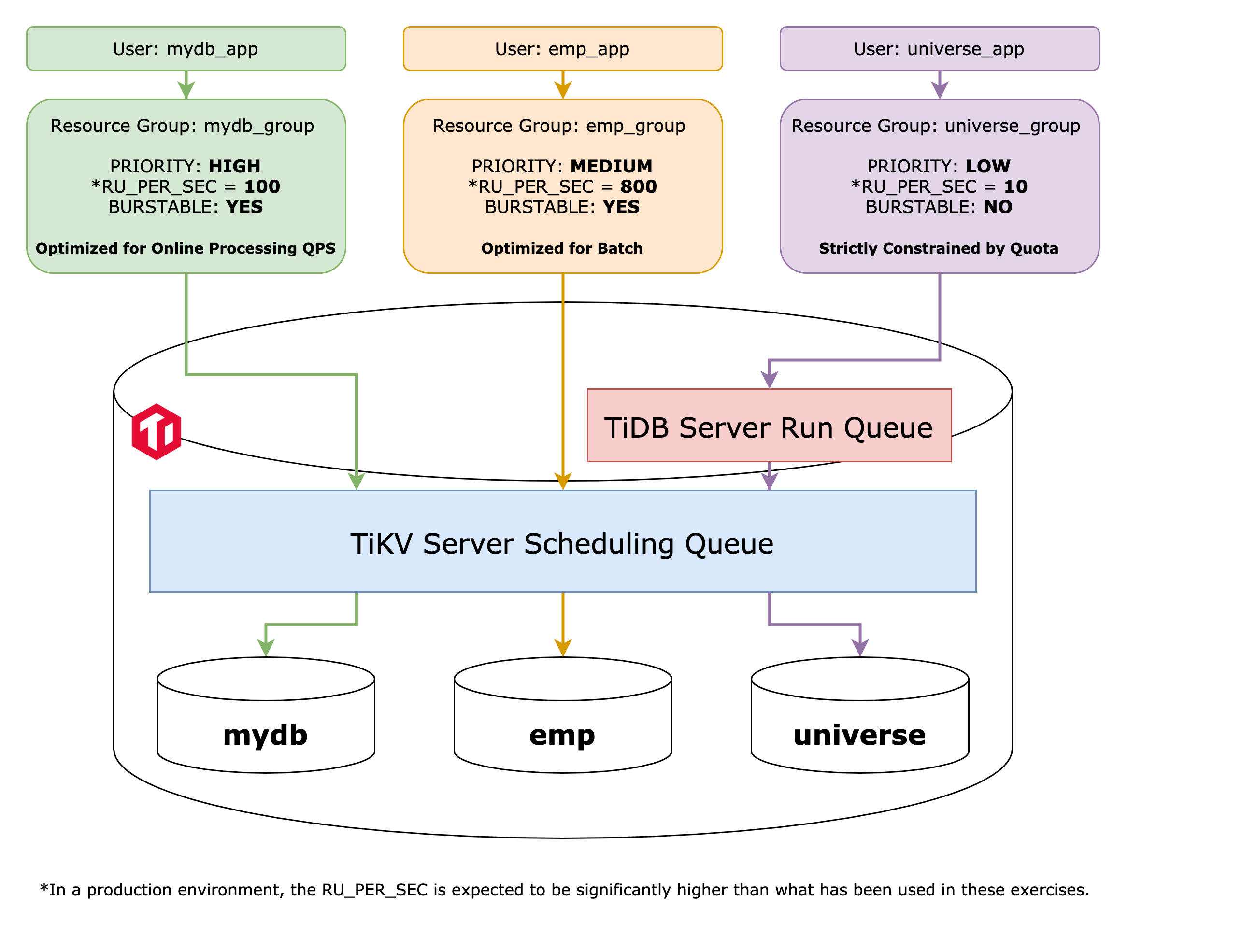
+ In this exercise, you become familiar with the `PRIORITY` attribute in resource group. Among resource groups with the same `PRIORITY` (default: `MEDIUM`), resource control will prioritize resources at both TiDB server layer and TiKV server layer for higher quota (higher `RU_PER_SECs`) services while the system is overloaded.
+ You reuse the TiDB Playground cluster, resource grouups, and databases users created in the previous exercise 14-1.
### Duration
+ This exercise should take you approximately 10 minutes to complete.
### Tasks
1. Change the `PRIORITY` attribute setting for resource group `p1_group` from `MEDIUM` to `HIGH`.
2. Change the `PRIORITY` attribute setting for resource group `p2_group` from `MEDIUM` to `LOW`.
3. Verify that the resource control had taken effect on user sessions.
### Solutions
1. Make sure that the resource control feature at both TiDB and TiKV server layers are turned on.
```sql
SHOW GLOBAL VARIABLES LIKE 'tidb_enable_resource_control';
SHOW CONFIG WHERE type='tikv' AND name='resource-control.enabled';
```
```
tidb:4000> SHOW GLOBAL VARIABLES LIKE 'tidb_enable_resource_control';
+------------------------------+-------+
| Variable_name | Value |
+------------------------------+-------+
| tidb_enable_resource_control | ON |
+------------------------------+-------+
1 row in set (0.00 sec)
tidb:4000> SHOW CONFIG WHERE type='tikv' AND name='resource-control.enabled';
+------+-----------------+--------------------------+-------+
| Type | Instance | Name | Value |
+------+-----------------+--------------------------+-------+
| tikv | 127.0.0.1:20160 | resource-control.enabled | true |
+------+-----------------+--------------------------+-------+
1 row in set (0.01 sec)
1. Set the `PRIORITY` attribute to `HIGH` for the resource group `p1_group`. And, Set the `PRIORITY` attribute to `LOW` for the resource group `p2_group`. These actions will prioritize user sessions in `p1_group` for CPU and Input/Output scheduling in the TiKV layer.
Please note that in a resource group, the attribute `RU_PER_SEC` refers to the user session's capability to consume CPU, IO, and other general resources in the TiDB server layer. A higher value indicates a greater capacity. For the purpose of this exercise, to study the IO/CPU resource control effects in the TiKV layer, you can significantly increase the `RU_PER_SEC` value in each resource group. By doing so, you will bypass any potential token bucket limitations resulting from TiDB server request throttling. This can be achieved by setting `RU_PER_SEC` to a huge value, which, for instance, is `20000000` in this step, this value is sufficient for bypassing the TiDB server layer resource control in majority Playground environment.
```sql
ALTER RESOURCE GROUP p1_group RU_PER_SEC = 20000000 PRIORITY=HIGH;
ALTER RESOURCE GROUP p2_group RU_PER_SEC = 10000000 PRIORITY=LOW;
SELECT name, ru_per_sec, priority, burstable FROM information_schema.resource_groups;
SELECT u.user, u.host, u.user_attributes, r.name, r.ru_per_sec, r.burstable
FROM mysql.user u JOIN information_schema.resource_groups r
ON r.name = u.user_attributes ->> '$.resource_group'
WHERE u.user LIKE 'p%';
```
```
tidb:4000> ALTER RESOURCE GROUP p1_group RU_PER_SEC = 10000000 PRIORITY=HIGH;
Query OK, 0 rows affected (0.49 sec)
tidb:4000> ALTER RESOURCE GROUP p2_group RU_PER_SEC = 10000000;
Query OK, 0 rows affected (0.45 sec)
tidb:4000> SELECT name, ru_per_sec, priority, burstable FROM information_schema.resource_groups;
+----------+------------+----------+-----------+
| name | ru_per_sec | priority | burstable |
+----------+------------+----------+-----------+
| default | UNLIMITED | MEDIUM | YES |
| p1_group | 20000000 | HIGH | NO |
| p2_group | 20000000 | LOW | NO |
+----------+------------+----------+-----------+
3 rows in set (0.00 sec)
tidb:4000> SELECT u.user, u.host, u.user_attributes, r.name, r.ru_per_sec, r.burstable
-> FROM mysql.user u JOIN information_schema.resource_groups r
-> ON r.name = u.user_attributes ->> '$.resource_group'
-> WHERE u.user LIKE 'p%';
+---------+------+--------------------------------+----------+------------+-----------+
| user | host | user_attributes | name | ru_per_sec | burstable |
+---------+------+--------------------------------+----------+------------+-----------+
| p1_user | % | {"resource_group": "p1_group"} | p1_group | 20000000 | NO |
| p2_user | % | {"resource_group": "p2_group"} | p2_group | 20000000 | NO |
+---------+------+--------------------------------+----------+------------+-----------+
2 rows in set (0.00 sec)
```
```
tidb:4000> exit;
Bye
```
2. Run the script with usernames as input parameters `20-demo-jdbc-resource-control-workload-compare-by-users-show.sh p1_user p2_user` to apply the same workload to TiDB under the identities of user `p1_user` and `p2_user` at the same time. User `p1_user` will work on table `test.p1_user_table`, while user `p2_user` will work on table `test.p2_user_table.`
**Note**: This step requires the JDK had been installed as mentioned in the assumption section, and it consumes the IO resource a lot (at a very short duration) and about 2 GB additional disk space (it will be reclaimed at the end of the exercises) on the TiUP Playground machine.
Execute the script and wait for its completion, then confirm that user `p2_user1` consistently exhibits longer elapsed time in each round of `UPDATE` load (`UPDATE - (0)`, `UPDATE - (1)` and `UPDATE - (2)`) than user `p1_user1`. The only possible exception could be the final round, `UPDATE - (3)`, and this would be due to the fact that at that point, `p1_user1` has already completed all the IO-intensive tasks.
```
$ ./20-demo-jdbc-resource-control-workload-compare-by-users-show.sh p1_user1 p2_user1
# Workloads for database users p1_user1 and p2_user1 started.
# UPDATE will begin after populating the sample data, please wait a few seconds.
# UPDATE: p1_user1
# UPDATE: p2_user1
UPDATE - (0)p1_user1 processed 524288 rows, elapsed time: 6499 ms
UPDATE - (0)p2_user1 processed 524288 rows, elapsed time: 7542 ms
UPDATE - (1)p1_user1 processed 524288 rows, elapsed time: 8944 ms
UPDATE - (1)p2_user1 processed 524288 rows, elapsed time: 10408 ms
UPDATE - (2)p1_user1 processed 524288 rows, elapsed time: 9786 ms
UPDATE - (2)p2_user1 processed 524288 rows, elapsed time: 11023 ms
UPDATE - (3)p1_user1 processed 524288 rows, elapsed time: 10578 ms
p1_user1 connection closed at Sun Mar 26 10:55:15 CST 2023
UPDATE - (3)p2_user1 processed 524288 rows, elapsed time: 9770 ms
p2_user1 connection closed at Sun Mar 26 10:55:18 CST 2023
```
3. Log in TiDb as `root`, reverse the priority settings for `p1_user1` and `p2_user2` in their respective resource groups. This time, user `p2_user1` is in the prioritized session for IO-intensive task.
```
$ cd tidb-course-201-lab/scripts
$ ./connect-4000.sh
tidb:4000>
```
```sql
ALTER RESOURCE GROUP p1_group RU_PER_SEC = 8000000;
ALTER RESOURCE GROUP p2_group RU_PER_SEC = 10000000;
SELECT u.user, u.host, u.user_attributes, r.name, r.ru_per_sec, r.burstable
FROM mysql.user u JOIN information_schema.resource_groups r
ON r.name = u.user_attributes ->> '$.resource_group'
WHERE u.user LIKE 'p%';
```
```
tidb:4000> ALTER RESOURCE GROUP p1_group RU_PER_SEC = 8000000;
Query OK, 0 rows affected (0.51 sec)
tidb:4000>
tidb:4000> ALTER RESOURCE GROUP p2_group RU_PER_SEC = 10000000;
Query OK, 0 rows affected (0.81 sec)
tidb:4000>
tidb:4000> SELECT u.user, u.host, u.user_attributes, r.name, r.ru_per_sec, r.burstable
-> FROM mysql.user u JOIN information_schema.resource_groups r
-> ON r.name = u.user_attributes ->> '$.resource_group'
-> WHERE u.user LIKE 'p%';
+----------+------+--------------------------------+----------+------------+-----------+
| user | host | user_attributes | name | ru_per_sec | burstable |
+----------+------+--------------------------------+----------+------------+-----------+
| p1_user1 | % | {"resource_group": "p1_group"} | p1_group | 8000000 | NO |
| p2_user1 | % | {"resource_group": "p2_group"} | p2_group | 10000000 | NO |
+----------+------+--------------------------------+----------+------------+-----------+
2 rows in set (0.01 sec)
tidb:4000> exit;
Bye
```
4. Afterwards, execute the script with usernames as input parameters `20-demo-jdbc-resource-control-workload-compare-by-users-show.sh p1_user1 p2_user1` once again and confirm that the elapsed time results have been flipped for user `p1_user1` and `p2_user1` contrast to step 5.
```
$ ./20-demo-jdbc-resource-control-workload-compare-by-users-show.sh p1_user1 p2_user1
# Workloads for database users p1_user1 and p2_user1 started.
# UPDATE will begin after populating the sample data, please wait a few seconds.
# UPDATE: p2_user1
# UPDATE: p1_user1
UPDATE - (0)p2_user1 processed 524288 rows, elapsed time: 8134 ms
UPDATE - (0)p1_user1 processed 524288 rows, elapsed time: 9039 ms
UPDATE - (1)p2_user1 processed 524288 rows, elapsed time: 8500 ms
UPDATE - (1)p1_user1 processed 524288 rows, elapsed time: 10294 ms
UPDATE - (2)p2_user1 processed 524288 rows, elapsed time: 9533 ms
UPDATE - (2)p1_user1 processed 524288 rows, elapsed time: 11698 ms
UPDATE - (3)p2_user1 processed 524288 rows, elapsed time: 10571 ms
p2_user1 connection closed at Sun Mar 26 10:59:10 CST 2023
UPDATE - (3)p1_user1 processed 524288 rows, elapsed time: 9832 ms
p1_user1 connection closed at Sun Mar 26 10:59:15 CST 2023
```
5. Terminate the `classroom-e14` Playground, and clear the Playground data to reclaim the disk space.
Go to the terminal where you previously executed `playground-start-e14-2.sh` for this exercise. The screen might look like this:
```
...
CLUSTER START SUCCESSFULLY, Enjoy it ^-^
To connect TiDB: mysql --comments --host 127.0.0.1 --port 4002 -u root -p (no password)
To connect TiDB: mysql --comments --host 127.0.0.1 --port 4001 -u root -p (no password)
To connect TiDB: mysql --comments --host 127.0.0.1 --port 4000 -u root -p (no password)
To view the dashboard: http://127.0.0.1:2379/dashboard
PD client endpoints: [127.0.0.1:2379 127.0.0.1:2382 127.0.0.1:2384]
To view the Prometheus: http://127.0.0.1:9090
To view the Grafana: http://127.0.0.1:3000
```
Press `Ctrl + C` once to abort the entire Playground cluster. All PD, TiKV, TiDB, and TiFlash instances will be terminated:
```
^CPlayground receive signal: interrupt
Got signal interrupt (Component: playground ; PID: 47472)
...
tikv quit
```
Delete all the data in the Playground cluster with the name `classroom-e14`.
```
$ tiup clean classroom-e14
Clean instance of `playground`, directory: /Users/username/.tiup/data/classroom-e14
```
## Exercise 14-3: Consolidating Databases to TiDB and Enforcing the QoS Policies
### Overview
+ In this exercise, you become familiar with the `PRIORITY` attribute in resource group. Among resource groups with the same `PRIORITY` (default: `MEDIUM`), resource control will prioritize resources at both TiDB server layer and TiKV server layer for higher quota (higher `RU_PER_SECs`) services while the system is overloaded.
+ You reuse the TiDB Playground cluster, resource grouups, and databases users created in the previous exercise 14-1.
### Duration
+ This exercise should take you approximately 10 minutes to complete.
### Tasks
1. Change the `PRIORITY` attribute setting for resource group `p1_group` from `MEDIUM` to `HIGH`.
2. Change the `PRIORITY` attribute setting for resource group `p2_group` from `MEDIUM` to `LOW`.
3. Verify that the resource control had taken effect on user sessions.
### Solutions
1. Make sure that the resource control feature at both TiDB and TiKV server layers are turned on.
```sql
SHOW GLOBAL VARIABLES LIKE 'tidb_enable_resource_control';
SHOW CONFIG WHERE type='tikv' AND name='resource-control.enabled';
```
```
tidb:4000> SHOW GLOBAL VARIABLES LIKE 'tidb_enable_resource_control';
+------------------------------+-------+
| Variable_name | Value |
+------------------------------+-------+
| tidb_enable_resource_control | ON |
+------------------------------+-------+
1 row in set (0.00 sec)
tidb:4000> SHOW CONFIG WHERE type='tikv' AND name='resource-control.enabled';
+------+-----------------+--------------------------+-------+
| Type | Instance | Name | Value |
+------+-----------------+--------------------------+-------+
| tikv | 127.0.0.1:20160 | resource-control.enabled | true |
+------+-----------------+--------------------------+-------+
1 row in set (0.01 sec)
1. Set the `PRIORITY` attribute to `HIGH` for the resource group `p1_group`. And, Set the `PRIORITY` attribute to `LOW` for the resource group `p2_group`. These actions will prioritize user sessions in `p1_group` for CPU and Input/Output scheduling in the TiKV layer.
Please note that in a resource group, the attribute `RU_PER_SEC` refers to the user session's capability to consume CPU, IO, and other general resources in the TiDB server layer. A higher value indicates a greater capacity. For the purpose of this exercise, to study the IO/CPU resource control effects in the TiKV layer, you can significantly increase the `RU_PER_SEC` value in each resource group. By doing so, you will bypass any potential token bucket limitations resulting from TiDB server request throttling. This can be achieved by setting `RU_PER_SEC` to a huge value, which, for instance, is `20000000` in this step, this value is sufficient for bypassing the TiDB server layer resource control in majority Playground environment.
```sql
ALTER RESOURCE GROUP p1_group RU_PER_SEC = 20000000 PRIORITY=HIGH;
ALTER RESOURCE GROUP p2_group RU_PER_SEC = 10000000 PRIORITY=LOW;
SELECT name, ru_per_sec, priority, burstable FROM information_schema.resource_groups;
SELECT u.user, u.host, u.user_attributes, r.name, r.ru_per_sec, r.burstable
FROM mysql.user u JOIN information_schema.resource_groups r
ON r.name = u.user_attributes ->> '$.resource_group'
WHERE u.user LIKE 'p%';
```
```
tidb:4000> ALTER RESOURCE GROUP p1_group RU_PER_SEC = 10000000 PRIORITY=HIGH;
Query OK, 0 rows affected (0.49 sec)
tidb:4000> ALTER RESOURCE GROUP p2_group RU_PER_SEC = 10000000;
Query OK, 0 rows affected (0.45 sec)
tidb:4000> SELECT name, ru_per_sec, priority, burstable FROM information_schema.resource_groups;
+----------+------------+----------+-----------+
| name | ru_per_sec | priority | burstable |
+----------+------------+----------+-----------+
| default | UNLIMITED | MEDIUM | YES |
| p1_group | 20000000 | HIGH | NO |
| p2_group | 20000000 | LOW | NO |
+----------+------------+----------+-----------+
3 rows in set (0.00 sec)
tidb:4000> SELECT u.user, u.host, u.user_attributes, r.name, r.ru_per_sec, r.burstable
-> FROM mysql.user u JOIN information_schema.resource_groups r
-> ON r.name = u.user_attributes ->> '$.resource_group'
-> WHERE u.user LIKE 'p%';
+---------+------+--------------------------------+----------+------------+-----------+
| user | host | user_attributes | name | ru_per_sec | burstable |
+---------+------+--------------------------------+----------+------------+-----------+
| p1_user | % | {"resource_group": "p1_group"} | p1_group | 20000000 | NO |
| p2_user | % | {"resource_group": "p2_group"} | p2_group | 20000000 | NO |
+---------+------+--------------------------------+----------+------------+-----------+
2 rows in set (0.00 sec)
```
```
tidb:4000> exit;
Bye
```
2. Run the script with usernames as input parameters `20-demo-jdbc-resource-control-workload-compare-by-users-show.sh p1_user p2_user` to apply the same workload to TiDB under the identities of user `p1_user` and `p2_user` at the same time. User `p1_user` will work on table `test.p1_user_table`, while user `p2_user` will work on table `test.p2_user_table.`
**Note**: This step requires the JDK had been installed as mentioned in the assumption section, and it consumes the IO resource a lot (at a very short duration) and about 2 GB additional disk space (it will be reclaimed at the end of the exercises) on the TiUP Playground machine.
Execute the script and wait for its completion, then confirm that user `p2_user1` consistently exhibits longer elapsed time in each round of `UPDATE` load (`UPDATE - (0)`, `UPDATE - (1)` and `UPDATE - (2)`) than user `p1_user1`. The only possible exception could be the final round, `UPDATE - (3)`, and this would be due to the fact that at that point, `p1_user1` has already completed all the IO-intensive tasks.
```
$ ./20-demo-jdbc-resource-control-workload-compare-by-users-show.sh p1_user1 p2_user1
# Workloads for database users p1_user1 and p2_user1 started.
# UPDATE will begin after populating the sample data, please wait a few seconds.
# UPDATE: p1_user1
# UPDATE: p2_user1
UPDATE - (0)p1_user1 processed 524288 rows, elapsed time: 6499 ms
UPDATE - (0)p2_user1 processed 524288 rows, elapsed time: 7542 ms
UPDATE - (1)p1_user1 processed 524288 rows, elapsed time: 8944 ms
UPDATE - (1)p2_user1 processed 524288 rows, elapsed time: 10408 ms
UPDATE - (2)p1_user1 processed 524288 rows, elapsed time: 9786 ms
UPDATE - (2)p2_user1 processed 524288 rows, elapsed time: 11023 ms
UPDATE - (3)p1_user1 processed 524288 rows, elapsed time: 10578 ms
p1_user1 connection closed at Sun Mar 26 10:55:15 CST 2023
UPDATE - (3)p2_user1 processed 524288 rows, elapsed time: 9770 ms
p2_user1 connection closed at Sun Mar 26 10:55:18 CST 2023
```
3. Log in TiDb as `root`, reverse the priority settings for `p1_user1` and `p2_user2` in their respective resource groups. This time, user `p2_user1` is in the prioritized session for IO-intensive task.
```
$ cd tidb-course-201-lab/scripts
$ ./connect-4000.sh
tidb:4000>
```
```sql
ALTER RESOURCE GROUP p1_group RU_PER_SEC = 8000000;
ALTER RESOURCE GROUP p2_group RU_PER_SEC = 10000000;
SELECT u.user, u.host, u.user_attributes, r.name, r.ru_per_sec, r.burstable
FROM mysql.user u JOIN information_schema.resource_groups r
ON r.name = u.user_attributes ->> '$.resource_group'
WHERE u.user LIKE 'p%';
```
```
tidb:4000> ALTER RESOURCE GROUP p1_group RU_PER_SEC = 8000000;
Query OK, 0 rows affected (0.51 sec)
tidb:4000>
tidb:4000> ALTER RESOURCE GROUP p2_group RU_PER_SEC = 10000000;
Query OK, 0 rows affected (0.81 sec)
tidb:4000>
tidb:4000> SELECT u.user, u.host, u.user_attributes, r.name, r.ru_per_sec, r.burstable
-> FROM mysql.user u JOIN information_schema.resource_groups r
-> ON r.name = u.user_attributes ->> '$.resource_group'
-> WHERE u.user LIKE 'p%';
+----------+------+--------------------------------+----------+------------+-----------+
| user | host | user_attributes | name | ru_per_sec | burstable |
+----------+------+--------------------------------+----------+------------+-----------+
| p1_user1 | % | {"resource_group": "p1_group"} | p1_group | 8000000 | NO |
| p2_user1 | % | {"resource_group": "p2_group"} | p2_group | 10000000 | NO |
+----------+------+--------------------------------+----------+------------+-----------+
2 rows in set (0.01 sec)
tidb:4000> exit;
Bye
```
4. Afterwards, execute the script with usernames as input parameters `20-demo-jdbc-resource-control-workload-compare-by-users-show.sh p1_user1 p2_user1` once again and confirm that the elapsed time results have been flipped for user `p1_user1` and `p2_user1` contrast to step 5.
```
$ ./20-demo-jdbc-resource-control-workload-compare-by-users-show.sh p1_user1 p2_user1
# Workloads for database users p1_user1 and p2_user1 started.
# UPDATE will begin after populating the sample data, please wait a few seconds.
# UPDATE: p2_user1
# UPDATE: p1_user1
UPDATE - (0)p2_user1 processed 524288 rows, elapsed time: 8134 ms
UPDATE - (0)p1_user1 processed 524288 rows, elapsed time: 9039 ms
UPDATE - (1)p2_user1 processed 524288 rows, elapsed time: 8500 ms
UPDATE - (1)p1_user1 processed 524288 rows, elapsed time: 10294 ms
UPDATE - (2)p2_user1 processed 524288 rows, elapsed time: 9533 ms
UPDATE - (2)p1_user1 processed 524288 rows, elapsed time: 11698 ms
UPDATE - (3)p2_user1 processed 524288 rows, elapsed time: 10571 ms
p2_user1 connection closed at Sun Mar 26 10:59:10 CST 2023
UPDATE - (3)p1_user1 processed 524288 rows, elapsed time: 9832 ms
p1_user1 connection closed at Sun Mar 26 10:59:15 CST 2023
```
5. Terminate the `classroom-e14` Playground, and clear the Playground data to reclaim the disk space.
Go to the terminal where you previously executed `playground-start-e14-2.sh` for this exercise. The screen might look like this:
```
...
CLUSTER START SUCCESSFULLY, Enjoy it ^-^
To connect TiDB: mysql --comments --host 127.0.0.1 --port 4002 -u root -p (no password)
To connect TiDB: mysql --comments --host 127.0.0.1 --port 4001 -u root -p (no password)
To connect TiDB: mysql --comments --host 127.0.0.1 --port 4000 -u root -p (no password)
To view the dashboard: http://127.0.0.1:2379/dashboard
PD client endpoints: [127.0.0.1:2379 127.0.0.1:2382 127.0.0.1:2384]
To view the Prometheus: http://127.0.0.1:9090
To view the Grafana: http://127.0.0.1:3000
```
Press `Ctrl + C` once to abort the entire Playground cluster. All PD, TiKV, TiDB, and TiFlash instances will be terminated:
```
^CPlayground receive signal: interrupt
Got signal interrupt (Component: playground ; PID: 47472)
...
tikv quit
```
Delete all the data in the Playground cluster with the name `classroom-e14`.
```
$ tiup clean classroom-e14
Clean instance of `playground`, directory: /Users/username/.tiup/data/classroom-e14
```
## Exercise 14-3: Consolidating Databases to TiDB and Enforcing the QoS Policies
 ### Overview
+ In this exercise, you will be consolidating three databases from MySQL-compatible sources that serve different businesses. These databases include `mydb`, `emp`, and `universe`.
+ For the `mydb`, `emp`, and `universe` databases, there are three dummy workload runners available. Depending on the level of resource consumption, the most lightweight runner is for `universe` and has the quickest completion time, while the runner for `mydb` is the slowest. The runner for `emp` falls in the middle.
+ You set up resource group settings for databases `mydb`, `emp`, and `universe` to reflect the varying priorities as per the business perspectives. So that, in short, TiDB treats those database applications differently when considering the CPU and IO resource quotas.
+ In addition to `RU_PER_SEC`, you practice with the `BURSTABLE` setting for resource group. Please note that in exercise 14-1, we have set extremely high values on 'RU_PER_SEC' to bypass the quota limitation on TiDB server. However, we can achieve the same result in a more appropriate manner by using `BURSTABLE`.
### Duration
+ This exercise should take you approximately 20 minutes to complete.
### Tasks
1. Start a new TiDB Playground cluster with tag `classroom-e14`.
2. Migrate three databases into TiDB, `mydb`, `emp` and `universe`.
3. Create three database users who would have access to three databases, namely `mydb_app`, `emp_app`, and `universe_app`.
4. Apply the resource control policies adhere to the business requirements by assigning the users to specific resource groups.
### Solutions
1. Run script to start `classroom-e14` Playground once again.
```
$ ./playground-start-e14-1.sh
```
2. Open a new terminal, log in TiDB as `root`, create a new user name `imp` for data importing tasks. And, turn on the `tidb_enable_resource_control` system variable.
```
$ ./connect-4000.sh
tidb:4000>
```
```sql
CREATE USER imp@'%' IDENTIFIED BY 'q1w2e3R4_';
GRANT ALL PRIVILEGES ON *.* TO imp@'%';
```
```
tidb:4000> CREATE USER imp@'%' IDENTIFIED BY 'q1w2e3R4_';
Query OK, 0 rows affected (0.06 sec)
tidb:4000> GRANT ALL PRIVILEGES ON *.* TO imp@'%';
Query OK, 0 rows affected (0.05 sec)
```
```sql
SET GLOBAL tidb_enable_resource_control=ON;
```
```
tidb:4000> SET GLOBAL tidb_enable_resource_control=ON;
Query OK, 0 rows affected (0.05 sec)
tidb:4000> exit;
Bye
```
3. Import `mydb` and `emp` databases from dump files. And import `universe` database from SQL script.
Change working directory to `misc/`.
```
$ cd tidb-course-201-lab/scripts/misc/
```
Import `mydb` database into TiDB.
```
$ rm -rf /tmp/tidb_lightning_checkpoint.pb
$ tiup tidb-lightning -config lightning-mydb.toml
```
Import `emp` database into TiDB.
```
$ rm -rf /tmp/tidb_lightning_checkpoint.pb
$ tiup tidb-lightning -config lightning-emp.toml
```
Change working directory back to `scripts/`, and import `universe` database into TiDB.
```
$ cd -
$ ./connect-4000.sh
```
```sql
SOURCE universe.sql
```
```
tidb:4000> SOURCE universe.sql
Query OK, 0 rows affected (0.00 sec)
Query OK, 0 rows affected (0.00 sec)
Query OK, 0 rows affected (0.24 sec)
Database changed
...
```
RUN `SHOW DATABASES` to verify that three databases, `mydb`, `emp` and `universe` had been imported.
```sql
SHOW DATABASES;
```
```
tidb:4000> SHOW DATABASES;
+--------------------+
| Database |
+--------------------+
| INFORMATION_SCHEMA |
| METRICS_SCHEMA |
| PERFORMANCE_SCHEMA |
| emp |
| lightning_metadata |
| mydb |
| mysql |
| test |
| universe |
+--------------------+
9 rows in set (0.00 sec)
```
4. Database `universe` only serves an internal legacy application and is not critical to the business operations. The priority is **low** in terms of resource control. In situations where resources are constrained in the TiDB system, consume all available resources for the applications accessing it is NOT allowed.
Create a user for `universe` database application.
```sql
CREATE USER universe_app IDENTIFIED BY 'tidb';
GRANT ALL ON universe.* TO universe_app;
```
```
tidb:4000> CREATE USER universe_app IDENTIFIED BY 'tidb';
Query OK, 0 rows affected (0.05 sec)
tidb:4000> GRANT ALL ON universe.* TO universe_app;
Query OK, 0 rows affected (0.06 sec)
```
```sql
CREATE RESOURCE GROUP universe_group RU_PER_SEC 10;
ALTER USER universe_app RESOURCE GROUP universe_group;
```
```
tidb:4000> CREATE RESOURCE GROUP universe_group RU_PER_SEC 10;
Query OK, 0 rows affected (0.68 sec)
tidb:4000> ALTER USER universe_app RESOURCE GROUP universe_group;
Query OK, 0 rows affected (0.06 sec)
```
5. Database `mydb` primarily serves online business and has a **high** priority in terms of resource control. In situations TiDB is under heavy load, allowing access to this database may consume all available resources for the applications accessing it.
Create a user for `mydb` database application.
```sql
CREATE USER mydb_app IDENTIFIED BY 'tidb';
GRANT ALL ON mydb.* TO mydb_app;
```
```
tidb:4000> CREATE USER mydb_app IDENTIFIED BY 'tidb';
Query OK, 0 rows affected (0.05 sec)
tidb:4000> GRANT ALL ON mydb.* TO mydb_app;
Query OK, 0 rows affected (0.06 sec)
```
```sql
CREATE RESOURCE GROUP mydb_group RU_PER_SEC 20 BURSTABLE;
ALTER USER mydb_app RESOURCE GROUP mydb_group;
```
```
tidb:4000> CREATE RESOURCE GROUP mydb_group RU_PER_SEC 20 BURSTABLE;
Query OK, 0 rows affected (0.68 sec)
tidb:4000> ALTER USER mydb_app RESOURCE GROUP mydb_group;
Query OK, 0 rows affected (0.06 sec)
```
6. Database `emp` primarily serves internal ERP and has a **medium** priority in terms of resource control. In situations TiDB is under heavy load, allowing access to this database may consume all available resources for the applications accessing it.
Create a user for `emp` database application.
```sql
CREATE USER emp_app IDENTIFIED BY 'tidb';
GRANT ALL ON emp.* TO emp_app;
```
```
tidb:4000> CREATE USER emp_app IDENTIFIED BY 'tidb';
Query OK, 0 rows affected (0.05 sec)
tidb:4000> GRANT ALL ON emp.* TO emp_app;
Query OK, 0 rows affected (0.06 sec)
```
```sql
CREATE RESOURCE GROUP emp_group RU_PER_SEC 5 BURSTABLE;
ALTER USER emp_app RESOURCE GROUP emp_group;
```
```
tidb:4000> CREATE RESOURCE GROUP emp_group RU_PER_SEC 5;
Query OK, 0 rows affected (0.68 sec)
tidb:4000> ALTER USER emp_app RESOURCE GROUP emp_group;
Query OK, 0 rows affected (0.06 sec)
```
7. Verify that the resource control settings for database users and resource groups meet the expected criteria. User `universe_app` has the most restricted resource quota since it is not allowed to burst; user `mydb_app` and `emp_app` are burstable, so they can consume all available resources on the TiDB system while the priority of `mydb_app` (`ru_per_sec` is 10) is higher than that of `emp_app` (`ru_per_sec` is 5).
```sql
SELECT u.user, u.host, u.user_attributes, r.name, r.ru_per_sec, r.burstable
FROM mysql.user u JOIN information_schema.resource_groups r
ON r.name = u.user_attributes ->> '$.resource_group'
WHERE u.user LIKE '%app'
ORDER BY r.burstable DESC, r.ru_per_sec DESC;
```
```
tidb:4000> SELECT u.user, u.host, u.user_attributes, r.name, r.ru_per_sec, r.burstable
-> FROM mysql.user u JOIN information_schema.resource_groups r
-> ON r.name = u.user_attributes ->> '$.resource_group'
-> WHERE u.user LIKE '%app'
-> ORDER BY r.burstable DESC, r.ru_per_sec DESC;
+--------------+------+--------------------------------------+----------------+------------+-----------+
| user | host | user_attributes | name | ru_per_sec | burstable |
+--------------+------+--------------------------------------+----------------+------------+-----------+
| mydb_app | % | {"resource_group": "mydb_group"} | mydb_group | 20 | YES |
| emp_app | % | {"resource_group": "emp_group"} | emp_group | 5 | YES |
| universe_app | % | {"resource_group": "universe_group"} | universe_group | 10 | NO |
+--------------+------+--------------------------------------+----------------+------------+-----------+
3 rows in set (0.00 sec)
```
8. Terminate TiDB Playground and Restart it to enable the resource control at TiKV layer as well.
Go to the terminal where you previously executed script `playground-start-e14-1.sh`. The screen might look like this:
```
...
To view the dashboard: http://127.0.0.1:2379/dashboard
PD client endpoints: [127.0.0.1:2379 127.0.0.1:2382 127.0.0.1:2384]
To view the Prometheus: http://127.0.0.1:9090
To view the Grafana: http://127.0.0.1:3000
```
Press `Ctrl + C` once to abort the entire Playground clusters. All PD, TiKV, TiDB, and TiFlash instances will be terminated:
```
^CPlayground receive signal: interrupt
Got signal interrupt (Component: playground ; PID: 47472)
...
tikv quit
```
Restart the Playground with script `playground-start-e14-2.sh`.
```
$ ./playground-start-e14-2.sh
...
To connect TiDB: mysql --comments --host 127.0.0.1 --port 4000 -u root -p (no password)
To view the dashboard: http://127.0.0.1:2379/dashboard
PD client endpoints: [127.0.0.1:2379 127.0.0.1:2382 127.0.0.1:2384]
To view the Prometheus: http://127.0.0.1:58774
To view the Grafana: http://127.0.0.1:58809
```
9. Run the sample `universe` workload alone with resource control turned off and on, then observe the resulting outcomes.
Open a terminal for SQL command, log in as `root`, then turn off the resource control feature.
```
$ ./connect-4000.sh
tidb:4000>
```
Turn off the resource control feature.
```sql
SET GLOBAL tidb_enable_resource_control=OFF;
```
```
tidb:4000> SET GLOBAL tidb_enable_resource_control=OFF;
Query OK, 0 rows affected (0.05 sec)
```
Open another terminal and execute the dummy workload on the `universe` database. Record the average elapsed time (estimated as less than 10 ms) and the total actual elapsed time, which is displayed as `0m2.403s` in the sample output.
```
$ time ./21-demo-jdbc-universe-dummy-workload.sh
UPDATE - (0)universe_app processed 10 rows, elapsed time: 7 ms
...
universe_app connection closed at Mon Mar 27 07:51:18 CST 2023
real 0m2.403s
user 0m2.277s
sys 0m0.227s
```
Turn on the resource control feature.
```sql
SET GLOBAL tidb_enable_resource_control=ON;
```
```
tidb:4000> SET GLOBAL tidb_enable_resource_control=ON;
Query OK, 0 rows affected (0.10 sec)
```
Execute the same dummy workload on the `universe` database on another terminal. Record the average elapsed time (estimated as more than 400 ms) and the total actual elapsed time, which is displayed as `0m20.916s` in the sample output. Note that the performance has been degraded after 3 to 4 rounds of executions.
```
$ time ./21-demo-jdbc-universe-dummy-workload.sh
UPDATE - (0)universe_app processed 10 rows, elapsed time: 8 ms
UPDATE - (1)universe_app processed 10 rows, elapsed time: 5 ms
UPDATE - (2)universe_app processed 10 rows, elapsed time: 3 ms
UPDATE - (3)universe_app processed 10 rows, elapsed time: 223 ms
UPDATE - (4)universe_app processed 10 rows, elapsed time: 400 ms
...
universe_app connection closed at Mon Mar 27 07:51:18 CST 2023
real 0m20.916s
user 0m2.155s
sys 0m0.214s
```
Conclusion: For the user session accessing the `universe` database, we have configured the `RU_PER_SEC` to a low value. This setting ensures that the user sessions can only consume a few resources, even if the entire system is not under heavy load. Remember, the `BURSTABLE` attribute is `NO`.
```sql
SELECT u.user, u.host, u.user_attributes, r.name, r.ru_per_sec, r.burstable
FROM mysql.user u JOIN information_schema.resource_groups r
ON r.name = u.user_attributes ->> '$.resource_group'
WHERE u.user = 'universe_app';
```
```
tidb:4000> SELECT u.user, u.host, u.user_attributes, r.name, r.ru_per_sec, r.burstable
-> FROM mysql.user u JOIN information_schema.resource_groups r
-> ON r.name = u.user_attributes ->> '$.resource_group'
-> WHERE u.user = 'universe_app';
+--------------+------+--------------------------------------+----------------+------------+-----------+
| user | host | user_attributes | name | ru_per_sec | burstable |
+--------------+------+--------------------------------------+----------------+------------+-----------+
| universe_app | % | {"resource_group": "universe_group"} | universe_group | 10 | NO |
+--------------+------+--------------------------------------+----------------+------------+-----------+
1 row in set (0.01 sec)
```
10. Run the sample `emp` workload alone with resource control turned off and on, then observe the resulting outcomes.
Turn off the resource control feature again.
```sql
SET GLOBAL tidb_enable_resource_control=OFF;
```
```
tidb:4000> SET GLOBAL tidb_enable_resource_control=OFF;
Query OK, 0 rows affected (0.05 sec)
```
In another terminal and execute the dummy workload on the `emp` database. Record the average elapsed time (estimated as less than 60 ms) and the total actual elapsed time, which is displayed as `0m4.846s` in the sample output.
```
$ time ./21-demo-jdbc-emp-dummy-workload.sh
UPDATE - (0)emp_app processed 29997 rows, elapsed time: 57 ms
...
emp_app connection closed at Mon Mar 27 08:09:46 CST 2023
real 0m4.846s
user 0m2.226s
sys 0m0.215s
```
Turn on the resource control feature again.
```sql
SET GLOBAL tidb_enable_resource_control=ON;
```
```
tidb:4000> SET GLOBAL tidb_enable_resource_control=ON;
Query OK, 0 rows affected (0.10 sec)
```
Execute the same dummy workload on the `emp` database on another terminal again. Record the average elapsed time (estimated as less than 60 ms) and the total actual elapsed time, which is displayed as `0m4.778s` in the sample output. Note that the performance is the same compared to the previous run.
```
$ time ./21-demo-jdbc-emp-dummy-workload.sh
UPDATE - (0)emp_app processed 29997 rows, elapsed time: 59 ms
...
emp_app connection closed at Mon Mar 27 08:13:05 CST 2023
real 0m4.778s
user 0m2.170s
sys 0m0.202s
```
Conclusion: For the user session accessing the `emp` database, we have configured the `RU_PER_SEC` to a low value. However, this time `BURSTABLE` is `YES`, which means user sessions can consume the resources above quota, so, the `RU_PER_SEC` here stands for the priority level, only two `BURSTABLE` sessions are comparable. As a result, TiDB prioritizes `emp` sessions over `universe` sessions, even though the `RU_PER_SEC` value of `universe` is higher.
```sql
SELECT u.user, u.host, u.user_attributes, r.name, r.ru_per_sec, r.burstable
FROM mysql.user u JOIN information_schema.resource_groups r
ON r.name = u.user_attributes ->> '$.resource_group'
WHERE u.user in ('emp_app','universe_app')
ORDER BY burstable DESC;
```
```
tidb:4000> SELECT u.user, u.host, u.user_attributes, r.name, r.ru_per_sec, r.burstable
-> FROM mysql.user u JOIN information_schema.resource_groups r
-> ON r.name = u.user_attributes ->> '$.resource_group'
-> WHERE u.user in ('emp_app','universe_app')
-> ORDER BY burstable DESC;
+--------------+------+--------------------------------------+----------------+------------+-----------+
| user | host | user_attributes | name | ru_per_sec | burstable |
+--------------+------+--------------------------------------+----------------+------------+-----------+
| emp_app | % | {"resource_group": "emp_group"} | emp_group | 5 | YES |
| universe_app | % | {"resource_group": "universe_group"} | universe_group | 10 | NO |
+--------------+------+--------------------------------------+----------------+------------+-----------+
2 rows in set (0.01 sec)
```
11. Run the sample `mydb` workload alone with resource control turned off and on, then observe the resulting outcomes.
Turn off the resource control feature again.
```sql
SET GLOBAL tidb_enable_resource_control=OFF;
```
```
tidb:4000> SET GLOBAL tidb_enable_resource_control=OFF;
Query OK, 0 rows affected (0.05 sec)
```
In another terminal and execute the dummy workload on the `mydb` database. Record the average elapsed time (estimated as less than 400 ms) and the total actual elapsed time, which is displayed as `0m21.557s` in the sample output.
```
$ time ./21-demo-jdbc-mydb-dummy-workload.sh
...
UPDATE - (4)mydb_app processed 20078 rows, elapsed time: 327 ms
...
mydb_app connection closed at Mon Mar 27 08:30:13 CST 2023
real 0m21.557s
user 0m2.290s
sys 0m0.227s
```
Turn on the resource control feature again.
```sql
SET GLOBAL tidb_enable_resource_control=ON;
```
```
tidb:4000> SET GLOBAL tidb_enable_resource_control=ON;
Query OK, 0 rows affected (0.10 sec)
```
Execute the same dummy workload on the `mydb` database on another terminal. Record the average elapsed time (estimated as less than 400 ms) and the total actual elapsed time, which is displayed as `0m22.209s` in the sample output. Note that the performance is the same compared to the previous run.
```
$ time ./21-demo-jdbc-mydb-dummy-workload.sh
...
UPDATE - (4)mydb_app processed 20078 rows, elapsed time: 323 ms
...
mydb_app connection closed at Mon Mar 27 08:36:52 CST 2023
real 0m22.209s
user 0m2.303s
sys 0m0.191s
```
Conclusion: For the user session accessing the `mydb` database, we have configured the `RU_PER_SEC` to a low value as well. However, like `emp`, this time `BURSTABLE` is also `YES`, which means user sessions can consume the resources above quota, so, the `RU_PER_SEC` here stands for the priority level, `mydb` has a higher priority than `emp`, as their `RU_PER_SEC` values are `10` and `5` respectively. As a result, TiDB prioritizes `mydb` sessions the most, then `emp` sessions over `universe` sessions. The following output can reflect the order of resource scheduling priority.
```sql
SELECT u.user, u.host, u.user_attributes, r.name, r.ru_per_sec, r.burstable
FROM mysql.user u JOIN information_schema.resource_groups r
ON r.name = u.user_attributes ->> '$.resource_group'
WHERE u.user in ('emp_app','universe_app', 'mydb_app')
ORDER BY burstable DESC, r.ru_per_sec DESC;
```
```
tidb:4000> SELECT u.user, u.host, u.user_attributes, r.name, r.ru_per_sec, r.burstable
-> FROM mysql.user u JOIN information_schema.resource_groups r
-> ON r.name = u.user_attributes ->> '$.resource_group'
-> WHERE u.user in ('emp_app','universe_app', 'mydb_app')
-> ORDER BY burstable DESC, r.ru_per_sec DESC;
+--------------+------+--------------------------------------+----------------+------------+-----------+
| user | host | user_attributes | name | ru_per_sec | burstable |
+--------------+------+--------------------------------------+----------------+------------+-----------+
| mydb_app | % | {"resource_group": "mydb_group"} | mydb_group | 20 | YES |
| emp_app | % | {"resource_group": "emp_group"} | emp_group | 5 | YES |
| universe_app | % | {"resource_group": "universe_group"} | universe_group | 10 | NO |
+--------------+------+--------------------------------------+----------------+------------+-----------+
3 rows in set (0.00 sec)
```
12. Run the sample `mydb`, `emp` and `universe` workloads together at the same time with resource control turned off and on, and observe the resulting outcomes.
Turn off the resource control feature again.
```sql
SET GLOBAL tidb_enable_resource_control=OFF;
```
```
tidb:4000> SET GLOBAL tidb_enable_resource_control=OFF;
Query OK, 0 rows affected (0.05 sec)
```
In another terminal and execute the dummy mixed workload, and observe that the `universe_app` completes the task first, followed by `emp_app`, and finally `mydb_app`. Note that you already got the task performance baseline for each workload in step 9, 10 and 11.
```
$ ./21-demo-jdbc-mydb-emp-universe-dummy-workload.sh
...
universe_app connection closed at Mon Mar 27 08:45:13 CST 2023
...
emp_app connection closed at Mon Mar 27 08:45:17 CST 2023
...
mydb_app connection closed at Mon Mar 27 08:45:31 CST 2023
```
Turn on the resource control feature.
```sql
SET GLOBAL tidb_enable_resource_control=ON;
```
```
tidb:4000> SET GLOBAL tidb_enable_resource_control=ON;
Query OK, 0 rows affected (0.03 sec)
```
In another terminal and execute the dummy mixed workload again, and observe that the `emp_app` completes the task first, followed by `mydb_app` or `universe_app`. Note that with resource control in place, `universe_app` performance has been intentionally degraded; And, based on the `BURSTABLE` setting, the `mydb_app` and the `emp_app` can compete over the free CPU and IO resources, while TiDB favors `mydb_app` more because the `RU_PER_SEC` is higher.
```
$ ./21-demo-jdbc-mydb-emp-universe-dummy-workload.sh
...
emp_app connection closed at Mon Mar 27 08:52:21 CST 2023
...
mydb_app connection closed at Mon Mar 27 08:52:33 CST 2023
...
universe_app connection closed at Mon Mar 27 08:52:34 CST 2023
```
## Conclusion
Note that TiDB is a PB level distributed RDBMS that supports strong consistency transactions. And, by gaining experience in using TiDB's resource control feature through these exercises, you can significantly simplify maintenance tasks by consolidating multiple databases from MySQL-compatible data sources into a single TiDB cluster. By following the best practices as you practiced in exercise 14-3, you can effectively prioritize resource groups in TiDB, ensuring that critical workloads receive the resources they need, while less critical workloads are allocated resources as needed. By balancing priority and quota limits, monitoring resource usage, and adjusting priorities ad needed, you can optimize resource allocation and improve overall system performance.
## End of Exercises 14
### Overview
+ In this exercise, you will be consolidating three databases from MySQL-compatible sources that serve different businesses. These databases include `mydb`, `emp`, and `universe`.
+ For the `mydb`, `emp`, and `universe` databases, there are three dummy workload runners available. Depending on the level of resource consumption, the most lightweight runner is for `universe` and has the quickest completion time, while the runner for `mydb` is the slowest. The runner for `emp` falls in the middle.
+ You set up resource group settings for databases `mydb`, `emp`, and `universe` to reflect the varying priorities as per the business perspectives. So that, in short, TiDB treats those database applications differently when considering the CPU and IO resource quotas.
+ In addition to `RU_PER_SEC`, you practice with the `BURSTABLE` setting for resource group. Please note that in exercise 14-1, we have set extremely high values on 'RU_PER_SEC' to bypass the quota limitation on TiDB server. However, we can achieve the same result in a more appropriate manner by using `BURSTABLE`.
### Duration
+ This exercise should take you approximately 20 minutes to complete.
### Tasks
1. Start a new TiDB Playground cluster with tag `classroom-e14`.
2. Migrate three databases into TiDB, `mydb`, `emp` and `universe`.
3. Create three database users who would have access to three databases, namely `mydb_app`, `emp_app`, and `universe_app`.
4. Apply the resource control policies adhere to the business requirements by assigning the users to specific resource groups.
### Solutions
1. Run script to start `classroom-e14` Playground once again.
```
$ ./playground-start-e14-1.sh
```
2. Open a new terminal, log in TiDB as `root`, create a new user name `imp` for data importing tasks. And, turn on the `tidb_enable_resource_control` system variable.
```
$ ./connect-4000.sh
tidb:4000>
```
```sql
CREATE USER imp@'%' IDENTIFIED BY 'q1w2e3R4_';
GRANT ALL PRIVILEGES ON *.* TO imp@'%';
```
```
tidb:4000> CREATE USER imp@'%' IDENTIFIED BY 'q1w2e3R4_';
Query OK, 0 rows affected (0.06 sec)
tidb:4000> GRANT ALL PRIVILEGES ON *.* TO imp@'%';
Query OK, 0 rows affected (0.05 sec)
```
```sql
SET GLOBAL tidb_enable_resource_control=ON;
```
```
tidb:4000> SET GLOBAL tidb_enable_resource_control=ON;
Query OK, 0 rows affected (0.05 sec)
tidb:4000> exit;
Bye
```
3. Import `mydb` and `emp` databases from dump files. And import `universe` database from SQL script.
Change working directory to `misc/`.
```
$ cd tidb-course-201-lab/scripts/misc/
```
Import `mydb` database into TiDB.
```
$ rm -rf /tmp/tidb_lightning_checkpoint.pb
$ tiup tidb-lightning -config lightning-mydb.toml
```
Import `emp` database into TiDB.
```
$ rm -rf /tmp/tidb_lightning_checkpoint.pb
$ tiup tidb-lightning -config lightning-emp.toml
```
Change working directory back to `scripts/`, and import `universe` database into TiDB.
```
$ cd -
$ ./connect-4000.sh
```
```sql
SOURCE universe.sql
```
```
tidb:4000> SOURCE universe.sql
Query OK, 0 rows affected (0.00 sec)
Query OK, 0 rows affected (0.00 sec)
Query OK, 0 rows affected (0.24 sec)
Database changed
...
```
RUN `SHOW DATABASES` to verify that three databases, `mydb`, `emp` and `universe` had been imported.
```sql
SHOW DATABASES;
```
```
tidb:4000> SHOW DATABASES;
+--------------------+
| Database |
+--------------------+
| INFORMATION_SCHEMA |
| METRICS_SCHEMA |
| PERFORMANCE_SCHEMA |
| emp |
| lightning_metadata |
| mydb |
| mysql |
| test |
| universe |
+--------------------+
9 rows in set (0.00 sec)
```
4. Database `universe` only serves an internal legacy application and is not critical to the business operations. The priority is **low** in terms of resource control. In situations where resources are constrained in the TiDB system, consume all available resources for the applications accessing it is NOT allowed.
Create a user for `universe` database application.
```sql
CREATE USER universe_app IDENTIFIED BY 'tidb';
GRANT ALL ON universe.* TO universe_app;
```
```
tidb:4000> CREATE USER universe_app IDENTIFIED BY 'tidb';
Query OK, 0 rows affected (0.05 sec)
tidb:4000> GRANT ALL ON universe.* TO universe_app;
Query OK, 0 rows affected (0.06 sec)
```
```sql
CREATE RESOURCE GROUP universe_group RU_PER_SEC 10;
ALTER USER universe_app RESOURCE GROUP universe_group;
```
```
tidb:4000> CREATE RESOURCE GROUP universe_group RU_PER_SEC 10;
Query OK, 0 rows affected (0.68 sec)
tidb:4000> ALTER USER universe_app RESOURCE GROUP universe_group;
Query OK, 0 rows affected (0.06 sec)
```
5. Database `mydb` primarily serves online business and has a **high** priority in terms of resource control. In situations TiDB is under heavy load, allowing access to this database may consume all available resources for the applications accessing it.
Create a user for `mydb` database application.
```sql
CREATE USER mydb_app IDENTIFIED BY 'tidb';
GRANT ALL ON mydb.* TO mydb_app;
```
```
tidb:4000> CREATE USER mydb_app IDENTIFIED BY 'tidb';
Query OK, 0 rows affected (0.05 sec)
tidb:4000> GRANT ALL ON mydb.* TO mydb_app;
Query OK, 0 rows affected (0.06 sec)
```
```sql
CREATE RESOURCE GROUP mydb_group RU_PER_SEC 20 BURSTABLE;
ALTER USER mydb_app RESOURCE GROUP mydb_group;
```
```
tidb:4000> CREATE RESOURCE GROUP mydb_group RU_PER_SEC 20 BURSTABLE;
Query OK, 0 rows affected (0.68 sec)
tidb:4000> ALTER USER mydb_app RESOURCE GROUP mydb_group;
Query OK, 0 rows affected (0.06 sec)
```
6. Database `emp` primarily serves internal ERP and has a **medium** priority in terms of resource control. In situations TiDB is under heavy load, allowing access to this database may consume all available resources for the applications accessing it.
Create a user for `emp` database application.
```sql
CREATE USER emp_app IDENTIFIED BY 'tidb';
GRANT ALL ON emp.* TO emp_app;
```
```
tidb:4000> CREATE USER emp_app IDENTIFIED BY 'tidb';
Query OK, 0 rows affected (0.05 sec)
tidb:4000> GRANT ALL ON emp.* TO emp_app;
Query OK, 0 rows affected (0.06 sec)
```
```sql
CREATE RESOURCE GROUP emp_group RU_PER_SEC 5 BURSTABLE;
ALTER USER emp_app RESOURCE GROUP emp_group;
```
```
tidb:4000> CREATE RESOURCE GROUP emp_group RU_PER_SEC 5;
Query OK, 0 rows affected (0.68 sec)
tidb:4000> ALTER USER emp_app RESOURCE GROUP emp_group;
Query OK, 0 rows affected (0.06 sec)
```
7. Verify that the resource control settings for database users and resource groups meet the expected criteria. User `universe_app` has the most restricted resource quota since it is not allowed to burst; user `mydb_app` and `emp_app` are burstable, so they can consume all available resources on the TiDB system while the priority of `mydb_app` (`ru_per_sec` is 10) is higher than that of `emp_app` (`ru_per_sec` is 5).
```sql
SELECT u.user, u.host, u.user_attributes, r.name, r.ru_per_sec, r.burstable
FROM mysql.user u JOIN information_schema.resource_groups r
ON r.name = u.user_attributes ->> '$.resource_group'
WHERE u.user LIKE '%app'
ORDER BY r.burstable DESC, r.ru_per_sec DESC;
```
```
tidb:4000> SELECT u.user, u.host, u.user_attributes, r.name, r.ru_per_sec, r.burstable
-> FROM mysql.user u JOIN information_schema.resource_groups r
-> ON r.name = u.user_attributes ->> '$.resource_group'
-> WHERE u.user LIKE '%app'
-> ORDER BY r.burstable DESC, r.ru_per_sec DESC;
+--------------+------+--------------------------------------+----------------+------------+-----------+
| user | host | user_attributes | name | ru_per_sec | burstable |
+--------------+------+--------------------------------------+----------------+------------+-----------+
| mydb_app | % | {"resource_group": "mydb_group"} | mydb_group | 20 | YES |
| emp_app | % | {"resource_group": "emp_group"} | emp_group | 5 | YES |
| universe_app | % | {"resource_group": "universe_group"} | universe_group | 10 | NO |
+--------------+------+--------------------------------------+----------------+------------+-----------+
3 rows in set (0.00 sec)
```
8. Terminate TiDB Playground and Restart it to enable the resource control at TiKV layer as well.
Go to the terminal where you previously executed script `playground-start-e14-1.sh`. The screen might look like this:
```
...
To view the dashboard: http://127.0.0.1:2379/dashboard
PD client endpoints: [127.0.0.1:2379 127.0.0.1:2382 127.0.0.1:2384]
To view the Prometheus: http://127.0.0.1:9090
To view the Grafana: http://127.0.0.1:3000
```
Press `Ctrl + C` once to abort the entire Playground clusters. All PD, TiKV, TiDB, and TiFlash instances will be terminated:
```
^CPlayground receive signal: interrupt
Got signal interrupt (Component: playground ; PID: 47472)
...
tikv quit
```
Restart the Playground with script `playground-start-e14-2.sh`.
```
$ ./playground-start-e14-2.sh
...
To connect TiDB: mysql --comments --host 127.0.0.1 --port 4000 -u root -p (no password)
To view the dashboard: http://127.0.0.1:2379/dashboard
PD client endpoints: [127.0.0.1:2379 127.0.0.1:2382 127.0.0.1:2384]
To view the Prometheus: http://127.0.0.1:58774
To view the Grafana: http://127.0.0.1:58809
```
9. Run the sample `universe` workload alone with resource control turned off and on, then observe the resulting outcomes.
Open a terminal for SQL command, log in as `root`, then turn off the resource control feature.
```
$ ./connect-4000.sh
tidb:4000>
```
Turn off the resource control feature.
```sql
SET GLOBAL tidb_enable_resource_control=OFF;
```
```
tidb:4000> SET GLOBAL tidb_enable_resource_control=OFF;
Query OK, 0 rows affected (0.05 sec)
```
Open another terminal and execute the dummy workload on the `universe` database. Record the average elapsed time (estimated as less than 10 ms) and the total actual elapsed time, which is displayed as `0m2.403s` in the sample output.
```
$ time ./21-demo-jdbc-universe-dummy-workload.sh
UPDATE - (0)universe_app processed 10 rows, elapsed time: 7 ms
...
universe_app connection closed at Mon Mar 27 07:51:18 CST 2023
real 0m2.403s
user 0m2.277s
sys 0m0.227s
```
Turn on the resource control feature.
```sql
SET GLOBAL tidb_enable_resource_control=ON;
```
```
tidb:4000> SET GLOBAL tidb_enable_resource_control=ON;
Query OK, 0 rows affected (0.10 sec)
```
Execute the same dummy workload on the `universe` database on another terminal. Record the average elapsed time (estimated as more than 400 ms) and the total actual elapsed time, which is displayed as `0m20.916s` in the sample output. Note that the performance has been degraded after 3 to 4 rounds of executions.
```
$ time ./21-demo-jdbc-universe-dummy-workload.sh
UPDATE - (0)universe_app processed 10 rows, elapsed time: 8 ms
UPDATE - (1)universe_app processed 10 rows, elapsed time: 5 ms
UPDATE - (2)universe_app processed 10 rows, elapsed time: 3 ms
UPDATE - (3)universe_app processed 10 rows, elapsed time: 223 ms
UPDATE - (4)universe_app processed 10 rows, elapsed time: 400 ms
...
universe_app connection closed at Mon Mar 27 07:51:18 CST 2023
real 0m20.916s
user 0m2.155s
sys 0m0.214s
```
Conclusion: For the user session accessing the `universe` database, we have configured the `RU_PER_SEC` to a low value. This setting ensures that the user sessions can only consume a few resources, even if the entire system is not under heavy load. Remember, the `BURSTABLE` attribute is `NO`.
```sql
SELECT u.user, u.host, u.user_attributes, r.name, r.ru_per_sec, r.burstable
FROM mysql.user u JOIN information_schema.resource_groups r
ON r.name = u.user_attributes ->> '$.resource_group'
WHERE u.user = 'universe_app';
```
```
tidb:4000> SELECT u.user, u.host, u.user_attributes, r.name, r.ru_per_sec, r.burstable
-> FROM mysql.user u JOIN information_schema.resource_groups r
-> ON r.name = u.user_attributes ->> '$.resource_group'
-> WHERE u.user = 'universe_app';
+--------------+------+--------------------------------------+----------------+------------+-----------+
| user | host | user_attributes | name | ru_per_sec | burstable |
+--------------+------+--------------------------------------+----------------+------------+-----------+
| universe_app | % | {"resource_group": "universe_group"} | universe_group | 10 | NO |
+--------------+------+--------------------------------------+----------------+------------+-----------+
1 row in set (0.01 sec)
```
10. Run the sample `emp` workload alone with resource control turned off and on, then observe the resulting outcomes.
Turn off the resource control feature again.
```sql
SET GLOBAL tidb_enable_resource_control=OFF;
```
```
tidb:4000> SET GLOBAL tidb_enable_resource_control=OFF;
Query OK, 0 rows affected (0.05 sec)
```
In another terminal and execute the dummy workload on the `emp` database. Record the average elapsed time (estimated as less than 60 ms) and the total actual elapsed time, which is displayed as `0m4.846s` in the sample output.
```
$ time ./21-demo-jdbc-emp-dummy-workload.sh
UPDATE - (0)emp_app processed 29997 rows, elapsed time: 57 ms
...
emp_app connection closed at Mon Mar 27 08:09:46 CST 2023
real 0m4.846s
user 0m2.226s
sys 0m0.215s
```
Turn on the resource control feature again.
```sql
SET GLOBAL tidb_enable_resource_control=ON;
```
```
tidb:4000> SET GLOBAL tidb_enable_resource_control=ON;
Query OK, 0 rows affected (0.10 sec)
```
Execute the same dummy workload on the `emp` database on another terminal again. Record the average elapsed time (estimated as less than 60 ms) and the total actual elapsed time, which is displayed as `0m4.778s` in the sample output. Note that the performance is the same compared to the previous run.
```
$ time ./21-demo-jdbc-emp-dummy-workload.sh
UPDATE - (0)emp_app processed 29997 rows, elapsed time: 59 ms
...
emp_app connection closed at Mon Mar 27 08:13:05 CST 2023
real 0m4.778s
user 0m2.170s
sys 0m0.202s
```
Conclusion: For the user session accessing the `emp` database, we have configured the `RU_PER_SEC` to a low value. However, this time `BURSTABLE` is `YES`, which means user sessions can consume the resources above quota, so, the `RU_PER_SEC` here stands for the priority level, only two `BURSTABLE` sessions are comparable. As a result, TiDB prioritizes `emp` sessions over `universe` sessions, even though the `RU_PER_SEC` value of `universe` is higher.
```sql
SELECT u.user, u.host, u.user_attributes, r.name, r.ru_per_sec, r.burstable
FROM mysql.user u JOIN information_schema.resource_groups r
ON r.name = u.user_attributes ->> '$.resource_group'
WHERE u.user in ('emp_app','universe_app')
ORDER BY burstable DESC;
```
```
tidb:4000> SELECT u.user, u.host, u.user_attributes, r.name, r.ru_per_sec, r.burstable
-> FROM mysql.user u JOIN information_schema.resource_groups r
-> ON r.name = u.user_attributes ->> '$.resource_group'
-> WHERE u.user in ('emp_app','universe_app')
-> ORDER BY burstable DESC;
+--------------+------+--------------------------------------+----------------+------------+-----------+
| user | host | user_attributes | name | ru_per_sec | burstable |
+--------------+------+--------------------------------------+----------------+------------+-----------+
| emp_app | % | {"resource_group": "emp_group"} | emp_group | 5 | YES |
| universe_app | % | {"resource_group": "universe_group"} | universe_group | 10 | NO |
+--------------+------+--------------------------------------+----------------+------------+-----------+
2 rows in set (0.01 sec)
```
11. Run the sample `mydb` workload alone with resource control turned off and on, then observe the resulting outcomes.
Turn off the resource control feature again.
```sql
SET GLOBAL tidb_enable_resource_control=OFF;
```
```
tidb:4000> SET GLOBAL tidb_enable_resource_control=OFF;
Query OK, 0 rows affected (0.05 sec)
```
In another terminal and execute the dummy workload on the `mydb` database. Record the average elapsed time (estimated as less than 400 ms) and the total actual elapsed time, which is displayed as `0m21.557s` in the sample output.
```
$ time ./21-demo-jdbc-mydb-dummy-workload.sh
...
UPDATE - (4)mydb_app processed 20078 rows, elapsed time: 327 ms
...
mydb_app connection closed at Mon Mar 27 08:30:13 CST 2023
real 0m21.557s
user 0m2.290s
sys 0m0.227s
```
Turn on the resource control feature again.
```sql
SET GLOBAL tidb_enable_resource_control=ON;
```
```
tidb:4000> SET GLOBAL tidb_enable_resource_control=ON;
Query OK, 0 rows affected (0.10 sec)
```
Execute the same dummy workload on the `mydb` database on another terminal. Record the average elapsed time (estimated as less than 400 ms) and the total actual elapsed time, which is displayed as `0m22.209s` in the sample output. Note that the performance is the same compared to the previous run.
```
$ time ./21-demo-jdbc-mydb-dummy-workload.sh
...
UPDATE - (4)mydb_app processed 20078 rows, elapsed time: 323 ms
...
mydb_app connection closed at Mon Mar 27 08:36:52 CST 2023
real 0m22.209s
user 0m2.303s
sys 0m0.191s
```
Conclusion: For the user session accessing the `mydb` database, we have configured the `RU_PER_SEC` to a low value as well. However, like `emp`, this time `BURSTABLE` is also `YES`, which means user sessions can consume the resources above quota, so, the `RU_PER_SEC` here stands for the priority level, `mydb` has a higher priority than `emp`, as their `RU_PER_SEC` values are `10` and `5` respectively. As a result, TiDB prioritizes `mydb` sessions the most, then `emp` sessions over `universe` sessions. The following output can reflect the order of resource scheduling priority.
```sql
SELECT u.user, u.host, u.user_attributes, r.name, r.ru_per_sec, r.burstable
FROM mysql.user u JOIN information_schema.resource_groups r
ON r.name = u.user_attributes ->> '$.resource_group'
WHERE u.user in ('emp_app','universe_app', 'mydb_app')
ORDER BY burstable DESC, r.ru_per_sec DESC;
```
```
tidb:4000> SELECT u.user, u.host, u.user_attributes, r.name, r.ru_per_sec, r.burstable
-> FROM mysql.user u JOIN information_schema.resource_groups r
-> ON r.name = u.user_attributes ->> '$.resource_group'
-> WHERE u.user in ('emp_app','universe_app', 'mydb_app')
-> ORDER BY burstable DESC, r.ru_per_sec DESC;
+--------------+------+--------------------------------------+----------------+------------+-----------+
| user | host | user_attributes | name | ru_per_sec | burstable |
+--------------+------+--------------------------------------+----------------+------------+-----------+
| mydb_app | % | {"resource_group": "mydb_group"} | mydb_group | 20 | YES |
| emp_app | % | {"resource_group": "emp_group"} | emp_group | 5 | YES |
| universe_app | % | {"resource_group": "universe_group"} | universe_group | 10 | NO |
+--------------+------+--------------------------------------+----------------+------------+-----------+
3 rows in set (0.00 sec)
```
12. Run the sample `mydb`, `emp` and `universe` workloads together at the same time with resource control turned off and on, and observe the resulting outcomes.
Turn off the resource control feature again.
```sql
SET GLOBAL tidb_enable_resource_control=OFF;
```
```
tidb:4000> SET GLOBAL tidb_enable_resource_control=OFF;
Query OK, 0 rows affected (0.05 sec)
```
In another terminal and execute the dummy mixed workload, and observe that the `universe_app` completes the task first, followed by `emp_app`, and finally `mydb_app`. Note that you already got the task performance baseline for each workload in step 9, 10 and 11.
```
$ ./21-demo-jdbc-mydb-emp-universe-dummy-workload.sh
...
universe_app connection closed at Mon Mar 27 08:45:13 CST 2023
...
emp_app connection closed at Mon Mar 27 08:45:17 CST 2023
...
mydb_app connection closed at Mon Mar 27 08:45:31 CST 2023
```
Turn on the resource control feature.
```sql
SET GLOBAL tidb_enable_resource_control=ON;
```
```
tidb:4000> SET GLOBAL tidb_enable_resource_control=ON;
Query OK, 0 rows affected (0.03 sec)
```
In another terminal and execute the dummy mixed workload again, and observe that the `emp_app` completes the task first, followed by `mydb_app` or `universe_app`. Note that with resource control in place, `universe_app` performance has been intentionally degraded; And, based on the `BURSTABLE` setting, the `mydb_app` and the `emp_app` can compete over the free CPU and IO resources, while TiDB favors `mydb_app` more because the `RU_PER_SEC` is higher.
```
$ ./21-demo-jdbc-mydb-emp-universe-dummy-workload.sh
...
emp_app connection closed at Mon Mar 27 08:52:21 CST 2023
...
mydb_app connection closed at Mon Mar 27 08:52:33 CST 2023
...
universe_app connection closed at Mon Mar 27 08:52:34 CST 2023
```
## Conclusion
Note that TiDB is a PB level distributed RDBMS that supports strong consistency transactions. And, by gaining experience in using TiDB's resource control feature through these exercises, you can significantly simplify maintenance tasks by consolidating multiple databases from MySQL-compatible data sources into a single TiDB cluster. By following the best practices as you practiced in exercise 14-3, you can effectively prioritize resource groups in TiDB, ensuring that critical workloads receive the resources they need, while less critical workloads are allocated resources as needed. By balancing priority and quota limits, monitoring resource usage, and adjusting priorities ad needed, you can optimize resource allocation and improve overall system performance.
## End of Exercises 14