# Importing Data from CSV Files Using TiDB Lightning
### Overview
+ In these exercises, you import data from CSV files into the TiDB Playground cluster using `TiDB Lightning`.
### Notes
+ Some of the steps require that you type commands in two different terminal windows. You might find it convenient to launch two terminals and keep them open for the duration of the exercises.
+ Your environment may be different with these exercises, including but not limited to `IP`, `port`, `username`, `password` and `directory`.
+ The "`$`" in the terminal window is an OS prompt.
+ The "`tidb>`" or "`mysql>`" in your terminal window is SQL command prompt.
+ These exercises can be run on a single machine, such as your laptop.
### Assumptions
+ You are using macOS or Linux.
+ You have cloned the [lab repository](https://github.com/pingcap/tidb-course-201-lab.git).
+ You have completed the Exercises - Creating a TiDB Cluster for Testing Purposes.
+ There is at least 10% of free storage space available on the macOS or Linux hands-on environment.
## Exercise 1: Importing Data from CSV Files into TiDB in Physical Mode
 ### Overview
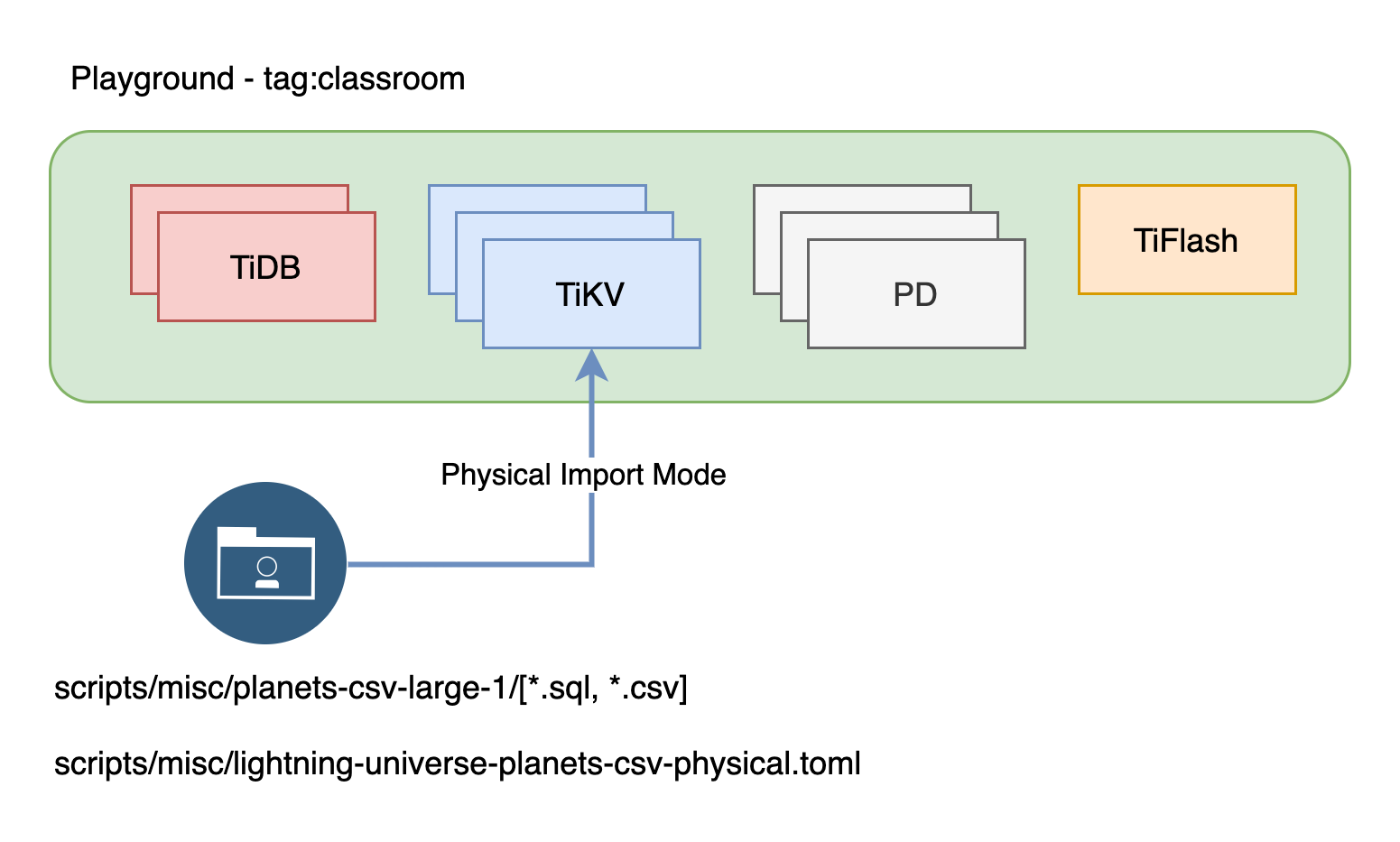
+ The physical import mode is a highly efficient method for importing data into the storage layer, without using the SQL interface. This mode is especially valuable for importing large data sets of hundreds of terabytes or more.
### Duration
+ This exercise should take you approximately 10 minutes to complete.
### Tasks
1. Verify the data to be imported.
2. Verify the `TiDB Lightning` import task configuration.
3. Import data into TiDB using `TiDB Lightning` physical mode.
### Solution
1. Create a user `imp` for the data importing task.
```
$ cd tidb-course-201-lab/scripts/
$ ./connect-4000.sh
```
```sql
CREATE USER imp@'%' IDENTIFIED BY 'q1w2e3R4_';
GRANT ALL PRIVILEGES ON *.* TO imp@'%';
EXIT;
```
2. List the contents of the source data directory `misc/planets-csv-large-1`. Enter the following command at the terminal prompt and receive the results shown.
```
$ ls -l ./misc/planets-csv-large-1/
total 89632
-rw-r--r-- 1 username staff 100 Apr 6 08:05 universe-schema-create.sql
-rw-r--r-- 1 username staff 1777 Nov 6 14:14 universe.planets-schema.sql
-rw-r--r-- 1 username staff 45109100 Apr 6 18:06 universe.planets.000000000.csv
-rwxr-xr-x 1 username staff 573 Apr 6 18:06 universe.stars-schema.sql
-rw-rw-r-- 1 username staff 301 Apr 6 18:05 universe.stars.csv
```
3. The SQL script named `universe-schema-create.sql` is used for creating the `universe` schema.
```
$ cat ./misc/planets-csv-large-1/universe-schema-create.sql
```
```sql
CREATE DATABASE `universe`
/*!40100 DEFAULT CHARACTER SET utf8mb4 */
;
```
4. The SQL script named `universe.planets-schema.sql` is used for creating the `planets` table.
```
$ cat ./misc/planets-csv-large-1/universe.planets-schema.sql
```
```sql
CREATE TABLE `planets` (
`id` bigint(20) NOT NULL AUTO_INCREMENT,
`name` char(20) NOT NULL DEFAULT '',
`mass` float NOT NULL DEFAULT '0.0' COMMENT '10**24 kg',
`diameter` decimal(12,2) NOT NULL DEFAULT '0' COMMENT 'km',
`density` int(11) NOT NULL DEFAULT '0' COMMENT 'kg/m**3',
`gravity` decimal(8,1) NOT NULL DEFAULT '0.0' COMMENT 'm/s**2',
`escape_velocity` decimal(8,1) NOT NULL DEFAULT '0.0' COMMENT 'km/s',
`rotation_period` decimal(5,1) NOT NULL DEFAULT '0.0' COMMENT 'hours',
`length_of_day` decimal(8,1) NOT NULL DEFAULT '0.0' COMMENT 'hours',
`distance_from_sun` float NOT NULL DEFAULT '0.0' COMMENT '10**6 km',
`perihelion` float DEFAULT NULL COMMENT '10**6 km',
`aphelion` float DEFAULT NULL COMMENT '10**6 km',
`orbital_period` decimal(12,1) NOT NULL DEFAULT '0.0' COMMENT 'days',
`orbital_velocity` decimal(12,1) DEFAULT NULL COMMENT 'km/s',
`orbital_inclination` decimal(8,1) DEFAULT NULL COMMENT 'degrees',
`orbital_eccentricity` decimal(7,0) NOT NULL DEFAULT '0.0',
`obliquity_to_orbit` decimal(10,4) DEFAULT NULL COMMENT 'degrees',
`mean_temperature` int(11) NOT NULL DEFAULT '0' COMMENT 'C',
`surface_pressure` float DEFAULT NULL COMMENT 'bars',
`ring_systems` tinyint(1) NOT NULL DEFAULT '0',
`global_magnetic_field` tinyint(1) DEFAULT '0',
`sun_id` bigint(20) NOT NULL,
`category_id` int(11) NOT NULL,
`discover_date` datetime DEFAULT NULL,
PRIMARY KEY (`id`) /*T![clustered_index] CLUSTERED */,
KEY `name` (`name`),
CONSTRAINT `planet_sun_fk` FOREIGN KEY (`sun_id`) REFERENCES `stars` (`id`),
CONSTRAINT `planet_cat_fk` FOREIGN KEY (`category_id`) REFERENCES `planet_categories` (`id`)
) ENGINE=InnoDB DEFAULT CHARSET=utf8mb4 COLLATE=utf8mb4_bin AUTO_INCREMENT=40510553;
```
Note that the comments for the columns are not similar to the comments in programming language, such as Java and Python. The comments in SQL are actually recorded in the `information_schema` table. After you have created the table. You can check these comments using the following query:
```sql
SELECT column_name, column_comment
FROM information_schema.columns
WHERE table_schema='universe' AND table_name='planets';
```
5. The SQL script named `universe.stars-schema.sql` is used for creating the `stars` table.
```
$ cat ./misc/planets-csv-large-1/universe.stars-schema.sql
```
```sql
CREATE TABLE `stars` (
`id` bigint AUTO_RANDOM,
`name` char(20) NOT NULL DEFAULT '',
`mass` float NOT NULL DEFAULT 0.0 COMMENT '10**24 kg',
`density` int NOT NULL DEFAULT 0 COMMENT 'kg/m**3',
`gravity` decimal(20, 4) NOT NULL DEFAULT 0.0 COMMENT 'm/s**2',
`escape_velocity` decimal(8, 1) DEFAULT NULL COMMENT 'km/s',
`mass_conversion_rate` int DEFAULT NULL COMMENT '10**6 kg/s',
`spectral_type` char(8) NOT NULL DEFAULT '',
`distance_from_earth` float COMMENT 'light year',
`discover_date` datetime DEFAULT NULL,
PRIMARY KEY (`id`),
KEY (`name`)
);
```
6. Verify that the files `universe.planets.000000000.csv` and `universe.stars.csv` contain 327681 and 3 rows respectively. These files are for demonstration purposes only and do not contain the real-world data.
```
$ head -5 ./misc/planets-csv-large-1/universe.planets.000000000.csv
"id","name","mass","diameter","density","gravity","escape_velocity","rotation_period","length_of_day","distance_from_sun","perihelion","aphelion","orbital_period","orbital_velocity","orbital_inclination","orbital_eccentricity","obliquity_to_orbit","mean_temperature","surface_pressure","ring_systems","global_magnetic_field","sun_id","category_id","discover_date"
1,"Mercury",0.33,4879.00,5429,3.7,4.3,1407.6,4222.6,57.9,46,69.8,88.0,47.4,7.0,0,0.0340,167,0,0,1,7782220156096217089,1,\N
2,"Venus",4.87,12104.00,5234,8.9,10.4,-5832.5,2802.0,108.2,107.5,108.9,224.7,35.0,3.4,0,177.4000,464,92,0,0,7782220156096217089,1,\N
3,"Earth",5.97,12756.00,5514,9.8,11.2,23.9,24.0,149.6,147.1,152.1,365.2,29.8,0.0,0,23.4000,15,1,0,1,7782220156096217089,1,\N
4,"Mars",0.642,6792.00,3934,3.7,5.0,24.6,24.7,228,206.7,249.3,687.0,24.1,1.8,0,25.2000,-65,0.01,0,0,7782220156096217089,1,\N
```
```
$ wc -l ./misc/planets-csv-large-1/universe.planets.000000000.csv
327681 ./misc/planets-csv-large-1/universe.planets.000000000.csv
```
```
$ head -5 ./misc/planets-csv-large-1/universe.stars.csv
"id","name","mass","density","gravity","escape_velocity","mass_conversion_rate","spectral_type","distance_from_earth","discover_date"
1,"Sun",1988500,1408,274.0000,617.6,4260,"G2 V",0.0000158,\N
3170534137668829186,"Proxima Centauri",244600,56800,0.0520,\N,\N,"M5.5 Ve",4.426,"1915-01-01 00:00:00"
...
```
```
$ wc -l ./misc/planets-csv-large-1/universe.stars.csv
3 ./misc/planets-csv-large-1/universe.stars.csv
```
7. Review the content of the provided `TiDB Lightning` task configuration file and take note that the value of the `backend` attribute in section `[tikv-importer]` is set to `local`. This configuration indicates that `TiDB Lightning` is operating in physical mode, importing data directly into the storage layer without passing through the SQL layer. Ensure that the `data-source-dir` attribute located under the `[mydumper]` section is correctly pointing to the `./misc/planets-csv-large-1` directory and the credentials under section `[tidb]` are the same as the ones created for the user in step 1.
```
$ cat ./misc/lightning-universe-planets-csv-physical.toml
[lightning]
level = "info"
file = "../stage/tidb-lightning-universe.log"
table-concurrency = 1
index-concurrency = 1
region-concurrency = 1
io-concurrency = 1
max-error = 0
task-info-schema-name = "lightning_task_info"
meta-schema-name = "lightning_metadata"
[checkpoint]
enable = true
driver = "file"
dsn = "/tmp/tidb_lightning_checkpoint_physical.pb"
[tikv-importer]
backend = "local"
incremental-import = false
sorted-kv-dir = "../stage/sorted-kv-dir-1"
[mydumper]
data-source-dir = "./misc/planets-csv-large-1"
filter = ['*.*', '!mysql.*', '!sys.*', '!INFORMATION_SCHEMA.*', '!PERFORMANCE_SCHEMA.*', '!METRICS_SCHEMA.*', '!INSPECTION_SCHEMA.*']
strict-format = true
[mydumper.csv]
separator = ','
delimiter = '"'
terminator = ''
header = true
not-null = false
null = '\N'
backslash-escape = true
trim-last-separator = false
[tidb]
host = "127.0.0.1"
port = 4000
user = "imp"
password = "q1w2e3R4_"
status-port = 10080
pd-addr = "127.0.0.1:2379"
```
8. Initiate the import task. Enter the following command at the terminal prompt and receive the results shown. Since the environment is TiDB Playground cluster, ignore the warning in check item 7.
```
$ tiup tidb-lightning:v6.5.1 --config ./misc/lightning-universe-planets-csv-physical.toml
...
+----+------------------------------------------------------------------------------------------------------------------------------------+-------------+--------+
| # | CHECK ITEM | TYPE | PASSED |
+----+------------------------------------------------------------------------------------------------------------------------------------+-------------+--------+
| 1 | Skip the csv size check, because config.StrictFormat is true | performance | true |
+----+------------------------------------------------------------------------------------------------------------------------------------+-------------+--------+
| 2 | the checkpoints are valid | critical | true |
+----+------------------------------------------------------------------------------------------------------------------------------------+-------------+--------+
| 3 | table schemas are valid | critical | true |
+----+------------------------------------------------------------------------------------------------------------------------------------+-------------+--------+
| 4 | all importing tables on the target are empty | critical | true |
+----+------------------------------------------------------------------------------------------------------------------------------------+-------------+--------+
| 5 | Cluster version check passed | critical | true |
+----+------------------------------------------------------------------------------------------------------------------------------------+-------------+--------+
| 6 | Lightning has the correct storage permission | critical | true |
+----+------------------------------------------------------------------------------------------------------------------------------------+-------------+--------+
| 7 | sorted-kv-dir:../stage/sorted-kv-dir-1 and data-source-dir:/Users/username/git/github/tidb-course-201-lab/scripts/misc/planets-csv | performance | false |
| | -large-1 are in the same disk, may slow down performance | | |
+----+------------------------------------------------------------------------------------------------------------------------------------+-------------+--------+
| 8 | local disk resources are rich, estimate sorted data size 14.34MiB, local available is 103.5GiB | critical | true |
+----+------------------------------------------------------------------------------------------------------------------------------------+-------------+--------+
| 9 | The storage space is rich, which TiKV/Tiflash is 310.5GiB/103.5GiB. The estimated storage space is 14.34MiB/0B. | performance | true |
+----+------------------------------------------------------------------------------------------------------------------------------------+-------------+--------+
| 10 | Cluster doesn't have too many empty regions | performance | true |
+----+------------------------------------------------------------------------------------------------------------------------------------+-------------+--------+
| 11 | Cluster region distribution is balanced | critical | true |
+----+------------------------------------------------------------------------------------------------------------------------------------+-------------+--------+
| 12 | no CDC or PiTR task found | critical | true |
+----+------------------------------------------------------------------------------------------------------------------------------------+-------------+--------+
tidb lightning exit successfully
```
9. (Optional) If any problems related to inaccurate configuration were encountered during the previous step, this error message may be encountered when re-executing the import task - `Checkpoint for ... has invalid status`. Try the following commands to clear the error.
```
$ rm /tmp/tidb_lightning_checkpoint_physical.pb
```
10. Verify that the data has been imported.
```
$ ./connect-4000.sh
```
```sql
SELECT COUNT(*) FROM universe.planets;
SELECT COUNT(*) FROM universe.stars;
```
```
...
+----------+
| COUNT(*) |
+----------+
| 327680 |
+----------+
...
+----------+
| COUNT(*) |
+----------+
| 2 |
+----------+
...
```
## Exercise 2: Importing Data from CSV Files into TiDB in Logical Mode
### Overview
+ The physical import mode is a highly efficient method for importing data into the storage layer, without using the SQL interface. This mode is especially valuable for importing large data sets of hundreds of terabytes or more.
### Duration
+ This exercise should take you approximately 10 minutes to complete.
### Tasks
1. Verify the data to be imported.
2. Verify the `TiDB Lightning` import task configuration.
3. Import data into TiDB using `TiDB Lightning` physical mode.
### Solution
1. Create a user `imp` for the data importing task.
```
$ cd tidb-course-201-lab/scripts/
$ ./connect-4000.sh
```
```sql
CREATE USER imp@'%' IDENTIFIED BY 'q1w2e3R4_';
GRANT ALL PRIVILEGES ON *.* TO imp@'%';
EXIT;
```
2. List the contents of the source data directory `misc/planets-csv-large-1`. Enter the following command at the terminal prompt and receive the results shown.
```
$ ls -l ./misc/planets-csv-large-1/
total 89632
-rw-r--r-- 1 username staff 100 Apr 6 08:05 universe-schema-create.sql
-rw-r--r-- 1 username staff 1777 Nov 6 14:14 universe.planets-schema.sql
-rw-r--r-- 1 username staff 45109100 Apr 6 18:06 universe.planets.000000000.csv
-rwxr-xr-x 1 username staff 573 Apr 6 18:06 universe.stars-schema.sql
-rw-rw-r-- 1 username staff 301 Apr 6 18:05 universe.stars.csv
```
3. The SQL script named `universe-schema-create.sql` is used for creating the `universe` schema.
```
$ cat ./misc/planets-csv-large-1/universe-schema-create.sql
```
```sql
CREATE DATABASE `universe`
/*!40100 DEFAULT CHARACTER SET utf8mb4 */
;
```
4. The SQL script named `universe.planets-schema.sql` is used for creating the `planets` table.
```
$ cat ./misc/planets-csv-large-1/universe.planets-schema.sql
```
```sql
CREATE TABLE `planets` (
`id` bigint(20) NOT NULL AUTO_INCREMENT,
`name` char(20) NOT NULL DEFAULT '',
`mass` float NOT NULL DEFAULT '0.0' COMMENT '10**24 kg',
`diameter` decimal(12,2) NOT NULL DEFAULT '0' COMMENT 'km',
`density` int(11) NOT NULL DEFAULT '0' COMMENT 'kg/m**3',
`gravity` decimal(8,1) NOT NULL DEFAULT '0.0' COMMENT 'm/s**2',
`escape_velocity` decimal(8,1) NOT NULL DEFAULT '0.0' COMMENT 'km/s',
`rotation_period` decimal(5,1) NOT NULL DEFAULT '0.0' COMMENT 'hours',
`length_of_day` decimal(8,1) NOT NULL DEFAULT '0.0' COMMENT 'hours',
`distance_from_sun` float NOT NULL DEFAULT '0.0' COMMENT '10**6 km',
`perihelion` float DEFAULT NULL COMMENT '10**6 km',
`aphelion` float DEFAULT NULL COMMENT '10**6 km',
`orbital_period` decimal(12,1) NOT NULL DEFAULT '0.0' COMMENT 'days',
`orbital_velocity` decimal(12,1) DEFAULT NULL COMMENT 'km/s',
`orbital_inclination` decimal(8,1) DEFAULT NULL COMMENT 'degrees',
`orbital_eccentricity` decimal(7,0) NOT NULL DEFAULT '0.0',
`obliquity_to_orbit` decimal(10,4) DEFAULT NULL COMMENT 'degrees',
`mean_temperature` int(11) NOT NULL DEFAULT '0' COMMENT 'C',
`surface_pressure` float DEFAULT NULL COMMENT 'bars',
`ring_systems` tinyint(1) NOT NULL DEFAULT '0',
`global_magnetic_field` tinyint(1) DEFAULT '0',
`sun_id` bigint(20) NOT NULL,
`category_id` int(11) NOT NULL,
`discover_date` datetime DEFAULT NULL,
PRIMARY KEY (`id`) /*T![clustered_index] CLUSTERED */,
KEY `name` (`name`),
CONSTRAINT `planet_sun_fk` FOREIGN KEY (`sun_id`) REFERENCES `stars` (`id`),
CONSTRAINT `planet_cat_fk` FOREIGN KEY (`category_id`) REFERENCES `planet_categories` (`id`)
) ENGINE=InnoDB DEFAULT CHARSET=utf8mb4 COLLATE=utf8mb4_bin AUTO_INCREMENT=40510553;
```
Note that the comments for the columns are not similar to the comments in programming language, such as Java and Python. The comments in SQL are actually recorded in the `information_schema` table. After you have created the table. You can check these comments using the following query:
```sql
SELECT column_name, column_comment
FROM information_schema.columns
WHERE table_schema='universe' AND table_name='planets';
```
5. The SQL script named `universe.stars-schema.sql` is used for creating the `stars` table.
```
$ cat ./misc/planets-csv-large-1/universe.stars-schema.sql
```
```sql
CREATE TABLE `stars` (
`id` bigint AUTO_RANDOM,
`name` char(20) NOT NULL DEFAULT '',
`mass` float NOT NULL DEFAULT 0.0 COMMENT '10**24 kg',
`density` int NOT NULL DEFAULT 0 COMMENT 'kg/m**3',
`gravity` decimal(20, 4) NOT NULL DEFAULT 0.0 COMMENT 'm/s**2',
`escape_velocity` decimal(8, 1) DEFAULT NULL COMMENT 'km/s',
`mass_conversion_rate` int DEFAULT NULL COMMENT '10**6 kg/s',
`spectral_type` char(8) NOT NULL DEFAULT '',
`distance_from_earth` float COMMENT 'light year',
`discover_date` datetime DEFAULT NULL,
PRIMARY KEY (`id`),
KEY (`name`)
);
```
6. Verify that the files `universe.planets.000000000.csv` and `universe.stars.csv` contain 327681 and 3 rows respectively. These files are for demonstration purposes only and do not contain the real-world data.
```
$ head -5 ./misc/planets-csv-large-1/universe.planets.000000000.csv
"id","name","mass","diameter","density","gravity","escape_velocity","rotation_period","length_of_day","distance_from_sun","perihelion","aphelion","orbital_period","orbital_velocity","orbital_inclination","orbital_eccentricity","obliquity_to_orbit","mean_temperature","surface_pressure","ring_systems","global_magnetic_field","sun_id","category_id","discover_date"
1,"Mercury",0.33,4879.00,5429,3.7,4.3,1407.6,4222.6,57.9,46,69.8,88.0,47.4,7.0,0,0.0340,167,0,0,1,7782220156096217089,1,\N
2,"Venus",4.87,12104.00,5234,8.9,10.4,-5832.5,2802.0,108.2,107.5,108.9,224.7,35.0,3.4,0,177.4000,464,92,0,0,7782220156096217089,1,\N
3,"Earth",5.97,12756.00,5514,9.8,11.2,23.9,24.0,149.6,147.1,152.1,365.2,29.8,0.0,0,23.4000,15,1,0,1,7782220156096217089,1,\N
4,"Mars",0.642,6792.00,3934,3.7,5.0,24.6,24.7,228,206.7,249.3,687.0,24.1,1.8,0,25.2000,-65,0.01,0,0,7782220156096217089,1,\N
```
```
$ wc -l ./misc/planets-csv-large-1/universe.planets.000000000.csv
327681 ./misc/planets-csv-large-1/universe.planets.000000000.csv
```
```
$ head -5 ./misc/planets-csv-large-1/universe.stars.csv
"id","name","mass","density","gravity","escape_velocity","mass_conversion_rate","spectral_type","distance_from_earth","discover_date"
1,"Sun",1988500,1408,274.0000,617.6,4260,"G2 V",0.0000158,\N
3170534137668829186,"Proxima Centauri",244600,56800,0.0520,\N,\N,"M5.5 Ve",4.426,"1915-01-01 00:00:00"
...
```
```
$ wc -l ./misc/planets-csv-large-1/universe.stars.csv
3 ./misc/planets-csv-large-1/universe.stars.csv
```
7. Review the content of the provided `TiDB Lightning` task configuration file and take note that the value of the `backend` attribute in section `[tikv-importer]` is set to `local`. This configuration indicates that `TiDB Lightning` is operating in physical mode, importing data directly into the storage layer without passing through the SQL layer. Ensure that the `data-source-dir` attribute located under the `[mydumper]` section is correctly pointing to the `./misc/planets-csv-large-1` directory and the credentials under section `[tidb]` are the same as the ones created for the user in step 1.
```
$ cat ./misc/lightning-universe-planets-csv-physical.toml
[lightning]
level = "info"
file = "../stage/tidb-lightning-universe.log"
table-concurrency = 1
index-concurrency = 1
region-concurrency = 1
io-concurrency = 1
max-error = 0
task-info-schema-name = "lightning_task_info"
meta-schema-name = "lightning_metadata"
[checkpoint]
enable = true
driver = "file"
dsn = "/tmp/tidb_lightning_checkpoint_physical.pb"
[tikv-importer]
backend = "local"
incremental-import = false
sorted-kv-dir = "../stage/sorted-kv-dir-1"
[mydumper]
data-source-dir = "./misc/planets-csv-large-1"
filter = ['*.*', '!mysql.*', '!sys.*', '!INFORMATION_SCHEMA.*', '!PERFORMANCE_SCHEMA.*', '!METRICS_SCHEMA.*', '!INSPECTION_SCHEMA.*']
strict-format = true
[mydumper.csv]
separator = ','
delimiter = '"'
terminator = ''
header = true
not-null = false
null = '\N'
backslash-escape = true
trim-last-separator = false
[tidb]
host = "127.0.0.1"
port = 4000
user = "imp"
password = "q1w2e3R4_"
status-port = 10080
pd-addr = "127.0.0.1:2379"
```
8. Initiate the import task. Enter the following command at the terminal prompt and receive the results shown. Since the environment is TiDB Playground cluster, ignore the warning in check item 7.
```
$ tiup tidb-lightning:v6.5.1 --config ./misc/lightning-universe-planets-csv-physical.toml
...
+----+------------------------------------------------------------------------------------------------------------------------------------+-------------+--------+
| # | CHECK ITEM | TYPE | PASSED |
+----+------------------------------------------------------------------------------------------------------------------------------------+-------------+--------+
| 1 | Skip the csv size check, because config.StrictFormat is true | performance | true |
+----+------------------------------------------------------------------------------------------------------------------------------------+-------------+--------+
| 2 | the checkpoints are valid | critical | true |
+----+------------------------------------------------------------------------------------------------------------------------------------+-------------+--------+
| 3 | table schemas are valid | critical | true |
+----+------------------------------------------------------------------------------------------------------------------------------------+-------------+--------+
| 4 | all importing tables on the target are empty | critical | true |
+----+------------------------------------------------------------------------------------------------------------------------------------+-------------+--------+
| 5 | Cluster version check passed | critical | true |
+----+------------------------------------------------------------------------------------------------------------------------------------+-------------+--------+
| 6 | Lightning has the correct storage permission | critical | true |
+----+------------------------------------------------------------------------------------------------------------------------------------+-------------+--------+
| 7 | sorted-kv-dir:../stage/sorted-kv-dir-1 and data-source-dir:/Users/username/git/github/tidb-course-201-lab/scripts/misc/planets-csv | performance | false |
| | -large-1 are in the same disk, may slow down performance | | |
+----+------------------------------------------------------------------------------------------------------------------------------------+-------------+--------+
| 8 | local disk resources are rich, estimate sorted data size 14.34MiB, local available is 103.5GiB | critical | true |
+----+------------------------------------------------------------------------------------------------------------------------------------+-------------+--------+
| 9 | The storage space is rich, which TiKV/Tiflash is 310.5GiB/103.5GiB. The estimated storage space is 14.34MiB/0B. | performance | true |
+----+------------------------------------------------------------------------------------------------------------------------------------+-------------+--------+
| 10 | Cluster doesn't have too many empty regions | performance | true |
+----+------------------------------------------------------------------------------------------------------------------------------------+-------------+--------+
| 11 | Cluster region distribution is balanced | critical | true |
+----+------------------------------------------------------------------------------------------------------------------------------------+-------------+--------+
| 12 | no CDC or PiTR task found | critical | true |
+----+------------------------------------------------------------------------------------------------------------------------------------+-------------+--------+
tidb lightning exit successfully
```
9. (Optional) If any problems related to inaccurate configuration were encountered during the previous step, this error message may be encountered when re-executing the import task - `Checkpoint for ... has invalid status`. Try the following commands to clear the error.
```
$ rm /tmp/tidb_lightning_checkpoint_physical.pb
```
10. Verify that the data has been imported.
```
$ ./connect-4000.sh
```
```sql
SELECT COUNT(*) FROM universe.planets;
SELECT COUNT(*) FROM universe.stars;
```
```
...
+----------+
| COUNT(*) |
+----------+
| 327680 |
+----------+
...
+----------+
| COUNT(*) |
+----------+
| 2 |
+----------+
...
```
## Exercise 2: Importing Data from CSV Files into TiDB in Logical Mode
 ### Overview
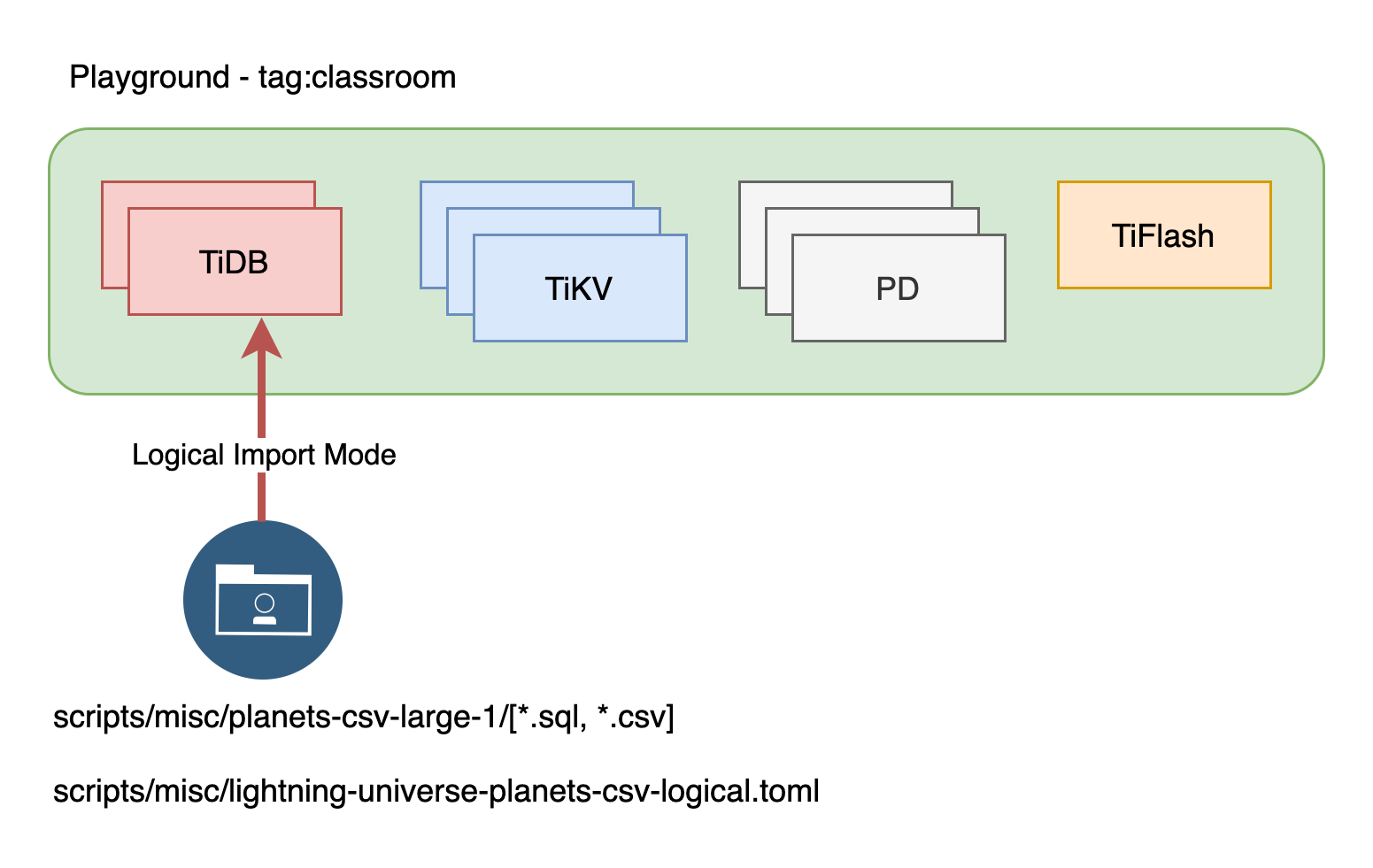
+ During the logical import mode, TiDB Lightning encodes the data into SQL statements and subsequently executes them to import data.
### Duration
+ This exercise should take you approximately 5 minutes to complete.
### Tasks.
1. Verify the `TiDB Lightning` import task configuration.
2. Import data into TiDB using `TiDB Lightning` logical mode.
### Solution
1. Truncate both tables imported previously.
```
$ cd tidb-course-201-lab/scripts/
$ ./connect-4000.sh
```
```sql
TRUNCATE universe.planets;
TRUNCATE universe.stars;
EXIT;
```
2. Review the content of the provided `TiDB Lightning` task configuration file and take note that the value of the `backend` attribute in section `[tikv-importer]` is set to `tidb`. This configuration indicates that `TiDB Lightning` is operating in logical mode.
```
$ cat ./misc/lightning-universe-planets-csv-logical.toml
[lightning]
level = "info"
file = "../stage/tidb-lightning-universe.log"
table-concurrency = 1
index-concurrency = 1
region-concurrency = 1
io-concurrency = 1
max-error = 0
task-info-schema-name = "lightning_task_info"
meta-schema-name = "lightning_metadata"
[checkpoint]
enable = true
driver = "file"
dsn = "/tmp/tidb_lightning_checkpoint_physical.pb"
[tikv-importer]
backend = "tidb"
incremental-import = false
sorted-kv-dir = "../stage/sorted-kv-dir-1"
[mydumper]
data-source-dir = "./misc/planets-csv-large-1"
filter = ['*.*', '!mysql.*', '!sys.*', '!INFORMATION_SCHEMA.*', '!PERFORMANCE_SCHEMA.*', '!METRICS_SCHEMA.*', '!INSPECTION_SCHEMA.*']
strict-format = true
[mydumper.csv]
separator = ','
delimiter = '"'
terminator = ''
header = true
not-null = false
null = '\N'
backslash-escape = true
trim-last-separator = false
[tidb]
host = "127.0.0.1"
port = 4000
user = "imp"
password = "q1w2e3R4_"
status-port = 10080
pd-addr = "127.0.0.1:2379"
```
3. Initiate the import task. Enter the following command at the terminal prompt and receive the results shown.
```
$ tiup tidb-lightning:v6.5.1 --config ./misc/lightning-universe-planets-csv-logical.toml
...
+---+--------------------------------------------------------------+-------------+--------+
| # | CHECK ITEM | TYPE | PASSED |
+---+--------------------------------------------------------------+-------------+--------+
| 1 | Skip the csv size check, because config.StrictFormat is true | performance | true |
+---+--------------------------------------------------------------+-------------+--------+
| 2 | the checkpoints are valid | critical | true |
+---+--------------------------------------------------------------+-------------+--------+
| 3 | Cluster version check passed | critical | true |
+---+--------------------------------------------------------------+-------------+--------+
| 4 | Lightning has the correct storage permission | critical | true |
+---+--------------------------------------------------------------+-------------+--------+
tidb lightning exit successfully
```
4. Verify that the data has been imported.
```
$ ./connect-4000.sh
```
```sql
SELECT COUNT(*) FROM universe.planets;
SELECT COUNT(*) FROM universe.stars;
```
```
...
+----------+
| COUNT(*) |
+----------+
| 327680 |
+----------+
...
+----------+
| COUNT(*) |
+----------+
| 2 |
+----------+
...
```
5. In production, it is not uncommon for TiDB Lightning to efficiently handle the import of tens of terabytes of data into TiDB, especially when it comes to migration. If you are interested in conducting a production-level test or demo, [click here](https://www.pingcap.com/demo/?utm_source=edu&utm_medium=referral&utm_campaign=201.3.E2) to apply.
## Additional Information
Apart from CSV files, TiDB Lightning is also capable of importing data from Mydumper SQL files, Parquet files that have been exported from Amazon Aurora or Apache Hive. Refer to the TiDB documentation for further details regarding [TiDB Lightning](https://docs.pingcap.com/tidb/stable/tidb-lightning-overview).
Note that [PingCAP Training and Certification](https://pingcap.com/education/) provides a private training course *TiDB Administration* that contains detailed instructions and hands-on labs on how to use tools related to TiDB cluster administration, such as TiDB Lightning, Dumping, TiDB Data Migration, etc.
## End of Exercises
### Overview
+ During the logical import mode, TiDB Lightning encodes the data into SQL statements and subsequently executes them to import data.
### Duration
+ This exercise should take you approximately 5 minutes to complete.
### Tasks.
1. Verify the `TiDB Lightning` import task configuration.
2. Import data into TiDB using `TiDB Lightning` logical mode.
### Solution
1. Truncate both tables imported previously.
```
$ cd tidb-course-201-lab/scripts/
$ ./connect-4000.sh
```
```sql
TRUNCATE universe.planets;
TRUNCATE universe.stars;
EXIT;
```
2. Review the content of the provided `TiDB Lightning` task configuration file and take note that the value of the `backend` attribute in section `[tikv-importer]` is set to `tidb`. This configuration indicates that `TiDB Lightning` is operating in logical mode.
```
$ cat ./misc/lightning-universe-planets-csv-logical.toml
[lightning]
level = "info"
file = "../stage/tidb-lightning-universe.log"
table-concurrency = 1
index-concurrency = 1
region-concurrency = 1
io-concurrency = 1
max-error = 0
task-info-schema-name = "lightning_task_info"
meta-schema-name = "lightning_metadata"
[checkpoint]
enable = true
driver = "file"
dsn = "/tmp/tidb_lightning_checkpoint_physical.pb"
[tikv-importer]
backend = "tidb"
incremental-import = false
sorted-kv-dir = "../stage/sorted-kv-dir-1"
[mydumper]
data-source-dir = "./misc/planets-csv-large-1"
filter = ['*.*', '!mysql.*', '!sys.*', '!INFORMATION_SCHEMA.*', '!PERFORMANCE_SCHEMA.*', '!METRICS_SCHEMA.*', '!INSPECTION_SCHEMA.*']
strict-format = true
[mydumper.csv]
separator = ','
delimiter = '"'
terminator = ''
header = true
not-null = false
null = '\N'
backslash-escape = true
trim-last-separator = false
[tidb]
host = "127.0.0.1"
port = 4000
user = "imp"
password = "q1w2e3R4_"
status-port = 10080
pd-addr = "127.0.0.1:2379"
```
3. Initiate the import task. Enter the following command at the terminal prompt and receive the results shown.
```
$ tiup tidb-lightning:v6.5.1 --config ./misc/lightning-universe-planets-csv-logical.toml
...
+---+--------------------------------------------------------------+-------------+--------+
| # | CHECK ITEM | TYPE | PASSED |
+---+--------------------------------------------------------------+-------------+--------+
| 1 | Skip the csv size check, because config.StrictFormat is true | performance | true |
+---+--------------------------------------------------------------+-------------+--------+
| 2 | the checkpoints are valid | critical | true |
+---+--------------------------------------------------------------+-------------+--------+
| 3 | Cluster version check passed | critical | true |
+---+--------------------------------------------------------------+-------------+--------+
| 4 | Lightning has the correct storage permission | critical | true |
+---+--------------------------------------------------------------+-------------+--------+
tidb lightning exit successfully
```
4. Verify that the data has been imported.
```
$ ./connect-4000.sh
```
```sql
SELECT COUNT(*) FROM universe.planets;
SELECT COUNT(*) FROM universe.stars;
```
```
...
+----------+
| COUNT(*) |
+----------+
| 327680 |
+----------+
...
+----------+
| COUNT(*) |
+----------+
| 2 |
+----------+
...
```
5. In production, it is not uncommon for TiDB Lightning to efficiently handle the import of tens of terabytes of data into TiDB, especially when it comes to migration. If you are interested in conducting a production-level test or demo, [click here](https://www.pingcap.com/demo/?utm_source=edu&utm_medium=referral&utm_campaign=201.3.E2) to apply.
## Additional Information
Apart from CSV files, TiDB Lightning is also capable of importing data from Mydumper SQL files, Parquet files that have been exported from Amazon Aurora or Apache Hive. Refer to the TiDB documentation for further details regarding [TiDB Lightning](https://docs.pingcap.com/tidb/stable/tidb-lightning-overview).
Note that [PingCAP Training and Certification](https://pingcap.com/education/) provides a private training course *TiDB Administration* that contains detailed instructions and hands-on labs on how to use tools related to TiDB cluster administration, such as TiDB Lightning, Dumping, TiDB Data Migration, etc.
## End of Exercises