# Flashback Table and Flashback Query
### Overview
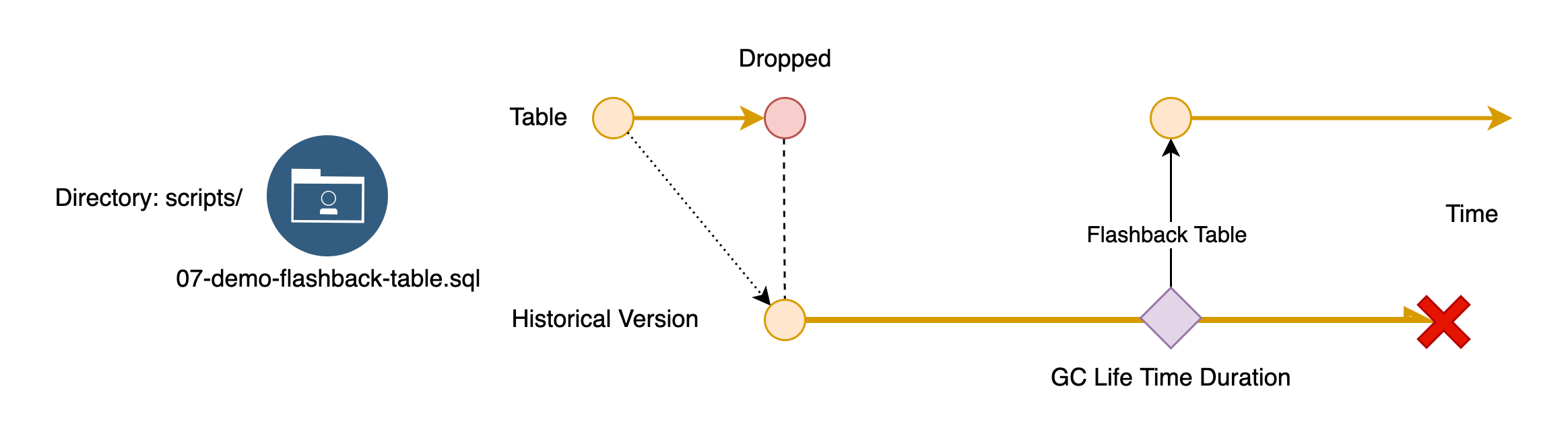
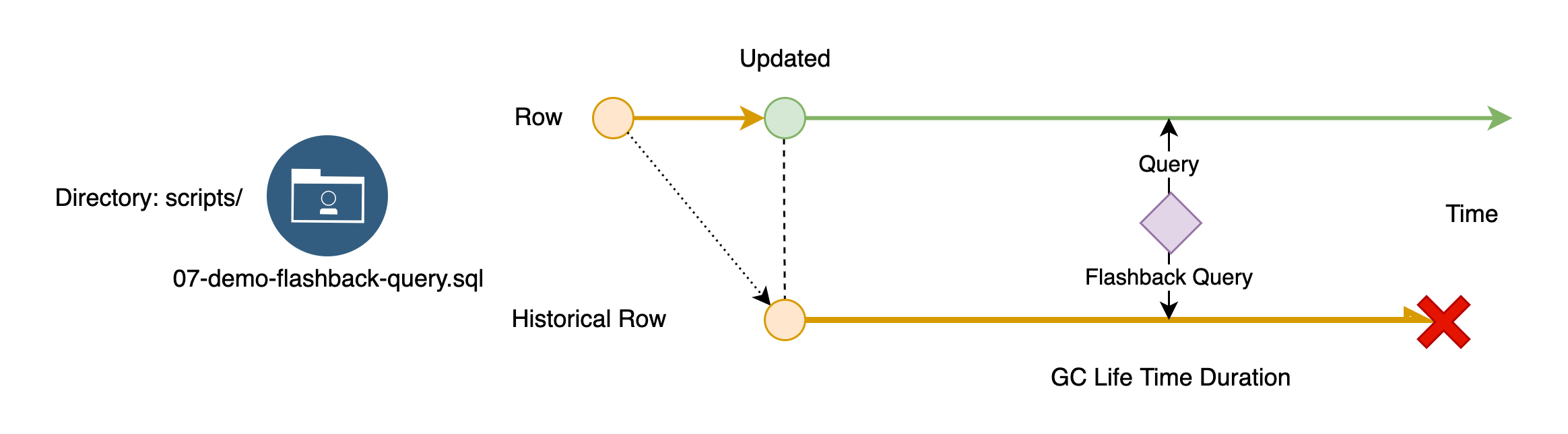
+ In these exercises, you gain some experience on Flashback Table and Flashback Query abilities. Because of TiDB's MVCC mechanism, you can retrieve the historical data in TiDB within the GC lifetime window.
+ You will create several tables, insert some values to them. After that, you can drop it and restore it using the `FLASHBACK TABLE` statement. Or, you can use an `AS OF` clause to an in-line flashback query to get the old data. Along the exercise steps, you will gain a deeper understanding of the concept of GC safe points.
### Notes
+ Some of the steps require that you type commands in two different terminal windows. You might find it convenient to launch two terminals and keep them open for the duration of the exercises.
+ Your environment may be different with these exercises, including but not limited to `IP`, `port`, `username`, `password` and `directory`.
+ The "`$`" in your terminal window is an OS prompt.
+ The "`tidb>`" or "`mysql>`" in your terminal window is SQL command prompt.
+ These exercises can be run on a single machine, such as your laptop.
### Assumptions
+ You are using macOS or Linux.
+ You have cloned the [lab repository](https://github.com/pingcap/tidb-course-201-lab.git).
+ You have completed the Exercises - Creating a TiDB Cluster for Testing Purposes.
## Exercise 1: Flashback Table
 ### Overview
+ In this exercise, you restore a table by using the `FLASHBACK TABLE` statement.
### Duration
+ This exercise should take you approximately 10 minutes to complete.
### Tasks
1. Connect to the TiDB server.
2. Review the `FLASHBACK TABLE` demo script.
3. Use the `FLASHBACK TABLE` statement to restore a table that has been dropped.
### Solution
1. Connect to the TiDB server as user `root`. For TiUP Playground users. Run the script `connect-4000.sh` to connect to the TiDB server.
```
$ cd tidb-course-201-lab/scripts
$ ./connect-4000.sh
...
tidb:4000>
```
2. Review the demo script `07-demo-flashback-table.sql`:
Print the demo script content and try to understand each statement by going through the comments.
```sql
SYSTEM cat 07-demo-flashback-table.sql
```
Create a simple table named `test.r2`, and insert two rows.
```
/* Setup */
DROP TABLE IF EXISTS test.r1, test.r2;
CREATE TABLE test.r1(id INT PRIMARY KEY);
/* Insert values into test.r1 */
INSERT INTO test.r1 (id)
VALUES (1);
INSERT INTO test.r1 (id)
VALUES (2);
```
Verify that two rows in table `test.r1`
```
/* Query A: Verify data in table test.r1, we are expecting COUNT 2 */
SELECT COUNT(*),
NOW()
FROM test.r1;
```
Confirm the earliest historical data that can be retained in TiDB by querying the `tikv_gc_safe_point` variable. Evaluate the value found in the `COMMENT` column.
```
/* Query B: Verify the GC safe point */
SELECT VARIABLE_NAME,
VARIABLE_VALUE,
COMMENT
FROM mysql.tidb
WHERE variable_name = "tikv_gc_safe_point";
```
Drop the table `test.r1`, and query it again. An error is expected.
```
DROP TABLE test.r1;
/* Query C: ERROR 1146 is expected */
SELECT COUNT(*)
FROM test.r1;
```
Restore the table `test.r1` to `test.r2` from historical versions.
```
/* Extract the table test.r1 and its rows from previous version to test.r2 within the GC safe-point window */
FLASHBACK TABLE test.r1 TO r2;
/* Query D: You can access the dropped table data from test.r2 now */
SELECT COUNT(*)
FROM test.r2;
```
3. Run the demo script `07-demo-flashback-table.sql`, and receive the results shown.
```sql
SOURCE 07-demo-flashback-table.sql
```
```
tidb:4000> SOURCE 07-demo-flashback-table.sql
--------------
DROP TABLE IF EXISTS TEST.R1, TEST.R2
--------------
Query OK, 0 rows affected, 2 warnings (0.00 sec)
--------------
CREATE TABLE TEST.R1(ID INT PRIMARY KEY)
--------------
Query OK, 0 rows affected (0.09 sec)
--------------
INSERT INTO TEST.R1 (ID)
VALUES (1)
--------------
Query OK, 1 row affected (0.01 sec)
--------------
INSERT INTO TEST.R1 (ID)
VALUES (2)
--------------
Query OK, 1 row affected (0.00 sec)
--------------
SELECT COUNT(*),
NOW()
FROM TEST.R1
--------------
+----------+---------------------+
| COUNT(*) | NOW() |
+----------+---------------------+
| 2 | 2023-05-19 14:47:22 |
+----------+---------------------+
1 row in set (0.00 sec)
--------------
SELECT VARIABLE_NAME,
VARIABLE_VALUE,
COMMENT
FROM MYSQL.TIDB
WHERE VARIABLE_NAME = "tikv_gc_safe_point"
--------------
+--------------------+-----------------------------+--------------------------------------------------------------+
| VARIABLE_NAME | VARIABLE_VALUE | COMMENT |
+--------------------+-----------------------------+--------------------------------------------------------------+
| tikv_gc_safe_point | 20230519-14:35:58.911 +0000 | All versions after safe point can be accessed. (DO NOT EDIT) |
+--------------------+-----------------------------+--------------------------------------------------------------+
1 row in set (0.00 sec)
--------------
DROP TABLE TEST.R1
--------------
Query OK, 0 rows affected (0.24 sec)
--------------
SELECT COUNT(*)
FROM TEST.R1
--------------
ERROR 1146 (42S02): Table 'test.R1' doesn't exist
--------------
FLASHBACK TABLE TEST.R1 TO R2
--------------
Query OK, 0 rows affected (0.13 sec)
--------------
SELECT COUNT(*)
FROM TEST.R2
--------------
+----------+
| COUNT(*) |
+----------+
| 2 |
+----------+
1 row in set (0.00 sec)
```
## Exercise 2: Flashback Query
### Overview
+ In this exercise, you restore a table by using the `FLASHBACK TABLE` statement.
### Duration
+ This exercise should take you approximately 10 minutes to complete.
### Tasks
1. Connect to the TiDB server.
2. Review the `FLASHBACK TABLE` demo script.
3. Use the `FLASHBACK TABLE` statement to restore a table that has been dropped.
### Solution
1. Connect to the TiDB server as user `root`. For TiUP Playground users. Run the script `connect-4000.sh` to connect to the TiDB server.
```
$ cd tidb-course-201-lab/scripts
$ ./connect-4000.sh
...
tidb:4000>
```
2. Review the demo script `07-demo-flashback-table.sql`:
Print the demo script content and try to understand each statement by going through the comments.
```sql
SYSTEM cat 07-demo-flashback-table.sql
```
Create a simple table named `test.r2`, and insert two rows.
```
/* Setup */
DROP TABLE IF EXISTS test.r1, test.r2;
CREATE TABLE test.r1(id INT PRIMARY KEY);
/* Insert values into test.r1 */
INSERT INTO test.r1 (id)
VALUES (1);
INSERT INTO test.r1 (id)
VALUES (2);
```
Verify that two rows in table `test.r1`
```
/* Query A: Verify data in table test.r1, we are expecting COUNT 2 */
SELECT COUNT(*),
NOW()
FROM test.r1;
```
Confirm the earliest historical data that can be retained in TiDB by querying the `tikv_gc_safe_point` variable. Evaluate the value found in the `COMMENT` column.
```
/* Query B: Verify the GC safe point */
SELECT VARIABLE_NAME,
VARIABLE_VALUE,
COMMENT
FROM mysql.tidb
WHERE variable_name = "tikv_gc_safe_point";
```
Drop the table `test.r1`, and query it again. An error is expected.
```
DROP TABLE test.r1;
/* Query C: ERROR 1146 is expected */
SELECT COUNT(*)
FROM test.r1;
```
Restore the table `test.r1` to `test.r2` from historical versions.
```
/* Extract the table test.r1 and its rows from previous version to test.r2 within the GC safe-point window */
FLASHBACK TABLE test.r1 TO r2;
/* Query D: You can access the dropped table data from test.r2 now */
SELECT COUNT(*)
FROM test.r2;
```
3. Run the demo script `07-demo-flashback-table.sql`, and receive the results shown.
```sql
SOURCE 07-demo-flashback-table.sql
```
```
tidb:4000> SOURCE 07-demo-flashback-table.sql
--------------
DROP TABLE IF EXISTS TEST.R1, TEST.R2
--------------
Query OK, 0 rows affected, 2 warnings (0.00 sec)
--------------
CREATE TABLE TEST.R1(ID INT PRIMARY KEY)
--------------
Query OK, 0 rows affected (0.09 sec)
--------------
INSERT INTO TEST.R1 (ID)
VALUES (1)
--------------
Query OK, 1 row affected (0.01 sec)
--------------
INSERT INTO TEST.R1 (ID)
VALUES (2)
--------------
Query OK, 1 row affected (0.00 sec)
--------------
SELECT COUNT(*),
NOW()
FROM TEST.R1
--------------
+----------+---------------------+
| COUNT(*) | NOW() |
+----------+---------------------+
| 2 | 2023-05-19 14:47:22 |
+----------+---------------------+
1 row in set (0.00 sec)
--------------
SELECT VARIABLE_NAME,
VARIABLE_VALUE,
COMMENT
FROM MYSQL.TIDB
WHERE VARIABLE_NAME = "tikv_gc_safe_point"
--------------
+--------------------+-----------------------------+--------------------------------------------------------------+
| VARIABLE_NAME | VARIABLE_VALUE | COMMENT |
+--------------------+-----------------------------+--------------------------------------------------------------+
| tikv_gc_safe_point | 20230519-14:35:58.911 +0000 | All versions after safe point can be accessed. (DO NOT EDIT) |
+--------------------+-----------------------------+--------------------------------------------------------------+
1 row in set (0.00 sec)
--------------
DROP TABLE TEST.R1
--------------
Query OK, 0 rows affected (0.24 sec)
--------------
SELECT COUNT(*)
FROM TEST.R1
--------------
ERROR 1146 (42S02): Table 'test.R1' doesn't exist
--------------
FLASHBACK TABLE TEST.R1 TO R2
--------------
Query OK, 0 rows affected (0.13 sec)
--------------
SELECT COUNT(*)
FROM TEST.R2
--------------
+----------+
| COUNT(*) |
+----------+
| 2 |
+----------+
1 row in set (0.00 sec)
```
## Exercise 2: Flashback Query
 ### Overview
+ In this exercise, you query the historical data from a table by using the `AS OF` clause.
### Duration
+ This exercise should take you approximately 10 minutes to complete.
### Tasks
1. Review the flashback query demo script.
2. Use `AS OF` clause to execute a flashback query.
### Solution
1. Review the demo script `07-demo-flashback-query.sql`:
Print the demo script content and try to understand each statement by going through the comments.
```sql
SYSTEM cat 07-demo-flashback-query.sql
```
Create a table named `test.fbq` and insert one row.
```
/* Setup */
DROP TABLE IF EXISTS test.fbq;
CREATE TABLE test.fbq (id INT PRIMARY KEY);
/* Insert values into test.fbq */
INSERT INTO test.fbq (id)
VALUES (1);
```
Verity the existing data, wait for 5 seconds, and apply the change.
```
/* Query A: Verify the data in table test.fbq, we are expecting id=1 */
SELECT id,
'Current Data'
FROM test.fbq;
/* Query B: Apply certain waiting, do nothing for 5 seconds */
SELECT SLEEP(5);
/* Update the ID column for the only row in test.fbq table to 2 from 1 */
UPDATE test.fbq
SET id = 2
WHERE id = 1;
```
Validate the updated outcomes and retrieve information from the table which reflects its state 3 seconds earlier.
```
/* Query C: Verify the data in table test.fbq, we are expecting id=2 */
SELECT id
FROM test.fbq;
/* Query D: Check the data in table test.fbq from 3 seconds ago, we are expecting id=1 instead of 2 */
SELECT id,
'Data from the Past'
FROM test.fbq AS OF TIMESTAMP(CURRENT_TIMESTAMP() - INTERVAL '3' SECOND);
```
Verify that the default lifetime duration for historical data is 10 minutes.
```
/* Query E: Check the default GC lifetime window duration, we are expecting 10 minutes and 0 seconds */
SHOW VARIABLES LIKE 'tidb_gc_life_time';
```
Attempt to retrieve information from the table which reflects its state 1 hour earlier, an error is anticipated.
```
/* Query F: Check the data in table test.fbq beyond the GC safe point window, error code 9006 is expected */
SELECT id
FROM test.fbq AS OF TIMESTAMP(CURRENT_TIMESTAMP() - INTERVAL '1' HOUR);
/* Query G: Confirm the system setting */
SELECT NOW(),
VARIABLE_VALUE
FROM mysql.tidb
WHERE variable_name = "tikv_gc_safe_point";
```
2. Run the demo script `07-demo-flashback-query.sql`, and receive the results shown.
```sql
SOURCE 07-demo-flashback-query.sql
```
```
tidb:4000> SOURCE 07-demo-flashback-query.sql
--------------
DROP TABLE IF EXISTS test.fbq
--------------
Query OK, 0 rows affected, 1 warning (0.00 sec)
--------------
CREATE TABLE test.fbq (id INT PRIMARY KEY)
--------------
Query OK, 0 rows affected (0.09 sec)
--------------
INSERT INTO test.fbq (id)
VALUES (1)
--------------
Query OK, 1 row affected (0.00 sec)
--------------
SELECT id,
'Current Data'
FROM test.fbq
--------------
+----+--------------+
| id | Current Data |
+----+--------------+
| 1 | Current Data |
+----+--------------+
1 row in set (0.00 sec)
--------------
SELECT SLEEP(5)
--------------
+----------+
| SLEEP(5) |
+----------+
| 0 |
+----------+
1 row in set (5.00 sec)
--------------
UPDATE test.fbq
SET id = 2
WHERE id = 1
--------------
Query OK, 1 row affected (0.01 sec)
Rows matched: 1 Changed: 1 Warnings: 0
--------------
SELECT id
FROM test.fbq
--------------
+----+
| id |
+----+
| 2 |
+----+
1 row in set (0.00 sec)
--------------
SELECT id,
'Data from the Past'
FROM test.fbq AS OF TIMESTAMP(CURRENT_TIMESTAMP() - INTERVAL '3' SECOND)
--------------
+----+--------------------+
| id | Data from the Past |
+----+--------------------+
| 1 | Data from the Past |
+----+--------------------+
1 row in set (0.00 sec)
--------------
SHOW VARIABLES LIKE 'tidb_gc_life_time'
--------------
+-------------------+-------+
| Variable_name | Value |
+-------------------+-------+
| tidb_gc_life_time | 10m0s |
+-------------------+-------+
1 row in set (0.00 sec)
--------------
SELECT id
FROM test.fbq AS OF TIMESTAMP(CURRENT_TIMESTAMP() - INTERVAL '1' HOUR)
--------------
ERROR 9006 (HY000): GC life time is shorter than transaction duration, transaction starts at 2023-05-19 13:50:55 +0000 UTC, GC safe point is 2023-05-19 14:35:58.911 +0000 UTC
--------------
SELECT NOW(),
VARIABLE_VALUE
FROM mysql.tidb
WHERE variable_name = "tikv_gc_safe_point"
--------------
+---------------------+-----------------------------+
| NOW() | VARIABLE_VALUE |
+---------------------+-----------------------------+
| 2023-05-19 14:50:55 | 20230519-14:35:58.911 +0000 |
+---------------------+-----------------------------+
1 row in set (0.00 sec)
```
## Summary
Throughout the exercises, the TiDB server system variable that determines how long historical versions of data are retained is `tidb_gc_life_time`. Its default value is 10 minutes. Please refer to the [TiDB documentation](https://docs.pingcap.com/tidb/stable/system-variables#tidb_gc_life_time-new-in-v50) for more information.
## End of Exercises
### Overview
+ In this exercise, you query the historical data from a table by using the `AS OF` clause.
### Duration
+ This exercise should take you approximately 10 minutes to complete.
### Tasks
1. Review the flashback query demo script.
2. Use `AS OF` clause to execute a flashback query.
### Solution
1. Review the demo script `07-demo-flashback-query.sql`:
Print the demo script content and try to understand each statement by going through the comments.
```sql
SYSTEM cat 07-demo-flashback-query.sql
```
Create a table named `test.fbq` and insert one row.
```
/* Setup */
DROP TABLE IF EXISTS test.fbq;
CREATE TABLE test.fbq (id INT PRIMARY KEY);
/* Insert values into test.fbq */
INSERT INTO test.fbq (id)
VALUES (1);
```
Verity the existing data, wait for 5 seconds, and apply the change.
```
/* Query A: Verify the data in table test.fbq, we are expecting id=1 */
SELECT id,
'Current Data'
FROM test.fbq;
/* Query B: Apply certain waiting, do nothing for 5 seconds */
SELECT SLEEP(5);
/* Update the ID column for the only row in test.fbq table to 2 from 1 */
UPDATE test.fbq
SET id = 2
WHERE id = 1;
```
Validate the updated outcomes and retrieve information from the table which reflects its state 3 seconds earlier.
```
/* Query C: Verify the data in table test.fbq, we are expecting id=2 */
SELECT id
FROM test.fbq;
/* Query D: Check the data in table test.fbq from 3 seconds ago, we are expecting id=1 instead of 2 */
SELECT id,
'Data from the Past'
FROM test.fbq AS OF TIMESTAMP(CURRENT_TIMESTAMP() - INTERVAL '3' SECOND);
```
Verify that the default lifetime duration for historical data is 10 minutes.
```
/* Query E: Check the default GC lifetime window duration, we are expecting 10 minutes and 0 seconds */
SHOW VARIABLES LIKE 'tidb_gc_life_time';
```
Attempt to retrieve information from the table which reflects its state 1 hour earlier, an error is anticipated.
```
/* Query F: Check the data in table test.fbq beyond the GC safe point window, error code 9006 is expected */
SELECT id
FROM test.fbq AS OF TIMESTAMP(CURRENT_TIMESTAMP() - INTERVAL '1' HOUR);
/* Query G: Confirm the system setting */
SELECT NOW(),
VARIABLE_VALUE
FROM mysql.tidb
WHERE variable_name = "tikv_gc_safe_point";
```
2. Run the demo script `07-demo-flashback-query.sql`, and receive the results shown.
```sql
SOURCE 07-demo-flashback-query.sql
```
```
tidb:4000> SOURCE 07-demo-flashback-query.sql
--------------
DROP TABLE IF EXISTS test.fbq
--------------
Query OK, 0 rows affected, 1 warning (0.00 sec)
--------------
CREATE TABLE test.fbq (id INT PRIMARY KEY)
--------------
Query OK, 0 rows affected (0.09 sec)
--------------
INSERT INTO test.fbq (id)
VALUES (1)
--------------
Query OK, 1 row affected (0.00 sec)
--------------
SELECT id,
'Current Data'
FROM test.fbq
--------------
+----+--------------+
| id | Current Data |
+----+--------------+
| 1 | Current Data |
+----+--------------+
1 row in set (0.00 sec)
--------------
SELECT SLEEP(5)
--------------
+----------+
| SLEEP(5) |
+----------+
| 0 |
+----------+
1 row in set (5.00 sec)
--------------
UPDATE test.fbq
SET id = 2
WHERE id = 1
--------------
Query OK, 1 row affected (0.01 sec)
Rows matched: 1 Changed: 1 Warnings: 0
--------------
SELECT id
FROM test.fbq
--------------
+----+
| id |
+----+
| 2 |
+----+
1 row in set (0.00 sec)
--------------
SELECT id,
'Data from the Past'
FROM test.fbq AS OF TIMESTAMP(CURRENT_TIMESTAMP() - INTERVAL '3' SECOND)
--------------
+----+--------------------+
| id | Data from the Past |
+----+--------------------+
| 1 | Data from the Past |
+----+--------------------+
1 row in set (0.00 sec)
--------------
SHOW VARIABLES LIKE 'tidb_gc_life_time'
--------------
+-------------------+-------+
| Variable_name | Value |
+-------------------+-------+
| tidb_gc_life_time | 10m0s |
+-------------------+-------+
1 row in set (0.00 sec)
--------------
SELECT id
FROM test.fbq AS OF TIMESTAMP(CURRENT_TIMESTAMP() - INTERVAL '1' HOUR)
--------------
ERROR 9006 (HY000): GC life time is shorter than transaction duration, transaction starts at 2023-05-19 13:50:55 +0000 UTC, GC safe point is 2023-05-19 14:35:58.911 +0000 UTC
--------------
SELECT NOW(),
VARIABLE_VALUE
FROM mysql.tidb
WHERE variable_name = "tikv_gc_safe_point"
--------------
+---------------------+-----------------------------+
| NOW() | VARIABLE_VALUE |
+---------------------+-----------------------------+
| 2023-05-19 14:50:55 | 20230519-14:35:58.911 +0000 |
+---------------------+-----------------------------+
1 row in set (0.00 sec)
```
## Summary
Throughout the exercises, the TiDB server system variable that determines how long historical versions of data are retained is `tidb_gc_life_time`. Its default value is 10 minutes. Please refer to the [TiDB documentation](https://docs.pingcap.com/tidb/stable/system-variables#tidb_gc_life_time-new-in-v50) for more information.
## End of Exercises