# Resource Control and Database Consolidation (v7.1)
### Overview
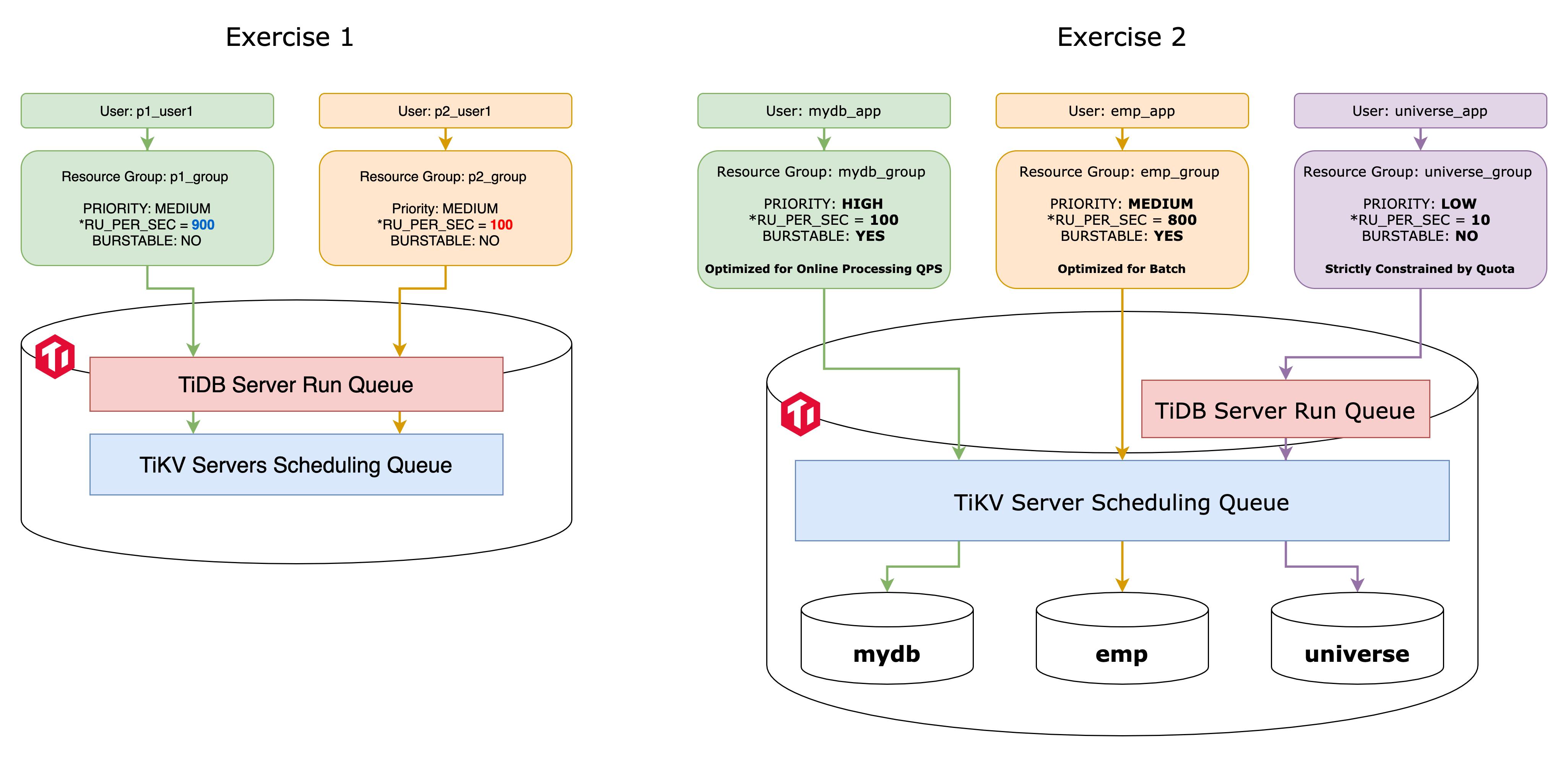
+ By completing these exercises, you will gain experience in working with resource control, which is one of the multi-tenant friendly features of TiDB. This particular feature enables you to implement resource isolation for database users.
+ In Exercise 1, you practice resource control by managing request quotas.
+ In Exercise 2, you practice consolidating data and workloads from multiple MySQL-compatible databases and implement resource isolation and Quality of Service measures among them.
 ### Notes
+ The first LTS to support resource control feature is version **7.1.0**.
+ Some of the steps require that you type commands in two or more different terminal windows. You might find it convenient to launch two or more terminals and keep them open for the duration of the exercises.
+ Your environment may be different with these exercises, including but not limited to `IP address`, `port number`, `username`, `password`, `directory` and the estimated elapsed time for exercise scripts.
+ The `$` sign in your terminal window is an OS prompt.
+ The "`tidb>`" or "`mysql>`" in your terminal window is SQL command prompt.
+ These exercises can be run on a single machine, such as your laptop.
+ These exercises are designed for TiDB Playground cluster and TiDB Serverless. It is crucial to note that the TiDB Playground cluster is not designed for production purposes.
### Assumptions
+ You have `tiup` and `mysql` command line client installed or completed the Exercises: Creating a TiDB Cluster for Testing Purposes.
+ You are using macOS or Linux.
+ You have cloned the [lab repository from GitHub](https://github.com/pingcap/tidb-course-201-lab.git).
## Exercise 1: Managing Request Quota
### Notes
+ The first LTS to support resource control feature is version **7.1.0**.
+ Some of the steps require that you type commands in two or more different terminal windows. You might find it convenient to launch two or more terminals and keep them open for the duration of the exercises.
+ Your environment may be different with these exercises, including but not limited to `IP address`, `port number`, `username`, `password`, `directory` and the estimated elapsed time for exercise scripts.
+ The `$` sign in your terminal window is an OS prompt.
+ The "`tidb>`" or "`mysql>`" in your terminal window is SQL command prompt.
+ These exercises can be run on a single machine, such as your laptop.
+ These exercises are designed for TiDB Playground cluster and TiDB Serverless. It is crucial to note that the TiDB Playground cluster is not designed for production purposes.
### Assumptions
+ You have `tiup` and `mysql` command line client installed or completed the Exercises: Creating a TiDB Cluster for Testing Purposes.
+ You are using macOS or Linux.
+ You have cloned the [lab repository from GitHub](https://github.com/pingcap/tidb-course-201-lab.git).
## Exercise 1: Managing Request Quota
 ### Overview
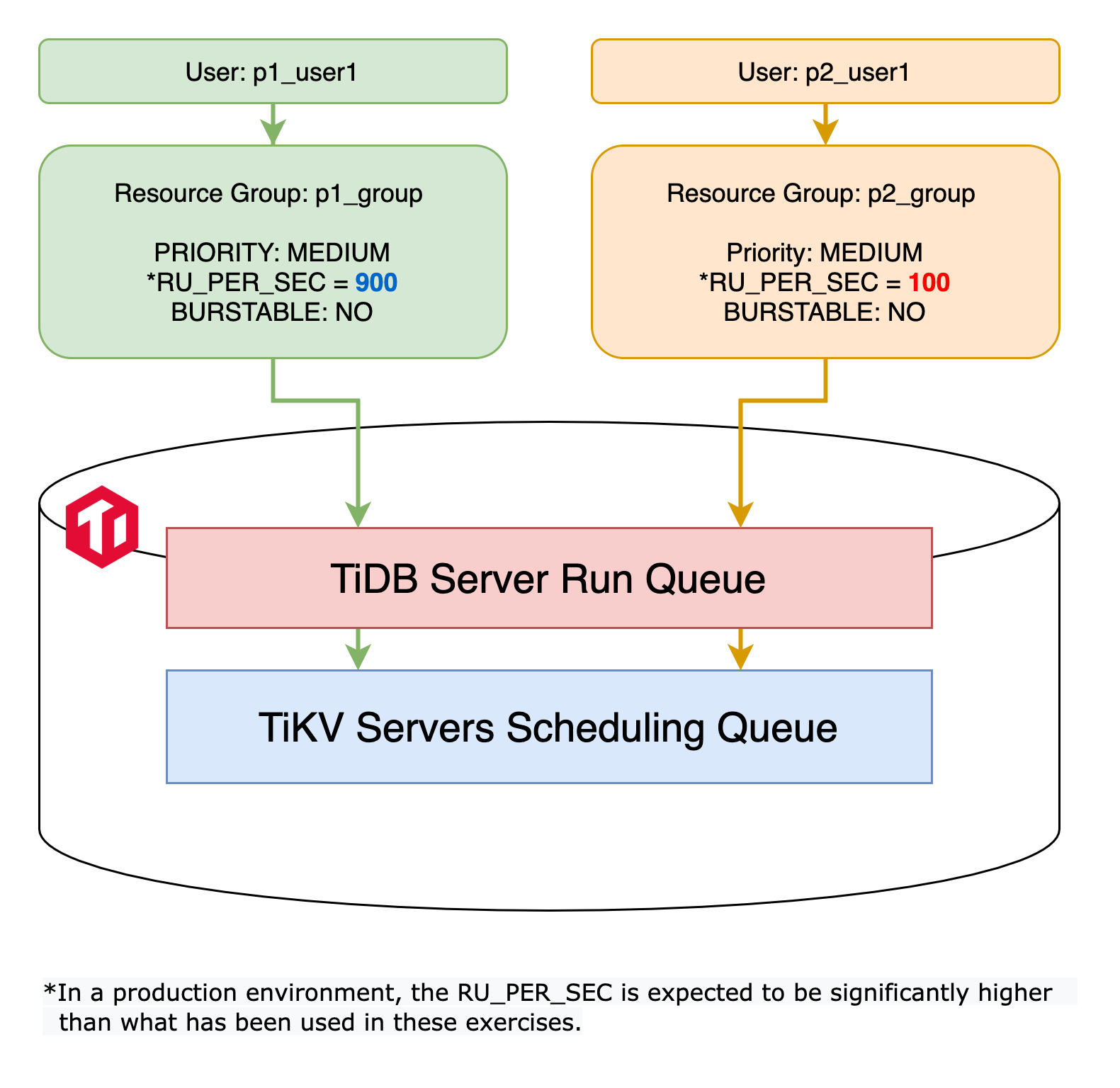
+ In this exercise, you become familiar with the `RU (Request Unit)` concept by using the `RU_PER_SEC` attribute to set up a resource quota for resource groups.
+ You create a TiDB Playground cluster with a new tag `classroom-rc` for this exercise.
### Duration
+ This exercise should take you approximately 10 minutes to complete.
### Tasks
1. Terminate the `classroom` Playground cluster if it is still running.
2. Deploy a new Playground cluster tagged with `classroom-rc` with a specific version of TiDB that supports resource control features.
3. Turn on the resource control feature for TiDB servers.
4. Create new users, new resource groups, and assign those users to the resources groups respectively.
5. Verify that the resource control quota settings had taken effect on user sessions.
### Solution
1. Terminate the `classroom` Playground cluster if it is still running.
Go to the terminal where you previously executed `playground-start.sh`. The screen might look like this:
```
...
Connect TiDB: mysql --comments --host 127.0.0.1 --port 4000 -u root
TiDB Dashboard: http://127.0.0.1:2379/dashboard
Grafana: http://127.0.0.1:56345
```
Press `Ctrl-C` once to abort the entire Playground clusters. All PD, TiKV, TiDB, and TiFlash instances will be terminated:
```
^CPlayground receive signal: interrupt
Got signal interrupt (Component: playground ; PID: 47472)
...
tikv quit
```
2. Under the `tidb-course-201-lab/scripts` directory, run script `playground-start-rc.sh` to deploy a new Playground cluster tagged with `classroom-rc`.
```
$ ./playground-start-rc.sh
```
3. On another terminal, Under the `tidb-course-201-lab/scripts` directory, run script `connect-4000.sh` to log in TiDB as user `root`.
```
$ ./connect-4000.sh
```
4. Verify that the resource control feature is enabled at both TiDB server and TiKV server layers.
```sql
SHOW GLOBAL VARIABLES LIKE 'tidb_enable_resource_control';
SHOW CONFIG WHERE type='tikv' AND name='resource-control.enabled';
```
```
tidb:4000> SHOW GLOBAL VARIABLES LIKE 'tidb_enable_resource_control';
+------------------------------+-------+
| Variable_name | Value |
+------------------------------+-------+
| tidb_enable_resource_control | ON |
+------------------------------+-------+
1 row in set (0.00 sec)
tidb:4000> SHOW CONFIG WHERE type='tikv' AND name='resource-control.enabled';
+------+-----------------+--------------------------+-------+
| Type | Instance | Name | Value |
+------+-----------------+--------------------------+-------+
| tikv | 127.0.0.1:20160 | resource-control.enabled | true |
+------+-----------------+--------------------------+-------+
1 row in set (0.01 sec)
```
5. Create a new resource group named `p1_group` and configure its backfill rate to `900` requests per second (`RU`). Additionally, assign the newly created database user, `p1_user`, to this resource group. The abbreviation `RU`, short for `Request Unit`, is used by TiDB server to manage resource quotas. Check the documentation for more details - [`RU`](https://docs.pingcap.com/tidb/stable/tidb-resource-control#what-is-request-unit-ru).
```sql
DROP RESOURCE GROUP IF EXISTS p1_group;
CREATE RESOURCE GROUP p1_group RU_PER_SEC 900;
CREATE USER p1_user IDENTIFIED BY 'tidb' RESOURCE GROUP p1_group;
GRANT CREATE, DROP, SELECT, UPDATE, INSERT, REFERENCES on *.* to p1_user;
```
```
tidb:4000> DROP RESOURCE GROUP IF EXISTS p1_group;
Query OK, 0 rows affected (0.65 sec)
tidb:4000> CREATE RESOURCE GROUP p1_group RU_PER_SEC 900;
Query OK, 0 rows affected (0.62 sec)
tidb:4000> CREATE USER p1_user IDENTIFIED BY 'tidb' RESOURCE GROUP p1_group;
Query OK, 0 rows affected (0.19 sec)
tidb:4000> GRANT CREATE, DROP, SELECT, UPDATE, INSERT on *.* to p1_user;
Query OK, 0 rows affected (0.08 sec)
```
6. Create a resource group named `p2_group` with the `RU` backfill rate per second `100`. And, assign new database user `p2_user` to it.
```sql
DROP RESOURCE GROUP IF EXISTS p2_group;
CREATE RESOURCE GROUP p2_group RU_PER_SEC 100;
CREATE USER p2_user IDENTIFIED BY 'tidb' RESOURCE GROUP p2_group;
GRANT CREATE, DROP, SELECT, UPDATE, INSERT, REFERENCES on *.* to p2_user;
SELECT name, ru_per_sec, priority, burstable FROM information_schema.resource_groups;
SELECT user, host, user_attributes FROM mysql.user WHERE user LIKE 'p%';
```
```
tidb:4000> DROP RESOURCE GROUP IF EXISTS p2_group;
Query OK, 0 rows affected (0.65 sec)
tidb:4000> CREATE RESOURCE GROUP p2_group RU_PER_SEC 100;
Query OK, 0 rows affected (0.69 sec)
tidb:4000> CREATE USER p2_user IDENTIFIED BY 'tidb' RESOURCE GROUP p2_group;
Query OK, 0 rows affected (0.16 sec)
tidb:4000> GRANT CREATE, DROP, SELECT, UPDATE, INSERT on *.* to p2_user;
Query OK, 0 rows affected (0.12 sec)
tidb:4000> SELECT name, ru_per_sec, priority, burstable FROM information_schema.resource_groups;
+----------+------------+----------+-----------+
| name | ru_per_sec | priority | burstable |
+----------+------------+----------+-----------+
| default | UNLIMITED | MEDIUM | YES |
| p1_group | 900 | MEDIUM | NO |
| p2_group | 100 | MEDIUM | NO |
+----------+------------+----------+-----------+
3 rows in set (0.00 sec)
tidb:4000> SELECT user, host, user_attributes FROM mysql.user WHERE user LIKE 'p%';
+---------+------+--------------------------------+
| user | host | user_attributes |
+---------+------+--------------------------------+
| p1_user | % | {"resource_group": "p1_group"} |
| p2_user | % | {"resource_group": "p2_group"} |
+---------+------+--------------------------------+
2 rows in set (0.03 sec)
tidb:4000> exit;
Bye
$
```
7. Verify that user `p2_user` belonging to the resource group `p2_group` is queued up while executing the sample workload since the `RU` configuration is too low for their requirements in step 5.
Under the `tidb-course-201-lab/scripts` directory, log in the TiDB cluster as user `p2_user`, recreate the `universe` schema again for testing purposes.
```
$ mysql -h 127.0.0.1 -P 4000 -u p2_user -ptidb
mysql>
```
```sql
SELECT USER();
SOURCE universe.sql
```
```
mysql> SELECT USER();
+-------------------+
| user() |
+-------------------+
| p2_user@127.0.0.1 |
+-------------------+
1 row in set (0.00 sec)
mysql> SOURCE universe.sql
Query OK, 0 rows affected (0.00 sec)
...
Records: 2 Duplicates: 0 Warnings: 0
```
Run `SOURCE double-planets.sql` for about **8 times**, observe that when the output prints **`Query OK, 1280 rows affected`**, it should take **more than 3** seconds, and it **might** fail due to the quota limit with error message `ERROR 8252 (HY000): Exceeded resource group quota limitation`. And, the system is not even under heavy load yet, this constrained quality of service for user `p2_user` is expected as a result of resource control. Users in resource group `p2_group` can not consume much CPU and IO resources on TiDB servers, because their `RU` backfill generation rate is only 100 per second.
```sql
SOURCE double-planets.sql
```
```
mysql> SOURCE double-planets.sql
Query OK, 1280 rows affected (4.53 sec)
Records: 1280 Duplicates: 0 Warnings: 0
```
```
mysql> exit;
Bye
$
```
8. Verify that user `p1_user` belonging to the resource group `p1_group` can run the workload with better performance, under the same conditions except the resource group settings, because the `RU` setting is sufficient in step 4.
Log in the TiDB cluster as user `p1_user`, recreate the `universe` schema again for testing purposes.
```
$ mysql -h 127.0.0.1 -P 4000 -u p1_user -ptidb
mysql>
```
```sql
SELECT USER();
SOURCE universe.sql
```
```
mysql> SELECT USER();
+--------------------+
| user() |
+--------------------+
| p1_user@127.0.0.1 |
+--------------------+
1 row in set (0.00 sec)
mysql> SOURCE universe.sql
Query OK, 0 rows affected (0.00 sec)
...
Records: 2 Duplicates: 0 Warnings: 0
```
Run `SOURCE double-planets.sql` for about **8 times** again, observe that when the output prints **`Query OK, 1280 rows affected`**, it should take **less than 1** second to execute the SQL statement to complete. The good performance for user `p1_user` is also expected as a result of resource control.
```sql
SOURCE double-planets.sql
```
```
mysql> SOURCE double-planets.sql
Query OK, 1280 rows affected (0.41 sec)
Records: 1280 Duplicates: 0 Warnings: 0
```
```
mysql> exit;
Bye
$
```
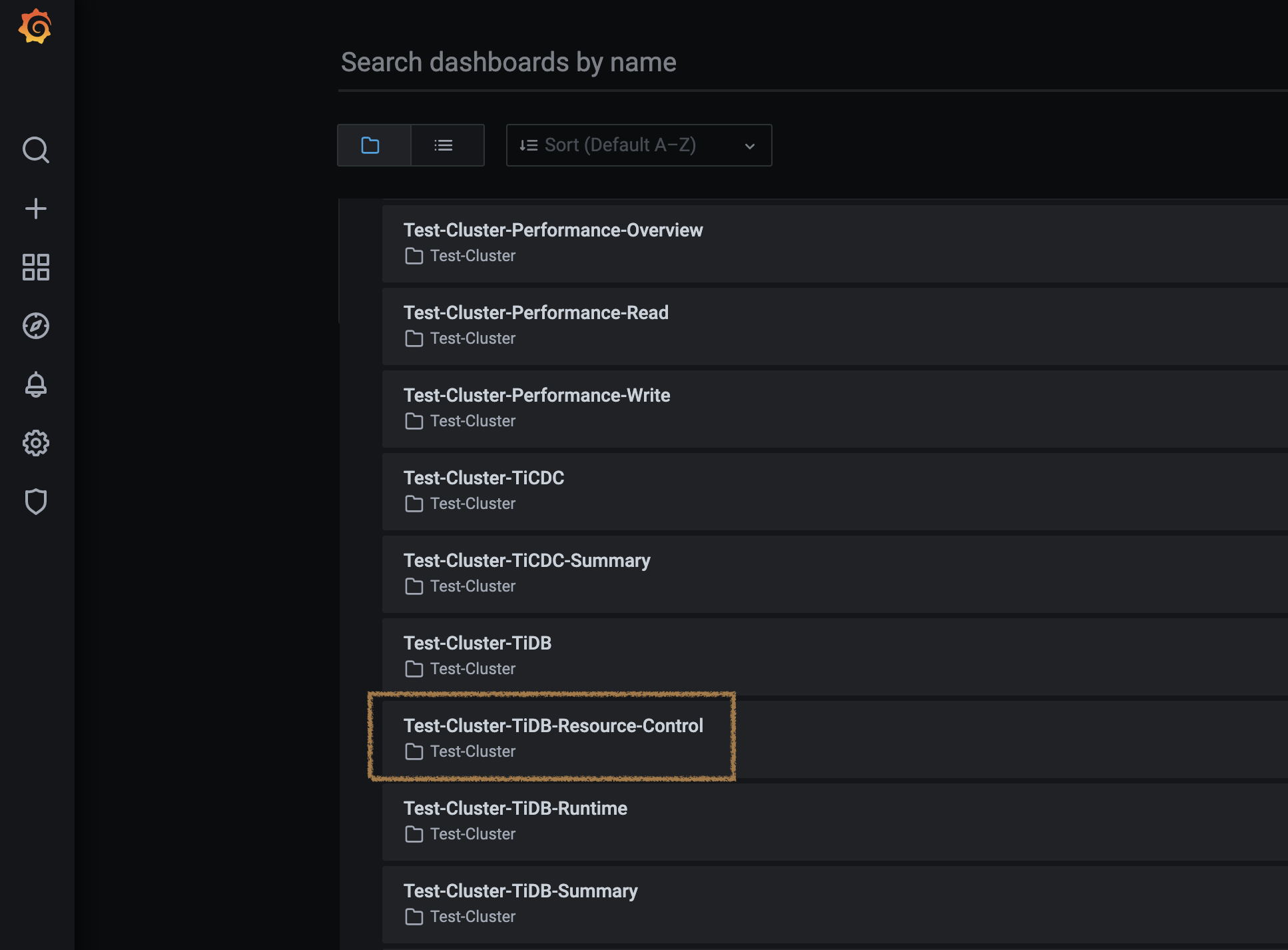
9. To get an understanding of the `RU` usage, go to `TiDB-Resource-Control` Grafana dashboard. Open `http://127.0.0.1:3000/`, provide username `admin` and password `admin` (you will be prompted to change the password). Find and click the `Test-Cluster-TiDB-Resource-Control` dashboard.
### Overview
+ In this exercise, you become familiar with the `RU (Request Unit)` concept by using the `RU_PER_SEC` attribute to set up a resource quota for resource groups.
+ You create a TiDB Playground cluster with a new tag `classroom-rc` for this exercise.
### Duration
+ This exercise should take you approximately 10 minutes to complete.
### Tasks
1. Terminate the `classroom` Playground cluster if it is still running.
2. Deploy a new Playground cluster tagged with `classroom-rc` with a specific version of TiDB that supports resource control features.
3. Turn on the resource control feature for TiDB servers.
4. Create new users, new resource groups, and assign those users to the resources groups respectively.
5. Verify that the resource control quota settings had taken effect on user sessions.
### Solution
1. Terminate the `classroom` Playground cluster if it is still running.
Go to the terminal where you previously executed `playground-start.sh`. The screen might look like this:
```
...
Connect TiDB: mysql --comments --host 127.0.0.1 --port 4000 -u root
TiDB Dashboard: http://127.0.0.1:2379/dashboard
Grafana: http://127.0.0.1:56345
```
Press `Ctrl-C` once to abort the entire Playground clusters. All PD, TiKV, TiDB, and TiFlash instances will be terminated:
```
^CPlayground receive signal: interrupt
Got signal interrupt (Component: playground ; PID: 47472)
...
tikv quit
```
2. Under the `tidb-course-201-lab/scripts` directory, run script `playground-start-rc.sh` to deploy a new Playground cluster tagged with `classroom-rc`.
```
$ ./playground-start-rc.sh
```
3. On another terminal, Under the `tidb-course-201-lab/scripts` directory, run script `connect-4000.sh` to log in TiDB as user `root`.
```
$ ./connect-4000.sh
```
4. Verify that the resource control feature is enabled at both TiDB server and TiKV server layers.
```sql
SHOW GLOBAL VARIABLES LIKE 'tidb_enable_resource_control';
SHOW CONFIG WHERE type='tikv' AND name='resource-control.enabled';
```
```
tidb:4000> SHOW GLOBAL VARIABLES LIKE 'tidb_enable_resource_control';
+------------------------------+-------+
| Variable_name | Value |
+------------------------------+-------+
| tidb_enable_resource_control | ON |
+------------------------------+-------+
1 row in set (0.00 sec)
tidb:4000> SHOW CONFIG WHERE type='tikv' AND name='resource-control.enabled';
+------+-----------------+--------------------------+-------+
| Type | Instance | Name | Value |
+------+-----------------+--------------------------+-------+
| tikv | 127.0.0.1:20160 | resource-control.enabled | true |
+------+-----------------+--------------------------+-------+
1 row in set (0.01 sec)
```
5. Create a new resource group named `p1_group` and configure its backfill rate to `900` requests per second (`RU`). Additionally, assign the newly created database user, `p1_user`, to this resource group. The abbreviation `RU`, short for `Request Unit`, is used by TiDB server to manage resource quotas. Check the documentation for more details - [`RU`](https://docs.pingcap.com/tidb/stable/tidb-resource-control#what-is-request-unit-ru).
```sql
DROP RESOURCE GROUP IF EXISTS p1_group;
CREATE RESOURCE GROUP p1_group RU_PER_SEC 900;
CREATE USER p1_user IDENTIFIED BY 'tidb' RESOURCE GROUP p1_group;
GRANT CREATE, DROP, SELECT, UPDATE, INSERT, REFERENCES on *.* to p1_user;
```
```
tidb:4000> DROP RESOURCE GROUP IF EXISTS p1_group;
Query OK, 0 rows affected (0.65 sec)
tidb:4000> CREATE RESOURCE GROUP p1_group RU_PER_SEC 900;
Query OK, 0 rows affected (0.62 sec)
tidb:4000> CREATE USER p1_user IDENTIFIED BY 'tidb' RESOURCE GROUP p1_group;
Query OK, 0 rows affected (0.19 sec)
tidb:4000> GRANT CREATE, DROP, SELECT, UPDATE, INSERT on *.* to p1_user;
Query OK, 0 rows affected (0.08 sec)
```
6. Create a resource group named `p2_group` with the `RU` backfill rate per second `100`. And, assign new database user `p2_user` to it.
```sql
DROP RESOURCE GROUP IF EXISTS p2_group;
CREATE RESOURCE GROUP p2_group RU_PER_SEC 100;
CREATE USER p2_user IDENTIFIED BY 'tidb' RESOURCE GROUP p2_group;
GRANT CREATE, DROP, SELECT, UPDATE, INSERT, REFERENCES on *.* to p2_user;
SELECT name, ru_per_sec, priority, burstable FROM information_schema.resource_groups;
SELECT user, host, user_attributes FROM mysql.user WHERE user LIKE 'p%';
```
```
tidb:4000> DROP RESOURCE GROUP IF EXISTS p2_group;
Query OK, 0 rows affected (0.65 sec)
tidb:4000> CREATE RESOURCE GROUP p2_group RU_PER_SEC 100;
Query OK, 0 rows affected (0.69 sec)
tidb:4000> CREATE USER p2_user IDENTIFIED BY 'tidb' RESOURCE GROUP p2_group;
Query OK, 0 rows affected (0.16 sec)
tidb:4000> GRANT CREATE, DROP, SELECT, UPDATE, INSERT on *.* to p2_user;
Query OK, 0 rows affected (0.12 sec)
tidb:4000> SELECT name, ru_per_sec, priority, burstable FROM information_schema.resource_groups;
+----------+------------+----------+-----------+
| name | ru_per_sec | priority | burstable |
+----------+------------+----------+-----------+
| default | UNLIMITED | MEDIUM | YES |
| p1_group | 900 | MEDIUM | NO |
| p2_group | 100 | MEDIUM | NO |
+----------+------------+----------+-----------+
3 rows in set (0.00 sec)
tidb:4000> SELECT user, host, user_attributes FROM mysql.user WHERE user LIKE 'p%';
+---------+------+--------------------------------+
| user | host | user_attributes |
+---------+------+--------------------------------+
| p1_user | % | {"resource_group": "p1_group"} |
| p2_user | % | {"resource_group": "p2_group"} |
+---------+------+--------------------------------+
2 rows in set (0.03 sec)
tidb:4000> exit;
Bye
$
```
7. Verify that user `p2_user` belonging to the resource group `p2_group` is queued up while executing the sample workload since the `RU` configuration is too low for their requirements in step 5.
Under the `tidb-course-201-lab/scripts` directory, log in the TiDB cluster as user `p2_user`, recreate the `universe` schema again for testing purposes.
```
$ mysql -h 127.0.0.1 -P 4000 -u p2_user -ptidb
mysql>
```
```sql
SELECT USER();
SOURCE universe.sql
```
```
mysql> SELECT USER();
+-------------------+
| user() |
+-------------------+
| p2_user@127.0.0.1 |
+-------------------+
1 row in set (0.00 sec)
mysql> SOURCE universe.sql
Query OK, 0 rows affected (0.00 sec)
...
Records: 2 Duplicates: 0 Warnings: 0
```
Run `SOURCE double-planets.sql` for about **8 times**, observe that when the output prints **`Query OK, 1280 rows affected`**, it should take **more than 3** seconds, and it **might** fail due to the quota limit with error message `ERROR 8252 (HY000): Exceeded resource group quota limitation`. And, the system is not even under heavy load yet, this constrained quality of service for user `p2_user` is expected as a result of resource control. Users in resource group `p2_group` can not consume much CPU and IO resources on TiDB servers, because their `RU` backfill generation rate is only 100 per second.
```sql
SOURCE double-planets.sql
```
```
mysql> SOURCE double-planets.sql
Query OK, 1280 rows affected (4.53 sec)
Records: 1280 Duplicates: 0 Warnings: 0
```
```
mysql> exit;
Bye
$
```
8. Verify that user `p1_user` belonging to the resource group `p1_group` can run the workload with better performance, under the same conditions except the resource group settings, because the `RU` setting is sufficient in step 4.
Log in the TiDB cluster as user `p1_user`, recreate the `universe` schema again for testing purposes.
```
$ mysql -h 127.0.0.1 -P 4000 -u p1_user -ptidb
mysql>
```
```sql
SELECT USER();
SOURCE universe.sql
```
```
mysql> SELECT USER();
+--------------------+
| user() |
+--------------------+
| p1_user@127.0.0.1 |
+--------------------+
1 row in set (0.00 sec)
mysql> SOURCE universe.sql
Query OK, 0 rows affected (0.00 sec)
...
Records: 2 Duplicates: 0 Warnings: 0
```
Run `SOURCE double-planets.sql` for about **8 times** again, observe that when the output prints **`Query OK, 1280 rows affected`**, it should take **less than 1** second to execute the SQL statement to complete. The good performance for user `p1_user` is also expected as a result of resource control.
```sql
SOURCE double-planets.sql
```
```
mysql> SOURCE double-planets.sql
Query OK, 1280 rows affected (0.41 sec)
Records: 1280 Duplicates: 0 Warnings: 0
```
```
mysql> exit;
Bye
$
```
9. To get an understanding of the `RU` usage, go to `TiDB-Resource-Control` Grafana dashboard. Open `http://127.0.0.1:3000/`, provide username `admin` and password `admin` (you will be prompted to change the password). Find and click the `Test-Cluster-TiDB-Resource-Control` dashboard.
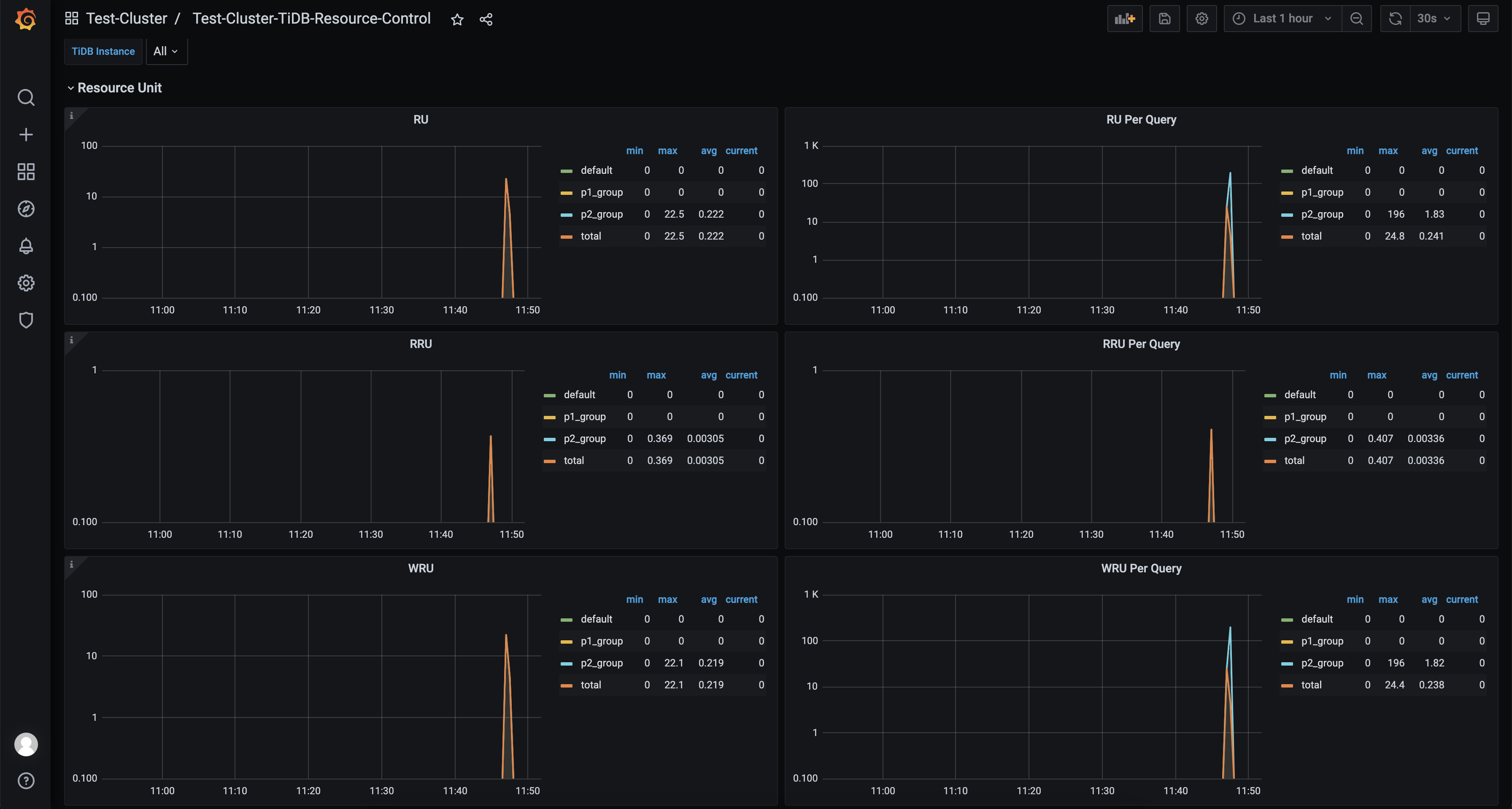
 10. On the dashboard, statistics related to `RU` are broken down by resource groups. In addition to the resource groups you have created, `p1_group` and `p2_group`, you may also notice a default resource group. These statistics can help you estimate the reasonable `RU` for your workloads.
 11. Additionally, use the following command to get the estimated maximum capacity of the system in terms of request units per second.
Login as `root`.
```
$ ./connect-4000.sh
```
Run `CALIBRATE` statement.
```sql
CALIBRATE RESOURCE;
```
```
tidb:4000> CALIBRATE RESOURCE;
+-------+
| QUOTA |
+-------+
| 45712 |
+-------+
1 row in set (0.02 sec)
```
## Exercise 2: Consolidating Databases to TiDB and Enforcing the QoS Policies for Mixed Workload
11. Additionally, use the following command to get the estimated maximum capacity of the system in terms of request units per second.
Login as `root`.
```
$ ./connect-4000.sh
```
Run `CALIBRATE` statement.
```sql
CALIBRATE RESOURCE;
```
```
tidb:4000> CALIBRATE RESOURCE;
+-------+
| QUOTA |
+-------+
| 45712 |
+-------+
1 row in set (0.02 sec)
```
## Exercise 2: Consolidating Databases to TiDB and Enforcing the QoS Policies for Mixed Workload
 ### Overview
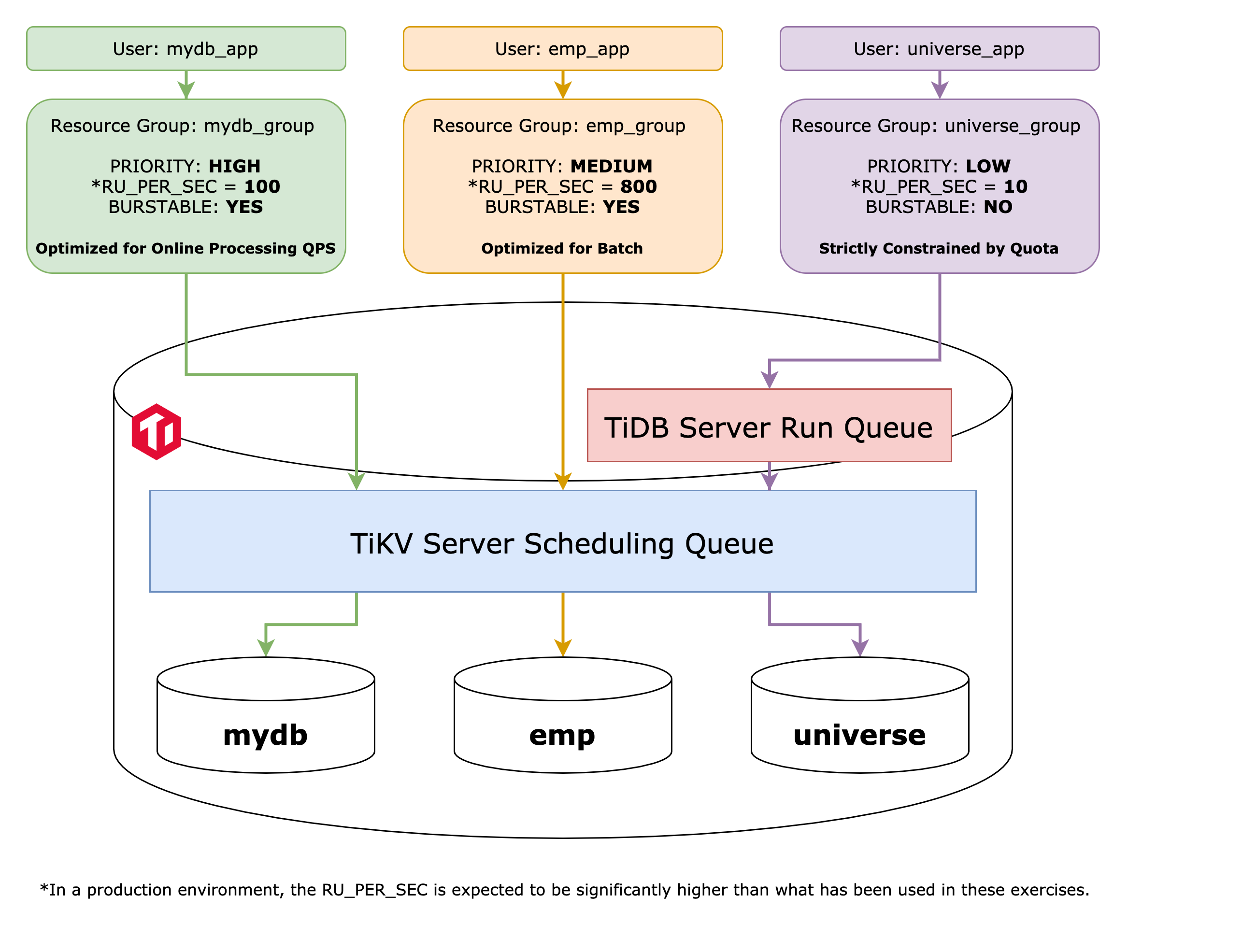
+ In this exercise, you will be consolidating three databases from MySQL-compatible sources that serve different businesses. These databases include `mydb`, `emp`, and `universe`.
+ For the `mydb`, `emp`, and `universe` databases, there are three dummy workload runners available. Depending on the level of resource consumption, the most lightweight runner is for `universe` and has the quickest completion time, while the runner for `mydb` is the slowest. The runner for `emp` falls in the middle.
+ You set up resource group settings for databases `mydb`, `emp`, and `universe` to support their workload patterns, and reflect the varying priorities as per the business perspectives.
+ In addition to `RU_PER_SEC`, you practice with two more attributes of the resource group, which are, `PRIORITY` and `BURSTABLE`.
### Notes
+ All test run results used in this exercise are for demonstrating the skills of using Resource Control through single node TiUP Playground, and do not represent any benchmark. If you wish to conduct production-level testing, please visit this [link](https://www.pingcap.com/demo/?utm_source=edu&utm_medium=referral&utm_campaign=201.3.E14) to submit a Demo request.
### Duration
+ This exercise should take you approximately 10 minutes to complete.
### Tasks
1. Migrate three databases into TiDB, `mydb`, `emp` and `universe`.
2. Create three database users who would have access to three databases, namely `mydb_app`, `emp_app`, and `universe_app`.
3. Apply the resource control policies to adhere to the business requirements by assigning the users to specific resource groups.
### Solution
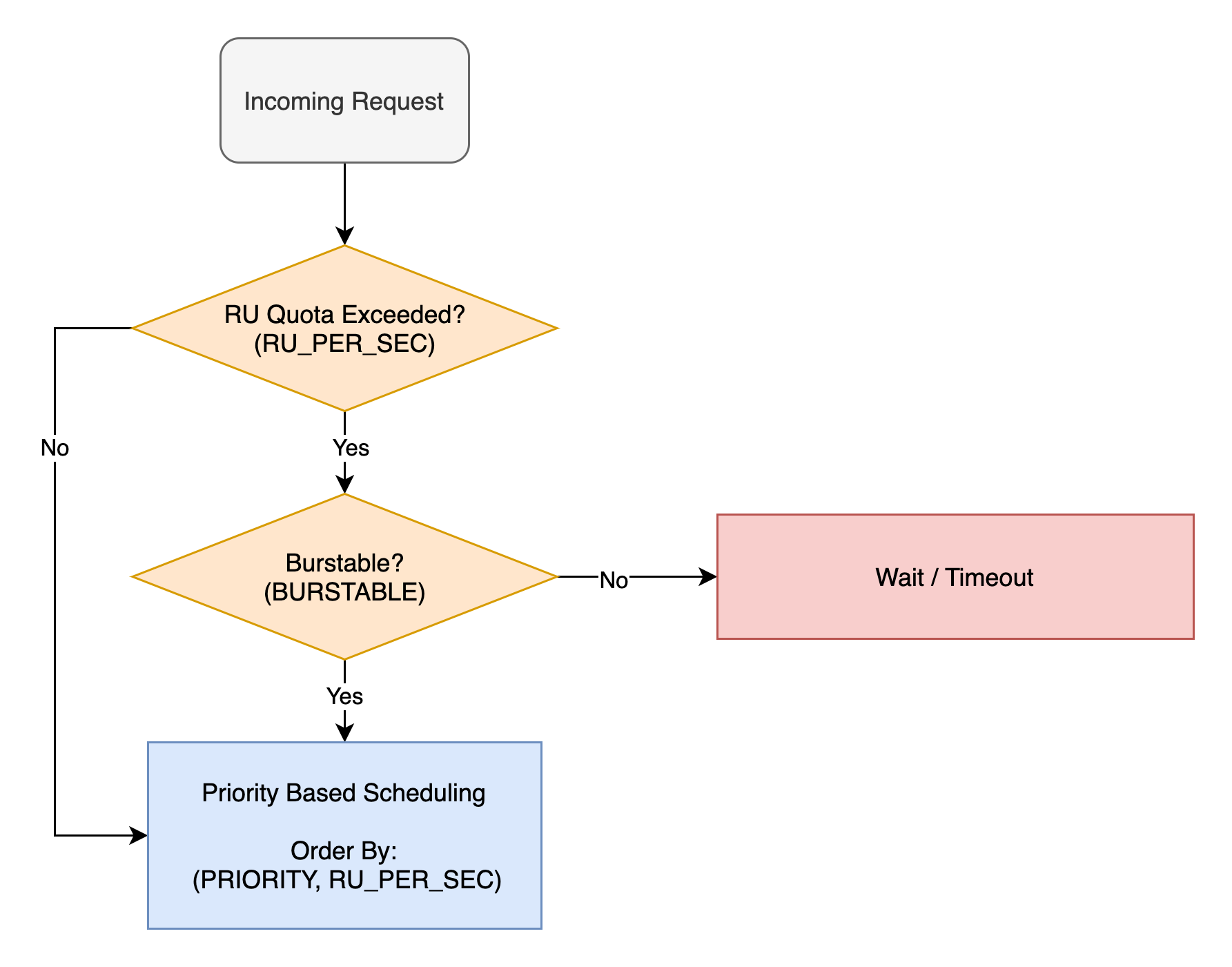
1. To achieve the goal of this exercise, we will use three resource group attributes in combination which are `RU_PER_SEC`, `BURSTABLE` and `PRIORITY`. The resource control logic operates as follows.
### Overview
+ In this exercise, you will be consolidating three databases from MySQL-compatible sources that serve different businesses. These databases include `mydb`, `emp`, and `universe`.
+ For the `mydb`, `emp`, and `universe` databases, there are three dummy workload runners available. Depending on the level of resource consumption, the most lightweight runner is for `universe` and has the quickest completion time, while the runner for `mydb` is the slowest. The runner for `emp` falls in the middle.
+ You set up resource group settings for databases `mydb`, `emp`, and `universe` to support their workload patterns, and reflect the varying priorities as per the business perspectives.
+ In addition to `RU_PER_SEC`, you practice with two more attributes of the resource group, which are, `PRIORITY` and `BURSTABLE`.
### Notes
+ All test run results used in this exercise are for demonstrating the skills of using Resource Control through single node TiUP Playground, and do not represent any benchmark. If you wish to conduct production-level testing, please visit this [link](https://www.pingcap.com/demo/?utm_source=edu&utm_medium=referral&utm_campaign=201.3.E14) to submit a Demo request.
### Duration
+ This exercise should take you approximately 10 minutes to complete.
### Tasks
1. Migrate three databases into TiDB, `mydb`, `emp` and `universe`.
2. Create three database users who would have access to three databases, namely `mydb_app`, `emp_app`, and `universe_app`.
3. Apply the resource control policies to adhere to the business requirements by assigning the users to specific resource groups.
### Solution
1. To achieve the goal of this exercise, we will use three resource group attributes in combination which are `RU_PER_SEC`, `BURSTABLE` and `PRIORITY`. The resource control logic operates as follows.
 2. Make sure that the resource control feature at both TiDB and TiKV server layers are turned on.
```sql
SHOW GLOBAL VARIABLES LIKE 'tidb_enable_resource_control';
SHOW CONFIG WHERE type='tikv' AND name='resource-control.enabled';
```
```
tidb:4000> SHOW GLOBAL VARIABLES LIKE 'tidb_enable_resource_control';
+------------------------------+-------+
| Variable_name | Value |
+------------------------------+-------+
| tidb_enable_resource_control | ON |
+------------------------------+-------+
1 row in set (0.00 sec)
tidb:4000> SHOW CONFIG WHERE type='tikv' AND name='resource-control.enabled';
+------+-----------------+--------------------------+-------+
| Type | Instance | Name | Value |
+------+-----------------+--------------------------+-------+
| tikv | 127.0.0.1:20160 | resource-control.enabled | true |
+------+-----------------+--------------------------+-------+
1 row in set (0.01 sec)
```
3. Create a new user named `imp` for data importing tasks.
```sql
CREATE USER imp@'%' IDENTIFIED BY 'q1w2e3R4_';
GRANT ALL PRIVILEGES ON *.* TO imp@'%';
```
```
tidb:4000> CREATE USER imp@'%' IDENTIFIED BY 'q1w2e3R4_';
Query OK, 0 rows affected (0.06 sec)
tidb:4000> GRANT ALL PRIVILEGES ON *.* TO imp@'%';
Query OK, 0 rows affected (0.05 sec)
```
```
tidb:4000> EXIT;
Bye
```
4. Import `mydb` and `emp` databases from dump files. And import `universe` database from SQL script.
Change the working directory to `misc/`.
```
$ cd tidb-course-201-lab/scripts/misc/
```
Import `mydb` database into TiDB.
```
$ rm -f /tmp/tidb_lightning_checkpoint.pb
$ tiup tidb-lightning -config lightning-mydb.toml
```
Import `emp` database into TiDB.
```
$ rm -f /tmp/tidb_lightning_checkpoint.pb
$ tiup tidb-lightning -config lightning-emp.toml
```
Change the working directory back to `scripts/`, and import the `universe` database into TiDB.
```
$ cd -
$ ./connect-4000.sh
```
```sql
SOURCE universe.sql
```
```
tidb:4000> SOURCE universe.sql
Query OK, 0 rows affected (0.00 sec)
Query OK, 0 rows affected (0.00 sec)
Query OK, 0 rows affected (0.24 sec)
Database changed
...
```
RUN `SHOW DATABASES` to verify that three databases, `mydb`, `emp` and `universe` had been imported.
```sql
SHOW DATABASES;
```
```
tidb:4000> SHOW DATABASES;
+--------------------+
| Database |
+--------------------+
| INFORMATION_SCHEMA |
| METRICS_SCHEMA |
| PERFORMANCE_SCHEMA |
| emp |
| mydb |
| mysql |
| test |
| universe |
+--------------------+
8 rows in set (0.00 sec)
```
5. The `universe` database exclusively supports an outdated internal application and is not essential to business operations in any way. In the event of system overload, the application's priority should be deemed as **low**, and it is strictly prohibited to consume all available system resources while accessing the database.
Create a user for `universe` database application.
```sql
CREATE USER universe_app IDENTIFIED BY 'tidb';
GRANT ALL ON universe.* TO universe_app;
```
```
tidb:4000> CREATE USER universe_app IDENTIFIED BY 'tidb';
Query OK, 0 rows affected (0.05 sec)
tidb:4000> GRANT ALL ON universe.* TO universe_app;
Query OK, 0 rows affected (0.06 sec)
```
Create a resource group named `universe_group`. To remain in the low priority class during system overload, set the `PRIORITY` to `LOW`. To prevent the consumption of the request quota from overflowing, do NOT declare `BURSTABLE`. In the example given for our Playground, the estimated `RU_PER_SEC` value is `10` for the `universe` application.
```sql
CREATE RESOURCE GROUP universe_group RU_PER_SEC=10 PRIORITY=LOW;
ALTER USER universe_app RESOURCE GROUP universe_group;
```
```
tidb:4000> CREATE RESOURCE GROUP universe_group RU_PER_SEC=10 PRIORITY=LOW;
ALTER USER universe_app RESOURCE GROUP universe_group;
Query OK, 0 rows affected (0.46 sec)
tidb:4000> ALTER USER universe_app RESOURCE GROUP universe_group;
Query OK, 0 rows affected (0.14 sec)
```
6. The `mydb` database is primarily intended for online business and experiences a high volume of QPS. The `mydb` application is allowed to exhaust all available system resources during periods of overload. In the example given for our Playground, the estimated `RU_PER_SEC` value is `100` for the `mydb` application.
Create a user for `mydb` database application.
```sql
CREATE USER mydb_app IDENTIFIED BY 'tidb';
GRANT ALL ON mydb.* TO mydb_app;
```
```
tidb:4000> CREATE USER mydb_app IDENTIFIED BY 'tidb';
Query OK, 0 rows affected (0.05 sec)
tidb:4000> GRANT ALL ON mydb.* TO mydb_app;
Query OK, 0 rows affected (0.06 sec)
```
Create a resource group named `mydb_group`. Set the `PRIORITY` to `HIGH` to ensure that the request coming from `mydb_app` is always scheduled first. To allow the consumption of the request quota from overflowing, declare `BURSTABLE`. In the example given for our Playground, the estimated `RU_PER_SEC` value is `100` for the `mydb` application.
```sql
CREATE RESOURCE GROUP mydb_group RU_PER_SEC=100 PRIORITY=HIGH BURSTABLE;
ALTER USER mydb_app RESOURCE GROUP mydb_group;
```
```
tidb:4000> CREATE RESOURCE GROUP mydb_group RU_PER_SEC=100 PRIORITY=HIGH BURSTABLE;
Query OK, 0 rows affected (0.46 sec)
tidb:4000> ALTER USER mydb_app RESOURCE GROUP mydb_group;
Query OK, 0 rows affected (0.05 sec)
```
7. The `emp` database is used for internal ERP and will frequently run batch jobs. It should not have any detrimental impact on the QPS of the `mydb` application during these batch jobs. The `mydb` application is allowed to exhaust all available system resources during periods of overload. In the example given for our Playground, the estimated `RU_PER_SEC` value is `800` for the `emp` application.
Create a user for `emp` database application.
```sql
CREATE USER emp_app IDENTIFIED BY 'tidb';
GRANT ALL ON emp.* TO emp_app;
```
```
tidb:4000> CREATE USER emp_app IDENTIFIED BY 'tidb';
Query OK, 0 rows affected (0.05 sec)
tidb:4000> GRANT ALL ON emp.* TO emp_app;
Query OK, 0 rows affected (0.06 sec)
```
Create a resource group named `emp_group`. To minimize the impact of `emp` application batch jobs on the `mydb` application, set the `PRIORITY` to `MEDIUM`. To allow the consumption of the request quota from overflowing, declare `BURSTABLE`. In the example given for our Playground, the estimated `RU_PER_SEC` value is `800` for the `emp` application.
```sql
CREATE RESOURCE GROUP emp_group RU_PER_SEC=800 PRIORITY=MEDIUM BURSTABLE;
ALTER USER emp_app RESOURCE GROUP emp_group;
```
```
tidb:4000> CREATE RESOURCE GROUP emp_group RU_PER_SEC=800 PRIORITY=MEDIUM BURSTABLE;
Query OK, 0 rows affected (0.68 sec)
tidb:4000> ALTER USER emp_app RESOURCE GROUP emp_group;
Query OK, 0 rows affected (0.06 sec)
```
8. Verify that the resource control settings for database users and resource groups meet the expected criteria. User `universe_app` has the most restricted resource quota since it is not allowed to burst. Users `mydb_app` and `emp_app` are burstable, so they can consume all available resources when the system is overloaded. According to the priority settings, requests from `mydb_app` are always scheduled first when the system is overloaded, regardless of the request quota settings, which is `RU_PER_SEC`.
```sql
SELECT u.user, u.host, u.user_attributes, r.name, r.ru_per_sec, r.burstable, r.priority
FROM mysql.user u JOIN information_schema.resource_groups r
ON r.name = u.user_attributes ->> '$.resource_group'
WHERE u.user IN ('universe_app','emp_app','mydb_app')
ORDER BY r.ru_per_sec DESC, r.burstable DESC;
```
```
tidb:4000> SELECT u.user, u.host, u.user_attributes, r.name, r.ru_per_sec, r.burstable, r.priority
-> FROM mysql.user u JOIN information_schema.resource_groups r
-> ON r.name = u.user_attributes ->> '$.resource_group'
-> WHERE u.user IN ('universe_app','emp_app','mydb_app')
-> ORDER BY r.ru_per_sec DESC, r.burstable DESC;
+--------------+------+--------------------------------------+----------------+------------+-----------+----------+
| user | host | user_attributes | name | ru_per_sec | burstable | priority |
+--------------+------+--------------------------------------+----------------+------------+-----------+----------+
| emp_app | % | {"resource_group": "emp_group"} | emp_group | 800 | YES | MEDIUM |
| mydb_app | % | {"resource_group": "mydb_group"} | mydb_group | 100 | YES | HIGH |
| universe_app | % | {"resource_group": "universe_group"} | universe_group | 10 | NO | LOW |
+--------------+------+--------------------------------------+----------------+------------+-----------+----------+
3 rows in set (0.00 sec)
```
9. Our exercise has to stop here in the TiDB Playground Cluster environment. It will be a challenge for your laptop or single node Linux to demonstrate the combination of `PRIORITY` and `BURSTABLE` due to the high system load required. Therefore, if you require a production-level test or demo, kindly click [here](https://www.pingcap.com/demo/?utm_source=edu&utm_medium=referral&utm_campaign=201.3.E14) to apply for it.
## Conclusion
Note that TiDB is a PB level distributed RDBMS that supports strong consistency transactions. And, by gaining experience in using TiDB's resource control feature through these exercises, you can significantly simplify maintenance tasks by consolidating multiple databases from MySQL-compatible data sources into a single TiDB cluster. By following the best practices as you practiced in these exercises, you can effectively prioritize resource groups in TiDB, ensuring that critical workloads receive the resources they need, while less critical workloads are allocated resources as needed. By balancing priority and quota limits, monitoring resource usage, and adjusting priorities as needed, you can optimize resource allocation and improve overall system performance.
## End of Exercises
2. Make sure that the resource control feature at both TiDB and TiKV server layers are turned on.
```sql
SHOW GLOBAL VARIABLES LIKE 'tidb_enable_resource_control';
SHOW CONFIG WHERE type='tikv' AND name='resource-control.enabled';
```
```
tidb:4000> SHOW GLOBAL VARIABLES LIKE 'tidb_enable_resource_control';
+------------------------------+-------+
| Variable_name | Value |
+------------------------------+-------+
| tidb_enable_resource_control | ON |
+------------------------------+-------+
1 row in set (0.00 sec)
tidb:4000> SHOW CONFIG WHERE type='tikv' AND name='resource-control.enabled';
+------+-----------------+--------------------------+-------+
| Type | Instance | Name | Value |
+------+-----------------+--------------------------+-------+
| tikv | 127.0.0.1:20160 | resource-control.enabled | true |
+------+-----------------+--------------------------+-------+
1 row in set (0.01 sec)
```
3. Create a new user named `imp` for data importing tasks.
```sql
CREATE USER imp@'%' IDENTIFIED BY 'q1w2e3R4_';
GRANT ALL PRIVILEGES ON *.* TO imp@'%';
```
```
tidb:4000> CREATE USER imp@'%' IDENTIFIED BY 'q1w2e3R4_';
Query OK, 0 rows affected (0.06 sec)
tidb:4000> GRANT ALL PRIVILEGES ON *.* TO imp@'%';
Query OK, 0 rows affected (0.05 sec)
```
```
tidb:4000> EXIT;
Bye
```
4. Import `mydb` and `emp` databases from dump files. And import `universe` database from SQL script.
Change the working directory to `misc/`.
```
$ cd tidb-course-201-lab/scripts/misc/
```
Import `mydb` database into TiDB.
```
$ rm -f /tmp/tidb_lightning_checkpoint.pb
$ tiup tidb-lightning -config lightning-mydb.toml
```
Import `emp` database into TiDB.
```
$ rm -f /tmp/tidb_lightning_checkpoint.pb
$ tiup tidb-lightning -config lightning-emp.toml
```
Change the working directory back to `scripts/`, and import the `universe` database into TiDB.
```
$ cd -
$ ./connect-4000.sh
```
```sql
SOURCE universe.sql
```
```
tidb:4000> SOURCE universe.sql
Query OK, 0 rows affected (0.00 sec)
Query OK, 0 rows affected (0.00 sec)
Query OK, 0 rows affected (0.24 sec)
Database changed
...
```
RUN `SHOW DATABASES` to verify that three databases, `mydb`, `emp` and `universe` had been imported.
```sql
SHOW DATABASES;
```
```
tidb:4000> SHOW DATABASES;
+--------------------+
| Database |
+--------------------+
| INFORMATION_SCHEMA |
| METRICS_SCHEMA |
| PERFORMANCE_SCHEMA |
| emp |
| mydb |
| mysql |
| test |
| universe |
+--------------------+
8 rows in set (0.00 sec)
```
5. The `universe` database exclusively supports an outdated internal application and is not essential to business operations in any way. In the event of system overload, the application's priority should be deemed as **low**, and it is strictly prohibited to consume all available system resources while accessing the database.
Create a user for `universe` database application.
```sql
CREATE USER universe_app IDENTIFIED BY 'tidb';
GRANT ALL ON universe.* TO universe_app;
```
```
tidb:4000> CREATE USER universe_app IDENTIFIED BY 'tidb';
Query OK, 0 rows affected (0.05 sec)
tidb:4000> GRANT ALL ON universe.* TO universe_app;
Query OK, 0 rows affected (0.06 sec)
```
Create a resource group named `universe_group`. To remain in the low priority class during system overload, set the `PRIORITY` to `LOW`. To prevent the consumption of the request quota from overflowing, do NOT declare `BURSTABLE`. In the example given for our Playground, the estimated `RU_PER_SEC` value is `10` for the `universe` application.
```sql
CREATE RESOURCE GROUP universe_group RU_PER_SEC=10 PRIORITY=LOW;
ALTER USER universe_app RESOURCE GROUP universe_group;
```
```
tidb:4000> CREATE RESOURCE GROUP universe_group RU_PER_SEC=10 PRIORITY=LOW;
ALTER USER universe_app RESOURCE GROUP universe_group;
Query OK, 0 rows affected (0.46 sec)
tidb:4000> ALTER USER universe_app RESOURCE GROUP universe_group;
Query OK, 0 rows affected (0.14 sec)
```
6. The `mydb` database is primarily intended for online business and experiences a high volume of QPS. The `mydb` application is allowed to exhaust all available system resources during periods of overload. In the example given for our Playground, the estimated `RU_PER_SEC` value is `100` for the `mydb` application.
Create a user for `mydb` database application.
```sql
CREATE USER mydb_app IDENTIFIED BY 'tidb';
GRANT ALL ON mydb.* TO mydb_app;
```
```
tidb:4000> CREATE USER mydb_app IDENTIFIED BY 'tidb';
Query OK, 0 rows affected (0.05 sec)
tidb:4000> GRANT ALL ON mydb.* TO mydb_app;
Query OK, 0 rows affected (0.06 sec)
```
Create a resource group named `mydb_group`. Set the `PRIORITY` to `HIGH` to ensure that the request coming from `mydb_app` is always scheduled first. To allow the consumption of the request quota from overflowing, declare `BURSTABLE`. In the example given for our Playground, the estimated `RU_PER_SEC` value is `100` for the `mydb` application.
```sql
CREATE RESOURCE GROUP mydb_group RU_PER_SEC=100 PRIORITY=HIGH BURSTABLE;
ALTER USER mydb_app RESOURCE GROUP mydb_group;
```
```
tidb:4000> CREATE RESOURCE GROUP mydb_group RU_PER_SEC=100 PRIORITY=HIGH BURSTABLE;
Query OK, 0 rows affected (0.46 sec)
tidb:4000> ALTER USER mydb_app RESOURCE GROUP mydb_group;
Query OK, 0 rows affected (0.05 sec)
```
7. The `emp` database is used for internal ERP and will frequently run batch jobs. It should not have any detrimental impact on the QPS of the `mydb` application during these batch jobs. The `mydb` application is allowed to exhaust all available system resources during periods of overload. In the example given for our Playground, the estimated `RU_PER_SEC` value is `800` for the `emp` application.
Create a user for `emp` database application.
```sql
CREATE USER emp_app IDENTIFIED BY 'tidb';
GRANT ALL ON emp.* TO emp_app;
```
```
tidb:4000> CREATE USER emp_app IDENTIFIED BY 'tidb';
Query OK, 0 rows affected (0.05 sec)
tidb:4000> GRANT ALL ON emp.* TO emp_app;
Query OK, 0 rows affected (0.06 sec)
```
Create a resource group named `emp_group`. To minimize the impact of `emp` application batch jobs on the `mydb` application, set the `PRIORITY` to `MEDIUM`. To allow the consumption of the request quota from overflowing, declare `BURSTABLE`. In the example given for our Playground, the estimated `RU_PER_SEC` value is `800` for the `emp` application.
```sql
CREATE RESOURCE GROUP emp_group RU_PER_SEC=800 PRIORITY=MEDIUM BURSTABLE;
ALTER USER emp_app RESOURCE GROUP emp_group;
```
```
tidb:4000> CREATE RESOURCE GROUP emp_group RU_PER_SEC=800 PRIORITY=MEDIUM BURSTABLE;
Query OK, 0 rows affected (0.68 sec)
tidb:4000> ALTER USER emp_app RESOURCE GROUP emp_group;
Query OK, 0 rows affected (0.06 sec)
```
8. Verify that the resource control settings for database users and resource groups meet the expected criteria. User `universe_app` has the most restricted resource quota since it is not allowed to burst. Users `mydb_app` and `emp_app` are burstable, so they can consume all available resources when the system is overloaded. According to the priority settings, requests from `mydb_app` are always scheduled first when the system is overloaded, regardless of the request quota settings, which is `RU_PER_SEC`.
```sql
SELECT u.user, u.host, u.user_attributes, r.name, r.ru_per_sec, r.burstable, r.priority
FROM mysql.user u JOIN information_schema.resource_groups r
ON r.name = u.user_attributes ->> '$.resource_group'
WHERE u.user IN ('universe_app','emp_app','mydb_app')
ORDER BY r.ru_per_sec DESC, r.burstable DESC;
```
```
tidb:4000> SELECT u.user, u.host, u.user_attributes, r.name, r.ru_per_sec, r.burstable, r.priority
-> FROM mysql.user u JOIN information_schema.resource_groups r
-> ON r.name = u.user_attributes ->> '$.resource_group'
-> WHERE u.user IN ('universe_app','emp_app','mydb_app')
-> ORDER BY r.ru_per_sec DESC, r.burstable DESC;
+--------------+------+--------------------------------------+----------------+------------+-----------+----------+
| user | host | user_attributes | name | ru_per_sec | burstable | priority |
+--------------+------+--------------------------------------+----------------+------------+-----------+----------+
| emp_app | % | {"resource_group": "emp_group"} | emp_group | 800 | YES | MEDIUM |
| mydb_app | % | {"resource_group": "mydb_group"} | mydb_group | 100 | YES | HIGH |
| universe_app | % | {"resource_group": "universe_group"} | universe_group | 10 | NO | LOW |
+--------------+------+--------------------------------------+----------------+------------+-----------+----------+
3 rows in set (0.00 sec)
```
9. Our exercise has to stop here in the TiDB Playground Cluster environment. It will be a challenge for your laptop or single node Linux to demonstrate the combination of `PRIORITY` and `BURSTABLE` due to the high system load required. Therefore, if you require a production-level test or demo, kindly click [here](https://www.pingcap.com/demo/?utm_source=edu&utm_medium=referral&utm_campaign=201.3.E14) to apply for it.
## Conclusion
Note that TiDB is a PB level distributed RDBMS that supports strong consistency transactions. And, by gaining experience in using TiDB's resource control feature through these exercises, you can significantly simplify maintenance tasks by consolidating multiple databases from MySQL-compatible data sources into a single TiDB cluster. By following the best practices as you practiced in these exercises, you can effectively prioritize resource groups in TiDB, ensuring that critical workloads receive the resources they need, while less critical workloads are allocated resources as needed. By balancing priority and quota limits, monitoring resource usage, and adjusting priorities as needed, you can optimize resource allocation and improve overall system performance.
## End of Exercises