# Using AUTO_RANDOM in TiDB
### Overview
+ In these exercises, you gain some hands-on experience on the attribute `AUTO_RANDOM`. You build a table with `AUTO_RANDOM` attribute on the primary key and query from it.
+ `AUTO_RANDOM` is frequently used to replace `AUTO_INCREMENT` in order to prevent a write hotspot caused by assigning consecutive IDs.
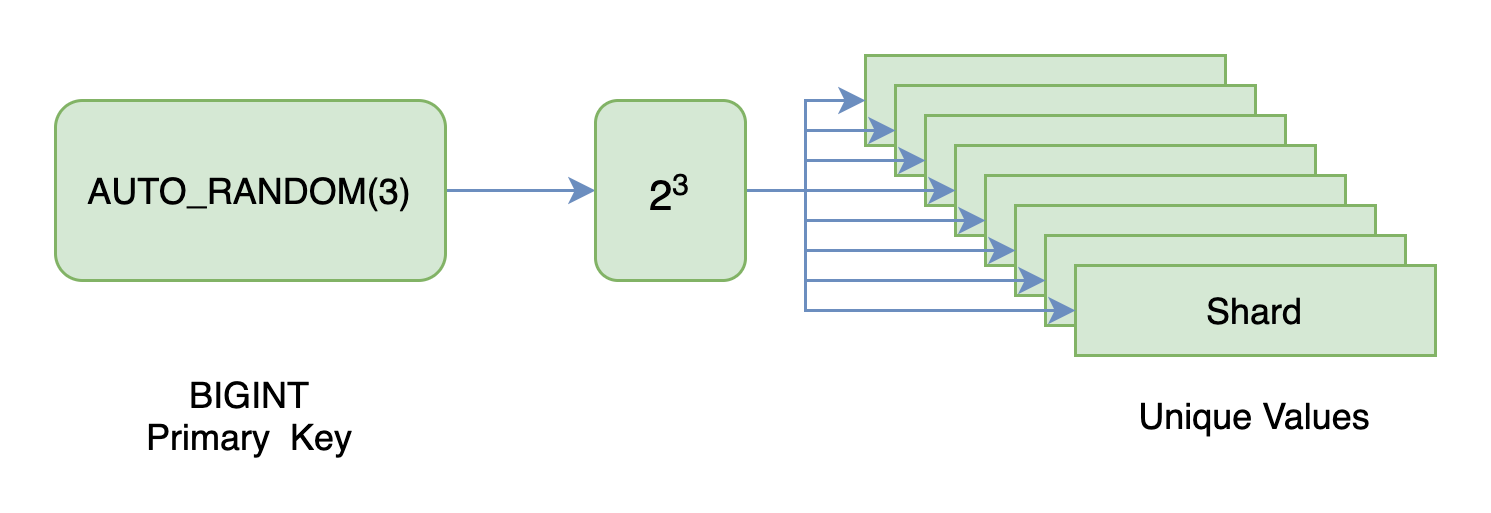
+ You create a table with `AUTO_RANDOM(3)` attribute, indicating 3 shard bits. After all regions are evenly scheduled to each TiKV node, the load of bulk writes can be uniformly distributed to different TiKV nodes as possible to maximize resource utilization.
 ### Notes
+ Some of the steps require that you type commands in two different terminal windows. You might find it convenient to launch two terminals and keep them open for the duration of the exercises.
+ Your environment may be different with these exercises, including but not limited to `IP`, `port`, `username`, `password` and `directory`.
+ The `$` in your terminal window is an OS prompt.
+ The "`tidb>`" or "`mysql>`" in your terminal window is SQL command prompt.
+ These exercises can be run on a single machine, such as your laptop.
### Assumptions
+ You are using macOS or Linux.
+ You have cloned the [lab repository](https://github.com/pingcap/tidb-course-201-lab.git).
+ You have completed the Exercises - Creating a TiDB Cluster for Testing Purposes.
### Duration
+ This exercise should take you approximately 15 minutes to complete.
### Tasks
1. Create a table with `AUTO_RANDOM` attribute.
2. Validate that the IDs generated by the `AUTO_RANDOM` setting are properly partitioned as intended.
### Solution
1. Connect to the TiDB server.
+ (a) Use `connect-cloud.sh` to connect to TiDB Cloud Serverless.
```
$ cd tidb-course-201-lab/scripts
$ ./connect-cloud.sh
...
tidb-cloud>
```
+ (b) Use `connect-4000.sh` to connect to the TiDB Playground cluster.
```
$ cd tidb-course-201-lab/scripts
$ ./connect-4000.sh
...
tidb:4000>
```
2. Create `test.auto_random_t1` table, which will have 8 shards (23) dedicated to primary key generation.
```sql
DROP TABLE IF EXISTS test.auto_random_t1;
CREATE TABLE test.auto_random_t1 (
id BIGINT PRIMARY KEY AUTO_RANDOM(3),
name CHAR(255));
```
3. Open another terminal window, review following scripts under `scripts` directory, `05-insert-loop.sh` and `misc/insert-into-auto-random.sql`.
```
$ cat ./05-insert-loop.sh
#!/bin/bash
for i in {1..800};
do
mysql -h 127.0.0.1 -P 4000 -u root < ./misc/insert-into-auto-random.sql
done;
```
```
$ cat ./misc/insert-into-auto-random.sql
INSERT INTO test.auto_random_t1
VALUES (NULL, 'A');
```
4. To populate 800 rows into the `test.auto_random_t1` table, run the script `05-insert-loop.sh` under `scripts` directory. Please note that the method used by `05-insert-loop.sh` may prove inefficient. Refer to our course "Working with TiDB from Java" for more information on batch insertion.
```
$ ./05-insert-loop.sh
```
5. Back to the MySQL client terminal window, review the `PK_AUTO_RANDOM_BITS` attribute on table `test.auto_random_t1`, it should be 3, indicating that during the random number generation process, 8 shards (23) will be utilized.
```sql
SELECT TIDB_ROW_ID_SHARDING_INFO, TIDB_PK_TYPE
FROM information_schema.tables
WHERE table_schema='test'
AND table_name='auto_random_t1';
SELECT COUNT(*) FROM test.auto_random_t1;
```
```
--------------
SELECT TIDB_ROW_ID_SHARDING_INFO, TIDB_PK_TYPE
FROM information_schema.tables
WHERE table_schema='test'
AND table_name='auto_random_t1'
--------------
+---------------------------+--------------+
| TIDB_ROW_ID_SHARDING_INFO | TIDB_PK_TYPE |
+---------------------------+--------------+
| PK_AUTO_RANDOM_BITS=3 | CLUSTERED |
+---------------------------+--------------+
1 row in set (0.00 sec)
...
--------------
SELECT COUNT(*) FROM test.auto_random_t1
--------------
+----------+
| COUNT(*) |
+----------+
| 800 |
+----------+
1 row in set (0.00 sec)
```
6. Get a general idea of the sharding results by executing a basic query. The number of rows in the query result should be equal to 8. The query extracts only the shard bits to be examined by using right shift (63 minus shard count bits) operation. The output shows that 8 shards have been used.
```sql
SELECT id >> 60 as shard,
COUNT(1) as rows_by_shard
FROM test.auto_random_t1
GROUP BY shard;
```
```
--------------
SELECT id >> 60 as shard,
COUNT(1) as rows_by_shard
FROM test.auto_random_t1
GROUP BY shard
--------------
+-------+---------------+
| shard | rows_by_shard |
+-------+---------------+
| 5 | 99 |
| 0 | 102 |
| 4 | 89 |
| 1 | 118 |
| 3 | 97 |
| 6 | 82 |
| 7 | 112 |
| 2 | 101 |
+-------+---------------+
8 rows in set (0.00 sec)
```
7. To learn more about the `AUTO_RANDOM` shard bits, please refer to the [TiDB documentation](https://docs.pingcap.com/tidb/stable/auto-random#basic-concepts).
## Conclusion
The TiDB `AUTO_RANDOM` attribute has the capability to evenly distribute auto-generated unique IDs among all shards, thereby mitigating the problem of write hotspot that may arise from consecutive IDs. If you require a production-level test or demo, kindly [click here](https://www.pingcap.com/demo/?utm_source=edu&utm_medium=referral&utm_campaign=201.3.E5) to apply for it.
## End of Exercises
### Notes
+ Some of the steps require that you type commands in two different terminal windows. You might find it convenient to launch two terminals and keep them open for the duration of the exercises.
+ Your environment may be different with these exercises, including but not limited to `IP`, `port`, `username`, `password` and `directory`.
+ The `$` in your terminal window is an OS prompt.
+ The "`tidb>`" or "`mysql>`" in your terminal window is SQL command prompt.
+ These exercises can be run on a single machine, such as your laptop.
### Assumptions
+ You are using macOS or Linux.
+ You have cloned the [lab repository](https://github.com/pingcap/tidb-course-201-lab.git).
+ You have completed the Exercises - Creating a TiDB Cluster for Testing Purposes.
### Duration
+ This exercise should take you approximately 15 minutes to complete.
### Tasks
1. Create a table with `AUTO_RANDOM` attribute.
2. Validate that the IDs generated by the `AUTO_RANDOM` setting are properly partitioned as intended.
### Solution
1. Connect to the TiDB server.
+ (a) Use `connect-cloud.sh` to connect to TiDB Cloud Serverless.
```
$ cd tidb-course-201-lab/scripts
$ ./connect-cloud.sh
...
tidb-cloud>
```
+ (b) Use `connect-4000.sh` to connect to the TiDB Playground cluster.
```
$ cd tidb-course-201-lab/scripts
$ ./connect-4000.sh
...
tidb:4000>
```
2. Create `test.auto_random_t1` table, which will have 8 shards (23) dedicated to primary key generation.
```sql
DROP TABLE IF EXISTS test.auto_random_t1;
CREATE TABLE test.auto_random_t1 (
id BIGINT PRIMARY KEY AUTO_RANDOM(3),
name CHAR(255));
```
3. Open another terminal window, review following scripts under `scripts` directory, `05-insert-loop.sh` and `misc/insert-into-auto-random.sql`.
```
$ cat ./05-insert-loop.sh
#!/bin/bash
for i in {1..800};
do
mysql -h 127.0.0.1 -P 4000 -u root < ./misc/insert-into-auto-random.sql
done;
```
```
$ cat ./misc/insert-into-auto-random.sql
INSERT INTO test.auto_random_t1
VALUES (NULL, 'A');
```
4. To populate 800 rows into the `test.auto_random_t1` table, run the script `05-insert-loop.sh` under `scripts` directory. Please note that the method used by `05-insert-loop.sh` may prove inefficient. Refer to our course "Working with TiDB from Java" for more information on batch insertion.
```
$ ./05-insert-loop.sh
```
5. Back to the MySQL client terminal window, review the `PK_AUTO_RANDOM_BITS` attribute on table `test.auto_random_t1`, it should be 3, indicating that during the random number generation process, 8 shards (23) will be utilized.
```sql
SELECT TIDB_ROW_ID_SHARDING_INFO, TIDB_PK_TYPE
FROM information_schema.tables
WHERE table_schema='test'
AND table_name='auto_random_t1';
SELECT COUNT(*) FROM test.auto_random_t1;
```
```
--------------
SELECT TIDB_ROW_ID_SHARDING_INFO, TIDB_PK_TYPE
FROM information_schema.tables
WHERE table_schema='test'
AND table_name='auto_random_t1'
--------------
+---------------------------+--------------+
| TIDB_ROW_ID_SHARDING_INFO | TIDB_PK_TYPE |
+---------------------------+--------------+
| PK_AUTO_RANDOM_BITS=3 | CLUSTERED |
+---------------------------+--------------+
1 row in set (0.00 sec)
...
--------------
SELECT COUNT(*) FROM test.auto_random_t1
--------------
+----------+
| COUNT(*) |
+----------+
| 800 |
+----------+
1 row in set (0.00 sec)
```
6. Get a general idea of the sharding results by executing a basic query. The number of rows in the query result should be equal to 8. The query extracts only the shard bits to be examined by using right shift (63 minus shard count bits) operation. The output shows that 8 shards have been used.
```sql
SELECT id >> 60 as shard,
COUNT(1) as rows_by_shard
FROM test.auto_random_t1
GROUP BY shard;
```
```
--------------
SELECT id >> 60 as shard,
COUNT(1) as rows_by_shard
FROM test.auto_random_t1
GROUP BY shard
--------------
+-------+---------------+
| shard | rows_by_shard |
+-------+---------------+
| 5 | 99 |
| 0 | 102 |
| 4 | 89 |
| 1 | 118 |
| 3 | 97 |
| 6 | 82 |
| 7 | 112 |
| 2 | 101 |
+-------+---------------+
8 rows in set (0.00 sec)
```
7. To learn more about the `AUTO_RANDOM` shard bits, please refer to the [TiDB documentation](https://docs.pingcap.com/tidb/stable/auto-random#basic-concepts).
## Conclusion
The TiDB `AUTO_RANDOM` attribute has the capability to evenly distribute auto-generated unique IDs among all shards, thereby mitigating the problem of write hotspot that may arise from consecutive IDs. If you require a production-level test or demo, kindly [click here](https://www.pingcap.com/demo/?utm_source=edu&utm_medium=referral&utm_campaign=201.3.E5) to apply for it.
## End of Exercises