# Online DDL
## Overview
+ In these exercises, you perform Online DDL in TiDB. You learn that TiDB provides various options for different requirements, when performing online DDL.
+ In Exercise 1, you will encounter a scenario where the system variable `tidb_enable_metadata_lock` is set to `OFF` and TiDB handles lengthy transactions.
+ In Exercise 2, you will be placed in a situation where the system variable `tidb_enable_metadata_lock` is set to `OFF`. During this time, TiDB will be processing short transactions using a retry mechanism.
+ In Exercise 3, you will encounter a scenario where the system variable `tidb_enable_metadata_lock` is set to `ON` and TiDB handles lengthy transactions.
### Notes
+ The TiDB server system variable `tidb_enable_metadata_lock` is available starting from version 6.3.0. Prior to version 6.3.0, TiDB behaves equivalently to having `tidb_enable_metadata_lock=OFF`.
+ Some of the steps require that you type commands in two or more different terminals. You might find it convenient to launch two terminals and keep them open for the duration of the exercises.
+ Your environment may be different with these exercises, including but not limited to `IP`, `port`, `username`, `password` and `directory`.
+ The "`$`" in your terminal window is an OS prompt.
+ The "`tidb>`" or "`mysql>`" in your terminal window is SQL command prompt.
+ These exercises can be run on a single machine, such as your laptop.
+ All scripts and codes in these exercises provide no product warranty, use them at your own risk.
### Assumptions
+ You are using macOS or Linux.
+ You have cloned the [lab repository](https://github.com/pingcap/tidb-course-201-lab.git).
+ You have completed the Exercises - Creating a TiDB Cluster for Testing Purposes.
+ You have JDK 8 or later installed.
## Exercise 1: Add a column to the table when TiDB server's system variable `tidb_enable_metadata_lock` is `OFF` and there is a long transaction running
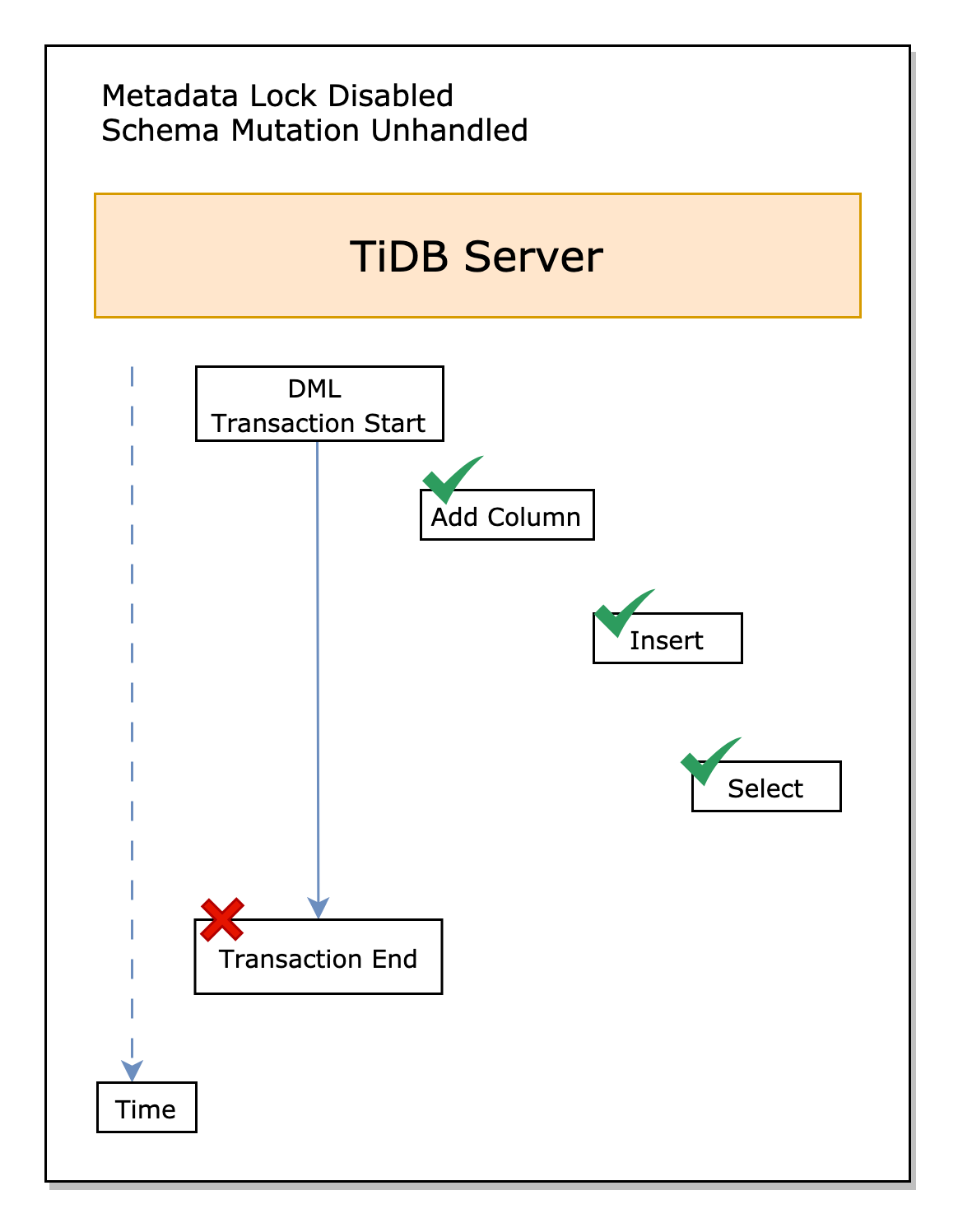 ### Overview
+ In this exercise, you are in the situation where the system variable `tidb_enable_metadata_lock` is `OFF`, when TiDB deals with long transactions.
### Duration
+ This exercise should take you approximately 10 minutes to complete.
### Tasks
1. In terminal one, start a long transaction.
2. In terminal two, add a column to the table.
3. In terminal three and four, query the table.
### Solution
1. In terminal 1, connect to TiDB, check the value of the system variable `autocommit`, and update the value to `OFF`.
```
$ cd tidb-course-201-lab/scripts
$ ./connect-4000.sh
Welcome to the MySQL monitor. Commands end with ; or \g.
...
```
```sql
SHOW VARIABLES LIKE "autocommit";
SET autocommit = OFF;
SET GLOBAL autocommit = OFF;
SHOW VARIABLES LIKE "autocommit";
```
```
tidb:4000> SHOW VARIABLES LIKE "autocommit";
--------------
SHOW VARIABLES LIKE "autocommit"
--------------
+---------------+-------+
| Variable_name | Value |
+---------------+-------+
| autocommit | ON |
+---------------+-------+
1 row in set (0.01 sec)
tidb:4000> SET autocommit = OFF;
--------------
SET autocommit = OFF
--------------
Query OK, 0 rows affected (0.00 sec)
tidb:4000> SET GLOBAL autocommit = OFF;
--------------
SET GLOBAL autocommit = OFF
--------------
Query OK, 0 rows affected (0.01 sec)
tidb:4000> SHOW VARIABLES LIKE "autocommit";
--------------
SHOW VARIABLES LIKE "autocommit"
--------------
+---------------+-------+
| Variable_name | Value |
+---------------+-------+
| autocommit | OFF |
+---------------+-------+
1 row in set (0.00 sec)
```
2. Open three new terminals: terminal 2, terminal 3, and terminal 4, connect to the `TiDB server` on port 4000, and check the value of the system variable `autocommit`, it should be `OFF`.
```
$ cd tidb-course-201-lab/scripts
$ ./connect-4000.sh
```
```sql
SHOW VARIABLES LIKE "autocommit";
```
```
tidb:4000> SHOW VARIABLES LIKE "autocommit";
--------------
SHOW VARIABLES LIKE "autocommit"
--------------
+---------------+-------+
| Variable_name | Value |
+---------------+-------+
| autocommit | OFF |
+---------------+-------+
1 row in set (0.00 sec)
```
3. In terminal 1, check the value of the system variable `tidb_enable_metadata_lock`. If the value is `ON`, update the value to `OFF`.
```sql
SHOW VARIABLES LIKE "tidb_enable_metadata_lock";
SET GLOBAL tidb_enable_metadata_lock = OFF;
```
```
tidb:4000> SHOW VARIABLES LIKE "tidb_enable_metadata_lock";
--------------
SHOW VARIABLES LIKE "tidb_enable_metadata_lock"
--------------
+---------------------------+-------+
| Variable_name | Value |
+---------------------------+-------+
| tidb_enable_metadata_lock | ON |
+---------------------------+-------+
1 row in set (0.00 sec)
tidb:4000> SET GLOBAL tidb_enable_metadata_lock = OFF;
--------------
SET GLOBAL tidb_enable_metadata_lock = OFF
--------------
Query OK, 0 rows affected (0.01 sec)
```
4. In all four terminals, check the `transaction_isolation` level. Make sure the transaction isolation level is `REPEATABLE-READ`.
```
SHOW SESSION VARIABLES LIKE 'transaction_isolation';
```
```
tidb:4000> SHOW SESSION VARIABLES LIKE 'transaction_isolation';
--------------
SHOW SESSION VARIABLES LIKE 'transaction_isolation'
--------------
+-----------------------+-----------------+
| Variable_name | Value |
+-----------------------+-----------------+
| transaction_isolation | REPEATABLE-READ |
+-----------------------+-----------------+
1 row in set (0.01 sec)
```
5. In terminal 1, create the database `demo` and table `t1`, insert 2 rows into the table, and then, start a new transaction with `BEGIN; INSERT INTO t1(num) VALUES (3)` without executing `COMMIT` or `ROLLBACK`.
```sql
DROP DATABASE IF EXISTS demo;
CREATE DATABASE demo;
USE demo;
CREATE TABLE IF NOT EXISTS t1 (
id BIGINT NOT NULL PRIMARY KEY auto_increment,
num INT
);
INSERT INTO t1(num) VALUES (1);
COMMIT;
INSERT INTO t1(num) VALUES (2);
COMMIT;
BEGIN;
INSERT INTO t1(num) VALUES (3);
```
```
...
tidb:4000> BEGIN;
--------------
BEGIN
--------------
Query OK, 0 rows affected (0.00 sec)
tidb:4000> INSERT INTO t1(num) VALUES (3);
--------------
INSERT INTO t1(num) VALUES (3)
--------------
Query OK, 1 row affected (0.00 sec)
```
6. In terminal 2, add a column to the table `t1`.
```sql
USE demo;
ALTER TABLE t1 ADD COLUMN c1 INT;
```
```
tidb:4000> USE demo;
Reading table information for completion of table and column names
You can turn off this feature to get a quicker startup with -A
Database changed
tidb:4000> ALTER TABLE t1 ADD COLUMN c1 INT;
--------------
ALTER TABLE t1 ADD COLUMN c1 INT
--------------
Query OK, 0 rows affected (0.52 sec)
```
7. In terminal 3, insert a record into the table `t1`.
```sql
USE demo;
INSERT INTO t1(num) VALUES (4);
COMMIT;
```
```
tidb:4000> USE demo;
...
Database changed
tidb:4000> INSERT INTO t1(num) VALUES (4);
--------------
INSERT INTO t1(num) VALUES (4)
--------------
Query OK, 1 row affected (0.00 sec)
tidb:4000> COMMIT;
--------------
COMMIT
--------------
Query OK, 0 rows affected (0.01 sec)
```
8. In terminal 4, query the table `t1`.
```sql
USE demo;
SELECT * FROM t1;
COMMIT;
```
```
tidb:4000> USE demo;
...
Database changed
tidb:4000> SELECT * FROM t1;
--------------
SELECT * FROM t1
--------------
+----+------+------+
| id | num | c1 |
+----+------+------+
| 1 | 1 | NULL |
| 2 | 2 | NULL |
| 4 | 4 | NULL |
+----+------+------+
3 rows in set (0.00 sec)
tidb:4000> COMMIT;
--------------
COMMIT
--------------
Query OK, 0 rows affected (0.00 sec)
```
9. Commit the transaction in terminal 1. And, an error with code `8028` is expected, the transaction will be rolled back.
```sql
COMMIT;
```
```
tidb:4000> COMMIT;
ERROR 8028 (HY000): Information schema is changed during the execution of the statement(for example, table definition may be updated by other DDL ran in parallel). If you see this error often, try increasing `tidb_max_delta_schema_count`. [try again later]
```
### Summary
If the system variable `tidb_enable_metadata_lock` is set to `OFF`, Online DDL can modify the schema without being blocked by ongoing transactions (terminal 1). However, it is expected that an error with code `8028` stating `Information schema is changed` will occur when attempting to commit the transaction.
## Exercise 2: Add a column to the table when TiDB server's system variable `tidb_enable_metadata_lock` is `OFF` and there are short transactions with retry mechanism
### Overview
+ In this exercise, you are in the situation where the system variable `tidb_enable_metadata_lock` is `OFF`, when TiDB deals with long transactions.
### Duration
+ This exercise should take you approximately 10 minutes to complete.
### Tasks
1. In terminal one, start a long transaction.
2. In terminal two, add a column to the table.
3. In terminal three and four, query the table.
### Solution
1. In terminal 1, connect to TiDB, check the value of the system variable `autocommit`, and update the value to `OFF`.
```
$ cd tidb-course-201-lab/scripts
$ ./connect-4000.sh
Welcome to the MySQL monitor. Commands end with ; or \g.
...
```
```sql
SHOW VARIABLES LIKE "autocommit";
SET autocommit = OFF;
SET GLOBAL autocommit = OFF;
SHOW VARIABLES LIKE "autocommit";
```
```
tidb:4000> SHOW VARIABLES LIKE "autocommit";
--------------
SHOW VARIABLES LIKE "autocommit"
--------------
+---------------+-------+
| Variable_name | Value |
+---------------+-------+
| autocommit | ON |
+---------------+-------+
1 row in set (0.01 sec)
tidb:4000> SET autocommit = OFF;
--------------
SET autocommit = OFF
--------------
Query OK, 0 rows affected (0.00 sec)
tidb:4000> SET GLOBAL autocommit = OFF;
--------------
SET GLOBAL autocommit = OFF
--------------
Query OK, 0 rows affected (0.01 sec)
tidb:4000> SHOW VARIABLES LIKE "autocommit";
--------------
SHOW VARIABLES LIKE "autocommit"
--------------
+---------------+-------+
| Variable_name | Value |
+---------------+-------+
| autocommit | OFF |
+---------------+-------+
1 row in set (0.00 sec)
```
2. Open three new terminals: terminal 2, terminal 3, and terminal 4, connect to the `TiDB server` on port 4000, and check the value of the system variable `autocommit`, it should be `OFF`.
```
$ cd tidb-course-201-lab/scripts
$ ./connect-4000.sh
```
```sql
SHOW VARIABLES LIKE "autocommit";
```
```
tidb:4000> SHOW VARIABLES LIKE "autocommit";
--------------
SHOW VARIABLES LIKE "autocommit"
--------------
+---------------+-------+
| Variable_name | Value |
+---------------+-------+
| autocommit | OFF |
+---------------+-------+
1 row in set (0.00 sec)
```
3. In terminal 1, check the value of the system variable `tidb_enable_metadata_lock`. If the value is `ON`, update the value to `OFF`.
```sql
SHOW VARIABLES LIKE "tidb_enable_metadata_lock";
SET GLOBAL tidb_enable_metadata_lock = OFF;
```
```
tidb:4000> SHOW VARIABLES LIKE "tidb_enable_metadata_lock";
--------------
SHOW VARIABLES LIKE "tidb_enable_metadata_lock"
--------------
+---------------------------+-------+
| Variable_name | Value |
+---------------------------+-------+
| tidb_enable_metadata_lock | ON |
+---------------------------+-------+
1 row in set (0.00 sec)
tidb:4000> SET GLOBAL tidb_enable_metadata_lock = OFF;
--------------
SET GLOBAL tidb_enable_metadata_lock = OFF
--------------
Query OK, 0 rows affected (0.01 sec)
```
4. In all four terminals, check the `transaction_isolation` level. Make sure the transaction isolation level is `REPEATABLE-READ`.
```
SHOW SESSION VARIABLES LIKE 'transaction_isolation';
```
```
tidb:4000> SHOW SESSION VARIABLES LIKE 'transaction_isolation';
--------------
SHOW SESSION VARIABLES LIKE 'transaction_isolation'
--------------
+-----------------------+-----------------+
| Variable_name | Value |
+-----------------------+-----------------+
| transaction_isolation | REPEATABLE-READ |
+-----------------------+-----------------+
1 row in set (0.01 sec)
```
5. In terminal 1, create the database `demo` and table `t1`, insert 2 rows into the table, and then, start a new transaction with `BEGIN; INSERT INTO t1(num) VALUES (3)` without executing `COMMIT` or `ROLLBACK`.
```sql
DROP DATABASE IF EXISTS demo;
CREATE DATABASE demo;
USE demo;
CREATE TABLE IF NOT EXISTS t1 (
id BIGINT NOT NULL PRIMARY KEY auto_increment,
num INT
);
INSERT INTO t1(num) VALUES (1);
COMMIT;
INSERT INTO t1(num) VALUES (2);
COMMIT;
BEGIN;
INSERT INTO t1(num) VALUES (3);
```
```
...
tidb:4000> BEGIN;
--------------
BEGIN
--------------
Query OK, 0 rows affected (0.00 sec)
tidb:4000> INSERT INTO t1(num) VALUES (3);
--------------
INSERT INTO t1(num) VALUES (3)
--------------
Query OK, 1 row affected (0.00 sec)
```
6. In terminal 2, add a column to the table `t1`.
```sql
USE demo;
ALTER TABLE t1 ADD COLUMN c1 INT;
```
```
tidb:4000> USE demo;
Reading table information for completion of table and column names
You can turn off this feature to get a quicker startup with -A
Database changed
tidb:4000> ALTER TABLE t1 ADD COLUMN c1 INT;
--------------
ALTER TABLE t1 ADD COLUMN c1 INT
--------------
Query OK, 0 rows affected (0.52 sec)
```
7. In terminal 3, insert a record into the table `t1`.
```sql
USE demo;
INSERT INTO t1(num) VALUES (4);
COMMIT;
```
```
tidb:4000> USE demo;
...
Database changed
tidb:4000> INSERT INTO t1(num) VALUES (4);
--------------
INSERT INTO t1(num) VALUES (4)
--------------
Query OK, 1 row affected (0.00 sec)
tidb:4000> COMMIT;
--------------
COMMIT
--------------
Query OK, 0 rows affected (0.01 sec)
```
8. In terminal 4, query the table `t1`.
```sql
USE demo;
SELECT * FROM t1;
COMMIT;
```
```
tidb:4000> USE demo;
...
Database changed
tidb:4000> SELECT * FROM t1;
--------------
SELECT * FROM t1
--------------
+----+------+------+
| id | num | c1 |
+----+------+------+
| 1 | 1 | NULL |
| 2 | 2 | NULL |
| 4 | 4 | NULL |
+----+------+------+
3 rows in set (0.00 sec)
tidb:4000> COMMIT;
--------------
COMMIT
--------------
Query OK, 0 rows affected (0.00 sec)
```
9. Commit the transaction in terminal 1. And, an error with code `8028` is expected, the transaction will be rolled back.
```sql
COMMIT;
```
```
tidb:4000> COMMIT;
ERROR 8028 (HY000): Information schema is changed during the execution of the statement(for example, table definition may be updated by other DDL ran in parallel). If you see this error often, try increasing `tidb_max_delta_schema_count`. [try again later]
```
### Summary
If the system variable `tidb_enable_metadata_lock` is set to `OFF`, Online DDL can modify the schema without being blocked by ongoing transactions (terminal 1). However, it is expected that an error with code `8028` stating `Information schema is changed` will occur when attempting to commit the transaction.
## Exercise 2: Add a column to the table when TiDB server's system variable `tidb_enable_metadata_lock` is `OFF` and there are short transactions with retry mechanism
 ### Overview
+ In this exercise, you are in the situation where the system variable `tidb_enable_metadata_lock` is `OFF`, when TiDB deals with short transactions. A Java application with a simple retry mechanism is used to deal with the error with code `8028`.
### Duration
+ This exercise should take you approximately 10 minutes to complete.
### Tasks
1. In terminal one, start the Java program.
2. In terminal two, add a column to the table.
3. In terminal three and four, query the table.
### Solution
1. In terminal 1, exit the connection with TiDB server, and start the Java program to keep inserting rows into table `t1`.
```
tidb:4000> EXIT
```
```
$ ./07-demo-online-ddl-add-column-v2.sh
```
```
$ ./07-demo-online-ddl-add-column-v2.sh
Connection established.
Record 1 to be inserted.
Record 2 to be inserted.
Record 3 to be inserted.
...
```
2. In terminal 2, add a column to the table `t1`.
```sql
USE demo;
ALTER TABLE t1 ADD COLUMN c1 INT;
```
```
tidb:4000> USE demo;
Reading table information for completion of table and column names
You can turn off this feature to get a quicker startup with -A
Database changed
tidb:4000> ALTER TABLE t1 ADD COLUMN c1 INT;
--------------
ALTER TABLE t1 ADD COLUMN c1 INT
--------------
Query OK, 0 rows affected (0.52 sec)
```
3. Check terminal 1. You can see the error messages similar to the following:
```
...
Record 1 to be inserted.
Record 2 to be inserted.
Main task error.
Error: java.sql.SQLException: Information schema is changed during the execution of the statement(for example, table definition may be updated by other DDL ran in parallel). If you see this error often, try increasing `tidb_max_delta_schema_count`. [try again later]
SQLState: HY000
ErrorCode: 8028
java.sql.SQLException: Information schema is changed during the execution of the statement(for example, table definition may be updated by other DDL ran in parallel). If you see this error often, try increasing `tidb_max_delta_schema_count`. [try again later]
at com.mysql.jdbc.SQLError.createSQLException(SQLError.java:998)
at com.mysql.jdbc.MysqlIO.checkErrorPacket(MysqlIO.java:3847)
at com.mysql.jdbc.MysqlIO.checkErrorPacket(MysqlIO.java:3783)
at com.mysql.jdbc.MysqlIO.sendCommand(MysqlIO.java:2447)
at com.mysql.jdbc.MysqlIO.sqlQueryDirect(MysqlIO.java:2594)
at com.mysql.jdbc.ConnectionImpl.execSQL(ConnectionImpl.java:2541)
at com.mysql.jdbc.ConnectionImpl.commit(ConnectionImpl.java:1612)
at DemoJdbcPreparedStatement8028v2.main(DemoJdbcPreparedStatement8028v2.java:38)
8028 (schema mutation) encountered, backoff...
DO anything in reaction to error, in this example we continue our workload.
Record 2 to be inserted.
Record 3 to be inserted.
...
```
Since the `tidb_enable_metadata_lock` is set to `OFF`, the online DDL command in terminal two succeeds. However, in terminal 1, a code `8028` error stating `Information schema is changed` is observed. In the Java code, we use a simple retry mechanism to deal with this. Whenever the `8028` error is encountered, the program pauses for a while, and then tries the transaction again. This simple retry method is good enough for our demonstration purpose. However, experienced developers handle it differently based on the business requirements.
4. In terminal 3, insert a record into table `t1`. No errors are expected.
```sql
USE demo;
INSERT INTO t1(num) VALUES (4);
COMMIT;
```
```
tidb:4000> USE demo;
...
Database changed
tidb:4000> INSERT INTO t1(num) VALUES (4);
--------------
INSERT INTO t1(num) VALUES (4)
--------------
Query OK, 1 row affected (0.00 sec)
tidb:4000> COMMIT;
--------------
COMMIT
--------------
Query OK, 0 rows affected (0.00 sec)
```
5. In terminal 4, query table `t1`. No errors are expected.
```sql
USE demo;
SELECT * FROM t1;
COMMIT;
```
```
tidb:4000> USE demo;
...
Database changed
tidb:4000> SELECT * FROM t1;
--------------
SELECT * FROM t1
--------------
+----+------+------+
| id | num | c1 |
+----+------+------+
| 1 | 1 | NULL |
| 2 | 2 | NULL |
| 3 | 100 | NULL |
| 4 | 100 | NULL |
| 5 | 100 | NULL |
| 6 | 100 | NULL |
| 7 | 100 | NULL |
| 8 | 100 | NULL |
| 9 | 100 | NULL |
| 10 | 4 | NULL |
| 11 | 100 | NULL |
| 12 | 100 | NULL |
+----+------+------+
12 rows in set (0.00 sec)
tidb:4000> COMMIT;
--------------
COMMIT
--------------
Query OK, 0 rows affected (0.00 sec)
```
### Summary
If the TiDB server system variable `tidb_enable_metadata_lock` is set to `OFF`, online DDL can modify the schema without being blocked by ongoing transactions (terminal 1). Although the short transactions in terminal 1 encounter `8028` error stating `Information schema is changed`, simple retry can solve the problem in our case. Developers may handle it differently based on the business requirements.
## Exercise 3: Add a column to the table when TiDB's system variable `tidb_enable_metadata_lock` is `ON`
### Overview
+ In this exercise, you are in the situation where the system variable `tidb_enable_metadata_lock` is `OFF`, when TiDB deals with short transactions. A Java application with a simple retry mechanism is used to deal with the error with code `8028`.
### Duration
+ This exercise should take you approximately 10 minutes to complete.
### Tasks
1. In terminal one, start the Java program.
2. In terminal two, add a column to the table.
3. In terminal three and four, query the table.
### Solution
1. In terminal 1, exit the connection with TiDB server, and start the Java program to keep inserting rows into table `t1`.
```
tidb:4000> EXIT
```
```
$ ./07-demo-online-ddl-add-column-v2.sh
```
```
$ ./07-demo-online-ddl-add-column-v2.sh
Connection established.
Record 1 to be inserted.
Record 2 to be inserted.
Record 3 to be inserted.
...
```
2. In terminal 2, add a column to the table `t1`.
```sql
USE demo;
ALTER TABLE t1 ADD COLUMN c1 INT;
```
```
tidb:4000> USE demo;
Reading table information for completion of table and column names
You can turn off this feature to get a quicker startup with -A
Database changed
tidb:4000> ALTER TABLE t1 ADD COLUMN c1 INT;
--------------
ALTER TABLE t1 ADD COLUMN c1 INT
--------------
Query OK, 0 rows affected (0.52 sec)
```
3. Check terminal 1. You can see the error messages similar to the following:
```
...
Record 1 to be inserted.
Record 2 to be inserted.
Main task error.
Error: java.sql.SQLException: Information schema is changed during the execution of the statement(for example, table definition may be updated by other DDL ran in parallel). If you see this error often, try increasing `tidb_max_delta_schema_count`. [try again later]
SQLState: HY000
ErrorCode: 8028
java.sql.SQLException: Information schema is changed during the execution of the statement(for example, table definition may be updated by other DDL ran in parallel). If you see this error often, try increasing `tidb_max_delta_schema_count`. [try again later]
at com.mysql.jdbc.SQLError.createSQLException(SQLError.java:998)
at com.mysql.jdbc.MysqlIO.checkErrorPacket(MysqlIO.java:3847)
at com.mysql.jdbc.MysqlIO.checkErrorPacket(MysqlIO.java:3783)
at com.mysql.jdbc.MysqlIO.sendCommand(MysqlIO.java:2447)
at com.mysql.jdbc.MysqlIO.sqlQueryDirect(MysqlIO.java:2594)
at com.mysql.jdbc.ConnectionImpl.execSQL(ConnectionImpl.java:2541)
at com.mysql.jdbc.ConnectionImpl.commit(ConnectionImpl.java:1612)
at DemoJdbcPreparedStatement8028v2.main(DemoJdbcPreparedStatement8028v2.java:38)
8028 (schema mutation) encountered, backoff...
DO anything in reaction to error, in this example we continue our workload.
Record 2 to be inserted.
Record 3 to be inserted.
...
```
Since the `tidb_enable_metadata_lock` is set to `OFF`, the online DDL command in terminal two succeeds. However, in terminal 1, a code `8028` error stating `Information schema is changed` is observed. In the Java code, we use a simple retry mechanism to deal with this. Whenever the `8028` error is encountered, the program pauses for a while, and then tries the transaction again. This simple retry method is good enough for our demonstration purpose. However, experienced developers handle it differently based on the business requirements.
4. In terminal 3, insert a record into table `t1`. No errors are expected.
```sql
USE demo;
INSERT INTO t1(num) VALUES (4);
COMMIT;
```
```
tidb:4000> USE demo;
...
Database changed
tidb:4000> INSERT INTO t1(num) VALUES (4);
--------------
INSERT INTO t1(num) VALUES (4)
--------------
Query OK, 1 row affected (0.00 sec)
tidb:4000> COMMIT;
--------------
COMMIT
--------------
Query OK, 0 rows affected (0.00 sec)
```
5. In terminal 4, query table `t1`. No errors are expected.
```sql
USE demo;
SELECT * FROM t1;
COMMIT;
```
```
tidb:4000> USE demo;
...
Database changed
tidb:4000> SELECT * FROM t1;
--------------
SELECT * FROM t1
--------------
+----+------+------+
| id | num | c1 |
+----+------+------+
| 1 | 1 | NULL |
| 2 | 2 | NULL |
| 3 | 100 | NULL |
| 4 | 100 | NULL |
| 5 | 100 | NULL |
| 6 | 100 | NULL |
| 7 | 100 | NULL |
| 8 | 100 | NULL |
| 9 | 100 | NULL |
| 10 | 4 | NULL |
| 11 | 100 | NULL |
| 12 | 100 | NULL |
+----+------+------+
12 rows in set (0.00 sec)
tidb:4000> COMMIT;
--------------
COMMIT
--------------
Query OK, 0 rows affected (0.00 sec)
```
### Summary
If the TiDB server system variable `tidb_enable_metadata_lock` is set to `OFF`, online DDL can modify the schema without being blocked by ongoing transactions (terminal 1). Although the short transactions in terminal 1 encounter `8028` error stating `Information schema is changed`, simple retry can solve the problem in our case. Developers may handle it differently based on the business requirements.
## Exercise 3: Add a column to the table when TiDB's system variable `tidb_enable_metadata_lock` is `ON`
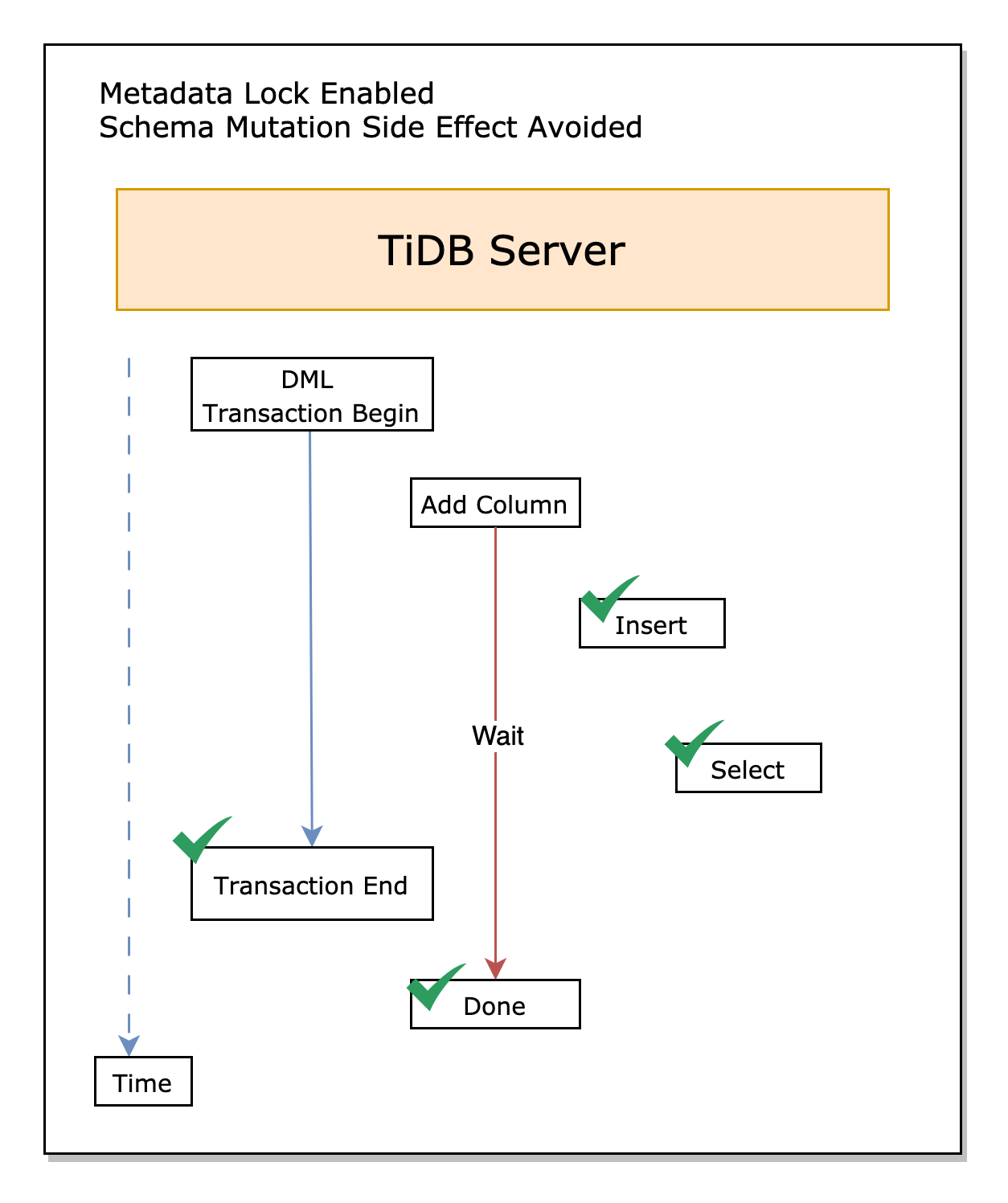 ### Overview
+ In this exercise, you are in the situation where the system variable `tidb_enable_metadata_lock` is `ON`. You can find that when the system variable `tidb_enable_metadata_lock` is enabled, DDL operation will wait for transactions to complete.
### Duration
+ This exercise should take you approximately 10 minutes to complete.
### Tasks
1. In terminal one, enable the system variable `tidb_enable_metadata_lock`, and then, start a long transaction.
2. In terminal two, add a column to the table.
3. In terminal three and four, query the table.
### Solution
1. In terminal 1, change the value of the system variable `tidb_enable_metadata_lock` to `ON`.
```
$ ./connect-4000.sh
```
```sql
SET GLOBAL tidb_enable_metadata_lock = ON;
SHOW VARIABLES LIKE "tidb_enable_metadata_lock";
```
```
tidb:4000> SET GLOBAL tidb_enable_metadata_lock = ON;
--------------
SET GLOBAL tidb_enable_metadata_lock = ON
--------------
Query OK, 0 rows affected (0.02 sec)
tidb:4000> SHOW VARIABLES LIKE "tidb_enable_metadata_lock";
--------------
SHOW VARIABLES LIKE "tidb_enable_metadata_lock"
--------------
+---------------------------+-------+
| Variable_name | Value |
+---------------------------+-------+
| tidb_enable_metadata_lock | ON |
+---------------------------+-------+
1 row in set (0.00 sec)
```
2. In terminal 1, create the database `demo` and table `t1`, insert 2 rows into the table, and then, start a new transaction with `BEGIN; INSERT INTO t1(num) VALUES (3)` without executing `COMMIT` or `ROLLBACK`.
```sql
DROP DATABASE IF EXISTS demo;
CREATE DATABASE demo;
USE demo;
CREATE TABLE IF NOT EXISTS t1 (
id BIGINT NOT NULL PRIMARY KEY auto_increment,
num INT
);
INSERT INTO t1(num) VALUES (1);
COMMIT;
INSERT INTO t1(num) VALUES (2);
COMMIT;
BEGIN;
INSERT INTO t1(num) VALUES (3);
```
```
...
tidb:4000> BEGIN;
--------------
BEGIN
--------------
Query OK, 0 rows affected (0.00 sec)
tidb:4000> INSERT INTO t1(num) VALUES (3);
--------------
INSERT INTO t1(num) VALUES (3)
--------------
Query OK, 1 row affected (0.00 sec)
```
3. In terminal 2, add a column to the table `t1`.
```sql
USE demo;
ALTER TABLE t1 ADD COLUMN c1 INT;
```
```
tidb:4000> USE demo;
...
Database changed
tidb:4000> ALTER TABLE t1 ADD COLUMN c1 INT;
--------------
ALTER TABLE t1 ADD COLUMN c1 INT
--------------
```
Since the `tidb_enable_metadata_lock` to `ON`, this adding column operation is blocked and waiting.
4. In terminal 3, insert a record into the table `t1`.
```sql
USE demo;
INSERT INTO t1(num) VALUES (4);
COMMIT;
```
```
tidb:4000> USE demo;
...
Database changed
tidb:4000> INSERT INTO t1(num) VALUES (4);
--------------
INSERT INTO t1(num) VALUES (4)
--------------
Query OK, 1 row affected (0.00 sec)
tidb:4000> COMMIT;
--------------
COMMIT
--------------
Query OK, 0 rows affected (0.00 sec)
```
5. In terminal 4, query the table.
```sql
USE demo;
SELECT * FROM t1;
COMMIT;
```
```
tidb:4000> USE demo;
...
Database changed
tidb:4000> SELECT * FROM t1;
--------------
SELECT * FROM t1
--------------
+----+------+
| id | num |
+----+------+
| 1 | 1 |
| 2 | 2 |
| 4 | 4 |
+----+------+
3 rows in set (0.00 sec)
tidb:4000> COMMIT;
--------------
COMMIT
--------------
Query OK, 0 rows affected (0.00 sec)
```
The results in the terminal 4 are different from the results in the terminal 4 in exercise 1 and exercise 2: The new column is NOT added yet. This is because the `tidb_enable_metadata_lock` is `ON`, and the adding column command in terminal 2 is still pending.
6. Commit the transaction in terminal 1.
```sql
COMMIT;
```
```
tidb:4000> COMMIT;
--------------
commit
--------------
Query OK, 0 rows affected (0.00 sec)
```
7. Now, go to terminal 2, the adding column DDL should be finished successfully.
### Summary
If the system variable `tidb_enable_metadata_lock` is set to `ON`, online DDL can NOT modify the schema. The online DDL operation waits until the long transaction which holds the `metadata lock` finishes.
### Note
The behavior of the `metadata lock` is also relevant to the transaction isolation level. You can go to [Metadata Lock](https://docs.pingcap.com/tidb/v6.5/metadata-lock).
## Clean up
In terminal 1, make sure the value of the TiDB server system variables `autocommit` and `tidb_enable_metadata_lock` are back to `ON`.
```sql
SET GLOBAL autocommit = ON;
SET GLOBAL tidb_enable_metadata_lock = ON;
```
Exit all connections and close all terminals.
## End of Exercises
### Overview
+ In this exercise, you are in the situation where the system variable `tidb_enable_metadata_lock` is `ON`. You can find that when the system variable `tidb_enable_metadata_lock` is enabled, DDL operation will wait for transactions to complete.
### Duration
+ This exercise should take you approximately 10 minutes to complete.
### Tasks
1. In terminal one, enable the system variable `tidb_enable_metadata_lock`, and then, start a long transaction.
2. In terminal two, add a column to the table.
3. In terminal three and four, query the table.
### Solution
1. In terminal 1, change the value of the system variable `tidb_enable_metadata_lock` to `ON`.
```
$ ./connect-4000.sh
```
```sql
SET GLOBAL tidb_enable_metadata_lock = ON;
SHOW VARIABLES LIKE "tidb_enable_metadata_lock";
```
```
tidb:4000> SET GLOBAL tidb_enable_metadata_lock = ON;
--------------
SET GLOBAL tidb_enable_metadata_lock = ON
--------------
Query OK, 0 rows affected (0.02 sec)
tidb:4000> SHOW VARIABLES LIKE "tidb_enable_metadata_lock";
--------------
SHOW VARIABLES LIKE "tidb_enable_metadata_lock"
--------------
+---------------------------+-------+
| Variable_name | Value |
+---------------------------+-------+
| tidb_enable_metadata_lock | ON |
+---------------------------+-------+
1 row in set (0.00 sec)
```
2. In terminal 1, create the database `demo` and table `t1`, insert 2 rows into the table, and then, start a new transaction with `BEGIN; INSERT INTO t1(num) VALUES (3)` without executing `COMMIT` or `ROLLBACK`.
```sql
DROP DATABASE IF EXISTS demo;
CREATE DATABASE demo;
USE demo;
CREATE TABLE IF NOT EXISTS t1 (
id BIGINT NOT NULL PRIMARY KEY auto_increment,
num INT
);
INSERT INTO t1(num) VALUES (1);
COMMIT;
INSERT INTO t1(num) VALUES (2);
COMMIT;
BEGIN;
INSERT INTO t1(num) VALUES (3);
```
```
...
tidb:4000> BEGIN;
--------------
BEGIN
--------------
Query OK, 0 rows affected (0.00 sec)
tidb:4000> INSERT INTO t1(num) VALUES (3);
--------------
INSERT INTO t1(num) VALUES (3)
--------------
Query OK, 1 row affected (0.00 sec)
```
3. In terminal 2, add a column to the table `t1`.
```sql
USE demo;
ALTER TABLE t1 ADD COLUMN c1 INT;
```
```
tidb:4000> USE demo;
...
Database changed
tidb:4000> ALTER TABLE t1 ADD COLUMN c1 INT;
--------------
ALTER TABLE t1 ADD COLUMN c1 INT
--------------
```
Since the `tidb_enable_metadata_lock` to `ON`, this adding column operation is blocked and waiting.
4. In terminal 3, insert a record into the table `t1`.
```sql
USE demo;
INSERT INTO t1(num) VALUES (4);
COMMIT;
```
```
tidb:4000> USE demo;
...
Database changed
tidb:4000> INSERT INTO t1(num) VALUES (4);
--------------
INSERT INTO t1(num) VALUES (4)
--------------
Query OK, 1 row affected (0.00 sec)
tidb:4000> COMMIT;
--------------
COMMIT
--------------
Query OK, 0 rows affected (0.00 sec)
```
5. In terminal 4, query the table.
```sql
USE demo;
SELECT * FROM t1;
COMMIT;
```
```
tidb:4000> USE demo;
...
Database changed
tidb:4000> SELECT * FROM t1;
--------------
SELECT * FROM t1
--------------
+----+------+
| id | num |
+----+------+
| 1 | 1 |
| 2 | 2 |
| 4 | 4 |
+----+------+
3 rows in set (0.00 sec)
tidb:4000> COMMIT;
--------------
COMMIT
--------------
Query OK, 0 rows affected (0.00 sec)
```
The results in the terminal 4 are different from the results in the terminal 4 in exercise 1 and exercise 2: The new column is NOT added yet. This is because the `tidb_enable_metadata_lock` is `ON`, and the adding column command in terminal 2 is still pending.
6. Commit the transaction in terminal 1.
```sql
COMMIT;
```
```
tidb:4000> COMMIT;
--------------
commit
--------------
Query OK, 0 rows affected (0.00 sec)
```
7. Now, go to terminal 2, the adding column DDL should be finished successfully.
### Summary
If the system variable `tidb_enable_metadata_lock` is set to `ON`, online DDL can NOT modify the schema. The online DDL operation waits until the long transaction which holds the `metadata lock` finishes.
### Note
The behavior of the `metadata lock` is also relevant to the transaction isolation level. You can go to [Metadata Lock](https://docs.pingcap.com/tidb/v6.5/metadata-lock).
## Clean up
In terminal 1, make sure the value of the TiDB server system variables `autocommit` and `tidb_enable_metadata_lock` are back to `ON`.
```sql
SET GLOBAL autocommit = ON;
SET GLOBAL tidb_enable_metadata_lock = ON;
```
Exit all connections and close all terminals.
## End of Exercises