# Operating TiDB Cluster
### Overview
+ In these exercises, you scale the TiKV cluster using TiUP and change the name of TiDB cluster.
+ The following shows the deployment topology diagram of TiDB cluster.
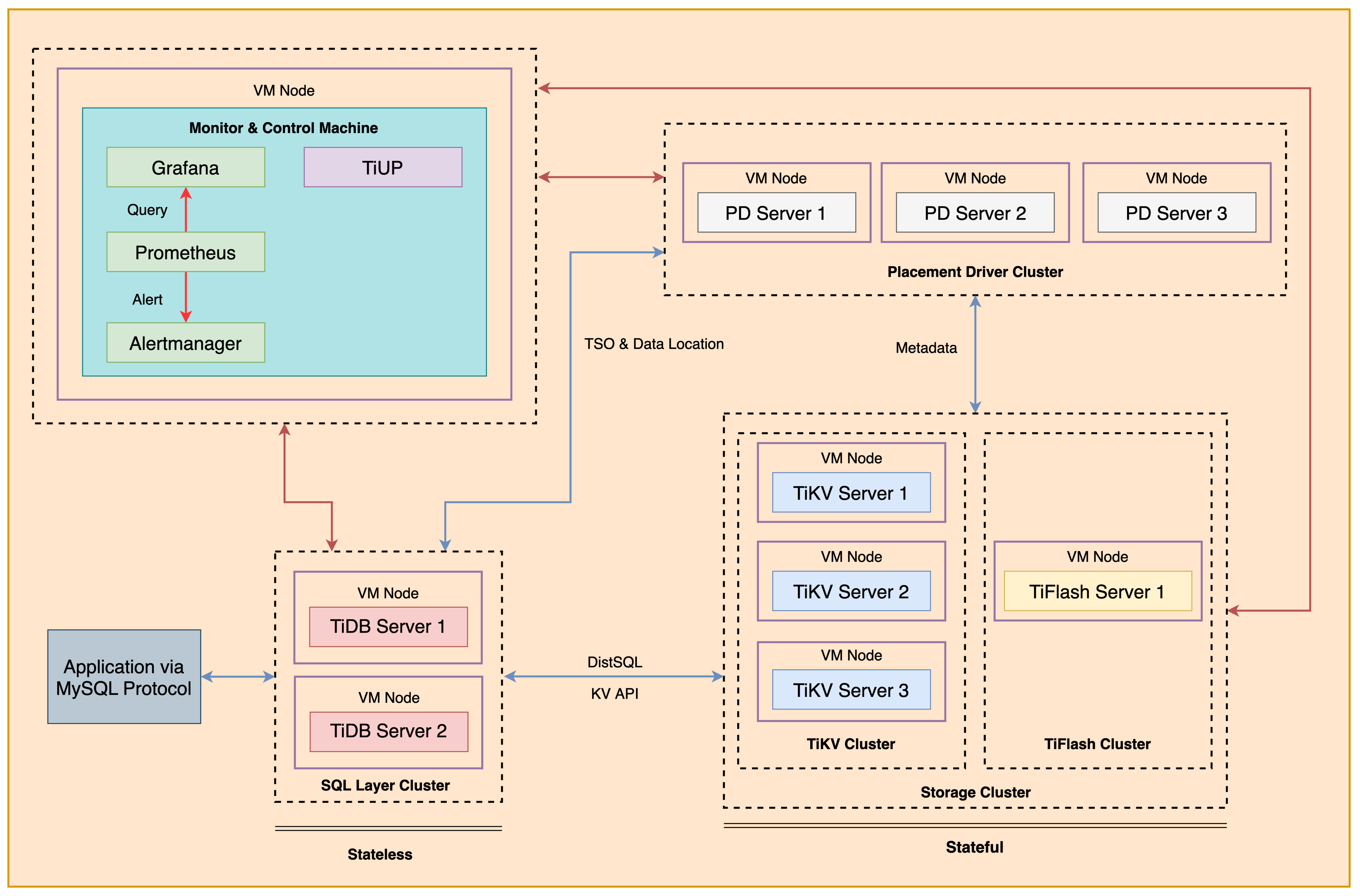 ### Notes
+ Completing *Exercises 1: Deploying a TiDB Cluster Using TiUP* is necessary for subsequent exercises to complete successfully.
+ Many of the steps require that you type commands in a terminal window. You might find it convenient to launch a terminal window and keep it open for the duration of the exercises.
+ Your environment may be different with these exercises, including but not limited to `IP`, `port`, `username`, `password` and `directory`.
+ The `$` in your terminal window is an OS prompt.
+ The "`tidb>`" or "`mysql>`" in your terminal window is SQL command prompt.
+ In these exercises, we need 10 machines connected in the network. The `Role` and `IP Address` (represented by environment variables) are as follows:
| `Node Role` | `IP Address` |
| :----------------- | :-------------------------------------------------------- |
| `Monitor 1` | `${HOST_MONITOR1_PRIVATE_IP}, ${HOST_MONITOR1_PUBLIC_IP}` |
| `Control Machine` | `${HOST_CM_PRIVATE_IP}, ${HOST_CM_PUBLIC_IP}` |
| `TiDB server 1` | `${HOST_DB1_PRIVATE_IP}, ${HOST_DB1_PUBLIC_IP}` |
| `TiDB server 2` | `${HOST_DB2_PRIVATE_IP}, ${HOST_DB2_PUBLIC_IP}` |
| `TiKV server 1` | `${HOST_KV1_PRIVATE_IP}, ${HOST_KV1_PUBLIC_IP}` |
| `TiKV server 2` | `${HOST_KV2_PRIVATE_IP}, ${HOST_KV2_PUBLIC_IP}` |
| `TiKV server 3` | `${HOST_KV3_PRIVATE_IP}, ${HOST_KV3_PUBLIC_IP}` |
| `PD server 1` | `${HOST_PD1_PRIVATE_IP}, ${HOST_PD1_PUBLIC_IP}` |
| `PD server 2` | `${HOST_PD2_PRIVATE_IP}, ${HOST_PD2_PUBLIC_IP}` |
| `PD server 3` | `${HOST_PD3_PRIVATE_IP}, ${HOST_PD3_PUBLIC_IP}` |
| `TiFlash server 1` | `${HOST_TIFLASH1_PRIVATE_IP}, ${HOST_TIFLASH1_PUBLIC_IP}` |
| `Alertmanager` | `${HOST_MONITOR1_PRIVATE_IP}, ${HOST_MONITOR1_PUBLIC_IP}` |
| `Grafana` | `${HOST_MONITOR1_PRIVATE_IP}, ${HOST_MONITOR1_PUBLIC_IP}` |
| `Prometheus` | `${HOST_MONITOR1_PRIVATE_IP}, ${HOST_MONITOR1_PUBLIC_IP}` |
### Assumptions
+ You are given access to 10 machines that have been set up.
+ You have completed the activities in the exercise titled "*Exercises 1: Deploying a TiDB Cluster Using TiUP*" and have a terminal window open.
+ Your environment has TiDB cluster deployed and running.
## Exercise 1: Scaling out a TiKV Cluster
### Overview
+ In this exercise, you add a TiDB node to the `monitor1` node. You will perform all tasks on `Control Machine`.
### Duration
+ This exercise should take you approximately 20 minutes to complete.
### Tasks
1. Prepare a yaml file called `scale-out-tikv.yaml` for scaling out TiKV.
2. Scale out the TiKV.
### Solution Steps
1. Login as user `ec2-user` on `Control Machine` (`${HOST_MONITOR1_PUBLIC_IP}`). Enter the following command at the terminal prompt and receive the results shown:
```
$ ssh -A ec2-user@
__| __|_ )
_| ( / Amazon Linux 2 AMI
___|\___|___|
https://aws.amazon.com/amazon-linux-2/
```
2. Use a text editor to edit the `scale-out-tikv.yaml` file. Modify `scale-out-tikv.yaml` file to contain settings similar to those that follow (replace the IP addresses with the correct ones assigned to you). Press the `ESC` and type `:wq` to quit to the terminal:
```
$ vi scale-out-tikv.yaml
tikv_servers:
- host:
ssh_port: 22
port: 20160
status_port: 20180
deploy_dir: /tidb-deploy/tikv-20160
data_dir: /tidb-data/tikv-20160
log_dir: /tidb-deploy/tikv-20160/log
```
3. Run the `tiup cluster scale-out` command to scale out TiKV cluster. Enter the following command at the terminal prompt and receive the results shown:
```
$ tiup cluster scale-out tidb-test scale-out-tikv.yaml
...
Do you want to continue? [y/N]: (default=N) y
...
Scaled cluster `tidb-test` out successfully
```
4. Check the status of the deployed TiDB cluster and the new TiKV node (IP address: `HOST_MONITOR1_PRIVATE_IP`). There are 4 TiKV nodes now. Enter the following command at the terminal prompt and receive the results shown:
```
$ tiup cluster display tidb-test
tiup is checking updates for component cluster ...
Starting component `cluster`: /home/ec2-user/.tiup/components/cluster/v1.12.1/tiup-cluster display tidb-test
Cluster type: tidb
Cluster name: tidb-test
Cluster version: v6.5.0
Deploy user: tidb
SSH type: builtin
Dashboard URL: http://10.90.1.122:2379/dashboard
Grafana URL: http://10.90.4.214:3000
ID Role Host Ports OS/Arch Status Data Dir Deploy Dir
-- ---- ---- ----- ------- ------ -------- ----------
10.90.4.214:9093 alertmanager 10.90.4.214 9093/9094 linux/x86_64 Up /tidb-data/alertmanager-9093 /tidb-deploy/alertmanager-9093
10.90.4.214:3000 grafana 10.90.4.214 3000 linux/x86_64 Up - /tidb-deploy/grafana-3000
10.90.1.122:2379 pd 10.90.1.122 2379/2380 linux/x86_64 Up|L|UI /tidb-data/pd-2379 /tidb-deploy/pd-2379
10.90.2.243:2379 pd 10.90.2.243 2379/2380 linux/x86_64 Up /tidb-data/pd-2379 /tidb-deploy/pd-2379
10.90.3.25:2379 pd 10.90.3.25 2379/2380 linux/x86_64 Up /tidb-data/pd-2379 /tidb-deploy/pd-2379
10.90.4.214:9090 prometheus 10.90.4.214 9090/12020 linux/x86_64 Up /tidb-data/prometheus-9090 /tidb-deploy/prometheus-9090
10.90.1.133:4000 tidb 10.90.1.133 4000/10080 linux/x86_64 Up - /tidb-deploy/tidb-4000
10.90.2.92:4000 tidb 10.90.2.92 4000/10080 linux/x86_64 Up - /tidb-deploy/tidb-4000
10.90.4.103:9000 tiflash 10.90.4.103 9000/8123/3930/20170/20292/8234 linux/x86_64 Up /tidb-data/tiflash-9000 /tidb-deploy/tiflash-9000
10.90.1.98:20160 tikv 10.90.1.98 20160/20180 linux/x86_64 Up /tidb-data/tikv-20160 /tidb-deploy/tikv-20160
10.90.2.235:20160 tikv 10.90.2.235 20160/20180 linux/x86_64 Up /tidb-data/tikv-20160 /tidb-deploy/tikv-20160
10.90.3.148:20160 tikv 10.90.3.148 20160/20180 linux/x86_64 Up /tidb-data/tikv-20160 /tidb-deploy/tikv-20160
10.90.4.214:20160 tikv 10.90.4.214 20160/20180 linux/x86_64 Up /tidb-data/tikv-20160 /tidb-deploy/tikv-20160
Total nodes: 13
```
## Exercise 2: Scaling in a TiKV Cluster
### Overview
+ In this exercise, you remove a TiDB node from the `monitor1` node. You will perform all tasks on the `Control Machine`.
### Duration
+ This exercise should take you approximately 20 minutes to complete.
### Tasks
1. Scale in the TiKV cluster.
2. Delete the stopped TiKV node.
### Solution Steps
1. Run the `tiup cluster scale-in` command to scale in TiKV cluster. Enter the following command at the terminal prompt and receive the results shown:
```
$ tiup cluster scale-in tidb-test --node ${HOST_MONITOR1_PRIVATE_IP}:20160
...
Do you want to continue? [y/N]:(default=N) y
The component `[tikv]` will become tombstone, maybe exists in several minutes or hours, after that you can use the prune command to clean it
Do you want to continue? [y/N]:(default=N) y
...
Scaled cluster `tidb-test` in successfully
```
2. Check the status of the deployed TiDB cluster. Observe that the status of the TiKV node (IP address: `HOST_MONITOR1_PRIVATE_IP`) has changed to `Tombstone`.
```
$ tiup cluster display tidb-test
tiup is checking updates for component cluster ...
...
ID Role Host Ports OS/Arch Status Data Dir Deploy Dir
-- ---- ---- ----- ------- ------ -------- ----------
...
10.90.4.214:20160 tikv 10.90.4.214 20160/20180 linux/x86_64 Tombstone /tidb-data/tikv-20160 /tidb-deploy/tikv-20160
Total nodes: 13
There are some nodes can be pruned:
Nodes: [10.90.4.214:20160]
You can destroy them with the command: `tiup cluster prune tidb-test`
```
3. Execute the `tiup cluster prune tidb-test` to clean up node data. Enter the following command at the terminal prompt and receive the results shown:
```
$ tiup cluster prune tidb-test
...
Do you confirm this action? [y/N]:(default=N) y
...
Destroy success
```
4. Check the status of the deployed TiDB cluster, confirm that the TiKV node (IP address: `HOST_MONITOR1_PRIVATE_IP`) no longer exists. Enter the following command at the terminal prompt and receive the results shown:
```
$ tiup cluster display tidb-test
tiup is checking updates for component cluster ...
Starting component `cluster`: /home/ec2-user/.tiup/components/cluster/v1.12.1/tiup-cluster display tidb-test
Cluster type: tidb
Cluster name: tidb-test
Cluster version: v6.5.0
Deploy user: tidb
SSH type: builtin
Dashboard URL: http://10.90.1.122:2379/dashboard
Grafana URL: http://10.90.4.214:3000
ID Role Host Ports OS/Arch Status Data Dir Deploy Dir
-- ---- ---- ----- ------- ------ -------- ----------
10.90.4.214:9093 alertmanager 10.90.4.214 9093/9094 linux/x86_64 Up /tidb-data/alertmanager-9093 /tidb-deploy/alertmanager-9093
10.90.4.214:3000 grafana 10.90.4.214 3000 linux/x86_64 Up - /tidb-deploy/grafana-3000
10.90.1.122:2379 pd 10.90.1.122 2379/2380 linux/x86_64 Up|L|UI /tidb-data/pd-2379 /tidb-deploy/pd-2379
10.90.2.243:2379 pd 10.90.2.243 2379/2380 linux/x86_64 Up /tidb-data/pd-2379 /tidb-deploy/pd-2379
10.90.3.25:2379 pd 10.90.3.25 2379/2380 linux/x86_64 Up /tidb-data/pd-2379 /tidb-deploy/pd-2379
10.90.4.214:9090 prometheus 10.90.4.214 9090/12020 linux/x86_64 Up /tidb-data/prometheus-9090 /tidb-deploy/prometheus-9090
10.90.1.133:4000 tidb 10.90.1.133 4000/10080 linux/x86_64 Up - /tidb-deploy/tidb-4000
10.90.2.92:4000 tidb 10.90.2.92 4000/10080 linux/x86_64 Up - /tidb-deploy/tidb-4000
10.90.4.103:9000 tiflash 10.90.4.103 9000/8123/3930/20170/20292/8234 linux/x86_64 Up /tidb-data/tiflash-9000 /tidb-deploy/tiflash-9000
10.90.1.98:20160 tikv 10.90.1.98 20160/20180 linux/x86_64 Up /tidb-data/tikv-20160 /tidb-deploy/tikv-20160
10.90.2.235:20160 tikv 10.90.2.235 20160/20180 linux/x86_64 Up /tidb-data/tikv-20160 /tidb-deploy/tikv-20160
10.90.3.148:20160 tikv 10.90.3.148 20160/20180 linux/x86_64 Up /tidb-data/tikv-20160 /tidb-deploy/tikv-20160
Total nodes: 12
```
## Exercise 3: Renaming Cluster
### Overview
+ In this exercise, you rename the TiDB cluster.
### Duration
+ This exercise should take you approximately 10 minutes to complete. You will perform all tasks on the `Control Machine`.
### Tasks
1. Change the name of TiDB cluster to `tidb-prod`.
2. Check the status of the deployed TiDB cluster and view the name of TiDB cluster.
3. Change the name of TiDB cluster back to `tidb-test`.
4. Check the status of the deployed TiDB cluster and view the name of TiDB cluster.
5. Close all open terminal windows.
### Solution Steps
1. Change the name of TiDB cluster to `tidb-prod`. Enter the following command at the terminal prompt and receive the results shown:
```
$ tiup cluster rename tidb-test tidb-prod
...
Do you confirm this action? [y/N]:(default=N) y
...
Do you want to continue? [y/N]:(default=N) y
...
Reloaded cluster `tidb-prod` successfully
```
2. Check the status of the deployed TiDB cluster and view the name of TiDB cluster. Enter the following command at the terminal prompt and receive the results shown:
```
$ tiup cluster display tidb-prod
tiup is checking updates for component cluster ...
Starting component `cluster`: /home/ec2-user/.tiup/components/cluster/v1.12.1/tiup-cluster display tidb-prod
Cluster type: tidb
Cluster name: tidb-prod
...
```
3. Change the name of TiDB cluster back to `tidb-test`. Enter the following command at the terminal prompt and receive the results shown:
```
$ tiup cluster rename tidb-prod tidb-test
...
Do you confirm this action? [y/N]:(default=N) y
...
Do you want to continue? [y/N]:(default=N) y
...
Reloaded cluster `tidb-test` successfully
```
4. Check the status of the deployed TiDB cluster and view the name of TiDB cluster. Enter the following command at the terminal prompt and receive the results shown:
```
$ tiup cluster display tidb-test
tiup is checking updates for component cluster ...
Starting component `cluster`: /home/ec2-user/.tiup/components/cluster/v1.12.1/tiup-cluster display tidb-prod
Cluster type: tidb
Cluster name: tidb-test
...
```
5. Close all open terminal windows.
## End of Exercises
### Notes
+ Completing *Exercises 1: Deploying a TiDB Cluster Using TiUP* is necessary for subsequent exercises to complete successfully.
+ Many of the steps require that you type commands in a terminal window. You might find it convenient to launch a terminal window and keep it open for the duration of the exercises.
+ Your environment may be different with these exercises, including but not limited to `IP`, `port`, `username`, `password` and `directory`.
+ The `$` in your terminal window is an OS prompt.
+ The "`tidb>`" or "`mysql>`" in your terminal window is SQL command prompt.
+ In these exercises, we need 10 machines connected in the network. The `Role` and `IP Address` (represented by environment variables) are as follows:
| `Node Role` | `IP Address` |
| :----------------- | :-------------------------------------------------------- |
| `Monitor 1` | `${HOST_MONITOR1_PRIVATE_IP}, ${HOST_MONITOR1_PUBLIC_IP}` |
| `Control Machine` | `${HOST_CM_PRIVATE_IP}, ${HOST_CM_PUBLIC_IP}` |
| `TiDB server 1` | `${HOST_DB1_PRIVATE_IP}, ${HOST_DB1_PUBLIC_IP}` |
| `TiDB server 2` | `${HOST_DB2_PRIVATE_IP}, ${HOST_DB2_PUBLIC_IP}` |
| `TiKV server 1` | `${HOST_KV1_PRIVATE_IP}, ${HOST_KV1_PUBLIC_IP}` |
| `TiKV server 2` | `${HOST_KV2_PRIVATE_IP}, ${HOST_KV2_PUBLIC_IP}` |
| `TiKV server 3` | `${HOST_KV3_PRIVATE_IP}, ${HOST_KV3_PUBLIC_IP}` |
| `PD server 1` | `${HOST_PD1_PRIVATE_IP}, ${HOST_PD1_PUBLIC_IP}` |
| `PD server 2` | `${HOST_PD2_PRIVATE_IP}, ${HOST_PD2_PUBLIC_IP}` |
| `PD server 3` | `${HOST_PD3_PRIVATE_IP}, ${HOST_PD3_PUBLIC_IP}` |
| `TiFlash server 1` | `${HOST_TIFLASH1_PRIVATE_IP}, ${HOST_TIFLASH1_PUBLIC_IP}` |
| `Alertmanager` | `${HOST_MONITOR1_PRIVATE_IP}, ${HOST_MONITOR1_PUBLIC_IP}` |
| `Grafana` | `${HOST_MONITOR1_PRIVATE_IP}, ${HOST_MONITOR1_PUBLIC_IP}` |
| `Prometheus` | `${HOST_MONITOR1_PRIVATE_IP}, ${HOST_MONITOR1_PUBLIC_IP}` |
### Assumptions
+ You are given access to 10 machines that have been set up.
+ You have completed the activities in the exercise titled "*Exercises 1: Deploying a TiDB Cluster Using TiUP*" and have a terminal window open.
+ Your environment has TiDB cluster deployed and running.
## Exercise 1: Scaling out a TiKV Cluster
### Overview
+ In this exercise, you add a TiDB node to the `monitor1` node. You will perform all tasks on `Control Machine`.
### Duration
+ This exercise should take you approximately 20 minutes to complete.
### Tasks
1. Prepare a yaml file called `scale-out-tikv.yaml` for scaling out TiKV.
2. Scale out the TiKV.
### Solution Steps
1. Login as user `ec2-user` on `Control Machine` (`${HOST_MONITOR1_PUBLIC_IP}`). Enter the following command at the terminal prompt and receive the results shown:
```
$ ssh -A ec2-user@
__| __|_ )
_| ( / Amazon Linux 2 AMI
___|\___|___|
https://aws.amazon.com/amazon-linux-2/
```
2. Use a text editor to edit the `scale-out-tikv.yaml` file. Modify `scale-out-tikv.yaml` file to contain settings similar to those that follow (replace the IP addresses with the correct ones assigned to you). Press the `ESC` and type `:wq` to quit to the terminal:
```
$ vi scale-out-tikv.yaml
tikv_servers:
- host:
ssh_port: 22
port: 20160
status_port: 20180
deploy_dir: /tidb-deploy/tikv-20160
data_dir: /tidb-data/tikv-20160
log_dir: /tidb-deploy/tikv-20160/log
```
3. Run the `tiup cluster scale-out` command to scale out TiKV cluster. Enter the following command at the terminal prompt and receive the results shown:
```
$ tiup cluster scale-out tidb-test scale-out-tikv.yaml
...
Do you want to continue? [y/N]: (default=N) y
...
Scaled cluster `tidb-test` out successfully
```
4. Check the status of the deployed TiDB cluster and the new TiKV node (IP address: `HOST_MONITOR1_PRIVATE_IP`). There are 4 TiKV nodes now. Enter the following command at the terminal prompt and receive the results shown:
```
$ tiup cluster display tidb-test
tiup is checking updates for component cluster ...
Starting component `cluster`: /home/ec2-user/.tiup/components/cluster/v1.12.1/tiup-cluster display tidb-test
Cluster type: tidb
Cluster name: tidb-test
Cluster version: v6.5.0
Deploy user: tidb
SSH type: builtin
Dashboard URL: http://10.90.1.122:2379/dashboard
Grafana URL: http://10.90.4.214:3000
ID Role Host Ports OS/Arch Status Data Dir Deploy Dir
-- ---- ---- ----- ------- ------ -------- ----------
10.90.4.214:9093 alertmanager 10.90.4.214 9093/9094 linux/x86_64 Up /tidb-data/alertmanager-9093 /tidb-deploy/alertmanager-9093
10.90.4.214:3000 grafana 10.90.4.214 3000 linux/x86_64 Up - /tidb-deploy/grafana-3000
10.90.1.122:2379 pd 10.90.1.122 2379/2380 linux/x86_64 Up|L|UI /tidb-data/pd-2379 /tidb-deploy/pd-2379
10.90.2.243:2379 pd 10.90.2.243 2379/2380 linux/x86_64 Up /tidb-data/pd-2379 /tidb-deploy/pd-2379
10.90.3.25:2379 pd 10.90.3.25 2379/2380 linux/x86_64 Up /tidb-data/pd-2379 /tidb-deploy/pd-2379
10.90.4.214:9090 prometheus 10.90.4.214 9090/12020 linux/x86_64 Up /tidb-data/prometheus-9090 /tidb-deploy/prometheus-9090
10.90.1.133:4000 tidb 10.90.1.133 4000/10080 linux/x86_64 Up - /tidb-deploy/tidb-4000
10.90.2.92:4000 tidb 10.90.2.92 4000/10080 linux/x86_64 Up - /tidb-deploy/tidb-4000
10.90.4.103:9000 tiflash 10.90.4.103 9000/8123/3930/20170/20292/8234 linux/x86_64 Up /tidb-data/tiflash-9000 /tidb-deploy/tiflash-9000
10.90.1.98:20160 tikv 10.90.1.98 20160/20180 linux/x86_64 Up /tidb-data/tikv-20160 /tidb-deploy/tikv-20160
10.90.2.235:20160 tikv 10.90.2.235 20160/20180 linux/x86_64 Up /tidb-data/tikv-20160 /tidb-deploy/tikv-20160
10.90.3.148:20160 tikv 10.90.3.148 20160/20180 linux/x86_64 Up /tidb-data/tikv-20160 /tidb-deploy/tikv-20160
10.90.4.214:20160 tikv 10.90.4.214 20160/20180 linux/x86_64 Up /tidb-data/tikv-20160 /tidb-deploy/tikv-20160
Total nodes: 13
```
## Exercise 2: Scaling in a TiKV Cluster
### Overview
+ In this exercise, you remove a TiDB node from the `monitor1` node. You will perform all tasks on the `Control Machine`.
### Duration
+ This exercise should take you approximately 20 minutes to complete.
### Tasks
1. Scale in the TiKV cluster.
2. Delete the stopped TiKV node.
### Solution Steps
1. Run the `tiup cluster scale-in` command to scale in TiKV cluster. Enter the following command at the terminal prompt and receive the results shown:
```
$ tiup cluster scale-in tidb-test --node ${HOST_MONITOR1_PRIVATE_IP}:20160
...
Do you want to continue? [y/N]:(default=N) y
The component `[tikv]` will become tombstone, maybe exists in several minutes or hours, after that you can use the prune command to clean it
Do you want to continue? [y/N]:(default=N) y
...
Scaled cluster `tidb-test` in successfully
```
2. Check the status of the deployed TiDB cluster. Observe that the status of the TiKV node (IP address: `HOST_MONITOR1_PRIVATE_IP`) has changed to `Tombstone`.
```
$ tiup cluster display tidb-test
tiup is checking updates for component cluster ...
...
ID Role Host Ports OS/Arch Status Data Dir Deploy Dir
-- ---- ---- ----- ------- ------ -------- ----------
...
10.90.4.214:20160 tikv 10.90.4.214 20160/20180 linux/x86_64 Tombstone /tidb-data/tikv-20160 /tidb-deploy/tikv-20160
Total nodes: 13
There are some nodes can be pruned:
Nodes: [10.90.4.214:20160]
You can destroy them with the command: `tiup cluster prune tidb-test`
```
3. Execute the `tiup cluster prune tidb-test` to clean up node data. Enter the following command at the terminal prompt and receive the results shown:
```
$ tiup cluster prune tidb-test
...
Do you confirm this action? [y/N]:(default=N) y
...
Destroy success
```
4. Check the status of the deployed TiDB cluster, confirm that the TiKV node (IP address: `HOST_MONITOR1_PRIVATE_IP`) no longer exists. Enter the following command at the terminal prompt and receive the results shown:
```
$ tiup cluster display tidb-test
tiup is checking updates for component cluster ...
Starting component `cluster`: /home/ec2-user/.tiup/components/cluster/v1.12.1/tiup-cluster display tidb-test
Cluster type: tidb
Cluster name: tidb-test
Cluster version: v6.5.0
Deploy user: tidb
SSH type: builtin
Dashboard URL: http://10.90.1.122:2379/dashboard
Grafana URL: http://10.90.4.214:3000
ID Role Host Ports OS/Arch Status Data Dir Deploy Dir
-- ---- ---- ----- ------- ------ -------- ----------
10.90.4.214:9093 alertmanager 10.90.4.214 9093/9094 linux/x86_64 Up /tidb-data/alertmanager-9093 /tidb-deploy/alertmanager-9093
10.90.4.214:3000 grafana 10.90.4.214 3000 linux/x86_64 Up - /tidb-deploy/grafana-3000
10.90.1.122:2379 pd 10.90.1.122 2379/2380 linux/x86_64 Up|L|UI /tidb-data/pd-2379 /tidb-deploy/pd-2379
10.90.2.243:2379 pd 10.90.2.243 2379/2380 linux/x86_64 Up /tidb-data/pd-2379 /tidb-deploy/pd-2379
10.90.3.25:2379 pd 10.90.3.25 2379/2380 linux/x86_64 Up /tidb-data/pd-2379 /tidb-deploy/pd-2379
10.90.4.214:9090 prometheus 10.90.4.214 9090/12020 linux/x86_64 Up /tidb-data/prometheus-9090 /tidb-deploy/prometheus-9090
10.90.1.133:4000 tidb 10.90.1.133 4000/10080 linux/x86_64 Up - /tidb-deploy/tidb-4000
10.90.2.92:4000 tidb 10.90.2.92 4000/10080 linux/x86_64 Up - /tidb-deploy/tidb-4000
10.90.4.103:9000 tiflash 10.90.4.103 9000/8123/3930/20170/20292/8234 linux/x86_64 Up /tidb-data/tiflash-9000 /tidb-deploy/tiflash-9000
10.90.1.98:20160 tikv 10.90.1.98 20160/20180 linux/x86_64 Up /tidb-data/tikv-20160 /tidb-deploy/tikv-20160
10.90.2.235:20160 tikv 10.90.2.235 20160/20180 linux/x86_64 Up /tidb-data/tikv-20160 /tidb-deploy/tikv-20160
10.90.3.148:20160 tikv 10.90.3.148 20160/20180 linux/x86_64 Up /tidb-data/tikv-20160 /tidb-deploy/tikv-20160
Total nodes: 12
```
## Exercise 3: Renaming Cluster
### Overview
+ In this exercise, you rename the TiDB cluster.
### Duration
+ This exercise should take you approximately 10 minutes to complete. You will perform all tasks on the `Control Machine`.
### Tasks
1. Change the name of TiDB cluster to `tidb-prod`.
2. Check the status of the deployed TiDB cluster and view the name of TiDB cluster.
3. Change the name of TiDB cluster back to `tidb-test`.
4. Check the status of the deployed TiDB cluster and view the name of TiDB cluster.
5. Close all open terminal windows.
### Solution Steps
1. Change the name of TiDB cluster to `tidb-prod`. Enter the following command at the terminal prompt and receive the results shown:
```
$ tiup cluster rename tidb-test tidb-prod
...
Do you confirm this action? [y/N]:(default=N) y
...
Do you want to continue? [y/N]:(default=N) y
...
Reloaded cluster `tidb-prod` successfully
```
2. Check the status of the deployed TiDB cluster and view the name of TiDB cluster. Enter the following command at the terminal prompt and receive the results shown:
```
$ tiup cluster display tidb-prod
tiup is checking updates for component cluster ...
Starting component `cluster`: /home/ec2-user/.tiup/components/cluster/v1.12.1/tiup-cluster display tidb-prod
Cluster type: tidb
Cluster name: tidb-prod
...
```
3. Change the name of TiDB cluster back to `tidb-test`. Enter the following command at the terminal prompt and receive the results shown:
```
$ tiup cluster rename tidb-prod tidb-test
...
Do you confirm this action? [y/N]:(default=N) y
...
Do you want to continue? [y/N]:(default=N) y
...
Reloaded cluster `tidb-test` successfully
```
4. Check the status of the deployed TiDB cluster and view the name of TiDB cluster. Enter the following command at the terminal prompt and receive the results shown:
```
$ tiup cluster display tidb-test
tiup is checking updates for component cluster ...
Starting component `cluster`: /home/ec2-user/.tiup/components/cluster/v1.12.1/tiup-cluster display tidb-prod
Cluster type: tidb
Cluster name: tidb-test
...
```
5. Close all open terminal windows.
## End of Exercises