# Upgrading TiDB Cluster
### Overview
+ In these exercises, you perform an in-place upgrade of the existing TiDB v6.5.0 cluster to TiDB v6.5.1.
+ The following shows the deployment topology diagram of TiDB cluster.
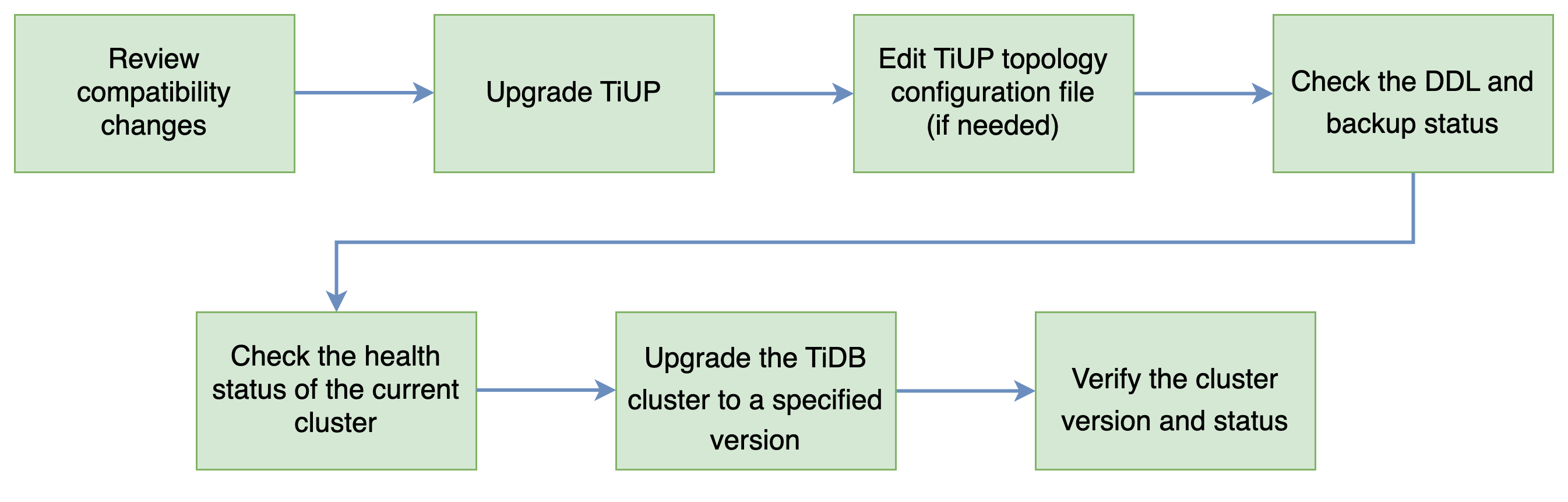
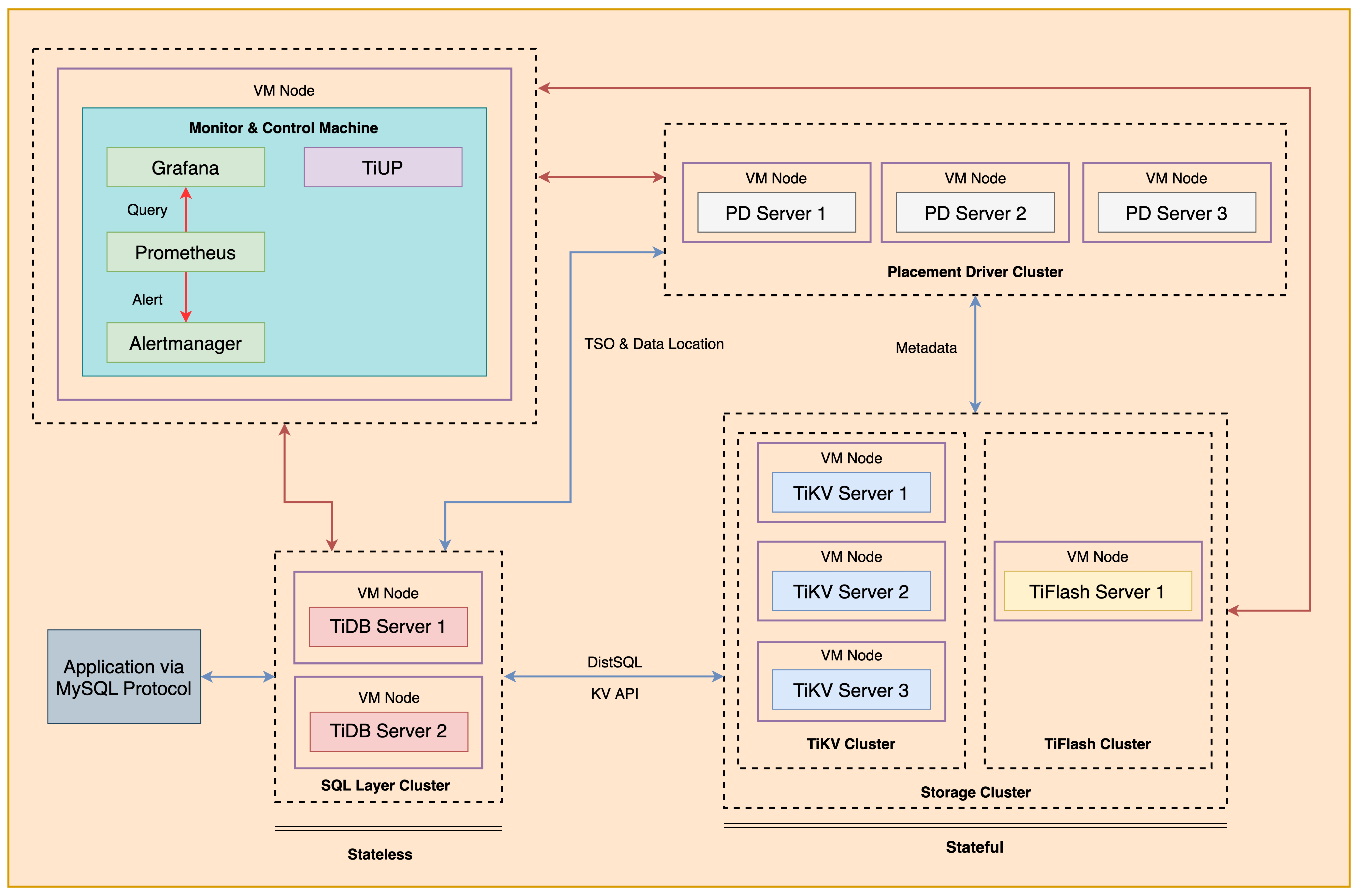 + Here are the steps of upgrade a TiDB cluster in production environment. Some of the steps are omitted in our lab. For example, we do not check the DDL and backup status, as there are no backup or DDL jobs in our previous labs.
 ### Notes
+ Completing *Exercises 1: Deploying a TiDB Cluster Using TiUP* is necessary for subsequent exercises to complete successfully.
+ Many of the steps require that you type commands in a terminal window. You might find it convenient to launch a terminal window and keep it open for the duration of the exercises.
+ Your environment may be different with these exercises, including but not limited to `IP`, `port`, `username`, `password` and `directory`.
+ The `$` in your terminal window is an OS prompt.
+ The "`tidb>`" or "`mysql>`" in your terminal window is SQL command prompt.
+ In these exercises, we need 10 machines connected in the network. The `Role` and `IP Address` (represented by environment variables) are as follows:
| `Node Role` | `IP Address` |
| :----------------- | :-------------------------------------------------------- |
| `Monitor 1` | `${HOST_MONITOR1_PRIVATE_IP}, ${HOST_MONITOR1_PUBLIC_IP}` |
| `Control Machine` | `${HOST_CM_PRIVATE_IP}, ${HOST_CM_PUBLIC_IP}` |
| `TiDB server 1` | `${HOST_DB1_PRIVATE_IP}, ${HOST_DB1_PUBLIC_IP}` |
| `TiDB server 2` | `${HOST_DB2_PRIVATE_IP}, ${HOST_DB2_PUBLIC_IP}` |
| `TiKV server 1` | `${HOST_KV1_PRIVATE_IP}, ${HOST_KV1_PUBLIC_IP}` |
| `TiKV server 2` | `${HOST_KV2_PRIVATE_IP}, ${HOST_KV2_PUBLIC_IP}` |
| `TiKV server 3` | `${HOST_KV3_PRIVATE_IP}, ${HOST_KV3_PUBLIC_IP}` |
| `PD server 1` | `${HOST_PD1_PRIVATE_IP}, ${HOST_PD1_PUBLIC_IP}` |
| `PD server 2` | `${HOST_PD2_PRIVATE_IP}, ${HOST_PD2_PUBLIC_IP}` |
| `PD server 3` | `${HOST_PD3_PRIVATE_IP}, ${HOST_PD3_PUBLIC_IP}` |
| `TiFlash server 1` | `${HOST_TIFLASH1_PRIVATE_IP}, ${HOST_TIFLASH1_PUBLIC_IP}` |
| `Alertmanager` | `${HOST_MONITOR1_PRIVATE_IP}, ${HOST_MONITOR1_PUBLIC_IP}` |
| `Grafana` | `${HOST_MONITOR1_PRIVATE_IP}, ${HOST_MONITOR1_PUBLIC_IP}` |
| `Prometheus` | `${HOST_MONITOR1_PRIVATE_IP}, ${HOST_MONITOR1_PUBLIC_IP}` |
### Assumptions
+ You are given the user credentials (for example: the private key) of the exercise environment.
+ You are given access to 10 machines that have been set up.
+ You have completed the activities in the exercise titled "*Exercises 1: Deploying a TiDB Cluster Using TiUP*" and have a terminal window open as the `root` user.
### Duration
+ This exercise should take you approximately 20 minutes to complete.
### Tasks
1. Upgrade the existing TiDB from v6.5.0 to v6.5.1.
### Solution
1. Login as user `ec2-user` on `Control Machine` (`${HOST_MONITOR1_PUBLIC_IP}`). Enter the following command at the terminal prompt and receive the results shown:
```
$ ssh -A ec2-user@
__| __|_ )
_| ( / Amazon Linux 2 AMI
___|\___|___|
https://aws.amazon.com/amazon-linux-2/
```
2. Check the version of the deployed TiDB cluster. Enter the following command at the terminal prompt and receive the results shown:
```
$ tiup cluster display tidb-test
...
Cluster version: v6.5.0
...
```
3. Upgrade of the existing TiDB v6.5.0 cluster to TiDB v6.5.1. Enter the following command at the terminal prompt and receive the results shown:
```
$ tiup cluster upgrade tidb-test v6.5.1
Starting component `cluster`: /home/ec2-user/.tiup/components/cluster/v1.10.1/tiup-cluster upgrade tidb-test v6.5.0
This operation will upgrade tidb v6.5.0 cluster tidb-test to v6.5.1.
Do you want to continue? [y/N]:(default=N) y
...
Upgraded cluster `tidb-test` successfully
```
4. Check the version of the deployed TiDB cluster. Enter the following command at the terminal prompt and receive the results shown:
```
$ tiup cluster display tidb-test
tiup is checking updates for component cluster ...
Starting component `cluster`: /home/ec2-user/.tiup/components/cluster/v1.10.1/tiup-cluster display tidb-test
Cluster type: tidb
Cluster name: tidb-test
Cluster version: v6.5.1
...
```
5. Close all open terminal windows.
## End of Exercises
### Notes
+ Completing *Exercises 1: Deploying a TiDB Cluster Using TiUP* is necessary for subsequent exercises to complete successfully.
+ Many of the steps require that you type commands in a terminal window. You might find it convenient to launch a terminal window and keep it open for the duration of the exercises.
+ Your environment may be different with these exercises, including but not limited to `IP`, `port`, `username`, `password` and `directory`.
+ The `$` in your terminal window is an OS prompt.
+ The "`tidb>`" or "`mysql>`" in your terminal window is SQL command prompt.
+ In these exercises, we need 10 machines connected in the network. The `Role` and `IP Address` (represented by environment variables) are as follows:
| `Node Role` | `IP Address` |
| :----------------- | :-------------------------------------------------------- |
| `Monitor 1` | `${HOST_MONITOR1_PRIVATE_IP}, ${HOST_MONITOR1_PUBLIC_IP}` |
| `Control Machine` | `${HOST_CM_PRIVATE_IP}, ${HOST_CM_PUBLIC_IP}` |
| `TiDB server 1` | `${HOST_DB1_PRIVATE_IP}, ${HOST_DB1_PUBLIC_IP}` |
| `TiDB server 2` | `${HOST_DB2_PRIVATE_IP}, ${HOST_DB2_PUBLIC_IP}` |
| `TiKV server 1` | `${HOST_KV1_PRIVATE_IP}, ${HOST_KV1_PUBLIC_IP}` |
| `TiKV server 2` | `${HOST_KV2_PRIVATE_IP}, ${HOST_KV2_PUBLIC_IP}` |
| `TiKV server 3` | `${HOST_KV3_PRIVATE_IP}, ${HOST_KV3_PUBLIC_IP}` |
| `PD server 1` | `${HOST_PD1_PRIVATE_IP}, ${HOST_PD1_PUBLIC_IP}` |
| `PD server 2` | `${HOST_PD2_PRIVATE_IP}, ${HOST_PD2_PUBLIC_IP}` |
| `PD server 3` | `${HOST_PD3_PRIVATE_IP}, ${HOST_PD3_PUBLIC_IP}` |
| `TiFlash server 1` | `${HOST_TIFLASH1_PRIVATE_IP}, ${HOST_TIFLASH1_PUBLIC_IP}` |
| `Alertmanager` | `${HOST_MONITOR1_PRIVATE_IP}, ${HOST_MONITOR1_PUBLIC_IP}` |
| `Grafana` | `${HOST_MONITOR1_PRIVATE_IP}, ${HOST_MONITOR1_PUBLIC_IP}` |
| `Prometheus` | `${HOST_MONITOR1_PRIVATE_IP}, ${HOST_MONITOR1_PUBLIC_IP}` |
### Assumptions
+ You are given the user credentials (for example: the private key) of the exercise environment.
+ You are given access to 10 machines that have been set up.
+ You have completed the activities in the exercise titled "*Exercises 1: Deploying a TiDB Cluster Using TiUP*" and have a terminal window open as the `root` user.
### Duration
+ This exercise should take you approximately 20 minutes to complete.
### Tasks
1. Upgrade the existing TiDB from v6.5.0 to v6.5.1.
### Solution
1. Login as user `ec2-user` on `Control Machine` (`${HOST_MONITOR1_PUBLIC_IP}`). Enter the following command at the terminal prompt and receive the results shown:
```
$ ssh -A ec2-user@
__| __|_ )
_| ( / Amazon Linux 2 AMI
___|\___|___|
https://aws.amazon.com/amazon-linux-2/
```
2. Check the version of the deployed TiDB cluster. Enter the following command at the terminal prompt and receive the results shown:
```
$ tiup cluster display tidb-test
...
Cluster version: v6.5.0
...
```
3. Upgrade of the existing TiDB v6.5.0 cluster to TiDB v6.5.1. Enter the following command at the terminal prompt and receive the results shown:
```
$ tiup cluster upgrade tidb-test v6.5.1
Starting component `cluster`: /home/ec2-user/.tiup/components/cluster/v1.10.1/tiup-cluster upgrade tidb-test v6.5.0
This operation will upgrade tidb v6.5.0 cluster tidb-test to v6.5.1.
Do you want to continue? [y/N]:(default=N) y
...
Upgraded cluster `tidb-test` successfully
```
4. Check the version of the deployed TiDB cluster. Enter the following command at the terminal prompt and receive the results shown:
```
$ tiup cluster display tidb-test
tiup is checking updates for component cluster ...
Starting component `cluster`: /home/ec2-user/.tiup/components/cluster/v1.10.1/tiup-cluster display tidb-test
Cluster type: tidb
Cluster name: tidb-test
Cluster version: v6.5.1
...
```
5. Close all open terminal windows.
## End of Exercises