# Importing the Data into TiDB Using TiDB Lightning
### Overview
+ In these exercises, you import the data into TiDB using `TiDB Lightning`.
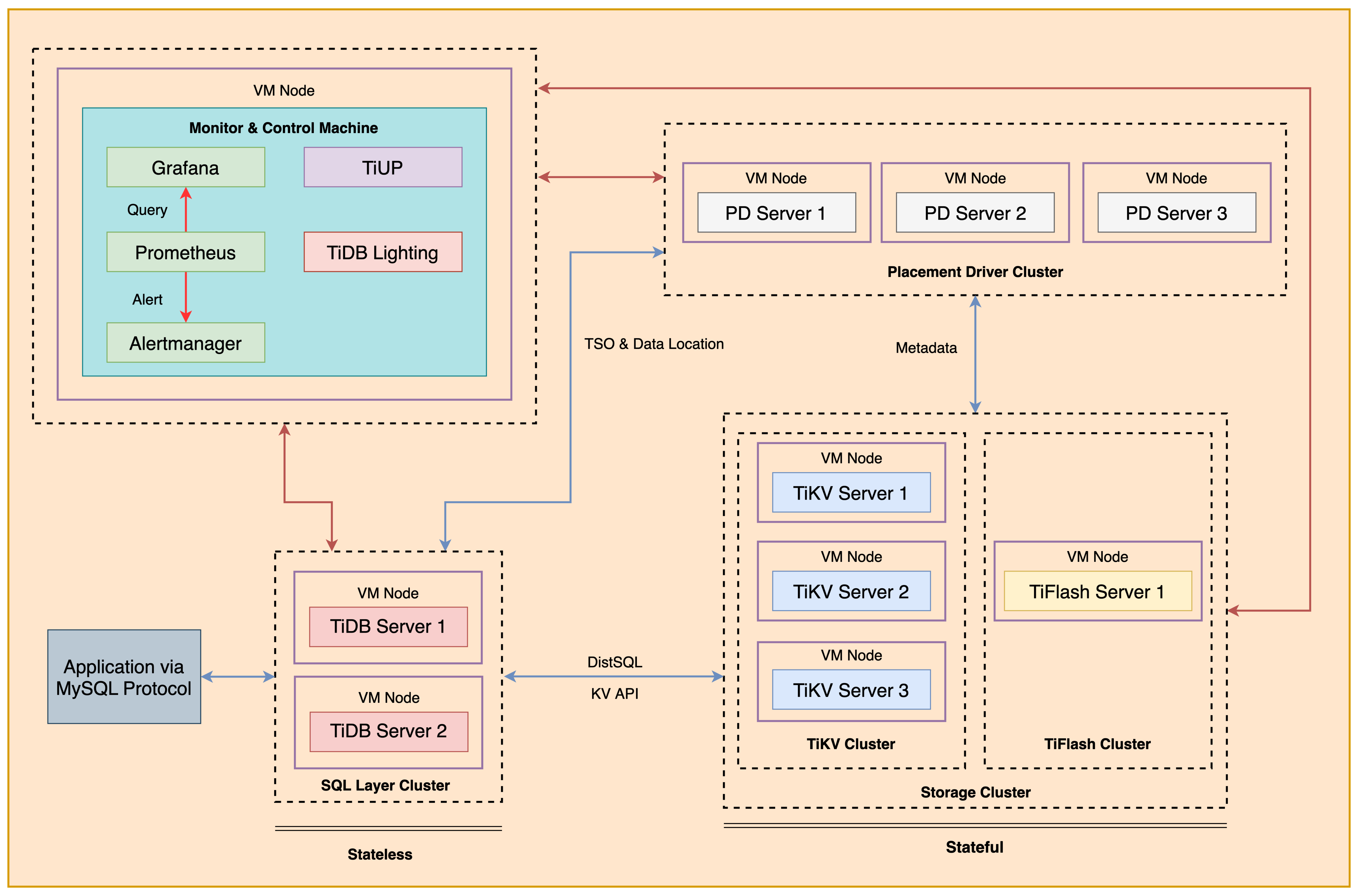
+ The following shows the deployment topology diagram of TiDB cluster.
 ### Notes
+ Completing *Exercises 1: Deploying a TiDB Cluster Using TiUP* is necessary for subsequent exercises to complete successfully.
+ Many of the steps require that you type commands in a terminal window. You might find it convenient to launch a terminal window and keep it open for the duration of the exercises.
+ Your environment may be different with these exercises, including but not limited to `IP`, `port`, `username`, `password` and `directory`.
+ The `$` in your terminal window is an OS prompt.
+ The "`tidb>`" or "`mysql>`" in your terminal window is SQL command prompt.
+ In these exercises, we need 10 machines connected in the network. The `Role` and `IP Address` (represented by environment variables) are as follows:
| `Node Role` | `IP Address` |
| :----------------- | :-------------------------------------------------------- |
| `Monitor 1` | `${HOST_MONITOR1_PRIVATE_IP}, ${HOST_MONITOR1_PUBLIC_IP}` |
| `Control Machine` | `${HOST_CM_PRIVATE_IP}, ${HOST_CM_PUBLIC_IP}` |
| `TiDB server 1` | `${HOST_DB1_PRIVATE_IP}, ${HOST_DB1_PUBLIC_IP}` |
| `TiDB server 2` | `${HOST_DB2_PRIVATE_IP}, ${HOST_DB2_PUBLIC_IP}` |
| `TiKV server 1` | `${HOST_KV1_PRIVATE_IP}, ${HOST_KV1_PUBLIC_IP}` |
| `TiKV server 2` | `${HOST_KV2_PRIVATE_IP}, ${HOST_KV2_PUBLIC_IP}` |
| `TiKV server 3` | `${HOST_KV3_PRIVATE_IP}, ${HOST_KV3_PUBLIC_IP}` |
| `PD server 1` | `${HOST_PD1_PRIVATE_IP}, ${HOST_PD1_PUBLIC_IP}` |
| `PD server 2` | `${HOST_PD2_PRIVATE_IP}, ${HOST_PD2_PUBLIC_IP}` |
| `PD server 3` | `${HOST_PD3_PRIVATE_IP}, ${HOST_PD3_PUBLIC_IP}` |
| `TiFlash server 1` | `${HOST_TIFLASH1_PRIVATE_IP}, ${HOST_TIFLASH1_PUBLIC_IP}` |
| `Alertmanager` | `${HOST_MONITOR1_PRIVATE_IP}, ${HOST_MONITOR1_PUBLIC_IP}` |
| `Grafana` | `${HOST_MONITOR1_PRIVATE_IP}, ${HOST_MONITOR1_PUBLIC_IP}` |
| `Prometheus` | `${HOST_MONITOR1_PRIVATE_IP}, ${HOST_MONITOR1_PUBLIC_IP}` |
### Assumptions
+ You are given the user credentials (for example: the private key) of the exercise environment.
+ You are given access to 10 machines that have been set up.
+ You have completed the activities in the exercise titled "*Exercises 1: Deploying a TiDB Cluster Using TiUP*" and have a terminal window open.
+ Your environment has TiDB cluster deployed and running.
+ You have cleaned up the previous data.
## Exercise 1: Importing CSV File into TiDB
### Overview
+ In this exercise, you import a CSV file into TiDB using `TiDB Lightning`. You will perform all tasks on node `monitor1`.
### Duration
+ This exercise should take you approximately 30 minutes to complete.
### Tasks
1. Install `TiDB Lightning` using `TiUP`.
2. Prepare the data.
3. Create schema in TiDB.
4. Config `TiDB Lightning`.
5. Import data into TiDB using `TiDB Lightning`.
### Solution
1. Login as user `ec2-user` on node `monitor1`
```
$ ssh -A ec2-user@
__| __|_ )
_| ( / Amazon Linux 2 AMI
___|\___|___|
https://aws.amazon.com/amazon-linux-2/
```
2. Create a user for Lightning task:
```
$ source hosts-env.sh
$ mysql -h ${HOST_DB1_PRIVATE_IP} -uroot -P4000
```
```sql
CREATE USER ltask@'%' IDENTIFIED BY 'q1w2e3R4_';
GRANT ALL PRIVILEGES ON *.* TO ltask@'%';
```
```
mysql> CREATE USER ltask@'%' IDENTIFIED BY 'q1w2e3R4_';
Query OK, 0 rows affected (0.05 sec)
mysql> GRANT ALL PRIVILEGES ON *.* TO ltask@'%';
Query OK, 0 rows affected (0.05 sec)
```
```
mysql> exit;
```
3. Install the `TiDB Lightning` on node `monitor1`. You are suggested to use **`TiUP`** to install the `TiDB Lightning`.
```
$ tiup install tidb-lightning:v6.5.1
```
4. Extract the data directories archive from `tidb-admin-dataset.zip` to `/home/ec2-user/stage/` on node `monitor1`. Enter the following command at the terminal prompt and receive the results shown:
```
$ unzip -u stage/tidb-admin-dataset.zip -d stage/
Archive: tidb-admin-dataset.zip
creating: TiDB-Administration-exercise-data/
creating: TiDB-Administration-exercise-data/exercise-12/
...
inflating: TiDB-Administration-exercise-data/exercise-08/Importing-Data-into-TiDB-in-Parallel/my_table_1/my_db.my_table_1.000000000.sql
```
5. List the contents of the CSV data directory. Enter the following command at the terminal prompt and receive the results shown:
```
$ ls ~/stage/TiDB-Administration-exercise-data/exercise-08/Importing-CSV-File
emp.sal.000000000.csv emp.sal.000000002.csv emp.sal.000000004.csv emp.sal.000000006.csv emp.sal.000000008.csv emp.sal.000000010.csv
emp.sal.000000001.csv emp.sal.000000003.csv emp.sal.000000005.csv emp.sal.000000007.csv emp.sal.000000009.csv metadata
```
6. View the `emp.sal.000000000.csv` file to learn about its structure. Enter the following command at the terminal prompt and receive the results shown:
```
$ head -n 10 ~/stage/TiDB-Administration-exercise-data/exercise-08/Importing-CSV-File/emp.sal.000000000.csv
"emp_no","salary","from_date","to_date"
10001,60117,"1986-06-26","1987-06-26"
10001,62102,"1987-06-26","1988-06-25"
10001,66074,"1988-06-25","1989-06-25"
10001,66596,"1989-06-25","1990-06-25"
10001,66961,"1990-06-25","1991-06-25"
10001,71046,"1991-06-25","1992-06-24"
10001,74333,"1992-06-24","1993-06-24"
10001,75286,"1993-06-24","1994-06-24"
10001,75994,"1994-06-24","1995-06-24"
```
```
$ wc -l ~/stage/TiDB-Administration-exercise-data/exercise-08/Importing-CSV-File/emp.sal.000000000.csv
275696 /home/ec2-user/stage/TiDB-Administration-exercise-data/exercise-08/Importing-CSV-File/emp.sal.000000000.csv
```
7. Use a text editor to edit the `lightning-csv.toml` file. Modify `lightning-csv.toml` file to contain settings similar to those that follow. Enter the following command at the terminal prompt and receive the results shown. Or, you can use `solution-lightning-csv.toml` which had been provisioned for you:
```
$ cd
$ vi lightning-csv.toml
[lightning]
# The concurrency number of data. It is set to the number of logical CPU
# cores by default. When deploying together with other components, you can
# set it to 75% of the size of logical CPU cores to limit the CPU usage.
# region-concurrency = 1
# Logging
level = "info"
file = "tidb-lightning.log"
[tikv-importer]
# Sets the backend to the "local" mode.
backend = "local"
# Sets the directory of temporary local storage.
sorted-kv-dir = "/tmp/sorted-kv-dir"
[mydumper]
# Local source data directory
data-source-dir = "/home/ec2-user/stage/TiDB-Administration-exercise-data/exercise-08/Importing-CSV-File"
# Configures the wildcard rule. By default, all tables in the mysql, sys, INFORMATION_SCHEMA, PERFORMANCE_SCHEMA, METRICS_SCHEMA, and INSPECTION_SCHEMA system databases are filtered.
# If this item is not configured, the "cannot find schema" error occurs when system tables are imported.
filter = ['*.*', '!mysql.*', '!sys.*', '!INFORMATION_SCHEMA.*', '!PERFORMANCE_SCHEMA.*', '!METRICS_SCHEMA.*', '!INSPECTION_SCHEMA.*']
[[mydumper.files]]
# Import only 00001~05000 data files and ignore other files
pattern = '(?i)(?:[/]*/)*emp\.sal\.(00000000[0-1]|000000001)\.csv'
schema = "emp"
table = "sal"
type = "csv"
[mydumper.csv]
# Separator between fields. Must not be empty.
separator = ','
# Quoting delimiter. Empty value means no quoting.
delimiter = '"'
# Line terminator. Empty value means both "\n" (LF) and "\r\n" (CRLF) are line terminators.
terminator = ""
# Whether the CSV files contain a header.
# If `header` is true, the first line will be skipped.
header = true
# Whether the CSV contains any NULL value.
# If `not-null` is true, all columns from CSV cannot be NULL.
not-null = false
# When `not-null` is false (that is, CSV can contain NULL),
# fields equal to this value will be treated as NULL.
null = '\N'
# Whether to interpret backslash escapes inside fields.
backslash-escape = true
# If a line ends with a separator, remove it.
trim-last-separator = false
[tidb]
# Configuration of any TiDB server from the cluster.
host = ""
port = 4000
user = "ltask"
password = "q1w2e3R4_"
# Table schema information is fetched from TiDB via this status-port.
status-port = 10080
# Address of any PD server from the cluster.
pd-addr = ":2379"
```
8. Connect to the TiDB. You should provide option `-p` if `root` has a password, otherwise you can omit the `-p` option.
```
$ mysql -h ${HOST_DB1_PRIVATE_IP} --port 4000 -u root
```
9. Create a new database called `emp`, with a table called `sal`. The `sal` table should have an `INT(11)` primary key column called `emp_no`, an `INT(11)` column called `salary`, a `DATE` primary key column called `from_date`, a `DATE` column called `to_date`. Then query the number of rows in the `sal` table. Enter the following command at the terminal prompt and receive the results shown:
```sql
DROP DATABASE IF EXISTS emp;
CREATE DATABASE emp;
USE emp;
CREATE TABLE `sal` ( `emp_no` INT(11) NOT NULL, `salary` INT(11) NOT NULL, `from_date` DATE NOT NULL, `to_date` DATE NOT NULL, PRIMARY KEY (`emp_no`,`from_date`));
SELECT COUNT(*) FROM emp.sal;
```
```
mysql> DROP DATABASE IF EXISTS emp;
Query OK, 0 rows affected (0.21 sec)
mysql> CREATE DATABASE emp;
Query OK, 0 rows affected (0.07 sec)
mysql> USE emp;
Database changed
mysql> CREATE TABLE `sal` ( `emp_no` INT(11) NOT NULL, `salary` INT(11) NOT NULL, `from_date` DATE NOT NULL, `to_date` DATE NOT NULL, PRIMARY KEY (`emp_no`,`from_date`));
Query OK, 0 rows affected (0.08 sec)
mysql> SELECT COUNT(*) FROM emp.sal;
+----------+
| COUNT(*) |
+----------+
| 0 |
+----------+
1 row in set (0.00 sec)
```
```
mysql> exit;
```
10. Use a `nohup` command to start the `tidb-lightning` process. Enter the following command at the terminal prompt and receive the results shown (You can press "Enter" to make ` tidb-lighting` work in the background):
```
$ nohup tiup tidb-lightning:v6.5.1 -config lightning-csv.toml > nohup.out &
[1] 17481
$ nohup: ignoring input and redirecting stderr to stdout
$
...
[1]+ Done nohup tiup tidb-lightning:v6.5.1 -config tidb-lightning-csv.toml > nohup.out
```
11. View the contents of the `nohup.out` file to verify that `TiDB Lightning` is exited. Enter the following command at the terminal prompt and receive the results shown:
```
$ cat nohup.out
Verbose debug logs will be written to tidb-lightning.log
+----+-----------------------------------------------------------------------------------------------------------------------+-------------+--------+
| # | CHECK ITEM | TYPE | PASSED |
+----+-----------------------------------------------------------------------------------------------------------------------+-------------+--------+
| 1 | Source csv files size is proper | performance | true |
+----+-----------------------------------------------------------------------------------------------------------------------+-------------+--------+
| 2 | checkpoints are valid | critical | true |
+----+-----------------------------------------------------------------------------------------------------------------------+-------------+--------+
| 3 | table schemas are valid | critical | true |
+----+-----------------------------------------------------------------------------------------------------------------------+-------------+--------+
| 4 | Cluster is available | critical | true |
+----+-----------------------------------------------------------------------------------------------------------------------+-------------+--------+
| 5 | Lightning has the correct storage permission | critical | true |
+----+-----------------------------------------------------------------------------------------------------------------------+-------------+--------+
| 6 | sorted-kv-dir:/tmp/sorted-kv-dir and data-source-dir:/home/ec2-user/sample/csv are in the same disk, may slow down performance | performance | false |
+----+-----------------------------------------------------------------------------------------------------------------------+-------------+--------+
| 7 | local disk resources are rich, estimate sorted data size 20.53MiB, local available is 5.15GiB | critical | true |
+----+-----------------------------------------------------------------------------------------------------------------------+-------------+--------+
| 8 | Cluster available is rich, available is 54.48GiB, we need 61.58MiB | critical | true |
+----+-----------------------------------------------------------------------------------------------------------------------+-------------+--------+
| 9 | Cluster doesn't have too many empty regions | critical | true |
+----+-----------------------------------------------------------------------------------------------------------------------+-------------+--------+
| 10 | Cluster region distribution is balanced | critical | true |
+----+-----------------------------------------------------------------------------------------------------------------------+-------------+--------+
tidb lightning exit successfully
```
+ If any error occurs, view the contents of the `tidb-lightning-csv.log` file to confirm the cause of the error:
```
$ less tidb-lightning.log
```
+ You might need to delete lightning checkpoint before importing the data again. The following command assumes that the checkpoint is stored in `/tmp/`.
```
rm /tmp/tidb_lightning_checkpoint.pb
```
12. Connect to the TiDB and query the count of the `sal` table, and then exit the session. You should provide option `-p` if `root` has a password, otherwise you can omit the `-p` option. Enter the following command at the terminal prompt and receive the results shown:
```
$ mysql -h ${HOST_DB1_PRIVATE_IP} --port 4000 -u root
```
```sql
SELECT COUNT(*) FROM emp.sal;
EXIT
```
```
mysql> SELECT COUNT(*) FROM emp.sal;
+----------+
| COUNT(*) |
+----------+
| 551395 |
+----------+
1 row in set (0.20 sec)
mysql> exit;
Bye
```
## Exercise 2: Importing Data into TiDB in Parallel
### Overview
+ In this exercise, you import multiple tables into TiDB using `TiDB Lightning` in parallel.
+ You use two terminal windows for this exercise.
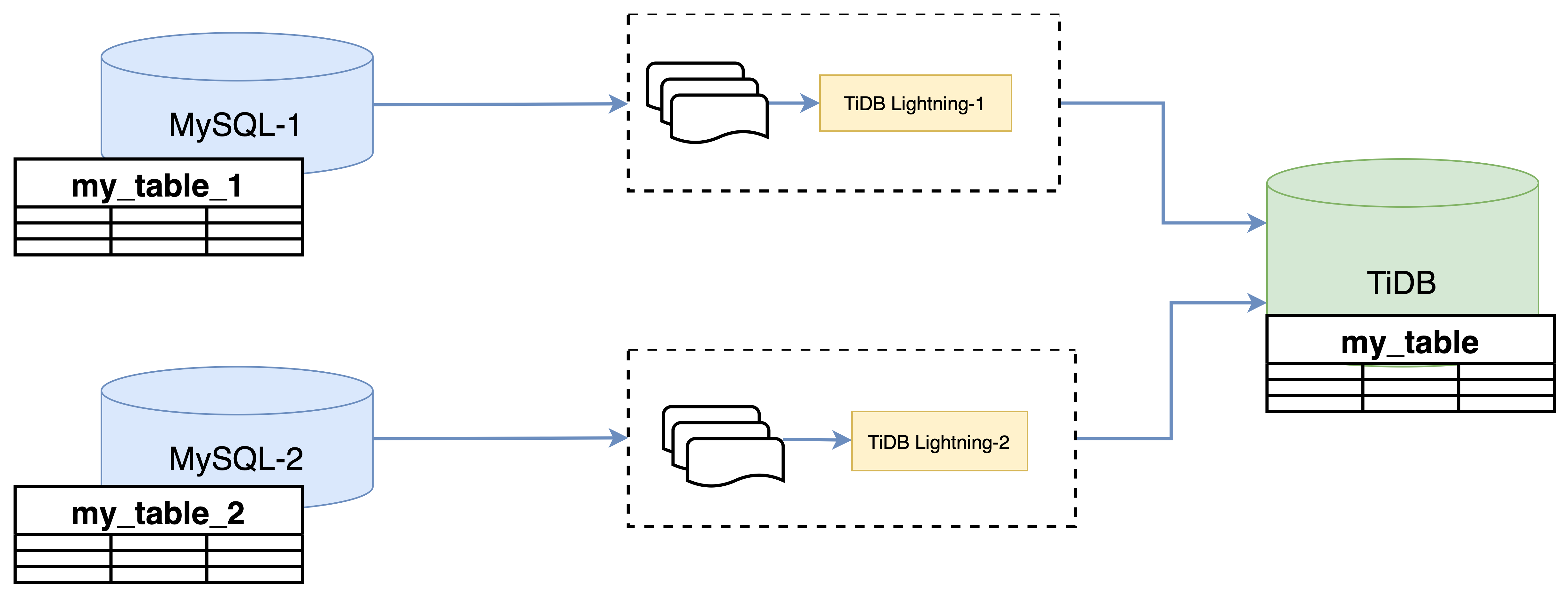
+ The following diagram shows how to use `TiDB Lightning` to import sharded databases and tables into TiDB in parallel. In our example, `my_table_1` contains all the records with an odd ID number, and `my_table_2` has all the records with an even ID number.
### Notes
+ Completing *Exercises 1: Deploying a TiDB Cluster Using TiUP* is necessary for subsequent exercises to complete successfully.
+ Many of the steps require that you type commands in a terminal window. You might find it convenient to launch a terminal window and keep it open for the duration of the exercises.
+ Your environment may be different with these exercises, including but not limited to `IP`, `port`, `username`, `password` and `directory`.
+ The `$` in your terminal window is an OS prompt.
+ The "`tidb>`" or "`mysql>`" in your terminal window is SQL command prompt.
+ In these exercises, we need 10 machines connected in the network. The `Role` and `IP Address` (represented by environment variables) are as follows:
| `Node Role` | `IP Address` |
| :----------------- | :-------------------------------------------------------- |
| `Monitor 1` | `${HOST_MONITOR1_PRIVATE_IP}, ${HOST_MONITOR1_PUBLIC_IP}` |
| `Control Machine` | `${HOST_CM_PRIVATE_IP}, ${HOST_CM_PUBLIC_IP}` |
| `TiDB server 1` | `${HOST_DB1_PRIVATE_IP}, ${HOST_DB1_PUBLIC_IP}` |
| `TiDB server 2` | `${HOST_DB2_PRIVATE_IP}, ${HOST_DB2_PUBLIC_IP}` |
| `TiKV server 1` | `${HOST_KV1_PRIVATE_IP}, ${HOST_KV1_PUBLIC_IP}` |
| `TiKV server 2` | `${HOST_KV2_PRIVATE_IP}, ${HOST_KV2_PUBLIC_IP}` |
| `TiKV server 3` | `${HOST_KV3_PRIVATE_IP}, ${HOST_KV3_PUBLIC_IP}` |
| `PD server 1` | `${HOST_PD1_PRIVATE_IP}, ${HOST_PD1_PUBLIC_IP}` |
| `PD server 2` | `${HOST_PD2_PRIVATE_IP}, ${HOST_PD2_PUBLIC_IP}` |
| `PD server 3` | `${HOST_PD3_PRIVATE_IP}, ${HOST_PD3_PUBLIC_IP}` |
| `TiFlash server 1` | `${HOST_TIFLASH1_PRIVATE_IP}, ${HOST_TIFLASH1_PUBLIC_IP}` |
| `Alertmanager` | `${HOST_MONITOR1_PRIVATE_IP}, ${HOST_MONITOR1_PUBLIC_IP}` |
| `Grafana` | `${HOST_MONITOR1_PRIVATE_IP}, ${HOST_MONITOR1_PUBLIC_IP}` |
| `Prometheus` | `${HOST_MONITOR1_PRIVATE_IP}, ${HOST_MONITOR1_PUBLIC_IP}` |
### Assumptions
+ You are given the user credentials (for example: the private key) of the exercise environment.
+ You are given access to 10 machines that have been set up.
+ You have completed the activities in the exercise titled "*Exercises 1: Deploying a TiDB Cluster Using TiUP*" and have a terminal window open.
+ Your environment has TiDB cluster deployed and running.
+ You have cleaned up the previous data.
## Exercise 1: Importing CSV File into TiDB
### Overview
+ In this exercise, you import a CSV file into TiDB using `TiDB Lightning`. You will perform all tasks on node `monitor1`.
### Duration
+ This exercise should take you approximately 30 minutes to complete.
### Tasks
1. Install `TiDB Lightning` using `TiUP`.
2. Prepare the data.
3. Create schema in TiDB.
4. Config `TiDB Lightning`.
5. Import data into TiDB using `TiDB Lightning`.
### Solution
1. Login as user `ec2-user` on node `monitor1`
```
$ ssh -A ec2-user@
__| __|_ )
_| ( / Amazon Linux 2 AMI
___|\___|___|
https://aws.amazon.com/amazon-linux-2/
```
2. Create a user for Lightning task:
```
$ source hosts-env.sh
$ mysql -h ${HOST_DB1_PRIVATE_IP} -uroot -P4000
```
```sql
CREATE USER ltask@'%' IDENTIFIED BY 'q1w2e3R4_';
GRANT ALL PRIVILEGES ON *.* TO ltask@'%';
```
```
mysql> CREATE USER ltask@'%' IDENTIFIED BY 'q1w2e3R4_';
Query OK, 0 rows affected (0.05 sec)
mysql> GRANT ALL PRIVILEGES ON *.* TO ltask@'%';
Query OK, 0 rows affected (0.05 sec)
```
```
mysql> exit;
```
3. Install the `TiDB Lightning` on node `monitor1`. You are suggested to use **`TiUP`** to install the `TiDB Lightning`.
```
$ tiup install tidb-lightning:v6.5.1
```
4. Extract the data directories archive from `tidb-admin-dataset.zip` to `/home/ec2-user/stage/` on node `monitor1`. Enter the following command at the terminal prompt and receive the results shown:
```
$ unzip -u stage/tidb-admin-dataset.zip -d stage/
Archive: tidb-admin-dataset.zip
creating: TiDB-Administration-exercise-data/
creating: TiDB-Administration-exercise-data/exercise-12/
...
inflating: TiDB-Administration-exercise-data/exercise-08/Importing-Data-into-TiDB-in-Parallel/my_table_1/my_db.my_table_1.000000000.sql
```
5. List the contents of the CSV data directory. Enter the following command at the terminal prompt and receive the results shown:
```
$ ls ~/stage/TiDB-Administration-exercise-data/exercise-08/Importing-CSV-File
emp.sal.000000000.csv emp.sal.000000002.csv emp.sal.000000004.csv emp.sal.000000006.csv emp.sal.000000008.csv emp.sal.000000010.csv
emp.sal.000000001.csv emp.sal.000000003.csv emp.sal.000000005.csv emp.sal.000000007.csv emp.sal.000000009.csv metadata
```
6. View the `emp.sal.000000000.csv` file to learn about its structure. Enter the following command at the terminal prompt and receive the results shown:
```
$ head -n 10 ~/stage/TiDB-Administration-exercise-data/exercise-08/Importing-CSV-File/emp.sal.000000000.csv
"emp_no","salary","from_date","to_date"
10001,60117,"1986-06-26","1987-06-26"
10001,62102,"1987-06-26","1988-06-25"
10001,66074,"1988-06-25","1989-06-25"
10001,66596,"1989-06-25","1990-06-25"
10001,66961,"1990-06-25","1991-06-25"
10001,71046,"1991-06-25","1992-06-24"
10001,74333,"1992-06-24","1993-06-24"
10001,75286,"1993-06-24","1994-06-24"
10001,75994,"1994-06-24","1995-06-24"
```
```
$ wc -l ~/stage/TiDB-Administration-exercise-data/exercise-08/Importing-CSV-File/emp.sal.000000000.csv
275696 /home/ec2-user/stage/TiDB-Administration-exercise-data/exercise-08/Importing-CSV-File/emp.sal.000000000.csv
```
7. Use a text editor to edit the `lightning-csv.toml` file. Modify `lightning-csv.toml` file to contain settings similar to those that follow. Enter the following command at the terminal prompt and receive the results shown. Or, you can use `solution-lightning-csv.toml` which had been provisioned for you:
```
$ cd
$ vi lightning-csv.toml
[lightning]
# The concurrency number of data. It is set to the number of logical CPU
# cores by default. When deploying together with other components, you can
# set it to 75% of the size of logical CPU cores to limit the CPU usage.
# region-concurrency = 1
# Logging
level = "info"
file = "tidb-lightning.log"
[tikv-importer]
# Sets the backend to the "local" mode.
backend = "local"
# Sets the directory of temporary local storage.
sorted-kv-dir = "/tmp/sorted-kv-dir"
[mydumper]
# Local source data directory
data-source-dir = "/home/ec2-user/stage/TiDB-Administration-exercise-data/exercise-08/Importing-CSV-File"
# Configures the wildcard rule. By default, all tables in the mysql, sys, INFORMATION_SCHEMA, PERFORMANCE_SCHEMA, METRICS_SCHEMA, and INSPECTION_SCHEMA system databases are filtered.
# If this item is not configured, the "cannot find schema" error occurs when system tables are imported.
filter = ['*.*', '!mysql.*', '!sys.*', '!INFORMATION_SCHEMA.*', '!PERFORMANCE_SCHEMA.*', '!METRICS_SCHEMA.*', '!INSPECTION_SCHEMA.*']
[[mydumper.files]]
# Import only 00001~05000 data files and ignore other files
pattern = '(?i)(?:[/]*/)*emp\.sal\.(00000000[0-1]|000000001)\.csv'
schema = "emp"
table = "sal"
type = "csv"
[mydumper.csv]
# Separator between fields. Must not be empty.
separator = ','
# Quoting delimiter. Empty value means no quoting.
delimiter = '"'
# Line terminator. Empty value means both "\n" (LF) and "\r\n" (CRLF) are line terminators.
terminator = ""
# Whether the CSV files contain a header.
# If `header` is true, the first line will be skipped.
header = true
# Whether the CSV contains any NULL value.
# If `not-null` is true, all columns from CSV cannot be NULL.
not-null = false
# When `not-null` is false (that is, CSV can contain NULL),
# fields equal to this value will be treated as NULL.
null = '\N'
# Whether to interpret backslash escapes inside fields.
backslash-escape = true
# If a line ends with a separator, remove it.
trim-last-separator = false
[tidb]
# Configuration of any TiDB server from the cluster.
host = ""
port = 4000
user = "ltask"
password = "q1w2e3R4_"
# Table schema information is fetched from TiDB via this status-port.
status-port = 10080
# Address of any PD server from the cluster.
pd-addr = ":2379"
```
8. Connect to the TiDB. You should provide option `-p` if `root` has a password, otherwise you can omit the `-p` option.
```
$ mysql -h ${HOST_DB1_PRIVATE_IP} --port 4000 -u root
```
9. Create a new database called `emp`, with a table called `sal`. The `sal` table should have an `INT(11)` primary key column called `emp_no`, an `INT(11)` column called `salary`, a `DATE` primary key column called `from_date`, a `DATE` column called `to_date`. Then query the number of rows in the `sal` table. Enter the following command at the terminal prompt and receive the results shown:
```sql
DROP DATABASE IF EXISTS emp;
CREATE DATABASE emp;
USE emp;
CREATE TABLE `sal` ( `emp_no` INT(11) NOT NULL, `salary` INT(11) NOT NULL, `from_date` DATE NOT NULL, `to_date` DATE NOT NULL, PRIMARY KEY (`emp_no`,`from_date`));
SELECT COUNT(*) FROM emp.sal;
```
```
mysql> DROP DATABASE IF EXISTS emp;
Query OK, 0 rows affected (0.21 sec)
mysql> CREATE DATABASE emp;
Query OK, 0 rows affected (0.07 sec)
mysql> USE emp;
Database changed
mysql> CREATE TABLE `sal` ( `emp_no` INT(11) NOT NULL, `salary` INT(11) NOT NULL, `from_date` DATE NOT NULL, `to_date` DATE NOT NULL, PRIMARY KEY (`emp_no`,`from_date`));
Query OK, 0 rows affected (0.08 sec)
mysql> SELECT COUNT(*) FROM emp.sal;
+----------+
| COUNT(*) |
+----------+
| 0 |
+----------+
1 row in set (0.00 sec)
```
```
mysql> exit;
```
10. Use a `nohup` command to start the `tidb-lightning` process. Enter the following command at the terminal prompt and receive the results shown (You can press "Enter" to make ` tidb-lighting` work in the background):
```
$ nohup tiup tidb-lightning:v6.5.1 -config lightning-csv.toml > nohup.out &
[1] 17481
$ nohup: ignoring input and redirecting stderr to stdout
$
...
[1]+ Done nohup tiup tidb-lightning:v6.5.1 -config tidb-lightning-csv.toml > nohup.out
```
11. View the contents of the `nohup.out` file to verify that `TiDB Lightning` is exited. Enter the following command at the terminal prompt and receive the results shown:
```
$ cat nohup.out
Verbose debug logs will be written to tidb-lightning.log
+----+-----------------------------------------------------------------------------------------------------------------------+-------------+--------+
| # | CHECK ITEM | TYPE | PASSED |
+----+-----------------------------------------------------------------------------------------------------------------------+-------------+--------+
| 1 | Source csv files size is proper | performance | true |
+----+-----------------------------------------------------------------------------------------------------------------------+-------------+--------+
| 2 | checkpoints are valid | critical | true |
+----+-----------------------------------------------------------------------------------------------------------------------+-------------+--------+
| 3 | table schemas are valid | critical | true |
+----+-----------------------------------------------------------------------------------------------------------------------+-------------+--------+
| 4 | Cluster is available | critical | true |
+----+-----------------------------------------------------------------------------------------------------------------------+-------------+--------+
| 5 | Lightning has the correct storage permission | critical | true |
+----+-----------------------------------------------------------------------------------------------------------------------+-------------+--------+
| 6 | sorted-kv-dir:/tmp/sorted-kv-dir and data-source-dir:/home/ec2-user/sample/csv are in the same disk, may slow down performance | performance | false |
+----+-----------------------------------------------------------------------------------------------------------------------+-------------+--------+
| 7 | local disk resources are rich, estimate sorted data size 20.53MiB, local available is 5.15GiB | critical | true |
+----+-----------------------------------------------------------------------------------------------------------------------+-------------+--------+
| 8 | Cluster available is rich, available is 54.48GiB, we need 61.58MiB | critical | true |
+----+-----------------------------------------------------------------------------------------------------------------------+-------------+--------+
| 9 | Cluster doesn't have too many empty regions | critical | true |
+----+-----------------------------------------------------------------------------------------------------------------------+-------------+--------+
| 10 | Cluster region distribution is balanced | critical | true |
+----+-----------------------------------------------------------------------------------------------------------------------+-------------+--------+
tidb lightning exit successfully
```
+ If any error occurs, view the contents of the `tidb-lightning-csv.log` file to confirm the cause of the error:
```
$ less tidb-lightning.log
```
+ You might need to delete lightning checkpoint before importing the data again. The following command assumes that the checkpoint is stored in `/tmp/`.
```
rm /tmp/tidb_lightning_checkpoint.pb
```
12. Connect to the TiDB and query the count of the `sal` table, and then exit the session. You should provide option `-p` if `root` has a password, otherwise you can omit the `-p` option. Enter the following command at the terminal prompt and receive the results shown:
```
$ mysql -h ${HOST_DB1_PRIVATE_IP} --port 4000 -u root
```
```sql
SELECT COUNT(*) FROM emp.sal;
EXIT
```
```
mysql> SELECT COUNT(*) FROM emp.sal;
+----------+
| COUNT(*) |
+----------+
| 551395 |
+----------+
1 row in set (0.20 sec)
mysql> exit;
Bye
```
## Exercise 2: Importing Data into TiDB in Parallel
### Overview
+ In this exercise, you import multiple tables into TiDB using `TiDB Lightning` in parallel.
+ You use two terminal windows for this exercise.
+ The following diagram shows how to use `TiDB Lightning` to import sharded databases and tables into TiDB in parallel. In our example, `my_table_1` contains all the records with an odd ID number, and `my_table_2` has all the records with an even ID number.
 ### Duration
+ This exercise should take you approximately 30 minutes to complete.
### Tasks
1. Import the data into TiDB by starting two `TiDB Lightning` processes on two PDs at nearly the same time.
### Solution
1. Open a terminal window (terminal 1) and log in as user `ec2-user` on node `monitor1`. Then list the contents of the data files directory. Enter the following command at the terminal prompt and receive the results shown:
```
$ ssh -A ec2-user@{HOST_MONITOR1_PUBLIC_IP}
__| __|_ )
_| ( / Amazon Linux 2 AMI
___|\___|___|
https://aws.amazon.com/amazon-linux-2/
$ ls ~/stage/TiDB-Administration-exercise-data/exercise-08/Importing-Data-into-TiDB-in-Parallel/my_table_1
metadata my_db.my_table_1.000000000.sql my_db.my_table_1-schema.sql my_db-schema-create.sql
```
2. View the `my_db-schema-create.sql`, `my_db.my_table_1-schema.sql` and `my_db.my_table_1.000000000.sql` files to learn about their structures. Enter the following command at the terminal prompt and receive the results shown:
```
$ cat ~/stage/TiDB-Administration-exercise-data/exercise-08/Importing-Data-into-TiDB-in-Parallel/my_table_1/my_db-schema-create.sql
/*!40101 SET NAMES binary*/;
CREATE DATABASE `my_db` /*!40100 DEFAULT CHARACTER SET latin1 */;
$ cat ~/stage/TiDB-Administration-exercise-data/exercise-08/Importing-Data-into-TiDB-in-Parallel/my_table_1/my_db.my_table_1-schema.sql
/*!40101 SET NAMES binary*/;
CREATE TABLE `my_table_1` (
`id` int(11) NOT NULL,
`name` varchar(32) DEFAULT NULL,
PRIMARY KEY (`id`)
) ENGINE=InnoDB DEFAULT CHARSET=latin1;
$ cat ~/stage/TiDB-Administration-exercise-data/exercise-08/Importing-Data-into-TiDB-in-Parallel/my_table_1/my_db.my_table_1.000000000.sql
/*!40101 SET NAMES binary*/;
> INSERT INTO `my_table_1` VALUES
(1,'tom'),
(3,'frank');
...
```
3. Open a new terminal window (terminal 2) and log in as user `ec2-user` on `PD1`. Then view the contents of the data files directory on `PD1`. Enter `yes` if prompted by `ssh`. Enter the following command at the terminal prompt and receive the results shown:
```
$ ssh -A ec2-user@
__| __|_ )
_| ( / Amazon Linux 2 AMI
___|\___|___|
https://aws.amazon.com/amazon-linux-2/
```
4. In terminal 2, extract the data.
```
$ unzip -u stage/tidb-admin-dataset.zip -d stage/
$ ls ~/stage/TiDB-Administration-exercise-data/exercise-08/Importing-Data-into-TiDB-in-Parallel/my_table_2
metadata
my_db.my_table_2.000000000.sql
my_db.my_table_2-schema.sql
my_db-schema-create.sql
```
5. In terminal 2, view the `my_db-schema-create.sql`, `my_db.my_table_2-schema.sql` and `my_db.my_table_2.000000000.sql` files to learn about their structures. Enter the following command at the terminal prompt and receive the results shown:
```
$ cat ~/stage/TiDB-Administration-exercise-data/exercise-08/Importing-Data-into-TiDB-in-Parallel/my_table_2/my_db-schema-create.sql
/*!40101 SET NAMES binary*/;
CREATE DATABASE `my_db` /*!40100 DEFAULT CHARACTER SET latin1 */;
$ cat ~/stage/TiDB-Administration-exercise-data/exercise-08/Importing-Data-into-TiDB-in-Parallel/my_table_2/my_db.my_table_2-schema.sql
/*!40101 SET NAMES binary*/;
CREATE TABLE `my_table_2` (
`id` int(11) NOT NULL,
`name` varchar(32) DEFAULT NULL,
PRIMARY KEY (`id`)
) ENGINE=InnoDB DEFAULT CHARSET=latin1;
$ cat ~/stage/TiDB-Administration-exercise-data/exercise-08/Importing-Data-into-TiDB-in-Parallel/my_table_2/my_db.my_table_2.000000000.sql
/*!40101 SET NAMES binary*/;
INSERT INTO `my_table_2` VALUES
(2,'jack'),
(4,'tony');
```
6. In terminal 1, use a text editor to edit the `lightning-p1.toml` file. Modify `lightning-p1.toml` file to contain settings similar to those that follow (replace the IP addresses with the correct ones assigned to you). Or, you can simply use the file `solution-lightning-p1.toml` which is provisioned for you:
```
$ vi lightning-p1.toml
[lightning]
# The concurrency number of data. It is set to the number of logical CPU
# cores by default. When deploying together with other components, you can
# set it to 75% of the size of logical CPU cores to limit the CPU usage.
# region-concurrency = 1
# Logging
level = "info"
file = "tidb-lightning-p1.log"
[tikv-importer]
# Whether to allow importing data to tables with data. The default value is `false`.
# When you use parallel import mode, you must set it to `true`, because multiple TiDB Lightning instances are importing the same table at the same time.
incremental-import = true
# Sets the backend to the "local" mode.
backend = "local"
# Sets the directory of temporary local storage.
sorted-kv-dir = "/tmp/sorted-kv-dir"
[mydumper]
# Local source data directory
data-source-dir = "/home/ec2-user/stage/TiDB-Administration-exercise-data/exercise-08/Importing-Data-into-TiDB-in-Parallel/my_table_1"
# Only import tables if these wildcard rules are matched. See the corresponding section for details.
filter = ['*.*', '!mysql.*', '!sys.*', '!INFORMATION_SCHEMA.*', '!PERFORMANCE_SCHEMA.*', '!METRICS_SCHEMA.*', '!INSPECTION_SCHEMA.*']
[[routes]]
schema-pattern = "my_db"
table-pattern = "my_table_*"
target-schema = "my_db"
target-table = "my_table"
[tidb]
# Configuration of any TiDB server from the cluster.
host = ""
port = 4000
user = "ltask"
password = "q1w2e3R4_"
# Table schema information is fetched from TiDB via this status-port.
status-port = 10080
# Address of any PD server from the cluster.
pd-addr = ":2379"
```
7. In terminal 2, install `TiUP`, and install `Lightning`:
```
$ ./01-install-tiup.sh
```
```
$ source .bash_profile
$ tiup install tidb-lightning:v6.5.1
```
8. In terminal 2, use a text editor to edit the `lightning-p2.toml` file. Modify `lightning-p2.toml` file to contain settings similar to those that follow (replace the IP addresses with the correct ones assigned to you). Or, you can simply copy the file `solution-lightning-p2.toml` from `monitor1` to `pd1` which is provisioned for you:
(a) Create and modify the `lightning-2.toml` file.
```
$ vi tidb-lightning-2.toml
[lightning]
# The concurrency number of data. It is set to the number of logical CPU
# cores by default. When deploying together with other components, you can
# set it to 75% of the size of logical CPU cores to limit the CPU usage.
# region-concurrency = 1
# Logging
level = "info"
file = "tidb-lightning-p2.log"
[tikv-importer]
# Whether to allow importing data to tables with data. The default value is `false`.
# When you use parallel import mode, you must set it to `true`, because multiple TiDB Lightning instances are importing the same table at the same time.
incremental-import = true
# Sets the backend to the "local" mode.
backend = "local"
# Sets the directory of temporary local storage.
sorted-kv-dir = "/tmp/sorted-kv-dir"
[mydumper]
# Local source data directory
data-source-dir = "/home/ec2-user/stage/TiDB-Administration-exercise-data/exercise-08/Importing-Data-into-TiDB-in-Parallel/my_table_2"
# Only import tables if these wildcard rules are matched. See the corresponding section for details.
filter = ['*.*', '!mysql.*', '!sys.*', '!INFORMATION_SCHEMA.*', '!PERFORMANCE_SCHEMA.*', '!METRICS_SCHEMA.*', '!INSPECTION_SCHEMA.*']
[[routes]]
schema-pattern = "my_db"
table-pattern = "my_table_*"
target-schema = "my_db"
target-table = "my_table"
[tidb]
# Configuration of any TiDB server from the cluster.
host = ""
port = 4000
user = "ltask"
password = "q1w2e3R4_"
# Table schema information is fetched from TiDB via this status-port.
status-port = 10080
# Address of any PD server from the cluster.
pd-addr = ":2379"
```
(b) Or, on terminal 1, copy the file `solution-lightning-p2.toml` from `monitor1` to `pd1`:
```
$ scp solution-lightning-p2.toml ${HOST_PD1_PRIVATE_IP}:/home/ec2-user/
```
9. In terminal 1, connect to the TiDB and drop the `my_db` database. You should provide option `-p` if `root` has a password, otherwise you can omit the `-p` option. Enter the following command at the terminal prompt and receive the results shown:
```
$ mysql -h ${HOST_DB1_PRIVATE_IP} --port 4000 -u root
```
```sql
DROP DATABASE IF EXISTS my_db;
```
```
mysql> DROP DATABASE IF EXISTS my_db;
```
```
mysql> exit;
```
10. Use a `nohup` command to start the `tidb-lightning` process (Press "Enter" to make `tidb-lighting` work in the background). Enter the following command at the terminal prompt and receive the results shown. Or, you can simply use the file `solution-lightning-p1.toml` which is provisioned for you::
```
$ nohup tiup tidb-lightning:v6.5.1 -config lightning-p1.toml > nohup.out &
[1] 4256
# nohup: ignoring input and redirecting stderr to stdout
...
[1]+ Done nohup tidb-lightning -config lightning-p1.toml > nohup
```
11. Change to terminal 2, use a `nohup` command to start the `tidb-lightning` process. Terminal 1 and terminal 2 import data into TiDB in parallel. Check the output from terminal 1 and terminal 2.
```
$ nohup .tiup/bin/tiup tidb-lightning:v6.5.1 -config lightning-p2.toml > nohup.out &
[1] 4256
# nohup: ignoring input and redirecting stderr to stdout
...
[1]+ Done nohup tidb-lightning -config lightning-p2.toml > nohup
```
12. In terminal 1, view the contents of the `nohup.out` file to verify that `TiDB Lightning` was exited successfully. Enter the following command at the terminal prompt and receive the results shown, and type `:q!` to quit to the terminal:
```
$ cat nohup.out
+----+----------------------------------------------------------------------------------------------------------------------------------+-------------+--------+
| # | CHECK ITEM | TYPE | PASSED |
+----+----------------------------------------------------------------------------------------------------------------------------------+-------------+--------+
| 1 | Source csv files size is proper | performance | true |
+----+----------------------------------------------------------------------------------------------------------------------------------+-------------+--------+
| 2 | checkpoints are valid | critical | true |
+----+----------------------------------------------------------------------------------------------------------------------------------+-------------+--------+
| 3 | table schemas are valid | critical | true |
+----+----------------------------------------------------------------------------------------------------------------------------------+-------------+--------+
| 4 | Cluster is available | critical | true |
+----+----------------------------------------------------------------------------------------------------------------------------------+-------------+--------+
| 5 | Lightning has the correct storage permission | critical | true |
+----+----------------------------------------------------------------------------------------------------------------------------------+-------------+--------+
| 6 |sorted-kv-dir:/tmp/sorted-kv-dir and data-source-dir:/home/ec2-user/sample/sql/my_table_1 are in the same disk, may slow down performance | performance | false |
+----+----------------------------------------------------------------------------------------------------------------------------------+-------------+--------+
| 7 | local disk resources are rich, estimate sorted data size 85B, local available is 5.149GiB | critical | true |
+----+----------------------------------------------------------------------------------------------------------------------------------+-------------+--------+
| 8 | Cluster available is rich, available is 54.46GiB, we need 255B | critical | true |
+----+----------------------------------------------------------------------------------------------------------------------------------+-------------+--------+
| 9 | Cluster doesn't have too many empty regions | critical | true |
+----+----------------------------------------------------------------------------------------------------------------------------------+-------------+--------+
| 10 | Cluster region distribution is balanced | critical | true |
+----+----------------------------------------------------------------------------------------------------------------------------------+-------------+--------+
tidb lightning exit successfully
```
+ If any error occurs, view the contents of the `tidb-lightning.log` file to confirm the cause of the error.
```
cat tidb-lightning.log
```
+ You might need to delete lightning checkpoint before importing the data again. The following command assumes that the checkpoint is stored in `/tmp/`.
```
rm /tmp/tidb_lightning_checkpoint.pb
```
13. In terminal 2, view the contents of the `nohup.out` file to verify that `TiDB Lightning` is exited successfully. Enter the following command at the terminal prompt and receive the results shown:
```
$ cat nohup.out
Verbose debug logs will be written to tidb-lightning.log
+----+----------------------------------------------------------------------------------------------------------------------------------+-------------+--------+
| # | CHECK ITEM | TYPE | PASSED |
+----+----------------------------------------------------------------------------------------------------------------------------------+-------------+--------+
| 1 | Source csv files size is proper | performance | true |
+----+----------------------------------------------------------------------------------------------------------------------------------+-------------+--------+
| 2 | checkpoints are valid | critical | true |
+----+----------------------------------------------------------------------------------------------------------------------------------+-------------+--------+
| 3 | table schemas are valid | critical | true |
+----+----------------------------------------------------------------------------------------------------------------------------------+-------------+--------+
| 4 | Cluster is available | critical | true |
+----+----------------------------------------------------------------------------------------------------------------------------------+-------------+--------+
| 5 | Lightning has the correct storage permission | critical | true |
+----+----------------------------------------------------------------------------------------------------------------------------------+-------------+--------+
| 6 |sorted-kv-dir:/tmp/sorted-kv-dir and data-source-dir:/home/ec2-user/sample/sql/my_table_2 are in the same disk, may slow down performance | performance | false |
+----+----------------------------------------------------------------------------------------------------------------------------------+-------------+--------+
| 7 | local disk resources are rich, estimate sorted data size 85B, local available is 7.173GiB | critical | true |
+----+----------------------------------------------------------------------------------------------------------------------------------+-------------+--------+
| 8 | Cluster available is rich, available is 54.46GiB, we need 255B | critical | true |
+----+----------------------------------------------------------------------------------------------------------------------------------+-------------+--------+
| 9 | Cluster doesn't have too many empty regions | critical | true |
+----+----------------------------------------------------------------------------------------------------------------------------------+-------------+--------+
| 10 | Cluster region distribution is balanced | critical | true |
+----+----------------------------------------------------------------------------------------------------------------------------------+-------------+--------+
tidb lightning exit successfully
```
+ If any error occurs, view the contents of the `tidb-lightning.log` file to confirm the cause of the error.
```
$ cat tidb-lightning.log
```
+ You might need to delete lightning checkpoint before importing the data again. The following command assumes that the checkpoint is stored in `/tmp/`.
```
rm /tmp/tidb_lightning_checkpoint.pb
```
14. In terminal 1, connect to the TiDB and query the count of the `emp.sal` table. Enter the following command at the terminal prompt and receive the results shown:
```
$ mysql -h ${HOST_DB1_PRIVATE_IP} --port 4000 -u root
```
```sql
SELECT COUNT(*) FROM my_db.my_table;
```
```
mysql> SELECT COUNT(*) FROM my_db.my_table;
+----------+
| COUNT(*) |
+----------+
| 40156 |
+----------+
1 row in set (0.01 sec)
```
15. Log out of the client and close all open terminal windows.
## End of Exercises
### Duration
+ This exercise should take you approximately 30 minutes to complete.
### Tasks
1. Import the data into TiDB by starting two `TiDB Lightning` processes on two PDs at nearly the same time.
### Solution
1. Open a terminal window (terminal 1) and log in as user `ec2-user` on node `monitor1`. Then list the contents of the data files directory. Enter the following command at the terminal prompt and receive the results shown:
```
$ ssh -A ec2-user@{HOST_MONITOR1_PUBLIC_IP}
__| __|_ )
_| ( / Amazon Linux 2 AMI
___|\___|___|
https://aws.amazon.com/amazon-linux-2/
$ ls ~/stage/TiDB-Administration-exercise-data/exercise-08/Importing-Data-into-TiDB-in-Parallel/my_table_1
metadata my_db.my_table_1.000000000.sql my_db.my_table_1-schema.sql my_db-schema-create.sql
```
2. View the `my_db-schema-create.sql`, `my_db.my_table_1-schema.sql` and `my_db.my_table_1.000000000.sql` files to learn about their structures. Enter the following command at the terminal prompt and receive the results shown:
```
$ cat ~/stage/TiDB-Administration-exercise-data/exercise-08/Importing-Data-into-TiDB-in-Parallel/my_table_1/my_db-schema-create.sql
/*!40101 SET NAMES binary*/;
CREATE DATABASE `my_db` /*!40100 DEFAULT CHARACTER SET latin1 */;
$ cat ~/stage/TiDB-Administration-exercise-data/exercise-08/Importing-Data-into-TiDB-in-Parallel/my_table_1/my_db.my_table_1-schema.sql
/*!40101 SET NAMES binary*/;
CREATE TABLE `my_table_1` (
`id` int(11) NOT NULL,
`name` varchar(32) DEFAULT NULL,
PRIMARY KEY (`id`)
) ENGINE=InnoDB DEFAULT CHARSET=latin1;
$ cat ~/stage/TiDB-Administration-exercise-data/exercise-08/Importing-Data-into-TiDB-in-Parallel/my_table_1/my_db.my_table_1.000000000.sql
/*!40101 SET NAMES binary*/;
> INSERT INTO `my_table_1` VALUES
(1,'tom'),
(3,'frank');
...
```
3. Open a new terminal window (terminal 2) and log in as user `ec2-user` on `PD1`. Then view the contents of the data files directory on `PD1`. Enter `yes` if prompted by `ssh`. Enter the following command at the terminal prompt and receive the results shown:
```
$ ssh -A ec2-user@
__| __|_ )
_| ( / Amazon Linux 2 AMI
___|\___|___|
https://aws.amazon.com/amazon-linux-2/
```
4. In terminal 2, extract the data.
```
$ unzip -u stage/tidb-admin-dataset.zip -d stage/
$ ls ~/stage/TiDB-Administration-exercise-data/exercise-08/Importing-Data-into-TiDB-in-Parallel/my_table_2
metadata
my_db.my_table_2.000000000.sql
my_db.my_table_2-schema.sql
my_db-schema-create.sql
```
5. In terminal 2, view the `my_db-schema-create.sql`, `my_db.my_table_2-schema.sql` and `my_db.my_table_2.000000000.sql` files to learn about their structures. Enter the following command at the terminal prompt and receive the results shown:
```
$ cat ~/stage/TiDB-Administration-exercise-data/exercise-08/Importing-Data-into-TiDB-in-Parallel/my_table_2/my_db-schema-create.sql
/*!40101 SET NAMES binary*/;
CREATE DATABASE `my_db` /*!40100 DEFAULT CHARACTER SET latin1 */;
$ cat ~/stage/TiDB-Administration-exercise-data/exercise-08/Importing-Data-into-TiDB-in-Parallel/my_table_2/my_db.my_table_2-schema.sql
/*!40101 SET NAMES binary*/;
CREATE TABLE `my_table_2` (
`id` int(11) NOT NULL,
`name` varchar(32) DEFAULT NULL,
PRIMARY KEY (`id`)
) ENGINE=InnoDB DEFAULT CHARSET=latin1;
$ cat ~/stage/TiDB-Administration-exercise-data/exercise-08/Importing-Data-into-TiDB-in-Parallel/my_table_2/my_db.my_table_2.000000000.sql
/*!40101 SET NAMES binary*/;
INSERT INTO `my_table_2` VALUES
(2,'jack'),
(4,'tony');
```
6. In terminal 1, use a text editor to edit the `lightning-p1.toml` file. Modify `lightning-p1.toml` file to contain settings similar to those that follow (replace the IP addresses with the correct ones assigned to you). Or, you can simply use the file `solution-lightning-p1.toml` which is provisioned for you:
```
$ vi lightning-p1.toml
[lightning]
# The concurrency number of data. It is set to the number of logical CPU
# cores by default. When deploying together with other components, you can
# set it to 75% of the size of logical CPU cores to limit the CPU usage.
# region-concurrency = 1
# Logging
level = "info"
file = "tidb-lightning-p1.log"
[tikv-importer]
# Whether to allow importing data to tables with data. The default value is `false`.
# When you use parallel import mode, you must set it to `true`, because multiple TiDB Lightning instances are importing the same table at the same time.
incremental-import = true
# Sets the backend to the "local" mode.
backend = "local"
# Sets the directory of temporary local storage.
sorted-kv-dir = "/tmp/sorted-kv-dir"
[mydumper]
# Local source data directory
data-source-dir = "/home/ec2-user/stage/TiDB-Administration-exercise-data/exercise-08/Importing-Data-into-TiDB-in-Parallel/my_table_1"
# Only import tables if these wildcard rules are matched. See the corresponding section for details.
filter = ['*.*', '!mysql.*', '!sys.*', '!INFORMATION_SCHEMA.*', '!PERFORMANCE_SCHEMA.*', '!METRICS_SCHEMA.*', '!INSPECTION_SCHEMA.*']
[[routes]]
schema-pattern = "my_db"
table-pattern = "my_table_*"
target-schema = "my_db"
target-table = "my_table"
[tidb]
# Configuration of any TiDB server from the cluster.
host = ""
port = 4000
user = "ltask"
password = "q1w2e3R4_"
# Table schema information is fetched from TiDB via this status-port.
status-port = 10080
# Address of any PD server from the cluster.
pd-addr = ":2379"
```
7. In terminal 2, install `TiUP`, and install `Lightning`:
```
$ ./01-install-tiup.sh
```
```
$ source .bash_profile
$ tiup install tidb-lightning:v6.5.1
```
8. In terminal 2, use a text editor to edit the `lightning-p2.toml` file. Modify `lightning-p2.toml` file to contain settings similar to those that follow (replace the IP addresses with the correct ones assigned to you). Or, you can simply copy the file `solution-lightning-p2.toml` from `monitor1` to `pd1` which is provisioned for you:
(a) Create and modify the `lightning-2.toml` file.
```
$ vi tidb-lightning-2.toml
[lightning]
# The concurrency number of data. It is set to the number of logical CPU
# cores by default. When deploying together with other components, you can
# set it to 75% of the size of logical CPU cores to limit the CPU usage.
# region-concurrency = 1
# Logging
level = "info"
file = "tidb-lightning-p2.log"
[tikv-importer]
# Whether to allow importing data to tables with data. The default value is `false`.
# When you use parallel import mode, you must set it to `true`, because multiple TiDB Lightning instances are importing the same table at the same time.
incremental-import = true
# Sets the backend to the "local" mode.
backend = "local"
# Sets the directory of temporary local storage.
sorted-kv-dir = "/tmp/sorted-kv-dir"
[mydumper]
# Local source data directory
data-source-dir = "/home/ec2-user/stage/TiDB-Administration-exercise-data/exercise-08/Importing-Data-into-TiDB-in-Parallel/my_table_2"
# Only import tables if these wildcard rules are matched. See the corresponding section for details.
filter = ['*.*', '!mysql.*', '!sys.*', '!INFORMATION_SCHEMA.*', '!PERFORMANCE_SCHEMA.*', '!METRICS_SCHEMA.*', '!INSPECTION_SCHEMA.*']
[[routes]]
schema-pattern = "my_db"
table-pattern = "my_table_*"
target-schema = "my_db"
target-table = "my_table"
[tidb]
# Configuration of any TiDB server from the cluster.
host = ""
port = 4000
user = "ltask"
password = "q1w2e3R4_"
# Table schema information is fetched from TiDB via this status-port.
status-port = 10080
# Address of any PD server from the cluster.
pd-addr = ":2379"
```
(b) Or, on terminal 1, copy the file `solution-lightning-p2.toml` from `monitor1` to `pd1`:
```
$ scp solution-lightning-p2.toml ${HOST_PD1_PRIVATE_IP}:/home/ec2-user/
```
9. In terminal 1, connect to the TiDB and drop the `my_db` database. You should provide option `-p` if `root` has a password, otherwise you can omit the `-p` option. Enter the following command at the terminal prompt and receive the results shown:
```
$ mysql -h ${HOST_DB1_PRIVATE_IP} --port 4000 -u root
```
```sql
DROP DATABASE IF EXISTS my_db;
```
```
mysql> DROP DATABASE IF EXISTS my_db;
```
```
mysql> exit;
```
10. Use a `nohup` command to start the `tidb-lightning` process (Press "Enter" to make `tidb-lighting` work in the background). Enter the following command at the terminal prompt and receive the results shown. Or, you can simply use the file `solution-lightning-p1.toml` which is provisioned for you::
```
$ nohup tiup tidb-lightning:v6.5.1 -config lightning-p1.toml > nohup.out &
[1] 4256
# nohup: ignoring input and redirecting stderr to stdout
...
[1]+ Done nohup tidb-lightning -config lightning-p1.toml > nohup
```
11. Change to terminal 2, use a `nohup` command to start the `tidb-lightning` process. Terminal 1 and terminal 2 import data into TiDB in parallel. Check the output from terminal 1 and terminal 2.
```
$ nohup .tiup/bin/tiup tidb-lightning:v6.5.1 -config lightning-p2.toml > nohup.out &
[1] 4256
# nohup: ignoring input and redirecting stderr to stdout
...
[1]+ Done nohup tidb-lightning -config lightning-p2.toml > nohup
```
12. In terminal 1, view the contents of the `nohup.out` file to verify that `TiDB Lightning` was exited successfully. Enter the following command at the terminal prompt and receive the results shown, and type `:q!` to quit to the terminal:
```
$ cat nohup.out
+----+----------------------------------------------------------------------------------------------------------------------------------+-------------+--------+
| # | CHECK ITEM | TYPE | PASSED |
+----+----------------------------------------------------------------------------------------------------------------------------------+-------------+--------+
| 1 | Source csv files size is proper | performance | true |
+----+----------------------------------------------------------------------------------------------------------------------------------+-------------+--------+
| 2 | checkpoints are valid | critical | true |
+----+----------------------------------------------------------------------------------------------------------------------------------+-------------+--------+
| 3 | table schemas are valid | critical | true |
+----+----------------------------------------------------------------------------------------------------------------------------------+-------------+--------+
| 4 | Cluster is available | critical | true |
+----+----------------------------------------------------------------------------------------------------------------------------------+-------------+--------+
| 5 | Lightning has the correct storage permission | critical | true |
+----+----------------------------------------------------------------------------------------------------------------------------------+-------------+--------+
| 6 |sorted-kv-dir:/tmp/sorted-kv-dir and data-source-dir:/home/ec2-user/sample/sql/my_table_1 are in the same disk, may slow down performance | performance | false |
+----+----------------------------------------------------------------------------------------------------------------------------------+-------------+--------+
| 7 | local disk resources are rich, estimate sorted data size 85B, local available is 5.149GiB | critical | true |
+----+----------------------------------------------------------------------------------------------------------------------------------+-------------+--------+
| 8 | Cluster available is rich, available is 54.46GiB, we need 255B | critical | true |
+----+----------------------------------------------------------------------------------------------------------------------------------+-------------+--------+
| 9 | Cluster doesn't have too many empty regions | critical | true |
+----+----------------------------------------------------------------------------------------------------------------------------------+-------------+--------+
| 10 | Cluster region distribution is balanced | critical | true |
+----+----------------------------------------------------------------------------------------------------------------------------------+-------------+--------+
tidb lightning exit successfully
```
+ If any error occurs, view the contents of the `tidb-lightning.log` file to confirm the cause of the error.
```
cat tidb-lightning.log
```
+ You might need to delete lightning checkpoint before importing the data again. The following command assumes that the checkpoint is stored in `/tmp/`.
```
rm /tmp/tidb_lightning_checkpoint.pb
```
13. In terminal 2, view the contents of the `nohup.out` file to verify that `TiDB Lightning` is exited successfully. Enter the following command at the terminal prompt and receive the results shown:
```
$ cat nohup.out
Verbose debug logs will be written to tidb-lightning.log
+----+----------------------------------------------------------------------------------------------------------------------------------+-------------+--------+
| # | CHECK ITEM | TYPE | PASSED |
+----+----------------------------------------------------------------------------------------------------------------------------------+-------------+--------+
| 1 | Source csv files size is proper | performance | true |
+----+----------------------------------------------------------------------------------------------------------------------------------+-------------+--------+
| 2 | checkpoints are valid | critical | true |
+----+----------------------------------------------------------------------------------------------------------------------------------+-------------+--------+
| 3 | table schemas are valid | critical | true |
+----+----------------------------------------------------------------------------------------------------------------------------------+-------------+--------+
| 4 | Cluster is available | critical | true |
+----+----------------------------------------------------------------------------------------------------------------------------------+-------------+--------+
| 5 | Lightning has the correct storage permission | critical | true |
+----+----------------------------------------------------------------------------------------------------------------------------------+-------------+--------+
| 6 |sorted-kv-dir:/tmp/sorted-kv-dir and data-source-dir:/home/ec2-user/sample/sql/my_table_2 are in the same disk, may slow down performance | performance | false |
+----+----------------------------------------------------------------------------------------------------------------------------------+-------------+--------+
| 7 | local disk resources are rich, estimate sorted data size 85B, local available is 7.173GiB | critical | true |
+----+----------------------------------------------------------------------------------------------------------------------------------+-------------+--------+
| 8 | Cluster available is rich, available is 54.46GiB, we need 255B | critical | true |
+----+----------------------------------------------------------------------------------------------------------------------------------+-------------+--------+
| 9 | Cluster doesn't have too many empty regions | critical | true |
+----+----------------------------------------------------------------------------------------------------------------------------------+-------------+--------+
| 10 | Cluster region distribution is balanced | critical | true |
+----+----------------------------------------------------------------------------------------------------------------------------------+-------------+--------+
tidb lightning exit successfully
```
+ If any error occurs, view the contents of the `tidb-lightning.log` file to confirm the cause of the error.
```
$ cat tidb-lightning.log
```
+ You might need to delete lightning checkpoint before importing the data again. The following command assumes that the checkpoint is stored in `/tmp/`.
```
rm /tmp/tidb_lightning_checkpoint.pb
```
14. In terminal 1, connect to the TiDB and query the count of the `emp.sal` table. Enter the following command at the terminal prompt and receive the results shown:
```
$ mysql -h ${HOST_DB1_PRIVATE_IP} --port 4000 -u root
```
```sql
SELECT COUNT(*) FROM my_db.my_table;
```
```
mysql> SELECT COUNT(*) FROM my_db.my_table;
+----------+
| COUNT(*) |
+----------+
| 40156 |
+----------+
1 row in set (0.01 sec)
```
15. Log out of the client and close all open terminal windows.
## End of Exercises