# Exporting Data Using Dumpling
### Overview
+ In these exercises, you export data stored in TiDB/MySQL as SQL or CSV data files and can be used to make a logical full backup or export.
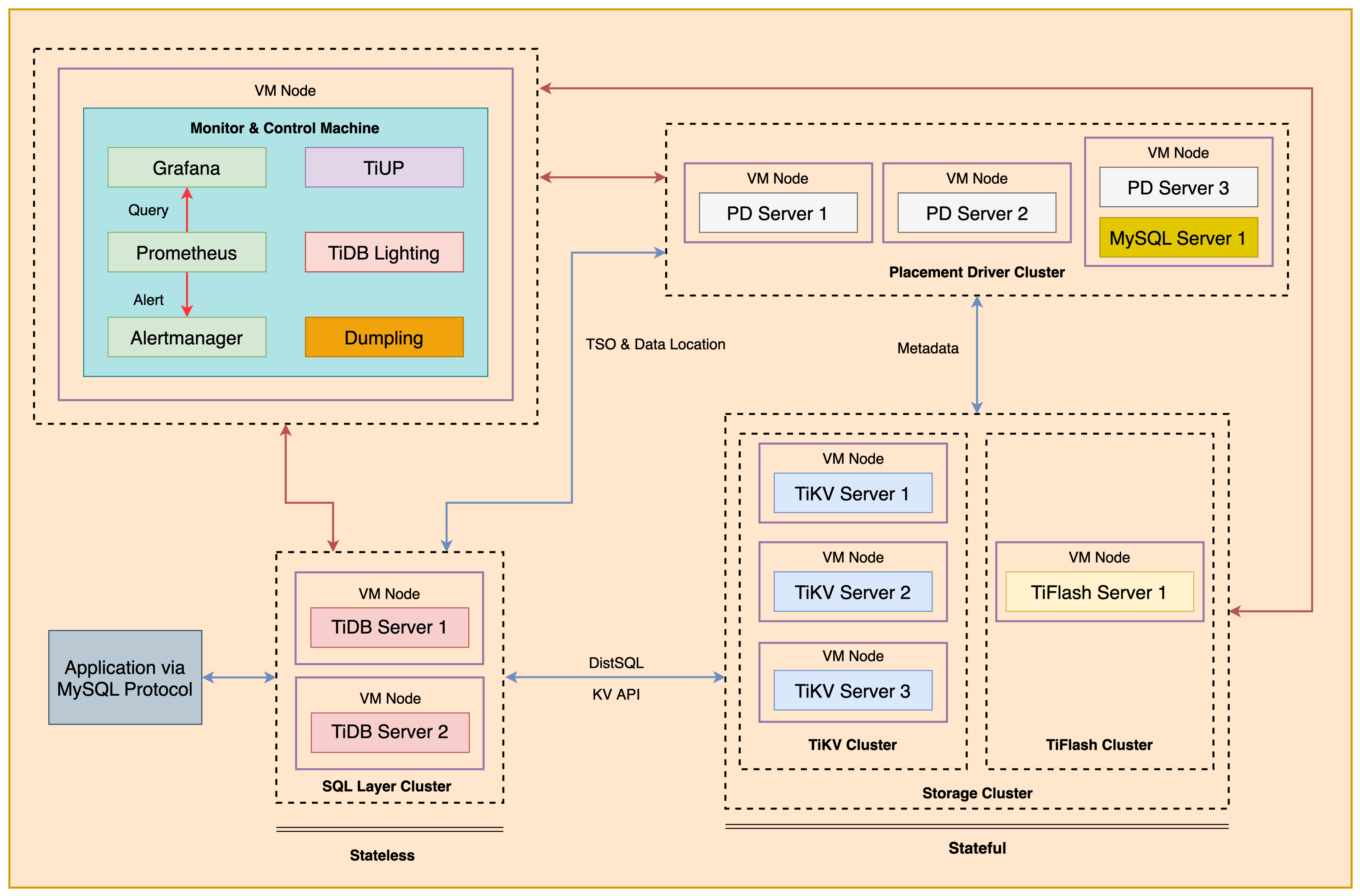
+ The following shows the deployment topology diagram of TiDB cluster.
 ### Notes
+ Many of the steps require that you type commands in a terminal window. You might find it convenient to launch a terminal window and keep it open for the duration of the exercises.
+ Your environment may be different with these exercises, including but not limited to `IP`, `port`, `username`, `password` and `directory`.
+ The `$` in your terminal window is an OS prompt.
+ The "`tidb>`" or "`mysql>`" in your terminal window is SQL command prompt.
+ In these exercises, we need 10 machines connected in the network. The `Role` and `IP Address` (represented by environment variables) are as follows:
| `Node Role` | `IP Address` |
| :----------------- | :-------------------------------------------------------- |
| `Monitor 1` | `${HOST_MONITOR1_PRIVATE_IP}, ${HOST_MONITOR1_PUBLIC_IP}` |
| `Control Machine` | `${HOST_CM_PRIVATE_IP}, ${HOST_CM_PUBLIC_IP}` |
| `TiDB server 1` | `${HOST_DB1_PRIVATE_IP}, ${HOST_DB1_PUBLIC_IP}` |
| `TiDB server 2` | `${HOST_DB2_PRIVATE_IP}, ${HOST_DB2_PUBLIC_IP}` |
| `TiKV server 1` | `${HOST_KV1_PRIVATE_IP}, ${HOST_KV1_PUBLIC_IP}` |
| `TiKV server 2` | `${HOST_KV2_PRIVATE_IP}, ${HOST_KV2_PUBLIC_IP}` |
| `TiKV server 3` | `${HOST_KV3_PRIVATE_IP}, ${HOST_KV3_PUBLIC_IP}` |
| `PD server 1` | `${HOST_PD1_PRIVATE_IP}, ${HOST_PD1_PUBLIC_IP}` |
| `PD server 2` | `${HOST_PD2_PRIVATE_IP}, ${HOST_PD2_PUBLIC_IP}` |
| `PD server 3` | `${HOST_PD3_PRIVATE_IP}, ${HOST_PD3_PUBLIC_IP}` |
| `TiFlash server 1` | `${HOST_TIFLASH1_PRIVATE_IP}, ${HOST_TIFLASH1_PUBLIC_IP}` |
| `Alertmanager` | `${HOST_MONITOR1_PRIVATE_IP}, ${HOST_MONITOR1_PUBLIC_IP}` |
| `Grafana` | `${HOST_MONITOR1_PRIVATE_IP}, ${HOST_MONITOR1_PUBLIC_IP}` |
| `Prometheus` | `${HOST_MONITOR1_PRIVATE_IP}, ${HOST_MONITOR1_PUBLIC_IP}` |
### Assumptions
+ You are given the user credentials (for example: the private key) of the exercise environment.
+ You are given access to 10 machines that have been set up.
+ You have completed the activities in the exercise titled "*Exercises 1: Deploying a TiDB Cluster Using TiUP*" and "*Exercises 8: Importing the Data into Using `TiDB Lightning`*", and have a terminal window open.
+ Your environment has TiDB cluster and MySQL deployed and running.
+ You have cleaned up the previous data.
## Exercise 1: Deploying the `Dumpling` Data Export Tool
### Overview
+ In this exercise, you download and install the Dumpling Data Export Tool. You will perform all tasks on the `Control Machine`.
### Duration
+ This exercise should take you approximately 10 minutes to complete.
### Tasks
1. Install `Dumpling` using `TiUP`.
2. Download and prepare the dataset.
### Solution
1. Login as user `ec2-user` on the `Control Machine` (`${HOST_MONITOR1_PUBLIC_IP}`). Enter the following command at the terminal prompt and receive the results shown:
```
$ ssh -A ec2-user@
__| __|_ )
_| ( / Amazon Linux 2 AMI
___|\___|___|
https://aws.amazon.com/amazon-linux-2/
```
2. Install `Dumpling` using `TiUP`. Enter the following command at the terminal prompt and receive the results shown:
```
$ tiup install dumpling:v6.5.1
...
51 MiB / 40.51 MiB 100.00% 3.62 MiB/s
```
3. (If you have already extracted the data, you may skip step 3) Extract the data directories archive from `tidb-admin-dataset.zip` to `./stage/`. Enter the following command at the terminal prompt and receive the results shown:
```
$ unzip -u stage/tidb-admin-dataset.zip -d stage/
Archive: tidb-admin-dataset.zip
creating: TiDB-Administration-exercise-data/
creating: TiDB-Administration-exercise-data/exercise-12/
...
inflating: TiDB-Administration-exercise-data/exercise-08/Importing-Data-into-TiDB-in-Parallel/my_table_1/my_db.my_table_1.000000000.sql
```
## Exercise 2: Importing the Data into TiDB Using `TiDB Lightning`
### Overview
+ In this exercise, you export data for exercise.
### Duration
+ This exercise should take you approximately 15 minutes to complete. You will perform all tasks on the `Control Machine`.
### Tasks
1. Importing the Data into TiDB Using `TiDB Lightning`
### Solution
1. List the contents of the data files directory.
```
$ ls ./stage/TiDB-Administration-exercise-data/exercise-09
emp.dep.0000000010000.sql emp.emp-schema.sql emp.sal.0000000030000.sql emp.sal-schema.sql emp.t-schema.sql
emp.dep-schema.sql emp.sal.0000000010000.sql emp.sal.0000000040000.sql emp-schema-create.sql metadata
emp.emp.0000000010000.sql emp.sal.0000000020000.sql emp.sal.0000000050000.sql emp.t.0000000010000.sql
```
2. Connect to the TiDB and drop the `emp` database. You should provide option `-p` if `root` has a password, otherwise you can omit the `-p` option. Enter the following command at the terminal prompt and receive the results shown:
```
$ mysql -h ${HOST_DB1_PRIVATE_IP} --port 4000 -u root
```
```sql
SHOW DATABASES;
DROP DATABASE IF EXISTS emp;
```
```
mysql> SHOW DATABASES;
+--------------------+
| Database |
+--------------------+
| INFORMATION_SCHEMA |
| METRICS_SCHEMA |
| PERFORMANCE_SCHEMA |
| emp |
| mysql |
| test |
| tidb |
+--------------------+
7 rows in set (0.00 sec)
mysql> DROP DATABASE IF EXISTS emp;
Query OK, 0 rows affected (0.21 sec)
mysql> exit;
Bye
```
3. Use a text editor to edit the `lightning-sql.toml` file to contain settings similar to those that follow (replace the IP addresses with the correct ones assigned to you). Or you may use the solution file `solution-lightning-sql.toml`.
```
$ vi lightning-sql.toml
[lightning]
# Logging
level = "info"
file = "tidb-lightning.log"
[tikv-importer]
# Sets the backend to the "local" mode.
backend = "local"
# Sets the directory of temporary local storage.
sorted-kv-dir = "/tmp/sorted-kv-dir"
[mydumper]
# Local source data directory
data-source-dir = "/home/ec2-user/stage/TiDB-Administration-exercise-data/exercise-09"
# Configures the wildcard rule. By default, all tables in the mysql, sys, INFORMATION_SCHEMA, PERFORMANCE_SCHEMA, METRICS_SCHEMA, and INSPECTION_SCHEMA system databases are filtered.
# If this item is not configured, the "cannot find schema" error occurs when system tables are imported.
filter = ['*.*', '!mysql.*', '!sys.*', '!INFORMATION_SCHEMA.*', '!PERFORMANCE_SCHEMA.*', '!METRICS_SCHEMA.*', '!INSPECTION_SCHEMA.*']
[tidb]
# Configuration of any TiDB server from the cluster.
host = ""
port = 4000
user = "ltask"
password = "q1w2e3R4_"
# Table schema information is fetched from TiDB via this status-port.
status-port = 10080
# Address of any PD server from the cluster.
pd-addr = ":2379"
```
4. Use a `nohup` command to start the `tidb-lightning` process (press "Enter" to make `tidb-lighting` work in the background). Enter the following command at the terminal prompt and receive the results shown:
```
$ nohup tiup tidb-lightning:v6.5.1 -config lightning-sql.toml > nohup.out &
[1] 13135
$ nohup: ignoring input and redirecting stderr to stdout
...
[1]+ Done nohup tidb-lightning:v6.5.1 -config tidb-lightning-sql.toml > nohup.out
```
5. View the contents of the `nohup.out` file to verify that `TiDB Lightning` is exited. Enter the following command at the terminal prompt and receive the results shown:
```
$ cat nohup.out
Verbose debug logs will be written to tidb-lightning.log
+----+------------------------------------------------------------------------------------------------------------------------------------+-------------+--------+
| # | CHECK ITEM | TYPE | PASSED |
+----+------------------------------------------------------------------------------------------------------------------------------------+-------------+--------+
| 1 | Source csv files size is proper | performance | true |
+----+------------------------------------------------------------------------------------------------------------------------------------+-------------+--------+
...
+-----------------------------------------------------------------------------------------------------------------------------------------+-------------+--------+
| 8 | Cluster available is rich, available is 51.79GiB, we need 1.007GiB | critical | true |
+----+------------------------------------------------------------------------------------------------------------------------------------+-------------+--------+
| 9 | Cluster doesn't have too many empty regions | critical | true |
+----+------------------------------------------------------------------------------------------------------------------------------------+-------------+--------+
| 10 | Cluster region distribution is balanced | critical | true |
+----+------------------------------------------------------------------------------------------------------------------------------------+-------------+--------+
tidb lightning exit successfully
```
## Exercise 3: Exporting the Data from TiDB Using `Dumpling`
### Overview
+ In this exercise, you export data stored in TiDB.
### Duration
+ This exercise should take you approximately 20 minutes to complete. You will perform all tasks on the `Control Machine`.
### Tasks
1. Export the `dept` table in the `emp` database from TiDB using `Dumpling`.
2. Export the `emp` database from TiDB using `Dumpling`.
### Solution
1. Connect to the TiDB and review the tables in the `emp` database. You should provide option `-p` if `root` has a password, otherwise you can omit the `-p` option. Then exit the clients. Enter the following command at the terminal prompt and receive the results shown:
```
$ mysql -h ${HOST_DB1_PRIVATE_IP} --port 4000 -u root
```
```sql
mysql> SHOW DATABASES;
+--------------------+
| Database |
+--------------------+
| INFORMATION_SCHEMA |
| METRICS_SCHEMA |
| PERFORMANCE_SCHEMA |
| emp |
| mysql |
| test |
| tidb |
+--------------------+
7 rows in set (0.00 sec)
mysql> USE emp;
Database changed
mysql> SHOW TABLES;
+---------------+
| Tables_in_emp |
+---------------+
| dep |
| emp |
| sal |
| t |
+---------------+
4 rows in set (0.00 sec)
mysql> exit;
Bye
```
2. Export the `dept` table in the `emp` database from TiDB. Enter the following command at the terminal prompt and receive the results shown:
```
$ tiup dumpling:v6.5.1 -uroot -P4000 -h ${HOST_DB1_PRIVATE_IP} --filetype sql -t 8 -o /tmp/dep -r 200000 -F 256MiB -T emp.dep
Release version: v6.5.1
Git commit hash: 1a89decdb192cbdce6a7b0020d71128bc964d30f
Git branch: heads/refs/tags/v6.5.1
Build timestamp: 2022-06-05 05:09:15Z
Go version: go version go1.18.2 linux/amd64
[2022/11/08 15:09:37.456 +08:00] [INFO] [versions.go:55] ["Welcome to dumpling"] ["Release Version"=v6.5.1] ["Git Commit Hash"=1a89decdb192cbdce6a7b0020d71128bc964d30f] ["Git Branch"=heads/refs/tags/v6.5.1] ["Build timestamp"="2022-06-05 05:09:15"] ["Go Version"="go version go1.18.2 linux/amd64"]
...
[2022/11/08 15:09:37.496 +08:00] [INFO] [main.go:80] ["dump data successfully, dumpling will exit now"]
```
+ The explanation of each parameter is as follows:
+ `-uroot`: user is root.
+ `-P4000`: port is 4000,
+ `-h ${HOST_DB1_PRIVATE_IP}`: IP address of TiDB is `${HOST_DB1_PRIVATE_IP}`.
+ `--filetype sql`: Export data to SQL files.
+ `-t 8`: uses 8 threads to export at the same time.
+ `-o /tmp/dept`: option `/tmp/dept` as the export directory.
+ `-r 200000`: specifies 200000 as maximum number of rows in a single file.
+ `-F 256MiB`: specify 256 MiB as maximum size of a single file (the unit here is MiB; inputs like 5GiB or 8KB are also acceptable).
3. Check the contents under `/tmp/dep` directory. Enter the following command at the terminal prompt and receive the results shown:
```
$ ls /tmp/dep
emp.dep.0000000010000.sql emp.dep-schema.sql emp-schema-create.sql metadata
```
4. View the details of `emp-schema-create.sql` script for creating the database. Enter the following command at the terminal prompt and receive the results shown:
```
$ cat /tmp/dep/emp-schema-create.sql
/*!40101 SET NAMES binary*/;
CREATE DATABASE `emp` /*!40100 DEFAULT CHARACTER SET utf8mb4 */;
```
5. View the details of `emp.dept-schema.sql` script for creating the table. Enter the following command at the terminal prompt and receive the results shown:
```
$ cat /tmp/dep/emp.dep-schema.sql
/*!40101 SET NAMES binary*/;
CREATE TABLE `dep` (
`dept_no` char(4) NOT NULL,
`dept_name` varchar(40) NOT NULL,
PRIMARY KEY (`dept_no`) /*T![clustered_index] NONCLUSTERED */,
UNIQUE KEY `dept_name` (`dept_name`)
) ENGINE=InnoDB DEFAULT CHARSET=utf8mb4 COLLATE=utf8mb4_bin;
```
6. View the details of `emp.dept.0000000010000.sql` script for data. Enter the following command at the terminal prompt and receive the results shown:
```
$ cat /tmp/dep/emp.dep.0000000010000.sql
/*!40101 SET NAMES binary*/;
INSERT INTO `dep` VALUES
('d001','Marketing'),
('d002','Finance'),
('d003','Human Resources'),
('d004','Production'),
('d005','Development'),
('d006','Quality Management'),
('d007','Sales'),
('d008','Research'),
('d009','Customer Service');
```
7. View the contents of the `metadata` data files. Enter the following command at the terminal prompt and receive the results shown:
```
$ cat /tmp/dep/metadata
Started dump at: 2022-06-25 15:44:18
SHOW MASTER STATUS:
Log: tidb-binlog
Pos: 434147965850615813
GTID:
Finished dump at: 2022-06-25 15:44:20
```
8. Export the `emp` database from the TiDB. Enter the following command at the terminal prompt and receive the results shown:
```
$ tiup dumpling:v6.5.1 -uroot -P4000 -h ${HOST_DB1_PRIVATE_IP} --filetype sql -t 8 -o /tmp/emp -r 200000 -F 256MiB -B emp
Release version: v6.5.1
Git commit hash: 1a89decdb192cbdce6a7b0020d71128bc964d30f
Git branch: heads/refs/tags/v6.5.1
Build timestamp: 2022-06-05 05:09:15Z
Go version: go version go1.18.2 linux/amd64
[2022/11/08 15:18:17.316 +08:00] [INFO] [versions.go:55] ["Welcome to dumpling"] ["Release Version"=v6.5.1] ["Git Commit Hash"=1a89decdb192cbdce6a7b0020d71128bc964d30f] ["Git Branch"=heads/refs/tags/v6.5.1] ["Build timestamp"="2022-06-05 05:09:15"] ["Go Version"="go version go1.18.2 linux/amd64"]
...
[2022/11/08 15:18:19.398 +08:00] [INFO] [main.go:80] ["dump data successfully, dumpling will exit now"]
```
9. View the contents of the `/tmp/emp` directory. Enter the following command at the terminal prompt and receive the results shown:
```
$ ls /tmp/emp
emp.dep.0000000010000.sql emp.emp.0000000010000.sql emp.sal.0000000010000.sql emp.sal.0000000030000.sql emp.sal-schema.sql emp.t.0000000010000.sql metadata
emp.dep-schema.sql emp.emp-schema.sql emp.sal.0000000020000.sql emp.sal.0000000040000.sql emp-schema-create.sql emp.t-schema.sql
```
## Exercise 4: Exporting the Data from MySQL Using `Dumpling`
### Overview
+ In this exercise, you export data stored in MySQL. You will perform all tasks on the `Control Machine`.
### Duration
+ This exercise should take you approximately 20 minutes to complete.
### Tasks
1. Start a MySQL server instance on PD3, and import data into it.
2. Export the `emp` database from MySQL.
### Solution Steps
1. SSH to `PD3`:
```
$ ./ssh-to-pd3.sh
The authenticity of host '10.80.0.215 (10.80.0.215)' can't be established.
...
__| __|_ )
_| ( / Amazon Linux 2 AMI
___|\___|___|
https://aws.amazon.com/amazon-linux-2/
```
2. Start MySQL server instance:
```
$ sudo service mysqld start
```
3. Unzip the data on PD3.
```
unzip -u stage/tidb-admin-dataset.zip -d stage/
```
4. Login MySQL server on port 3306 as `root@'localhost'` with the password `q1w2e3R4_`. Enter the following command at the terminal prompt and receive the results shown:
```
$ mysql -u root -p -h 127.0.0.1 -P 3306 -pq1w2e3R4_
```
5. Create a user for export task:
```sql
CREATE USER exp@'%' IDENTIFIED BY 'q1w2e3R4_';
GRANT ALL PRIVILEGES on *.* to exp@'%';
```
```
mysql> CREATE USER exp@'%' IDENTIFIED BY 'q1w2e3R4_';
Query OK, 0 rows affected (0.00 sec)
mysql> GRANT ALL PRIVILEGES on *.* to exp@'%';
Query OK, 0 rows affected (0.00 sec)
```
6. Import data into MySQL. Enter the following command at the terminal prompt and receive the results shown:
```sql
mysql> SOURCE ./stage/TiDB-Administration-exercise-data/exercise-09/emp-schema-create.sql
```
```sql
USE emp;
```
```
mysql> USE emp;
Database changed
```
```sql
SOURCE ./stage/TiDB-Administration-exercise-data/exercise-09/emp.dep-schema.sql
SOURCE ./stage/TiDB-Administration-exercise-data/exercise-09/emp.dep.0000000010000.sql
SOURCE ./stage/TiDB-Administration-exercise-data/exercise-09/emp.t-schema.sql
SOURCE ./stage/TiDB-Administration-exercise-data/exercise-09/emp.t.0000000010000.sql
SOURCE ./stage/TiDB-Administration-exercise-data/exercise-09/emp.emp-schema.sql
SOURCE ./stage/TiDB-Administration-exercise-data/exercise-09/emp.emp.0000000010000.sql
```
```
...
Query OK, 16843 rows affected (0.14 sec)
Records: 16843 Duplicates: 0 Warnings: 0
Query OK, 12161 rows affected (0.10 sec)
Records: 12161 Duplicates: 0 Warnings: 0
```
7. Review the tables in the `emp` database from MySQL. Then exit the clients. Enter the following command at the terminal prompt and receive the results shown:
```sql
SHOW TABLES;
```
```
mysql> SHOW TABLES;
+---------------+
| Tables_in_emp |
+---------------+
| dep |
| emp |
| t |
+---------------+
3 rows in set (0.00 sec)
```
8. Return to `monitor1` by exit from MySQL client and then the SSH terminal:
```
mysql> exit;
```
```
$ exit
```
9. Export the `emp` database from MySQL with port 3306. Enter the following command at the terminal prompt and receive the results shown:
```
$ tiup dumpling:v6.5.1 -uexp -P 3306 -h ${HOST_PD3_PRIVATE_IP} -pq1w2e3R4_ --filetype sql -t 8 -o /tmp/empmysql -r 200000 -F 256MiB -B emp
Release version: v6.5.1
Git commit hash: 1a89decdb192cbdce6a7b0020d71128bc964d30f
Git branch: heads/refs/tags/v6.5.1
Build timestamp: 2022-06-05 05:09:15Z
Go version: go version go1.18.2 linux/amd64
[2022/11/08 15:18:17.316 +08:00] [INFO] [versions.go:55] ["Welcome to dumpling"] ["Release Version"=v6.5.1] ["Git Commit Hash"=1a89decdb192cbdce6a7b0020d71128bc964d30f] ["Git Branch"=heads/refs/tags/v6.5.1] ["Build timestamp"="2022-06-05 05:09:15"] ["Go Version"="go version go1.18.2 linux/amd64"]
...
[2022/11/08 15:18:19.398 +08:00] [INFO] [main.go:80] ["dump data successfully, dumpling will exit now"]
```
10. View the contents of the `/tmp/empmysql` directory. Enter the following command at the terminal prompt and receive the results shown:
```
$ ls /tmp/empmysql
emp.dep.0000000010000.sql emp.emp-schema.sql emp.sal.0000000030000.sql emp-schema-create.sql metadata
emp.dep-schema.sql emp.sal.0000000010000.sql emp.sal.0000000040000.sql emp.t.0000000010000.sql
emp.emp.0000000010000.sql emp.sal.0000000020000.sql emp.sal-schema.sql emp.t-schema.sql
```
11. Close all open terminal windows.
## End of Exercises
### Notes
+ Many of the steps require that you type commands in a terminal window. You might find it convenient to launch a terminal window and keep it open for the duration of the exercises.
+ Your environment may be different with these exercises, including but not limited to `IP`, `port`, `username`, `password` and `directory`.
+ The `$` in your terminal window is an OS prompt.
+ The "`tidb>`" or "`mysql>`" in your terminal window is SQL command prompt.
+ In these exercises, we need 10 machines connected in the network. The `Role` and `IP Address` (represented by environment variables) are as follows:
| `Node Role` | `IP Address` |
| :----------------- | :-------------------------------------------------------- |
| `Monitor 1` | `${HOST_MONITOR1_PRIVATE_IP}, ${HOST_MONITOR1_PUBLIC_IP}` |
| `Control Machine` | `${HOST_CM_PRIVATE_IP}, ${HOST_CM_PUBLIC_IP}` |
| `TiDB server 1` | `${HOST_DB1_PRIVATE_IP}, ${HOST_DB1_PUBLIC_IP}` |
| `TiDB server 2` | `${HOST_DB2_PRIVATE_IP}, ${HOST_DB2_PUBLIC_IP}` |
| `TiKV server 1` | `${HOST_KV1_PRIVATE_IP}, ${HOST_KV1_PUBLIC_IP}` |
| `TiKV server 2` | `${HOST_KV2_PRIVATE_IP}, ${HOST_KV2_PUBLIC_IP}` |
| `TiKV server 3` | `${HOST_KV3_PRIVATE_IP}, ${HOST_KV3_PUBLIC_IP}` |
| `PD server 1` | `${HOST_PD1_PRIVATE_IP}, ${HOST_PD1_PUBLIC_IP}` |
| `PD server 2` | `${HOST_PD2_PRIVATE_IP}, ${HOST_PD2_PUBLIC_IP}` |
| `PD server 3` | `${HOST_PD3_PRIVATE_IP}, ${HOST_PD3_PUBLIC_IP}` |
| `TiFlash server 1` | `${HOST_TIFLASH1_PRIVATE_IP}, ${HOST_TIFLASH1_PUBLIC_IP}` |
| `Alertmanager` | `${HOST_MONITOR1_PRIVATE_IP}, ${HOST_MONITOR1_PUBLIC_IP}` |
| `Grafana` | `${HOST_MONITOR1_PRIVATE_IP}, ${HOST_MONITOR1_PUBLIC_IP}` |
| `Prometheus` | `${HOST_MONITOR1_PRIVATE_IP}, ${HOST_MONITOR1_PUBLIC_IP}` |
### Assumptions
+ You are given the user credentials (for example: the private key) of the exercise environment.
+ You are given access to 10 machines that have been set up.
+ You have completed the activities in the exercise titled "*Exercises 1: Deploying a TiDB Cluster Using TiUP*" and "*Exercises 8: Importing the Data into Using `TiDB Lightning`*", and have a terminal window open.
+ Your environment has TiDB cluster and MySQL deployed and running.
+ You have cleaned up the previous data.
## Exercise 1: Deploying the `Dumpling` Data Export Tool
### Overview
+ In this exercise, you download and install the Dumpling Data Export Tool. You will perform all tasks on the `Control Machine`.
### Duration
+ This exercise should take you approximately 10 minutes to complete.
### Tasks
1. Install `Dumpling` using `TiUP`.
2. Download and prepare the dataset.
### Solution
1. Login as user `ec2-user` on the `Control Machine` (`${HOST_MONITOR1_PUBLIC_IP}`). Enter the following command at the terminal prompt and receive the results shown:
```
$ ssh -A ec2-user@
__| __|_ )
_| ( / Amazon Linux 2 AMI
___|\___|___|
https://aws.amazon.com/amazon-linux-2/
```
2. Install `Dumpling` using `TiUP`. Enter the following command at the terminal prompt and receive the results shown:
```
$ tiup install dumpling:v6.5.1
...
51 MiB / 40.51 MiB 100.00% 3.62 MiB/s
```
3. (If you have already extracted the data, you may skip step 3) Extract the data directories archive from `tidb-admin-dataset.zip` to `./stage/`. Enter the following command at the terminal prompt and receive the results shown:
```
$ unzip -u stage/tidb-admin-dataset.zip -d stage/
Archive: tidb-admin-dataset.zip
creating: TiDB-Administration-exercise-data/
creating: TiDB-Administration-exercise-data/exercise-12/
...
inflating: TiDB-Administration-exercise-data/exercise-08/Importing-Data-into-TiDB-in-Parallel/my_table_1/my_db.my_table_1.000000000.sql
```
## Exercise 2: Importing the Data into TiDB Using `TiDB Lightning`
### Overview
+ In this exercise, you export data for exercise.
### Duration
+ This exercise should take you approximately 15 minutes to complete. You will perform all tasks on the `Control Machine`.
### Tasks
1. Importing the Data into TiDB Using `TiDB Lightning`
### Solution
1. List the contents of the data files directory.
```
$ ls ./stage/TiDB-Administration-exercise-data/exercise-09
emp.dep.0000000010000.sql emp.emp-schema.sql emp.sal.0000000030000.sql emp.sal-schema.sql emp.t-schema.sql
emp.dep-schema.sql emp.sal.0000000010000.sql emp.sal.0000000040000.sql emp-schema-create.sql metadata
emp.emp.0000000010000.sql emp.sal.0000000020000.sql emp.sal.0000000050000.sql emp.t.0000000010000.sql
```
2. Connect to the TiDB and drop the `emp` database. You should provide option `-p` if `root` has a password, otherwise you can omit the `-p` option. Enter the following command at the terminal prompt and receive the results shown:
```
$ mysql -h ${HOST_DB1_PRIVATE_IP} --port 4000 -u root
```
```sql
SHOW DATABASES;
DROP DATABASE IF EXISTS emp;
```
```
mysql> SHOW DATABASES;
+--------------------+
| Database |
+--------------------+
| INFORMATION_SCHEMA |
| METRICS_SCHEMA |
| PERFORMANCE_SCHEMA |
| emp |
| mysql |
| test |
| tidb |
+--------------------+
7 rows in set (0.00 sec)
mysql> DROP DATABASE IF EXISTS emp;
Query OK, 0 rows affected (0.21 sec)
mysql> exit;
Bye
```
3. Use a text editor to edit the `lightning-sql.toml` file to contain settings similar to those that follow (replace the IP addresses with the correct ones assigned to you). Or you may use the solution file `solution-lightning-sql.toml`.
```
$ vi lightning-sql.toml
[lightning]
# Logging
level = "info"
file = "tidb-lightning.log"
[tikv-importer]
# Sets the backend to the "local" mode.
backend = "local"
# Sets the directory of temporary local storage.
sorted-kv-dir = "/tmp/sorted-kv-dir"
[mydumper]
# Local source data directory
data-source-dir = "/home/ec2-user/stage/TiDB-Administration-exercise-data/exercise-09"
# Configures the wildcard rule. By default, all tables in the mysql, sys, INFORMATION_SCHEMA, PERFORMANCE_SCHEMA, METRICS_SCHEMA, and INSPECTION_SCHEMA system databases are filtered.
# If this item is not configured, the "cannot find schema" error occurs when system tables are imported.
filter = ['*.*', '!mysql.*', '!sys.*', '!INFORMATION_SCHEMA.*', '!PERFORMANCE_SCHEMA.*', '!METRICS_SCHEMA.*', '!INSPECTION_SCHEMA.*']
[tidb]
# Configuration of any TiDB server from the cluster.
host = ""
port = 4000
user = "ltask"
password = "q1w2e3R4_"
# Table schema information is fetched from TiDB via this status-port.
status-port = 10080
# Address of any PD server from the cluster.
pd-addr = ":2379"
```
4. Use a `nohup` command to start the `tidb-lightning` process (press "Enter" to make `tidb-lighting` work in the background). Enter the following command at the terminal prompt and receive the results shown:
```
$ nohup tiup tidb-lightning:v6.5.1 -config lightning-sql.toml > nohup.out &
[1] 13135
$ nohup: ignoring input and redirecting stderr to stdout
...
[1]+ Done nohup tidb-lightning:v6.5.1 -config tidb-lightning-sql.toml > nohup.out
```
5. View the contents of the `nohup.out` file to verify that `TiDB Lightning` is exited. Enter the following command at the terminal prompt and receive the results shown:
```
$ cat nohup.out
Verbose debug logs will be written to tidb-lightning.log
+----+------------------------------------------------------------------------------------------------------------------------------------+-------------+--------+
| # | CHECK ITEM | TYPE | PASSED |
+----+------------------------------------------------------------------------------------------------------------------------------------+-------------+--------+
| 1 | Source csv files size is proper | performance | true |
+----+------------------------------------------------------------------------------------------------------------------------------------+-------------+--------+
...
+-----------------------------------------------------------------------------------------------------------------------------------------+-------------+--------+
| 8 | Cluster available is rich, available is 51.79GiB, we need 1.007GiB | critical | true |
+----+------------------------------------------------------------------------------------------------------------------------------------+-------------+--------+
| 9 | Cluster doesn't have too many empty regions | critical | true |
+----+------------------------------------------------------------------------------------------------------------------------------------+-------------+--------+
| 10 | Cluster region distribution is balanced | critical | true |
+----+------------------------------------------------------------------------------------------------------------------------------------+-------------+--------+
tidb lightning exit successfully
```
## Exercise 3: Exporting the Data from TiDB Using `Dumpling`
### Overview
+ In this exercise, you export data stored in TiDB.
### Duration
+ This exercise should take you approximately 20 minutes to complete. You will perform all tasks on the `Control Machine`.
### Tasks
1. Export the `dept` table in the `emp` database from TiDB using `Dumpling`.
2. Export the `emp` database from TiDB using `Dumpling`.
### Solution
1. Connect to the TiDB and review the tables in the `emp` database. You should provide option `-p` if `root` has a password, otherwise you can omit the `-p` option. Then exit the clients. Enter the following command at the terminal prompt and receive the results shown:
```
$ mysql -h ${HOST_DB1_PRIVATE_IP} --port 4000 -u root
```
```sql
mysql> SHOW DATABASES;
+--------------------+
| Database |
+--------------------+
| INFORMATION_SCHEMA |
| METRICS_SCHEMA |
| PERFORMANCE_SCHEMA |
| emp |
| mysql |
| test |
| tidb |
+--------------------+
7 rows in set (0.00 sec)
mysql> USE emp;
Database changed
mysql> SHOW TABLES;
+---------------+
| Tables_in_emp |
+---------------+
| dep |
| emp |
| sal |
| t |
+---------------+
4 rows in set (0.00 sec)
mysql> exit;
Bye
```
2. Export the `dept` table in the `emp` database from TiDB. Enter the following command at the terminal prompt and receive the results shown:
```
$ tiup dumpling:v6.5.1 -uroot -P4000 -h ${HOST_DB1_PRIVATE_IP} --filetype sql -t 8 -o /tmp/dep -r 200000 -F 256MiB -T emp.dep
Release version: v6.5.1
Git commit hash: 1a89decdb192cbdce6a7b0020d71128bc964d30f
Git branch: heads/refs/tags/v6.5.1
Build timestamp: 2022-06-05 05:09:15Z
Go version: go version go1.18.2 linux/amd64
[2022/11/08 15:09:37.456 +08:00] [INFO] [versions.go:55] ["Welcome to dumpling"] ["Release Version"=v6.5.1] ["Git Commit Hash"=1a89decdb192cbdce6a7b0020d71128bc964d30f] ["Git Branch"=heads/refs/tags/v6.5.1] ["Build timestamp"="2022-06-05 05:09:15"] ["Go Version"="go version go1.18.2 linux/amd64"]
...
[2022/11/08 15:09:37.496 +08:00] [INFO] [main.go:80] ["dump data successfully, dumpling will exit now"]
```
+ The explanation of each parameter is as follows:
+ `-uroot`: user is root.
+ `-P4000`: port is 4000,
+ `-h ${HOST_DB1_PRIVATE_IP}`: IP address of TiDB is `${HOST_DB1_PRIVATE_IP}`.
+ `--filetype sql`: Export data to SQL files.
+ `-t 8`: uses 8 threads to export at the same time.
+ `-o /tmp/dept`: option `/tmp/dept` as the export directory.
+ `-r 200000`: specifies 200000 as maximum number of rows in a single file.
+ `-F 256MiB`: specify 256 MiB as maximum size of a single file (the unit here is MiB; inputs like 5GiB or 8KB are also acceptable).
3. Check the contents under `/tmp/dep` directory. Enter the following command at the terminal prompt and receive the results shown:
```
$ ls /tmp/dep
emp.dep.0000000010000.sql emp.dep-schema.sql emp-schema-create.sql metadata
```
4. View the details of `emp-schema-create.sql` script for creating the database. Enter the following command at the terminal prompt and receive the results shown:
```
$ cat /tmp/dep/emp-schema-create.sql
/*!40101 SET NAMES binary*/;
CREATE DATABASE `emp` /*!40100 DEFAULT CHARACTER SET utf8mb4 */;
```
5. View the details of `emp.dept-schema.sql` script for creating the table. Enter the following command at the terminal prompt and receive the results shown:
```
$ cat /tmp/dep/emp.dep-schema.sql
/*!40101 SET NAMES binary*/;
CREATE TABLE `dep` (
`dept_no` char(4) NOT NULL,
`dept_name` varchar(40) NOT NULL,
PRIMARY KEY (`dept_no`) /*T![clustered_index] NONCLUSTERED */,
UNIQUE KEY `dept_name` (`dept_name`)
) ENGINE=InnoDB DEFAULT CHARSET=utf8mb4 COLLATE=utf8mb4_bin;
```
6. View the details of `emp.dept.0000000010000.sql` script for data. Enter the following command at the terminal prompt and receive the results shown:
```
$ cat /tmp/dep/emp.dep.0000000010000.sql
/*!40101 SET NAMES binary*/;
INSERT INTO `dep` VALUES
('d001','Marketing'),
('d002','Finance'),
('d003','Human Resources'),
('d004','Production'),
('d005','Development'),
('d006','Quality Management'),
('d007','Sales'),
('d008','Research'),
('d009','Customer Service');
```
7. View the contents of the `metadata` data files. Enter the following command at the terminal prompt and receive the results shown:
```
$ cat /tmp/dep/metadata
Started dump at: 2022-06-25 15:44:18
SHOW MASTER STATUS:
Log: tidb-binlog
Pos: 434147965850615813
GTID:
Finished dump at: 2022-06-25 15:44:20
```
8. Export the `emp` database from the TiDB. Enter the following command at the terminal prompt and receive the results shown:
```
$ tiup dumpling:v6.5.1 -uroot -P4000 -h ${HOST_DB1_PRIVATE_IP} --filetype sql -t 8 -o /tmp/emp -r 200000 -F 256MiB -B emp
Release version: v6.5.1
Git commit hash: 1a89decdb192cbdce6a7b0020d71128bc964d30f
Git branch: heads/refs/tags/v6.5.1
Build timestamp: 2022-06-05 05:09:15Z
Go version: go version go1.18.2 linux/amd64
[2022/11/08 15:18:17.316 +08:00] [INFO] [versions.go:55] ["Welcome to dumpling"] ["Release Version"=v6.5.1] ["Git Commit Hash"=1a89decdb192cbdce6a7b0020d71128bc964d30f] ["Git Branch"=heads/refs/tags/v6.5.1] ["Build timestamp"="2022-06-05 05:09:15"] ["Go Version"="go version go1.18.2 linux/amd64"]
...
[2022/11/08 15:18:19.398 +08:00] [INFO] [main.go:80] ["dump data successfully, dumpling will exit now"]
```
9. View the contents of the `/tmp/emp` directory. Enter the following command at the terminal prompt and receive the results shown:
```
$ ls /tmp/emp
emp.dep.0000000010000.sql emp.emp.0000000010000.sql emp.sal.0000000010000.sql emp.sal.0000000030000.sql emp.sal-schema.sql emp.t.0000000010000.sql metadata
emp.dep-schema.sql emp.emp-schema.sql emp.sal.0000000020000.sql emp.sal.0000000040000.sql emp-schema-create.sql emp.t-schema.sql
```
## Exercise 4: Exporting the Data from MySQL Using `Dumpling`
### Overview
+ In this exercise, you export data stored in MySQL. You will perform all tasks on the `Control Machine`.
### Duration
+ This exercise should take you approximately 20 minutes to complete.
### Tasks
1. Start a MySQL server instance on PD3, and import data into it.
2. Export the `emp` database from MySQL.
### Solution Steps
1. SSH to `PD3`:
```
$ ./ssh-to-pd3.sh
The authenticity of host '10.80.0.215 (10.80.0.215)' can't be established.
...
__| __|_ )
_| ( / Amazon Linux 2 AMI
___|\___|___|
https://aws.amazon.com/amazon-linux-2/
```
2. Start MySQL server instance:
```
$ sudo service mysqld start
```
3. Unzip the data on PD3.
```
unzip -u stage/tidb-admin-dataset.zip -d stage/
```
4. Login MySQL server on port 3306 as `root@'localhost'` with the password `q1w2e3R4_`. Enter the following command at the terminal prompt and receive the results shown:
```
$ mysql -u root -p -h 127.0.0.1 -P 3306 -pq1w2e3R4_
```
5. Create a user for export task:
```sql
CREATE USER exp@'%' IDENTIFIED BY 'q1w2e3R4_';
GRANT ALL PRIVILEGES on *.* to exp@'%';
```
```
mysql> CREATE USER exp@'%' IDENTIFIED BY 'q1w2e3R4_';
Query OK, 0 rows affected (0.00 sec)
mysql> GRANT ALL PRIVILEGES on *.* to exp@'%';
Query OK, 0 rows affected (0.00 sec)
```
6. Import data into MySQL. Enter the following command at the terminal prompt and receive the results shown:
```sql
mysql> SOURCE ./stage/TiDB-Administration-exercise-data/exercise-09/emp-schema-create.sql
```
```sql
USE emp;
```
```
mysql> USE emp;
Database changed
```
```sql
SOURCE ./stage/TiDB-Administration-exercise-data/exercise-09/emp.dep-schema.sql
SOURCE ./stage/TiDB-Administration-exercise-data/exercise-09/emp.dep.0000000010000.sql
SOURCE ./stage/TiDB-Administration-exercise-data/exercise-09/emp.t-schema.sql
SOURCE ./stage/TiDB-Administration-exercise-data/exercise-09/emp.t.0000000010000.sql
SOURCE ./stage/TiDB-Administration-exercise-data/exercise-09/emp.emp-schema.sql
SOURCE ./stage/TiDB-Administration-exercise-data/exercise-09/emp.emp.0000000010000.sql
```
```
...
Query OK, 16843 rows affected (0.14 sec)
Records: 16843 Duplicates: 0 Warnings: 0
Query OK, 12161 rows affected (0.10 sec)
Records: 12161 Duplicates: 0 Warnings: 0
```
7. Review the tables in the `emp` database from MySQL. Then exit the clients. Enter the following command at the terminal prompt and receive the results shown:
```sql
SHOW TABLES;
```
```
mysql> SHOW TABLES;
+---------------+
| Tables_in_emp |
+---------------+
| dep |
| emp |
| t |
+---------------+
3 rows in set (0.00 sec)
```
8. Return to `monitor1` by exit from MySQL client and then the SSH terminal:
```
mysql> exit;
```
```
$ exit
```
9. Export the `emp` database from MySQL with port 3306. Enter the following command at the terminal prompt and receive the results shown:
```
$ tiup dumpling:v6.5.1 -uexp -P 3306 -h ${HOST_PD3_PRIVATE_IP} -pq1w2e3R4_ --filetype sql -t 8 -o /tmp/empmysql -r 200000 -F 256MiB -B emp
Release version: v6.5.1
Git commit hash: 1a89decdb192cbdce6a7b0020d71128bc964d30f
Git branch: heads/refs/tags/v6.5.1
Build timestamp: 2022-06-05 05:09:15Z
Go version: go version go1.18.2 linux/amd64
[2022/11/08 15:18:17.316 +08:00] [INFO] [versions.go:55] ["Welcome to dumpling"] ["Release Version"=v6.5.1] ["Git Commit Hash"=1a89decdb192cbdce6a7b0020d71128bc964d30f] ["Git Branch"=heads/refs/tags/v6.5.1] ["Build timestamp"="2022-06-05 05:09:15"] ["Go Version"="go version go1.18.2 linux/amd64"]
...
[2022/11/08 15:18:19.398 +08:00] [INFO] [main.go:80] ["dump data successfully, dumpling will exit now"]
```
10. View the contents of the `/tmp/empmysql` directory. Enter the following command at the terminal prompt and receive the results shown:
```
$ ls /tmp/empmysql
emp.dep.0000000010000.sql emp.emp-schema.sql emp.sal.0000000030000.sql emp-schema-create.sql metadata
emp.dep-schema.sql emp.sal.0000000010000.sql emp.sal.0000000040000.sql emp.t.0000000010000.sql
emp.emp.0000000010000.sql emp.sal.0000000020000.sql emp.sal-schema.sql emp.t-schema.sql
```
11. Close all open terminal windows.
## End of Exercises