# Performing Backup and Restore
### Overview
+ In these exercises, you perform backups and restore the database by using `Backup & Restore`.
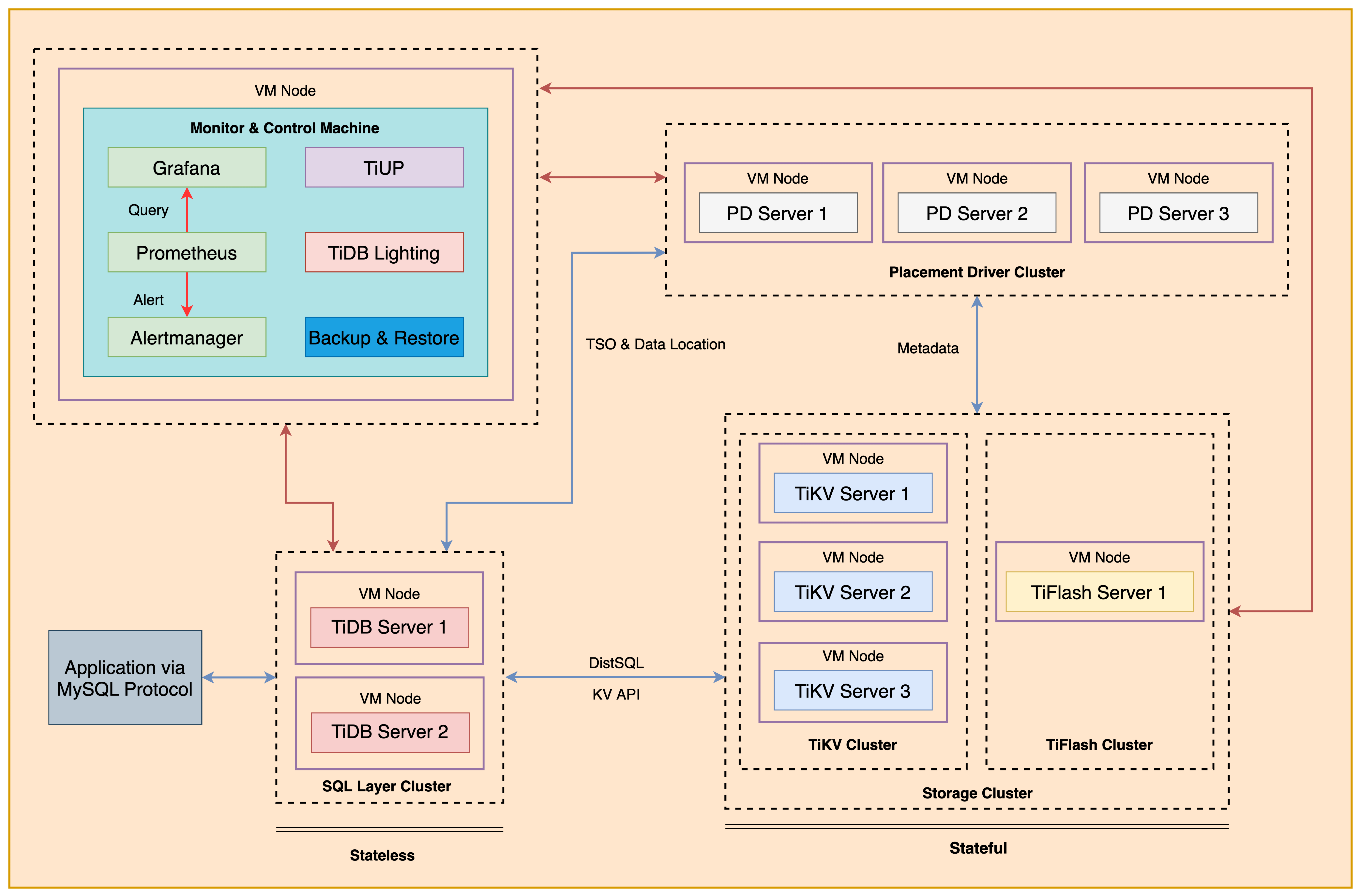
+ The following shows the deployment topology diagram of TiDB cluster.
 ### Notes
+ Many of the steps require that you type commands in a terminal window. You might find it convenient to launch a terminal window and keep it open for the duration of the exercises.
+ Your environment may be different with these exercises, including but not limited to `IP`, `port`, `username`, `password` and `directory`.
+ The `$` in your terminal window is an OS prompt.
+ The "`tidb>`" or "`mysql>`" in your terminal window is SQL command prompt.
+ You may use `ff7.sh` to install, deploy, and start a TiDB cluster and relevant utilities. Make sure you have executed `source ~/hosts-env.sh` and `source ~/.bash_profile` to set environment variables.
+ In these exercises, we need 10 machines connected in the network. The `Role` and `IP Address` (represented by environment variables) are as follows:
| `Node Role` | `IP Address` |
| :----------------- | :-------------------------------------------------------- |
| `Monitor 1` | `${HOST_MONITOR1_PRIVATE_IP}, ${HOST_MONITOR1_PUBLIC_IP}` |
| `Control Machine` | `${HOST_CM_PRIVATE_IP}, ${HOST_CM_PUBLIC_IP}` |
| `TiDB server 1` | `${HOST_DB1_PRIVATE_IP}, ${HOST_DB1_PUBLIC_IP}` |
| `TiDB server 2` | `${HOST_DB2_PRIVATE_IP}, ${HOST_DB2_PUBLIC_IP}` |
| `TiKV server 1` | `${HOST_KV1_PRIVATE_IP}, ${HOST_KV1_PUBLIC_IP}` |
| `TiKV server 2` | `${HOST_KV2_PRIVATE_IP}, ${HOST_KV2_PUBLIC_IP}` |
| `TiKV server 3` | `${HOST_KV3_PRIVATE_IP}, ${HOST_KV3_PUBLIC_IP}` |
| `PD server 1` | `${HOST_PD1_PRIVATE_IP}, ${HOST_PD1_PUBLIC_IP}` |
| `PD server 2` | `${HOST_PD2_PRIVATE_IP}, ${HOST_PD2_PUBLIC_IP}` |
| `PD server 3` | `${HOST_PD3_PRIVATE_IP}, ${HOST_PD3_PUBLIC_IP}` |
| `TiFlash server 1` | `${HOST_TIFLASH1_PRIVATE_IP}, ${HOST_TIFLASH1_PUBLIC_IP}` |
| `Alertmanager` | `${HOST_MONITOR1_PRIVATE_IP}, ${HOST_MONITOR1_PUBLIC_IP}` |
| `Grafana` | `${HOST_MONITOR1_PRIVATE_IP}, ${HOST_MONITOR1_PUBLIC_IP}` |
| `Prometheus` | `${HOST_MONITOR1_PRIVATE_IP}, ${HOST_MONITOR1_PUBLIC_IP}` |
### Assumptions
+ You are given the user credentials (for example: the private key) of the exercise environment.
+ You are given access to 10 machines that have been set up.
+ You have completed the activities in the exercise titled "*Exercises 1: Deploying a TiDB Cluster Using TiUP*" and "*Exercises 8: Importing the Data into Using TiDB Lightning*", and have a terminal window open.
+ Your environment has TiDB cluster deployed and running.
+ You have cleaned up the old practice data.
+ You have installed the `TiDB Lightning`.
## Exercise 1: Deploying `Backup & Restore` and Preparing Data
### Overview
+ In this exercise, you deploy `Backup & Restore` utility and prepare data for exercise. You will perform all tasks on the `Control Machine`.
### Duration
+ This exercise should take you approximately 25 minutes to complete.
### Tasks
1. Install `Backup & Restore` utility.
2. Prepare the data.
3. Input data into TiDB using `TiDB Lightning`.
### Solution
1. Login as user `ec2-user` on `Control Machine` (`${HOST_MONITOR1_PUBLIC_IP}`). Enter the following command at the terminal prompt and receive the results shown:
```
$ ssh -A ec2-user@
__| __|_ )
_| ( / Amazon Linux 2 AMI
___|\___|___|
https://aws.amazon.com/amazon-linux-2/
```
2. Install `Backup & Restore` utility using `TiUP`.
```
$ source .bash_profile
$ tiup install br:v6.5.1
```
3. (If you have already unzipped the dataset, you may skip this step.) Extract the data directories archive from tidb-admin-dataset.zip to ./stage/ on `Control Machine` and `TiKV server 1`. Enter the following command at the terminal prompt and receive the results shown:
```
$ unzip -u stage/tidb-admin-dataset.zip -d stage/
Archive: tidb-admin-dataset.zip
creating: TiDB-Administration-exercise-data/
creating: TiDB-Administration-exercise-data/exercise-12/
...
inflating: TiDB-Administration-exercise-data/exercise-08/Importing-Data-into-TiDB-in-Parallel/my_table_1/my_db.my_table_1.000000000.sql
```
```
$ ssh ${HOST_KV1_PRIVATE_IP} unzip -u stage/tidb-admin-dataset.zip -d stage/
```
4. Use a text editor to edit the `lightning-init.toml` file. Modify `lightning-init.toml` file to contain settings similar to those that follow (replace the IP addresses with the correct ones assigned to you). Or you copy from the solution file which has been already provisioned for you at `solution-lightning-init.toml`:
```
$ vi lightning-init.toml
[lightning]
level = "info"
file = "tidb-lightning.log"
[tikv-importer]
incremental-import = true
backend = "local"
sorted-kv-dir = "/tmp/sorted-kv-dir"
[mydumper]
data-source-dir = "/home/ec2-user/stage/TiDB-Administration-exercise-data/exercise-10"
filter = ['*.*', '!mysql.*', '!sys.*', '!INFORMATION_SCHEMA.*', '!PERFORMANCE_SCHEMA.*', '!METRICS_SCHEMA.*', '!INSPECTION_SCHEMA.*']
[tidb]
host = ""
port = 4000
user = "ltask"
password = "q1w2e3R4_"
status-port = 10080
pd-addr = ":2379"
```
5. Connect to the TiDB, and drop the `emp` database. Create a user for the lightning task, if needed. You should provide option `-p` if `root` has a password, otherwise you can omit the `-p` option. Enter the following command at the terminal prompt and receive the results shown:
```
$ mysql -h ${HOST_DB1_PRIVATE_IP} --port 4000 -u root
```
```sql
DROP DATABASE IF EXISTS emp;
```
```
mysql> DROP DATABASE IF EXISTS emp;
Query OK, 0 rows affected (0.51 sec)
```
```sql
CREATE USER ltask@'%' IDENTIFIED BY 'q1w2e3R4_';
GRANT ALL PRIVILEGES ON *.* TO ltask@'%';
exit;
```
```
mysql> CREATE USER ltask@'%' IDENTIFIED BY 'q1w2e3R4_';
Query OK, 0 rows affected (0.05 sec)
mysql> GRANT ALL PRIVILEGES ON *.* TO ltask@'%';
Query OK, 0 rows affected (0.05 sec)
mysql> exit;
```
6. Use a `nohup` command to start the `tidb-lightning` process. Enter the following command at the terminal prompt and receive the results shown:
```
$ nohup tiup tidb-lightning:v6.5.1 -config lightning-init.toml > nohup.out &
...
[1]+ Done nohup tidb-lightning:v6.5.1 -config lightning-init.toml > nohup.out
```
7. View the contents of the `nohup.out` file to verify that `TiDB Lightning` is exited. Enter the following command at the terminal prompt and receive the results shown:
```
$ cat nohup.out
Verbose debug logs will be written to tidb-lightning.log
+----+------------------------------------------------------------------------------------------------------------------------+-------------+--------+
| # | CHECK ITEM | TYPE | PASSED |
+----+------------------------------------------------------------------------------------------------------------------------+-------------+--------+
| 1 | Source csv files size is proper | performance | true |
+----+------------------------------------------------------------------------------------------------------------------------+-------------+--------+
| 2 | checkpoints are valid | critical | true |
+----+------------------------------------------------------------------------------------------------------------------------+-------------+--------+
| 3 | table schemas are valid | critical | true |
+----+------------------------------------------------------------------------------------------------------------------------+-------------+--------+
| 4 | Cluster is available | critical | true |
+----+------------------------------------------------------------------------------------------------------------------------+-------------+--------+
| 5 | Lightning has the correct storage permission | critical | true |
+----+------------------------------------------------------------------------------------------------------------------------+-------------+--------+
| 6 | sorted-kv-dir:/tmp/sorted-kv-dir and data-source-dir:/root/sample/init are in the same disk, may slow down performance | performance | false |
+----+------------------------------------------------------------------------------------------------------------------------+-------------+--------+
| 7 | local disk resources are rich, estimate sorted data size 343.6MiB, local available is 6.459GiB | critical | true |
+----+------------------------------------------------------------------------------------------------------------------------+-------------+--------+
| 8 | Cluster available is rich, available is 55.03GiB, we need 1.007GiB | critical | true |
+----+------------------------------------------------------------------------------------------------------------------------+-------------+--------+
| 9 | Cluster doesn't have too many empty regions | critical | true |
+----+------------------------------------------------------------------------------------------------------------------------+-------------+--------+
| 10 | Cluster region distribution is balanced | critical | true |
+----+------------------------------------------------------------------------------------------------------------------------+-------------+--------+
tidb lightning exit successfully
```
8. Connect to the TiDB and display all of the databases. Does the list include the `emp` database? Enter the following command at the terminal prompt and receive the results shown:
```
$ mysql -h ${HOST_DB1_PRIVATE_IP} --port 4000 -u root
```
```sql
SHOW DATABASES;
```
```
mysql> SHOW DATABASES;
+--------------------+
| Database |
+--------------------+
| INFORMATION_SCHEMA |
| METRICS_SCHEMA |
| PERFORMANCE_SCHEMA |
| emp |
| my_db |
| mysql |
| test |
+--------------------+
7 rows in set (0.01 sec)
```
## Exercise 2: Making a Full TiDB Cluster Data Backup to Locally Attached Storage with `Backup & Restore`
### Overview
+ In this exercise, you use `Backup & Restore` to make a physical full backup. The backup files are stored on the TiKV nodes.
#### Note:
+ You have cleaned up the old practice data on `TiKV server 1`, `TiKV server 2` and `TiKV server 3`.
### Duration
+ This exercise should take you approximately 30 minutes to complete.
### Tasks
1. Backup the data in TiDB into local disks of the TiKV nodes.
2. Check the backup files.
### Solution
1. Create a new directory named `/tmp/backup` on `TiKV server 1`, `TiKV server 2` and `TiKV server 3`, and change the permissions on the `/tmp/backup` folder to read and write access. Enter `yes` if prompted by `ssh`. Enter the following command at the terminal prompt and receive the results shown:
```
$ ssh ${HOST_KV1_PRIVATE_IP} mkdir /tmp/backup
$ ssh ${HOST_KV2_PRIVATE_IP} mkdir /tmp/backup
$ ssh ${HOST_KV3_PRIVATE_IP} mkdir /tmp/backup
```
2. On `Control Machine`, run the `tiup br backup full` command to backup the database. Enter the following command at the terminal prompt and receive the results shown:
```
$ tiup br:v6.5.1 backup full --pd "${HOST_PD1_PRIVATE_IP}:2379" --storage "local:///tmp/backup" --ratelimit 128 --log-file backupfull.log
Detail BR log in backupfull.log
Full Backup <----------------------------------------------------------------------------------------------------------------------------------------------------------------> 100.00%
Checksum <-------------------------------------------------------------------------------------------------------------------------------------------------------------------> 100.00%
[2022/06/25 18:39:20.183 +08:00] [INFO] [collector.go:69] ["Full Backup success summary"] [total-ranges=36] [ranges-succeed=36] [ranges-failed=0] [backup-checksum=951.052235ms] [backup-fast-checksum=4.138427ms] [backup-total-ranges=73] [backup-total-regions=78] [total-take=4.187101891s] [BackupTS=434150717785899011] [total-kv=5999621] [total-kv-size=322.9MB] [average-speed=77.11MB/s] [backup-data-size(after-compressed)=65.71MB] [Size=65706363]
```
+ The parameters are explained as follows:
+ `--pd "${HOST_PD1_PRIVATE_IP}:2379"`: The IP address of the PD node.
+ `--storage "local:///tmp/backup"`: The path where the backup files are stored.
+ `--ratelimit 128`: The maximum speed per TiKV performing backup tasks (in MiB/s).
+ `--log-file backupfull.log`: The target file for BR logging.
+ If any error occurs, view the contents of the `backupfull.log` file to confirm the cause of the error, and type `:q!` to quit to the terminal (if you use `vi`):
```
$ cat backupfull.log
[2022/06/25 18:39:15.996 +08:00] [INFO] [info.go:49] ["Welcome to Backup & Restore (BR)"] [release-version=v6.1.0] [git-hash=1a89decdb192cbdce6a7b0020d71128bc964d30f] [git-branch=heads/refs/tags/v6.1.0] [go-version=go1.18.2] [utc-build-time="2022-06-05 05:09:12"] [race-enabled=false]
[2022/06/25 18:39:15.996 +08:00] [INFO] [common.go:692] [arguments] [__command="br backup full"]
...
[2022/06/25 18:39:20.183 +08:00] [INFO] [collector.go:70] ["Full Backup success summary"] [total-ranges=36] [ranges-succeed=36] [ranges-failed=0] [backup-checksum=951.052235ms] [backup-fast-checksum=4.138427ms] [backup-total-ranges=73] [backup-total-regions=78] [total-take=4.187101891s] [BackupTS=434150717785899011] [total-kv=5999621] [total-kv-size=322.9MB] [average-speed=77.11MB/s] [backup-data-size(after-compressed)=65.71MB] [Size=65706363]
```
3. List the files generated in the `/tmp/backup/` directory from `TiKV server 1`, `TiKV server 2` and `TiKV server 3`. Enter the following command at the terminal prompt and receive the results shown, for example, to check on `TiKV server 1`:
```
$ ssh ${HOST_KV1_PRIVATE_IP} find /tmp/backup/
/tmp/backup/
/tmp/backup/1
/tmp/backup/1/38_19_8dd75043152f9a7a07ef9bc0b24b629d464621806e3c93219cac918ec3d5b346_1670169544111_write.sst
...
/tmp/backup/1/147_51_a005fa70db819be4f64dc51d7e50f9a5c5694304295cf5f41b0b7f7df19b5e0e_1670169550220_write.sst
/tmp/backup/1/147_51_82164855cb8e661a0ef5d566634576dd53a3dd7cd3954478f03955a43c453a63_1670169550222_write.sst
```
4. On `Control Machine`, list the `metadata` and `backup.lock` files created in the `/tmp/backup/` directory. Enter the following command at the terminal prompt and receive the results shown:
```
$ ls /tmp/backup/
backup.lock backupmeta checkpoint.meta checkpoints
```
## Exercise 3: Backing Up and Restoring a Database to S3 Bucket with `Backup & Restore`
### Overview
+ In this exercise, you back up and restore a database in the TiDB cluster by using the `Backup & Restore`. In the previous exercise, you backed up data to the local disks connected to `TiKV` servers, in this exercise, you will back up database data to S3 bucket, it is available for each `TiKV` server to read and write. Shared file system and Cloud storage is a preferred way to work with `Backup & Restore (BR)`, it's convenient for `TiKV` to access.
### Duration
+ This exercise should take you approximately 30 minutes to complete.
### Tasks
1. Back up the `emp` database in `TiDB` to `Amazon S3` bucket.
2. Drop the `emp` database in `TiDB`
3. Use the `Backup & Restore` utility to restore the `emp` database.
### Solution
1. On `Control Machine`, use the `Backup & Restore` utility to back up the `emp` database. Replace `{-class_tag}`, `{trainer_tag}` and `{user_tag}` with assigned values by your instructor. Enter the following command at the terminal prompt and receive the results shown:
```
$ tiup br:v6.5.1 backup db --db emp --pd "${HOST_PD1_PRIVATE_IP}:2379" --storage "s3://pe-class-{location_tag}/{trainer_tag}/{user_tag}/emp" --send-credentials-to-tikv=false --ratelimit 128 --log-file backupdb.log
Detail BR log in backupdb.log
Database Backup <--------------------------------------------------------------------------------------------------------------------------------------------------------> 100.00%
Checksum <---------------------------------------------------------------------------------------------------------------------------------------------------------------> 100.00%
[2022/12/04 16:30:56.102 +00:00] [INFO] [collector.go:69] ["Database Backup success summary"] [total-ranges=14] [ranges-succeed=14] [ranges-failed=0] [backup-checksum=1.769284373s] [backup-fast-checksum=495.092µs] [backup-total-ranges=7] [backup-total-regions=26] [total-take=10.347769213s] [BackupTS=437825423763570689] [total-kv=5988147] [total-kv-size=322.2MB] [average-speed=31.13MB/s] [backup-data-size(after-compressed)=65.51MB] [Size=65506701]
```
+ The parameters are explained as follows:
+ `--pd "${HOST_PD1_PRIVATE_IP}:2379"`: The IP address of the PD node.
+ `--storage "s3://pe-class-{location_tag}/{trainer_tag}/{user_tag}/emp"`: The S3 bucket and object prefix under where the backup files are stored.
+ `--send-credentials-to-tikv=false`: The IAM credentials are got from the EC2 instance role, so no need to pass the credentials.
+ `--db emp`: specifies the database name.
+ `--ratelimit 128`: The maximum speed per TiKV performing backup tasks (in MiB/s).
+ `--log-file backupdb.log`: The target file for BR logging.
+ If any error occurs, view the contents of the `backupfull.log` file to confirm the cause of the error, and type `:q!` to quit to the terminal:
```
$ cat backupdb.log
...
[2022/12/04 16:30:55.978 +00:00] [INFO] [global.go:34] ["Backup calculated table checksum into metas"] [take=1.769275336s]
[2022/12/04 16:30:55.978 +00:00] [INFO] [global.go:34] ["write metas finished"] [type=schema]
[2022/12/04 16:30:55.978 +00:00] [INFO] [global.go:34] ["finish the write metas"] [item=18] [type=schema] [costs=1.769280576s]
[2022/12/04 16:30:55.978 +00:00] [INFO] [global.go:34] ["save backup meta"] [size=14617]
[2022/12/04 16:30:56.101 +00:00] [INFO] [global.go:34] ["checksum success"] [db=emp] [table=t]
[2022/12/04 16:30:56.101 +00:00] [INFO] [global.go:34] ["checksum success"] [db=emp] [table=emp]
[2022/12/04 16:30:56.101 +00:00] [INFO] [global.go:34] ["checksum success"] [db=emp] [table=sal]
[2022/12/04 16:30:56.101 +00:00] [INFO] [global.go:34] ["checksum success"] [db=emp] [table=dep]
[2022/12/04 16:30:56.101 +00:00] [INFO] [global.go:34] ["[pd] stop fetching the pending tso requests due to context canceled"] [dc-location=global]
[2022/12/04 16:30:56.101 +00:00] [INFO] [global.go:34] ["[pd] exit tso dispatcher"] [dc-location=global]
[2022/12/04 16:30:56.102 +00:00] [INFO] [global.go:34] ["[pd] stop fetching the pending tso requests due to context canceled"] [dc-location=global]
[2022/12/04 16:30:56.102 +00:00] [INFO] [global.go:34] ["[pd] exit tso dispatcher"] [dc-location=global]
[2022/12/04 16:30:56.102 +00:00] [INFO] [global.go:34] ["Database Backup success summary"] [total-ranges=14] [ranges-succeed=14] [ranges-failed=0] [backup-checksum=1.769284373s] [backup-fast-checksum=495.092µs] [backup-total-ranges=7] [backup-total-regions=26] [total-take=10.347769213s] [BackupTS=437825423763570689] [total-kv=5988147] [total-kv-size=322.2MB] [average-speed=31.13MB/s] [backup-data-size(after-compressed)=65.51MB] [Size=65506701]
```
2. Connect to TiDB and list the databases. You should provide option `-p` if `root` has a password, otherwise you can omit the `-p` option. Enter the following command at the terminal prompt and receive the results shown:
```
$ mysql -h ${HOST_DB1_PRIVATE_IP} --port 4000 -u root
```
```sql
SHOW DATABASES;
```
```
mysql> SHOW DATABASES;
+--------------------+
| Database |
+--------------------+
| INFORMATION_SCHEMA |
| METRICS_SCHEMA |
| PERFORMANCE_SCHEMA |
| emp |
| my_db |
| mysql |
| test |
+--------------------+
7 rows in set (0.00 sec)
```
3. Drop the `emp` database. Enter the following command at the terminal prompt and receive the results shown:
```sql
DROP DATABASE emp;
SHOW DATABASES;
```
```
mysql> DROP DATABASE emp;
Query OK, 0 rows affected (39.90 sec)
mysql> SHOW DATABASES;
+--------------------+
| Database |
+--------------------+
| INFORMATION_SCHEMA |
| METRICS_SCHEMA |
| PERFORMANCE_SCHEMA |
| my_db |
| mysql |
| test |
+--------------------+
6 rows in set (0.00 sec)
```
```
mysql> exit;
```
4. On `Control Machine`, use the `Backup & Restore` utility to restore the `emp` database. Replace `{-class_tag}`, `{trainer_tag}` and `{user_tag}` with assigned values by your instructor. Enter the following command at the terminal prompt and receive the results shown:
```
$ tiup br:v6.5.1 restore db --pd "${HOST_PD1_PRIVATE_IP}:2379" --db "emp" --storage "s3://pe-class-{location_tag}/{trainer_tag}/{user_tag}/emp" --send-credentials-to-tikv=false --log-file restoredb.log
Detail BR log in restoredb.log
DataBase Restore <------------------------------------------------------------------------------------------------------------------------------------> 100.00%
[2022/06/25 20:00:56.031 +08:00] [INFO] [collector.go:69] ["DataBase Restore success summary"] [total-ranges=15] [ranges-succeed=15] [ranges-failed=0] [split-region=201.381µs] [restore-ranges=11] [total-take=3.770701239s] [restore-data-size(after-compressed)=65.55MB] [Size=65549823] [BackupTS=434152001321566251] [total-kv=5988147] [total-kv-size=322.2MB] [average-speed=85.44MB/s]
```
+ If any error occurs, view the contents of the `backupfull.log` file to confirm the cause of the error.
```
$ cat restoredb.log
[2022/06/25 20:00:52.260 +08:00] [INFO] [info.go:49] ["Welcome to Backup & Restore (BR)"] [release-version=v6.1.0] [git-hash=1a89decdb192cbdce6a7b0020d71128bc964d30f] [git-branch=heads/refs/tags/v6.1.0] [go-version=go1.18.2] [utc-build-time="2022-06-05 05:09:12"] [race-enabled=false]
[2022/06/25 20:00:52.260 +08:00] [INFO] [common.go:692] [arguments] [__command="br restore db"] [db=emp] [log-file=restoredb.log] [pd="[172.31.0.233:2379]"] [storage=local:///tmp/emp]
...
[2022/06/25 20:00:56.030 +08:00] [INFO] [client.go:768] ["[pd] stop fetching the pending tso requests due to context canceled"] [dc-location=global]
[2022/06/25 20:00:56.030 +08:00] [INFO] [client.go:706] ["[pd] exit tso dispatcher"] [dc-location=global]
[2022/06/25 20:00:56.031 +08:00] [INFO] [collector.go:70] ["DataBase Restore success summary"] [total-ranges=15] [ranges-succeed=15] [ranges-failed=0] [split-region=201.381µs] [restore-ranges=11] [total-take=3.770701239s] [restore-data-size(after-compressed)=65.55MB] [Size=65549823] [BackupTS=434152001321566251] [total-kv=5988147] [total-kv-size=322.2MB] [average-speed=85.44MB/s]
```
5. Connect to the TiDB and list the databases. Does the list include the `emp` database? Enter the following command at the terminal prompt and receive the results shown:
```
$ mysql -h ${HOST_DB1_PRIVATE_IP} --port 4000 -u root
```
```sql
SHOW DATABASES;
```
```
mysql> SHOW DATABASES;
+--------------------+
| Database |
+--------------------+
| INFORMATION_SCHEMA |
| METRICS_SCHEMA |
| PERFORMANCE_SCHEMA |
| emp |
| my_db |
| mysql |
| test |
+--------------------+
7 rows in set (0.00 sec)
```
6. Review the tables in the `emp` database. Enter the following command at the terminal prompt and receive the results shown:
```sql
USE emp;
SHOW TABLES;
```
```
mysql> USE emp;
Database changed
mysql> SHOW TABLES;
+---------------+
| Tables_in_emp |
+---------------+
| dep |
| emp |
| sal |
| t |
+---------------+
4 rows in set (0.00 sec)
```
7. Verify that the `dep`, `emp`, `sql` and `t` tables are restored. Enter the following command at the terminal prompt and receive the results shown:
```sql
SELECT COUNT(*) FROM dep;
SELECT COUNT(*) FROM emp;
SELECT COUNT(*) FROM sal;
SELECT COUNT(*) FROM t;
```
```
mysql> SELECT COUNT(*) FROM dep;
+----------+
| COUNT(*) |
+----------+
| 9 |
+----------+
1 row in set (0.01 sec)
mysql> SELECT COUNT(*) FROM emp;
+----------+
| COUNT(*) |
+----------+
| 300024 |
+----------+
1 row in set (0.00 sec)
mysql> SELECT COUNT(*) FROM sal;
+----------+
| COUNT(*) |
+----------+
| 2844047 |
+----------+
1 row in set (0.00 sec)
mysql> SELECT COUNT(*) FROM t;
+----------+
| COUNT(*) |
+----------+
| 2 |
+----------+
1 row in set (0.00 sec)
```
## Exercise 4: Backing Up and Restoring a Table to S3 Bucket with `Backup & Restore`
### Overview
+ In this exercise, you backup and restore a table in the TiDB cluster by using the `Backup & Restore`. You will back up table data to S3 bucket, it is available for each `TiKV` server to read and write. Shared file system and Cloud storage is a preferred way to work with `Backup & Restore (BR)`, it's convenient for `TiKV` to access.
### Duration
+ This exercise should take you approximately 30 minutes to complete.
### Tasks
1. Backup the `sal` table in the `emp` database to the `Amazon S3` bucket.
2. Drop the `sal` table in `emp` database.
3. Use the `Backup & Restore` utility to restore the `sal` table in `emp` database.
### Solution
1. On `Control Machine`, use the `Backup & Restore` utility to back up the `sal` table in the `emp` database. Replace `{-class_tag}`, `{trainer_tag}` and `{user_tag}` with assigned values by your instructor. Enter the following command at the terminal prompt and receive the results shown:
```
$ tiup br:v6.5.1 backup table --pd "${HOST_PD1_PRIVATE_IP}:2379" --db emp --table sal --storage "s3://pe-class-{location_tag}/{trainer_tag}/{user_tag}/empsal" --send-credentials-to-tikv=false --ratelimit 128 --log-file backuptable.log
Detail BR log in backuptable.log
Table Backup <----------------------------------------------------------------------------------------------------------------------------------------> 100.00%
Checksum <--------------------------------------------------------------------------------------------------------------------------------------------> 100.00%
[2022/06/25 20:25:08.432 +08:00] [INFO] [collector.go:69] ["Table Backup success summary"] [total-ranges=6] [ranges-succeed=6] [ranges-failed=0] [backup-checksum=963.74443ms] [backup-fast-checksum=219.535µs] [backup-total-ranges=2] [backup-total-regions=6] [total-take=4.664522392s] [Size=58300863] [BackupTS=434152381823320066] [total-kv=5688094] [total-kv-size=301MB] [average-speed=64.54MB/s] [backup-data-size(after-compressed)=58.3MB]
```
+ The parameters are explained as follows:
+ `--pd "${HOST_PD1_PRIVATE_IP}:2379"`: The IP address of the PD node.
+ `--storage "s3://pe-class-{location_tag}/{trainer_tag}/{user_tag}/empsal"`: The S3 bucket and object prefix under where the backup files are stored.
+ `--db emp --table sal`: Specify the database name and table name respectively.
+ `--ratelimit 128`: The maximum speed per TiKV performing backup tasks (in MiB/s).
+ `--log-file backuptable.log`: The target file for `Backup & Restore` logging.
+ If any error occurs, view the contents of the `backupfull.log` file to confirm the cause of the error, and type `:q!` to quit to the terminal:
```
$ cat backuptable.log
[2022/06/25 20:25:03.768 +08:00] [INFO] [info.go:49] ["Welcome to Backup & Restore (BR)"] [release-version=v6.1.0] [git-hash=1a89decdb192cbdce6a7b0020d71128bc964d30f] [git-branch=heads/refs/tags/v6.1.0] [go-version=go1.18.2] [utc-build-time="2022-06-05 05:09:12"] [race-enabled=false]
[2022/06/25 20:25:03.768 +08:00] [INFO] [common.go:692] [arguments] [__command="br backup table"] [db=emp] [log-file=backuptable.log] [pd="[172.31.0.233:2379]"] [ratelimit=128] [storage=local:///tmp/empsal] [table=sal]
...
[2022/06/25 20:25:08.432 +08:00] [INFO] [client.go:706] ["[pd] exit tso dispatcher"] [dc-location=global]
[2022/06/25 20:25:08.433 +08:00] [INFO] [collector.go:70] ["Table Backup success summary"] [total-ranges=6] [ranges-succeed=6] [ranges-failed=0] [backup-checksum=963.74443ms] [backup-fast-checksum=219.535µs] [backup-total-ranges=2] [backup-total-regions=6] [total-take=4.664522392s] [Size=58300863] [BackupTS=434152381823320066] [total-kv=5688094] [total-kv-size=301MB] [average-speed=64.54MB/s] [backup-data-size(after-compressed)=58.3MB]
```
2. Connect to the TiDB and drop the `sal` table in the `emp` database. You should provide option `-p` if `root` has a password, otherwise you can omit the `-p` option. Enter the following command at the terminal prompt and receive the results shown:
```
$ mysql -h ${HOST_DB1_PRIVATE_IP} --port 4000 -u root
```
```sql
SELECT COUNT(*) FROM emp.sal;
DROP TABLE emp.sal;
SELECT COUNT(*) FROM emp.sal;
```
```
mysql> SELECT COUNT(*) FROM emp.sal;
+----------+
| COUNT(*) |
+----------+
| 2844047 |
+----------+
1 row in set (0.00 sec)
mysql> DROP TABLE emp.sal;
mysql> SELECT COUNT(*) FROM emp.sal;
ERROR 1146 (42S02): Table 'emp.sal' doesn't exist
```
3. On `Control Machine`, use the `Backup & Restore` utility to restore the `emp.sal` table. Replace `{-class_tag}`, `{trainer_tag}` and `{user_tag}` with assigned values by your instructor. Enter the following command at the terminal prompt and receive the results shown:
```
$ tiup br:v6.5.1 restore table --pd "${HOST_PD1_PRIVATE_IP}:2379" --db "emp" --table "sal" --storage "s3://pe-class-{location_tag}/{trainer_tag}/{user_tag}/empsal" --send-credentials-to-tikv=false --log-file restoretable.log
Detail BR log in restoretable.log
Table Restore <--------------------------------------------------------------------------------------------------------------------------------------------------------> 100.00%
[2022/06/25 20:39:21.447 +08:00] [INFO] [collector.go:69] ["Table Restore success summary"] [total-ranges=7] [ranges-succeed=7] [ranges-failed=0] [split-region=150.684µs] [restore-ranges=6] [total-take=3.206398749s] [restore-data-size(after-compressed)=58.3MB] [Size=58300863] [BackupTS=434152605812523049] [total-kv=5688094] [total-kv-size=301MB] [average-speed=93.89MB/s]
```
+ If any error occurs, view the contents of the `backupfull.log` file to confirm the cause of the error.
```
$ cat restoretable.log
[2022/06/25 20:39:18.240 +08:00] [INFO] [info.go:49] ["Welcome to Backup & Restore (BR)"] [release-version=v6.1.0] [git-hash=1a89decdb192cbdce6a7b0020d71128bc964d30f] [git-branch=heads/refs/tags/v6.1.0] [go-version=go1.18.2] [utc-build-time="2022-06-05 05:09:12"] [race-enabled=false]
[2022/06/25 20:39:18.241 +08:00] [INFO] [common.go:692] [arguments] [__command="br restore table"] [db=emp] [log-file=restoretable.log] [pd="[172.31.0.233:2379]"] [storage=local:///tmp/empsal] [table=sal]
...
[2022/06/25 20:39:21.446 +08:00] [INFO] [client.go:768] ["[pd] stop fetching the pending tso requests due to context canceled"] [dc-location=global]
[2022/06/25 20:39:21.446 +08:00] [INFO] [client.go:706] ["[pd] exit tso dispatcher"] [dc-location=global]
[2022/06/25 20:39:21.447 +08:00] [INFO] [collector.go:70] ["Table Restore success summary"] [total-ranges=7] [ranges-succeed=7] [ranges-failed=0] [split-region=150.684µs] [restore-ranges=6] [total-take=3.206398749s] [restore-data-size(after-compressed)=58.3MB] [Size=58300863] [BackupTS=434152605812523049] [total-kv=5688094] [total-kv-size=301MB] [average-speed=93.89MB/s]
[2022/06/25 20:39:21.447 +08:00] [INFO] [client.go:768] ["[pd] stop fetching the pending tso requests due to context canceled"] [dc-location=global]
```
4. Connect to the TiDB and verify that the `sal` table in the `emp` database is restored. You should provide option `-p` if `root` has a password, otherwise you can omit the `-p` option. Enter the following command at the terminal prompt and receive the results shown:
```
$ mysql -h ${HOST_DB1_PRIVATE_IP} --port 4000 -u root
```
```sql
SELECT COUNT(*) FROM emp.sal;
```
```
mysql> SELECT COUNT(*) FROM emp.sal;
+----------+
| COUNT(*) |
+----------+
| 2844047 |
+----------+
1 row in set (0.53 sec)
```
5. Log out of the client and close all open terminal windows.
## End of Exercises
### Notes
+ Many of the steps require that you type commands in a terminal window. You might find it convenient to launch a terminal window and keep it open for the duration of the exercises.
+ Your environment may be different with these exercises, including but not limited to `IP`, `port`, `username`, `password` and `directory`.
+ The `$` in your terminal window is an OS prompt.
+ The "`tidb>`" or "`mysql>`" in your terminal window is SQL command prompt.
+ You may use `ff7.sh` to install, deploy, and start a TiDB cluster and relevant utilities. Make sure you have executed `source ~/hosts-env.sh` and `source ~/.bash_profile` to set environment variables.
+ In these exercises, we need 10 machines connected in the network. The `Role` and `IP Address` (represented by environment variables) are as follows:
| `Node Role` | `IP Address` |
| :----------------- | :-------------------------------------------------------- |
| `Monitor 1` | `${HOST_MONITOR1_PRIVATE_IP}, ${HOST_MONITOR1_PUBLIC_IP}` |
| `Control Machine` | `${HOST_CM_PRIVATE_IP}, ${HOST_CM_PUBLIC_IP}` |
| `TiDB server 1` | `${HOST_DB1_PRIVATE_IP}, ${HOST_DB1_PUBLIC_IP}` |
| `TiDB server 2` | `${HOST_DB2_PRIVATE_IP}, ${HOST_DB2_PUBLIC_IP}` |
| `TiKV server 1` | `${HOST_KV1_PRIVATE_IP}, ${HOST_KV1_PUBLIC_IP}` |
| `TiKV server 2` | `${HOST_KV2_PRIVATE_IP}, ${HOST_KV2_PUBLIC_IP}` |
| `TiKV server 3` | `${HOST_KV3_PRIVATE_IP}, ${HOST_KV3_PUBLIC_IP}` |
| `PD server 1` | `${HOST_PD1_PRIVATE_IP}, ${HOST_PD1_PUBLIC_IP}` |
| `PD server 2` | `${HOST_PD2_PRIVATE_IP}, ${HOST_PD2_PUBLIC_IP}` |
| `PD server 3` | `${HOST_PD3_PRIVATE_IP}, ${HOST_PD3_PUBLIC_IP}` |
| `TiFlash server 1` | `${HOST_TIFLASH1_PRIVATE_IP}, ${HOST_TIFLASH1_PUBLIC_IP}` |
| `Alertmanager` | `${HOST_MONITOR1_PRIVATE_IP}, ${HOST_MONITOR1_PUBLIC_IP}` |
| `Grafana` | `${HOST_MONITOR1_PRIVATE_IP}, ${HOST_MONITOR1_PUBLIC_IP}` |
| `Prometheus` | `${HOST_MONITOR1_PRIVATE_IP}, ${HOST_MONITOR1_PUBLIC_IP}` |
### Assumptions
+ You are given the user credentials (for example: the private key) of the exercise environment.
+ You are given access to 10 machines that have been set up.
+ You have completed the activities in the exercise titled "*Exercises 1: Deploying a TiDB Cluster Using TiUP*" and "*Exercises 8: Importing the Data into Using TiDB Lightning*", and have a terminal window open.
+ Your environment has TiDB cluster deployed and running.
+ You have cleaned up the old practice data.
+ You have installed the `TiDB Lightning`.
## Exercise 1: Deploying `Backup & Restore` and Preparing Data
### Overview
+ In this exercise, you deploy `Backup & Restore` utility and prepare data for exercise. You will perform all tasks on the `Control Machine`.
### Duration
+ This exercise should take you approximately 25 minutes to complete.
### Tasks
1. Install `Backup & Restore` utility.
2. Prepare the data.
3. Input data into TiDB using `TiDB Lightning`.
### Solution
1. Login as user `ec2-user` on `Control Machine` (`${HOST_MONITOR1_PUBLIC_IP}`). Enter the following command at the terminal prompt and receive the results shown:
```
$ ssh -A ec2-user@
__| __|_ )
_| ( / Amazon Linux 2 AMI
___|\___|___|
https://aws.amazon.com/amazon-linux-2/
```
2. Install `Backup & Restore` utility using `TiUP`.
```
$ source .bash_profile
$ tiup install br:v6.5.1
```
3. (If you have already unzipped the dataset, you may skip this step.) Extract the data directories archive from tidb-admin-dataset.zip to ./stage/ on `Control Machine` and `TiKV server 1`. Enter the following command at the terminal prompt and receive the results shown:
```
$ unzip -u stage/tidb-admin-dataset.zip -d stage/
Archive: tidb-admin-dataset.zip
creating: TiDB-Administration-exercise-data/
creating: TiDB-Administration-exercise-data/exercise-12/
...
inflating: TiDB-Administration-exercise-data/exercise-08/Importing-Data-into-TiDB-in-Parallel/my_table_1/my_db.my_table_1.000000000.sql
```
```
$ ssh ${HOST_KV1_PRIVATE_IP} unzip -u stage/tidb-admin-dataset.zip -d stage/
```
4. Use a text editor to edit the `lightning-init.toml` file. Modify `lightning-init.toml` file to contain settings similar to those that follow (replace the IP addresses with the correct ones assigned to you). Or you copy from the solution file which has been already provisioned for you at `solution-lightning-init.toml`:
```
$ vi lightning-init.toml
[lightning]
level = "info"
file = "tidb-lightning.log"
[tikv-importer]
incremental-import = true
backend = "local"
sorted-kv-dir = "/tmp/sorted-kv-dir"
[mydumper]
data-source-dir = "/home/ec2-user/stage/TiDB-Administration-exercise-data/exercise-10"
filter = ['*.*', '!mysql.*', '!sys.*', '!INFORMATION_SCHEMA.*', '!PERFORMANCE_SCHEMA.*', '!METRICS_SCHEMA.*', '!INSPECTION_SCHEMA.*']
[tidb]
host = ""
port = 4000
user = "ltask"
password = "q1w2e3R4_"
status-port = 10080
pd-addr = ":2379"
```
5. Connect to the TiDB, and drop the `emp` database. Create a user for the lightning task, if needed. You should provide option `-p` if `root` has a password, otherwise you can omit the `-p` option. Enter the following command at the terminal prompt and receive the results shown:
```
$ mysql -h ${HOST_DB1_PRIVATE_IP} --port 4000 -u root
```
```sql
DROP DATABASE IF EXISTS emp;
```
```
mysql> DROP DATABASE IF EXISTS emp;
Query OK, 0 rows affected (0.51 sec)
```
```sql
CREATE USER ltask@'%' IDENTIFIED BY 'q1w2e3R4_';
GRANT ALL PRIVILEGES ON *.* TO ltask@'%';
exit;
```
```
mysql> CREATE USER ltask@'%' IDENTIFIED BY 'q1w2e3R4_';
Query OK, 0 rows affected (0.05 sec)
mysql> GRANT ALL PRIVILEGES ON *.* TO ltask@'%';
Query OK, 0 rows affected (0.05 sec)
mysql> exit;
```
6. Use a `nohup` command to start the `tidb-lightning` process. Enter the following command at the terminal prompt and receive the results shown:
```
$ nohup tiup tidb-lightning:v6.5.1 -config lightning-init.toml > nohup.out &
...
[1]+ Done nohup tidb-lightning:v6.5.1 -config lightning-init.toml > nohup.out
```
7. View the contents of the `nohup.out` file to verify that `TiDB Lightning` is exited. Enter the following command at the terminal prompt and receive the results shown:
```
$ cat nohup.out
Verbose debug logs will be written to tidb-lightning.log
+----+------------------------------------------------------------------------------------------------------------------------+-------------+--------+
| # | CHECK ITEM | TYPE | PASSED |
+----+------------------------------------------------------------------------------------------------------------------------+-------------+--------+
| 1 | Source csv files size is proper | performance | true |
+----+------------------------------------------------------------------------------------------------------------------------+-------------+--------+
| 2 | checkpoints are valid | critical | true |
+----+------------------------------------------------------------------------------------------------------------------------+-------------+--------+
| 3 | table schemas are valid | critical | true |
+----+------------------------------------------------------------------------------------------------------------------------+-------------+--------+
| 4 | Cluster is available | critical | true |
+----+------------------------------------------------------------------------------------------------------------------------+-------------+--------+
| 5 | Lightning has the correct storage permission | critical | true |
+----+------------------------------------------------------------------------------------------------------------------------+-------------+--------+
| 6 | sorted-kv-dir:/tmp/sorted-kv-dir and data-source-dir:/root/sample/init are in the same disk, may slow down performance | performance | false |
+----+------------------------------------------------------------------------------------------------------------------------+-------------+--------+
| 7 | local disk resources are rich, estimate sorted data size 343.6MiB, local available is 6.459GiB | critical | true |
+----+------------------------------------------------------------------------------------------------------------------------+-------------+--------+
| 8 | Cluster available is rich, available is 55.03GiB, we need 1.007GiB | critical | true |
+----+------------------------------------------------------------------------------------------------------------------------+-------------+--------+
| 9 | Cluster doesn't have too many empty regions | critical | true |
+----+------------------------------------------------------------------------------------------------------------------------+-------------+--------+
| 10 | Cluster region distribution is balanced | critical | true |
+----+------------------------------------------------------------------------------------------------------------------------+-------------+--------+
tidb lightning exit successfully
```
8. Connect to the TiDB and display all of the databases. Does the list include the `emp` database? Enter the following command at the terminal prompt and receive the results shown:
```
$ mysql -h ${HOST_DB1_PRIVATE_IP} --port 4000 -u root
```
```sql
SHOW DATABASES;
```
```
mysql> SHOW DATABASES;
+--------------------+
| Database |
+--------------------+
| INFORMATION_SCHEMA |
| METRICS_SCHEMA |
| PERFORMANCE_SCHEMA |
| emp |
| my_db |
| mysql |
| test |
+--------------------+
7 rows in set (0.01 sec)
```
## Exercise 2: Making a Full TiDB Cluster Data Backup to Locally Attached Storage with `Backup & Restore`
### Overview
+ In this exercise, you use `Backup & Restore` to make a physical full backup. The backup files are stored on the TiKV nodes.
#### Note:
+ You have cleaned up the old practice data on `TiKV server 1`, `TiKV server 2` and `TiKV server 3`.
### Duration
+ This exercise should take you approximately 30 minutes to complete.
### Tasks
1. Backup the data in TiDB into local disks of the TiKV nodes.
2. Check the backup files.
### Solution
1. Create a new directory named `/tmp/backup` on `TiKV server 1`, `TiKV server 2` and `TiKV server 3`, and change the permissions on the `/tmp/backup` folder to read and write access. Enter `yes` if prompted by `ssh`. Enter the following command at the terminal prompt and receive the results shown:
```
$ ssh ${HOST_KV1_PRIVATE_IP} mkdir /tmp/backup
$ ssh ${HOST_KV2_PRIVATE_IP} mkdir /tmp/backup
$ ssh ${HOST_KV3_PRIVATE_IP} mkdir /tmp/backup
```
2. On `Control Machine`, run the `tiup br backup full` command to backup the database. Enter the following command at the terminal prompt and receive the results shown:
```
$ tiup br:v6.5.1 backup full --pd "${HOST_PD1_PRIVATE_IP}:2379" --storage "local:///tmp/backup" --ratelimit 128 --log-file backupfull.log
Detail BR log in backupfull.log
Full Backup <----------------------------------------------------------------------------------------------------------------------------------------------------------------> 100.00%
Checksum <-------------------------------------------------------------------------------------------------------------------------------------------------------------------> 100.00%
[2022/06/25 18:39:20.183 +08:00] [INFO] [collector.go:69] ["Full Backup success summary"] [total-ranges=36] [ranges-succeed=36] [ranges-failed=0] [backup-checksum=951.052235ms] [backup-fast-checksum=4.138427ms] [backup-total-ranges=73] [backup-total-regions=78] [total-take=4.187101891s] [BackupTS=434150717785899011] [total-kv=5999621] [total-kv-size=322.9MB] [average-speed=77.11MB/s] [backup-data-size(after-compressed)=65.71MB] [Size=65706363]
```
+ The parameters are explained as follows:
+ `--pd "${HOST_PD1_PRIVATE_IP}:2379"`: The IP address of the PD node.
+ `--storage "local:///tmp/backup"`: The path where the backup files are stored.
+ `--ratelimit 128`: The maximum speed per TiKV performing backup tasks (in MiB/s).
+ `--log-file backupfull.log`: The target file for BR logging.
+ If any error occurs, view the contents of the `backupfull.log` file to confirm the cause of the error, and type `:q!` to quit to the terminal (if you use `vi`):
```
$ cat backupfull.log
[2022/06/25 18:39:15.996 +08:00] [INFO] [info.go:49] ["Welcome to Backup & Restore (BR)"] [release-version=v6.1.0] [git-hash=1a89decdb192cbdce6a7b0020d71128bc964d30f] [git-branch=heads/refs/tags/v6.1.0] [go-version=go1.18.2] [utc-build-time="2022-06-05 05:09:12"] [race-enabled=false]
[2022/06/25 18:39:15.996 +08:00] [INFO] [common.go:692] [arguments] [__command="br backup full"]
...
[2022/06/25 18:39:20.183 +08:00] [INFO] [collector.go:70] ["Full Backup success summary"] [total-ranges=36] [ranges-succeed=36] [ranges-failed=0] [backup-checksum=951.052235ms] [backup-fast-checksum=4.138427ms] [backup-total-ranges=73] [backup-total-regions=78] [total-take=4.187101891s] [BackupTS=434150717785899011] [total-kv=5999621] [total-kv-size=322.9MB] [average-speed=77.11MB/s] [backup-data-size(after-compressed)=65.71MB] [Size=65706363]
```
3. List the files generated in the `/tmp/backup/` directory from `TiKV server 1`, `TiKV server 2` and `TiKV server 3`. Enter the following command at the terminal prompt and receive the results shown, for example, to check on `TiKV server 1`:
```
$ ssh ${HOST_KV1_PRIVATE_IP} find /tmp/backup/
/tmp/backup/
/tmp/backup/1
/tmp/backup/1/38_19_8dd75043152f9a7a07ef9bc0b24b629d464621806e3c93219cac918ec3d5b346_1670169544111_write.sst
...
/tmp/backup/1/147_51_a005fa70db819be4f64dc51d7e50f9a5c5694304295cf5f41b0b7f7df19b5e0e_1670169550220_write.sst
/tmp/backup/1/147_51_82164855cb8e661a0ef5d566634576dd53a3dd7cd3954478f03955a43c453a63_1670169550222_write.sst
```
4. On `Control Machine`, list the `metadata` and `backup.lock` files created in the `/tmp/backup/` directory. Enter the following command at the terminal prompt and receive the results shown:
```
$ ls /tmp/backup/
backup.lock backupmeta checkpoint.meta checkpoints
```
## Exercise 3: Backing Up and Restoring a Database to S3 Bucket with `Backup & Restore`
### Overview
+ In this exercise, you back up and restore a database in the TiDB cluster by using the `Backup & Restore`. In the previous exercise, you backed up data to the local disks connected to `TiKV` servers, in this exercise, you will back up database data to S3 bucket, it is available for each `TiKV` server to read and write. Shared file system and Cloud storage is a preferred way to work with `Backup & Restore (BR)`, it's convenient for `TiKV` to access.
### Duration
+ This exercise should take you approximately 30 minutes to complete.
### Tasks
1. Back up the `emp` database in `TiDB` to `Amazon S3` bucket.
2. Drop the `emp` database in `TiDB`
3. Use the `Backup & Restore` utility to restore the `emp` database.
### Solution
1. On `Control Machine`, use the `Backup & Restore` utility to back up the `emp` database. Replace `{-class_tag}`, `{trainer_tag}` and `{user_tag}` with assigned values by your instructor. Enter the following command at the terminal prompt and receive the results shown:
```
$ tiup br:v6.5.1 backup db --db emp --pd "${HOST_PD1_PRIVATE_IP}:2379" --storage "s3://pe-class-{location_tag}/{trainer_tag}/{user_tag}/emp" --send-credentials-to-tikv=false --ratelimit 128 --log-file backupdb.log
Detail BR log in backupdb.log
Database Backup <--------------------------------------------------------------------------------------------------------------------------------------------------------> 100.00%
Checksum <---------------------------------------------------------------------------------------------------------------------------------------------------------------> 100.00%
[2022/12/04 16:30:56.102 +00:00] [INFO] [collector.go:69] ["Database Backup success summary"] [total-ranges=14] [ranges-succeed=14] [ranges-failed=0] [backup-checksum=1.769284373s] [backup-fast-checksum=495.092µs] [backup-total-ranges=7] [backup-total-regions=26] [total-take=10.347769213s] [BackupTS=437825423763570689] [total-kv=5988147] [total-kv-size=322.2MB] [average-speed=31.13MB/s] [backup-data-size(after-compressed)=65.51MB] [Size=65506701]
```
+ The parameters are explained as follows:
+ `--pd "${HOST_PD1_PRIVATE_IP}:2379"`: The IP address of the PD node.
+ `--storage "s3://pe-class-{location_tag}/{trainer_tag}/{user_tag}/emp"`: The S3 bucket and object prefix under where the backup files are stored.
+ `--send-credentials-to-tikv=false`: The IAM credentials are got from the EC2 instance role, so no need to pass the credentials.
+ `--db emp`: specifies the database name.
+ `--ratelimit 128`: The maximum speed per TiKV performing backup tasks (in MiB/s).
+ `--log-file backupdb.log`: The target file for BR logging.
+ If any error occurs, view the contents of the `backupfull.log` file to confirm the cause of the error, and type `:q!` to quit to the terminal:
```
$ cat backupdb.log
...
[2022/12/04 16:30:55.978 +00:00] [INFO] [global.go:34] ["Backup calculated table checksum into metas"] [take=1.769275336s]
[2022/12/04 16:30:55.978 +00:00] [INFO] [global.go:34] ["write metas finished"] [type=schema]
[2022/12/04 16:30:55.978 +00:00] [INFO] [global.go:34] ["finish the write metas"] [item=18] [type=schema] [costs=1.769280576s]
[2022/12/04 16:30:55.978 +00:00] [INFO] [global.go:34] ["save backup meta"] [size=14617]
[2022/12/04 16:30:56.101 +00:00] [INFO] [global.go:34] ["checksum success"] [db=emp] [table=t]
[2022/12/04 16:30:56.101 +00:00] [INFO] [global.go:34] ["checksum success"] [db=emp] [table=emp]
[2022/12/04 16:30:56.101 +00:00] [INFO] [global.go:34] ["checksum success"] [db=emp] [table=sal]
[2022/12/04 16:30:56.101 +00:00] [INFO] [global.go:34] ["checksum success"] [db=emp] [table=dep]
[2022/12/04 16:30:56.101 +00:00] [INFO] [global.go:34] ["[pd] stop fetching the pending tso requests due to context canceled"] [dc-location=global]
[2022/12/04 16:30:56.101 +00:00] [INFO] [global.go:34] ["[pd] exit tso dispatcher"] [dc-location=global]
[2022/12/04 16:30:56.102 +00:00] [INFO] [global.go:34] ["[pd] stop fetching the pending tso requests due to context canceled"] [dc-location=global]
[2022/12/04 16:30:56.102 +00:00] [INFO] [global.go:34] ["[pd] exit tso dispatcher"] [dc-location=global]
[2022/12/04 16:30:56.102 +00:00] [INFO] [global.go:34] ["Database Backup success summary"] [total-ranges=14] [ranges-succeed=14] [ranges-failed=0] [backup-checksum=1.769284373s] [backup-fast-checksum=495.092µs] [backup-total-ranges=7] [backup-total-regions=26] [total-take=10.347769213s] [BackupTS=437825423763570689] [total-kv=5988147] [total-kv-size=322.2MB] [average-speed=31.13MB/s] [backup-data-size(after-compressed)=65.51MB] [Size=65506701]
```
2. Connect to TiDB and list the databases. You should provide option `-p` if `root` has a password, otherwise you can omit the `-p` option. Enter the following command at the terminal prompt and receive the results shown:
```
$ mysql -h ${HOST_DB1_PRIVATE_IP} --port 4000 -u root
```
```sql
SHOW DATABASES;
```
```
mysql> SHOW DATABASES;
+--------------------+
| Database |
+--------------------+
| INFORMATION_SCHEMA |
| METRICS_SCHEMA |
| PERFORMANCE_SCHEMA |
| emp |
| my_db |
| mysql |
| test |
+--------------------+
7 rows in set (0.00 sec)
```
3. Drop the `emp` database. Enter the following command at the terminal prompt and receive the results shown:
```sql
DROP DATABASE emp;
SHOW DATABASES;
```
```
mysql> DROP DATABASE emp;
Query OK, 0 rows affected (39.90 sec)
mysql> SHOW DATABASES;
+--------------------+
| Database |
+--------------------+
| INFORMATION_SCHEMA |
| METRICS_SCHEMA |
| PERFORMANCE_SCHEMA |
| my_db |
| mysql |
| test |
+--------------------+
6 rows in set (0.00 sec)
```
```
mysql> exit;
```
4. On `Control Machine`, use the `Backup & Restore` utility to restore the `emp` database. Replace `{-class_tag}`, `{trainer_tag}` and `{user_tag}` with assigned values by your instructor. Enter the following command at the terminal prompt and receive the results shown:
```
$ tiup br:v6.5.1 restore db --pd "${HOST_PD1_PRIVATE_IP}:2379" --db "emp" --storage "s3://pe-class-{location_tag}/{trainer_tag}/{user_tag}/emp" --send-credentials-to-tikv=false --log-file restoredb.log
Detail BR log in restoredb.log
DataBase Restore <------------------------------------------------------------------------------------------------------------------------------------> 100.00%
[2022/06/25 20:00:56.031 +08:00] [INFO] [collector.go:69] ["DataBase Restore success summary"] [total-ranges=15] [ranges-succeed=15] [ranges-failed=0] [split-region=201.381µs] [restore-ranges=11] [total-take=3.770701239s] [restore-data-size(after-compressed)=65.55MB] [Size=65549823] [BackupTS=434152001321566251] [total-kv=5988147] [total-kv-size=322.2MB] [average-speed=85.44MB/s]
```
+ If any error occurs, view the contents of the `backupfull.log` file to confirm the cause of the error.
```
$ cat restoredb.log
[2022/06/25 20:00:52.260 +08:00] [INFO] [info.go:49] ["Welcome to Backup & Restore (BR)"] [release-version=v6.1.0] [git-hash=1a89decdb192cbdce6a7b0020d71128bc964d30f] [git-branch=heads/refs/tags/v6.1.0] [go-version=go1.18.2] [utc-build-time="2022-06-05 05:09:12"] [race-enabled=false]
[2022/06/25 20:00:52.260 +08:00] [INFO] [common.go:692] [arguments] [__command="br restore db"] [db=emp] [log-file=restoredb.log] [pd="[172.31.0.233:2379]"] [storage=local:///tmp/emp]
...
[2022/06/25 20:00:56.030 +08:00] [INFO] [client.go:768] ["[pd] stop fetching the pending tso requests due to context canceled"] [dc-location=global]
[2022/06/25 20:00:56.030 +08:00] [INFO] [client.go:706] ["[pd] exit tso dispatcher"] [dc-location=global]
[2022/06/25 20:00:56.031 +08:00] [INFO] [collector.go:70] ["DataBase Restore success summary"] [total-ranges=15] [ranges-succeed=15] [ranges-failed=0] [split-region=201.381µs] [restore-ranges=11] [total-take=3.770701239s] [restore-data-size(after-compressed)=65.55MB] [Size=65549823] [BackupTS=434152001321566251] [total-kv=5988147] [total-kv-size=322.2MB] [average-speed=85.44MB/s]
```
5. Connect to the TiDB and list the databases. Does the list include the `emp` database? Enter the following command at the terminal prompt and receive the results shown:
```
$ mysql -h ${HOST_DB1_PRIVATE_IP} --port 4000 -u root
```
```sql
SHOW DATABASES;
```
```
mysql> SHOW DATABASES;
+--------------------+
| Database |
+--------------------+
| INFORMATION_SCHEMA |
| METRICS_SCHEMA |
| PERFORMANCE_SCHEMA |
| emp |
| my_db |
| mysql |
| test |
+--------------------+
7 rows in set (0.00 sec)
```
6. Review the tables in the `emp` database. Enter the following command at the terminal prompt and receive the results shown:
```sql
USE emp;
SHOW TABLES;
```
```
mysql> USE emp;
Database changed
mysql> SHOW TABLES;
+---------------+
| Tables_in_emp |
+---------------+
| dep |
| emp |
| sal |
| t |
+---------------+
4 rows in set (0.00 sec)
```
7. Verify that the `dep`, `emp`, `sql` and `t` tables are restored. Enter the following command at the terminal prompt and receive the results shown:
```sql
SELECT COUNT(*) FROM dep;
SELECT COUNT(*) FROM emp;
SELECT COUNT(*) FROM sal;
SELECT COUNT(*) FROM t;
```
```
mysql> SELECT COUNT(*) FROM dep;
+----------+
| COUNT(*) |
+----------+
| 9 |
+----------+
1 row in set (0.01 sec)
mysql> SELECT COUNT(*) FROM emp;
+----------+
| COUNT(*) |
+----------+
| 300024 |
+----------+
1 row in set (0.00 sec)
mysql> SELECT COUNT(*) FROM sal;
+----------+
| COUNT(*) |
+----------+
| 2844047 |
+----------+
1 row in set (0.00 sec)
mysql> SELECT COUNT(*) FROM t;
+----------+
| COUNT(*) |
+----------+
| 2 |
+----------+
1 row in set (0.00 sec)
```
## Exercise 4: Backing Up and Restoring a Table to S3 Bucket with `Backup & Restore`
### Overview
+ In this exercise, you backup and restore a table in the TiDB cluster by using the `Backup & Restore`. You will back up table data to S3 bucket, it is available for each `TiKV` server to read and write. Shared file system and Cloud storage is a preferred way to work with `Backup & Restore (BR)`, it's convenient for `TiKV` to access.
### Duration
+ This exercise should take you approximately 30 minutes to complete.
### Tasks
1. Backup the `sal` table in the `emp` database to the `Amazon S3` bucket.
2. Drop the `sal` table in `emp` database.
3. Use the `Backup & Restore` utility to restore the `sal` table in `emp` database.
### Solution
1. On `Control Machine`, use the `Backup & Restore` utility to back up the `sal` table in the `emp` database. Replace `{-class_tag}`, `{trainer_tag}` and `{user_tag}` with assigned values by your instructor. Enter the following command at the terminal prompt and receive the results shown:
```
$ tiup br:v6.5.1 backup table --pd "${HOST_PD1_PRIVATE_IP}:2379" --db emp --table sal --storage "s3://pe-class-{location_tag}/{trainer_tag}/{user_tag}/empsal" --send-credentials-to-tikv=false --ratelimit 128 --log-file backuptable.log
Detail BR log in backuptable.log
Table Backup <----------------------------------------------------------------------------------------------------------------------------------------> 100.00%
Checksum <--------------------------------------------------------------------------------------------------------------------------------------------> 100.00%
[2022/06/25 20:25:08.432 +08:00] [INFO] [collector.go:69] ["Table Backup success summary"] [total-ranges=6] [ranges-succeed=6] [ranges-failed=0] [backup-checksum=963.74443ms] [backup-fast-checksum=219.535µs] [backup-total-ranges=2] [backup-total-regions=6] [total-take=4.664522392s] [Size=58300863] [BackupTS=434152381823320066] [total-kv=5688094] [total-kv-size=301MB] [average-speed=64.54MB/s] [backup-data-size(after-compressed)=58.3MB]
```
+ The parameters are explained as follows:
+ `--pd "${HOST_PD1_PRIVATE_IP}:2379"`: The IP address of the PD node.
+ `--storage "s3://pe-class-{location_tag}/{trainer_tag}/{user_tag}/empsal"`: The S3 bucket and object prefix under where the backup files are stored.
+ `--db emp --table sal`: Specify the database name and table name respectively.
+ `--ratelimit 128`: The maximum speed per TiKV performing backup tasks (in MiB/s).
+ `--log-file backuptable.log`: The target file for `Backup & Restore` logging.
+ If any error occurs, view the contents of the `backupfull.log` file to confirm the cause of the error, and type `:q!` to quit to the terminal:
```
$ cat backuptable.log
[2022/06/25 20:25:03.768 +08:00] [INFO] [info.go:49] ["Welcome to Backup & Restore (BR)"] [release-version=v6.1.0] [git-hash=1a89decdb192cbdce6a7b0020d71128bc964d30f] [git-branch=heads/refs/tags/v6.1.0] [go-version=go1.18.2] [utc-build-time="2022-06-05 05:09:12"] [race-enabled=false]
[2022/06/25 20:25:03.768 +08:00] [INFO] [common.go:692] [arguments] [__command="br backup table"] [db=emp] [log-file=backuptable.log] [pd="[172.31.0.233:2379]"] [ratelimit=128] [storage=local:///tmp/empsal] [table=sal]
...
[2022/06/25 20:25:08.432 +08:00] [INFO] [client.go:706] ["[pd] exit tso dispatcher"] [dc-location=global]
[2022/06/25 20:25:08.433 +08:00] [INFO] [collector.go:70] ["Table Backup success summary"] [total-ranges=6] [ranges-succeed=6] [ranges-failed=0] [backup-checksum=963.74443ms] [backup-fast-checksum=219.535µs] [backup-total-ranges=2] [backup-total-regions=6] [total-take=4.664522392s] [Size=58300863] [BackupTS=434152381823320066] [total-kv=5688094] [total-kv-size=301MB] [average-speed=64.54MB/s] [backup-data-size(after-compressed)=58.3MB]
```
2. Connect to the TiDB and drop the `sal` table in the `emp` database. You should provide option `-p` if `root` has a password, otherwise you can omit the `-p` option. Enter the following command at the terminal prompt and receive the results shown:
```
$ mysql -h ${HOST_DB1_PRIVATE_IP} --port 4000 -u root
```
```sql
SELECT COUNT(*) FROM emp.sal;
DROP TABLE emp.sal;
SELECT COUNT(*) FROM emp.sal;
```
```
mysql> SELECT COUNT(*) FROM emp.sal;
+----------+
| COUNT(*) |
+----------+
| 2844047 |
+----------+
1 row in set (0.00 sec)
mysql> DROP TABLE emp.sal;
mysql> SELECT COUNT(*) FROM emp.sal;
ERROR 1146 (42S02): Table 'emp.sal' doesn't exist
```
3. On `Control Machine`, use the `Backup & Restore` utility to restore the `emp.sal` table. Replace `{-class_tag}`, `{trainer_tag}` and `{user_tag}` with assigned values by your instructor. Enter the following command at the terminal prompt and receive the results shown:
```
$ tiup br:v6.5.1 restore table --pd "${HOST_PD1_PRIVATE_IP}:2379" --db "emp" --table "sal" --storage "s3://pe-class-{location_tag}/{trainer_tag}/{user_tag}/empsal" --send-credentials-to-tikv=false --log-file restoretable.log
Detail BR log in restoretable.log
Table Restore <--------------------------------------------------------------------------------------------------------------------------------------------------------> 100.00%
[2022/06/25 20:39:21.447 +08:00] [INFO] [collector.go:69] ["Table Restore success summary"] [total-ranges=7] [ranges-succeed=7] [ranges-failed=0] [split-region=150.684µs] [restore-ranges=6] [total-take=3.206398749s] [restore-data-size(after-compressed)=58.3MB] [Size=58300863] [BackupTS=434152605812523049] [total-kv=5688094] [total-kv-size=301MB] [average-speed=93.89MB/s]
```
+ If any error occurs, view the contents of the `backupfull.log` file to confirm the cause of the error.
```
$ cat restoretable.log
[2022/06/25 20:39:18.240 +08:00] [INFO] [info.go:49] ["Welcome to Backup & Restore (BR)"] [release-version=v6.1.0] [git-hash=1a89decdb192cbdce6a7b0020d71128bc964d30f] [git-branch=heads/refs/tags/v6.1.0] [go-version=go1.18.2] [utc-build-time="2022-06-05 05:09:12"] [race-enabled=false]
[2022/06/25 20:39:18.241 +08:00] [INFO] [common.go:692] [arguments] [__command="br restore table"] [db=emp] [log-file=restoretable.log] [pd="[172.31.0.233:2379]"] [storage=local:///tmp/empsal] [table=sal]
...
[2022/06/25 20:39:21.446 +08:00] [INFO] [client.go:768] ["[pd] stop fetching the pending tso requests due to context canceled"] [dc-location=global]
[2022/06/25 20:39:21.446 +08:00] [INFO] [client.go:706] ["[pd] exit tso dispatcher"] [dc-location=global]
[2022/06/25 20:39:21.447 +08:00] [INFO] [collector.go:70] ["Table Restore success summary"] [total-ranges=7] [ranges-succeed=7] [ranges-failed=0] [split-region=150.684µs] [restore-ranges=6] [total-take=3.206398749s] [restore-data-size(after-compressed)=58.3MB] [Size=58300863] [BackupTS=434152605812523049] [total-kv=5688094] [total-kv-size=301MB] [average-speed=93.89MB/s]
[2022/06/25 20:39:21.447 +08:00] [INFO] [client.go:768] ["[pd] stop fetching the pending tso requests due to context canceled"] [dc-location=global]
```
4. Connect to the TiDB and verify that the `sal` table in the `emp` database is restored. You should provide option `-p` if `root` has a password, otherwise you can omit the `-p` option. Enter the following command at the terminal prompt and receive the results shown:
```
$ mysql -h ${HOST_DB1_PRIVATE_IP} --port 4000 -u root
```
```sql
SELECT COUNT(*) FROM emp.sal;
```
```
mysql> SELECT COUNT(*) FROM emp.sal;
+----------+
| COUNT(*) |
+----------+
| 2844047 |
+----------+
1 row in set (0.53 sec)
```
5. Log out of the client and close all open terminal windows.
## End of Exercises