## Using sync-diff-inspector for Data Check
### Overview
+ In these exercises, you compare data stored in the databases with the MySQL and TiDB by using `sync-diff-inspector`.
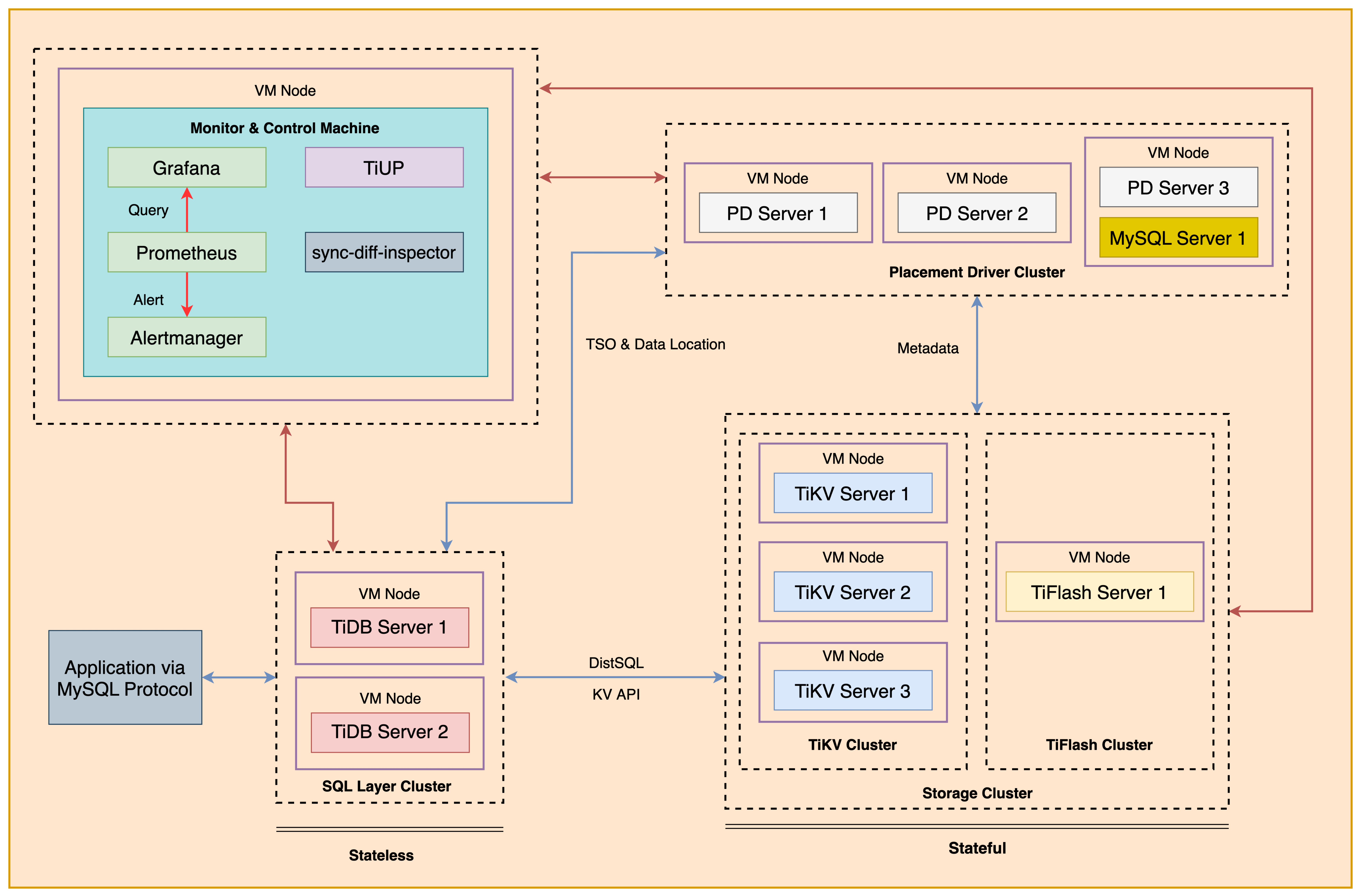
+ The following shows the deployment topology diagram of TiDB cluster.
 ### Notes
+ Many of the steps require that you type commands in a terminal window. You might find it convenient to launch a terminal window and keep it open for the duration of the exercises.
+ Your environment may be different with these exercises, including but not limited to `IP`, `port`, `username`, `password` and `directory`.
+ The `$` in your terminal window is an OS prompt.
+ The "`tidb>`" or "`mysql>`" in your terminal window is SQL command prompt.
+ You may use `ff7.sh` to install, deploy, and start a TiDB cluster and relevant tools. Make sure you have executed `source ~/hosts-env.sh` and `source ~/.bash_profile` to set environment variables.
+ In these exercises, we need 10 machines connected in the network. The `Role` and `IP Address` (represented by environment variables) are as follows:
| `Node Role` | `IP Address` |
| :----------------- | :-------------------------------------------------------- |
| `Monitor 1` | `${HOST_MONITOR1_PRIVATE_IP}, ${HOST_MONITOR1_PUBLIC_IP}` |
| `Control Machine` | `${HOST_CM_PRIVATE_IP}, ${HOST_CM_PUBLIC_IP}` |
| `TiDB server 1` | `${HOST_DB1_PRIVATE_IP}, ${HOST_DB1_PUBLIC_IP}` |
| `TiDB server 2` | `${HOST_DB2_PRIVATE_IP}, ${HOST_DB2_PUBLIC_IP}` |
| `TiKV server 1` | `${HOST_KV1_PRIVATE_IP}, ${HOST_KV1_PUBLIC_IP}` |
| `TiKV server 2` | `${HOST_KV2_PRIVATE_IP}, ${HOST_KV2_PUBLIC_IP}` |
| `TiKV server 3` | `${HOST_KV3_PRIVATE_IP}, ${HOST_KV3_PUBLIC_IP}` |
| `PD server 1` | `${HOST_PD1_PRIVATE_IP}, ${HOST_PD1_PUBLIC_IP}` |
| `PD server 2` | `${HOST_PD2_PRIVATE_IP}, ${HOST_PD2_PUBLIC_IP}` |
| `PD server 3` | `${HOST_PD3_PRIVATE_IP}, ${HOST_PD3_PUBLIC_IP}` |
| `TiFlash server 1` | `${HOST_TIFLASH1_PRIVATE_IP}, ${HOST_TIFLASH1_PUBLIC_IP}` |
| `Alertmanager` | `${HOST_MONITOR1_PRIVATE_IP}, ${HOST_MONITOR1_PUBLIC_IP}` |
| `Grafana` | `${HOST_MONITOR1_PRIVATE_IP}, ${HOST_MONITOR1_PUBLIC_IP}` |
| `Prometheus` | `${HOST_MONITOR1_PRIVATE_IP}, ${HOST_MONITOR1_PUBLIC_IP}` |
### Assumptions
+ You are given the user credentials (for example: the private key) of the exercise environment.
+ You are given access to 10 machines that have been set up.
+ You have completed the activities in the exercise titled "*Exercises 1: Deploying a TiDB Cluster Using TiUP*" and have a terminal window open.
+ You have cleaned up the old practice data.
+ Your environment has TiDB cluster and MySQL deployed and running.
+ You have installed the `Backup & Restore`.
## Exercise 1: Deploying the `sync-diff-inspector` Tool
### Overview
+ In this exercise, you download and install the `sync-diff-inspector` tool.
### Duration
+ This exercise should take you approximately 15 minutes to complete.
### Tasks
1. Install `sync-diff-inspector`
### Solution
1. Login as user `ec2-user` on the `Control Machine` (`${HOST_MONITOR1_PUBLIC_IP}`), the `sync-diff-inspector` tool is included in the `TiDB Toolkit`. Enter the following command in the terminal to download the `TiDB Toolkit`.
```
$ wget https://download.pingcap.org/tidb-community-toolkit-v6.5.1-linux-amd64.tar.gz
--2023-02-08 03:57:06-- https://download.pingcap.org/tidb-community-toolkit-v6.5.1-linux-amd64.tar.gz
Resolving download.pingcap.org (download.pingcap.org)... 156.251.65.6, 156.251.65.9
Connecting to download.pingcap.org (download.pingcap.org)|156.251.65.6|:443... connected.
HTTP request sent, awaiting response... 200 OK
Length: 958570823 (914M) [application/x-compressed]
Saving to: ‘tidb-community-toolkit-v6.5.1-linux-amd64.tar.gz’
100%[=============================================================================================>] 958,570,823 35.3MB/s in 27s
2023-02-08 03:57:34 (33.3 MB/s) - ‘tidb-community-toolkit-v6.5.1-linux-amd64.tar.gz’ saved [958570823/958570823]
```
2. Extract the `TiDB Toolkit` binary archive from `tidb-community-toolkit-v6.5.1-linux-amd64.tar.gz`. Enter the following command at the terminal prompt and receive the results shown:
```
$ tar xvf tidb-community-toolkit-v6.5.1-linux-amd64.tar.gz
tidb-community-toolkit-v6.5.1-linux-amd64/
tidb-community-toolkit-v6.5.1-linux-amd64/keys/
...
tidb-community-toolkit-v6.5.1-linux-amd64/sync_diff_inspector
tidb-community-toolkit-v6.5.1-linux-amd64/reparo
tidb-community-toolkit-v6.5.1-linux-amd64/arbiter
tidb-community-toolkit-v6.5.1-linux-amd64/tidb-lightning-ctl
tidb-community-toolkit-v6.5.1-linux-amd64/mydumper
tidb-community-toolkit-v6.5.1-linux-amd64/etcdctl
```
3. Confirm the `sync-diff-inspector` has been installed.
```
$ ls -lF tidb-community-toolkit-v6.5.1-linux-amd64/sync_diff_inspector
-rwxr-xr-x 1 ec2-user ec2-user 111859344 Mar 10 05:45 tidb-community-toolkit-v6.5.1-linux-amd64/sync_diff_inspector*
```
## Exercise 2: Checking Data for TiDB Upstream and Downstream Clusters
### Overview
+ In this exercise, you compare data stored in the databases with MySQL and TiDB by using `sync-diff-inspector`.
### Duration
+ This exercise should take you approximately 25 minutes to complete.
### Tasks
1. Prepare the schema and data for the upstream MySQL server instance on PD3.
2. Prepare the schema and data for downstream TiDB server.
3. Compare the schema and data using `sync-diff-inspector`.
### Solution
1. Login as user `ec2-user` on node `monitor1`. Enter the following command at the terminal prompt and receive the results shown:
```
$ ssh -A ec2-user@{HOST_MONITOR1_PUBLIC_IP}
__| __|_ )
_| ( / Amazon Linux 2 AMI
___|\___|___|
https://aws.amazon.com/amazon-linux-2/
```
2. SSH to PD3 from `monitor1`:
```
$ source hosts-env.sh
$ ./ssh-to-pd3.sh
The authenticity of host '10.80.0.215 (10.80.0.215)' can't be established.
...
__| __|_ )
_| ( / Amazon Linux 2 AMI
___|\___|___|
https://aws.amazon.com/amazon-linux-2/
```
3. Start MySQL server instance, if you have no MySQL instance running on PD3:
```
$ sudo service mysqld start
```
4. Login MySQL server on port 3306 as `root@'localhost'` with the password `q1w2e3R4_`. Enter the following command at the terminal prompt and receive the results shown:
```
$ mysql -u root -p -h 127.0.0.1 -P 3306 -pq1w2e3R4_
```
5. Create a user for `sync-diff-inspector` task:
```sql
CREATE USER ins@'%' IDENTIFIED BY 'q1w2e3R4_';
GRANT ALL PRIVILEGES on *.* to ins@'%';
```
```
mysql> CREATE USER ins@'%' IDENTIFIED BY 'q1w2e3R4_';
Query OK, 0 rows affected (0.00 sec)
mysql> GRANT ALL PRIVILEGES on *.* to ins@'%';
Query OK, 0 rows affected (0.00 sec)
```
6. Create dummy data in MySQL database. Enter the following command at the terminal prompt and receive the results shown:.
```sql
CREATE DATABASE test1;
USE test1;
CREATE TABLE T1(id INT(11) NOT NULL PRIMARY KEY, name VARCHAR(32));
CREATE TABLE T2(id INT(11), name VARCHAR(32));
CREATE TABLE T3(id INT(11) NOT NULL PRIMARY KEY, name VARCHAR(32));
CREATE TABLE T4(id INT(11), name VARCHAR(32));
INSERT INTO T1 VALUES (1,'Tom'), (2,'Jack'), (3,'Frank'), (4,'Tony');
INSERT INTO T2 VALUES (1,'Tom'), (2,'Jack'), (3,'Frank'), (4,'Tony');
INSERT INTO T3 VALUES (1,'Tom'), (2,'Jack'), (3,'Frank'), (4,'Tony');
INSERT INTO T4 VALUES (1,'Tom'), (2,'Jack'), (3,'Frank'), (4,'Tony');
DESC T1;
DESC T2;
DESC T3;
DESC T4;
SELECT * FROM T1;
SELECT * FROM T2;
SELECT * FROM T3;
SELECT * FROM T4;
```
```
mysql> CREATE DATABASE test1;
Query OK, 1 row affected (0.00 sec)
...
mysql> SELECT * FROM T4;
+------+-------+
| id | name |
+------+-------+
| 1 | Tom |
| 2 | Jack |
| 3 | Frank |
| 4 | Tony |
+------+-------+
4 rows in set (0.00 sec)
```
7. Return to `monitor1` by exit from MySQL client and then the SSH terminal:
```
mysql> exit;
```
```
$ exit
```
8. Create a user on TiDB for `sync-diff-inspector` task:
```
$ mysql -h ${HOST_DB1_PRIVATE_IP} --port 4000 -u root
```
```sql
CREATE USER ins@'%' IDENTIFIED BY 'q1w2e3R4_';
GRANT ALL PRIVILEGES on *.* to ins@'%';
```
```
mysql> CREATE USER ins@'%' IDENTIFIED BY 'q1w2e3R4_';
Query OK, 0 rows affected (0.06 sec)
mysql> GRANT ALL PRIVILEGES on *.* to ins@'%';
Query OK, 0 rows affected (0.04 sec)
```
9. Create dummy data in TiDB cluster. Enter the following command at the terminal prompt and receive the results shown:
```sql
CREATE DATABASE test1;
USE test1;
CREATE TABLE T1(id INT(11) NOT NULL PRIMARY KEY, name VARCHAR(32));
CREATE TABLE T2(id INT(11), name VARCHAR(32));
CREATE TABLE T3(id INT(11) NOT NULL PRIMARY KEY, name VARCHAR(32));
CREATE TABLE T4(id INT(11), name VARCHAR(32));
INSERT INTO T1 VALUES (1,'Tom'), (2,'Jack'), (3,'Frank'), (4,'Tony');
INSERT INTO T2 VALUES (1,'Tom'), (2,'Jack'), (3,'Frank'), (4,'Tony');
INSERT INTO T3 VALUES (1,'Tom'), (2,'Jack'), (3,'Frank'), (4,'Tony');
INSERT INTO T4 VALUES (1,'Tom'), (2,'Jack'), (3,'Frank'), (4,'Tony');
DESC T1;
DESC T2;
DESC T3;
DESC T4;
SELECT * FROM T1;
SELECT * FROM T2;
SELECT * FROM T3;
SELECT * FROM T4;
```
```
mysql> CREATE DATABASE test1;
Query OK, 1 row affected (0.00 sec)
...
mysql> SELECT * FROM T4;
+------+-------+
| id | name |
+------+-------+
| 1 | Tom |
| 2 | Jack |
| 3 | Frank |
| 4 | Tony |
+------+-------+
4 rows in set (0.00 sec)
```
```
mysql> exit;
```
10. Use a text editor to edit the `config.toml` file of the `sync-diff-inspector` tool. Modify `config.toml` file to contain settings similar to those that follow (replace the IP addresses with the correct ones assigned to you). Press the `ESC` and type `:wq` to quit the editor. Or, you can simply use the `solution-sync-diff-config.toml` which had been provisioned for you:
```
$ vi config.toml
```
```
# Diff Configuration.
#####################Global config #########################
# The number of threads that check the data. The number of connections to the upstream and downstream databases will be slightly larger than this value.
check-thread-count = 4
# When on, if there is an inconsistency in the table, the SQL statement used to fix it is output.
export-fix-sql = true
# Comparing only table schema without comparing data
check-struct-only = false
#####################Datasource config #########################
[data-sources]
[data-sources.mysql]
host = ""
port = 3306
user = "ins"
password = ""
#(Optional) Use mapping rules to match multiple shards upstream, where rule1 and rule2 are defined in the Routes configuration column below
route-rules = ["rule1"]
[data-sources.tidb]
host = ""
port = 4000
user = "ins"
password = ""
#######################Routes ###########################
# If You Need to Compare the Data of a Large Number of Tables with Different Library Names or Table Names, or to Verify the Data of Multiple Upstream Sharded Sharded Table and Downstream Combined Table, You Can Use Table-rule to Set the Mapping Relationship
# You Can Configure Only Schema or Table Mapping Relationships, or Both
[routes]
[routes.rule1] # rule1 is a custom id that uniquely identifies this configuration and is used in data-sources.route-rules above
schema-pattern = "test1" # Match the library name of the data source. Wildcards "*" and "?" are supported
target-schema = "test1" # Target library name
#####################Task config #########################
# Configuration Table in *Target Database* That Needs to Be Compared
[task]
output-dir = "./output"
source-instances = ["mysql"]
target-instance = "tidb"
target-check-tables = ["test1.*"]
```
11. Compare the table structures and table data using `sync-diff-inspector`. Enter the following command at the terminal prompt and receive the results shown:
```
$ source hosts-env.sh
$ ./tidb-community-toolkit-v6.5.1-linux-amd64/sync_diff_inspector --config=./config.toml
A total of 4 tables need to be compared
Comparing the table structure of ``test`.`T3`` ... equivalent
Comparing the table structure of ``test`.`T2`` ... equivalent
Comparing the table structure of ``test`.`T4`` ... equivalent
Comparing the table structure of ``test`.`T1`` ... equivalent
Comparing the table data of ``test`.`T3`` ... equivalent
Comparing the table data of ``test`.`T2`` ... equivalent
Comparing the table data of ``test`.`T1`` ... equivalent
Comparing the table data of ``test`.`T4`` ... equivalent
_____________________________________________________________________________
Progress [============================================================>] 100% 0/0
A total of 4 table have been compared and all are equal.
You can view the comparison details through './output/sync_diff.log'
```
12. View the contents of the `output/summary.txt` file. Verify that tables `T1`, `T2`, `T3` and `T4` contain the data from MySQL and TiDB.
```
$ cat ./output/summary.txt
...
Summary
Source Database
host = "127.0.0.1"
port = 3306
user = "root"
Target Databases
host = "127.0.0.1"
port = 4000
user = "root"
Comparison Result
The table structure and data in following tables are equivalent
+-------------+---------+-----------+
| TABLE | UPCOUNT | DOWNCOUNT |
+-------------+---------+-----------+
| `test`.`T1` | 4 | 4 |
| `test`.`T2` | 4 | 4 |
| `test`.`T3` | 4 | 4 |
| `test`.`T4` | 4 | 4 |
+-------------+---------+-----------+
Time Cost: 1.147223044s
Average Speed: 0.000173MB/s
```
13. Connect to the MySQL running on port 3306 as `root`. `INSERT`, `DELETE`, `UPDATE` on `T1`, `T2`, `T3` and `T4` tables. Enter the following command at the terminal prompt and receive the results shown:
```
$ source hosts-env.sh
$ mysql -u ins -h ${HOST_PD3_PRIVATE_IP} -P 3306 -pq1w2e3R4_
```
```sql
USE test1;
INSERT INTO T1 SELECT 5, 'Candy';
INSERT INTO T2 SELECT 5, 'Candy';
INSERT INTO T3 SELECT 5, 'Candy';
INSERT INTO T4 SELECT 5, 'Candy';
DELETE FROM T1 WHERE id=4;
DELETE FROM T2 WHERE id=4;
DELETE FROM T3 WHERE id=4;
DELETE FROM T4 WHERE id=4;
UPDATE T1 SET NAME='Andy' WHERE id=1;
UPDATE T2 SET NAME='Andy' WHERE id=1;
UPDATE T3 SET NAME='Andy' WHERE id=1;
UPDATE T4 SET NAME='Andy' WHERE id=1;
```
```
mysql> USE test1;
Reading table information for completion of table and column names
You can turn off this feature to get a quicker startup with -A
Database changed
...
mysql> UPDATE T4 SET NAME='Andy' WHERE id=1;
Query OK, 1 row affected (0.00 sec)
Rows matched: 1 Changed: 1 Warnings: 0
```
14. Compare the table structures and table data using `sync-diff-inspector`. Enter the following command at the terminal prompt and receive the results shown:
```
$ source hosts-env.sh
$ ./tidb-community-toolkit-v6.5.1-linux-amd64/sync_diff_inspector --config=./config.toml
A total of 4 tables need to be compared
Comparing the table structure of ``test`.`T2`` ... equivalent
Comparing the table structure of ``test`.`T3`` ... equivalent
Comparing the table structure of ``test`.`T4`` ... equivalent
Comparing the table structure of ``test`.`T1`` ... equivalent
Comparing the table data of ``test`.`T4`` ... failure
Comparing the table data of ``test`.`T3`` ... failure
Comparing the table data of ``test`.`T2`` ... failure
Comparing the table data of ``test`.`T1`` ... failure
_____________________________________________________________________________
Progress [============================================================>] 100% 0/0
The data of `test`.`T4` is not equal
The data of `test`.`T3` is not equal
The data of `test`.`T2` is not equal
The data of `test`.`T1` is not equal
The rest of tables are all equal.
The patch file has been generated in
'output/fix-on-tidb/'
You can view the comparison details through './output/sync_diff.log'
```
15. View the contents of the `output/summary.txt` file. Verify that tables `T1`, `T2`, `T3` and `T4` contain the data from MySQL and TiDB.
```
$ cat ./output/summary.txt
Summary
Source Database
host = "127.0.0.1"
port = 3306
user = "root"
Target Databases
host = "127.0.0.1"
port = 4000
user = "root"
Comparison Result
The table structure and data in following tables are equivalent
The following tables contains inconsistent data
+-------------+--------------------+----------------+---------+-----------+
| TABLE | STRUCTURE EQUALITY | DATA DIFF ROWS | UPCOUNT | DOWNCOUNT |
+-------------+--------------------+----------------+---------+-----------+
| `test`.`T1` | true | +2/-2 | 4 | 4 |
| `test`.`T4` | true | +2/-2 | 4 | 4 |
| `test`.`T3` | true | +2/-2 | 4 | 4 |
| `test`.`T2` | true | +2/-2 | 4 | 4 |
+-------------+--------------------+----------------+---------+-----------+
Time Cost: 34.324683ms
Average Speed: 0.005779MB/s
```
16. Close all terminal windows.
## End of Exercises
### Notes
+ Many of the steps require that you type commands in a terminal window. You might find it convenient to launch a terminal window and keep it open for the duration of the exercises.
+ Your environment may be different with these exercises, including but not limited to `IP`, `port`, `username`, `password` and `directory`.
+ The `$` in your terminal window is an OS prompt.
+ The "`tidb>`" or "`mysql>`" in your terminal window is SQL command prompt.
+ You may use `ff7.sh` to install, deploy, and start a TiDB cluster and relevant tools. Make sure you have executed `source ~/hosts-env.sh` and `source ~/.bash_profile` to set environment variables.
+ In these exercises, we need 10 machines connected in the network. The `Role` and `IP Address` (represented by environment variables) are as follows:
| `Node Role` | `IP Address` |
| :----------------- | :-------------------------------------------------------- |
| `Monitor 1` | `${HOST_MONITOR1_PRIVATE_IP}, ${HOST_MONITOR1_PUBLIC_IP}` |
| `Control Machine` | `${HOST_CM_PRIVATE_IP}, ${HOST_CM_PUBLIC_IP}` |
| `TiDB server 1` | `${HOST_DB1_PRIVATE_IP}, ${HOST_DB1_PUBLIC_IP}` |
| `TiDB server 2` | `${HOST_DB2_PRIVATE_IP}, ${HOST_DB2_PUBLIC_IP}` |
| `TiKV server 1` | `${HOST_KV1_PRIVATE_IP}, ${HOST_KV1_PUBLIC_IP}` |
| `TiKV server 2` | `${HOST_KV2_PRIVATE_IP}, ${HOST_KV2_PUBLIC_IP}` |
| `TiKV server 3` | `${HOST_KV3_PRIVATE_IP}, ${HOST_KV3_PUBLIC_IP}` |
| `PD server 1` | `${HOST_PD1_PRIVATE_IP}, ${HOST_PD1_PUBLIC_IP}` |
| `PD server 2` | `${HOST_PD2_PRIVATE_IP}, ${HOST_PD2_PUBLIC_IP}` |
| `PD server 3` | `${HOST_PD3_PRIVATE_IP}, ${HOST_PD3_PUBLIC_IP}` |
| `TiFlash server 1` | `${HOST_TIFLASH1_PRIVATE_IP}, ${HOST_TIFLASH1_PUBLIC_IP}` |
| `Alertmanager` | `${HOST_MONITOR1_PRIVATE_IP}, ${HOST_MONITOR1_PUBLIC_IP}` |
| `Grafana` | `${HOST_MONITOR1_PRIVATE_IP}, ${HOST_MONITOR1_PUBLIC_IP}` |
| `Prometheus` | `${HOST_MONITOR1_PRIVATE_IP}, ${HOST_MONITOR1_PUBLIC_IP}` |
### Assumptions
+ You are given the user credentials (for example: the private key) of the exercise environment.
+ You are given access to 10 machines that have been set up.
+ You have completed the activities in the exercise titled "*Exercises 1: Deploying a TiDB Cluster Using TiUP*" and have a terminal window open.
+ You have cleaned up the old practice data.
+ Your environment has TiDB cluster and MySQL deployed and running.
+ You have installed the `Backup & Restore`.
## Exercise 1: Deploying the `sync-diff-inspector` Tool
### Overview
+ In this exercise, you download and install the `sync-diff-inspector` tool.
### Duration
+ This exercise should take you approximately 15 minutes to complete.
### Tasks
1. Install `sync-diff-inspector`
### Solution
1. Login as user `ec2-user` on the `Control Machine` (`${HOST_MONITOR1_PUBLIC_IP}`), the `sync-diff-inspector` tool is included in the `TiDB Toolkit`. Enter the following command in the terminal to download the `TiDB Toolkit`.
```
$ wget https://download.pingcap.org/tidb-community-toolkit-v6.5.1-linux-amd64.tar.gz
--2023-02-08 03:57:06-- https://download.pingcap.org/tidb-community-toolkit-v6.5.1-linux-amd64.tar.gz
Resolving download.pingcap.org (download.pingcap.org)... 156.251.65.6, 156.251.65.9
Connecting to download.pingcap.org (download.pingcap.org)|156.251.65.6|:443... connected.
HTTP request sent, awaiting response... 200 OK
Length: 958570823 (914M) [application/x-compressed]
Saving to: ‘tidb-community-toolkit-v6.5.1-linux-amd64.tar.gz’
100%[=============================================================================================>] 958,570,823 35.3MB/s in 27s
2023-02-08 03:57:34 (33.3 MB/s) - ‘tidb-community-toolkit-v6.5.1-linux-amd64.tar.gz’ saved [958570823/958570823]
```
2. Extract the `TiDB Toolkit` binary archive from `tidb-community-toolkit-v6.5.1-linux-amd64.tar.gz`. Enter the following command at the terminal prompt and receive the results shown:
```
$ tar xvf tidb-community-toolkit-v6.5.1-linux-amd64.tar.gz
tidb-community-toolkit-v6.5.1-linux-amd64/
tidb-community-toolkit-v6.5.1-linux-amd64/keys/
...
tidb-community-toolkit-v6.5.1-linux-amd64/sync_diff_inspector
tidb-community-toolkit-v6.5.1-linux-amd64/reparo
tidb-community-toolkit-v6.5.1-linux-amd64/arbiter
tidb-community-toolkit-v6.5.1-linux-amd64/tidb-lightning-ctl
tidb-community-toolkit-v6.5.1-linux-amd64/mydumper
tidb-community-toolkit-v6.5.1-linux-amd64/etcdctl
```
3. Confirm the `sync-diff-inspector` has been installed.
```
$ ls -lF tidb-community-toolkit-v6.5.1-linux-amd64/sync_diff_inspector
-rwxr-xr-x 1 ec2-user ec2-user 111859344 Mar 10 05:45 tidb-community-toolkit-v6.5.1-linux-amd64/sync_diff_inspector*
```
## Exercise 2: Checking Data for TiDB Upstream and Downstream Clusters
### Overview
+ In this exercise, you compare data stored in the databases with MySQL and TiDB by using `sync-diff-inspector`.
### Duration
+ This exercise should take you approximately 25 minutes to complete.
### Tasks
1. Prepare the schema and data for the upstream MySQL server instance on PD3.
2. Prepare the schema and data for downstream TiDB server.
3. Compare the schema and data using `sync-diff-inspector`.
### Solution
1. Login as user `ec2-user` on node `monitor1`. Enter the following command at the terminal prompt and receive the results shown:
```
$ ssh -A ec2-user@{HOST_MONITOR1_PUBLIC_IP}
__| __|_ )
_| ( / Amazon Linux 2 AMI
___|\___|___|
https://aws.amazon.com/amazon-linux-2/
```
2. SSH to PD3 from `monitor1`:
```
$ source hosts-env.sh
$ ./ssh-to-pd3.sh
The authenticity of host '10.80.0.215 (10.80.0.215)' can't be established.
...
__| __|_ )
_| ( / Amazon Linux 2 AMI
___|\___|___|
https://aws.amazon.com/amazon-linux-2/
```
3. Start MySQL server instance, if you have no MySQL instance running on PD3:
```
$ sudo service mysqld start
```
4. Login MySQL server on port 3306 as `root@'localhost'` with the password `q1w2e3R4_`. Enter the following command at the terminal prompt and receive the results shown:
```
$ mysql -u root -p -h 127.0.0.1 -P 3306 -pq1w2e3R4_
```
5. Create a user for `sync-diff-inspector` task:
```sql
CREATE USER ins@'%' IDENTIFIED BY 'q1w2e3R4_';
GRANT ALL PRIVILEGES on *.* to ins@'%';
```
```
mysql> CREATE USER ins@'%' IDENTIFIED BY 'q1w2e3R4_';
Query OK, 0 rows affected (0.00 sec)
mysql> GRANT ALL PRIVILEGES on *.* to ins@'%';
Query OK, 0 rows affected (0.00 sec)
```
6. Create dummy data in MySQL database. Enter the following command at the terminal prompt and receive the results shown:.
```sql
CREATE DATABASE test1;
USE test1;
CREATE TABLE T1(id INT(11) NOT NULL PRIMARY KEY, name VARCHAR(32));
CREATE TABLE T2(id INT(11), name VARCHAR(32));
CREATE TABLE T3(id INT(11) NOT NULL PRIMARY KEY, name VARCHAR(32));
CREATE TABLE T4(id INT(11), name VARCHAR(32));
INSERT INTO T1 VALUES (1,'Tom'), (2,'Jack'), (3,'Frank'), (4,'Tony');
INSERT INTO T2 VALUES (1,'Tom'), (2,'Jack'), (3,'Frank'), (4,'Tony');
INSERT INTO T3 VALUES (1,'Tom'), (2,'Jack'), (3,'Frank'), (4,'Tony');
INSERT INTO T4 VALUES (1,'Tom'), (2,'Jack'), (3,'Frank'), (4,'Tony');
DESC T1;
DESC T2;
DESC T3;
DESC T4;
SELECT * FROM T1;
SELECT * FROM T2;
SELECT * FROM T3;
SELECT * FROM T4;
```
```
mysql> CREATE DATABASE test1;
Query OK, 1 row affected (0.00 sec)
...
mysql> SELECT * FROM T4;
+------+-------+
| id | name |
+------+-------+
| 1 | Tom |
| 2 | Jack |
| 3 | Frank |
| 4 | Tony |
+------+-------+
4 rows in set (0.00 sec)
```
7. Return to `monitor1` by exit from MySQL client and then the SSH terminal:
```
mysql> exit;
```
```
$ exit
```
8. Create a user on TiDB for `sync-diff-inspector` task:
```
$ mysql -h ${HOST_DB1_PRIVATE_IP} --port 4000 -u root
```
```sql
CREATE USER ins@'%' IDENTIFIED BY 'q1w2e3R4_';
GRANT ALL PRIVILEGES on *.* to ins@'%';
```
```
mysql> CREATE USER ins@'%' IDENTIFIED BY 'q1w2e3R4_';
Query OK, 0 rows affected (0.06 sec)
mysql> GRANT ALL PRIVILEGES on *.* to ins@'%';
Query OK, 0 rows affected (0.04 sec)
```
9. Create dummy data in TiDB cluster. Enter the following command at the terminal prompt and receive the results shown:
```sql
CREATE DATABASE test1;
USE test1;
CREATE TABLE T1(id INT(11) NOT NULL PRIMARY KEY, name VARCHAR(32));
CREATE TABLE T2(id INT(11), name VARCHAR(32));
CREATE TABLE T3(id INT(11) NOT NULL PRIMARY KEY, name VARCHAR(32));
CREATE TABLE T4(id INT(11), name VARCHAR(32));
INSERT INTO T1 VALUES (1,'Tom'), (2,'Jack'), (3,'Frank'), (4,'Tony');
INSERT INTO T2 VALUES (1,'Tom'), (2,'Jack'), (3,'Frank'), (4,'Tony');
INSERT INTO T3 VALUES (1,'Tom'), (2,'Jack'), (3,'Frank'), (4,'Tony');
INSERT INTO T4 VALUES (1,'Tom'), (2,'Jack'), (3,'Frank'), (4,'Tony');
DESC T1;
DESC T2;
DESC T3;
DESC T4;
SELECT * FROM T1;
SELECT * FROM T2;
SELECT * FROM T3;
SELECT * FROM T4;
```
```
mysql> CREATE DATABASE test1;
Query OK, 1 row affected (0.00 sec)
...
mysql> SELECT * FROM T4;
+------+-------+
| id | name |
+------+-------+
| 1 | Tom |
| 2 | Jack |
| 3 | Frank |
| 4 | Tony |
+------+-------+
4 rows in set (0.00 sec)
```
```
mysql> exit;
```
10. Use a text editor to edit the `config.toml` file of the `sync-diff-inspector` tool. Modify `config.toml` file to contain settings similar to those that follow (replace the IP addresses with the correct ones assigned to you). Press the `ESC` and type `:wq` to quit the editor. Or, you can simply use the `solution-sync-diff-config.toml` which had been provisioned for you:
```
$ vi config.toml
```
```
# Diff Configuration.
#####################Global config #########################
# The number of threads that check the data. The number of connections to the upstream and downstream databases will be slightly larger than this value.
check-thread-count = 4
# When on, if there is an inconsistency in the table, the SQL statement used to fix it is output.
export-fix-sql = true
# Comparing only table schema without comparing data
check-struct-only = false
#####################Datasource config #########################
[data-sources]
[data-sources.mysql]
host = ""
port = 3306
user = "ins"
password = ""
#(Optional) Use mapping rules to match multiple shards upstream, where rule1 and rule2 are defined in the Routes configuration column below
route-rules = ["rule1"]
[data-sources.tidb]
host = ""
port = 4000
user = "ins"
password = ""
#######################Routes ###########################
# If You Need to Compare the Data of a Large Number of Tables with Different Library Names or Table Names, or to Verify the Data of Multiple Upstream Sharded Sharded Table and Downstream Combined Table, You Can Use Table-rule to Set the Mapping Relationship
# You Can Configure Only Schema or Table Mapping Relationships, or Both
[routes]
[routes.rule1] # rule1 is a custom id that uniquely identifies this configuration and is used in data-sources.route-rules above
schema-pattern = "test1" # Match the library name of the data source. Wildcards "*" and "?" are supported
target-schema = "test1" # Target library name
#####################Task config #########################
# Configuration Table in *Target Database* That Needs to Be Compared
[task]
output-dir = "./output"
source-instances = ["mysql"]
target-instance = "tidb"
target-check-tables = ["test1.*"]
```
11. Compare the table structures and table data using `sync-diff-inspector`. Enter the following command at the terminal prompt and receive the results shown:
```
$ source hosts-env.sh
$ ./tidb-community-toolkit-v6.5.1-linux-amd64/sync_diff_inspector --config=./config.toml
A total of 4 tables need to be compared
Comparing the table structure of ``test`.`T3`` ... equivalent
Comparing the table structure of ``test`.`T2`` ... equivalent
Comparing the table structure of ``test`.`T4`` ... equivalent
Comparing the table structure of ``test`.`T1`` ... equivalent
Comparing the table data of ``test`.`T3`` ... equivalent
Comparing the table data of ``test`.`T2`` ... equivalent
Comparing the table data of ``test`.`T1`` ... equivalent
Comparing the table data of ``test`.`T4`` ... equivalent
_____________________________________________________________________________
Progress [============================================================>] 100% 0/0
A total of 4 table have been compared and all are equal.
You can view the comparison details through './output/sync_diff.log'
```
12. View the contents of the `output/summary.txt` file. Verify that tables `T1`, `T2`, `T3` and `T4` contain the data from MySQL and TiDB.
```
$ cat ./output/summary.txt
...
Summary
Source Database
host = "127.0.0.1"
port = 3306
user = "root"
Target Databases
host = "127.0.0.1"
port = 4000
user = "root"
Comparison Result
The table structure and data in following tables are equivalent
+-------------+---------+-----------+
| TABLE | UPCOUNT | DOWNCOUNT |
+-------------+---------+-----------+
| `test`.`T1` | 4 | 4 |
| `test`.`T2` | 4 | 4 |
| `test`.`T3` | 4 | 4 |
| `test`.`T4` | 4 | 4 |
+-------------+---------+-----------+
Time Cost: 1.147223044s
Average Speed: 0.000173MB/s
```
13. Connect to the MySQL running on port 3306 as `root`. `INSERT`, `DELETE`, `UPDATE` on `T1`, `T2`, `T3` and `T4` tables. Enter the following command at the terminal prompt and receive the results shown:
```
$ source hosts-env.sh
$ mysql -u ins -h ${HOST_PD3_PRIVATE_IP} -P 3306 -pq1w2e3R4_
```
```sql
USE test1;
INSERT INTO T1 SELECT 5, 'Candy';
INSERT INTO T2 SELECT 5, 'Candy';
INSERT INTO T3 SELECT 5, 'Candy';
INSERT INTO T4 SELECT 5, 'Candy';
DELETE FROM T1 WHERE id=4;
DELETE FROM T2 WHERE id=4;
DELETE FROM T3 WHERE id=4;
DELETE FROM T4 WHERE id=4;
UPDATE T1 SET NAME='Andy' WHERE id=1;
UPDATE T2 SET NAME='Andy' WHERE id=1;
UPDATE T3 SET NAME='Andy' WHERE id=1;
UPDATE T4 SET NAME='Andy' WHERE id=1;
```
```
mysql> USE test1;
Reading table information for completion of table and column names
You can turn off this feature to get a quicker startup with -A
Database changed
...
mysql> UPDATE T4 SET NAME='Andy' WHERE id=1;
Query OK, 1 row affected (0.00 sec)
Rows matched: 1 Changed: 1 Warnings: 0
```
14. Compare the table structures and table data using `sync-diff-inspector`. Enter the following command at the terminal prompt and receive the results shown:
```
$ source hosts-env.sh
$ ./tidb-community-toolkit-v6.5.1-linux-amd64/sync_diff_inspector --config=./config.toml
A total of 4 tables need to be compared
Comparing the table structure of ``test`.`T2`` ... equivalent
Comparing the table structure of ``test`.`T3`` ... equivalent
Comparing the table structure of ``test`.`T4`` ... equivalent
Comparing the table structure of ``test`.`T1`` ... equivalent
Comparing the table data of ``test`.`T4`` ... failure
Comparing the table data of ``test`.`T3`` ... failure
Comparing the table data of ``test`.`T2`` ... failure
Comparing the table data of ``test`.`T1`` ... failure
_____________________________________________________________________________
Progress [============================================================>] 100% 0/0
The data of `test`.`T4` is not equal
The data of `test`.`T3` is not equal
The data of `test`.`T2` is not equal
The data of `test`.`T1` is not equal
The rest of tables are all equal.
The patch file has been generated in
'output/fix-on-tidb/'
You can view the comparison details through './output/sync_diff.log'
```
15. View the contents of the `output/summary.txt` file. Verify that tables `T1`, `T2`, `T3` and `T4` contain the data from MySQL and TiDB.
```
$ cat ./output/summary.txt
Summary
Source Database
host = "127.0.0.1"
port = 3306
user = "root"
Target Databases
host = "127.0.0.1"
port = 4000
user = "root"
Comparison Result
The table structure and data in following tables are equivalent
The following tables contains inconsistent data
+-------------+--------------------+----------------+---------+-----------+
| TABLE | STRUCTURE EQUALITY | DATA DIFF ROWS | UPCOUNT | DOWNCOUNT |
+-------------+--------------------+----------------+---------+-----------+
| `test`.`T1` | true | +2/-2 | 4 | 4 |
| `test`.`T4` | true | +2/-2 | 4 | 4 |
| `test`.`T3` | true | +2/-2 | 4 | 4 |
| `test`.`T2` | true | +2/-2 | 4 | 4 |
+-------------+--------------------+----------------+---------+-----------+
Time Cost: 34.324683ms
Average Speed: 0.005779MB/s
```
16. Close all terminal windows.
## End of Exercises