# Exercises 12: Migrating Data Using TiDB Data Migration
### Overview
+ In these exercises, you migrate data using the `TiDB Data Migration` tool.
+ The following shows the deployment topology diagram of TiDB cluster.
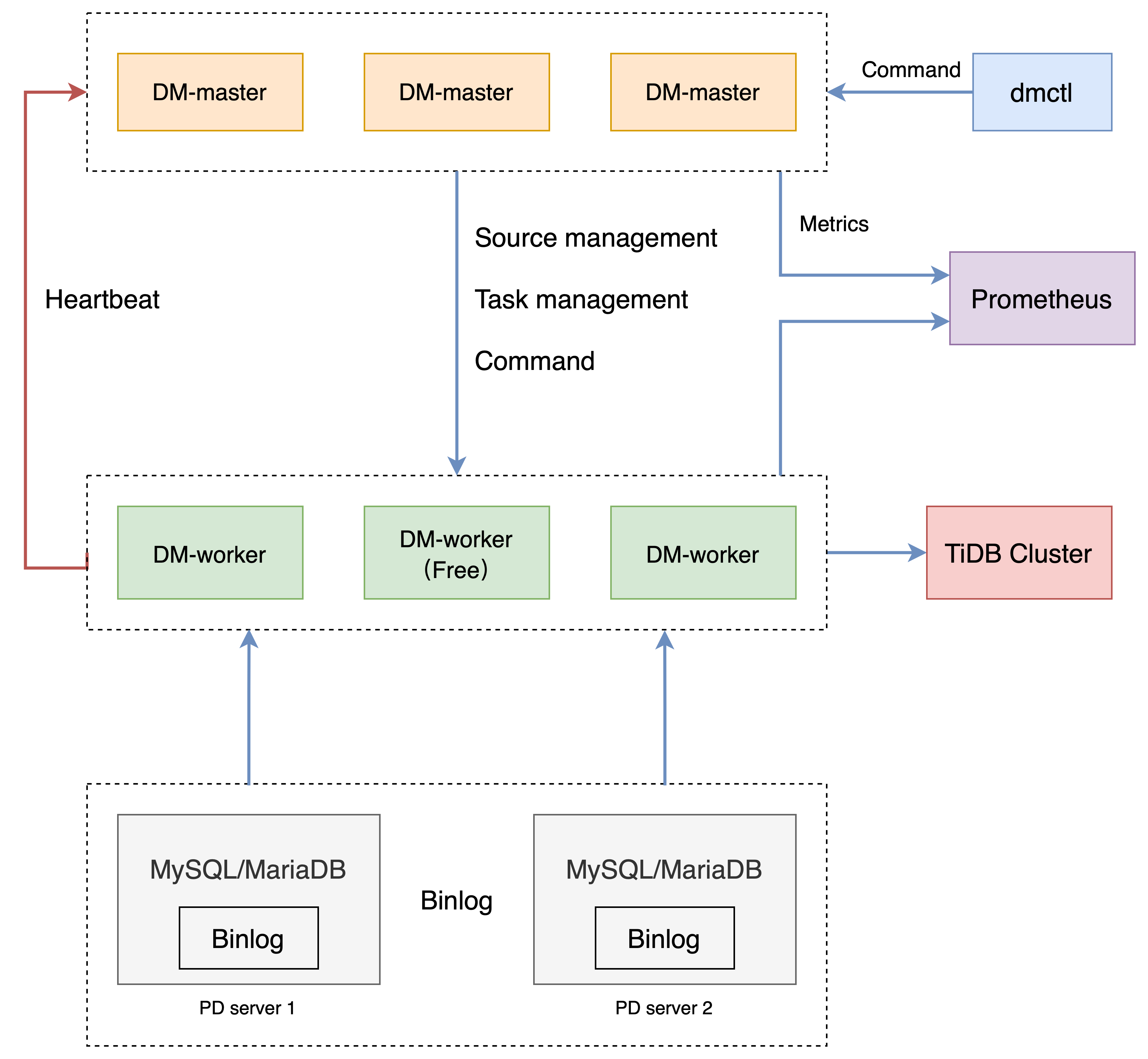
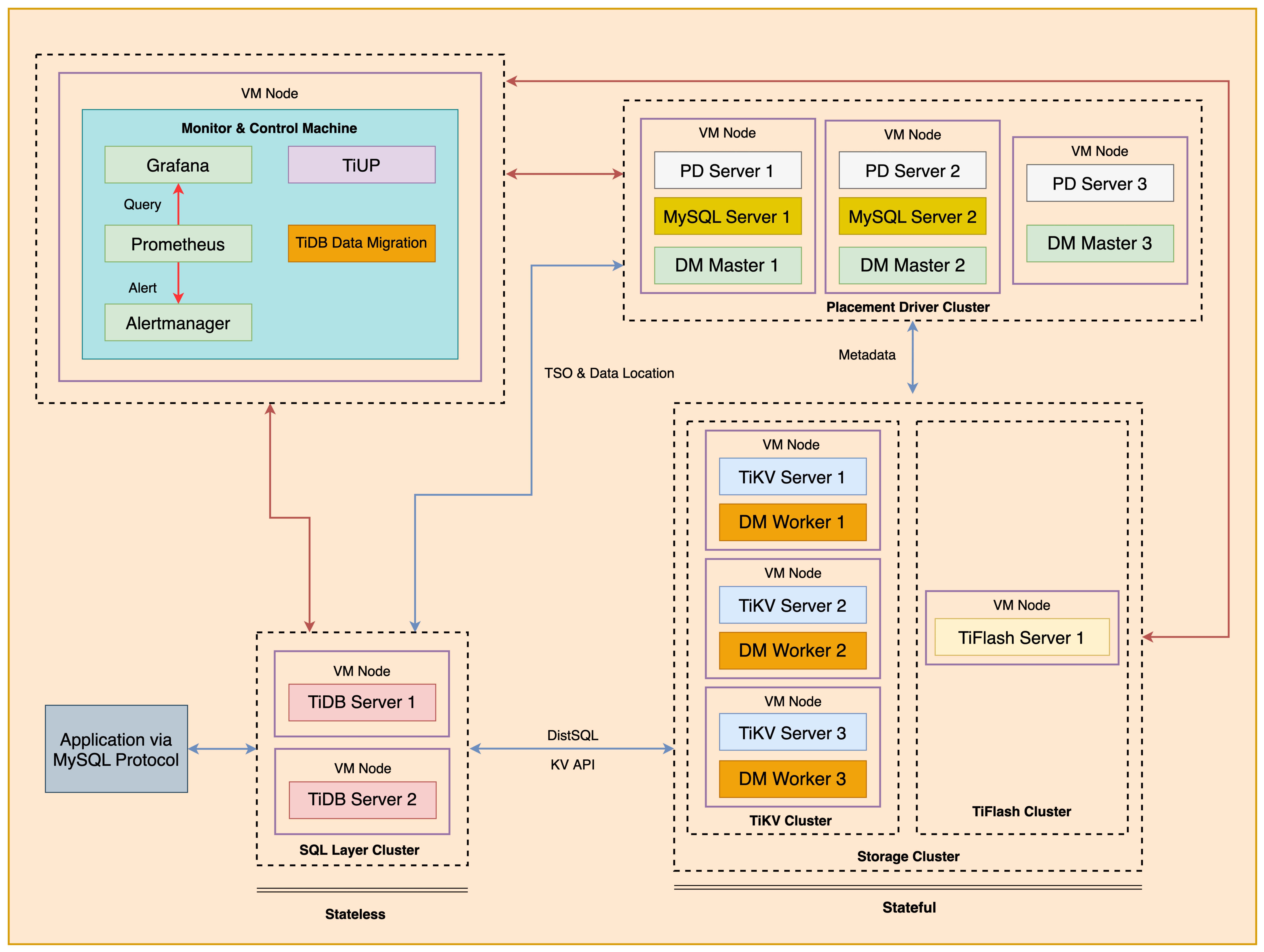 + The `TiDB Data Migration` is used for supporting the full data migration and the incremental data replication from the upstream MySQL instances into downstream TiDB instance. The following shows the topology diagram of `TiDB Data Migration` cluster.
 ### Notes
+ Many of the steps require that you type commands in a terminal window. You might find it convenient to launch a terminal window and keep it open for the duration of the exercises.
+ Your environment may be different with these exercises, including but not limited to `IP`, `port`, `username`, `password` and `directory`.
+ The `$` in your terminal window is an OS prompt.
+ The "`tidb>`" or "`mysql>`" in your terminal window is SQL command prompt.
+ In these exercises, we need 10 machines connected in the network. The `Role` and `IP Address` (represented by environment variables) are as follows:
| `Node Role` | `IP Address` |
| :----------------- | :-------------------------------------------------------- |
| `Monitor 1` | `${HOST_MONITOR1_PRIVATE_IP}, ${HOST_MONITOR1_PUBLIC_IP}` |
| `Control Machine` | `${HOST_CM_PRIVATE_IP}, ${HOST_CM_PUBLIC_IP}` |
| `TiDB server 1` | `${HOST_DB1_PRIVATE_IP}, ${HOST_DB1_PUBLIC_IP}` |
| `TiDB server 2` | `${HOST_DB2_PRIVATE_IP}, ${HOST_DB2_PUBLIC_IP}` |
| `TiKV server 1` | `${HOST_KV1_PRIVATE_IP}, ${HOST_KV1_PUBLIC_IP}` |
| `TiKV server 2` | `${HOST_KV2_PRIVATE_IP}, ${HOST_KV2_PUBLIC_IP}` |
| `TiKV server 3` | `${HOST_KV3_PRIVATE_IP}, ${HOST_KV3_PUBLIC_IP}` |
| `PD server 1` | `${HOST_PD1_PRIVATE_IP}, ${HOST_PD1_PUBLIC_IP}` |
| `PD server 2` | `${HOST_PD2_PRIVATE_IP}, ${HOST_PD2_PUBLIC_IP}` |
| `PD server 3` | `${HOST_PD3_PRIVATE_IP}, ${HOST_PD3_PUBLIC_IP}` |
| `TiFlash server 1` | `${HOST_TIFLASH1_PRIVATE_IP}, ${HOST_TIFLASH1_PUBLIC_IP}` |
| `Alertmanager` | `${HOST_MONITOR1_PRIVATE_IP}, ${HOST_MONITOR1_PUBLIC_IP}` |
| `Grafana` | `${HOST_MONITOR1_PRIVATE_IP}, ${HOST_MONITOR1_PUBLIC_IP}` |
| `Prometheus` | `${HOST_MONITOR1_PRIVATE_IP}, ${HOST_MONITOR1_PUBLIC_IP}` |
### Assumptions
+ You are given the user credentials (for example: the private key) of the exercise environment.
+ You are given access to 10 machines that have been set up.
+ You have completed the activities in the exercise titled "*Exercises 1: Deploying a TiDB Cluster Using TiUP*" and have a terminal window open.
+ Your environment has TiDB cluster deployed and running.
## Exercise 12-1: Deploying `TiDB Data Migration` Cluster
### Overview
+ In this exercise, you deploy a `TiDB Data Migration` cluster with TiUP.
### Duration
+ This exercise should take you approximately 10 minutes to complete.
### Tasks
1. Install `TiDB Data Migration` component.
2. Deploy and start a `TiDB Data Migration` cluster using a topology file.
3. Install the `dmctl` tool.
### Solution
1. Login as user `ec2-user` on the `Control Machine` (`${HOST_MONITOR1_PUBLIC_IP}`). Enter the following command at the terminal prompt and receive the results shown:
```
$ ssh -A ec2-user@
__| __|_ )
_| ( / Amazon Linux 2 AMI
___|\___|___|
https://aws.amazon.com/amazon-linux-2/
```
2. Install `TiDB Data Migration` component. Enter the following command at the terminal prompt and receive the results shown:
```
$ tiup install dm dmctl:v6.5.1
```
3. Use a text editor to edit the `dm-topology.yaml` file. Modify `dm-topology.yaml` file to contain settings similar to those that follow (replace the IP addresses with the correct ones assigned to you). Or, you can simply copy from the solution file `solution-dm-topology-six-nodes.yaml` which had been already provisioned for you:
```
$ vi dm-topology.yaml
```
```
# The topology template is used deploy a minimal DM cluster, which suitable
# for scenarios with only three machines. The minimal cluster contains
# - 3 master nodes
# - 3 worker nodes
# You can change the hosts according your environment
---
global:
user: "tidb"
ssh_port: 22
deploy_dir: "/tidb-deploy"
data_dir: "/tidb-data"
arch: "amd64"
master_servers:
- host:
- host:
- host:
worker_servers:
- host:
- host:
- host:
monitoring_servers:
- host:
grafana_servers:
- host:
alertmanager_servers:
- host:
```
4. Verify that the new version of `TiDB Data Migration` is installed on your host. Enter the following command at the terminal prompt and receive the results shown:
```
$ tiup list dm-master
Available versions for dm-master:
Version Installed Release Platforms
------- --------- ------- ---------
build-debug-mode 2022-06-10T14:27:38+08:00 linux/amd64,linux/arm64
...
```
5. Deploy a `TiDB Data Migration` cluster with name `dm-test` using the `dm-topology.yaml` file. Enter the following command at the terminal prompt and receive the results shown. Or, you can simply use the solution file `solution-dm-topology-six-nodes.yaml` which is already provisioned for you:
```
$ tiup dm deploy dm-test v6.5.1 ./dm-topology.yaml --yes
...
Cluster `dm-test` deployed successfully, you can start it with command: `tiup dm start dm-test`
```
6. Start the `TiDB Data Migration` cluster. Enter the following command at the terminal prompt and receive the results shown:
```
$ tiup dm start dm-test
...
Started cluster `dm-test` successfully
```
7. Check the `TiDB Data Migration` cluster managed by TiUP. Enter the following command at the terminal prompt and receive the results shown:
```
$ tiup dm list
tiup is checking updates for component dm ...
Starting component `dm`: /home/ec2-user/.tiup/components/dm/v1.12.1/tiup-dm list
Name User Version Path PrivateKey
---- ---- ------- ---- ----------
dm-test tidb v6.5.1 /home/ec2-user/.tiup/storage/dm/clusters/dm-test /home/ec2-user/.tiup/storage/dm/clusters/dm-test/ssh/id_rsa
```
8. Check the status of the deployed `TiDB Data Migration` cluster. Enter the following command at the terminal prompt and receive the results shown:
```
$ tiup dm display dm-test
tiup is checking updates for component dm ...
Starting component `dm`: /home/ec2-user/.tiup/components/dm/v1.12.1/tiup-dm display dm-test
Cluster type: dm
Cluster name: dm-test
Cluster version: v6.5.1
Deploy user: tidb
SSH type: builtin
Grafana URL: http://10.90.4.231:3000
ID Role Host Ports OS/Arch Status Data Dir Deploy Dir
-- ---- ---- ----- ------- ------ -------- ----------
10.90.4.231:9093 alertmanager 10.90.4.231 9093/9094 linux/x86_64 Up /tidb-data/alertmanager-9093 /tidb-deploy/alertmanager-9093
10.90.1.34:8261 dm-master 10.90.1.34 8261/8291 linux/x86_64 Healthy|L /tidb-data/dm-master-8261 /tidb-deploy/dm-master-8261
10.90.2.38:8261 dm-master 10.90.2.38 8261/8291 linux/x86_64 Healthy /tidb-data/dm-master-8261 /tidb-deploy/dm-master-8261
10.90.3.188:8261 dm-master 10.90.3.188 8261/8291 linux/x86_64 Healthy /tidb-data/dm-master-8261 /tidb-deploy/dm-master-8261
10.90.1.162:8262 dm-worker 10.90.1.162 8262 linux/x86_64 Free /tidb-data/dm-worker-8262 /tidb-deploy/dm-worker-8262
10.90.2.108:8262 dm-worker 10.90.2.108 8262 linux/x86_64 Free /tidb-data/dm-worker-8262 /tidb-deploy/dm-worker-8262
10.90.3.12:8262 dm-worker 10.90.3.12 8262 linux/x86_64 Free /tidb-data/dm-worker-8262 /tidb-deploy/dm-worker-8262
10.90.4.231:3000 grafana 10.90.4.231 3000 linux/x86_64 Up - /tidb-deploy/grafana-3000
10.90.4.231:9090 prometheus 10.90.4.231 9090 linux/x86_64 Up /tidb-data/prometheus-9090 /tidb-deploy/prometheus-9090
Total nodes: 9
```
## Exercise 12-2: Migrating data From Two MySQL Instances
### Overview
+ In this exercise, you migrate data from the upstream database MySQL to the downstream database TiDB.
### The migration rules used in this exercise:
+ Rule 1: Migrate all tables in the `user` database in upstream MySQL instance on `PD1` with port 3306 to `user_north` database in the downstream TiDB instance. Migrate all tables in `user` database in the upstream MySQL instance on `PD2` with port 3306 to `user_east` database in the downstream TiDB instance.
+ Rule 2: Migrate all tables in `store` database in upstream MySQL instance to `store` database in the downstream TiDB instance, except the table `store.store_sz` in upstream MySQL instances on PD2 to the table `store.store_suzhou` in the downstream TiDB instance.
+ Rule 3: Migrate the table `salesdb.sales` which is sharded schemas in upstream MySQL instances on PD1 and PD2 in the two upstream MySQL instances to the `salesdb.sales` tables in the downstream TiDB instance.
+ Rule 4: Any `delete` DML event on `user.*`, any `drop table`,`truncate table` DDL event on table 'user.trace' and any 'delete', `truncate table`,`drop table` DDL event on `store` database in any upstream MySQL instance will not be replicated to the downstream TiDB instance.
+ Rule 5: The `log` databases in any upstream MySQL instance will not be replicated to the downstream TiDB instance.
### Duration
+ This exercise should take you approximately 30 minutes to complete.
### Tasks
1. Setup source MySQL instance on PD1
2. Setup source MySQL instance on PD2
3. Import data into two MySQL instances
4. Setup target TiDB cluster schemas
5. Create the DM source configurations
6. Create the DM task configuration
7. Start the DM task
8. Verify the DM task
### Solution
#### Setup source MySQL instance on PD1
1. Log in as user `ec2-user` on `PD1` (`${HOST_PD1_PUBLIC_IP}`). Enter the following command at the terminal prompt and receive the results shown:
```
$ ssh -A ec2-user@
__| __|_ )
_| ( / Amazon Linux 2 AMI
___|\___|___|
https://aws.amazon.com/amazon-linux-2/
```
2. Start the MySQL instance on `PD1`:
```
$ sudo service mysqld start
Redirecting to /bin/systemctl start mysqld.service
```
3. Connect to MySQL server on PD1 using user `root@'localhost'`:
```
$ mysql -h localhost -P 3306 -uroot -pq1w2e3R4_
Enter password:
...
Server version: 5.7.41-log
...
mysql>
```
4. Create a new user `dm_user@'%'`, and grant all privileges to the user:
```sql
CREATE USER dm_user@'%' identified by 'q1w2e3R4_';
GRANT ALL PRIVILEGES ON *.* TO dm_user@'%';
```
```
mysql> CREATE USER dm_user@'%' identified by 'q1w2e3R4_';
Query OK, 0 rows affected (0.00 sec)
mysql> GRANT ALL PRIVILEGES ON *.* TO dm_user@'%';
Query OK, 0 rows affected (0.00 sec)
```
5. Turn on `show_compatibility_56`:
```sql
SET @@global.show_compatibility_56=ON;
```
```
mysql> SET @@global.show_compatibility_56=ON;
Query OK, 0 rows affected (0.00 sec)
```
6. Exit to terminal:
```
mysql> exit;
Bye
```
#### Setup source MySQL instance on PD2
1. Login as user `ec2-user` on `PD2`. Enter the following command at the terminal prompt and receive the results shown:
```
$ ssh -A ec2-user@
...
__| __|_ )
_| ( / Amazon Linux 2 AMI
___|\___|___|
https://aws.amazon.com/amazon-linux-2/
```
2. Start the MySQL instance on `PD2`:
```
$ sudo service mysqld start
Redirecting to /bin/systemctl start mysqld.service
```
3. Connect to MySQL server on PD2 using user `root@'localhost'`:
```
$ mysql -h localhost -P 3306 -uroot -pq1w2e3R4_
Enter password:
...
Server version: 5.7.41-log
...
mysql>
```
4. Create a new user `dm_user@'%'`, and grant all privileges to the user:
```sql
CREATE USER dm_user@'%' identified by 'q1w2e3R4_';
GRANT ALL PRIVILEGES ON *.* TO dm_user@'%';
```
```
mysql> CREATE USER dm_user@'%' identified by 'q1w2e3R4_';
Query OK, 0 rows affected (0.00 sec)
mysql> GRANT ALL PRIVILEGES ON *.* TO dm_user@'%';
Query OK, 0 rows affected (0.00 sec)
```
5. Turn on `show_compatibility_56`:
```sql
SET @@global.show_compatibility_56=ON;
```
```
mysql> SET @@global.show_compatibility_56=ON;
Query OK, 0 rows affected (0.00 sec)
```
6. Exit to terminal:
```
mysql> exit;
Bye
```
#### Import data into two MySQL instances
1. Login as user `ec2-user` on `monitor1`.
2. Make sure the sample is extract.
```
$ unzip -u stage/tidb-admin-dataset.zip -d stage/
```
3. Import the `user`, `store`, `log` and `salesdb` databases into MySQL on PD1:
```
$ mysql -udm_user -pq1w2e3R4_ -h ${HOST_PD1_PRIVATE_IP} -P3306 < stage/TiDB-Administration-exercise-data/exercise-12/3306db.sql
```
4. Import the `user`, `store`, `log` and `salesdb` databases into MySQL on PD2:
```
$ mysql -udm_user -pq1w2e3R4_ -h ${HOST_PD2_PRIVATE_IP} -P3306 < stage/TiDB-Administration-exercise-data/exercise-12/3307db.sql
```
#### Setup target TiDB cluster schemas
1. Connect to the TiDB:
```
$ mysql -h ${HOST_DB1_PRIVATE_IP} -P 4000 -uroot
Welcome to the MySQL monitor. Commands end with ; or \g.
Your MySQL connection id is 405
Server version: 5.7.25-TiDB-v6.5.1 TiDB Server (Apache License 2.0) Community Edition, MySQL 5.7 compatible
...
mysql>
```
2. Create new user called `dm_user`, and grant all privileges to the user:
```sql
CREATE USER dm_user@'%' identified by 'q1w2e3R4_';
GRANT ALL PRIVILEGES ON *.* TO dm_user@'%';
```
```
mysql> CREATE USER dm_user@'%' identified by 'q1w2e3R4_';
Query OK, 0 rows affected (0.04 sec)
mysql> GRANT ALL PRIVILEGES ON *.* TO dm_user@'%';
Query OK, 0 rows affected (0.02 sec)
```
3. Create a database on the TiDB called `user_north`, with table called `information` and `trace`. The `information` table should have a primary key column called `id` and a `VARCHAR(64)` column called `info`. The `trace` table should have a primary key column called `id` and a `VARCHAR(64)` column called `content`. Enter the following command at the terminal prompt and receive the results shown:
```sql
CREATE DATABASE user_north;
CREATE TABLE user_north.information(id INT PRIMARY KEY, info VARCHAR(64));
CREATE TABLE user_north.trace(id INT PRIMARY KEY, content VARCHAR(64));
```
```
mysql> CREATE DATABASE user_north;
Query OK, 0 rows affected (0.08 sec)
mysql> CREATE TABLE user_north.information(id INT PRIMARY KEY, info VARCHAR(64));
Query OK, 0 rows affected (0.09 sec)
mysql> CREATE TABLE user_north.trace(id INT PRIMARY KEY, content VARCHAR(64));
Query OK, 0 rows affected (0.09 sec)
```
4. Create a database on the TiDB called `user_east`, with tables called `information` and `trace`. The `information` table should have a primary key column called `id` and a `VARCHAR(64)` column called `info`. The `trace` table should have a primary key column called `id` and a `VARCHAR(64)` column called `content`. Enter the following command at the terminal prompt and receive the results shown:
```sql
CREATE DATABASE user_east;
CREATE TABLE user_east.information(id INT PRIMARY KEY, info VARCHAR(64));
CREATE TABLE user_east.trace(id INT PRIMARY KEY, content VARCHAR(64));
```
```
mysql> CREATE DATABASE user_east;
Query OK, 0 rows affected (0.08 sec)
mysql> CREATE TABLE user_east.information(id INT PRIMARY KEY, info VARCHAR(64));
Query OK, 0 rows affected (0.09 sec)
mysql> CREATE TABLE user_east.trace(id INT PRIMARY KEY, content VARCHAR(64));
Query OK, 0 rows affected (0.09 sec)
```
5. Create a database on the TiDB called `store`, with tables called `store_bj`, `store_tj`, `store_sh` and `store_suzhou`. The `store_bj` table should have a primary key column called `id` and a `VARCHAR(64)` column called `pname`. The `store_tj` table should have a primary key column called `id` and a `VARCHAR(64)` column called `pname`. The `store_sh` table should have a primary key column called `id` and a `VARCHAR(64)` column called `pname`. The `store_suzhou` table should have a primary key column called `id` and a `VARCHAR(64)` column called `pname`. Enter the following command at the terminal prompt and receive the results shown:
```sql
CREATE DATABASE store;
CREATE TABLE store.store_bj(id INT PRIMARY KEY, pname VARCHAR(64));
CREATE TABLE store.store_tj(id INT PRIMARY KEY, pname VARCHAR(64));
CREATE TABLE store.store_sh(id INT PRIMARY KEY, pname VARCHAR(64));
CREATE TABLE store.store_suzhou(id INT PRIMARY KEY, pname VARCHAR(64));
```
```
mysql> CREATE DATABASE store;
Query OK, 0 rows affected (0.09 sec)
mysql> CREATE TABLE store.store_bj(id INT PRIMARY KEY, pname VARCHAR(64));
Query OK, 0 rows affected (0.09 sec)
mysql> CREATE TABLE store.store_tj(id INT PRIMARY KEY, pname VARCHAR(64));
Query OK, 0 rows affected (0.09 sec)
mysql> CREATE TABLE store.store_sh(id INT PRIMARY KEY, pname VARCHAR(64));
Query OK, 0 rows affected (0.09 sec)
mysql> CREATE TABLE store.store_suzhou(id INT PRIMARY KEY, pname VARCHAR(64));
Query OK, 0 rows affected (0.09 sec)
```
6. Create a database on the TiDB called `salesdb`, with a table called `sales`. The `sales` table should have a primary key column called `id`, a `VARCHAR(20)` column called `pname` and an `int` column called `cnt`. Enter the following command at the terminal prompt and receive the results shown:
```sql
CREATE DATABASE salesdb;
CREATE TABLE salesdb.sales(id INT PRIMARY KEY, pname VARCHAR(20), cnt int);
```
```
mysql> CREATE DATABASE salesdb;
Query OK, 0 rows affected (0.09 sec)
mysql> CREATE TABLE sales.sales(id INT PRIMARY KEY, pname VARCHAR(20), cnt int);
Query OK, 0 rows affected (0.09 sec)
```
7. Create a database on the TiDB called `log`, with a table called `messages`. The `messages` table should have a primary key column called `id`, and a `VARCHAR(64)` column called `msg`. Then exit the session. Enter the following command at the terminal prompt and receive the results shown:
```sql
CREATE DATABASE log;
CREATE TABLE log.messages(id INT PRIMARY KEY, msg VARCHAR(64));
```
```
mysql> CREATE DATABASE log;
Query OK, 0 rows affected (0.08 sec)
mysql> CREATE TABLE log.messages(id INT PRIMARY KEY, msg VARCHAR(64));
Query OK, 0 rows affected (0.08 sec)
mysql> exit;
Bye
```
#### Create the DM source configurations
1. Execute the `tiup dmctl:v6.5.1 --encrypt` statements to encrypt the password of the upstream database MySQL. Enter the following command at the terminal prompt and receive the results shown. Copy and save the encrypted password to a temporary file, you will need it in the subsequent steps:
```
$ tiup dmctl:v6.5.1 --encrypt 'q1w2e3R4_'
tiup is checking updates for component dmctl ...
Starting component `dmctl`: /root/.tiup/components/dmctl/v6.5.1/dmctl/dmctl --encrypt mysql
DMJtTSNCJbEoxUn1RVUZCUD9D3L4Fw==
```
2. Use a text editor to edit the `mysql-source-conf1.yaml` file for MySQL instance on PD1. Modify `mysql-source-conf1.yaml` file to contain settings similar to those that follow (replace the IP addresses with the correct ones assigned to you):
```
$ vi mysql-source-conf1.yaml
```
```
source-id: "mysql-replica-01"
from:
host: ""
port: 3306
user: "dm_user"
password: ""
```
3. Use a text editor to edit the `mysql-source-conf2.yaml` file for MySQL instance on PD2. Modify `mysql-source-conf2.yaml` file to contain settings similar to those that follow (replace the IP addresses with the correct ones assigned to you):
```
$ vi mysql-source-conf2.yaml
```
```
source-id: "mysql-replica-02"
from:
host: ""
port: 3306
user: "dm_user"
password: ""
```
4. Execute the `tiup dmctl:v6.5.1` statement to load the configuration file for MySQL instance on PD1 as the upstream database. Enter the following command at the terminal prompt and receive the results shown:
```
$ tiup dmctl:v6.5.1 --master-addr=${HOST_PD1_PRIVATE_IP}:8261 operate-source create mysql-source-conf1.yaml
tiup is checking updates for component dmctl ...
Starting component `dmctl`: /root/.tiup/components/dmctl/v6.5.1/dmctl/dmctl --master-addr=172.31.0.232:8261 operate-source create mysql-source-conf1.yaml
{
"result": true,
"msg": "",
"sources": [
{
"result": true,
"msg": "",
"source": "mysql-replica-01",
"worker": "dm-172.31.0.232-8262"
}
]
}
```
5. Execute the `tiup dmctl:v6.5.1` statements to load the configuration file for MySQL instance on PD2 as the upstream database. Enter the following command at the terminal prompt and receive the results shown:
```
$ tiup dmctl:v6.5.1 --master-addr=${HOST_PD1_PRIVATE_IP}:8261 operate-source create mysql-source-conf2.yaml
tiup is checking updates for component dmctl ...
Starting component `dmctl`: /root/.tiup/components/dmctl/v6.5.1/dmctl/dmctl --master-addr=172.31.0.232:8261 operate-source create mysql-source-conf2.yaml
{
"result": true,
"msg": "",
"sources": [
{
"result": true,
"msg": "",
"source": "mysql-replica-02",
"worker": "dm-172.31.0.233-8262"
}
]
}
```
6. View the content of the loaded configuration named `mysql-replica-01` and `mysql-replica-02`. Enter the following command at the terminal prompt and receive the results shown:
```
$ tiup dmctl:v6.5.1 --master-addr=${HOST_PD1_PRIVATE_IP}:8261 get-config source mysql-replica-01
tiup is checking updates for component dmctl ...
Starting component `dmctl`: /root/.tiup/components/dmctl/v6.5.1/dmctl/dmctl --master-addr=172.31.0.232:8261 get-config upstream databasemysql-replica-01
{
"result": true,
"msg": "",
"cfg": "enable: true\nenable-gtid: false\nauto-fix-gtid: false\nrelay-dir: relay-dir\nmeta-dir: \"\"\nflavor: mysql\ncharset: \"\"\nenable-relay: false\nrelay-binlog-name: \"\"\nrelay-binlog-gtid: \"\"\nsource-id: mysql-replica-01\nfrom:\n host: 172.31.0.135\n port: 3306\n user: root\n password: '******'\n max-allowed-packet: null\n session: {}\n security: null\npurge:\n interval: 3600\n expires: 0\n remain-space: 15\nchecker:\n check-enable: true\n backoff-rollback: 5m0s\n backoff-max: 5m0s\n check-interval: 5s\n backoff-min: 1s\n backoff-jitter: true\n backoff-factor: 2\nserver-id: 429542057\ntracer: {}\ncase-sensitive: false\nfilters: []\n"
}
```
```
$ tiup dmctl:v6.5.1 --master-addr=${HOST_PD1_PRIVATE_IP}:8261 get-config source mysql-replica-02
tiup is checking updates for component dmctl ...
Starting component `dmctl`: /root/.tiup/components/dmctl/v6.5.1/dmctl/dmctl --master-addr=172.31.0.232:8261 get-config upstream databasemysql-replica-02
{
"result": true,
"msg": "",
"cfg": "enable: true\nenable-gtid: false\nauto-fix-gtid: false\nrelay-dir: relay-dir\nmeta-dir: \"\"\nflavor: mysql\ncharset: \"\"\nenable-relay: false\nrelay-binlog-name: \"\"\nrelay-binlog-gtid: \"\"\nsource-id: mysql-replica-02\nfrom:\n host: 172.31.0.135\n port: 3307\n user: root\n password: '******'\n max-allowed-packet: null\n session: {}\n security: null\npurge:\n interval: 3600\n expires: 0\n remain-space: 15\nchecker:\n check-enable: true\n backoff-rollback: 5m0s\n backoff-max: 5m0s\n check-interval: 5s\n backoff-min: 1s\n backoff-jitter: true\n backoff-factor: 2\nserver-id: 429507194\ntracer: {}\ncase-sensitive: false\nfilters: []\n"
}
```
7. View the added data source and the corresponding `DM-worker`. Enter the following command at the terminal prompt and receive the results shown:
```
$ tiup dmctl:v6.5.1 --master-addr=${HOST_PD1_PRIVATE_IP}:8261 operate-source show
tiup is checking updates for component dmctl ...
Starting component `dmctl`: /root/.tiup/components/dmctl/v6.5.1/dmctl/dmctl --master-addr=172.31.0.232:8261 operate-source databaseshow
{
"result": true,
"msg": "",
"sources": [
{
"result": true,
"msg": "",
"source": "mysql-replica-01",
"worker": "dm-172.31.0.232-8262"
},
{
"result": true,
"msg": "",
"source": "mysql-replica-02",
"worker": "dm-172.31.0.233-8262"
}
]
}
```
#### Create the DM task configuration
1. Create a `TiDB Data Migration` task configuration file named `dm-task.yaml`, use a text editor to edit the `dm-task.yaml`. The `dm-task.yaml` file should now contain settings similar to those that follow. Pay attention to two items, `` and ``, in the yaml file, you need to replace them with the private IP address of TiDB server and the encrypted password from the previous section respectively:
```
name: "dm-task" # The name of the task is dm-task.
task-mode: all # The task mode is set to full (only migrates full data).
ignore-checking-items: ["auto_increment_ID"] # Ignorable checking auto_increment_ID.
target-database: # set the host, port, user and password of the downstream database TiDB.
host: ""
port: 4000
user: "dm_user"
password: ""
mysql-instances: # configure data sources that need to be migrated for the data migration task.
- source-id: "mysql-replica-01"
route-rules: ["instance-1-user-schema-rule","salesdb-schema-route-rule"]
filter-rules: ["trace-table-filter-rule", "user-table-filter-rule" , "store-table-filter-rule"]
block-allow-list: "log-ignored"
mydumper-config-name: "global"
- source-id: "mysql-replica-02"
route-rules: ["instance-2-user-schema-rule", "instance-2-store-schema-rule","salesdb-schema-route-rule"]
filter-rules: ["trace-table-filter-rule", "user-table-filter-rule" , "store-table-filter-rule"]
block-allow-list: "log-ignored"
mydumper-config-name: "global"
routes:
# Rule 1: Migrate all tables in the user database in upstream MySQL instance on PD1 to user_north database in the downstream TiDB instance. Migrate all tables in the `user` database in upstream MySQL instance on PD2 to user_east database in the downstream TiDB instance.
instance-1-user-schema-rule: # The first of the routing mapping rule.
schema-pattern: "user"
target-schema: "user_north"
instance-2-user-schema-rule:
schema-pattern: "user"
target-schema: "user_east"
# Rule 2: Migrate all tables in store database in upstream MySQL instance to store database in the downstream TiDB instance, except the table store.store_sz in upstream MySQL instances on PD2 to the table store.store_suzhou in the downstream TiDB instance.
instance-2-store-schema-rule:
schema-pattern: "store"
table-pattern: "store_sz"
target-schema: "store"
target-table: "store_suzhou"
# Rule 3: Migrate the table salesdb.sales which is sharded schemas in upstream MySQL instances on PD1 and PD2 in the two upstream MySQL instances to the salesdb.sales tables in the downstream TiDB instance.
salesdb-schema-route-rule:
schema-pattern: "salesdb"
target-schema: "salesdb"
# Rule 4: Any delete DML event on user.*, any drop table, truncate table DDL event on table user.trace and any delete, truncate table, drop table DDL event on store database in any upstream MySQL instance will not be replicated to the downstream TiDB instance.
filters:
trace-table-filter-rule:
schema-pattern: "user"
table-pattern: "trace"
events: ["truncate table", "DROP TABLE", "delete"]
action: Ignore
user-table-filter-rule:
schema-pattern: "user"
events: ["drop database"]
action: Ignore
store-table-filter-rule:
schema-pattern: "store"
events: ["drop database", "truncate table", "DROP TABLE", "delete"]
action: Ignore
# Rule 5: The log databases in any upstream MySQL instance will not be replicated to the downstream TiDB instance.
block-allow-list:
log-ignored:
ignore-dbs: ["log"]
mydumpers:
global:
threads: 4
chunk-filesize: 64
```
2. Execute the `check-task` command to run a data migration task smoothly. Enter the following command at the terminal prompt and receive the results shown:
```
$ tiup dmctl:v6.5.1 --master-addr=${HOST_PD1_PRIVATE_IP}:8261 check-task dm-task.yaml
tiup is checking updates for component dmctl ...
Starting component `dmctl`: /root/.tiup/components/dmctl/v6.5.1/dmctl/dmctl --master-addr=172.31.0.232:8261 check-task dm-task.yaml
{
"result": true,
"msg": "pre-check is passed. "
}
```
#### Start the DM task
1. Start a migration task by using `tiup dmctl:v6.5.1` command. Enter the following command at the terminal prompt and receive the results shown:
```
$ tiup dmctl:v6.5.1 --master-addr=${HOST_PD1_PRIVATE_IP}:8261 start-task dm-task.yaml
tiup is checking updates for component dmctl ...
Starting component `dmctl`: /root/.tiup/components/dmctl/v6.5.1/dmctl/dmctl --master-addr=172.31.0.232:8261 start-task dm-task.yaml
{
"result": true,
"msg": "",
"sources": [
{
"result": true,
"msg": "",
"source": "mysql-replica-01",
"worker": "dm-172.31.0.232-8262"
},
{
"result": true,
"msg": "",
"source": "mysql-replica-02",
"worker": "dm-172.31.0.233-8262"
}
],
"checkResult": "pre-check is passed. "
}
```
2. View the status of the task. Enter the following command at the terminal prompt and receive the results shown:
```
$ tiup dmctl:v6.5.1 --master-addr=${HOST_PD1_PRIVATE_IP}:8261 query-status dm-task.yaml
tiup is checking updates for component dmctl ...
Starting component `dmctl`: /root/.tiup/components/dmctl/v6.5.1/dmctl/dmctl --master-addr=172.31.0.232:8261 query-status dm-task.yaml
{
"result": true,
"msg": "",
"sources": [
{
"result": true,
"msg": "",
"sourceStatus": {
"source": "mysql-replica-01",
"worker": "dm-172.31.0.232-8262",
"result": null,
"relayStatus": null
},
"subTaskStatus": [
{
"name": "dm-task2",
"stage": "Running",
"unit": "Sync",
"result": null,
...
"unresolvedDDLLockID": "",
"sync": {
"totalEvents": "4",
"totalTps": "0",
"recentTps": "0",
"masterBinlog": "(mysql-bin.000002, 154)",
"masterBinlogGtid": "",
"syncerBinlog": "(mysql-bin.000002, 154)",
"syncerBinlogGtid": "",
"blockingDDLs": [
],
"unresolvedGroups": [
],
"synced": true,
"binlogType": "remote",
"secondsBehindMaster": "0",
"blockDDLOwner": "",
"conflictMsg": ""
}
}
]
}
]
}
```
#### Verify the DM task
1. Verify that the downstream database TiDB contains the full data from the migration task. Enter the following command at the terminal prompt and receive the results shown:
```
$ mysql -h${HOST_DB1_PRIVATE_IP} -P4000 -uroot
```
```sql
USE user_east;
SHOW TABLES;
SELECT * FROM information;
SELECT * FROM trace;
USE user_north;
SHOW TABLES;
SELECT * FROM information;
SELECT * FROM trace;
USE store;
SHOW TABLES;
SELECT * FROM store_bj;
SELECT * FROM store_tj;
SELECT * FROM store_suzhou;
SELECT * FROM store_sh;
USE salesdb;
SELECT * FROM sales;
EXIT;
```
```
$ mysql -h${HOST_DB1_PRIVATE_IP} -P4000 -uroot << EOF
> USE user_east;
> SHOW TABLES;
> SELECT * FROM information;
> SELECT * FROM trace;
> USE user_north;
> SHOW TABLES;
> SELECT * FROM information;
> SELECT * FROM trace;
> USE store;
> SHOW TABLES;
> SELECT * FROM store_bj;
> SELECT * FROM store_tj;
> SELECT * FROM store_suzhou;
> SELECT * FROM store_sh;
> USE salesdb;
> SELECT * FROM sales;
> EOF
Tables_in_user_east
information
trace
id info
1 andy
2 candy
...
id pname cnt
1 book 100
2 cup 200
```
2. Verify that after inserting data into the upstream database, the downstream database can also receive the value.
On the `PD1`:
```
$ mysql -u root -p -h 127.0.0.1 -P 3306 -pq1w2e3R4_
```
```sql
INSERT INTO salesdb.sales VALUES(3,'shoes',120);
SELECT * FROM salesdb.sales;
EXIT
```
```
mysql> INSERT INTO salesdb.sales VALUES(3,'shoes',120);
Query OK, 1 row affected (0.01 sec)
mysql> SELECT * FROM salesdb.sales;
+----+-------+------+
| id | pname | cnt |
+----+-------+------+
| 1 | book | 100 |
| 3 | shoes | 120 |
+----+-------+------+
2 rows in set (0.00 sec)
mysql> exit;
Bye
```
On the `Monitor`:
```
$ mysql -h ${HOST_DB1_PRIVATE_IP} -P 4000 -uroot
```
```sql
SELECT * FROM salesdb.sales;
EXIT
```
```
mysql> SELECT * FROM salesdb.sales;
+----+-------+------+
| id | pname | cnt |
+----+-------+------+
| 1 | book | 100 |
| 2 | cup | 200 |
| 3 | shoes | 120 |
+----+-------+------+
3 rows in set (0.00 sec)
```
3. You can also design your own experiments to verify that the `log` databases in any upstream MySQL instance will not be replicated to the downstream TiDB instance.
## Exercise 12-3: Scale-in and scale-out `TiDB Data Migration` Cluster
### Overview
+ In this exercise, you remove the `TiDB Data Migration` cluster.
### Duration
+ This exercise should take you approximately 10 minutes to complete.
### Tasks
1. Scale in `TiDB DM` cluster.
2. Scale out `TiDB DM` cluster.
3. Stop and delete `TiDB DM` cluster.
### Solution
1. On the `Control Machine`, check the status of the deployed `TiDB Data Migration` cluster and see how many free nodes of `dm-master` in the cluster. Enter the following command at the terminal prompt and receive the results shown:
```
$ tiup dm display dm-test
tiup is checking updates for component dm ...
Starting component `dm`: /home/ec2-user/.tiup/components/dm/v1.12.1/tiup-dm display dm-test
Cluster type: dm
Cluster name: dm-test
Cluster version: v6.5.1
Deploy user: tidb
SSH type: builtin
Grafana URL: http://10.90.4.231:3000
ID Role Host Ports OS/Arch Status Data Dir Deploy Dir
-- ---- ---- ----- ------- ------ -------- ----------
10.90.4.231:9093 alertmanager 10.90.4.231 9093/9094 linux/x86_64 Up /tidb-data/alertmanager-9093 /tidb-deploy/alertmanager-9093
10.90.1.34:8261 dm-master 10.90.1.34 8261/8291 linux/x86_64 Healthy|L /tidb-data/dm-master-8261 /tidb-deploy/dm-master-8261
10.90.2.38:8261 dm-master 10.90.2.38 8261/8291 linux/x86_64 Healthy /tidb-data/dm-master-8261 /tidb-deploy/dm-master-8261
10.90.3.188:8261 dm-master 10.90.3.188 8261/8291 linux/x86_64 Healthy /tidb-data/dm-master-8261 /tidb-deploy/dm-master-8261
10.90.1.162:8262 dm-worker 10.90.1.162 8262 linux/x86_64 Bound /tidb-data/dm-worker-8262 /tidb-deploy/dm-worker-8262
10.90.2.108:8262 dm-worker 10.90.2.108 8262 linux/x86_64 Bound /tidb-data/dm-worker-8262 /tidb-deploy/dm-worker-8262
10.90.3.12:8262 dm-worker 10.90.3.12 8262 linux/x86_64 Free /tidb-data/dm-worker-8262 /tidb-deploy/dm-worker-8262
10.90.4.231:3000 grafana 10.90.4.231 3000 linux/x86_64 Up - /tidb-deploy/grafana-3000
10.90.4.231:9090 prometheus 10.90.4.231 9090 linux/x86_64 Up /tidb-data/prometheus-9090 /tidb-deploy/prometheus-9090
Total nodes: 9
```
2. Run the `tiup dm scale-in` command to scale in the `TiDB Data Migration` cluster, and take the `DM-worker` node with `KV server 1` IP address offline. Enter the following command at the terminal prompt and receive the results shown:
```
$ tiup dm scale-in dm-test -N ${HOST_KV1_PRIVATE_IP}:8262
...
Do you want to continue? [y/N]:(default=N) y
...
Scaled cluster `dm-test` in successfully
```
3. Check the status of the deployed `TiDB Data Migration` cluster again, verify that the node with free states is offline. Enter the following command at the terminal prompt and receive the results shown:
```
$ tiup dm display dm-test
tiup is checking updates for component dm ...
Starting component `dm`: /home/ec2-user/.tiup/components/dm/v1.12.1/tiup-dm display dm-test
Cluster type: dm
Cluster name: dm-test
Cluster version: v6.5.1
Deploy user: tidb
SSH type: builtin
Grafana URL: http://10.90.4.231:3000
ID Role Host Ports OS/Arch Status Data Dir Deploy Dir
-- ---- ---- ----- ------- ------ -------- ----------
10.90.4.231:9093 alertmanager 10.90.4.231 9093/9094 linux/x86_64 Up /tidb-data/alertmanager-9093 /tidb-deploy/alertmanager-9093
10.90.1.34:8261 dm-master 10.90.1.34 8261/8291 linux/x86_64 Healthy|L /tidb-data/dm-master-8261 /tidb-deploy/dm-master-8261
10.90.2.38:8261 dm-master 10.90.2.38 8261/8291 linux/x86_64 Healthy /tidb-data/dm-master-8261 /tidb-deploy/dm-master-8261
10.90.3.188:8261 dm-master 10.90.3.188 8261/8291 linux/x86_64 Healthy /tidb-data/dm-master-8261 /tidb-deploy/dm-master-8261
10.90.1.162:8262 dm-worker 10.90.1.162 8262 linux/x86_64 Bound /tidb-data/dm-worker-8262 /tidb-deploy/dm-worker-8262
10.90.3.12:8262 dm-worker 10.90.3.12 8262 linux/x86_64 Bound /tidb-data/dm-worker-8262 /tidb-deploy/dm-worker-8262
10.90.4.231:3000 grafana 10.90.4.231 3000 linux/x86_64 Up - /tidb-deploy/grafana-3000
10.90.4.231:9090 prometheus 10.90.4.231 9090 linux/x86_64 Up /tidb-data/prometheus-9090 /tidb-deploy/prometheus-9090
Total nodes: 8
```
4. Use a text editor to edit the `dm-scale.yaml` file. Modify `dm-scale.yaml` file to contain settings similar to those that follow (replace the IP addresses with the correct ones assigned to you):
```
$ vi dm-scale.yaml
```
```
worker_servers:
- host:
```
5. Run the `tiup dm scale-out` command to scale out `TiDB Data Migration` cluster. Enter the following command at the terminal prompt and receive the results shown:
```
$ tiup dm scale-out dm-test dm-scale.yaml
...
Do you want to continue? [y/N]: (default=N) y
...
Scaled cluster `dm-test` out successfully
```
6. Check the status of the `TiDB Data Migration` cluster, and verify that the new `dm-worker` with `KV server 1` IP address is online. Enter the following command at the terminal prompt and receive the results shown:
```
$ tiup dm display dm-test
```
7. Execute the `stop-task` command to stop data migration tasks. Enter the following command at the terminal prompt and receive the results shown:
```
$ tiup dmctl:v6.5.1 --master-addr=${HOST_PD3_PRIVATE_IP}:8261 stop-task dm-task.yaml
tiup is checking updates for component dmctl ...
Starting component `dmctl`: /home/ec2-user/.tiup/components/dmctl/v6.5.1/dmctl/dmctl --master-addr=10.90.2.38:8261 stop-task dm-task.yaml
{
"op": "Delete",
"result": true,
"msg": "",
"sources": [
{
"result": true,
"msg": "",
"source": "mysql-replica-01",
"worker": "dm-10.90.3.12-8262"
},
{
"result": true,
"msg": "",
"source": "mysql-replica-02",
"worker": "dm-10.90.1.162-8262"
}
]
}
```
8. Verify that the `TiDB Data Migration` cluster data migration has stopped. Enter the following command at the terminal prompt and receive the results shown:
```
$ tiup dmctl:v6.5.1 --master-addr=${HOST_PD3_PRIVATE_IP}:8261 query-status dm-task.yaml
Starting component `dmctl`: /home/ec2-user/.tiup/components/dmctl/v6.5.1/dmctl/dmctl --master-addr=10.90.2.38:8261 query-status dm-task.yaml
{
"result": false,
"msg": "task dm-task has no source or not exist",
"sources": [
]
}
```
9. Execute `tiup dm stop` command to stop all the services of the `TiDB Data Migration` cluster. Enter the following command at the terminal prompt and receive the results shown:
```
$ tiup dm stop dm-test
...
Do you want to continue? [y/N]:(default=N) y
...
Stopped cluster `dm-test` successfully
```
10. Check the status of the `TiDB Data Migration` cluster. Enter the following command at the terminal prompt and receive the results shown:
```
$ tiup dm display dm-test
```
11. Destroy your DM cluster
```
$ tiup dm destroy dm-test
```
12. Log out of the client and close all open terminal windows.
## End of Exercises
### Notes
+ Many of the steps require that you type commands in a terminal window. You might find it convenient to launch a terminal window and keep it open for the duration of the exercises.
+ Your environment may be different with these exercises, including but not limited to `IP`, `port`, `username`, `password` and `directory`.
+ The `$` in your terminal window is an OS prompt.
+ The "`tidb>`" or "`mysql>`" in your terminal window is SQL command prompt.
+ In these exercises, we need 10 machines connected in the network. The `Role` and `IP Address` (represented by environment variables) are as follows:
| `Node Role` | `IP Address` |
| :----------------- | :-------------------------------------------------------- |
| `Monitor 1` | `${HOST_MONITOR1_PRIVATE_IP}, ${HOST_MONITOR1_PUBLIC_IP}` |
| `Control Machine` | `${HOST_CM_PRIVATE_IP}, ${HOST_CM_PUBLIC_IP}` |
| `TiDB server 1` | `${HOST_DB1_PRIVATE_IP}, ${HOST_DB1_PUBLIC_IP}` |
| `TiDB server 2` | `${HOST_DB2_PRIVATE_IP}, ${HOST_DB2_PUBLIC_IP}` |
| `TiKV server 1` | `${HOST_KV1_PRIVATE_IP}, ${HOST_KV1_PUBLIC_IP}` |
| `TiKV server 2` | `${HOST_KV2_PRIVATE_IP}, ${HOST_KV2_PUBLIC_IP}` |
| `TiKV server 3` | `${HOST_KV3_PRIVATE_IP}, ${HOST_KV3_PUBLIC_IP}` |
| `PD server 1` | `${HOST_PD1_PRIVATE_IP}, ${HOST_PD1_PUBLIC_IP}` |
| `PD server 2` | `${HOST_PD2_PRIVATE_IP}, ${HOST_PD2_PUBLIC_IP}` |
| `PD server 3` | `${HOST_PD3_PRIVATE_IP}, ${HOST_PD3_PUBLIC_IP}` |
| `TiFlash server 1` | `${HOST_TIFLASH1_PRIVATE_IP}, ${HOST_TIFLASH1_PUBLIC_IP}` |
| `Alertmanager` | `${HOST_MONITOR1_PRIVATE_IP}, ${HOST_MONITOR1_PUBLIC_IP}` |
| `Grafana` | `${HOST_MONITOR1_PRIVATE_IP}, ${HOST_MONITOR1_PUBLIC_IP}` |
| `Prometheus` | `${HOST_MONITOR1_PRIVATE_IP}, ${HOST_MONITOR1_PUBLIC_IP}` |
### Assumptions
+ You are given the user credentials (for example: the private key) of the exercise environment.
+ You are given access to 10 machines that have been set up.
+ You have completed the activities in the exercise titled "*Exercises 1: Deploying a TiDB Cluster Using TiUP*" and have a terminal window open.
+ Your environment has TiDB cluster deployed and running.
## Exercise 12-1: Deploying `TiDB Data Migration` Cluster
### Overview
+ In this exercise, you deploy a `TiDB Data Migration` cluster with TiUP.
### Duration
+ This exercise should take you approximately 10 minutes to complete.
### Tasks
1. Install `TiDB Data Migration` component.
2. Deploy and start a `TiDB Data Migration` cluster using a topology file.
3. Install the `dmctl` tool.
### Solution
1. Login as user `ec2-user` on the `Control Machine` (`${HOST_MONITOR1_PUBLIC_IP}`). Enter the following command at the terminal prompt and receive the results shown:
```
$ ssh -A ec2-user@
__| __|_ )
_| ( / Amazon Linux 2 AMI
___|\___|___|
https://aws.amazon.com/amazon-linux-2/
```
2. Install `TiDB Data Migration` component. Enter the following command at the terminal prompt and receive the results shown:
```
$ tiup install dm dmctl:v6.5.1
```
3. Use a text editor to edit the `dm-topology.yaml` file. Modify `dm-topology.yaml` file to contain settings similar to those that follow (replace the IP addresses with the correct ones assigned to you). Or, you can simply copy from the solution file `solution-dm-topology-six-nodes.yaml` which had been already provisioned for you:
```
$ vi dm-topology.yaml
```
```
# The topology template is used deploy a minimal DM cluster, which suitable
# for scenarios with only three machines. The minimal cluster contains
# - 3 master nodes
# - 3 worker nodes
# You can change the hosts according your environment
---
global:
user: "tidb"
ssh_port: 22
deploy_dir: "/tidb-deploy"
data_dir: "/tidb-data"
arch: "amd64"
master_servers:
- host:
- host:
- host:
worker_servers:
- host:
- host:
- host:
monitoring_servers:
- host:
grafana_servers:
- host:
alertmanager_servers:
- host:
```
4. Verify that the new version of `TiDB Data Migration` is installed on your host. Enter the following command at the terminal prompt and receive the results shown:
```
$ tiup list dm-master
Available versions for dm-master:
Version Installed Release Platforms
------- --------- ------- ---------
build-debug-mode 2022-06-10T14:27:38+08:00 linux/amd64,linux/arm64
...
```
5. Deploy a `TiDB Data Migration` cluster with name `dm-test` using the `dm-topology.yaml` file. Enter the following command at the terminal prompt and receive the results shown. Or, you can simply use the solution file `solution-dm-topology-six-nodes.yaml` which is already provisioned for you:
```
$ tiup dm deploy dm-test v6.5.1 ./dm-topology.yaml --yes
...
Cluster `dm-test` deployed successfully, you can start it with command: `tiup dm start dm-test`
```
6. Start the `TiDB Data Migration` cluster. Enter the following command at the terminal prompt and receive the results shown:
```
$ tiup dm start dm-test
...
Started cluster `dm-test` successfully
```
7. Check the `TiDB Data Migration` cluster managed by TiUP. Enter the following command at the terminal prompt and receive the results shown:
```
$ tiup dm list
tiup is checking updates for component dm ...
Starting component `dm`: /home/ec2-user/.tiup/components/dm/v1.12.1/tiup-dm list
Name User Version Path PrivateKey
---- ---- ------- ---- ----------
dm-test tidb v6.5.1 /home/ec2-user/.tiup/storage/dm/clusters/dm-test /home/ec2-user/.tiup/storage/dm/clusters/dm-test/ssh/id_rsa
```
8. Check the status of the deployed `TiDB Data Migration` cluster. Enter the following command at the terminal prompt and receive the results shown:
```
$ tiup dm display dm-test
tiup is checking updates for component dm ...
Starting component `dm`: /home/ec2-user/.tiup/components/dm/v1.12.1/tiup-dm display dm-test
Cluster type: dm
Cluster name: dm-test
Cluster version: v6.5.1
Deploy user: tidb
SSH type: builtin
Grafana URL: http://10.90.4.231:3000
ID Role Host Ports OS/Arch Status Data Dir Deploy Dir
-- ---- ---- ----- ------- ------ -------- ----------
10.90.4.231:9093 alertmanager 10.90.4.231 9093/9094 linux/x86_64 Up /tidb-data/alertmanager-9093 /tidb-deploy/alertmanager-9093
10.90.1.34:8261 dm-master 10.90.1.34 8261/8291 linux/x86_64 Healthy|L /tidb-data/dm-master-8261 /tidb-deploy/dm-master-8261
10.90.2.38:8261 dm-master 10.90.2.38 8261/8291 linux/x86_64 Healthy /tidb-data/dm-master-8261 /tidb-deploy/dm-master-8261
10.90.3.188:8261 dm-master 10.90.3.188 8261/8291 linux/x86_64 Healthy /tidb-data/dm-master-8261 /tidb-deploy/dm-master-8261
10.90.1.162:8262 dm-worker 10.90.1.162 8262 linux/x86_64 Free /tidb-data/dm-worker-8262 /tidb-deploy/dm-worker-8262
10.90.2.108:8262 dm-worker 10.90.2.108 8262 linux/x86_64 Free /tidb-data/dm-worker-8262 /tidb-deploy/dm-worker-8262
10.90.3.12:8262 dm-worker 10.90.3.12 8262 linux/x86_64 Free /tidb-data/dm-worker-8262 /tidb-deploy/dm-worker-8262
10.90.4.231:3000 grafana 10.90.4.231 3000 linux/x86_64 Up - /tidb-deploy/grafana-3000
10.90.4.231:9090 prometheus 10.90.4.231 9090 linux/x86_64 Up /tidb-data/prometheus-9090 /tidb-deploy/prometheus-9090
Total nodes: 9
```
## Exercise 12-2: Migrating data From Two MySQL Instances
### Overview
+ In this exercise, you migrate data from the upstream database MySQL to the downstream database TiDB.
### The migration rules used in this exercise:
+ Rule 1: Migrate all tables in the `user` database in upstream MySQL instance on `PD1` with port 3306 to `user_north` database in the downstream TiDB instance. Migrate all tables in `user` database in the upstream MySQL instance on `PD2` with port 3306 to `user_east` database in the downstream TiDB instance.
+ Rule 2: Migrate all tables in `store` database in upstream MySQL instance to `store` database in the downstream TiDB instance, except the table `store.store_sz` in upstream MySQL instances on PD2 to the table `store.store_suzhou` in the downstream TiDB instance.
+ Rule 3: Migrate the table `salesdb.sales` which is sharded schemas in upstream MySQL instances on PD1 and PD2 in the two upstream MySQL instances to the `salesdb.sales` tables in the downstream TiDB instance.
+ Rule 4: Any `delete` DML event on `user.*`, any `drop table`,`truncate table` DDL event on table 'user.trace' and any 'delete', `truncate table`,`drop table` DDL event on `store` database in any upstream MySQL instance will not be replicated to the downstream TiDB instance.
+ Rule 5: The `log` databases in any upstream MySQL instance will not be replicated to the downstream TiDB instance.
### Duration
+ This exercise should take you approximately 30 minutes to complete.
### Tasks
1. Setup source MySQL instance on PD1
2. Setup source MySQL instance on PD2
3. Import data into two MySQL instances
4. Setup target TiDB cluster schemas
5. Create the DM source configurations
6. Create the DM task configuration
7. Start the DM task
8. Verify the DM task
### Solution
#### Setup source MySQL instance on PD1
1. Log in as user `ec2-user` on `PD1` (`${HOST_PD1_PUBLIC_IP}`). Enter the following command at the terminal prompt and receive the results shown:
```
$ ssh -A ec2-user@
__| __|_ )
_| ( / Amazon Linux 2 AMI
___|\___|___|
https://aws.amazon.com/amazon-linux-2/
```
2. Start the MySQL instance on `PD1`:
```
$ sudo service mysqld start
Redirecting to /bin/systemctl start mysqld.service
```
3. Connect to MySQL server on PD1 using user `root@'localhost'`:
```
$ mysql -h localhost -P 3306 -uroot -pq1w2e3R4_
Enter password:
...
Server version: 5.7.41-log
...
mysql>
```
4. Create a new user `dm_user@'%'`, and grant all privileges to the user:
```sql
CREATE USER dm_user@'%' identified by 'q1w2e3R4_';
GRANT ALL PRIVILEGES ON *.* TO dm_user@'%';
```
```
mysql> CREATE USER dm_user@'%' identified by 'q1w2e3R4_';
Query OK, 0 rows affected (0.00 sec)
mysql> GRANT ALL PRIVILEGES ON *.* TO dm_user@'%';
Query OK, 0 rows affected (0.00 sec)
```
5. Turn on `show_compatibility_56`:
```sql
SET @@global.show_compatibility_56=ON;
```
```
mysql> SET @@global.show_compatibility_56=ON;
Query OK, 0 rows affected (0.00 sec)
```
6. Exit to terminal:
```
mysql> exit;
Bye
```
#### Setup source MySQL instance on PD2
1. Login as user `ec2-user` on `PD2`. Enter the following command at the terminal prompt and receive the results shown:
```
$ ssh -A ec2-user@
...
__| __|_ )
_| ( / Amazon Linux 2 AMI
___|\___|___|
https://aws.amazon.com/amazon-linux-2/
```
2. Start the MySQL instance on `PD2`:
```
$ sudo service mysqld start
Redirecting to /bin/systemctl start mysqld.service
```
3. Connect to MySQL server on PD2 using user `root@'localhost'`:
```
$ mysql -h localhost -P 3306 -uroot -pq1w2e3R4_
Enter password:
...
Server version: 5.7.41-log
...
mysql>
```
4. Create a new user `dm_user@'%'`, and grant all privileges to the user:
```sql
CREATE USER dm_user@'%' identified by 'q1w2e3R4_';
GRANT ALL PRIVILEGES ON *.* TO dm_user@'%';
```
```
mysql> CREATE USER dm_user@'%' identified by 'q1w2e3R4_';
Query OK, 0 rows affected (0.00 sec)
mysql> GRANT ALL PRIVILEGES ON *.* TO dm_user@'%';
Query OK, 0 rows affected (0.00 sec)
```
5. Turn on `show_compatibility_56`:
```sql
SET @@global.show_compatibility_56=ON;
```
```
mysql> SET @@global.show_compatibility_56=ON;
Query OK, 0 rows affected (0.00 sec)
```
6. Exit to terminal:
```
mysql> exit;
Bye
```
#### Import data into two MySQL instances
1. Login as user `ec2-user` on `monitor1`.
2. Make sure the sample is extract.
```
$ unzip -u stage/tidb-admin-dataset.zip -d stage/
```
3. Import the `user`, `store`, `log` and `salesdb` databases into MySQL on PD1:
```
$ mysql -udm_user -pq1w2e3R4_ -h ${HOST_PD1_PRIVATE_IP} -P3306 < stage/TiDB-Administration-exercise-data/exercise-12/3306db.sql
```
4. Import the `user`, `store`, `log` and `salesdb` databases into MySQL on PD2:
```
$ mysql -udm_user -pq1w2e3R4_ -h ${HOST_PD2_PRIVATE_IP} -P3306 < stage/TiDB-Administration-exercise-data/exercise-12/3307db.sql
```
#### Setup target TiDB cluster schemas
1. Connect to the TiDB:
```
$ mysql -h ${HOST_DB1_PRIVATE_IP} -P 4000 -uroot
Welcome to the MySQL monitor. Commands end with ; or \g.
Your MySQL connection id is 405
Server version: 5.7.25-TiDB-v6.5.1 TiDB Server (Apache License 2.0) Community Edition, MySQL 5.7 compatible
...
mysql>
```
2. Create new user called `dm_user`, and grant all privileges to the user:
```sql
CREATE USER dm_user@'%' identified by 'q1w2e3R4_';
GRANT ALL PRIVILEGES ON *.* TO dm_user@'%';
```
```
mysql> CREATE USER dm_user@'%' identified by 'q1w2e3R4_';
Query OK, 0 rows affected (0.04 sec)
mysql> GRANT ALL PRIVILEGES ON *.* TO dm_user@'%';
Query OK, 0 rows affected (0.02 sec)
```
3. Create a database on the TiDB called `user_north`, with table called `information` and `trace`. The `information` table should have a primary key column called `id` and a `VARCHAR(64)` column called `info`. The `trace` table should have a primary key column called `id` and a `VARCHAR(64)` column called `content`. Enter the following command at the terminal prompt and receive the results shown:
```sql
CREATE DATABASE user_north;
CREATE TABLE user_north.information(id INT PRIMARY KEY, info VARCHAR(64));
CREATE TABLE user_north.trace(id INT PRIMARY KEY, content VARCHAR(64));
```
```
mysql> CREATE DATABASE user_north;
Query OK, 0 rows affected (0.08 sec)
mysql> CREATE TABLE user_north.information(id INT PRIMARY KEY, info VARCHAR(64));
Query OK, 0 rows affected (0.09 sec)
mysql> CREATE TABLE user_north.trace(id INT PRIMARY KEY, content VARCHAR(64));
Query OK, 0 rows affected (0.09 sec)
```
4. Create a database on the TiDB called `user_east`, with tables called `information` and `trace`. The `information` table should have a primary key column called `id` and a `VARCHAR(64)` column called `info`. The `trace` table should have a primary key column called `id` and a `VARCHAR(64)` column called `content`. Enter the following command at the terminal prompt and receive the results shown:
```sql
CREATE DATABASE user_east;
CREATE TABLE user_east.information(id INT PRIMARY KEY, info VARCHAR(64));
CREATE TABLE user_east.trace(id INT PRIMARY KEY, content VARCHAR(64));
```
```
mysql> CREATE DATABASE user_east;
Query OK, 0 rows affected (0.08 sec)
mysql> CREATE TABLE user_east.information(id INT PRIMARY KEY, info VARCHAR(64));
Query OK, 0 rows affected (0.09 sec)
mysql> CREATE TABLE user_east.trace(id INT PRIMARY KEY, content VARCHAR(64));
Query OK, 0 rows affected (0.09 sec)
```
5. Create a database on the TiDB called `store`, with tables called `store_bj`, `store_tj`, `store_sh` and `store_suzhou`. The `store_bj` table should have a primary key column called `id` and a `VARCHAR(64)` column called `pname`. The `store_tj` table should have a primary key column called `id` and a `VARCHAR(64)` column called `pname`. The `store_sh` table should have a primary key column called `id` and a `VARCHAR(64)` column called `pname`. The `store_suzhou` table should have a primary key column called `id` and a `VARCHAR(64)` column called `pname`. Enter the following command at the terminal prompt and receive the results shown:
```sql
CREATE DATABASE store;
CREATE TABLE store.store_bj(id INT PRIMARY KEY, pname VARCHAR(64));
CREATE TABLE store.store_tj(id INT PRIMARY KEY, pname VARCHAR(64));
CREATE TABLE store.store_sh(id INT PRIMARY KEY, pname VARCHAR(64));
CREATE TABLE store.store_suzhou(id INT PRIMARY KEY, pname VARCHAR(64));
```
```
mysql> CREATE DATABASE store;
Query OK, 0 rows affected (0.09 sec)
mysql> CREATE TABLE store.store_bj(id INT PRIMARY KEY, pname VARCHAR(64));
Query OK, 0 rows affected (0.09 sec)
mysql> CREATE TABLE store.store_tj(id INT PRIMARY KEY, pname VARCHAR(64));
Query OK, 0 rows affected (0.09 sec)
mysql> CREATE TABLE store.store_sh(id INT PRIMARY KEY, pname VARCHAR(64));
Query OK, 0 rows affected (0.09 sec)
mysql> CREATE TABLE store.store_suzhou(id INT PRIMARY KEY, pname VARCHAR(64));
Query OK, 0 rows affected (0.09 sec)
```
6. Create a database on the TiDB called `salesdb`, with a table called `sales`. The `sales` table should have a primary key column called `id`, a `VARCHAR(20)` column called `pname` and an `int` column called `cnt`. Enter the following command at the terminal prompt and receive the results shown:
```sql
CREATE DATABASE salesdb;
CREATE TABLE salesdb.sales(id INT PRIMARY KEY, pname VARCHAR(20), cnt int);
```
```
mysql> CREATE DATABASE salesdb;
Query OK, 0 rows affected (0.09 sec)
mysql> CREATE TABLE sales.sales(id INT PRIMARY KEY, pname VARCHAR(20), cnt int);
Query OK, 0 rows affected (0.09 sec)
```
7. Create a database on the TiDB called `log`, with a table called `messages`. The `messages` table should have a primary key column called `id`, and a `VARCHAR(64)` column called `msg`. Then exit the session. Enter the following command at the terminal prompt and receive the results shown:
```sql
CREATE DATABASE log;
CREATE TABLE log.messages(id INT PRIMARY KEY, msg VARCHAR(64));
```
```
mysql> CREATE DATABASE log;
Query OK, 0 rows affected (0.08 sec)
mysql> CREATE TABLE log.messages(id INT PRIMARY KEY, msg VARCHAR(64));
Query OK, 0 rows affected (0.08 sec)
mysql> exit;
Bye
```
#### Create the DM source configurations
1. Execute the `tiup dmctl:v6.5.1 --encrypt` statements to encrypt the password of the upstream database MySQL. Enter the following command at the terminal prompt and receive the results shown. Copy and save the encrypted password to a temporary file, you will need it in the subsequent steps:
```
$ tiup dmctl:v6.5.1 --encrypt 'q1w2e3R4_'
tiup is checking updates for component dmctl ...
Starting component `dmctl`: /root/.tiup/components/dmctl/v6.5.1/dmctl/dmctl --encrypt mysql
DMJtTSNCJbEoxUn1RVUZCUD9D3L4Fw==
```
2. Use a text editor to edit the `mysql-source-conf1.yaml` file for MySQL instance on PD1. Modify `mysql-source-conf1.yaml` file to contain settings similar to those that follow (replace the IP addresses with the correct ones assigned to you):
```
$ vi mysql-source-conf1.yaml
```
```
source-id: "mysql-replica-01"
from:
host: ""
port: 3306
user: "dm_user"
password: ""
```
3. Use a text editor to edit the `mysql-source-conf2.yaml` file for MySQL instance on PD2. Modify `mysql-source-conf2.yaml` file to contain settings similar to those that follow (replace the IP addresses with the correct ones assigned to you):
```
$ vi mysql-source-conf2.yaml
```
```
source-id: "mysql-replica-02"
from:
host: ""
port: 3306
user: "dm_user"
password: ""
```
4. Execute the `tiup dmctl:v6.5.1` statement to load the configuration file for MySQL instance on PD1 as the upstream database. Enter the following command at the terminal prompt and receive the results shown:
```
$ tiup dmctl:v6.5.1 --master-addr=${HOST_PD1_PRIVATE_IP}:8261 operate-source create mysql-source-conf1.yaml
tiup is checking updates for component dmctl ...
Starting component `dmctl`: /root/.tiup/components/dmctl/v6.5.1/dmctl/dmctl --master-addr=172.31.0.232:8261 operate-source create mysql-source-conf1.yaml
{
"result": true,
"msg": "",
"sources": [
{
"result": true,
"msg": "",
"source": "mysql-replica-01",
"worker": "dm-172.31.0.232-8262"
}
]
}
```
5. Execute the `tiup dmctl:v6.5.1` statements to load the configuration file for MySQL instance on PD2 as the upstream database. Enter the following command at the terminal prompt and receive the results shown:
```
$ tiup dmctl:v6.5.1 --master-addr=${HOST_PD1_PRIVATE_IP}:8261 operate-source create mysql-source-conf2.yaml
tiup is checking updates for component dmctl ...
Starting component `dmctl`: /root/.tiup/components/dmctl/v6.5.1/dmctl/dmctl --master-addr=172.31.0.232:8261 operate-source create mysql-source-conf2.yaml
{
"result": true,
"msg": "",
"sources": [
{
"result": true,
"msg": "",
"source": "mysql-replica-02",
"worker": "dm-172.31.0.233-8262"
}
]
}
```
6. View the content of the loaded configuration named `mysql-replica-01` and `mysql-replica-02`. Enter the following command at the terminal prompt and receive the results shown:
```
$ tiup dmctl:v6.5.1 --master-addr=${HOST_PD1_PRIVATE_IP}:8261 get-config source mysql-replica-01
tiup is checking updates for component dmctl ...
Starting component `dmctl`: /root/.tiup/components/dmctl/v6.5.1/dmctl/dmctl --master-addr=172.31.0.232:8261 get-config upstream databasemysql-replica-01
{
"result": true,
"msg": "",
"cfg": "enable: true\nenable-gtid: false\nauto-fix-gtid: false\nrelay-dir: relay-dir\nmeta-dir: \"\"\nflavor: mysql\ncharset: \"\"\nenable-relay: false\nrelay-binlog-name: \"\"\nrelay-binlog-gtid: \"\"\nsource-id: mysql-replica-01\nfrom:\n host: 172.31.0.135\n port: 3306\n user: root\n password: '******'\n max-allowed-packet: null\n session: {}\n security: null\npurge:\n interval: 3600\n expires: 0\n remain-space: 15\nchecker:\n check-enable: true\n backoff-rollback: 5m0s\n backoff-max: 5m0s\n check-interval: 5s\n backoff-min: 1s\n backoff-jitter: true\n backoff-factor: 2\nserver-id: 429542057\ntracer: {}\ncase-sensitive: false\nfilters: []\n"
}
```
```
$ tiup dmctl:v6.5.1 --master-addr=${HOST_PD1_PRIVATE_IP}:8261 get-config source mysql-replica-02
tiup is checking updates for component dmctl ...
Starting component `dmctl`: /root/.tiup/components/dmctl/v6.5.1/dmctl/dmctl --master-addr=172.31.0.232:8261 get-config upstream databasemysql-replica-02
{
"result": true,
"msg": "",
"cfg": "enable: true\nenable-gtid: false\nauto-fix-gtid: false\nrelay-dir: relay-dir\nmeta-dir: \"\"\nflavor: mysql\ncharset: \"\"\nenable-relay: false\nrelay-binlog-name: \"\"\nrelay-binlog-gtid: \"\"\nsource-id: mysql-replica-02\nfrom:\n host: 172.31.0.135\n port: 3307\n user: root\n password: '******'\n max-allowed-packet: null\n session: {}\n security: null\npurge:\n interval: 3600\n expires: 0\n remain-space: 15\nchecker:\n check-enable: true\n backoff-rollback: 5m0s\n backoff-max: 5m0s\n check-interval: 5s\n backoff-min: 1s\n backoff-jitter: true\n backoff-factor: 2\nserver-id: 429507194\ntracer: {}\ncase-sensitive: false\nfilters: []\n"
}
```
7. View the added data source and the corresponding `DM-worker`. Enter the following command at the terminal prompt and receive the results shown:
```
$ tiup dmctl:v6.5.1 --master-addr=${HOST_PD1_PRIVATE_IP}:8261 operate-source show
tiup is checking updates for component dmctl ...
Starting component `dmctl`: /root/.tiup/components/dmctl/v6.5.1/dmctl/dmctl --master-addr=172.31.0.232:8261 operate-source databaseshow
{
"result": true,
"msg": "",
"sources": [
{
"result": true,
"msg": "",
"source": "mysql-replica-01",
"worker": "dm-172.31.0.232-8262"
},
{
"result": true,
"msg": "",
"source": "mysql-replica-02",
"worker": "dm-172.31.0.233-8262"
}
]
}
```
#### Create the DM task configuration
1. Create a `TiDB Data Migration` task configuration file named `dm-task.yaml`, use a text editor to edit the `dm-task.yaml`. The `dm-task.yaml` file should now contain settings similar to those that follow. Pay attention to two items, `` and ``, in the yaml file, you need to replace them with the private IP address of TiDB server and the encrypted password from the previous section respectively:
```
name: "dm-task" # The name of the task is dm-task.
task-mode: all # The task mode is set to full (only migrates full data).
ignore-checking-items: ["auto_increment_ID"] # Ignorable checking auto_increment_ID.
target-database: # set the host, port, user and password of the downstream database TiDB.
host: ""
port: 4000
user: "dm_user"
password: ""
mysql-instances: # configure data sources that need to be migrated for the data migration task.
- source-id: "mysql-replica-01"
route-rules: ["instance-1-user-schema-rule","salesdb-schema-route-rule"]
filter-rules: ["trace-table-filter-rule", "user-table-filter-rule" , "store-table-filter-rule"]
block-allow-list: "log-ignored"
mydumper-config-name: "global"
- source-id: "mysql-replica-02"
route-rules: ["instance-2-user-schema-rule", "instance-2-store-schema-rule","salesdb-schema-route-rule"]
filter-rules: ["trace-table-filter-rule", "user-table-filter-rule" , "store-table-filter-rule"]
block-allow-list: "log-ignored"
mydumper-config-name: "global"
routes:
# Rule 1: Migrate all tables in the user database in upstream MySQL instance on PD1 to user_north database in the downstream TiDB instance. Migrate all tables in the `user` database in upstream MySQL instance on PD2 to user_east database in the downstream TiDB instance.
instance-1-user-schema-rule: # The first of the routing mapping rule.
schema-pattern: "user"
target-schema: "user_north"
instance-2-user-schema-rule:
schema-pattern: "user"
target-schema: "user_east"
# Rule 2: Migrate all tables in store database in upstream MySQL instance to store database in the downstream TiDB instance, except the table store.store_sz in upstream MySQL instances on PD2 to the table store.store_suzhou in the downstream TiDB instance.
instance-2-store-schema-rule:
schema-pattern: "store"
table-pattern: "store_sz"
target-schema: "store"
target-table: "store_suzhou"
# Rule 3: Migrate the table salesdb.sales which is sharded schemas in upstream MySQL instances on PD1 and PD2 in the two upstream MySQL instances to the salesdb.sales tables in the downstream TiDB instance.
salesdb-schema-route-rule:
schema-pattern: "salesdb"
target-schema: "salesdb"
# Rule 4: Any delete DML event on user.*, any drop table, truncate table DDL event on table user.trace and any delete, truncate table, drop table DDL event on store database in any upstream MySQL instance will not be replicated to the downstream TiDB instance.
filters:
trace-table-filter-rule:
schema-pattern: "user"
table-pattern: "trace"
events: ["truncate table", "DROP TABLE", "delete"]
action: Ignore
user-table-filter-rule:
schema-pattern: "user"
events: ["drop database"]
action: Ignore
store-table-filter-rule:
schema-pattern: "store"
events: ["drop database", "truncate table", "DROP TABLE", "delete"]
action: Ignore
# Rule 5: The log databases in any upstream MySQL instance will not be replicated to the downstream TiDB instance.
block-allow-list:
log-ignored:
ignore-dbs: ["log"]
mydumpers:
global:
threads: 4
chunk-filesize: 64
```
2. Execute the `check-task` command to run a data migration task smoothly. Enter the following command at the terminal prompt and receive the results shown:
```
$ tiup dmctl:v6.5.1 --master-addr=${HOST_PD1_PRIVATE_IP}:8261 check-task dm-task.yaml
tiup is checking updates for component dmctl ...
Starting component `dmctl`: /root/.tiup/components/dmctl/v6.5.1/dmctl/dmctl --master-addr=172.31.0.232:8261 check-task dm-task.yaml
{
"result": true,
"msg": "pre-check is passed. "
}
```
#### Start the DM task
1. Start a migration task by using `tiup dmctl:v6.5.1` command. Enter the following command at the terminal prompt and receive the results shown:
```
$ tiup dmctl:v6.5.1 --master-addr=${HOST_PD1_PRIVATE_IP}:8261 start-task dm-task.yaml
tiup is checking updates for component dmctl ...
Starting component `dmctl`: /root/.tiup/components/dmctl/v6.5.1/dmctl/dmctl --master-addr=172.31.0.232:8261 start-task dm-task.yaml
{
"result": true,
"msg": "",
"sources": [
{
"result": true,
"msg": "",
"source": "mysql-replica-01",
"worker": "dm-172.31.0.232-8262"
},
{
"result": true,
"msg": "",
"source": "mysql-replica-02",
"worker": "dm-172.31.0.233-8262"
}
],
"checkResult": "pre-check is passed. "
}
```
2. View the status of the task. Enter the following command at the terminal prompt and receive the results shown:
```
$ tiup dmctl:v6.5.1 --master-addr=${HOST_PD1_PRIVATE_IP}:8261 query-status dm-task.yaml
tiup is checking updates for component dmctl ...
Starting component `dmctl`: /root/.tiup/components/dmctl/v6.5.1/dmctl/dmctl --master-addr=172.31.0.232:8261 query-status dm-task.yaml
{
"result": true,
"msg": "",
"sources": [
{
"result": true,
"msg": "",
"sourceStatus": {
"source": "mysql-replica-01",
"worker": "dm-172.31.0.232-8262",
"result": null,
"relayStatus": null
},
"subTaskStatus": [
{
"name": "dm-task2",
"stage": "Running",
"unit": "Sync",
"result": null,
...
"unresolvedDDLLockID": "",
"sync": {
"totalEvents": "4",
"totalTps": "0",
"recentTps": "0",
"masterBinlog": "(mysql-bin.000002, 154)",
"masterBinlogGtid": "",
"syncerBinlog": "(mysql-bin.000002, 154)",
"syncerBinlogGtid": "",
"blockingDDLs": [
],
"unresolvedGroups": [
],
"synced": true,
"binlogType": "remote",
"secondsBehindMaster": "0",
"blockDDLOwner": "",
"conflictMsg": ""
}
}
]
}
]
}
```
#### Verify the DM task
1. Verify that the downstream database TiDB contains the full data from the migration task. Enter the following command at the terminal prompt and receive the results shown:
```
$ mysql -h${HOST_DB1_PRIVATE_IP} -P4000 -uroot
```
```sql
USE user_east;
SHOW TABLES;
SELECT * FROM information;
SELECT * FROM trace;
USE user_north;
SHOW TABLES;
SELECT * FROM information;
SELECT * FROM trace;
USE store;
SHOW TABLES;
SELECT * FROM store_bj;
SELECT * FROM store_tj;
SELECT * FROM store_suzhou;
SELECT * FROM store_sh;
USE salesdb;
SELECT * FROM sales;
EXIT;
```
```
$ mysql -h${HOST_DB1_PRIVATE_IP} -P4000 -uroot << EOF
> USE user_east;
> SHOW TABLES;
> SELECT * FROM information;
> SELECT * FROM trace;
> USE user_north;
> SHOW TABLES;
> SELECT * FROM information;
> SELECT * FROM trace;
> USE store;
> SHOW TABLES;
> SELECT * FROM store_bj;
> SELECT * FROM store_tj;
> SELECT * FROM store_suzhou;
> SELECT * FROM store_sh;
> USE salesdb;
> SELECT * FROM sales;
> EOF
Tables_in_user_east
information
trace
id info
1 andy
2 candy
...
id pname cnt
1 book 100
2 cup 200
```
2. Verify that after inserting data into the upstream database, the downstream database can also receive the value.
On the `PD1`:
```
$ mysql -u root -p -h 127.0.0.1 -P 3306 -pq1w2e3R4_
```
```sql
INSERT INTO salesdb.sales VALUES(3,'shoes',120);
SELECT * FROM salesdb.sales;
EXIT
```
```
mysql> INSERT INTO salesdb.sales VALUES(3,'shoes',120);
Query OK, 1 row affected (0.01 sec)
mysql> SELECT * FROM salesdb.sales;
+----+-------+------+
| id | pname | cnt |
+----+-------+------+
| 1 | book | 100 |
| 3 | shoes | 120 |
+----+-------+------+
2 rows in set (0.00 sec)
mysql> exit;
Bye
```
On the `Monitor`:
```
$ mysql -h ${HOST_DB1_PRIVATE_IP} -P 4000 -uroot
```
```sql
SELECT * FROM salesdb.sales;
EXIT
```
```
mysql> SELECT * FROM salesdb.sales;
+----+-------+------+
| id | pname | cnt |
+----+-------+------+
| 1 | book | 100 |
| 2 | cup | 200 |
| 3 | shoes | 120 |
+----+-------+------+
3 rows in set (0.00 sec)
```
3. You can also design your own experiments to verify that the `log` databases in any upstream MySQL instance will not be replicated to the downstream TiDB instance.
## Exercise 12-3: Scale-in and scale-out `TiDB Data Migration` Cluster
### Overview
+ In this exercise, you remove the `TiDB Data Migration` cluster.
### Duration
+ This exercise should take you approximately 10 minutes to complete.
### Tasks
1. Scale in `TiDB DM` cluster.
2. Scale out `TiDB DM` cluster.
3. Stop and delete `TiDB DM` cluster.
### Solution
1. On the `Control Machine`, check the status of the deployed `TiDB Data Migration` cluster and see how many free nodes of `dm-master` in the cluster. Enter the following command at the terminal prompt and receive the results shown:
```
$ tiup dm display dm-test
tiup is checking updates for component dm ...
Starting component `dm`: /home/ec2-user/.tiup/components/dm/v1.12.1/tiup-dm display dm-test
Cluster type: dm
Cluster name: dm-test
Cluster version: v6.5.1
Deploy user: tidb
SSH type: builtin
Grafana URL: http://10.90.4.231:3000
ID Role Host Ports OS/Arch Status Data Dir Deploy Dir
-- ---- ---- ----- ------- ------ -------- ----------
10.90.4.231:9093 alertmanager 10.90.4.231 9093/9094 linux/x86_64 Up /tidb-data/alertmanager-9093 /tidb-deploy/alertmanager-9093
10.90.1.34:8261 dm-master 10.90.1.34 8261/8291 linux/x86_64 Healthy|L /tidb-data/dm-master-8261 /tidb-deploy/dm-master-8261
10.90.2.38:8261 dm-master 10.90.2.38 8261/8291 linux/x86_64 Healthy /tidb-data/dm-master-8261 /tidb-deploy/dm-master-8261
10.90.3.188:8261 dm-master 10.90.3.188 8261/8291 linux/x86_64 Healthy /tidb-data/dm-master-8261 /tidb-deploy/dm-master-8261
10.90.1.162:8262 dm-worker 10.90.1.162 8262 linux/x86_64 Bound /tidb-data/dm-worker-8262 /tidb-deploy/dm-worker-8262
10.90.2.108:8262 dm-worker 10.90.2.108 8262 linux/x86_64 Bound /tidb-data/dm-worker-8262 /tidb-deploy/dm-worker-8262
10.90.3.12:8262 dm-worker 10.90.3.12 8262 linux/x86_64 Free /tidb-data/dm-worker-8262 /tidb-deploy/dm-worker-8262
10.90.4.231:3000 grafana 10.90.4.231 3000 linux/x86_64 Up - /tidb-deploy/grafana-3000
10.90.4.231:9090 prometheus 10.90.4.231 9090 linux/x86_64 Up /tidb-data/prometheus-9090 /tidb-deploy/prometheus-9090
Total nodes: 9
```
2. Run the `tiup dm scale-in` command to scale in the `TiDB Data Migration` cluster, and take the `DM-worker` node with `KV server 1` IP address offline. Enter the following command at the terminal prompt and receive the results shown:
```
$ tiup dm scale-in dm-test -N ${HOST_KV1_PRIVATE_IP}:8262
...
Do you want to continue? [y/N]:(default=N) y
...
Scaled cluster `dm-test` in successfully
```
3. Check the status of the deployed `TiDB Data Migration` cluster again, verify that the node with free states is offline. Enter the following command at the terminal prompt and receive the results shown:
```
$ tiup dm display dm-test
tiup is checking updates for component dm ...
Starting component `dm`: /home/ec2-user/.tiup/components/dm/v1.12.1/tiup-dm display dm-test
Cluster type: dm
Cluster name: dm-test
Cluster version: v6.5.1
Deploy user: tidb
SSH type: builtin
Grafana URL: http://10.90.4.231:3000
ID Role Host Ports OS/Arch Status Data Dir Deploy Dir
-- ---- ---- ----- ------- ------ -------- ----------
10.90.4.231:9093 alertmanager 10.90.4.231 9093/9094 linux/x86_64 Up /tidb-data/alertmanager-9093 /tidb-deploy/alertmanager-9093
10.90.1.34:8261 dm-master 10.90.1.34 8261/8291 linux/x86_64 Healthy|L /tidb-data/dm-master-8261 /tidb-deploy/dm-master-8261
10.90.2.38:8261 dm-master 10.90.2.38 8261/8291 linux/x86_64 Healthy /tidb-data/dm-master-8261 /tidb-deploy/dm-master-8261
10.90.3.188:8261 dm-master 10.90.3.188 8261/8291 linux/x86_64 Healthy /tidb-data/dm-master-8261 /tidb-deploy/dm-master-8261
10.90.1.162:8262 dm-worker 10.90.1.162 8262 linux/x86_64 Bound /tidb-data/dm-worker-8262 /tidb-deploy/dm-worker-8262
10.90.3.12:8262 dm-worker 10.90.3.12 8262 linux/x86_64 Bound /tidb-data/dm-worker-8262 /tidb-deploy/dm-worker-8262
10.90.4.231:3000 grafana 10.90.4.231 3000 linux/x86_64 Up - /tidb-deploy/grafana-3000
10.90.4.231:9090 prometheus 10.90.4.231 9090 linux/x86_64 Up /tidb-data/prometheus-9090 /tidb-deploy/prometheus-9090
Total nodes: 8
```
4. Use a text editor to edit the `dm-scale.yaml` file. Modify `dm-scale.yaml` file to contain settings similar to those that follow (replace the IP addresses with the correct ones assigned to you):
```
$ vi dm-scale.yaml
```
```
worker_servers:
- host:
```
5. Run the `tiup dm scale-out` command to scale out `TiDB Data Migration` cluster. Enter the following command at the terminal prompt and receive the results shown:
```
$ tiup dm scale-out dm-test dm-scale.yaml
...
Do you want to continue? [y/N]: (default=N) y
...
Scaled cluster `dm-test` out successfully
```
6. Check the status of the `TiDB Data Migration` cluster, and verify that the new `dm-worker` with `KV server 1` IP address is online. Enter the following command at the terminal prompt and receive the results shown:
```
$ tiup dm display dm-test
```
7. Execute the `stop-task` command to stop data migration tasks. Enter the following command at the terminal prompt and receive the results shown:
```
$ tiup dmctl:v6.5.1 --master-addr=${HOST_PD3_PRIVATE_IP}:8261 stop-task dm-task.yaml
tiup is checking updates for component dmctl ...
Starting component `dmctl`: /home/ec2-user/.tiup/components/dmctl/v6.5.1/dmctl/dmctl --master-addr=10.90.2.38:8261 stop-task dm-task.yaml
{
"op": "Delete",
"result": true,
"msg": "",
"sources": [
{
"result": true,
"msg": "",
"source": "mysql-replica-01",
"worker": "dm-10.90.3.12-8262"
},
{
"result": true,
"msg": "",
"source": "mysql-replica-02",
"worker": "dm-10.90.1.162-8262"
}
]
}
```
8. Verify that the `TiDB Data Migration` cluster data migration has stopped. Enter the following command at the terminal prompt and receive the results shown:
```
$ tiup dmctl:v6.5.1 --master-addr=${HOST_PD3_PRIVATE_IP}:8261 query-status dm-task.yaml
Starting component `dmctl`: /home/ec2-user/.tiup/components/dmctl/v6.5.1/dmctl/dmctl --master-addr=10.90.2.38:8261 query-status dm-task.yaml
{
"result": false,
"msg": "task dm-task has no source or not exist",
"sources": [
]
}
```
9. Execute `tiup dm stop` command to stop all the services of the `TiDB Data Migration` cluster. Enter the following command at the terminal prompt and receive the results shown:
```
$ tiup dm stop dm-test
...
Do you want to continue? [y/N]:(default=N) y
...
Stopped cluster `dm-test` successfully
```
10. Check the status of the `TiDB Data Migration` cluster. Enter the following command at the terminal prompt and receive the results shown:
```
$ tiup dm display dm-test
```
11. Destroy your DM cluster
```
$ tiup dm destroy dm-test
```
12. Log out of the client and close all open terminal windows.
## End of Exercises