# Replicating TiDB Change Events Using TiCDC
### Overview
+ In these exercises, you add TiCDC to an existing TiDB cluster using TiUP and create a replication task from the TiDB to the MySQL, then remove the TiCDC node.
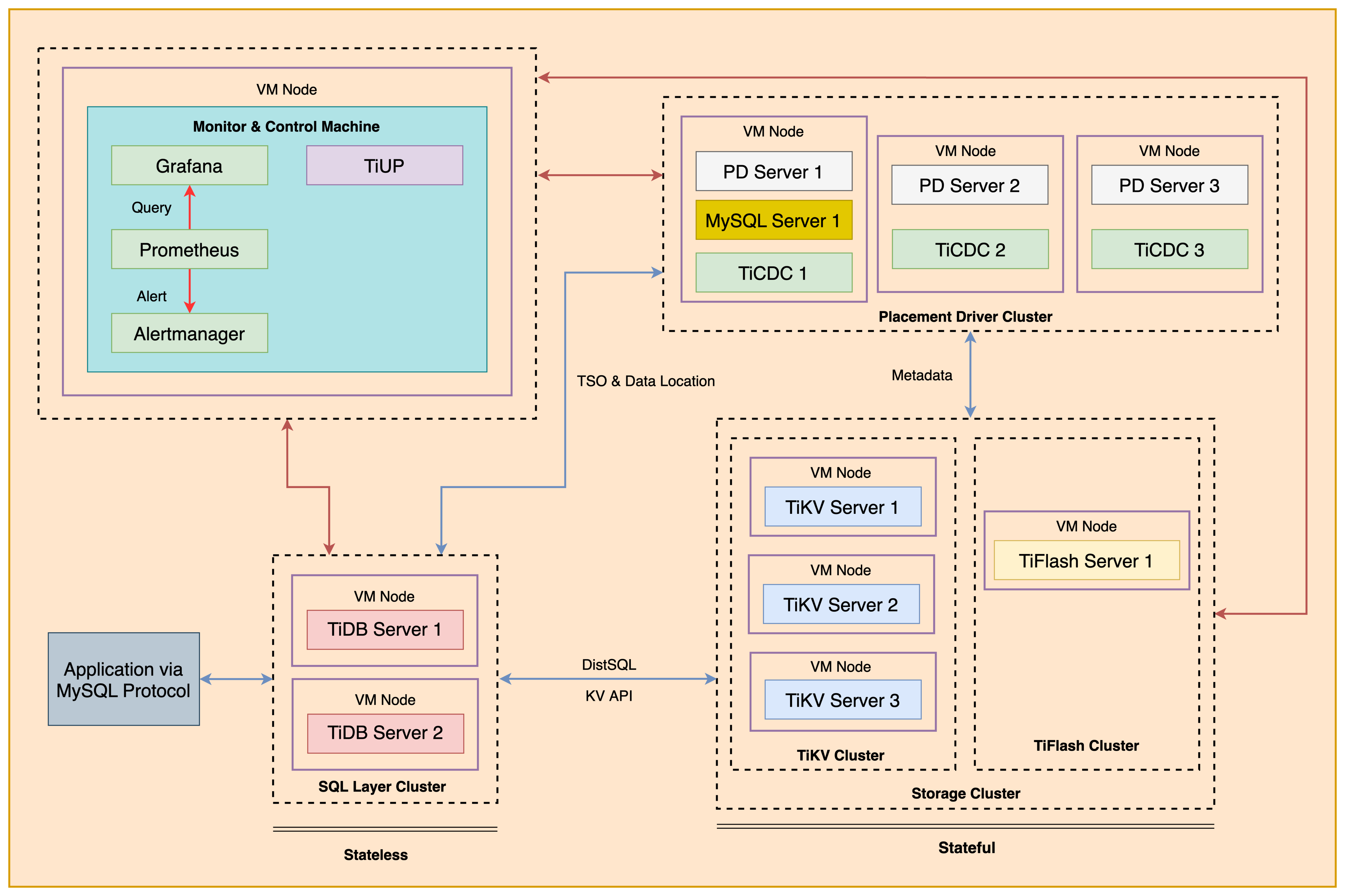
+ The following shows the deployment topology diagram of TiDB cluster.
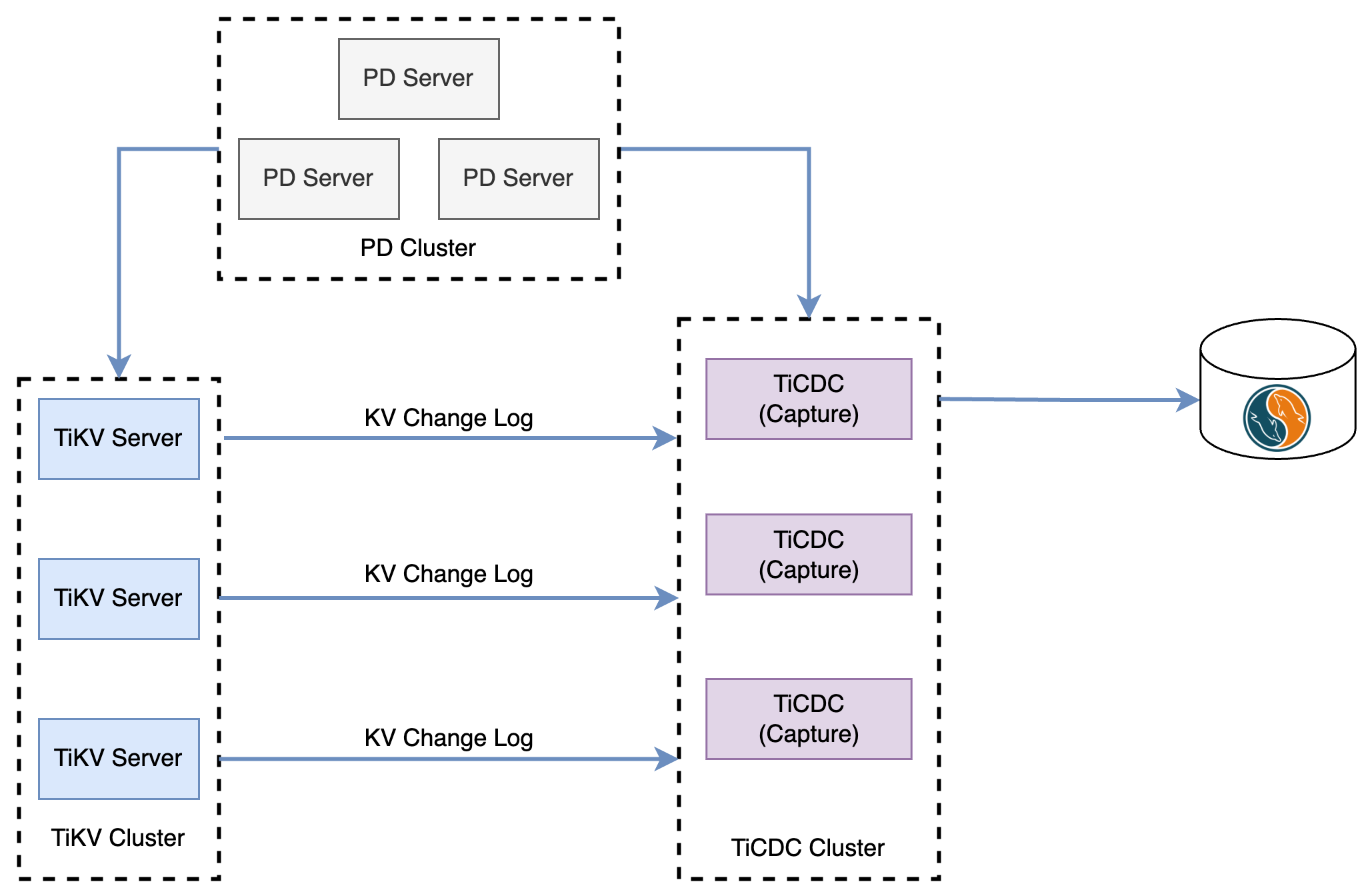
 + The TiCDC is used for replicating incremental data of upstream TiDB instance to downstream databases which is a MySQL instance. The following shows the topology diagram of `TiCDC`.
 ### Notes
+ Many of the steps require that you type commands in a terminal window. You might find it convenient to launch a terminal window and keep it open for the duration of the exercises.
+ Your environment may be different with these exercises, including but not limited to `IP`, `port`, `username`, `password` and `directory`.
+ The `$` in your terminal window is an OS prompt.
+ The "`tidb>`" or "`mysql>`" in your terminal window is SQL command prompt.
+ You may use `ff7.sh` to install, deploy, and start a TiDB cluster and relevant tools. And, you can run `source hosts-env.sh` and `source .bash_profile` to set environment variables.
+ In these exercises, we need 10 machines connected in the network. The `Role` and `IP Address` (represented by environment variables) are as follows:
| `Node Role` | `IP Address` |
| :----------------- | :-------------------------------------------------------- |
| `Monitor 1` | `${HOST_MONITOR1_PRIVATE_IP}, ${HOST_MONITOR1_PUBLIC_IP}` |
| `Control Machine` | `${HOST_CM_PRIVATE_IP}, ${HOST_CM_PUBLIC_IP}` |
| `TiDB server 1` | `${HOST_DB1_PRIVATE_IP}, ${HOST_DB1_PUBLIC_IP}` |
| `TiDB server 2` | `${HOST_DB2_PRIVATE_IP}, ${HOST_DB2_PUBLIC_IP}` |
| `TiKV server 1` | `${HOST_KV1_PRIVATE_IP}, ${HOST_KV1_PUBLIC_IP}` |
| `TiKV server 2` | `${HOST_KV2_PRIVATE_IP}, ${HOST_KV2_PUBLIC_IP}` |
| `TiKV server 3` | `${HOST_KV3_PRIVATE_IP}, ${HOST_KV3_PUBLIC_IP}` |
| `PD server 1` | `${HOST_PD1_PRIVATE_IP}, ${HOST_PD1_PUBLIC_IP}` |
| `PD server 2` | `${HOST_PD2_PRIVATE_IP}, ${HOST_PD2_PUBLIC_IP}` |
| `PD server 3` | `${HOST_PD3_PRIVATE_IP}, ${HOST_PD3_PUBLIC_IP}` |
| `TiFlash server 1` | `${HOST_TIFLASH1_PRIVATE_IP}, ${HOST_TIFLASH1_PUBLIC_IP}` |
| `Alertmanager` | `${HOST_MONITOR1_PRIVATE_IP}, ${HOST_MONITOR1_PUBLIC_IP}` |
| `Grafana` | `${HOST_MONITOR1_PRIVATE_IP}, ${HOST_MONITOR1_PUBLIC_IP}` |
| `Prometheus` | `${HOST_MONITOR1_PRIVATE_IP}, ${HOST_MONITOR1_PUBLIC_IP}` |
### Assumptions
+ You are given the user credentials (for example: the private key) of the exercise environment.
+ You are given access to 10 machines that have been set up.
+ You have completed the activities in the exercise titled "*Exercises 1: Deploying a TiDB Cluster Using TiUP*" and have a terminal window open.
+ Your environment has TiDB cluster and MySQL deployed and running.
+ You have cleaned up the old practice data.
## Exercise 1: Deploying TiCDC
### Overview
+ In this exercise, you add TiCDC to an existing TiDB cluster using TiUP.
### Duration
+ This exercise should take you approximately 20 minutes to complete.
### Tasks
1. Add a `TiCDC` server to the existing TiDB cluster.
### Solution
1. Login as user `ec2-user` on the `Control Machine` (`${HOST_MONITOR1_PUBLIC_IP}`). Enter the following command at the terminal prompt and receive the results shown:
```
$ ssh -A ec2-user@
__| __|_ )
_| ( / Amazon Linux 2 AMI
___|\___|___|
https://aws.amazon.com/amazon-linux-2/
```
2. Check the status of the deployed TiDB cluster. Enter the following command at the terminal prompt and receive the results shown:
```
$ tiup cluster display tidb-test
tiup is checking updates for component cluster ...
Starting component `cluster`: /root/.tiup/components/cluster/v1.10.2/tiup-cluster display tidb-test
Cluster type: tidb
Cluster name: tidb-test
Cluster version: v6.5.1
Deploy user: tidb
SSH type: builtin
Dashboard URL: http://10.90.1.34:2379/dashboard
Grafana URL: http://10.90.4.231:3000
ID Role Host Ports OS/Arch Status Data Dir Deploy Dir
-- ---- ---- ----- ------- ------ -------- ----------
10.90.4.231:9093 alertmanager 10.90.4.231 9093/9094 linux/x86_64 Up /tidb-data/alertmanager-9093 /tidb-deploy/alertmanager-9093
10.90.4.231:3000 grafana 10.90.4.231 3000 linux/x86_64 Up - /tidb-deploy/grafana-3000
10.90.1.34:2379 pd 10.90.1.34 2379/2380 linux/x86_64 Up|L|UI /tidb-data/pd-2379 /tidb-deploy/pd-2379
10.90.2.38:2379 pd 10.90.2.38 2379/2380 linux/x86_64 Up /tidb-data/pd-2379 /tidb-deploy/pd-2379
10.90.3.188:2379 pd 10.90.3.188 2379/2380 linux/x86_64 Up /tidb-data/pd-2379 /tidb-deploy/pd-2379
10.90.4.231:9090 prometheus 10.90.4.231 9090/12020 linux/x86_64 Up /tidb-data/prometheus-9090 /tidb-deploy/prometheus-9090
10.90.1.69:4000 tidb 10.90.1.69 4000/10080 linux/x86_64 Up - /tidb-deploy/tidb-4000
10.90.2.35:4000 tidb 10.90.2.35 4000/10080 linux/x86_64 Up - /tidb-deploy/tidb-4000
10.90.4.53:9000 tiflash 10.90.4.53 9000/8123/3930/20170/20292/8234 linux/x86_64 Up /tidb-data/tiflash-9000 /tidb-deploy/tiflash-9000
10.90.1.162:20160 tikv 10.90.1.162 20160/20180 linux/x86_64 Up /tidb-data/tikv-20160 /tidb-deploy/tikv-20160
10.90.2.108:20160 tikv 10.90.2.108 20160/20180 linux/x86_64 Up /tidb-data/tikv-20160 /tidb-deploy/tikv-20160
10.90.3.12:20160 tikv 10.90.3.12 20160/20180 linux/x86_64 Up /tidb-data/tikv-20160 /tidb-deploy/tikv-20160
Total nodes: 12
```
3. Use a text editor to edit the `scale-out-ticdc.yaml` file. Modify it to contain settings similar to those that follow (replace the IP addresses with the correct ones assigned to you, we use 3 TiCDC capture instances for this exercise). Or, you can simply use the `solution-three-nodes-scale-out-ticdc.yaml` file which had been provisioned for you:
```
$ vi scale-out-ticdc.yaml
```
```
cdc_servers:
- host:
gc-ttl: 86400
data_dir: "/cdc-data"
- host:
gc-ttl: 86400
data_dir: "/cdc-data"
- host:
gc-ttl: 86400
data_dir: "/cdc-data"
```
4. Run the `tiup cluster scale-out` command to add a TiCDC node. Enter the following command at the terminal prompt and receive the results shown:
```
$ tiup cluster scale-out tidb-test scale-out-ticdc.yaml
...
Do you want to continue? [y/N]: (default=N) y
...
Scaled cluster `tidb-test` out successfully
```
5. Check the status of the deployed TiDB cluster and the TiCDC node. Enter the following command at the terminal prompt and receive the results shown:
```
$ tiup cluster display tidb-test
tiup is checking updates for component cluster ...
Starting component `cluster`: /home/ec2-user/.tiup/components/cluster/v1.12.1/tiup-cluster display tidb-test
Cluster type: tidb
Cluster name: tidb-test
Cluster version: v6.5.1
Deploy user: tidb
SSH type: builtin
Dashboard URL: http://10.90.1.34:2379/dashboard
Grafana URL: http://10.90.4.231:3000
ID Role Host Ports OS/Arch Status Data Dir Deploy Dir
-- ---- ---- ----- ------- ------ -------- ----------
10.90.4.231:9093 alertmanager 10.90.4.231 9093/9094 linux/x86_64 Up /tidb-data/alertmanager-9093 /tidb-deploy/alertmanager-9093
10.90.1.34:8300 cdc 10.90.1.34 8300 linux/x86_64 Up /cdc-data /tidb-deploy/cdc-8300
10.90.2.38:8300 cdc 10.90.2.38 8300 linux/x86_64 Up /cdc-data /tidb-deploy/cdc-8300
10.90.3.188:8300 cdc 10.90.3.188 8300 linux/x86_64 Up /cdc-data /tidb-deploy/cdc-8300
10.90.4.231:3000 grafana 10.90.4.231 3000 linux/x86_64 Up - /tidb-deploy/grafana-3000
10.90.1.34:2379 pd 10.90.1.34 2379/2380 linux/x86_64 Up|L|UI /tidb-data/pd-2379 /tidb-deploy/pd-2379
10.90.2.38:2379 pd 10.90.2.38 2379/2380 linux/x86_64 Up /tidb-data/pd-2379 /tidb-deploy/pd-2379
10.90.3.188:2379 pd 10.90.3.188 2379/2380 linux/x86_64 Up /tidb-data/pd-2379 /tidb-deploy/pd-2379
10.90.4.231:9090 prometheus 10.90.4.231 9090/12020 linux/x86_64 Up /tidb-data/prometheus-9090 /tidb-deploy/prometheus-9090
10.90.1.69:4000 tidb 10.90.1.69 4000/10080 linux/x86_64 Up - /tidb-deploy/tidb-4000
10.90.2.35:4000 tidb 10.90.2.35 4000/10080 linux/x86_64 Up - /tidb-deploy/tidb-4000
10.90.4.53:9000 tiflash 10.90.4.53 9000/8123/3930/20170/20292/8234 linux/x86_64 Up /tidb-data/tiflash-9000 /tidb-deploy/tiflash-9000
10.90.1.162:20160 tikv 10.90.1.162 20160/20180 linux/x86_64 Up /tidb-data/tikv-20160 /tidb-deploy/tikv-20160
10.90.2.108:20160 tikv 10.90.2.108 20160/20180 linux/x86_64 Up /tidb-data/tikv-20160 /tidb-deploy/tikv-20160
10.90.3.12:20160 tikv 10.90.3.12 20160/20180 linux/x86_64 Up /tidb-data/tikv-20160 /tidb-deploy/tikv-20160
Total nodes: 15
```
6. Execute `tiup ctl:v6.5.1 cdc` command to check the status of TiCDC. Pay attention to the `is-owner` attribute in the output. Enter the following command at the terminal prompt and receive the results shown:
```
$ source hosts-env.sh
$ tiup ctl:v6.5.1 cdc capture list --pd=http://${HOST_PD1_PRIVATE_IP}:2379
...
Starting component `ctl`: /home/ec2-user/.tiup/components/ctl/v6.5.1/ctl cdc capture list --pd=http://10.80.0.224:2379
[
{
"id": "1c15e075-1435-464c-af66-92ba0286a7fe",
"is-owner": false,
"address": "10.90.1.34:8300",
"cluster-id": "default"
},
{
"id": "4399c858-e811-4d9e-9b08-fb5690c097ec",
"is-owner": true,
"address": "10.90.2.38:8300",
"cluster-id": "default"
},
{
"id": "5982fa7d-c755-409a-88d5-03527c8a0fcd",
"is-owner": false,
"address": "10.90.3.188:8300",
"cluster-id": "default"
}
]
```
## Exercise 2: Creating a Replication Task
### Overview
+ In this exercise, you create a replication task from the TiDB to the MySQL and check the status of the replication task.
### Duration
+ This exercise should take you approximately 15 minutes to complete.
### Tasks
1. Prepare the schema in the downstream MySQL server.
2. Prepare the schema and data in the upstream TiDB cluster.
3. Create a replication task.
4. Check the replication results.
### Solution
1. `SSH` to PD1
```
$ ./ssh-to-pd1.sh
...
Last login: Sun Oct 15 21:44:34 2023
...
```
2. (You can skip this step if you already completed it before.) Login PD1 as `ec2-user`, and start MySQL server instance on PD1:
```
$ sudo service mysqld start
```
3. Login MySQL server on port 3306 as `root@'localhost'` with the password `q1w2e3R4_`. Enter the following command at the terminal prompt and receive the results shown:
```
$ mysql -u root -p -h 127.0.0.1 -P 3306 -pq1w2e3R4_
```
4. Create a user for change capture task:
```sql
CREATE USER cdc_user@'%' IDENTIFIED BY 'q1w2e3R4_';
GRANT ALL PRIVILEGES on *.* to cdc_user@'%';
EXIT;
```
```
mysql> CREATE USER cdc_user@'%' IDENTIFIED BY 'q1w2e3R4_';
Query OK, 0 rows affected (0.00 sec)
mysql> GRANT ALL PRIVILEGES on *.* to cdc_user@'%';
Query OK, 0 rows affected (0.00 sec)
```
5. Load timezone for upstream MySQL database:
```
$ mysql_tzinfo_to_sql /usr/share/zoneinfo | mysql -u root mysql -pq1w2e3R4_
mysql: [Warning] Using a password on the command line interface can be insecure.
Warning: Unable to load '/usr/share/zoneinfo/iso3166.tab' as time zone. Skipping it.
Warning: Unable to load '/usr/share/zoneinfo/leapseconds' as time zone. Skipping it.
Warning: Unable to load '/usr/share/zoneinfo/tzdata.zi' as time zone. Skipping it.
Warning: Unable to load '/usr/share/zoneinfo/zone.tab' as time zone. Skipping it.
Warning: Unable to load '/usr/share/zoneinfo/zone1970.tab' as time zone. Skipping it.
```
6. Connect to MySQL with port 3306 as a downstream database, and create a new database called `test`, with a table called `T1`. The `T1` table should have a primary key column called `id` and a `VARCHAR(20)` column called `name`. And then exit the mysql client. Enter the following command at the terminal prompt and receive the results shown:
```
$ mysql -u root -h 127.0.0.1 -P 3306 -pq1w2e3R4_
```
```sql
DROP DATABASE IF EXISTS test;
CREATE DATABASE test;
CREATE TABLE test.T1(id INT PRIMARY KEY, name VARCHAR(20));
SELECT * FROM test.T1;
```
7. Open a second terminal window (terminal 2) on `monitor1`, connect to TiDB as an upstream database. Change the current database to `test`, and create a new table called `T1`. The `T1` table should have a primary key column called `id` and a `VARCHAR(20)` column called `name`. And then exit the mysql client. Enter the following command at the terminal prompt and receive the results shown:
```
$ mysql -h${HOST_DB1_PRIVATE_IP} -P4000 -uroot
```
```sql
DROP DATABASE IF EXISTS test;
CREATE DATABASE test;
CREATE TABLE test.T1(id INT PRIMARY KEY, name VARCHAR(20));
SELECT * FROM test.T1;
```
```
mysql> exit;
```
8. In terminal 2 on `monitor1`, execute `cdc:v6.5.1 cli` command to create a replication task. Pay attention to the `cdc:v6.5.1` version, if you omit the version tag, the most up-to-date version might not be compatible with our TiDB cluster. Enter the following command at the terminal prompt and receive the results shown:
```
tiup cdc:v6.5.1 cli changefeed create --pd=http://${HOST_PD1_PRIVATE_IP}:2379 \
--sink-uri="mysql://cdc_user:q1w2e3R4_@${HOST_PD1_PRIVATE_IP}:3306/" \
--changefeed-id="replication-task-1" --sort-engine="unified"
```
```
$ tiup cdc:v6.5.1 cli changefeed create --pd=http://${HOST_PD1_PRIVATE_IP}:2379 \
> --sink-uri="mysql://cdc_user:q1w2e3R4_@${HOST_PD1_PRIVATE_IP}:3306/" \
> --changefeed-id="replication-task-1" --sort-engine="unified"
Starting component `cdc`: /home/ec2-user/.tiup/components/cdc/v6.5.1/cdc cli changefeed create --pd=http://10.80.0.224:2379 --sink-uri=mysql://cdc_user:q1w2e3R4_@10.80.0.224:3306/ --changefeed-id=replication-task-1 --sort-engine=unified
Create changefeed successfully!
ID: replication-task-1
Info: {"upstream-id":0,"sink-uri":"mysql://cdc_user:q1w2e3R4_@10.80.0.224:3306/","opts":{},"create-time":"2023-02-13T12:54:53.673149259Z","start-ts":439430124303286275,"target-ts":0,"admin-job-type":0,"sort-engine":"unified","sort-dir":"","config":{"case-sensitive":true,"enable-old-value":true,"force-replicate":false,"check-gc-safe-point":true,"filter":{"rules":["*.*"],"ignore-txn-start-ts":null},"mounter":{"worker-num":16},"sink":{"dispatchers":null,"protocol":"","column-selectors":null,"schema-registry":""},"cyclic-replication":{"enable":false,"replica-id":0,"filter-replica-ids":null,"id-buckets":0,"sync-ddl":false},"consistent":{"level":"none","max-log-size":64,"flush-interval":1000,"storage":""}},"state":"normal","error":null,"sync-point-enabled":false,"sync-point-interval":600000000000,"creator-version":"v6.1.0"}
```
+ `--pd=http://${HOST_PD1_PRIVATE_IP}:2379`: IP address of one of the PD nodes.
+ `--sink-uri="mysql://cdc_user:q1w2e3R4_@${HOST_PD1_PRIVATE_IP}:3306/"`: The downstream address of the replication task: ${HOST_PD1_PRIVATE_IP}, and the port is: 3306
+ `--changefeed-id="replication-task-1" --sort-engine="unified"`: The ID of the replication task.
9. Query the replication task list. Enter the following command at the terminal prompt and receive the results shown:
```
$ tiup cdc:v6.5.1 cli changefeed list --pd=http://${HOST_PD1_PRIVATE_IP}:2379
Starting component `cdc`: /home/ec2-user/.tiup/components/cdc/v6.5.1/cdc cli changefeed list --pd=http://10.80.0.224:2379
[
{
"id": "replication-task-1",
"summary": {
"state": "normal",
"tso": 439430205069852673,
"checkpoint": "2023-02-13 13:00:01.713",
"error": null
}
}
]
```
+ `"state": "normal"`: The replication task runs normally.
+ `tso`: The largest transaction TSO.
+ `checkpoint`: The corresponding time of the largest transaction TSO.
10. Execute the `changefeed query` command to query a specific replication task. Enter the following command at the terminal prompt and receive the results shown:
```
$ tiup cdc:v6.5.1 cli changefeed query --pd=http://${HOST_PD3_PRIVATE_IP}:2379 --changefeed-id=replication-task-1
Starting component `cdc`: /home/ec2-user/.tiup/components/cdc/v6.5.1/cdc cli changefeed query --pd=http://10.80.0.12:2379 --changefeed-id=replication-task-1
{
"upstream_id": 7231813390813770262,
"namespace": "default",
"id": "replication-task-1",
"sink_uri": "mysql://cdc_user:xxxxx@10.90.3.188:3306/",
"config": {
"memory_quota": 1073741824,
"case_sensitive": true,
"enable_old_value": true,
"force_replicate": false,
"ignore_ineligible_table": false,
"check_gc_safe_point": true,
"enable_sync_point": false,
"bdr_mode": false,
"sync_point_interval": 600000000000,
"sync_point_retention": 86400000000000,
"filter": {
"rules": [
"*.*"
],
"event_filters": null
},
"mounter": {
"worker_num": 16
},
"sink": {
"protocol": "",
"schema_registry": "",
"csv": {
"delimiter": ",",
"quote": "\"",
"null": "\\N",
"include_commit_ts": false
},
"column_selectors": null,
"transaction_atomicity": "",
"encoder_concurrency": 16,
"terminator": "\r\n",
"date_separator": "none",
"enable_partition_separator": false
},
"consistent": {
"level": "none",
"max_log_size": 64,
"flush_interval": 2000,
"storage": ""
}
},
"create_time": "2023-05-11 07:09:04.259",
"start_ts": 441395168967655437,
"resolved_ts": 441395195247853571,
"target_ts": 0,
"checkpoint_tso": 441395195247853571,
"checkpoint_time": "2023-05-11 07:10:44.372",
"sort_engine": "unified",
"state": "normal",
"error": null,
"error_history": null,
"creator_version": "",
"task_status": [
{
"capture_id": "4399c858-e811-4d9e-9b08-fb5690c097ec",
"table_ids": [],
"table_operations": null
},
{
"capture_id": "5982fa7d-c755-409a-88d5-03527c8a0fcd",
"table_ids": [],
"table_operations": null
},
{
"capture_id": "1c15e075-1435-464c-af66-92ba0286a7fe",
"table_ids": [
80
],
"table_operations": null
}
]
}
```
11. Connect to TiDB as an upstream database. Display the contents of the `T1` table in the `test` database, and insert a row into table `T1`. Exit the client. Enter the following command at the terminal prompt and receive the results shown:
```
$ mysql -h${HOST_DB1_PRIVATE_IP} -P4000 -uroot
```
```sql
SELECT * FROM test.T1;
INSERT INTO test.T1 VALUES(1, 'Tom');
SELECT * FROM test.T1;
```
```
mysql> SELECT * FROM test.T1;
Empty set (0.01 sec)
mysql> INSERT INTO test.T1 VALUES(1, 'Tom');
Query OK, 1 row affected (0.00 sec)
mysql> SELECT * FROM test.T1;
+----+------+
| id | name |
+----+------+
| 1 | Tom |
+----+------+
1 row in set (0.00 sec)
```
12. In terminal 1 on `monitor1`, connect to MySQL with port 3306 as a downstream database. Display the contents of the `T1` table in the `test` database, verify that the `T1` contains the data from upstream database TiDB. And then exit the mysql client. Enter the following command at the terminal prompt and receive the results shown:
```
$ mysql -u cdc_user -h ${HOST_PD1_PRIVATE_IP} -P 3306 -pq1w2e3R4_
```
```sql
SELECT * FROM test.T1;
```
```
mysql> SELECT * FROM test.T1;
+----+------+
| id | name |
+----+------+
| 1 | Tom |
+----+------+
1 row in set (0.00 sec)
mysql> EXIT
Bye
```
## Exercise 3: Removing the TiCDC Cluster
### Overview
+ In this exercise, remove the TiCDC cluster.
### Duration
+ This exercise should take you approximately 10 minutes to complete.
### Tasks
1. Pause and remove the replication task.
2. Stop the `TiCDC` cluster.
### Solution Steps
1. Execute the `changefeed pause` command to pause a replication task. Enter the following command at the terminal prompt and receive the results shown:
```
$ source hosts-env.sh
$ tiup cdc:v6.5.1 cli changefeed pause --pd=http://${HOST_PD1_PRIVATE_IP}:2379 --changefeed-id replication-task-1
```
2. Execute the `changefeed remove` command to remove a replication task. Enter the following command at the terminal prompt and receive the results shown:
```
$ tiup cdc:v6.5.1 cli changefeed remove --pd=http://${HOST_PD1_PRIVATE_IP}:2379 --changefeed-id replication-task-1
```
3. Execute the `changefeed list` command to query the replication task list. Enter the following command at the terminal prompt and receive the results shown:
```
$ tiup cdc:v6.5.1 cli changefeed list --pd=http://${HOST_PD3_PRIVATE_IP}:2379
Starting component `cdc`: /home/ec2-user/.tiup/components/cdc/v6.5.1/cdc cli changefeed list --pd=http://10.80.0.12:2379
[]
```
4. Run the `tiup cluster scale-in` command to scale in the TiCDC cluster. Enter the following command at the terminal prompt and receive the results shown:
```
$ tiup cluster scale-in tidb-test --node ${HOST_PD1_PRIVATE_IP}:8300 --node ${HOST_PD2_PRIVATE_IP}:8300 --node ${HOST_PD3_PRIVATE_IP}:8300 --yes
...
Scaled cluster `tidb-test` in successfully
```
5. Check the cluster status after scale in TiCDC cluster, confirm that the TiCDC cluster no longer exists. Enter the following command at the terminal prompt and receive the results shown:
```
$ tiup cluster display tidb-test
tiup is checking updates for component cluster ...
Starting component `cluster`: /home/ec2-user/.tiup/components/cluster/v1.12.1/tiup-cluster display tidb-test
Cluster type: tidb
Cluster name: tidb-test
Cluster version: v6.5.1
Deploy user: tidb
SSH type: builtin
Dashboard URL: http://10.90.1.34:2379/dashboard
Grafana URL: http://10.90.4.231:3000
ID Role Host Ports OS/Arch Status Data Dir Deploy Dir
-- ---- ---- ----- ------- ------ -------- ----------
10.90.4.231:9093 alertmanager 10.90.4.231 9093/9094 linux/x86_64 Up /tidb-data/alertmanager-9093 /tidb-deploy/alertmanager-9093
10.90.4.231:3000 grafana 10.90.4.231 3000 linux/x86_64 Up - /tidb-deploy/grafana-3000
10.90.1.34:2379 pd 10.90.1.34 2379/2380 linux/x86_64 Up|L|UI /tidb-data/pd-2379 /tidb-deploy/pd-2379
10.90.2.38:2379 pd 10.90.2.38 2379/2380 linux/x86_64 Up /tidb-data/pd-2379 /tidb-deploy/pd-2379
10.90.3.188:2379 pd 10.90.3.188 2379/2380 linux/x86_64 Up /tidb-data/pd-2379 /tidb-deploy/pd-2379
10.90.4.231:9090 prometheus 10.90.4.231 9090/12020 linux/x86_64 Up /tidb-data/prometheus-9090 /tidb-deploy/prometheus-9090
10.90.1.69:4000 tidb 10.90.1.69 4000/10080 linux/x86_64 Up - /tidb-deploy/tidb-4000
10.90.2.35:4000 tidb 10.90.2.35 4000/10080 linux/x86_64 Up - /tidb-deploy/tidb-4000
10.90.4.53:9000 tiflash 10.90.4.53 9000/8123/3930/20170/20292/8234 linux/x86_64 Up /tidb-data/tiflash-9000 /tidb-deploy/tiflash-9000
10.90.1.162:20160 tikv 10.90.1.162 20160/20180 linux/x86_64 Up /tidb-data/tikv-20160 /tidb-deploy/tikv-20160
10.90.2.108:20160 tikv 10.90.2.108 20160/20180 linux/x86_64 Up /tidb-data/tikv-20160 /tidb-deploy/tikv-20160
10.90.3.12:20160 tikv 10.90.3.12 20160/20180 linux/x86_64 Up /tidb-data/tikv-20160 /tidb-deploy/tikv-20160
Total nodes: 12
```
6. Close all terminal windows.
## End of Exercises
### Notes
+ Many of the steps require that you type commands in a terminal window. You might find it convenient to launch a terminal window and keep it open for the duration of the exercises.
+ Your environment may be different with these exercises, including but not limited to `IP`, `port`, `username`, `password` and `directory`.
+ The `$` in your terminal window is an OS prompt.
+ The "`tidb>`" or "`mysql>`" in your terminal window is SQL command prompt.
+ You may use `ff7.sh` to install, deploy, and start a TiDB cluster and relevant tools. And, you can run `source hosts-env.sh` and `source .bash_profile` to set environment variables.
+ In these exercises, we need 10 machines connected in the network. The `Role` and `IP Address` (represented by environment variables) are as follows:
| `Node Role` | `IP Address` |
| :----------------- | :-------------------------------------------------------- |
| `Monitor 1` | `${HOST_MONITOR1_PRIVATE_IP}, ${HOST_MONITOR1_PUBLIC_IP}` |
| `Control Machine` | `${HOST_CM_PRIVATE_IP}, ${HOST_CM_PUBLIC_IP}` |
| `TiDB server 1` | `${HOST_DB1_PRIVATE_IP}, ${HOST_DB1_PUBLIC_IP}` |
| `TiDB server 2` | `${HOST_DB2_PRIVATE_IP}, ${HOST_DB2_PUBLIC_IP}` |
| `TiKV server 1` | `${HOST_KV1_PRIVATE_IP}, ${HOST_KV1_PUBLIC_IP}` |
| `TiKV server 2` | `${HOST_KV2_PRIVATE_IP}, ${HOST_KV2_PUBLIC_IP}` |
| `TiKV server 3` | `${HOST_KV3_PRIVATE_IP}, ${HOST_KV3_PUBLIC_IP}` |
| `PD server 1` | `${HOST_PD1_PRIVATE_IP}, ${HOST_PD1_PUBLIC_IP}` |
| `PD server 2` | `${HOST_PD2_PRIVATE_IP}, ${HOST_PD2_PUBLIC_IP}` |
| `PD server 3` | `${HOST_PD3_PRIVATE_IP}, ${HOST_PD3_PUBLIC_IP}` |
| `TiFlash server 1` | `${HOST_TIFLASH1_PRIVATE_IP}, ${HOST_TIFLASH1_PUBLIC_IP}` |
| `Alertmanager` | `${HOST_MONITOR1_PRIVATE_IP}, ${HOST_MONITOR1_PUBLIC_IP}` |
| `Grafana` | `${HOST_MONITOR1_PRIVATE_IP}, ${HOST_MONITOR1_PUBLIC_IP}` |
| `Prometheus` | `${HOST_MONITOR1_PRIVATE_IP}, ${HOST_MONITOR1_PUBLIC_IP}` |
### Assumptions
+ You are given the user credentials (for example: the private key) of the exercise environment.
+ You are given access to 10 machines that have been set up.
+ You have completed the activities in the exercise titled "*Exercises 1: Deploying a TiDB Cluster Using TiUP*" and have a terminal window open.
+ Your environment has TiDB cluster and MySQL deployed and running.
+ You have cleaned up the old practice data.
## Exercise 1: Deploying TiCDC
### Overview
+ In this exercise, you add TiCDC to an existing TiDB cluster using TiUP.
### Duration
+ This exercise should take you approximately 20 minutes to complete.
### Tasks
1. Add a `TiCDC` server to the existing TiDB cluster.
### Solution
1. Login as user `ec2-user` on the `Control Machine` (`${HOST_MONITOR1_PUBLIC_IP}`). Enter the following command at the terminal prompt and receive the results shown:
```
$ ssh -A ec2-user@
__| __|_ )
_| ( / Amazon Linux 2 AMI
___|\___|___|
https://aws.amazon.com/amazon-linux-2/
```
2. Check the status of the deployed TiDB cluster. Enter the following command at the terminal prompt and receive the results shown:
```
$ tiup cluster display tidb-test
tiup is checking updates for component cluster ...
Starting component `cluster`: /root/.tiup/components/cluster/v1.10.2/tiup-cluster display tidb-test
Cluster type: tidb
Cluster name: tidb-test
Cluster version: v6.5.1
Deploy user: tidb
SSH type: builtin
Dashboard URL: http://10.90.1.34:2379/dashboard
Grafana URL: http://10.90.4.231:3000
ID Role Host Ports OS/Arch Status Data Dir Deploy Dir
-- ---- ---- ----- ------- ------ -------- ----------
10.90.4.231:9093 alertmanager 10.90.4.231 9093/9094 linux/x86_64 Up /tidb-data/alertmanager-9093 /tidb-deploy/alertmanager-9093
10.90.4.231:3000 grafana 10.90.4.231 3000 linux/x86_64 Up - /tidb-deploy/grafana-3000
10.90.1.34:2379 pd 10.90.1.34 2379/2380 linux/x86_64 Up|L|UI /tidb-data/pd-2379 /tidb-deploy/pd-2379
10.90.2.38:2379 pd 10.90.2.38 2379/2380 linux/x86_64 Up /tidb-data/pd-2379 /tidb-deploy/pd-2379
10.90.3.188:2379 pd 10.90.3.188 2379/2380 linux/x86_64 Up /tidb-data/pd-2379 /tidb-deploy/pd-2379
10.90.4.231:9090 prometheus 10.90.4.231 9090/12020 linux/x86_64 Up /tidb-data/prometheus-9090 /tidb-deploy/prometheus-9090
10.90.1.69:4000 tidb 10.90.1.69 4000/10080 linux/x86_64 Up - /tidb-deploy/tidb-4000
10.90.2.35:4000 tidb 10.90.2.35 4000/10080 linux/x86_64 Up - /tidb-deploy/tidb-4000
10.90.4.53:9000 tiflash 10.90.4.53 9000/8123/3930/20170/20292/8234 linux/x86_64 Up /tidb-data/tiflash-9000 /tidb-deploy/tiflash-9000
10.90.1.162:20160 tikv 10.90.1.162 20160/20180 linux/x86_64 Up /tidb-data/tikv-20160 /tidb-deploy/tikv-20160
10.90.2.108:20160 tikv 10.90.2.108 20160/20180 linux/x86_64 Up /tidb-data/tikv-20160 /tidb-deploy/tikv-20160
10.90.3.12:20160 tikv 10.90.3.12 20160/20180 linux/x86_64 Up /tidb-data/tikv-20160 /tidb-deploy/tikv-20160
Total nodes: 12
```
3. Use a text editor to edit the `scale-out-ticdc.yaml` file. Modify it to contain settings similar to those that follow (replace the IP addresses with the correct ones assigned to you, we use 3 TiCDC capture instances for this exercise). Or, you can simply use the `solution-three-nodes-scale-out-ticdc.yaml` file which had been provisioned for you:
```
$ vi scale-out-ticdc.yaml
```
```
cdc_servers:
- host:
gc-ttl: 86400
data_dir: "/cdc-data"
- host:
gc-ttl: 86400
data_dir: "/cdc-data"
- host:
gc-ttl: 86400
data_dir: "/cdc-data"
```
4. Run the `tiup cluster scale-out` command to add a TiCDC node. Enter the following command at the terminal prompt and receive the results shown:
```
$ tiup cluster scale-out tidb-test scale-out-ticdc.yaml
...
Do you want to continue? [y/N]: (default=N) y
...
Scaled cluster `tidb-test` out successfully
```
5. Check the status of the deployed TiDB cluster and the TiCDC node. Enter the following command at the terminal prompt and receive the results shown:
```
$ tiup cluster display tidb-test
tiup is checking updates for component cluster ...
Starting component `cluster`: /home/ec2-user/.tiup/components/cluster/v1.12.1/tiup-cluster display tidb-test
Cluster type: tidb
Cluster name: tidb-test
Cluster version: v6.5.1
Deploy user: tidb
SSH type: builtin
Dashboard URL: http://10.90.1.34:2379/dashboard
Grafana URL: http://10.90.4.231:3000
ID Role Host Ports OS/Arch Status Data Dir Deploy Dir
-- ---- ---- ----- ------- ------ -------- ----------
10.90.4.231:9093 alertmanager 10.90.4.231 9093/9094 linux/x86_64 Up /tidb-data/alertmanager-9093 /tidb-deploy/alertmanager-9093
10.90.1.34:8300 cdc 10.90.1.34 8300 linux/x86_64 Up /cdc-data /tidb-deploy/cdc-8300
10.90.2.38:8300 cdc 10.90.2.38 8300 linux/x86_64 Up /cdc-data /tidb-deploy/cdc-8300
10.90.3.188:8300 cdc 10.90.3.188 8300 linux/x86_64 Up /cdc-data /tidb-deploy/cdc-8300
10.90.4.231:3000 grafana 10.90.4.231 3000 linux/x86_64 Up - /tidb-deploy/grafana-3000
10.90.1.34:2379 pd 10.90.1.34 2379/2380 linux/x86_64 Up|L|UI /tidb-data/pd-2379 /tidb-deploy/pd-2379
10.90.2.38:2379 pd 10.90.2.38 2379/2380 linux/x86_64 Up /tidb-data/pd-2379 /tidb-deploy/pd-2379
10.90.3.188:2379 pd 10.90.3.188 2379/2380 linux/x86_64 Up /tidb-data/pd-2379 /tidb-deploy/pd-2379
10.90.4.231:9090 prometheus 10.90.4.231 9090/12020 linux/x86_64 Up /tidb-data/prometheus-9090 /tidb-deploy/prometheus-9090
10.90.1.69:4000 tidb 10.90.1.69 4000/10080 linux/x86_64 Up - /tidb-deploy/tidb-4000
10.90.2.35:4000 tidb 10.90.2.35 4000/10080 linux/x86_64 Up - /tidb-deploy/tidb-4000
10.90.4.53:9000 tiflash 10.90.4.53 9000/8123/3930/20170/20292/8234 linux/x86_64 Up /tidb-data/tiflash-9000 /tidb-deploy/tiflash-9000
10.90.1.162:20160 tikv 10.90.1.162 20160/20180 linux/x86_64 Up /tidb-data/tikv-20160 /tidb-deploy/tikv-20160
10.90.2.108:20160 tikv 10.90.2.108 20160/20180 linux/x86_64 Up /tidb-data/tikv-20160 /tidb-deploy/tikv-20160
10.90.3.12:20160 tikv 10.90.3.12 20160/20180 linux/x86_64 Up /tidb-data/tikv-20160 /tidb-deploy/tikv-20160
Total nodes: 15
```
6. Execute `tiup ctl:v6.5.1 cdc` command to check the status of TiCDC. Pay attention to the `is-owner` attribute in the output. Enter the following command at the terminal prompt and receive the results shown:
```
$ source hosts-env.sh
$ tiup ctl:v6.5.1 cdc capture list --pd=http://${HOST_PD1_PRIVATE_IP}:2379
...
Starting component `ctl`: /home/ec2-user/.tiup/components/ctl/v6.5.1/ctl cdc capture list --pd=http://10.80.0.224:2379
[
{
"id": "1c15e075-1435-464c-af66-92ba0286a7fe",
"is-owner": false,
"address": "10.90.1.34:8300",
"cluster-id": "default"
},
{
"id": "4399c858-e811-4d9e-9b08-fb5690c097ec",
"is-owner": true,
"address": "10.90.2.38:8300",
"cluster-id": "default"
},
{
"id": "5982fa7d-c755-409a-88d5-03527c8a0fcd",
"is-owner": false,
"address": "10.90.3.188:8300",
"cluster-id": "default"
}
]
```
## Exercise 2: Creating a Replication Task
### Overview
+ In this exercise, you create a replication task from the TiDB to the MySQL and check the status of the replication task.
### Duration
+ This exercise should take you approximately 15 minutes to complete.
### Tasks
1. Prepare the schema in the downstream MySQL server.
2. Prepare the schema and data in the upstream TiDB cluster.
3. Create a replication task.
4. Check the replication results.
### Solution
1. `SSH` to PD1
```
$ ./ssh-to-pd1.sh
...
Last login: Sun Oct 15 21:44:34 2023
...
```
2. (You can skip this step if you already completed it before.) Login PD1 as `ec2-user`, and start MySQL server instance on PD1:
```
$ sudo service mysqld start
```
3. Login MySQL server on port 3306 as `root@'localhost'` with the password `q1w2e3R4_`. Enter the following command at the terminal prompt and receive the results shown:
```
$ mysql -u root -p -h 127.0.0.1 -P 3306 -pq1w2e3R4_
```
4. Create a user for change capture task:
```sql
CREATE USER cdc_user@'%' IDENTIFIED BY 'q1w2e3R4_';
GRANT ALL PRIVILEGES on *.* to cdc_user@'%';
EXIT;
```
```
mysql> CREATE USER cdc_user@'%' IDENTIFIED BY 'q1w2e3R4_';
Query OK, 0 rows affected (0.00 sec)
mysql> GRANT ALL PRIVILEGES on *.* to cdc_user@'%';
Query OK, 0 rows affected (0.00 sec)
```
5. Load timezone for upstream MySQL database:
```
$ mysql_tzinfo_to_sql /usr/share/zoneinfo | mysql -u root mysql -pq1w2e3R4_
mysql: [Warning] Using a password on the command line interface can be insecure.
Warning: Unable to load '/usr/share/zoneinfo/iso3166.tab' as time zone. Skipping it.
Warning: Unable to load '/usr/share/zoneinfo/leapseconds' as time zone. Skipping it.
Warning: Unable to load '/usr/share/zoneinfo/tzdata.zi' as time zone. Skipping it.
Warning: Unable to load '/usr/share/zoneinfo/zone.tab' as time zone. Skipping it.
Warning: Unable to load '/usr/share/zoneinfo/zone1970.tab' as time zone. Skipping it.
```
6. Connect to MySQL with port 3306 as a downstream database, and create a new database called `test`, with a table called `T1`. The `T1` table should have a primary key column called `id` and a `VARCHAR(20)` column called `name`. And then exit the mysql client. Enter the following command at the terminal prompt and receive the results shown:
```
$ mysql -u root -h 127.0.0.1 -P 3306 -pq1w2e3R4_
```
```sql
DROP DATABASE IF EXISTS test;
CREATE DATABASE test;
CREATE TABLE test.T1(id INT PRIMARY KEY, name VARCHAR(20));
SELECT * FROM test.T1;
```
7. Open a second terminal window (terminal 2) on `monitor1`, connect to TiDB as an upstream database. Change the current database to `test`, and create a new table called `T1`. The `T1` table should have a primary key column called `id` and a `VARCHAR(20)` column called `name`. And then exit the mysql client. Enter the following command at the terminal prompt and receive the results shown:
```
$ mysql -h${HOST_DB1_PRIVATE_IP} -P4000 -uroot
```
```sql
DROP DATABASE IF EXISTS test;
CREATE DATABASE test;
CREATE TABLE test.T1(id INT PRIMARY KEY, name VARCHAR(20));
SELECT * FROM test.T1;
```
```
mysql> exit;
```
8. In terminal 2 on `monitor1`, execute `cdc:v6.5.1 cli` command to create a replication task. Pay attention to the `cdc:v6.5.1` version, if you omit the version tag, the most up-to-date version might not be compatible with our TiDB cluster. Enter the following command at the terminal prompt and receive the results shown:
```
tiup cdc:v6.5.1 cli changefeed create --pd=http://${HOST_PD1_PRIVATE_IP}:2379 \
--sink-uri="mysql://cdc_user:q1w2e3R4_@${HOST_PD1_PRIVATE_IP}:3306/" \
--changefeed-id="replication-task-1" --sort-engine="unified"
```
```
$ tiup cdc:v6.5.1 cli changefeed create --pd=http://${HOST_PD1_PRIVATE_IP}:2379 \
> --sink-uri="mysql://cdc_user:q1w2e3R4_@${HOST_PD1_PRIVATE_IP}:3306/" \
> --changefeed-id="replication-task-1" --sort-engine="unified"
Starting component `cdc`: /home/ec2-user/.tiup/components/cdc/v6.5.1/cdc cli changefeed create --pd=http://10.80.0.224:2379 --sink-uri=mysql://cdc_user:q1w2e3R4_@10.80.0.224:3306/ --changefeed-id=replication-task-1 --sort-engine=unified
Create changefeed successfully!
ID: replication-task-1
Info: {"upstream-id":0,"sink-uri":"mysql://cdc_user:q1w2e3R4_@10.80.0.224:3306/","opts":{},"create-time":"2023-02-13T12:54:53.673149259Z","start-ts":439430124303286275,"target-ts":0,"admin-job-type":0,"sort-engine":"unified","sort-dir":"","config":{"case-sensitive":true,"enable-old-value":true,"force-replicate":false,"check-gc-safe-point":true,"filter":{"rules":["*.*"],"ignore-txn-start-ts":null},"mounter":{"worker-num":16},"sink":{"dispatchers":null,"protocol":"","column-selectors":null,"schema-registry":""},"cyclic-replication":{"enable":false,"replica-id":0,"filter-replica-ids":null,"id-buckets":0,"sync-ddl":false},"consistent":{"level":"none","max-log-size":64,"flush-interval":1000,"storage":""}},"state":"normal","error":null,"sync-point-enabled":false,"sync-point-interval":600000000000,"creator-version":"v6.1.0"}
```
+ `--pd=http://${HOST_PD1_PRIVATE_IP}:2379`: IP address of one of the PD nodes.
+ `--sink-uri="mysql://cdc_user:q1w2e3R4_@${HOST_PD1_PRIVATE_IP}:3306/"`: The downstream address of the replication task: ${HOST_PD1_PRIVATE_IP}, and the port is: 3306
+ `--changefeed-id="replication-task-1" --sort-engine="unified"`: The ID of the replication task.
9. Query the replication task list. Enter the following command at the terminal prompt and receive the results shown:
```
$ tiup cdc:v6.5.1 cli changefeed list --pd=http://${HOST_PD1_PRIVATE_IP}:2379
Starting component `cdc`: /home/ec2-user/.tiup/components/cdc/v6.5.1/cdc cli changefeed list --pd=http://10.80.0.224:2379
[
{
"id": "replication-task-1",
"summary": {
"state": "normal",
"tso": 439430205069852673,
"checkpoint": "2023-02-13 13:00:01.713",
"error": null
}
}
]
```
+ `"state": "normal"`: The replication task runs normally.
+ `tso`: The largest transaction TSO.
+ `checkpoint`: The corresponding time of the largest transaction TSO.
10. Execute the `changefeed query` command to query a specific replication task. Enter the following command at the terminal prompt and receive the results shown:
```
$ tiup cdc:v6.5.1 cli changefeed query --pd=http://${HOST_PD3_PRIVATE_IP}:2379 --changefeed-id=replication-task-1
Starting component `cdc`: /home/ec2-user/.tiup/components/cdc/v6.5.1/cdc cli changefeed query --pd=http://10.80.0.12:2379 --changefeed-id=replication-task-1
{
"upstream_id": 7231813390813770262,
"namespace": "default",
"id": "replication-task-1",
"sink_uri": "mysql://cdc_user:xxxxx@10.90.3.188:3306/",
"config": {
"memory_quota": 1073741824,
"case_sensitive": true,
"enable_old_value": true,
"force_replicate": false,
"ignore_ineligible_table": false,
"check_gc_safe_point": true,
"enable_sync_point": false,
"bdr_mode": false,
"sync_point_interval": 600000000000,
"sync_point_retention": 86400000000000,
"filter": {
"rules": [
"*.*"
],
"event_filters": null
},
"mounter": {
"worker_num": 16
},
"sink": {
"protocol": "",
"schema_registry": "",
"csv": {
"delimiter": ",",
"quote": "\"",
"null": "\\N",
"include_commit_ts": false
},
"column_selectors": null,
"transaction_atomicity": "",
"encoder_concurrency": 16,
"terminator": "\r\n",
"date_separator": "none",
"enable_partition_separator": false
},
"consistent": {
"level": "none",
"max_log_size": 64,
"flush_interval": 2000,
"storage": ""
}
},
"create_time": "2023-05-11 07:09:04.259",
"start_ts": 441395168967655437,
"resolved_ts": 441395195247853571,
"target_ts": 0,
"checkpoint_tso": 441395195247853571,
"checkpoint_time": "2023-05-11 07:10:44.372",
"sort_engine": "unified",
"state": "normal",
"error": null,
"error_history": null,
"creator_version": "",
"task_status": [
{
"capture_id": "4399c858-e811-4d9e-9b08-fb5690c097ec",
"table_ids": [],
"table_operations": null
},
{
"capture_id": "5982fa7d-c755-409a-88d5-03527c8a0fcd",
"table_ids": [],
"table_operations": null
},
{
"capture_id": "1c15e075-1435-464c-af66-92ba0286a7fe",
"table_ids": [
80
],
"table_operations": null
}
]
}
```
11. Connect to TiDB as an upstream database. Display the contents of the `T1` table in the `test` database, and insert a row into table `T1`. Exit the client. Enter the following command at the terminal prompt and receive the results shown:
```
$ mysql -h${HOST_DB1_PRIVATE_IP} -P4000 -uroot
```
```sql
SELECT * FROM test.T1;
INSERT INTO test.T1 VALUES(1, 'Tom');
SELECT * FROM test.T1;
```
```
mysql> SELECT * FROM test.T1;
Empty set (0.01 sec)
mysql> INSERT INTO test.T1 VALUES(1, 'Tom');
Query OK, 1 row affected (0.00 sec)
mysql> SELECT * FROM test.T1;
+----+------+
| id | name |
+----+------+
| 1 | Tom |
+----+------+
1 row in set (0.00 sec)
```
12. In terminal 1 on `monitor1`, connect to MySQL with port 3306 as a downstream database. Display the contents of the `T1` table in the `test` database, verify that the `T1` contains the data from upstream database TiDB. And then exit the mysql client. Enter the following command at the terminal prompt and receive the results shown:
```
$ mysql -u cdc_user -h ${HOST_PD1_PRIVATE_IP} -P 3306 -pq1w2e3R4_
```
```sql
SELECT * FROM test.T1;
```
```
mysql> SELECT * FROM test.T1;
+----+------+
| id | name |
+----+------+
| 1 | Tom |
+----+------+
1 row in set (0.00 sec)
mysql> EXIT
Bye
```
## Exercise 3: Removing the TiCDC Cluster
### Overview
+ In this exercise, remove the TiCDC cluster.
### Duration
+ This exercise should take you approximately 10 minutes to complete.
### Tasks
1. Pause and remove the replication task.
2. Stop the `TiCDC` cluster.
### Solution Steps
1. Execute the `changefeed pause` command to pause a replication task. Enter the following command at the terminal prompt and receive the results shown:
```
$ source hosts-env.sh
$ tiup cdc:v6.5.1 cli changefeed pause --pd=http://${HOST_PD1_PRIVATE_IP}:2379 --changefeed-id replication-task-1
```
2. Execute the `changefeed remove` command to remove a replication task. Enter the following command at the terminal prompt and receive the results shown:
```
$ tiup cdc:v6.5.1 cli changefeed remove --pd=http://${HOST_PD1_PRIVATE_IP}:2379 --changefeed-id replication-task-1
```
3. Execute the `changefeed list` command to query the replication task list. Enter the following command at the terminal prompt and receive the results shown:
```
$ tiup cdc:v6.5.1 cli changefeed list --pd=http://${HOST_PD3_PRIVATE_IP}:2379
Starting component `cdc`: /home/ec2-user/.tiup/components/cdc/v6.5.1/cdc cli changefeed list --pd=http://10.80.0.12:2379
[]
```
4. Run the `tiup cluster scale-in` command to scale in the TiCDC cluster. Enter the following command at the terminal prompt and receive the results shown:
```
$ tiup cluster scale-in tidb-test --node ${HOST_PD1_PRIVATE_IP}:8300 --node ${HOST_PD2_PRIVATE_IP}:8300 --node ${HOST_PD3_PRIVATE_IP}:8300 --yes
...
Scaled cluster `tidb-test` in successfully
```
5. Check the cluster status after scale in TiCDC cluster, confirm that the TiCDC cluster no longer exists. Enter the following command at the terminal prompt and receive the results shown:
```
$ tiup cluster display tidb-test
tiup is checking updates for component cluster ...
Starting component `cluster`: /home/ec2-user/.tiup/components/cluster/v1.12.1/tiup-cluster display tidb-test
Cluster type: tidb
Cluster name: tidb-test
Cluster version: v6.5.1
Deploy user: tidb
SSH type: builtin
Dashboard URL: http://10.90.1.34:2379/dashboard
Grafana URL: http://10.90.4.231:3000
ID Role Host Ports OS/Arch Status Data Dir Deploy Dir
-- ---- ---- ----- ------- ------ -------- ----------
10.90.4.231:9093 alertmanager 10.90.4.231 9093/9094 linux/x86_64 Up /tidb-data/alertmanager-9093 /tidb-deploy/alertmanager-9093
10.90.4.231:3000 grafana 10.90.4.231 3000 linux/x86_64 Up - /tidb-deploy/grafana-3000
10.90.1.34:2379 pd 10.90.1.34 2379/2380 linux/x86_64 Up|L|UI /tidb-data/pd-2379 /tidb-deploy/pd-2379
10.90.2.38:2379 pd 10.90.2.38 2379/2380 linux/x86_64 Up /tidb-data/pd-2379 /tidb-deploy/pd-2379
10.90.3.188:2379 pd 10.90.3.188 2379/2380 linux/x86_64 Up /tidb-data/pd-2379 /tidb-deploy/pd-2379
10.90.4.231:9090 prometheus 10.90.4.231 9090/12020 linux/x86_64 Up /tidb-data/prometheus-9090 /tidb-deploy/prometheus-9090
10.90.1.69:4000 tidb 10.90.1.69 4000/10080 linux/x86_64 Up - /tidb-deploy/tidb-4000
10.90.2.35:4000 tidb 10.90.2.35 4000/10080 linux/x86_64 Up - /tidb-deploy/tidb-4000
10.90.4.53:9000 tiflash 10.90.4.53 9000/8123/3930/20170/20292/8234 linux/x86_64 Up /tidb-data/tiflash-9000 /tidb-deploy/tiflash-9000
10.90.1.162:20160 tikv 10.90.1.162 20160/20180 linux/x86_64 Up /tidb-data/tikv-20160 /tidb-deploy/tikv-20160
10.90.2.108:20160 tikv 10.90.2.108 20160/20180 linux/x86_64 Up /tidb-data/tikv-20160 /tidb-deploy/tikv-20160
10.90.3.12:20160 tikv 10.90.3.12 20160/20180 linux/x86_64 Up /tidb-data/tikv-20160 /tidb-deploy/tikv-20160
Total nodes: 12
```
6. Close all terminal windows.
## End of Exercises