# Using Resource Control with Mixed Workloads
### Overview
+ In this exercises, you use the recourse control to manage resource usage of two workloads.
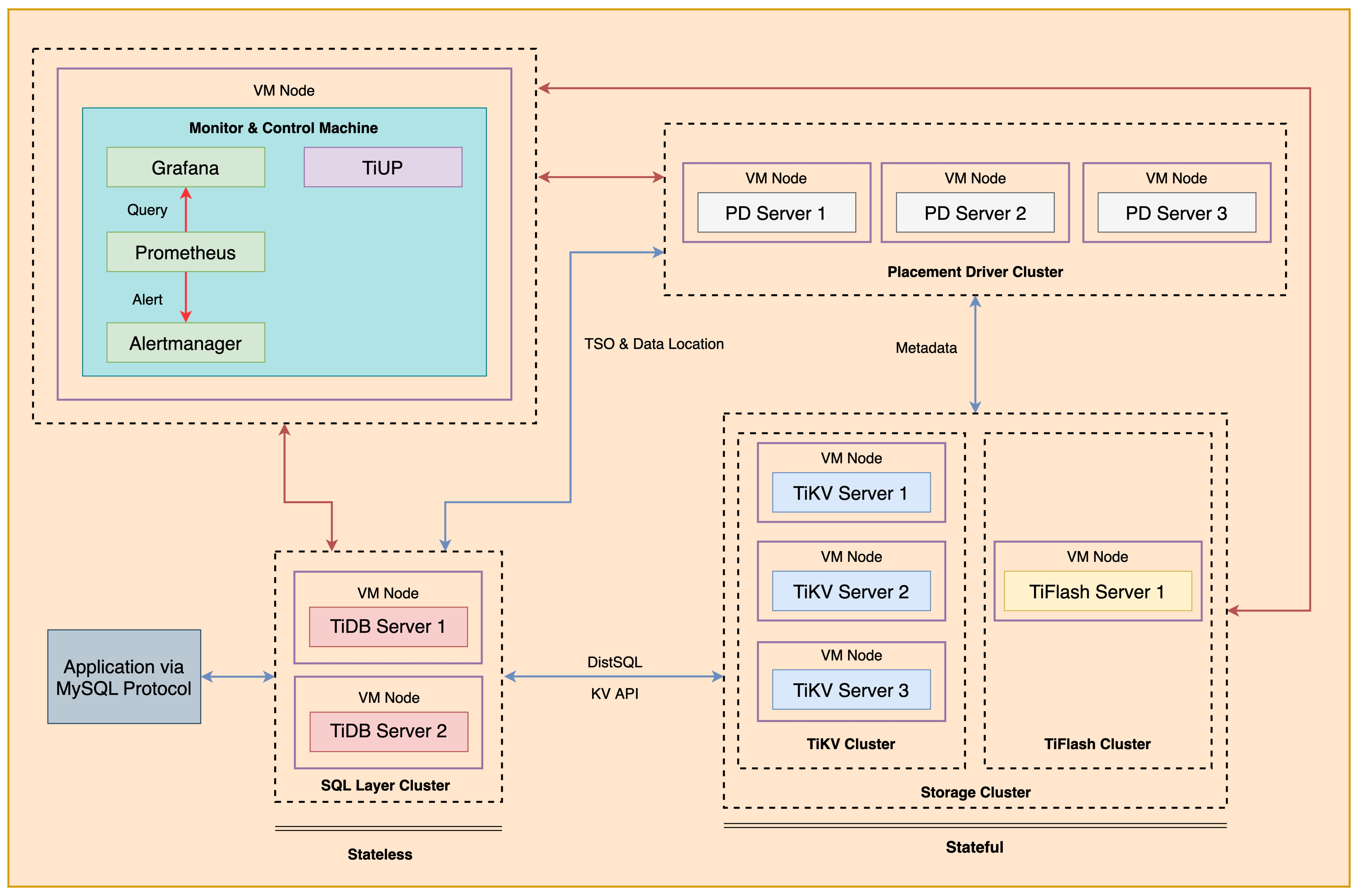
+ The following shows the deployment topology diagram of TiDB cluster.
 ### Notes
+ Many of the steps require that you type commands in a terminal window. You might find it convenient to launch a terminal window and keep it open for the duration of the exercises.
+ Your environment may be different with these exercises, including but not limited to `IP`, `port`, `username`, `password` and `directory`.
+ The `$` in your terminal window is an OS prompt.
+ The "`tidb>`" or "`mysql>`" in your terminal window is SQL command prompt.
+ You may use `ff7.sh` to install, deploy, and start a TiDB cluster and relevant tools. And, you can run `source hosts-env.sh` and `source .bash_profile` to set environment variables.
+ In these exercises, we need 10 machines connected in the network. The `Role` and `IP Address` (represented by environment variables) are as follows:
| `Node Role` | `IP Address` |
| :----------------- | :-------------------------------------------------------- |
| `Monitor 1` | `${HOST_MONITOR1_PRIVATE_IP}, ${HOST_MONITOR1_PUBLIC_IP}` |
| `Control Machine` | `${HOST_CM_PRIVATE_IP}, ${HOST_CM_PUBLIC_IP}` |
| `TiDB server 1` | `${HOST_DB1_PRIVATE_IP}, ${HOST_DB1_PUBLIC_IP}` |
| `TiDB server 2` | `${HOST_DB2_PRIVATE_IP}, ${HOST_DB2_PUBLIC_IP}` |
| `TiKV server 1` | `${HOST_KV1_PRIVATE_IP}, ${HOST_KV1_PUBLIC_IP}` |
| `TiKV server 2` | `${HOST_KV2_PRIVATE_IP}, ${HOST_KV2_PUBLIC_IP}` |
| `TiKV server 3` | `${HOST_KV3_PRIVATE_IP}, ${HOST_KV3_PUBLIC_IP}` |
| `PD server 1` | `${HOST_PD1_PRIVATE_IP}, ${HOST_PD1_PUBLIC_IP}` |
| `PD server 2` | `${HOST_PD2_PRIVATE_IP}, ${HOST_PD2_PUBLIC_IP}` |
| `PD server 3` | `${HOST_PD3_PRIVATE_IP}, ${HOST_PD3_PUBLIC_IP}` |
| `TiFlash server 1` | `${HOST_TIFLASH1_PRIVATE_IP}, ${HOST_TIFLASH1_PUBLIC_IP}` |
| `Alertmanager` | `${HOST_MONITOR1_PRIVATE_IP}, ${HOST_MONITOR1_PUBLIC_IP}` |
| `Grafana` | `${HOST_MONITOR1_PRIVATE_IP}, ${HOST_MONITOR1_PUBLIC_IP}` |
| `Prometheus` | `${HOST_MONITOR1_PRIVATE_IP}, ${HOST_MONITOR1_PUBLIC_IP}` |
### Assumptions
+ You are given the user credentials (for example: the private key) of the exercise environment.
+ You are given access to 10 machines that have been set up.
+ You have completed the activities in the exercise titled "*Exercises 1: Deploying a TiDB Cluster Using TiUP*" and have a terminal window open.
+ Your environment has TiDB cluster and MySQL deployed and running.
+ You have cleaned up the old practice data.
## Exercise 1: Demo setup and observe the baseline
### Overview
+ In this exercise, you setup the demo my importing the Sysbench data. You also observe the throughput baseline of workload 1 and 2, without resource control.
### Duration
+ This exercise should take you approximately 20 minutes to complete.
### Tasks
1. Setup up the demo, and observe the baseline throughput of userA and userB.
### Solution
1. Open two terminals, login as user `ec2-user` on the `Control Machine` (`${HOST_MONITOR1_PUBLIC_IP}`). Enter the following command at the terminal prompt and receive the results shown:
```
$ ssh -A -o ServerAliveInterval=30 -o ServerAliveCountMax=5 ec2-user
__| __|_ )
_| ( / Amazon Linux 2 AMI
___|\___|___|
https://aws.amazon.com/amazon-linux-2/
2. In any terminal, upgrade the existing TiDB from v6.5.1 to v7.5.1.
```
$ tiup cluster upgrade tidb-test v7.5.1
```
3. In any terminal, extract the data directories archive from `tidb-admin-dataset.zip` to `/home/ec2-user/stage/` on node `monitor1`. You may skip this step, if you have done so eariler.
```
unzip -u stage/tidb-admin-dataset.zip -d stage/
```
4. In terminal 1, run the script to prepare the workload schema
```
$ mysql -h ${HOST_DB1_PRIVATE_IP} -uroot -P4000 --verbose
mysql> CREATE USER ltask@'%' IDENTIFIED BY 'q1w2e3R4_';
mysql> GRANT ALL PRIVILEGES ON *.* TO ltask@'%';
mysql> DROP DATABASE IF EXISTS emp;
mysql> CREATE DATABASE emp;
mysql> USE emp;
mysql> CREATE TABLE `sal` ( `emp_no` INT(11) NOT NULL, `salary` INT(11) NOT NULL, `from_date` DATE NOT NULL, `to_date` DATE NOT NULL, PRIMARY KEY (`emp_no`,`from_date`));
mysql> exit;
$ tiup install tidb-lightning:v7.5.1
$ tiup tidb-lightning:v7.5.1 -config solution-lightning-csv.toml
```
5. In terminal 1, run the script to prepare the sysbench schema:
```
$ mysql -h ${HOST_DB1_PRIVATE_IP} -uroot -P4000 --verbose
mysql> CREATE DATABASE sbtest;
mysql> CREATE USER 'userA'@'%' IDENTIFIED BY 'tidb';
mysql> CREATE USER 'userB'@'%' IDENTIFIED BY 'tidb';
mysql> GRANT ALL PRIVILEGES ON *.* TO 'userA'@'%';
mysql> GRANT ALL PRIVILEGES ON *.* TO 'userB'@'%';
mysql> exit;
$ sysbench '/usr/local/share/sysbench/oltp_read_only.lua' --mysql-host=${HOST_DB1_PRIVATE_IP} --mysql-port=4000 --mysql-user=root --mysql-db=sbtest --percentile=99 --threads=10 --tables=32 --table-size=100000 --report-interval=2 --db-driver=mysql prepare
```
6. In terminal 1, run the script to start a sample workload by userA:
```
$ sysbench '/usr/local/share/sysbench/oltp_read_only.lua' --mysql-host=${HOST_DB1_PRIVATE_IP} --mysql-port=4000 --mysql-user=userA --mysql-db=sbtest --percentile=99 --mysql-password=tidb --time=300 --threads=10 --tables=32 --table-size=100000 --report-interval=2 run
```
7. At the almost the same time, in terminal 2, run the script to start the same workload by userB:
```
$ sysbench '/usr/local/share/sysbench/oltp_read_only.lua' --mysql-host=${HOST_DB2_PRIVATE_IP} --mysql-port=4000 --mysql-user=userB --mysql-db=sbtest --percentile=99 --mysql-password=tidb --time=300 --threads=10 --tables=32 --table-size=100000 --report-interval=2 run
```
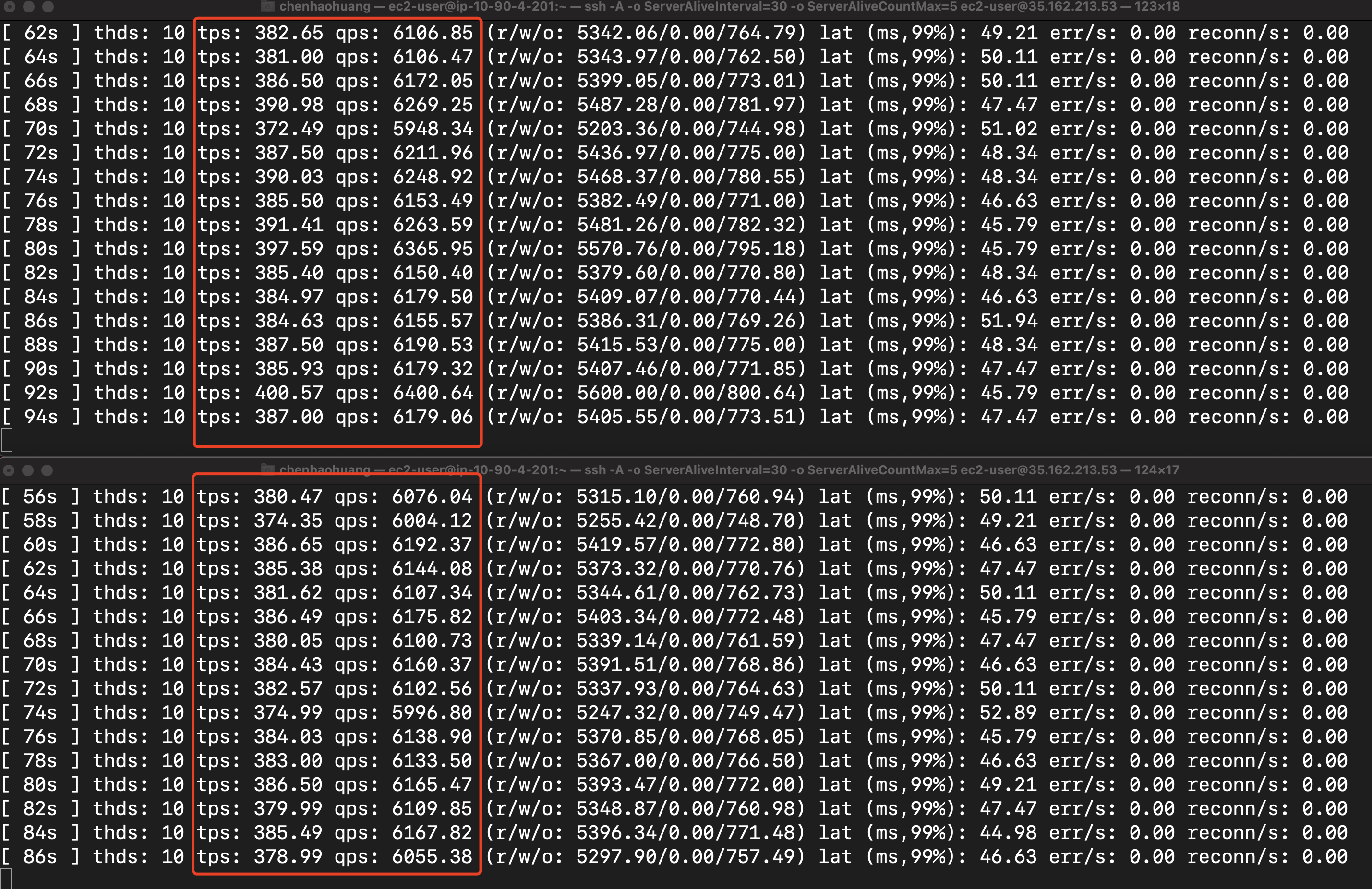
8. Verify the QPS in terminal 1 and 2 are similar. Because we did not apply any Resource Control measures so far, so userA and userB are equal on competing TiDB resources. Note that the performance numbers shown in the figure below are indicative only. The virtual machine types used in the lab may be different from the ones used when making the screen shot.
### Notes
+ Many of the steps require that you type commands in a terminal window. You might find it convenient to launch a terminal window and keep it open for the duration of the exercises.
+ Your environment may be different with these exercises, including but not limited to `IP`, `port`, `username`, `password` and `directory`.
+ The `$` in your terminal window is an OS prompt.
+ The "`tidb>`" or "`mysql>`" in your terminal window is SQL command prompt.
+ You may use `ff7.sh` to install, deploy, and start a TiDB cluster and relevant tools. And, you can run `source hosts-env.sh` and `source .bash_profile` to set environment variables.
+ In these exercises, we need 10 machines connected in the network. The `Role` and `IP Address` (represented by environment variables) are as follows:
| `Node Role` | `IP Address` |
| :----------------- | :-------------------------------------------------------- |
| `Monitor 1` | `${HOST_MONITOR1_PRIVATE_IP}, ${HOST_MONITOR1_PUBLIC_IP}` |
| `Control Machine` | `${HOST_CM_PRIVATE_IP}, ${HOST_CM_PUBLIC_IP}` |
| `TiDB server 1` | `${HOST_DB1_PRIVATE_IP}, ${HOST_DB1_PUBLIC_IP}` |
| `TiDB server 2` | `${HOST_DB2_PRIVATE_IP}, ${HOST_DB2_PUBLIC_IP}` |
| `TiKV server 1` | `${HOST_KV1_PRIVATE_IP}, ${HOST_KV1_PUBLIC_IP}` |
| `TiKV server 2` | `${HOST_KV2_PRIVATE_IP}, ${HOST_KV2_PUBLIC_IP}` |
| `TiKV server 3` | `${HOST_KV3_PRIVATE_IP}, ${HOST_KV3_PUBLIC_IP}` |
| `PD server 1` | `${HOST_PD1_PRIVATE_IP}, ${HOST_PD1_PUBLIC_IP}` |
| `PD server 2` | `${HOST_PD2_PRIVATE_IP}, ${HOST_PD2_PUBLIC_IP}` |
| `PD server 3` | `${HOST_PD3_PRIVATE_IP}, ${HOST_PD3_PUBLIC_IP}` |
| `TiFlash server 1` | `${HOST_TIFLASH1_PRIVATE_IP}, ${HOST_TIFLASH1_PUBLIC_IP}` |
| `Alertmanager` | `${HOST_MONITOR1_PRIVATE_IP}, ${HOST_MONITOR1_PUBLIC_IP}` |
| `Grafana` | `${HOST_MONITOR1_PRIVATE_IP}, ${HOST_MONITOR1_PUBLIC_IP}` |
| `Prometheus` | `${HOST_MONITOR1_PRIVATE_IP}, ${HOST_MONITOR1_PUBLIC_IP}` |
### Assumptions
+ You are given the user credentials (for example: the private key) of the exercise environment.
+ You are given access to 10 machines that have been set up.
+ You have completed the activities in the exercise titled "*Exercises 1: Deploying a TiDB Cluster Using TiUP*" and have a terminal window open.
+ Your environment has TiDB cluster and MySQL deployed and running.
+ You have cleaned up the old practice data.
## Exercise 1: Demo setup and observe the baseline
### Overview
+ In this exercise, you setup the demo my importing the Sysbench data. You also observe the throughput baseline of workload 1 and 2, without resource control.
### Duration
+ This exercise should take you approximately 20 minutes to complete.
### Tasks
1. Setup up the demo, and observe the baseline throughput of userA and userB.
### Solution
1. Open two terminals, login as user `ec2-user` on the `Control Machine` (`${HOST_MONITOR1_PUBLIC_IP}`). Enter the following command at the terminal prompt and receive the results shown:
```
$ ssh -A -o ServerAliveInterval=30 -o ServerAliveCountMax=5 ec2-user
__| __|_ )
_| ( / Amazon Linux 2 AMI
___|\___|___|
https://aws.amazon.com/amazon-linux-2/
2. In any terminal, upgrade the existing TiDB from v6.5.1 to v7.5.1.
```
$ tiup cluster upgrade tidb-test v7.5.1
```
3. In any terminal, extract the data directories archive from `tidb-admin-dataset.zip` to `/home/ec2-user/stage/` on node `monitor1`. You may skip this step, if you have done so eariler.
```
unzip -u stage/tidb-admin-dataset.zip -d stage/
```
4. In terminal 1, run the script to prepare the workload schema
```
$ mysql -h ${HOST_DB1_PRIVATE_IP} -uroot -P4000 --verbose
mysql> CREATE USER ltask@'%' IDENTIFIED BY 'q1w2e3R4_';
mysql> GRANT ALL PRIVILEGES ON *.* TO ltask@'%';
mysql> DROP DATABASE IF EXISTS emp;
mysql> CREATE DATABASE emp;
mysql> USE emp;
mysql> CREATE TABLE `sal` ( `emp_no` INT(11) NOT NULL, `salary` INT(11) NOT NULL, `from_date` DATE NOT NULL, `to_date` DATE NOT NULL, PRIMARY KEY (`emp_no`,`from_date`));
mysql> exit;
$ tiup install tidb-lightning:v7.5.1
$ tiup tidb-lightning:v7.5.1 -config solution-lightning-csv.toml
```
5. In terminal 1, run the script to prepare the sysbench schema:
```
$ mysql -h ${HOST_DB1_PRIVATE_IP} -uroot -P4000 --verbose
mysql> CREATE DATABASE sbtest;
mysql> CREATE USER 'userA'@'%' IDENTIFIED BY 'tidb';
mysql> CREATE USER 'userB'@'%' IDENTIFIED BY 'tidb';
mysql> GRANT ALL PRIVILEGES ON *.* TO 'userA'@'%';
mysql> GRANT ALL PRIVILEGES ON *.* TO 'userB'@'%';
mysql> exit;
$ sysbench '/usr/local/share/sysbench/oltp_read_only.lua' --mysql-host=${HOST_DB1_PRIVATE_IP} --mysql-port=4000 --mysql-user=root --mysql-db=sbtest --percentile=99 --threads=10 --tables=32 --table-size=100000 --report-interval=2 --db-driver=mysql prepare
```
6. In terminal 1, run the script to start a sample workload by userA:
```
$ sysbench '/usr/local/share/sysbench/oltp_read_only.lua' --mysql-host=${HOST_DB1_PRIVATE_IP} --mysql-port=4000 --mysql-user=userA --mysql-db=sbtest --percentile=99 --mysql-password=tidb --time=300 --threads=10 --tables=32 --table-size=100000 --report-interval=2 run
```
7. At the almost the same time, in terminal 2, run the script to start the same workload by userB:
```
$ sysbench '/usr/local/share/sysbench/oltp_read_only.lua' --mysql-host=${HOST_DB2_PRIVATE_IP} --mysql-port=4000 --mysql-user=userB --mysql-db=sbtest --percentile=99 --mysql-password=tidb --time=300 --threads=10 --tables=32 --table-size=100000 --report-interval=2 run
```
8. Verify the QPS in terminal 1 and 2 are similar. Because we did not apply any Resource Control measures so far, so userA and userB are equal on competing TiDB resources. Note that the performance numbers shown in the figure below are indicative only. The virtual machine types used in the lab may be different from the ones used when making the screen shot.
 9. Press CTRL-C to stop both workloads before proceeding to the next section.
## Exercise 2: Control the TiDB server run queue by managing the resource group request unit per seconds quota
9. Press CTRL-C to stop both workloads before proceeding to the next section.
## Exercise 2: Control the TiDB server run queue by managing the resource group request unit per seconds quota
 ### Overview
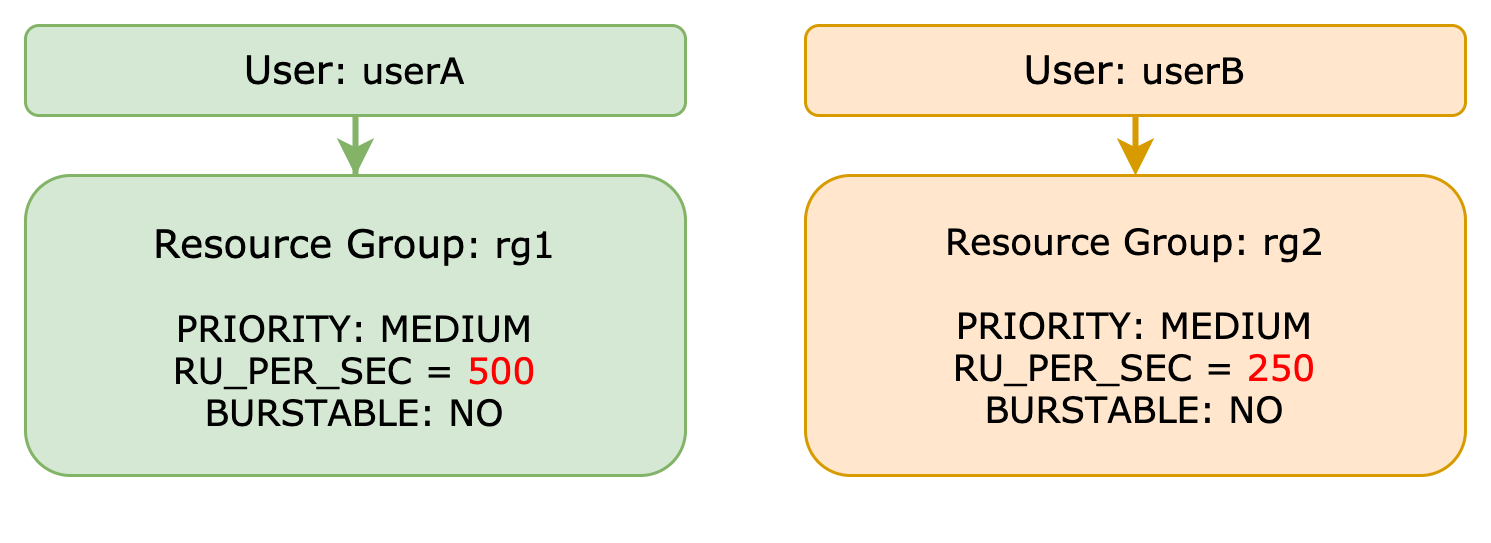
+ In this exercise, you control the TiDB server run queue by managing the resource group request unit per seconds quota
### Duration
+ This exercise should take you approximately 20 minutes to complete.
### Tasks
1. Control the TiDB server run queue by managing the resource group request unit per seconds quota.
### Solution
1. In terminal 1, run the script to set up resource groups for userA and userB with a different quota on RU per seconds:
```
$ mysql -h ${HOST_DB1_PRIVATE_IP} -P 4000 -u root --verbose
mysql> ALTER USER userA RESOURCE GROUP default;
mysql> ALTER USER userB RESOURCE GROUP default;
mysql> DROP RESOURCE GROUP IF EXISTS rg1;
mysql> DROP RESOURCE GROUP IF EXISTS rg2;
mysql> CREATE RESOURCE GROUP rg1 RU_PER_SEC = 500;
mysql> CREATE RESOURCE GROUP rg2 RU_PER_SEC = 250;
mysql> ALTER USER userA RESOURCE GROUP rg1;
mysql> ALTER USER userB RESOURCE GROUP rg2;
mysql> SELECT * FROM information_schema.resource_groups;
mysql> SELECT Host,user, User_attributes FROM mysql.user WHERE user IN ('userA','userB');
mysql> exit;
```
2. In terminal 1, run the script to start an OLTP workload by userA, keep the script running:
```
$ sysbench '/usr/local/share/sysbench/oltp_read_only.lua' --mysql-host=${HOST_DB1_PRIVATE_IP} --mysql-port=4000 --mysql-user=userA --mysql-db=sbtest --percentile=99 --mysql-password=tidb --time=300 --threads=10 --tables=32 --table-size=100000 --report-interval=2 run
```
3. At almost the same time, in terminal 2, run the script to start an OLTP workload by userB, keep the script running:
```
$ sysbench '/usr/local/share/sysbench/oltp_read_only.lua' --mysql-host=${HOST_DB2_PRIVATE_IP} --mysql-port=4000 --mysql-user=userB --mysql-db=sbtest --percentile=99 --mysql-password=tidb --time=300 --threads=10 --tables=32 --table-size=100000 --report-interval=2 run
```
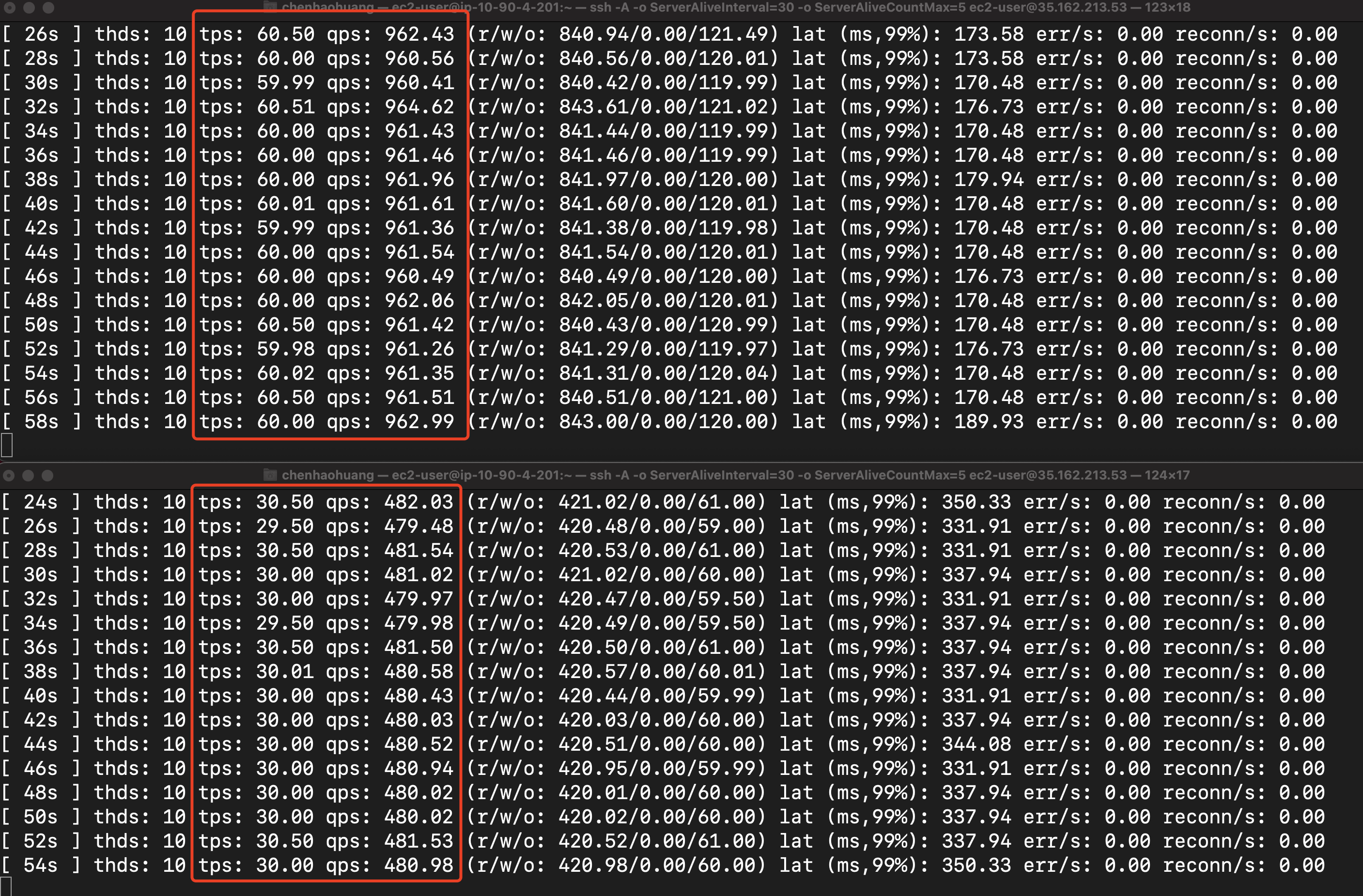
4. Observe that QPS for userA is higher than the QPS for userB because userA had been assigned with more RU_PER_SEC quota. Note that the performance numbers shown in the figure below are indicative only. The virtual machine types used in the lab may be different from the ones used when making the screen shot.
### Overview
+ In this exercise, you control the TiDB server run queue by managing the resource group request unit per seconds quota
### Duration
+ This exercise should take you approximately 20 minutes to complete.
### Tasks
1. Control the TiDB server run queue by managing the resource group request unit per seconds quota.
### Solution
1. In terminal 1, run the script to set up resource groups for userA and userB with a different quota on RU per seconds:
```
$ mysql -h ${HOST_DB1_PRIVATE_IP} -P 4000 -u root --verbose
mysql> ALTER USER userA RESOURCE GROUP default;
mysql> ALTER USER userB RESOURCE GROUP default;
mysql> DROP RESOURCE GROUP IF EXISTS rg1;
mysql> DROP RESOURCE GROUP IF EXISTS rg2;
mysql> CREATE RESOURCE GROUP rg1 RU_PER_SEC = 500;
mysql> CREATE RESOURCE GROUP rg2 RU_PER_SEC = 250;
mysql> ALTER USER userA RESOURCE GROUP rg1;
mysql> ALTER USER userB RESOURCE GROUP rg2;
mysql> SELECT * FROM information_schema.resource_groups;
mysql> SELECT Host,user, User_attributes FROM mysql.user WHERE user IN ('userA','userB');
mysql> exit;
```
2. In terminal 1, run the script to start an OLTP workload by userA, keep the script running:
```
$ sysbench '/usr/local/share/sysbench/oltp_read_only.lua' --mysql-host=${HOST_DB1_PRIVATE_IP} --mysql-port=4000 --mysql-user=userA --mysql-db=sbtest --percentile=99 --mysql-password=tidb --time=300 --threads=10 --tables=32 --table-size=100000 --report-interval=2 run
```
3. At almost the same time, in terminal 2, run the script to start an OLTP workload by userB, keep the script running:
```
$ sysbench '/usr/local/share/sysbench/oltp_read_only.lua' --mysql-host=${HOST_DB2_PRIVATE_IP} --mysql-port=4000 --mysql-user=userB --mysql-db=sbtest --percentile=99 --mysql-password=tidb --time=300 --threads=10 --tables=32 --table-size=100000 --report-interval=2 run
```
4. Observe that QPS for userA is higher than the QPS for userB because userA had been assigned with more RU_PER_SEC quota. Note that the performance numbers shown in the figure below are indicative only. The virtual machine types used in the lab may be different from the ones used when making the screen shot.
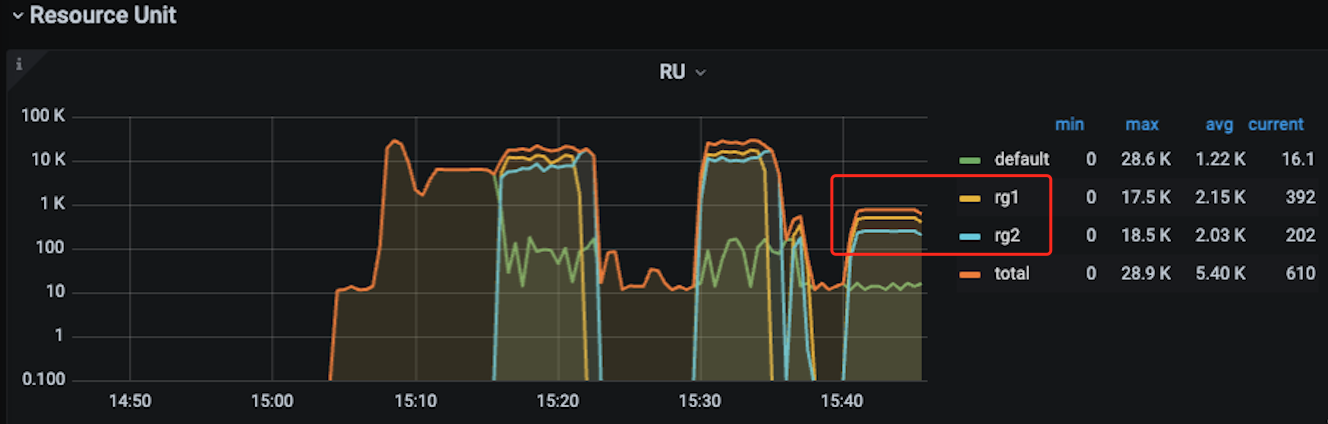
 6. Log in to the Grafana Dashboard with admin/admin, find tidb-demo-TiDB-Resource-Control -> Resource Unit -> RU panel and confirm rg1 has higher RU_PER_SEC than rg2. Note that the performance numbers shown in the figure below are indicative only. The virtual machine types used in the lab may be different from the ones used when making the screen shot.
 Due to the hardware limitation, we will not be able to demo the following:
(1) Control the TiDB cluster scheduling queue by managing the resource group priorities.
(2) Turn on BURSTABLE to serve both workloads with the best effort, while honoring the PRIORITY settings.
If you are interested in those two demos, you may consider join our Kickstart Workshops. Please talk to the instructor, or your sales.
Due to the hardware limitation, we will not be able to demo the following:
(1) Control the TiDB cluster scheduling queue by managing the resource group priorities.
(2) Turn on BURSTABLE to serve both workloads with the best effort, while honoring the PRIORITY settings.
If you are interested in those two demos, you may consider join our Kickstart Workshops. Please talk to the instructor, or your sales.