# Quick recover lost data
### Overview
+ In these exercises, you will set the tidb_snapshot parameter to read historical data and perform data recovery; and use dumpling -- snapshot and FLASHBACK TABLE, FLASHBACK DATABASE and FLASHBACK CLUSTER to recover data that has been modified multiple times.
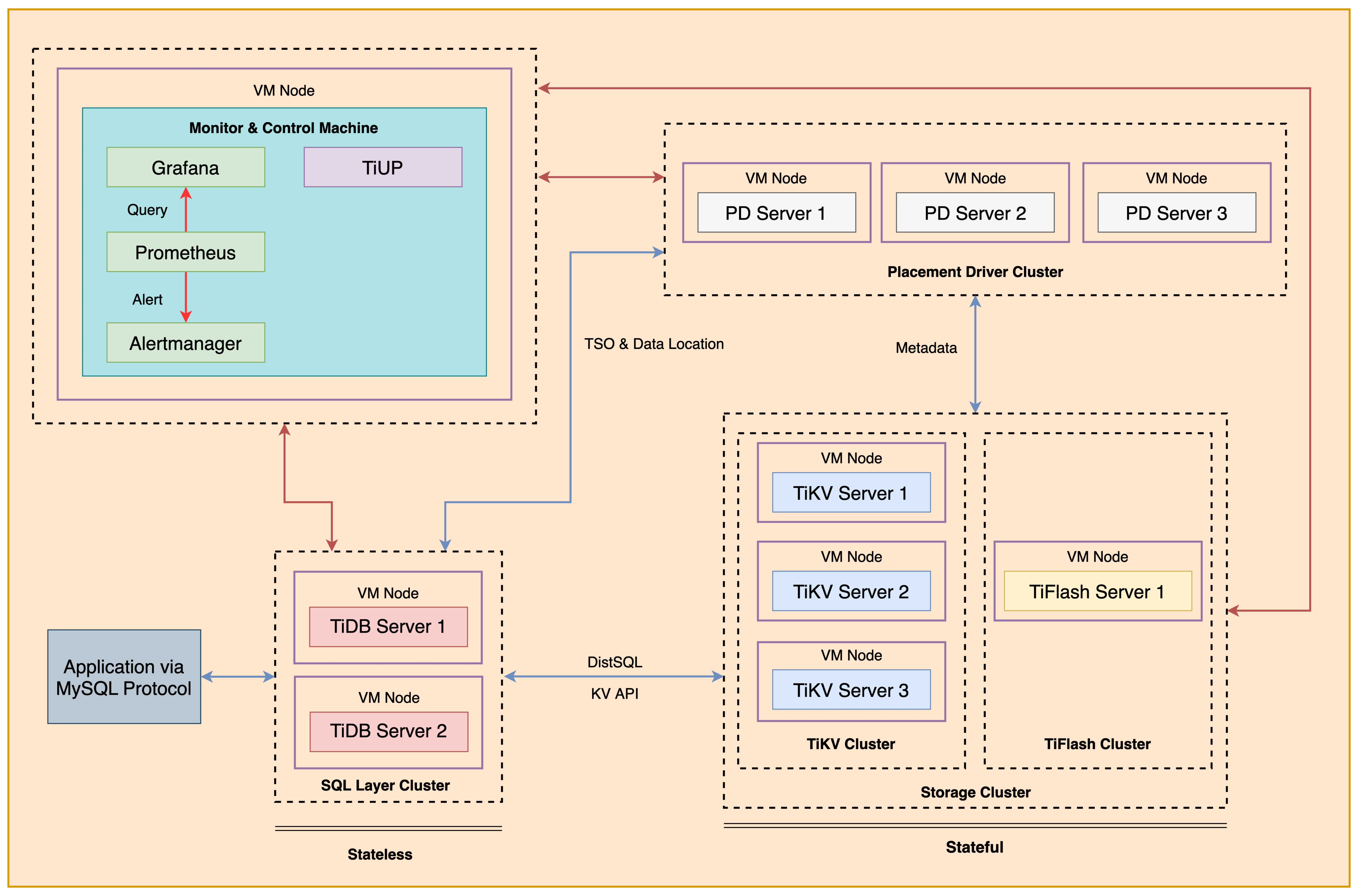
+ The following shows the deployment topology diagram of TiDB cluster.
 ### Notes
+ Many of the steps require that you type commands in a terminal window. You might find it convenient to launch a terminal window and keep it open for the duration of the exercises.
+ Your environment may be different with these exercises, including but not limited to `IP`, `port`, `username`, `password` and `directory`.
+ The `$` in your terminal window is an OS prompt.
+ The "`tidb>`" or "`mysql>`" in your terminal window is SQL command prompt.
+ You may use `ff7.sh` to install, deploy, and start a TiDB cluster and relevant tools. And, you can run `source hosts-env.sh` and `source .bash_profile` to set environment variables.
+ In these exercises, we need 10 machines connected in the network. The `Role` and `IP Address` (represented by environment variables) are as follows:
| `Node Role` | `IP Address` |
| :----------------- | :-------------------------------------------------------- |
| `Monitor 1` | `${HOST_MONITOR1_PRIVATE_IP}, ${HOST_MONITOR1_PUBLIC_IP}` |
| `Control Machine` | `${HOST_CM_PRIVATE_IP}, ${HOST_CM_PUBLIC_IP}` |
| `TiDB server 1` | `${HOST_DB1_PRIVATE_IP}, ${HOST_DB1_PUBLIC_IP}` |
| `TiDB server 2` | `${HOST_DB2_PRIVATE_IP}, ${HOST_DB2_PUBLIC_IP}` |
| `TiKV server 1` | `${HOST_KV1_PRIVATE_IP}, ${HOST_KV1_PUBLIC_IP}` |
| `TiKV server 2` | `${HOST_KV2_PRIVATE_IP}, ${HOST_KV2_PUBLIC_IP}` |
| `TiKV server 3` | `${HOST_KV3_PRIVATE_IP}, ${HOST_KV3_PUBLIC_IP}` |
| `PD server 1` | `${HOST_PD1_PRIVATE_IP}, ${HOST_PD1_PUBLIC_IP}` |
| `PD server 2` | `${HOST_PD2_PRIVATE_IP}, ${HOST_PD2_PUBLIC_IP}` |
| `PD server 3` | `${HOST_PD3_PRIVATE_IP}, ${HOST_PD3_PUBLIC_IP}` |
| `TiFlash server 1` | `${HOST_TIFLASH1_PRIVATE_IP}, ${HOST_TIFLASH1_PUBLIC_IP}` |
| `Alertmanager` | `${HOST_MONITOR1_PRIVATE_IP}, ${HOST_MONITOR1_PUBLIC_IP}` |
| `Grafana` | `${HOST_MONITOR1_PRIVATE_IP}, ${HOST_MONITOR1_PUBLIC_IP}` |
| `Prometheus` | `${HOST_MONITOR1_PRIVATE_IP}, ${HOST_MONITOR1_PUBLIC_IP}` |
### Assumptions
+ You are given the user credentials (for example: the private key) of the exercise environment.
+ You are given access to 10 machines that have been set up.
+ You have completed the activities in the exercise titled "*Exercises 1: Deploying a TiDB Cluster Using TiUP*" and have a terminal window open.
+ Your environment has TiDB cluster and MySQL deployed and running.
+ You have cleaned up the old practice data.
## Exercise 1: Set the tidb_snapshot system variable to read history and recover
### Overview
+ In this exercise, you will set the system variable `tidb_snapshot` to read historical data and then recover the data.
### Duration
+ This exercise should take you approximately 15 minutes to complete.
### Tasks
1. Initialize the environment.
2. Check the current time.
3. Simulation data is updated incorrectly.
4. Confirm whether the `GC` requirements are met.
5. Perform data recovery.
6. Restore parameter values.
### Solution
0. Open two terminals, login as user `ec2-user` on the `Control Machine` (`${HOST_MONITOR1_PUBLIC_IP}`). Enter the following command at the terminal prompt and receive the results shown:
```
$ ssh -A -o ServerAliveInterval=30 -o ServerAliveCountMax=5 ec2-user@
__| __|_ )
_| ( / Amazon Linux 2 AMI
___|\___|___|
https://aws.amazon.com/amazon-linux-2/
1. Initialize the environment.
+ Enter the test database, then create the table `snap_tab` and insert 3 rows of data.
```
tidb>USE test;
Database changed
tidb>CREATE TABLE snap_tab(c int);
Query OK, 0 rows affected (0.12 sec)
tidb>INSERT INTO snap_tab VALUES(1),(2),(3);
Query OK, 3 rows affected (0.01 sec)
Records: 3 Duplicates: 0 Warnings: 0
tidb>SELECT * FROM snap_tab;
+------+
| c |
+------+
| 1 |
| 2 |
| 3 |
+------+
3 rows in set (0.00 sec)
```
2. Check the current time.
+ Record the current time. You can return to this time point if the data is accidentally deleted.
```
tidb>SELECT now();
+---------------------+
| now() |
+---------------------+
| 2024-05-16 11:27:34 |
+---------------------+
1 row in set (0.00 sec)
```
3. Simulation data is updated incorrectly.
```
tidb>UPDATE snap_tab SET c = 22 WHERE c = 2;
Query OK, 1 row affected (0.01 sec)
Rows matched: 1 Changed: 1 Warnings: 0
tidb>SELECT * FROM snap_tab;
+------+
| c |
+------+
| 1 |
| 22 |
| 3 |
+------+
3 rows in set (0.00 sec)
```
4. Confirm whether the `GC` requirements are met.
+ Confirm that the `GC` has not cleaned up historical data and adjust the parameter `tikv_gc_life_time` to ensure that the `GC` does not clean up the data.
```
tidb>SELECT * FROM mysql.tidb WHERE variable_name = 'tikv_gc_safe_point';
+--------------------+-----------------------------+--------------------------------------------------------------+
| VARIABLE_NAME | VARIABLE_VALUE | COMMENT |
+--------------------+-----------------------------+--------------------------------------------------------------+
| tikv_gc_safe_point | 20240516-11:23:08.195 +0000 | All versions after safe point can be accessed. (DO NOT EDIT) |
+--------------------+-----------------------------+--------------------------------------------------------------+
1 row in set (0.00 sec)
tidb>UPDATE mysql.tidb SET VARIABLE_VALUE = '720h' WHERE VARIABLE_NAME='tikv_gc_life_time';
Query OK, 1 row affected (0.00 sec)
Rows matched: 1 Changed: 1 Warnings: 0
```
5. Perform data recovery.
+ Restore the parameter `tidb_snapshot` to the time point before the error update, query the data and confirm the correctness of the data with the business party.
```
tidb>SET @@tidb_snapshot="2024-05-16 11:27:34";
Query OK, 0 rows affected (0.00 sec)
tidb>SELECT * FROM snap_tab;
+------+
| c |
+------+
| 1 |
| 2 |
| 3 |
+------+
3 rows in set (0.01 sec)
```
+ After confirming that the historical data is correct, set the variable `tidb_snapshot` to empty and modify the data.
```
tidb>SET @@tidb_snapshot="";
Query OK, 0 rows affected (0.00 sec)
tidb>UPDATE snap_tab SET c=2 WHERE c=22;
Query OK, 1 row affected (0.00 sec)
Rows matched: 1 Changed: 1 Warnings: 0
tidb>SELECT * FROM snap_tab;
+------+
| c |
+------+
| 1 |
| 2 |
| 3 |
+------+
3 rows in set (0.00 sec)
```
6. Restore parameter values.
+ Restore the system variable `tikv_gc_life_time` to its original value.
```
tidb>UPDATE mysql.tidb SET VARIABLE_VALUE = '10m' WHERE VARIABLE_NAME='tikv_gc_life_time';
Query OK, 1 row affected (0.00 sec)
Rows matched: 1 Changed: 1 Warnings: 0
```
## Exercise 2: Recovering Truncated table
### Overview
+ In this exercise, you will read historical data by setting the `tidb_snapshot` parameter, and use `dumpling --snapshot` and `FLASHBACK TABLE` to recover data that has been TRUNCATEd multiple times.
### Duration
+ This exercise should take you approximately 20 minutes to complete.
### Tasks
1. Initialize the environment.
2. Simulation table is truncated incorrectly.
3. Confirm whether the GC requirements are met.
4. Perform data recovery.
5. Restore parameter values.
### Solution
0. Open two terminals, login as user `ec2-user` on the `Control Machine` (`${HOST_MONITOR1_PUBLIC_IP}`). Enter the following command at the terminal prompt and receive the results shown:
```
$ ssh -A -o ServerAliveInterval=30 -o ServerAliveCountMax=5 ec2-user@
__| __|_ )
_| ( / Amazon Linux 2 AMI
___|\___|___|
https://aws.amazon.com/amazon-linux-2/
1. Initialize the environment.
+ Enter the test database, then create the table `snap_tab` and insert 3 rows of data.
```
tidb>USE test;
Database changed
tidb>CREATE TABLE trun_tab(c int);
Query OK, 0 rows affected (0.10 sec)
tidb>INSERT INTO trun_tab VALUES(1),(2),(3);
Query OK, 3 rows affected (0.00 sec)
Records: 3 Duplicates: 0 Warnings: 0
tidb>SELECT * FROM trun_tab;
+------+
| c |
+------+
| 1 |
| 2 |
| 3 |
+------+
3 rows in set (0.00 sec)
```
2. Simulation data is truncated incorrectly.
+ The truncate operation is performed twice, and new data is inserted into the table after each truncate.
+ The first truncate operation, and new data is inserted after the truncate operation.
```
tidb>TRUNCATE TABLE trun_tab;
Query OK, 0 rows affected (0.15 sec)
tidb>SELECT * FROM trun_tab;
Empty set (0.00 sec)
tidb>INSERT INTO trun_tab VALUES(4),(5),(6);
Query OK, 3 rows affected (0.01 sec)
Records: 3 Duplicates: 0 Warnings: 0
tidb>SELECT * FROM trun_tab;
+------+
| c |
+------+
| 4 |
| 5 |
| 6 |
+------+
3 rows in set (0.01 sec)
```
+ The second truncate operation is performed, and new data is inserted after the truncate operation.
```
tidb>TRUNCATE TABLE trun_tab;
Query OK, 0 rows affected (0.12 sec)
tidb>INSERT INTO trun_tab VALUES(7),(8),(9),(10);
Query OK, 4 rows affected (0.01 sec)
Records: 4 Duplicates: 0 Warnings: 0
tidb>SELECT * FROM trun_tab;
+------+
| c |
+------+
| 7 |
| 8 |
| 9 |
| 10 |
+------+
4 rows in set (0.00 sec)
```
3. Confirm whether the `GC` requirements are met.
+ Use `ADMIN SHOW DDL JOBS` to view the time when two truncate operations occurred: first time: `2024-05-24 04:28:16` - second time: `2024-05-24 04:31:13`
```
tidb>ADMIN SHOW DDL JOBS WHERE table_name='trun_tab';
+--------+---------+------------+----------------+--------------+-----------+----------+-----------+---------------------+---------------------+---------------------+--------+
| JOB_ID | DB_NAME | TABLE_NAME | JOB_TYPE | SCHEMA_STATE | SCHEMA_ID | TABLE_ID | ROW_COUNT | CREATE_TIME | START_TIME | END_TIME | STATE |
+--------+---------+------------+----------------+--------------+-----------+----------+-----------+---------------------+---------------------+---------------------+--------+
| 85 | test | trun_tab | truncate table | public | 2 | 82 | 0 | 2024-05-24 04:31:13 | 2024-05-24 04:31:13 | 2024-05-24 04:31:13 | synced |
| 83 | test | trun_tab | truncate table | public | 2 | 80 | 0 | 2024-05-24 04:28:16 | 2024-05-24 04:28:16 | 2024-05-24 04:28:16 | synced |
| 81 | test | trun_tab | create table | public | 2 | 80 | 0 | 2024-05-24 04:27:43 | 2024-05-24 04:27:43 | 2024-05-24 04:27:43 | synced |
+--------+---------+------------+----------------+--------------+-----------+----------+-----------+---------------------+---------------------+---------------------+--------+
3 rows in set (0.00 sec)
```
+ Check the current safe point reserved by `GC`, which is `2024-05-24 04:15:50.056 +0000`, and meet the recovery requirements.
```
tidb>SELECT * FROM mysql.tidb WHERE variable_name = 'tikv_gc_safe_point';
+--------------------+-----------------------------+--------------------------------------------------------------+
| VARIABLE_NAME | VARIABLE_VALUE | COMMENT |
+--------------------+-----------------------------+--------------------------------------------------------------+
| tikv_gc_safe_point | 20240524-04:15:50.056 +0000 | All versions after safe point can be accessed. (DO NOT EDIT) |
+--------------------+-----------------------------+--------------------------------------------------------------+
1 row in set (0.00 sec)
```
+ Adjust the `GC` interval time to prevent the `MVCC` historical version of the data from being cleaned up and affecting data recovery temporarily. Here it is `720h`.
```
tidb>UPDATE mysql.tidb SET VARIABLE_VALUE = '720h' WHERE VARIABLE_NAME = 'tikv_gc_life_time';
Query OK, 1 row affected (0.00 sec)
Rows matched: 1 Changed: 1 Warnings: 0
```
4. Perform data recovery.
+ Restore the parameter `tidb_snapshot` to the time point before the first error truncate(`2024-05-24 04:28:16`), query the data and confirm the correctness of the data with the business party.
```
tidb>SET SESSION tidb_snapshot="2024-05-24 04:28:16";
Query OK, 0 rows affected (0.01 sec)
```
+ Check whether it is correct historical data:
```
tidb>SELECT * FROM trun_tab;
+------+
| c |
+------+
| 1 |
| 2 |
| 3 |
+------+
3 rows in set (0.01 sec)
```
+ Recover the data that was truncated for the first time:
+ Note: The `FLASHBACK` command cannot be used to recover the first error truncate here, because the `FLASHBACK` command cannot be used with `tidb_snapshot`, because the `FLASHBACK` command cannot recover the same table multiple times, and an error will be reported: `ERROR 1105 (HY000): can not execute write statement when 'tidb_snapshot' is seted.`.
+ You can use the `dumpling` tool with the parameter `snapshot` set to `2024-05-24 04:28:16` to export the historical data of table `trun_tab`.
```
$ tiup dumpling -h10.90.2.196 -P4000 -uroot --filetype sql -T test.trun_tab --snapshot "2024-05-24 04:28:16" -o /tmp/test
Starting component dumpling: /home/ec2-user/.tiup/components/dumpling/v6.5.0/dumpling -h10.90.2.196 -P4000 -uroot --filetype sql -T test.trun_tab --snapshot 2024-05-24 04:28:16 -o /tmp/test
Release version: v6.5.0
Git commit hash: 706c3fa3c526cdba5b3e9f066b1a568fb96c56e3
Git branch: heads/refs/tags/v6.5.0
Build timestamp: 2022-12-27 03:43:05Z
Go version: go version go1.19.3 linux/amd64
...
[2024/05/24 05:06:28.182 +00:00] [INFO] [client.go:779] ["[pd] stop fetching the pending tso requests due to context canceled"] [dc-location=global]
[2024/05/24 05:06:28.182 +00:00] [INFO] [client.go:716] ["[pd] exit tso dispatcher"] [dc-location=global]
[2024/05/24 05:06:28.182 +00:00] [INFO] [main.go:81] ["dump data successfully, dumpling will exit now"]
$ more /tmp/test/test.trun_tab.000000000.sql
/*!40101 SET NAMES binary*/;
INSERT INTO `trun_tab` VALUES
(1),
(2),
(3);
```
+ After confirming that the data is correct, login to the database and recover the first truncate data to the `trun_tab` table.
```
tidb>SOURCE /tmp/test/test.trun_tab.000000000.sql
Query OK, 0 rows affected (0.00 sec)
Query OK, 3 rows affected (0.00 sec)
Records: 3 Duplicates: 0 Warnings: 0
tidb>SELECT * FROM trun_tab;
+------+
| c |
+------+
| 7 |
| 8 |
| 9 |
| 10 |
| 1 |
| 2 |
| 3 |
+------+
7 rows in set (0.00 sec)
```
+ Recover the data that was truncated for the second time:
+ You can use `FLASHBACK TABLE` to recover the data of the table `trun_tab` that was truncate incorrectly for the second time to the new table `trun_tab_tmp`.
```
tidb>FLASHBACK TABLE trun_tab TO trun_tab_tmp;
Query OK, 0 rows affected (0.52 sec)
tidb>SELECT * FROM trun_tab_tmp;
+------+
| c |
+------+
| 4 |
| 5 |
| 6 |
+------+
3 rows in set (0.01 sec)
```
+ After confirming that the data is correct, append the data of the `trun_tab_tmp` table to `trun_tab`.
```
tidb>SELECT * FROM trun_tab;
+------+
| c |
+------+
| 7 |
| 8 |
| 9 |
| 10 |
| 1 |
| 2 |
| 3 |
+------+
7 rows in set (0.00 sec)
tidb>INSERT trun_tab SELECT * FROM trun_tab_tmp;
Query OK, 3 rows affected (0.00 sec)
Records: 3 Duplicates: 0 Warnings: 0
tidb>SELECT * FROM trun_tab;
+------+
| c |
+------+
| 7 |
| 8 |
| 9 |
| 10 |
| 1 |
| 2 |
| 3 |
| 4 |
| 5 |
| 6 |
+------+
10 rows in set (0.00 sec)
```
+ Confirm that the data is correct.
5. Restore parameter values.
+ Restore the system variable `tikv_gc_life_time` to its original value.
```
tidb>UPDATE mysql.tidb SET VARIABLE_VALUE = '10m' WHERE VARIABLE_NAME='tikv_gc_life_time';
Query OK, 1 row affected (0.00 sec)
Rows matched: 1 Changed: 1 Warnings: 0
```
## Exercise 3: Recovering database
### Overview
+ In this exercise, you will use the `FLASHBACK DATABASE` command to recover the `database` that was accidentally deleted.
### Duration
+ This exercise should take you approximately 10 minutes to complete.
### Tasks
1. Initialize the environment.
2. Simulation tables in one database is modified incorrectly.
3. Confirm whether the `GC` requirements are met.
4. Perform data recovery.
5. Restore parameter values.
### Solution
0. Open two terminals, login as user `ec2-user` on the `Control Machine` (`${HOST_MONITOR1_PUBLIC_IP}`). Enter the following command at the terminal prompt and receive the results shown:
```
$ ssh -A -o ServerAliveInterval=30 -o ServerAliveCountMax=5 ec2-user
__| __|_ )
_| ( / Amazon Linux 2 AMI
___|\___|___|
https://aws.amazon.com/amazon-linux-2/
1. Initialize the environment.
+ Create tables `Tab1`, `Tab2` and `Tab3` and insert three rows of data into each table.
```
tidb>USE test;
Database changed
tidb>CREATE TABLE Tab1(a int);
Query OK, 0 rows affected (0.51 sec)
tidb>CREATE TABLE Tab2(b int);
Query OK, 0 rows affected (0.52 sec)
tidb>CREATE TABLE Tab3(c int);
Query OK, 0 rows affected (0.52 sec)
tidb>INSERT INTO Tab1 VALUES(1),(2),(3);
Query OK, 3 rows affected (0.00 sec)
Records: 3 Duplicates: 0 Warnings: 0
tidb>INSERT INTO Tab2 VALUES(4),(5),(6);
Query OK, 3 rows affected (0.01 sec)
Records: 3 Duplicates: 0 Warnings: 0
tidb>INSERT INTO Tab3 VALUES(7),(8),(9);
Query OK, 3 rows affected (0.00 sec)
Records: 3 Duplicates: 0 Warnings: 0
tidb>SELECT * FROM Tab1;
+------+
| a |
+------+
| 1 |
| 2 |
| 3 |
+------+
3 rows in set (0.00 sec)
tidb>SELECT * FROM Tab2;
+------+
| b |
+------+
| 4 |
| 5 |
| 6 |
+------+
3 rows in set (0.00 sec)
tidb>SELECT * FROM Tab3;
+------+
| c |
+------+
| 7 |
| 8 |
| 9 |
+------+
3 rows in set (0.01 sec)
```
2. Simulation database is droped incorrectly.
```
tidb>DROP DATABASE test;
Query OK, 0 rows affected (0.52 sec)
```
3. Confirm whether the `GC` requirements are met.
+ Confirm that the `GC` has not cleaned up historical data and adjust the parameter `tikv_gc_life_time` to ensure that the `GC` does not clean up the data.
```
tidb>SELECT * FROM mysql.tidb WHERE variable_name = 'tikv_gc_safe_point';
+--------------------+-----------------------------+--------------------------------------------------------------+
| VARIABLE_NAME | VARIABLE_VALUE | COMMENT |
+--------------------+-----------------------------+--------------------------------------------------------------+
| tikv_gc_safe_point | 20240524-05:40:50.155 +0000 | All versions after safe point can be accessed. (DO NOT EDIT) |
+--------------------+-----------------------------+--------------------------------------------------------------+
1 row in set (0.00 sec)
tidb>UPDATE mysql.tidb SET VARIABLE_VALUE = '720h' WHERE VARIABLE_NAME='tikv_gc_life_time';
Query OK, 1 row affected (0.00 sec)
Rows matched: 1 Changed: 1 Warnings: 0
```
4. Perform data recovery.
+ Use the `FLASHBACK DATABASE` command to restore `test` database.
```
tidb>FLASHBACK DATABASE test TO test;
Query OK, 0 rows affected (0.52 sec)
```
+ View the recovered data.
```
tidb>SELECT * FROM Tab1;
+------+
| a |
+------+
| 1 |
| 2 |
| 3 |
+------+
3 rows in set (0.00 sec)
tidb>SELECT * FROM Tab2;
+------+
| b |
+------+
| 4 |
| 5 |
| 6 |
+------+
3 rows in set (0.00 sec)
tidb>SELECT * FROM Tab3;
+------+
| c |
+------+
| 7 |
| 8 |
| 9 |
+------+
3 rows in set (0.00 sec)
```
5. Restore parameter values.
+ Restore the system variable `tikv_gc_life_time` to its original value.
```
tidb>UPDATE mysql.tidb SET VARIABLE_VALUE = '10m' WHERE VARIABLE_NAME='tikv_gc_life_time';
Query OK, 1 row affected (0.00 sec)
Rows matched: 1 Changed: 1 Warnings: 0
```
## Exercise 4: Recover the whole cluster
### Overview
+ In this exercise, you will use the `FLASHBACK DATABASE` command to recover the `database` after multiple tables have been misused.
### Duration
+ This exercise should take you approximately 10 minutes to complete.
### Tasks
1. Initialize the environment.
2. Simulation tables in one database is modified incorrectly.
3. Confirm whether the `GC` requirements are met.
4. Perform data recovery.
5. Restore parameter values.
### Solution
0. Open two terminals, login as user `ec2-user` on the `Control Machine` (`${HOST_MONITOR1_PUBLIC_IP}`). Enter the following command at the terminal prompt and receive the results shown:
```
$ ssh -A -o ServerAliveInterval=30 -o ServerAliveCountMax=5 ec2-user@
__| __|_ )
_| ( / Amazon Linux 2 AMI
___|\___|___|
https://aws.amazon.com/amazon-linux-2/
1. Initialize the environment.
+ Create tables `Tab1`, `Tab2` and `Tab3` and insert three rows of data into each table.
```
tidb>USE test;
Database changed
tidb>CREATE TABLE Tab1(a int);
Query OK, 0 rows affected (0.51 sec)
tidb>CREATE TABLE Tab2(b int);
Query OK, 0 rows affected (0.52 sec)
tidb>CREATE TABLE Tab3(c int);
Query OK, 0 rows affected (0.52 sec)
tidb>INSERT INTO Tab1 VALUES(1),(2),(3);
Query OK, 3 rows affected (0.00 sec)
Records: 3 Duplicates: 0 Warnings: 0
tidb>INSERT INTO Tab2 VALUES(4),(5),(6);
Query OK, 3 rows affected (0.01 sec)
Records: 3 Duplicates: 0 Warnings: 0
tidb>INSERT INTO Tab3 VALUES(7),(8),(9);
Query OK, 3 rows affected (0.00 sec)
Records: 3 Duplicates: 0 Warnings: 0
tidb>SELECT * FROM Tab1;
+------+
| a |
+------+
| 1 |
| 2 |
| 3 |
+------+
3 rows in set (0.00 sec)
tidb>SELECT * FROM Tab2;
+------+
| b |
+------+
| 4 |
| 5 |
| 6 |
+------+
3 rows in set (0.00 sec)
tidb>SELECT * FROM Tab3;
+------+
| c |
+------+
| 7 |
| 8 |
| 9 |
+------+
3 rows in set (0.01 sec)
```
+ Get the current time.
```
tidb>SELECT now();
+---------------------+
| now() |
+---------------------+
| 2024-05-24 07:34:41 |
+---------------------+
1 row in set (0.00 sec)
```
2. Simulation tables in one database is modified incorrectly.
```
tidb>DELETE FROM Tab1 WHERE a>1;
Query OK, 2 rows affected (0.01 sec)
tidb>UPDATE Tab2 SET b=9;
Query OK, 3 rows affected (0.00 sec)
Rows matched: 3 Changed: 3 Warnings: 0
tidb>INSERT INTO Tab3 VALUES(7),(8),(9);
Query OK, 3 rows affected (0.00 sec)
Records: 3 Duplicates: 0 Warnings: 0
```
+ View the data.
```
tidb>select * from Tab1;
+------+
| a |
+------+
| 1 |
+------+
1 row in set (0.00 sec)
tidb>select * from Tab2;
+------+
| b |
+------+
| 9 |
| 9 |
| 9 |
+------+
3 rows in set (0.00 sec)
tidb>select * from Tab3;
+------+
| c |
+------+
| 7 |
| 8 |
| 9 |
| 7 |
| 8 |
| 9 |
+------+
6 rows in set (0.00 sec)
```
3. Confirm whether the `GC` requirements are met.
+ Confirm that the `GC` has not cleaned up historical data and adjust the parameter `tikv_gc_life_time` to ensure that the `GC` does not clean up the data.
```
tidb>SELECT * FROM mysql.tidb WHERE variable_name = 'tikv_gc_safe_point';
+--------------------+-----------------------------+--------------------------------------------------------------+
| VARIABLE_NAME | VARIABLE_VALUE | COMMENT |
+--------------------+-----------------------------+--------------------------------------------------------------+
| tikv_gc_safe_point | 20240524-07:20:29.716 +0000 | All versions after safe point can be accessed. (DO NOT EDIT) |
+--------------------+-----------------------------+--------------------------------------------------------------+
1 row in set (0.00 sec)
tidb>UPDATE mysql.tidb SET VARIABLE_VALUE = '720h' WHERE VARIABLE_NAME='tikv_gc_life_time';
Query OK, 0 rows affected (0.00 sec)
Rows matched: 1 Changed: 0 Warnings: 0
```
4. Perform data recovery.
+ Use `FLASHBACK CLUSTER` to recover the whole cluster to a specified point in time.
+ Please note that there cannot be any DDL statement operation from the time point specified in `FLASHBACK CLUSTER` to the current time point, otherwise the `FLASHBACK CLUSTER` operation fails and the error is: `ERROR 1105 (HY000): Detected schema change due to another DDL job during [2024-05-24 07:27:08 +0000 UTC, now), can't do flashback`.
```
tidb>FLASHBACK CLUSTER TO TIMESTAMP '2024-05-24 07:34:41';
Query OK, 0 rows affected (0.36 sec)
```
+ View the recovered data.
```
tidb>select * from Tab1;
+------+
| a |
+------+
| 1 |
| 2 |
| 3 |
+------+
3 rows in set (0.01 sec)
tidb>select * from Tab2;
+------+
| b |
+------+
| 4 |
| 5 |
| 6 |
+------+
3 rows in set (0.00 sec)
tidb>select * from Tab3;
+------+
| c |
+------+
| 7 |
| 8 |
| 9 |
+------+
3 rows in set (0.00 sec)
```
5. Restore parameter values.
+ Restore the system variable `tikv_gc_life_time` to its original value.
```
tidb>UPDATE mysql.tidb SET VARIABLE_VALUE = '10m' WHERE VARIABLE_NAME='tikv_gc_life_time';
Query OK, 1 row affected (0.00 sec)
Rows matched: 1 Changed: 1 Warnings: 0
```
### Notes
+ Many of the steps require that you type commands in a terminal window. You might find it convenient to launch a terminal window and keep it open for the duration of the exercises.
+ Your environment may be different with these exercises, including but not limited to `IP`, `port`, `username`, `password` and `directory`.
+ The `$` in your terminal window is an OS prompt.
+ The "`tidb>`" or "`mysql>`" in your terminal window is SQL command prompt.
+ You may use `ff7.sh` to install, deploy, and start a TiDB cluster and relevant tools. And, you can run `source hosts-env.sh` and `source .bash_profile` to set environment variables.
+ In these exercises, we need 10 machines connected in the network. The `Role` and `IP Address` (represented by environment variables) are as follows:
| `Node Role` | `IP Address` |
| :----------------- | :-------------------------------------------------------- |
| `Monitor 1` | `${HOST_MONITOR1_PRIVATE_IP}, ${HOST_MONITOR1_PUBLIC_IP}` |
| `Control Machine` | `${HOST_CM_PRIVATE_IP}, ${HOST_CM_PUBLIC_IP}` |
| `TiDB server 1` | `${HOST_DB1_PRIVATE_IP}, ${HOST_DB1_PUBLIC_IP}` |
| `TiDB server 2` | `${HOST_DB2_PRIVATE_IP}, ${HOST_DB2_PUBLIC_IP}` |
| `TiKV server 1` | `${HOST_KV1_PRIVATE_IP}, ${HOST_KV1_PUBLIC_IP}` |
| `TiKV server 2` | `${HOST_KV2_PRIVATE_IP}, ${HOST_KV2_PUBLIC_IP}` |
| `TiKV server 3` | `${HOST_KV3_PRIVATE_IP}, ${HOST_KV3_PUBLIC_IP}` |
| `PD server 1` | `${HOST_PD1_PRIVATE_IP}, ${HOST_PD1_PUBLIC_IP}` |
| `PD server 2` | `${HOST_PD2_PRIVATE_IP}, ${HOST_PD2_PUBLIC_IP}` |
| `PD server 3` | `${HOST_PD3_PRIVATE_IP}, ${HOST_PD3_PUBLIC_IP}` |
| `TiFlash server 1` | `${HOST_TIFLASH1_PRIVATE_IP}, ${HOST_TIFLASH1_PUBLIC_IP}` |
| `Alertmanager` | `${HOST_MONITOR1_PRIVATE_IP}, ${HOST_MONITOR1_PUBLIC_IP}` |
| `Grafana` | `${HOST_MONITOR1_PRIVATE_IP}, ${HOST_MONITOR1_PUBLIC_IP}` |
| `Prometheus` | `${HOST_MONITOR1_PRIVATE_IP}, ${HOST_MONITOR1_PUBLIC_IP}` |
### Assumptions
+ You are given the user credentials (for example: the private key) of the exercise environment.
+ You are given access to 10 machines that have been set up.
+ You have completed the activities in the exercise titled "*Exercises 1: Deploying a TiDB Cluster Using TiUP*" and have a terminal window open.
+ Your environment has TiDB cluster and MySQL deployed and running.
+ You have cleaned up the old practice data.
## Exercise 1: Set the tidb_snapshot system variable to read history and recover
### Overview
+ In this exercise, you will set the system variable `tidb_snapshot` to read historical data and then recover the data.
### Duration
+ This exercise should take you approximately 15 minutes to complete.
### Tasks
1. Initialize the environment.
2. Check the current time.
3. Simulation data is updated incorrectly.
4. Confirm whether the `GC` requirements are met.
5. Perform data recovery.
6. Restore parameter values.
### Solution
0. Open two terminals, login as user `ec2-user` on the `Control Machine` (`${HOST_MONITOR1_PUBLIC_IP}`). Enter the following command at the terminal prompt and receive the results shown:
```
$ ssh -A -o ServerAliveInterval=30 -o ServerAliveCountMax=5 ec2-user@
__| __|_ )
_| ( / Amazon Linux 2 AMI
___|\___|___|
https://aws.amazon.com/amazon-linux-2/
1. Initialize the environment.
+ Enter the test database, then create the table `snap_tab` and insert 3 rows of data.
```
tidb>USE test;
Database changed
tidb>CREATE TABLE snap_tab(c int);
Query OK, 0 rows affected (0.12 sec)
tidb>INSERT INTO snap_tab VALUES(1),(2),(3);
Query OK, 3 rows affected (0.01 sec)
Records: 3 Duplicates: 0 Warnings: 0
tidb>SELECT * FROM snap_tab;
+------+
| c |
+------+
| 1 |
| 2 |
| 3 |
+------+
3 rows in set (0.00 sec)
```
2. Check the current time.
+ Record the current time. You can return to this time point if the data is accidentally deleted.
```
tidb>SELECT now();
+---------------------+
| now() |
+---------------------+
| 2024-05-16 11:27:34 |
+---------------------+
1 row in set (0.00 sec)
```
3. Simulation data is updated incorrectly.
```
tidb>UPDATE snap_tab SET c = 22 WHERE c = 2;
Query OK, 1 row affected (0.01 sec)
Rows matched: 1 Changed: 1 Warnings: 0
tidb>SELECT * FROM snap_tab;
+------+
| c |
+------+
| 1 |
| 22 |
| 3 |
+------+
3 rows in set (0.00 sec)
```
4. Confirm whether the `GC` requirements are met.
+ Confirm that the `GC` has not cleaned up historical data and adjust the parameter `tikv_gc_life_time` to ensure that the `GC` does not clean up the data.
```
tidb>SELECT * FROM mysql.tidb WHERE variable_name = 'tikv_gc_safe_point';
+--------------------+-----------------------------+--------------------------------------------------------------+
| VARIABLE_NAME | VARIABLE_VALUE | COMMENT |
+--------------------+-----------------------------+--------------------------------------------------------------+
| tikv_gc_safe_point | 20240516-11:23:08.195 +0000 | All versions after safe point can be accessed. (DO NOT EDIT) |
+--------------------+-----------------------------+--------------------------------------------------------------+
1 row in set (0.00 sec)
tidb>UPDATE mysql.tidb SET VARIABLE_VALUE = '720h' WHERE VARIABLE_NAME='tikv_gc_life_time';
Query OK, 1 row affected (0.00 sec)
Rows matched: 1 Changed: 1 Warnings: 0
```
5. Perform data recovery.
+ Restore the parameter `tidb_snapshot` to the time point before the error update, query the data and confirm the correctness of the data with the business party.
```
tidb>SET @@tidb_snapshot="2024-05-16 11:27:34";
Query OK, 0 rows affected (0.00 sec)
tidb>SELECT * FROM snap_tab;
+------+
| c |
+------+
| 1 |
| 2 |
| 3 |
+------+
3 rows in set (0.01 sec)
```
+ After confirming that the historical data is correct, set the variable `tidb_snapshot` to empty and modify the data.
```
tidb>SET @@tidb_snapshot="";
Query OK, 0 rows affected (0.00 sec)
tidb>UPDATE snap_tab SET c=2 WHERE c=22;
Query OK, 1 row affected (0.00 sec)
Rows matched: 1 Changed: 1 Warnings: 0
tidb>SELECT * FROM snap_tab;
+------+
| c |
+------+
| 1 |
| 2 |
| 3 |
+------+
3 rows in set (0.00 sec)
```
6. Restore parameter values.
+ Restore the system variable `tikv_gc_life_time` to its original value.
```
tidb>UPDATE mysql.tidb SET VARIABLE_VALUE = '10m' WHERE VARIABLE_NAME='tikv_gc_life_time';
Query OK, 1 row affected (0.00 sec)
Rows matched: 1 Changed: 1 Warnings: 0
```
## Exercise 2: Recovering Truncated table
### Overview
+ In this exercise, you will read historical data by setting the `tidb_snapshot` parameter, and use `dumpling --snapshot` and `FLASHBACK TABLE` to recover data that has been TRUNCATEd multiple times.
### Duration
+ This exercise should take you approximately 20 minutes to complete.
### Tasks
1. Initialize the environment.
2. Simulation table is truncated incorrectly.
3. Confirm whether the GC requirements are met.
4. Perform data recovery.
5. Restore parameter values.
### Solution
0. Open two terminals, login as user `ec2-user` on the `Control Machine` (`${HOST_MONITOR1_PUBLIC_IP}`). Enter the following command at the terminal prompt and receive the results shown:
```
$ ssh -A -o ServerAliveInterval=30 -o ServerAliveCountMax=5 ec2-user@
__| __|_ )
_| ( / Amazon Linux 2 AMI
___|\___|___|
https://aws.amazon.com/amazon-linux-2/
1. Initialize the environment.
+ Enter the test database, then create the table `snap_tab` and insert 3 rows of data.
```
tidb>USE test;
Database changed
tidb>CREATE TABLE trun_tab(c int);
Query OK, 0 rows affected (0.10 sec)
tidb>INSERT INTO trun_tab VALUES(1),(2),(3);
Query OK, 3 rows affected (0.00 sec)
Records: 3 Duplicates: 0 Warnings: 0
tidb>SELECT * FROM trun_tab;
+------+
| c |
+------+
| 1 |
| 2 |
| 3 |
+------+
3 rows in set (0.00 sec)
```
2. Simulation data is truncated incorrectly.
+ The truncate operation is performed twice, and new data is inserted into the table after each truncate.
+ The first truncate operation, and new data is inserted after the truncate operation.
```
tidb>TRUNCATE TABLE trun_tab;
Query OK, 0 rows affected (0.15 sec)
tidb>SELECT * FROM trun_tab;
Empty set (0.00 sec)
tidb>INSERT INTO trun_tab VALUES(4),(5),(6);
Query OK, 3 rows affected (0.01 sec)
Records: 3 Duplicates: 0 Warnings: 0
tidb>SELECT * FROM trun_tab;
+------+
| c |
+------+
| 4 |
| 5 |
| 6 |
+------+
3 rows in set (0.01 sec)
```
+ The second truncate operation is performed, and new data is inserted after the truncate operation.
```
tidb>TRUNCATE TABLE trun_tab;
Query OK, 0 rows affected (0.12 sec)
tidb>INSERT INTO trun_tab VALUES(7),(8),(9),(10);
Query OK, 4 rows affected (0.01 sec)
Records: 4 Duplicates: 0 Warnings: 0
tidb>SELECT * FROM trun_tab;
+------+
| c |
+------+
| 7 |
| 8 |
| 9 |
| 10 |
+------+
4 rows in set (0.00 sec)
```
3. Confirm whether the `GC` requirements are met.
+ Use `ADMIN SHOW DDL JOBS` to view the time when two truncate operations occurred: first time: `2024-05-24 04:28:16` - second time: `2024-05-24 04:31:13`
```
tidb>ADMIN SHOW DDL JOBS WHERE table_name='trun_tab';
+--------+---------+------------+----------------+--------------+-----------+----------+-----------+---------------------+---------------------+---------------------+--------+
| JOB_ID | DB_NAME | TABLE_NAME | JOB_TYPE | SCHEMA_STATE | SCHEMA_ID | TABLE_ID | ROW_COUNT | CREATE_TIME | START_TIME | END_TIME | STATE |
+--------+---------+------------+----------------+--------------+-----------+----------+-----------+---------------------+---------------------+---------------------+--------+
| 85 | test | trun_tab | truncate table | public | 2 | 82 | 0 | 2024-05-24 04:31:13 | 2024-05-24 04:31:13 | 2024-05-24 04:31:13 | synced |
| 83 | test | trun_tab | truncate table | public | 2 | 80 | 0 | 2024-05-24 04:28:16 | 2024-05-24 04:28:16 | 2024-05-24 04:28:16 | synced |
| 81 | test | trun_tab | create table | public | 2 | 80 | 0 | 2024-05-24 04:27:43 | 2024-05-24 04:27:43 | 2024-05-24 04:27:43 | synced |
+--------+---------+------------+----------------+--------------+-----------+----------+-----------+---------------------+---------------------+---------------------+--------+
3 rows in set (0.00 sec)
```
+ Check the current safe point reserved by `GC`, which is `2024-05-24 04:15:50.056 +0000`, and meet the recovery requirements.
```
tidb>SELECT * FROM mysql.tidb WHERE variable_name = 'tikv_gc_safe_point';
+--------------------+-----------------------------+--------------------------------------------------------------+
| VARIABLE_NAME | VARIABLE_VALUE | COMMENT |
+--------------------+-----------------------------+--------------------------------------------------------------+
| tikv_gc_safe_point | 20240524-04:15:50.056 +0000 | All versions after safe point can be accessed. (DO NOT EDIT) |
+--------------------+-----------------------------+--------------------------------------------------------------+
1 row in set (0.00 sec)
```
+ Adjust the `GC` interval time to prevent the `MVCC` historical version of the data from being cleaned up and affecting data recovery temporarily. Here it is `720h`.
```
tidb>UPDATE mysql.tidb SET VARIABLE_VALUE = '720h' WHERE VARIABLE_NAME = 'tikv_gc_life_time';
Query OK, 1 row affected (0.00 sec)
Rows matched: 1 Changed: 1 Warnings: 0
```
4. Perform data recovery.
+ Restore the parameter `tidb_snapshot` to the time point before the first error truncate(`2024-05-24 04:28:16`), query the data and confirm the correctness of the data with the business party.
```
tidb>SET SESSION tidb_snapshot="2024-05-24 04:28:16";
Query OK, 0 rows affected (0.01 sec)
```
+ Check whether it is correct historical data:
```
tidb>SELECT * FROM trun_tab;
+------+
| c |
+------+
| 1 |
| 2 |
| 3 |
+------+
3 rows in set (0.01 sec)
```
+ Recover the data that was truncated for the first time:
+ Note: The `FLASHBACK` command cannot be used to recover the first error truncate here, because the `FLASHBACK` command cannot be used with `tidb_snapshot`, because the `FLASHBACK` command cannot recover the same table multiple times, and an error will be reported: `ERROR 1105 (HY000): can not execute write statement when 'tidb_snapshot' is seted.`.
+ You can use the `dumpling` tool with the parameter `snapshot` set to `2024-05-24 04:28:16` to export the historical data of table `trun_tab`.
```
$ tiup dumpling -h10.90.2.196 -P4000 -uroot --filetype sql -T test.trun_tab --snapshot "2024-05-24 04:28:16" -o /tmp/test
Starting component dumpling: /home/ec2-user/.tiup/components/dumpling/v6.5.0/dumpling -h10.90.2.196 -P4000 -uroot --filetype sql -T test.trun_tab --snapshot 2024-05-24 04:28:16 -o /tmp/test
Release version: v6.5.0
Git commit hash: 706c3fa3c526cdba5b3e9f066b1a568fb96c56e3
Git branch: heads/refs/tags/v6.5.0
Build timestamp: 2022-12-27 03:43:05Z
Go version: go version go1.19.3 linux/amd64
...
[2024/05/24 05:06:28.182 +00:00] [INFO] [client.go:779] ["[pd] stop fetching the pending tso requests due to context canceled"] [dc-location=global]
[2024/05/24 05:06:28.182 +00:00] [INFO] [client.go:716] ["[pd] exit tso dispatcher"] [dc-location=global]
[2024/05/24 05:06:28.182 +00:00] [INFO] [main.go:81] ["dump data successfully, dumpling will exit now"]
$ more /tmp/test/test.trun_tab.000000000.sql
/*!40101 SET NAMES binary*/;
INSERT INTO `trun_tab` VALUES
(1),
(2),
(3);
```
+ After confirming that the data is correct, login to the database and recover the first truncate data to the `trun_tab` table.
```
tidb>SOURCE /tmp/test/test.trun_tab.000000000.sql
Query OK, 0 rows affected (0.00 sec)
Query OK, 3 rows affected (0.00 sec)
Records: 3 Duplicates: 0 Warnings: 0
tidb>SELECT * FROM trun_tab;
+------+
| c |
+------+
| 7 |
| 8 |
| 9 |
| 10 |
| 1 |
| 2 |
| 3 |
+------+
7 rows in set (0.00 sec)
```
+ Recover the data that was truncated for the second time:
+ You can use `FLASHBACK TABLE` to recover the data of the table `trun_tab` that was truncate incorrectly for the second time to the new table `trun_tab_tmp`.
```
tidb>FLASHBACK TABLE trun_tab TO trun_tab_tmp;
Query OK, 0 rows affected (0.52 sec)
tidb>SELECT * FROM trun_tab_tmp;
+------+
| c |
+------+
| 4 |
| 5 |
| 6 |
+------+
3 rows in set (0.01 sec)
```
+ After confirming that the data is correct, append the data of the `trun_tab_tmp` table to `trun_tab`.
```
tidb>SELECT * FROM trun_tab;
+------+
| c |
+------+
| 7 |
| 8 |
| 9 |
| 10 |
| 1 |
| 2 |
| 3 |
+------+
7 rows in set (0.00 sec)
tidb>INSERT trun_tab SELECT * FROM trun_tab_tmp;
Query OK, 3 rows affected (0.00 sec)
Records: 3 Duplicates: 0 Warnings: 0
tidb>SELECT * FROM trun_tab;
+------+
| c |
+------+
| 7 |
| 8 |
| 9 |
| 10 |
| 1 |
| 2 |
| 3 |
| 4 |
| 5 |
| 6 |
+------+
10 rows in set (0.00 sec)
```
+ Confirm that the data is correct.
5. Restore parameter values.
+ Restore the system variable `tikv_gc_life_time` to its original value.
```
tidb>UPDATE mysql.tidb SET VARIABLE_VALUE = '10m' WHERE VARIABLE_NAME='tikv_gc_life_time';
Query OK, 1 row affected (0.00 sec)
Rows matched: 1 Changed: 1 Warnings: 0
```
## Exercise 3: Recovering database
### Overview
+ In this exercise, you will use the `FLASHBACK DATABASE` command to recover the `database` that was accidentally deleted.
### Duration
+ This exercise should take you approximately 10 minutes to complete.
### Tasks
1. Initialize the environment.
2. Simulation tables in one database is modified incorrectly.
3. Confirm whether the `GC` requirements are met.
4. Perform data recovery.
5. Restore parameter values.
### Solution
0. Open two terminals, login as user `ec2-user` on the `Control Machine` (`${HOST_MONITOR1_PUBLIC_IP}`). Enter the following command at the terminal prompt and receive the results shown:
```
$ ssh -A -o ServerAliveInterval=30 -o ServerAliveCountMax=5 ec2-user
__| __|_ )
_| ( / Amazon Linux 2 AMI
___|\___|___|
https://aws.amazon.com/amazon-linux-2/
1. Initialize the environment.
+ Create tables `Tab1`, `Tab2` and `Tab3` and insert three rows of data into each table.
```
tidb>USE test;
Database changed
tidb>CREATE TABLE Tab1(a int);
Query OK, 0 rows affected (0.51 sec)
tidb>CREATE TABLE Tab2(b int);
Query OK, 0 rows affected (0.52 sec)
tidb>CREATE TABLE Tab3(c int);
Query OK, 0 rows affected (0.52 sec)
tidb>INSERT INTO Tab1 VALUES(1),(2),(3);
Query OK, 3 rows affected (0.00 sec)
Records: 3 Duplicates: 0 Warnings: 0
tidb>INSERT INTO Tab2 VALUES(4),(5),(6);
Query OK, 3 rows affected (0.01 sec)
Records: 3 Duplicates: 0 Warnings: 0
tidb>INSERT INTO Tab3 VALUES(7),(8),(9);
Query OK, 3 rows affected (0.00 sec)
Records: 3 Duplicates: 0 Warnings: 0
tidb>SELECT * FROM Tab1;
+------+
| a |
+------+
| 1 |
| 2 |
| 3 |
+------+
3 rows in set (0.00 sec)
tidb>SELECT * FROM Tab2;
+------+
| b |
+------+
| 4 |
| 5 |
| 6 |
+------+
3 rows in set (0.00 sec)
tidb>SELECT * FROM Tab3;
+------+
| c |
+------+
| 7 |
| 8 |
| 9 |
+------+
3 rows in set (0.01 sec)
```
2. Simulation database is droped incorrectly.
```
tidb>DROP DATABASE test;
Query OK, 0 rows affected (0.52 sec)
```
3. Confirm whether the `GC` requirements are met.
+ Confirm that the `GC` has not cleaned up historical data and adjust the parameter `tikv_gc_life_time` to ensure that the `GC` does not clean up the data.
```
tidb>SELECT * FROM mysql.tidb WHERE variable_name = 'tikv_gc_safe_point';
+--------------------+-----------------------------+--------------------------------------------------------------+
| VARIABLE_NAME | VARIABLE_VALUE | COMMENT |
+--------------------+-----------------------------+--------------------------------------------------------------+
| tikv_gc_safe_point | 20240524-05:40:50.155 +0000 | All versions after safe point can be accessed. (DO NOT EDIT) |
+--------------------+-----------------------------+--------------------------------------------------------------+
1 row in set (0.00 sec)
tidb>UPDATE mysql.tidb SET VARIABLE_VALUE = '720h' WHERE VARIABLE_NAME='tikv_gc_life_time';
Query OK, 1 row affected (0.00 sec)
Rows matched: 1 Changed: 1 Warnings: 0
```
4. Perform data recovery.
+ Use the `FLASHBACK DATABASE` command to restore `test` database.
```
tidb>FLASHBACK DATABASE test TO test;
Query OK, 0 rows affected (0.52 sec)
```
+ View the recovered data.
```
tidb>SELECT * FROM Tab1;
+------+
| a |
+------+
| 1 |
| 2 |
| 3 |
+------+
3 rows in set (0.00 sec)
tidb>SELECT * FROM Tab2;
+------+
| b |
+------+
| 4 |
| 5 |
| 6 |
+------+
3 rows in set (0.00 sec)
tidb>SELECT * FROM Tab3;
+------+
| c |
+------+
| 7 |
| 8 |
| 9 |
+------+
3 rows in set (0.00 sec)
```
5. Restore parameter values.
+ Restore the system variable `tikv_gc_life_time` to its original value.
```
tidb>UPDATE mysql.tidb SET VARIABLE_VALUE = '10m' WHERE VARIABLE_NAME='tikv_gc_life_time';
Query OK, 1 row affected (0.00 sec)
Rows matched: 1 Changed: 1 Warnings: 0
```
## Exercise 4: Recover the whole cluster
### Overview
+ In this exercise, you will use the `FLASHBACK DATABASE` command to recover the `database` after multiple tables have been misused.
### Duration
+ This exercise should take you approximately 10 minutes to complete.
### Tasks
1. Initialize the environment.
2. Simulation tables in one database is modified incorrectly.
3. Confirm whether the `GC` requirements are met.
4. Perform data recovery.
5. Restore parameter values.
### Solution
0. Open two terminals, login as user `ec2-user` on the `Control Machine` (`${HOST_MONITOR1_PUBLIC_IP}`). Enter the following command at the terminal prompt and receive the results shown:
```
$ ssh -A -o ServerAliveInterval=30 -o ServerAliveCountMax=5 ec2-user@
__| __|_ )
_| ( / Amazon Linux 2 AMI
___|\___|___|
https://aws.amazon.com/amazon-linux-2/
1. Initialize the environment.
+ Create tables `Tab1`, `Tab2` and `Tab3` and insert three rows of data into each table.
```
tidb>USE test;
Database changed
tidb>CREATE TABLE Tab1(a int);
Query OK, 0 rows affected (0.51 sec)
tidb>CREATE TABLE Tab2(b int);
Query OK, 0 rows affected (0.52 sec)
tidb>CREATE TABLE Tab3(c int);
Query OK, 0 rows affected (0.52 sec)
tidb>INSERT INTO Tab1 VALUES(1),(2),(3);
Query OK, 3 rows affected (0.00 sec)
Records: 3 Duplicates: 0 Warnings: 0
tidb>INSERT INTO Tab2 VALUES(4),(5),(6);
Query OK, 3 rows affected (0.01 sec)
Records: 3 Duplicates: 0 Warnings: 0
tidb>INSERT INTO Tab3 VALUES(7),(8),(9);
Query OK, 3 rows affected (0.00 sec)
Records: 3 Duplicates: 0 Warnings: 0
tidb>SELECT * FROM Tab1;
+------+
| a |
+------+
| 1 |
| 2 |
| 3 |
+------+
3 rows in set (0.00 sec)
tidb>SELECT * FROM Tab2;
+------+
| b |
+------+
| 4 |
| 5 |
| 6 |
+------+
3 rows in set (0.00 sec)
tidb>SELECT * FROM Tab3;
+------+
| c |
+------+
| 7 |
| 8 |
| 9 |
+------+
3 rows in set (0.01 sec)
```
+ Get the current time.
```
tidb>SELECT now();
+---------------------+
| now() |
+---------------------+
| 2024-05-24 07:34:41 |
+---------------------+
1 row in set (0.00 sec)
```
2. Simulation tables in one database is modified incorrectly.
```
tidb>DELETE FROM Tab1 WHERE a>1;
Query OK, 2 rows affected (0.01 sec)
tidb>UPDATE Tab2 SET b=9;
Query OK, 3 rows affected (0.00 sec)
Rows matched: 3 Changed: 3 Warnings: 0
tidb>INSERT INTO Tab3 VALUES(7),(8),(9);
Query OK, 3 rows affected (0.00 sec)
Records: 3 Duplicates: 0 Warnings: 0
```
+ View the data.
```
tidb>select * from Tab1;
+------+
| a |
+------+
| 1 |
+------+
1 row in set (0.00 sec)
tidb>select * from Tab2;
+------+
| b |
+------+
| 9 |
| 9 |
| 9 |
+------+
3 rows in set (0.00 sec)
tidb>select * from Tab3;
+------+
| c |
+------+
| 7 |
| 8 |
| 9 |
| 7 |
| 8 |
| 9 |
+------+
6 rows in set (0.00 sec)
```
3. Confirm whether the `GC` requirements are met.
+ Confirm that the `GC` has not cleaned up historical data and adjust the parameter `tikv_gc_life_time` to ensure that the `GC` does not clean up the data.
```
tidb>SELECT * FROM mysql.tidb WHERE variable_name = 'tikv_gc_safe_point';
+--------------------+-----------------------------+--------------------------------------------------------------+
| VARIABLE_NAME | VARIABLE_VALUE | COMMENT |
+--------------------+-----------------------------+--------------------------------------------------------------+
| tikv_gc_safe_point | 20240524-07:20:29.716 +0000 | All versions after safe point can be accessed. (DO NOT EDIT) |
+--------------------+-----------------------------+--------------------------------------------------------------+
1 row in set (0.00 sec)
tidb>UPDATE mysql.tidb SET VARIABLE_VALUE = '720h' WHERE VARIABLE_NAME='tikv_gc_life_time';
Query OK, 0 rows affected (0.00 sec)
Rows matched: 1 Changed: 0 Warnings: 0
```
4. Perform data recovery.
+ Use `FLASHBACK CLUSTER` to recover the whole cluster to a specified point in time.
+ Please note that there cannot be any DDL statement operation from the time point specified in `FLASHBACK CLUSTER` to the current time point, otherwise the `FLASHBACK CLUSTER` operation fails and the error is: `ERROR 1105 (HY000): Detected schema change due to another DDL job during [2024-05-24 07:27:08 +0000 UTC, now), can't do flashback`.
```
tidb>FLASHBACK CLUSTER TO TIMESTAMP '2024-05-24 07:34:41';
Query OK, 0 rows affected (0.36 sec)
```
+ View the recovered data.
```
tidb>select * from Tab1;
+------+
| a |
+------+
| 1 |
| 2 |
| 3 |
+------+
3 rows in set (0.01 sec)
tidb>select * from Tab2;
+------+
| b |
+------+
| 4 |
| 5 |
| 6 |
+------+
3 rows in set (0.00 sec)
tidb>select * from Tab3;
+------+
| c |
+------+
| 7 |
| 8 |
| 9 |
+------+
3 rows in set (0.00 sec)
```
5. Restore parameter values.
+ Restore the system variable `tikv_gc_life_time` to its original value.
```
tidb>UPDATE mysql.tidb SET VARIABLE_VALUE = '10m' WHERE VARIABLE_NAME='tikv_gc_life_time';
Query OK, 1 row affected (0.00 sec)
Rows matched: 1 Changed: 1 Warnings: 0
```