# Exercises 14: Replicating data Using `TiDB Binlog`
## Exercises 14: Overview
### Overview
+ In these exercises, you use the TiUP tool to add a `pump` node and a `drainer` node and then replicate data from one TiDB cluster to MySQL.
+ The following shows the deployment topology diagram of TiDB cluster.
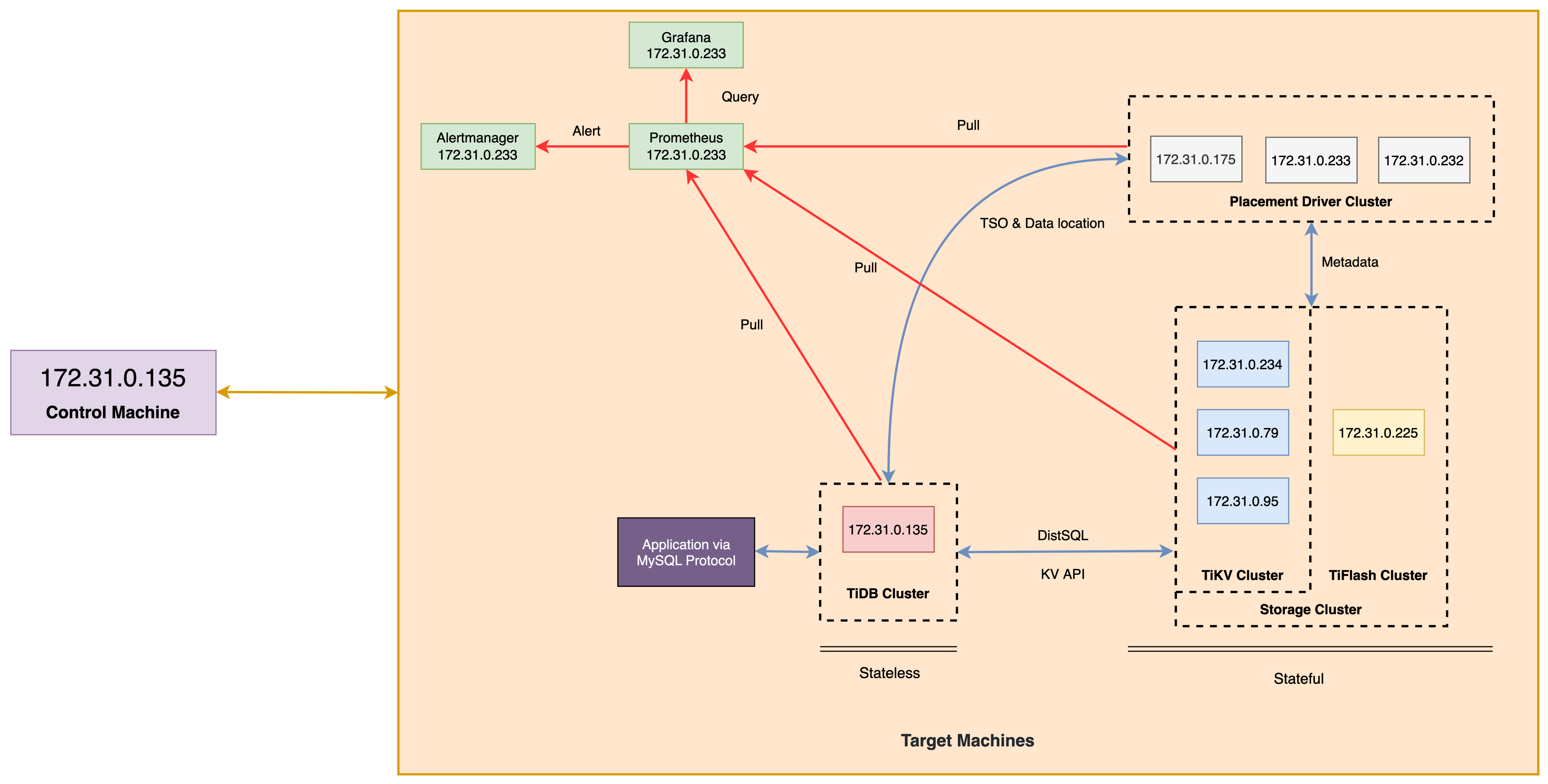 + TiDB Binlog is used to record, sort and merge the binlogs generated in upstream database TiDB instance, then converts the binlog to SQL or data of a specific format, and replicates the data to a specific downstream MySQL instance. The following shows the topology diagram of `TiDB Binlog` cluster.
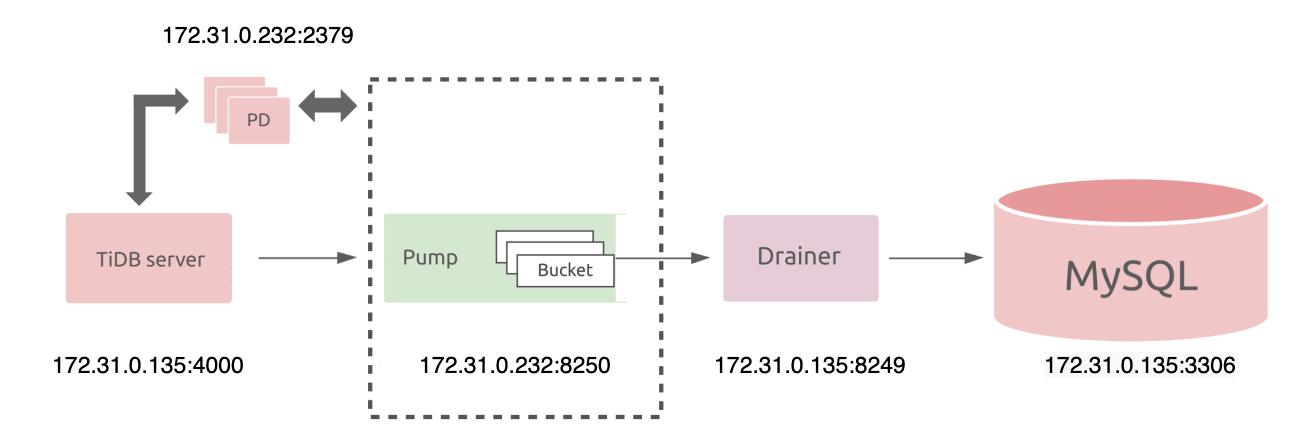 ### Notes
+ Many of the steps require that you type commands in a terminal window. You might find it convenient to launch a terminal window and keep it open for the duration of the exercises.
+ Your environment may be different with these exercises, including but not limited to `IP`, `port`, `username`, `password` and `directory`.
+ The `$` in your terminal window is OS prompt.
+ The "`tidb>`" or "`mysql>`" in your terminal window is SQL command prompt.
+ In these exercises, we need 8 machines connected in the same network. The `Role`, `IP Address` and `Host` are as follows:
| `Role` | `IP Address` | `Host` |
| :------------- | :------------- | :------- |
| `TiDB server` | `172.31.0.135` | `host 1` |
| `TiKV server` | `172.31.0.234` | `host 2` |
| `TiKV server` | `172.31.0.79` | `host 3` |
| `TiKV server` | `172.31.0.95` | `host 4` |
| `PD server` | `172.31.0.175` | `host 5` |
| `PD server` | `172.31.0.233` | `host 6` |
| `PD server` | `172.31.0.252` | `host 7` |
| `TiFlash` | `172.31.0.225` | `host 8` |
| `Alertmanager` | `172.31.0.233` | `host 6` |
| `Grafana` | `172.31.0.233` | `host 6` |
| `Prometheus` | `172.31.0.233` | `host 6` |
### Assumptions
+ You are given access to 8 machines that have been set up.
+ You are given the root user credential of the 8 machines environment.
+ You have completed the activities in the exercise titled "*Exercises 1: Deploying a TiDB Cluster Using TiUP*" and have a terminal window open as the `root` user.
+ Your environment has TiDB cluster and MySQL deployed and running.
+ You have cleaned up the old practice data.
## Exercise 14-1: Deploying `TiDB Binlog` Cluster
### Overview
+ In this exercise, you deploy `TiDB Binlog` using TiUP.
### Duration
+ This exercise should take you approximately 10 minutes to complete.
### Tasks
1. Log in as the `root` user on `host 1`, use a text editor to edit the `scale-out-binlog.yaml` file.
2. On `host 1`, connect to MySQL with port 3306 as downstream database. Create a new user called `root'@'172.31.0.135'` and grant the `all privilege` on all tables to `root'@'172.31.0.135'`. And then exit the mysql client.
3. On `host 1`, connect to TiDB as upstream database and create a new table called `T`. The `T` table should have a primary key column called `id` and a `varchar(20)` column called `name`. Then insert three rows into `T1` table and exit the mysql client.
4. On `host 1`, connect to MySQL with port 3306 as downstream database and create a new database called `test`, with a table called `T`. The `T` table should have a primary key column called `id` and a `varchar(20)` column called `name`. Then insert three rows into `T1` table.
5. On `host 1`, execute the `tiup cluster scale-out` command to scale out the TiDB cluster and add `pump` and `drainer` nodes.
6. On `host 1`, check the status of the deployed TiDB cluster. Verify that the `pump` node with host `172.31.0.232:8250` and the `drainer` node with host `172.31.0.135:8249` have been added and the status is `UP`.
7. On `host 1`, execute the `tiup cluster edit-config` command to set the value of the `binlog.enable` to `true` and `binlog.ignore-error` to `true`.
8. On `host 1`, execute the `tiup cluster reload` to update the configuration.
9. On `host 1`, connect to TiDB as upstream database. Display the values of the `log_bin`.
10. On `host 1`, display the status information for `Pump` and `Drainer` node in TiDB cluster.
### Solution Steps
1. Log in as the `root` user on `host 1`, use a text editor to edit the `scale-out-binlog.yaml` file.
```
$ vi scale-out-binlog.yaml
```
+ The `scale-out-binlog.yaml` file should now contain settings similar to those that follow:
```
pump_servers:
- host: 172.31.0.232
drainer_servers:
- host: 172.31.0.135
config:
syncer.db-type: "mysql"
syncer.to.host: "172.31.0.135"
syncer.to.user: "root"
syncer.to.password: "mysql"
syncer.to.port: 3306
```
+ Configure the `IP` of the MySQL as `172.31.0.135`, the port as `3306`, the replication user of MySQL as `root`, and the password as `mysql`.
2. On `host 1`, connect to MySQL with port 3306 as downstream database. Create a new user called `root'@'172.31.0.135'` and grant the `all privilege` on all tables to `root'@'172.31.0.135'`. And then exit the mysql client. Enter the following command at the terminal prompt and receive the results shown:
```
$ mysql -h127.0.0.1 -P3306 -uroot -pmysql
```
```sql
mysql> CREATE user 'root'@'172.31.0.135' identified BY 'mysql';
Query OK, 0 rows affected (0.00 sec)
mysql> GRANT all privileges ON *.* TO 'root'@'172.31.0.135';
Query OK, 0 rows affected (0.00 sec)
mysql> EXIT
Bye
```
3. On `host 1`, connect to TiDB as upstream database and create a new table called `T`. The `T` table should have a primary key column called `id` and a `varchar(20)` column called `name`. Then insert three rows into `T1` table and exit the mysql client. Enter the following command at the terminal prompt and receive the results shown:
```
$ mysql -h172.31.0.135 -P4000 -uroot -ptidb
```
```sql
tidb> USE test
Database changed
tidb> CREATE TABLE T(id int primary key, name varchar(20));
Query OK, 0 rows affected (0.08 sec)
tidb> INSERT INTO T VALUES(1,'Tom');
Query OK, 1 row affected (0.00 sec)
tidb> INSERT INTO T VALUES(2,'Jack');
Query OK, 1 row affected (0.00 sec)
tidb> INSERT INTO T VALUES(3,'Frank');
Query OK, 1 row affected (0.00 sec)
tidb> SELECT * FROM T;
+----+-------+
| id | name |
+----+-------+
| 1 | Tom |
| 2 | Jack |
| 3 | Frank |
+----+-------+
3 rows in set (0.00 sec)
tidb> EXIT
Bye
```
4. On `host 1`, connect to MySQL with port 3306 as downstream database and create a new database called `test`, with a table called `T`. The `T` table should have a primary key column called `id` and a `varchar(20)` column called `name`. Then insert three rows into `T1` table. Enter the following command at the terminal prompt and receive the results shown:
```
$ mysql -h127.0.0.1 -P3306 -uroot -pmysql
```
```sql
mysql> DROP DATABASE test;
Query OK, 1 row affected (0.01 sec)
mysql> CREATE DATABASE test;
Query OK, 1 row affected (0.00 sec)
mysql> USE test;
Database changed
mysql> CREATE TABLE T(id int primary key, name varchar(20));
Query OK, 0 rows affected (0.02 sec)
mysql> INSERT INTO T VALUES(1,'Tom');
Query OK, 1 row affected (0.00 sec)
mysql> INSERT INTO T VALUES(2,'Jack');
Query OK, 1 row affected (0.00 sec)
mysql> INSERT INTO T VALUES(3,'Frank');
Query OK, 1 row affected (0.00 sec)
mysql> SELECT * FROM T;
+----+-------+
| id | name |
+----+-------+
| 1 | Tom |
| 2 | Jack |
| 3 | Frank |
+----+-------+
3 rows in set (0.00 sec)
mysql> EXIT
Bye
```
5. On `host 1`, execute the `tiup cluster scale-out` command to scale out the TiDB cluster and add `pump` and `drainer` nodes. Enter the following command at the terminal prompt and receive the results shown:
```
$ tiup cluster scale-out tidb-test scale-out-binlog.yaml -uroot -p
...
+ Refresh components conifgs
- Generate config pd -> 172.31.0.233:2379 ... Done
- Generate config pd -> 172.31.0.175:2379 ... Done
- Generate config pd -> 172.31.0.232:2379 ... Done
- Generate config tikv -> 172.31.0.234:20160 ... Done
- Generate config tikv -> 172.31.0.79:20160 ... Done
- Generate config tikv -> 172.31.0.95:20160 ... Done
- Generate config pump -> 172.31.0.232:8250 ... Done
- Generate config tidb -> 172.31.0.135:4000 ... Done
- Generate config tiflash -> 172.31.0.225:9000 ... Done
- Generate config drainer -> 172.31.0.135:8249 ... Done
- Generate config prometheus -> 172.31.0.233:9090 ... Done
- Generate config grafana -> 172.31.0.233:3000 ... Done
- Generate config alertmanager -> 172.31.0.233:9093 ... Done
+ Reload prometheus and grafana
- Reload prometheus -> 172.31.0.233:9090 ... Done
- Reload grafana -> 172.31.0.233:3000 ... Done
+ [ Serial ] - UpdateTopology: cluster=tidb-test
Scaled cluster `tidb-test` out successfully
```
6. On `host 1`, check the status of the deployed TiDB cluster. Verify that the `pump` node with host `172.31.0.232:8250` and the `drainer` node with host `172.31.0.135:8249` have been added and the status is `UP`. Enter the following command at the terminal prompt and receive the results shown:
```
$ tiup cluster display tidb-test
tiup is checking updates for component cluster ...
Starting component `cluster`: /root/.tiup/components/cluster/v1.10.2/tiup-cluster display tidb-test
Cluster type: tidb
Cluster name: tidb-test
Cluster version: v6.1.0
Deploy user: tidb
SSH type: builtin
Dashboard URL: http://172.31.0.232:2379/dashboard
Grafana URL: http://172.31.0.233:3000
ID Role Host Ports OS/Arch Status Data Dir Deploy Dir
-- ---- ---- ----- ------- ------ -------- ----------
172.31.0.233:9093 alertmanager 172.31.0.233 9093/9094 linux/x86_64 Up /tidb-data/alertmanager-9093 /tidb-deploy/alertmanager-9093
172.31.0.135:8249 drainer 172.31.0.135 8249 linux/x86_64 Up /tidb-data/drainer-8249 /tidb-deploy/drainer-8249
172.31.0.233:3000 grafana 172.31.0.233 3000 linux/x86_64 Up - /tidb-deploy/grafana-3000
172.31.0.175:2379 pd 172.31.0.175 2379/2380 linux/x86_64 Up /tidb-data/pd-2379 /tidb-deploy/pd-2379
172.31.0.232:2379 pd 172.31.0.232 2379/2380 linux/x86_64 Up|L|UI /tidb-data/pd-2379 /tidb-deploy/pd-2379
172.31.0.233:2379 pd 172.31.0.233 2379/2380 linux/x86_64 Up /tidb-data/pd-2379 /tidb-deploy/pd-2379
172.31.0.233:9090 prometheus 172.31.0.233 9090/12020 linux/x86_64 Up /tidb-data/prometheus-9090 /tidb-deploy/prometheus-9090
172.31.0.232:8250 pump 172.31.0.232 8250 linux/x86_64 Up /tidb-data/pump-8250 /tidb-deploy/pump-8250
172.31.0.135:4000 tidb 172.31.0.135 4000/10080 linux/x86_64 Up - /tidb-deploy/tidb-4000
172.31.0.225:9000 tiflash 172.31.0.225 9000/8123/3930/20170/20292/8234 linux/x86_64 Up /tidb-data/tiflash-9000 /tidb-deploy/tiflash-9000
172.31.0.234:20160 tikv 172.31.0.234 20160/20180 linux/x86_64 Up /tidb-data/tikv-20160 /tidb-deploy/tikv-20160
172.31.0.79:20160 tikv 172.31.0.79 20160/20180 linux/x86_64 Up /tidb-data/tikv-20160 /tidb-deploy/tikv-20160
172.31.0.95:20160 tikv 172.31.0.95 20160/20180 linux/x86_64 Up /tidb-data/tikv-20160 /tidb-deploy/tikv-20160
Total nodes: 13
```
7. On `host 1`, execute the `tiup cluster edit-config` command to set the value of the `binlog.enable` to `true` and `binlog.ignore-error` to `true`. Enter the following command at the terminal prompt and receive the results shown:
```
$ tiup cluster edit-config tidb-test
...
server_configs:
tidb:
binlog.enable: true
binlog.ignore-error: true
...
Please check change highlight above, do you want to apply the change? [y/N]:(default=N) y
Applying changes...
Applied successfully, please use `tiup cluster reload tidb-test [-N ] [-R ]` to reload config.
```
8. On `host 1`, execute the `tiup cluster reload` to update the configuration. Enter the following command at the terminal prompt and receive the results shown:
```
$ tiup cluster reload tidb-test
tiup is checking updates for component cluster ...
Starting component `cluster`: /root/.tiup/components/cluster/v1.10.2/tiup-cluster reload tidb-test
Will reload the cluster tidb-test with restart policy is true, nodes: , roles: .
Do you want to continue? [y/N]:(default=N) y
+ [ Serial ] - SSHKeySet: privateKey=/root/.tiup/storage/cluster/clusters/tidb-test/ssh/id_rsa, publicKey=/root/.tiup/storage/cluster/clusters/tidb-test/ssh/id_rsa.pub
+ [Parallel] - UserSSH: user=tidb, host=172.31.0.79
+ [Parallel] - UserSSH: user=tidb, host=172.31.0.175
+ [Parallel] - UserSSH: user=tidb, host=172.31.0.95
+ [Parallel] - UserSSH: user=tidb, host=172.31.0.233
+ [Parallel] - UserSSH: user=tidb, host=172.31.0.232
...
Starting component blackbox_exporter
Starting instance 172.31.0.233
Starting instance 172.31.0.234
Starting instance 172.31.0.95
Starting instance 172.31.0.135
Starting instance 172.31.0.175
Starting instance 172.31.0.225
Starting instance 172.31.0.79
Starting instance 172.31.0.232
Start 172.31.0.135 success
Start 172.31.0.232 success
Start 172.31.0.234 success
Start 172.31.0.233 success
Start 172.31.0.95 success
Start 172.31.0.225 success
Start 172.31.0.79 success
Start 172.31.0.175 success
Reloaded cluster `tidb-test` successfully
```
9. On `host 1`, connect to TiDB as upstream database. Display the values of the `log_bin`. Enter the following command at the terminal prompt and receive the results shown:
```
$ mysql -h172.31.0.135 -P4000 -uroot -ptidb
```
```sql
tidb> SHOW VARIABLES LIKE "log_bin";
+---------------+-------+
| Variable_name | Value |
+---------------+-------+
| log_bin | ON |
+---------------+-------+
1 row in set (0.00 sec)
```
+ The values of the `log_bin` is `ON`.
10. On `host 1`, display the status information for `Pump` and `Drainer` node in TiDB cluster. Enter the following command at the terminal prompt and receive the results shown:
```sql
tidb> SHOW pump STATUS;
+-------------------+-------------------+--------+--------------------+---------------------+
| NodeID | Address | State | Max_Commit_Ts | Update_Time |
+-------------------+-------------------+--------+--------------------+---------------------+
| 172.31.0.232:8250 | 172.31.0.232:8250 | online | 434154283869929473 | 2022-06-25 22:26:00 |
+-------------------+-------------------+--------+--------------------+---------------------+
1 row in set (0.00 sec)
tidb> SHOW drainer STATUS;
+-------------------+-------------------+--------+--------------------+---------------------+
| NodeID | Address | State | Max_Commit_Ts | Update_Time |
+-------------------+-------------------+--------+--------------------+---------------------+
| 172.31.0.135:8249 | 172.31.0.135:8249 | online | 434154287015395329 | 2022-06-25 22:26:13 |
+-------------------+-------------------+--------+--------------------+---------------------+
1 row in set (0.00 sec)
tidb> EXIT
Bye
```
+ `TiDB Binlog` has been deployed, and the status of `Pump` and `Drainer` are both online.
## Exercise 14-2: Replicating data Using `TiDB Binlog`
### Overview
+ In this exercise, you replicate data from one TiDB cluster to MySQL using `TiDB Binlog`.
### Duration
+ This exercise should take you approximately 10 minutes to complete.
### Tasks
1. Log in as the `root` user on `host 1`, open a terminal window (t1), connect to TiDB as upstream database. Query the data of the `T` table in the `test` database.
2. On `host 1`, open a second terminal window (t2), connect to MySQL with port 3306 as downstream database. Query the data of the `T` table in the test `database`.
3. In `t1`, insert a row into the `T` table.
4. In `t2`, query the data of the `T` table, verify that the `T` table contains the data from upstream database MySQL.
### Solution Steps
1. Log in as the `root` user on `host 1`, open a terminal window (t1), connect to TiDB as upstream database. Query the data of the `T` table in the `test` database. Enter the following command at the terminal prompt and receive the results shown:
```
$ mysql -h172.31.0.135 -P4000 -uroot -ptidb
```
```sql
tidb> SELECT * FROM test.T;
+----+-------+
| id | name |
+----+-------+
| 1 | Tom |
| 2 | Jack |
| 3 | Frank |
+----+-------+
3 rows in set (0.00 sec)
```
2. On `host 1`, open a second terminal window (t2), connect to MySQL with port 3306 as downstream database. Query the data of the `T` table in the test `database`. Enter the following command at the terminal prompt and receive the results shown:
```
$ mysql -h172.31.0.135 -P3306 -uroot -pmysql
```
```sql
mysql> SELECT * FROM test.T;
+----+-------+
| id | name |
+----+-------+
| 1 | Tom |
| 2 | Jack |
| 3 | Frank |
+----+-------+
3 rows in set (0.00 sec)
```
3. In `t1`, insert a row into the `T` table. Enter the following command at the terminal prompt and receive the results shown:
```sql
mysql> INSERT INTO test.T SELECT 4, 'Tony';
Query OK, 1 row affected (0.01 sec)
Records: 1 Duplicates: 0 Warnings: 0
mysql> SELECT * FROM test.T;
+----+-------+
| id | name |
+----+-------+
| 1 | Tom |
| 2 | Jack |
| 3 | Frank |
| 4 | Tony |
+----+-------+
4 rows in set (0.00 sec)
```
4. In `t2`, query the data of the `T` table, verify that the `T` table contains the data from upstream database MySQL. Enter the following command at the terminal prompt and receive the results shown:
```sql
mysql> SELECT * FROM test.T;
+----+-------+
| id | name |
+----+-------+
| 1 | Tom |
| 2 | Jack |
| 3 | Frank |
| 4 | Tony |
+----+-------+
4 rows in set (0.00 sec)
```
## Exercise 14-3: Managing the `TiDB Binlog` cluster
### Overview
+ In this exercise, you manage the `TiDB Binlog` cluster by using the `binlogctl` tool.
### Duration
+ This exercise should take you approximately 10 minutes to complete.
### Tasks
1. Log in as the `root` user on `host 1`, the `binlogctl` tool installation package is included in the `TiDB Toolkit`. Download the latest `TiDB-community-toolkit` package from https://download.pingcap.org/tidb-community-toolkit-v6.1.0-linux-amd64.tar.gz.
2. On `host 1`, extract the `TiDB Toolkit` binary archive from `tidb-community-toolkit-v6.1.0-linux-amd64.tar.gz` to `/root/`.
3. On `host 1`, confirm the `binlogctl` has been installed.
4. As an option, you can add the installation directory of `binlogctl` to the root user's executable search path by adding the line export `PATH=$PATH:`.
5. On `host 1`, check the status of the `pump` node.
6. On `host 1`, check the status of the `drainer` node.
7. On `host 1`, use `binlogctl` to pause the `drainer node`.
8. On `host 1`, check the status of the paused `drainer node`.
9. On `host 1`, connect to TiDB and insert a row into the `T` table in the `test` database. And then exit the mysql client.
10. On `host 1`, connect to the MySQL and query the data of `T` table in the `test` database. And then exit the mysql client.
### Solution Steps
1. Log in as the `root` user on `host 1`, the `binlogctl` tool installation package is included in the `TiDB Toolkit`. Download the latest `TiDB Toolkit` package from https://download.pingcap.org/tidb-community-toolkit-v6.1.0-linux-amd64.tar.gz.
2. On `host 1`, extract the `TiDB Toolkit` binary archive from `tidb-community-toolkit-v6.1.0-linux-amd64.tar.gz` to `/root/`. Enter the following command at the terminal prompt and receive the results shown:
```
$ cd tidb-community-toolkit-v6.1.0-linux-amd64
$ tar xvf tidb-community-toolkit-v6.1.0-linux-amd64.tar
```
3. On `host 1`, confirm the `binlogctl` has been installed.
```
$ ls binlogctl
binlogctl
```
4. As an option, you can add the installation directory of `binlogctl` to the root user's executable search path by adding the line export `PATH=$PATH:`. Enter the following command at the terminal prompt and receive the results shown:
```
$ cd
$ vi .bash_profile
```
+ The `.bash_profile` file should now contain settings similar to those that follow:
```
# .bash_profile
# Get the aliases and functions
if [ -f ~/.bashrc ]; then
. ~/.bashrc
fi
# User specific environment and startup programs
PATH=$PATH:$HOME/bin:/usr/local/mysql/bin:/root/tidb-community-toolkit-v6.1.0-linux-amd64
export PATH
```
5. On `host 1`, check the status of the `pump` node. Enter the following command at the terminal prompt and receive the results shown:
```
$ binlogctl -pd-urls=http://172.31.0.232:2379 -cmd pumps
[2022/06/26 10:20:08.311 +08:00] [INFO] [nodes.go:53] ["query node"] [type=pump] [node="{NodeID: 172.31.0.232:8250, Addr: 172.31.0.232:8250, State: online, MaxCommitTS: 434165515531321346, UpdateTime: 2022-06-26 10:20:06 +0800 CST}"]
```
6. On `host 1`, check the status of the `drainer` node. Enter the following command at the terminal prompt and receive the results shown:
```
$ binlogctl -pd-urls=http://172.31.0.232:2379 -cmd drainers
[2022/06/26 10:20:31.473 +08:00] [INFO] [nodes.go:53] ["query node"] [type=drainer] [node="{NodeID: 172.31.0.135:8249, Addr: 172.31.0.135:8249, State: online, MaxCommitTS: 434165521036345346, UpdateTime: 2022-06-26 10:20:30 +0800 CST}"]
```
7. On `host 1`, use `binlogctl` to pause the `drainer node`. Enter the following command at the terminal prompt and receive the results shown:
```
$ binlogctl -pd-urls=http://172.31.0.232:2379 -cmd pause-drainer -node-id 172.31.0.135:8249
[2022/06/26 10:24:46.178 +08:00] [INFO] [nodes.go:123] ["Apply action on node success"] [action=pause] [NodeID=172.31.0.135:8249]
```
8. On `host 1`, check the status of the paused `drainer node`. Enter the following command at the terminal prompt and receive the results shown:
```
$ binlogctl -pd-urls=http://172.31.0.232:2379 -cmd drainers
[2022/06/26 10:24:56.047 +08:00] [INFO] [nodes.go:53] ["query node"] [type=drainer] [node="{NodeID: 172.31.0.135:8249, Addr: 172.31.0.135:8249, State: paused, MaxCommitTS: 434165587987922945, UpdateTime: 2022-06-26 10:24:45 +0800 CST}"]
```
9. On `host 1`, connect to TiDB and insert a row into the `T` table in the `test` database. And then exit the mysql client. Enter the following command at the terminal prompt and receive the results shown:
```
$ mysql -h172.31.0.135 -P4000 -uroot -ptidb
```
```sql
tidb> SELECT * FROM test.T;
+----+-------+
| id | name |
+----+-------+
| 1 | Tom |
| 2 | Jack |
| 3 | Frank |
| 4 | Tony |
+----+-------+
4 rows in set (0.00 sec)
tidb> INSERT INTO test.T VALUES(5, 'Candy');
Query OK, 1 row affected (0.01 sec)
tidb> SELECT * FROM test.T;
+----+-------+
| id | name |
+----+-------+
| 1 | Tom |
| 2 | Jack |
| 3 | Frank |
| 4 | Tony |
| 5 | Candy |
+----+-------+
5 rows in set (0.00 sec)
tidb> EXIT
Bye
```
10. On `host 1`, connect to the MySQL and query the data of `T` table in the `test` database. And then exit the mysql client. Enter the following command at the terminal prompt and receive the results shown:
```
$ mysql -h172.31.0.135 -P3306 -uroot -pmysql
```
```sql
mysql> SELECT * FROM test.T;
+----+-------+
| id | name |
+----+-------+
| 1 | Tom |
| 2 | Jack |
| 3 | Frank |
| 4 | Tony |
+----+-------+
4 rows in set (0.00 sec)
mysql> EXIT
Bye
```
+ Replicate has stopped after the `drainer` node stopped.
## Exercise 14-4: Removing the `TiDB Binlog` cluster
### Overview
+ In this exercise, you remove the `TiDB Binlog` cluster.
### Duration
+ This exercise should take you approximately 10 minutes to complete.
### Tasks
1. Log in as the `root` user on `host 1`, execute the `tiup cluster edit-config` command to set the value of the `binlog.enable` and `binlog.ignore-error` to `false`.
2. On `host 1`, use the `tiup cluster reload` to update the configuration.
3. On `host 1`, check the status of the TiDB cluster.
4. On `host 1`, run the `tiup cluster scale-in` command to scale in `drainer` node.
5. On `host 1`, check the status of the TiDB cluster after scale in `drainer` node.
6. On `host 1`, run the `tiup cluster scale-in` command to scale in `pump` node.
7. On `host 1`, check the status of the TiDB cluster after scale in `pump` node.
8. On `host 1`, run the `tiup cluster prune tidb-test` to clean up node data.
9. On `host 1`, check the status of the TiDB cluster.
10. Log out of the client and close all open terminal windows.
### Solution Steps
1. Log in as the `root` user on `host 1`, execute the `tiup cluster edit-config` command to set the value of the `binlog.enable` and `binlog.ignore-error` to `false`. Enter the following command at the terminal prompt and receive the results shown:
```
$ tiup cluster edit-config tidb-test
...
server_configs:
tidb:
binlog.enable: false
binlog.ignore-error: false
...
Please check change highlight above, do you want to apply the change? [y/N]:(default=N) y
Applying changes...
Applied successfully, please use `tiup cluster reload tidb-test [-N ] [-R ]` to reload config.
```
2. On `host 1`, use the `tiup cluster reload` to update the configuration. Enter the following command at the terminal prompt and receive the results shown:
```
$ tiup cluster reload tidb-test
tiup is checking updates for component cluster ...
Starting component `cluster`: /root/.tiup/components/cluster/v1.10.2/tiup-cluster reload tidb-test
Will reload the cluster tidb-test with restart policy is true, nodes: , roles: .
Do you want to continue? [y/N]:(default=N) y
...
Starting component blackbox_exporter
Starting instance 172.31.0.175
Starting instance 172.31.0.232
Starting instance 172.31.0.234
Starting instance 172.31.0.79
Starting instance 172.31.0.95
Starting instance 172.31.0.135
Starting instance 172.31.0.225
Starting instance 172.31.0.233
Start 172.31.0.135 success
Start 172.31.0.233 success
Start 172.31.0.232 success
Start 172.31.0.234 success
Start 172.31.0.225 success
Start 172.31.0.95 success
Start 172.31.0.79 success
Start 172.31.0.175 success
Reloaded cluster `tidb-test` successfully
```
3. On `host 1`, check the status of the TiDB cluster. Enter the following command at the terminal prompt and receive the results shown:
```
$ tiup cluster display tidb-test
tiup is checking updates for component cluster ...
Starting component `cluster`: /root/.tiup/components/cluster/v1.10.2/tiup-cluster display tidb-test
Cluster type: tidb
Cluster name: tidb-test
Cluster version: v6.1.0
Deploy user: tidb
SSH type: builtin
Dashboard URL: http://172.31.0.232:2379/dashboard
Grafana URL: http://172.31.0.233:3000
ID Role Host Ports OS/Arch Status Data Dir Deploy Dir
-- ---- ---- ----- ------- ------ -------- ----------
172.31.0.233:9093 alertmanager 172.31.0.233 9093/9094 linux/x86_64 Up /tidb-data/alertmanager-9093 /tidb-deploy/alertmanager-9093
172.31.0.135:8249 drainer 172.31.0.135 8249 linux/x86_64 Up /tidb-data/drainer-8249 /tidb-deploy/drainer-8249
172.31.0.233:3000 grafana 172.31.0.233 3000 linux/x86_64 Up - /tidb-deploy/grafana-3000
172.31.0.175:2379 pd 172.31.0.175 2379/2380 linux/x86_64 Up /tidb-data/pd-2379 /tidb-deploy/pd-2379
172.31.0.232:2379 pd 172.31.0.232 2379/2380 linux/x86_64 Up|L|UI /tidb-data/pd-2379 /tidb-deploy/pd-2379
172.31.0.233:2379 pd 172.31.0.233 2379/2380 linux/x86_64 Up /tidb-data/pd-2379 /tidb-deploy/pd-2379
172.31.0.233:9090 prometheus 172.31.0.233 9090/12020 linux/x86_64 Up /tidb-data/prometheus-9090 /tidb-deploy/prometheus-9090
172.31.0.232:8250 pump 172.31.0.232 8250 linux/x86_64 Up /tidb-data/pump-8250 /tidb-deploy/pump-8250
172.31.0.135:4000 tidb 172.31.0.135 4000/10080 linux/x86_64 Up - /tidb-deploy/tidb-4000
172.31.0.225:9000 tiflash 172.31.0.225 9000/8123/3930/20170/20292/8234 linux/x86_64 Up /tidb-data/tiflash-9000 /tidb-deploy/tiflash-9000
172.31.0.234:20160 tikv 172.31.0.234 20160/20180 linux/x86_64 Up /tidb-data/tikv-20160 /tidb-deploy/tikv-20160
172.31.0.79:20160 tikv 172.31.0.79 20160/20180 linux/x86_64 Up /tidb-data/tikv-20160 /tidb-deploy/tikv-20160
172.31.0.95:20160 tikv 172.31.0.95 20160/20180 linux/x86_64 Up /tidb-data/tikv-20160 /tidb-deploy/tikv-20160
Total nodes: 13
```
4. On `host 1`, run the `tiup cluster scale-in` command to scale in `drainer` node. Enter the following command at the terminal prompt and receive the results shown:
```
$ tiup cluster scale-in tidb-test --node 172.31.0.135:8249
tiup is checking updates for component cluster ...
Starting component `cluster`: /root/.tiup/components/cluster/v1.10.2/tiup-cluster scale-in tidb-test --node 172.31.0.135:8249
This operation will delete the 172.31.0.135:8249 nodes in `tidb-test` and all their data.
Do you want to continue? [y/N]:(default=N) y
The component `[drainer]` will become tombstone, maybe exists in several minutes or hours, after that you can use the prune command to clean it
Do you want to continue? [y/N]:(default=N) y
...
+ Refresh instance configs
- Generate config pd -> 172.31.0.233:2379 ... Done
- Generate config pd -> 172.31.0.175:2379 ... Done
- Generate config pd -> 172.31.0.232:2379 ... Done
- Generate config tikv -> 172.31.0.234:20160 ... Done
- Generate config tikv -> 172.31.0.79:20160 ... Done
- Generate config tikv -> 172.31.0.95:20160 ... Done
- Generate config pump -> 172.31.0.232:8250 ... Done
- Generate config tidb -> 172.31.0.135:4000 ... Done
- Generate config tiflash -> 172.31.0.225:9000 ... Done
- Generate config prometheus -> 172.31.0.233:9090 ... Done
- Generate config grafana -> 172.31.0.233:3000 ... Done
- Generate config alertmanager -> 172.31.0.233:9093 ... Done
+ Reload prometheus and grafana
- Reload prometheus -> 172.31.0.233:9090 ... Done
- Reload grafana -> 172.31.0.233:3000 ... Done
Scaled cluster `tidb-test` in successfully
```
5. On `host 1`, check the status of the TiDB cluster after scale in `drainer` node. Enter the following command at the terminal prompt and receive the results shown:
```
$ tiup cluster display tidb-test
tiup is checking updates for component cluster ...
Starting component `cluster`: /root/.tiup/components/cluster/v1.10.2/tiup-cluster display tidb-test
Cluster type: tidb
Cluster name: tidb-test
Cluster version: v6.1.0
Deploy user: tidb
SSH type: builtin
Dashboard URL: http://172.31.0.232:2379/dashboard
Grafana URL: http://172.31.0.233:3000
ID Role Host Ports OS/Arch Status Data Dir Deploy Dir
-- ---- ---- ----- ------- ------ -------- ----------
172.31.0.233:9093 alertmanager 172.31.0.233 9093/9094 linux/x86_64 Up /tidb-data/alertmanager-9093 /tidb-deploy/alertmanager-9093
172.31.0.135:8249 drainer 172.31.0.135 8249 linux/x86_64 Tombstone /tidb-data/drainer-8249 /tidb-deploy/drainer-8249
172.31.0.233:3000 grafana 172.31.0.233 3000 linux/x86_64 Up - /tidb-deploy/grafana-3000
172.31.0.175:2379 pd 172.31.0.175 2379/2380 linux/x86_64 Up /tidb-data/pd-2379 /tidb-deploy/pd-2379
172.31.0.232:2379 pd 172.31.0.232 2379/2380 linux/x86_64 Up|UI /tidb-data/pd-2379 /tidb-deploy/pd-2379
172.31.0.233:2379 pd 172.31.0.233 2379/2380 linux/x86_64 Up|L /tidb-data/pd-2379 /tidb-deploy/pd-2379
172.31.0.233:9090 prometheus 172.31.0.233 9090/12020 linux/x86_64 Up /tidb-data/prometheus-9090 /tidb-deploy/prometheus-9090
172.31.0.232:8250 pump 172.31.0.232 8250 linux/x86_64 Up /tidb-data/pump-8250 /tidb-deploy/pump-8250
172.31.0.135:4000 tidb 172.31.0.135 4000/10080 linux/x86_64 Up - /tidb-deploy/tidb-4000
172.31.0.225:9000 tiflash 172.31.0.225 9000/8123/3930/20170/20292/8234 linux/x86_64 Up /tidb-data/tiflash-9000 /tidb-deploy/tiflash-9000
172.31.0.234:20160 tikv 172.31.0.234 20160/20180 linux/x86_64 Up /tidb-data/tikv-20160 /tidb-deploy/tikv-20160
172.31.0.79:20160 tikv 172.31.0.79 20160/20180 linux/x86_64 Up /tidb-data/tikv-20160 /tidb-deploy/tikv-20160
172.31.0.95:20160 tikv 172.31.0.95 20160/20180 linux/x86_64 Up /tidb-data/tikv-20160 /tidb-deploy/tikv-20160
Total nodes: 13
There are some nodes can be pruned:
Nodes: [172.31.0.135:8249]
You can destroy them with the command: `tiup cluster prune tidb-test`
```
6. On `host 1`, run the `tiup cluster scale-in` command to scale in `pump` node. Enter the following command at the terminal prompt and receive the results shown:
```
$ tiup cluster scale-in tidb-test --node 172.31.0.232:8250
tiup is checking updates for component cluster ...
Starting component `cluster`: /root/.tiup/components/cluster/v1.10.2/tiup-cluster scale-in tidb-test --node 172.31.0.232:8250
This operation will delete the 172.31.0.232:8250 nodes in `tidb-test` and all their data.
Do you want to continue? [y/N]:(default=N) y
The component `[pump]` will become tombstone, maybe exists in several minutes or hours, after that you can use the prune command to clean it
Do you want to continue? [y/N]:(default=N) y
...
+ Refresh instance configs
- Generate config pd -> 172.31.0.233:2379 ... Done
- Generate config pd -> 172.31.0.175:2379 ... Done
- Generate config pd -> 172.31.0.232:2379 ... Done
- Generate config tikv -> 172.31.0.234:20160 ... Done
- Generate config tikv -> 172.31.0.79:20160 ... Done
- Generate config tikv -> 172.31.0.95:20160 ... Done
- Generate config tidb -> 172.31.0.135:4000 ... Done
- Generate config tiflash -> 172.31.0.225:9000 ... Done
- Generate config drainer -> 172.31.0.135:8249 ... Done
- Generate config prometheus -> 172.31.0.233:9090 ... Done
- Generate config grafana -> 172.31.0.233:3000 ... Done
- Generate config alertmanager -> 172.31.0.233:9093 ... Done
+ Reload prometheus and grafana
- Reload prometheus -> 172.31.0.233:9090 ... Done
- Reload grafana -> 172.31.0.233:3000 ... Done
Scaled cluster `tidb-test` in successfully
```
7. On `host 1`, check the status of the TiDB cluster after scale in `pump` node. Enter the following command at the terminal prompt and receive the results shown:
```
$ tiup cluster display tidb-test
tiup is checking updates for component cluster ...
Starting component `cluster`: /root/.tiup/components/cluster/v1.10.2/tiup-cluster display tidb-test
Cluster type: tidb
Cluster name: tidb-test
Cluster version: v6.1.0
Deploy user: tidb
SSH type: builtin
Dashboard URL: http://172.31.0.232:2379/dashboard
Grafana URL: http://172.31.0.233:3000
ID Role Host Ports OS/Arch Status Data Dir Deploy Dir
-- ---- ---- ----- ------- ------ -------- ----------
172.31.0.233:9093 alertmanager 172.31.0.233 9093/9094 linux/x86_64 Up /tidb-data/alertmanager-9093 /tidb-deploy/alertmanager-9093
172.31.0.135:8249 drainer 172.31.0.135 8249 linux/x86_64 Tombstone /tidb-data/drainer-8249 /tidb-deploy/drainer-8249
172.31.0.233:3000 grafana 172.31.0.233 3000 linux/x86_64 Up - /tidb-deploy/grafana-3000
172.31.0.175:2379 pd 172.31.0.175 2379/2380 linux/x86_64 Up /tidb-data/pd-2379 /tidb-deploy/pd-2379
172.31.0.232:2379 pd 172.31.0.232 2379/2380 linux/x86_64 Up|UI /tidb-data/pd-2379 /tidb-deploy/pd-2379
172.31.0.233:2379 pd 172.31.0.233 2379/2380 linux/x86_64 Up|L /tidb-data/pd-2379 /tidb-deploy/pd-2379
172.31.0.233:9090 prometheus 172.31.0.233 9090/12020 linux/x86_64 Up /tidb-data/prometheus-9090 /tidb-deploy/prometheus-9090
172.31.0.232:8250 pump 172.31.0.232 8250 linux/x86_64 Tombstone /tidb-data/pump-8250 /tidb-deploy/pump-8250
172.31.0.135:4000 tidb 172.31.0.135 4000/10080 linux/x86_64 Up - /tidb-deploy/tidb-4000
172.31.0.225:9000 tiflash 172.31.0.225 9000/8123/3930/20170/20292/8234 linux/x86_64 Up /tidb-data/tiflash-9000 /tidb-deploy/tiflash-9000
172.31.0.234:20160 tikv 172.31.0.234 20160/20180 linux/x86_64 Up /tidb-data/tikv-20160 /tidb-deploy/tikv-20160
172.31.0.79:20160 tikv 172.31.0.79 20160/20180 linux/x86_64 Up /tidb-data/tikv-20160 /tidb-deploy/tikv-20160
172.31.0.95:20160 tikv 172.31.0.95 20160/20180 linux/x86_64 Up /tidb-data/tikv-20160 /tidb-deploy/tikv-20160
Total nodes: 13
There are some nodes can be pruned:
Nodes: [172.31.0.232:8250 172.31.0.135:8249]
You can destroy them with the command: `tiup cluster prune tidb-test`
```
8. On `host 1`, run the `tiup cluster prune tidb-test` to clean up node data. Enter the following command at the terminal prompt and receive the results shown:
```
$ tiup cluster prune tidb-test
tiup is checking updates for component cluster ...
Starting component `cluster`: /root/.tiup/components/cluster/v1.10.2/tiup-cluster prune tidb-test
+ [ Serial ] - SSHKeySet: privateKey=/root/.tiup/storage/cluster/clusters/tidb-test/ssh/id_rsa, publicKey=/root/.tiup/storage/cluster/clusters/tidb-test/ssh/id_rsa.pub
+ [Parallel] - UserSSH: user=tidb, host=172.31.0.79
+ [Parallel] - UserSSH: user=tidb, host=172.31.0.175
+ [Parallel] - UserSSH: user=tidb, host=172.31.0.95
+ [Parallel] - UserSSH: user=tidb, host=172.31.0.232
+ [Parallel] - UserSSH: user=tidb, host=172.31.0.232
+ [Parallel] - UserSSH: user=tidb, host=172.31.0.135
+ [Parallel] - UserSSH: user=tidb, host=172.31.0.225
+ [Parallel] - UserSSH: user=tidb, host=172.31.0.135
+ [Parallel] - UserSSH: user=tidb, host=172.31.0.233
+ [Parallel] - UserSSH: user=tidb, host=172.31.0.233
+ [Parallel] - UserSSH: user=tidb, host=172.31.0.234
+ [Parallel] - UserSSH: user=tidb, host=172.31.0.233
+ [Parallel] - UserSSH: user=tidb, host=172.31.0.233
+ [ Serial ] - FindTomestoneNodes
Will destroy these nodes: [172.31.0.232:8250 172.31.0.135:8249]
Do you confirm this action? [y/N]:(default=N) y
...
+ Refresh instance configs
- Generate config pd -> 172.31.0.233:2379 ... Done
- Generate config pd -> 172.31.0.175:2379 ... Done
- Generate config pd -> 172.31.0.232:2379 ... Done
- Generate config tikv -> 172.31.0.234:20160 ... Done
- Generate config tikv -> 172.31.0.79:20160 ... Done
- Generate config tikv -> 172.31.0.95:20160 ... Done
- Generate config tidb -> 172.31.0.135:4000 ... Done
- Generate config tiflash -> 172.31.0.225:9000 ... Done
- Generate config prometheus -> 172.31.0.233:9090 ... Done
- Generate config grafana -> 172.31.0.233:3000 ... Done
- Generate config alertmanager -> 172.31.0.233:9093 ... Done
+ Reload prometheus and grafana
- Reload prometheus -> 172.31.0.233:9090 ... Done
- Reload grafana -> 172.31.0.233:3000 ... Done
Destroy success
```
9. On `host 1`, check the status of the TiDB cluster. Enter the following command at the terminal prompt and receive the results shown:
```
$ tiup cluster display tidb-test
tiup is checking updates for component cluster ...
Starting component `cluster`: /root/.tiup/components/cluster/v1.10.2/tiup-cluster display tidb-test
Cluster type: tidb
Cluster name: tidb-test
Cluster version: v6.1.0
Deploy user: tidb
SSH type: builtin
Dashboard URL: http://172.31.0.232:2379/dashboard
Grafana URL: http://172.31.0.233:3000
ID Role Host Ports OS/Arch Status Data Dir Deploy Dir
-- ---- ---- ----- ------- ------ -------- ----------
172.31.0.233:9093 alertmanager 172.31.0.233 9093/9094 linux/x86_64 Up /tidb-data/alertmanager-9093 /tidb-deploy/alertmanager-9093
172.31.0.233:3000 grafana 172.31.0.233 3000 linux/x86_64 Up - /tidb-deploy/grafana-3000
172.31.0.175:2379 pd 172.31.0.175 2379/2380 linux/x86_64 Up /tidb-data/pd-2379 /tidb-deploy/pd-2379
172.31.0.232:2379 pd 172.31.0.232 2379/2380 linux/x86_64 Up|UI /tidb-data/pd-2379 /tidb-deploy/pd-2379
172.31.0.233:2379 pd 172.31.0.233 2379/2380 linux/x86_64 Up|L /tidb-data/pd-2379 /tidb-deploy/pd-2379
172.31.0.233:9090 prometheus 172.31.0.233 9090/12020 linux/x86_64 Up /tidb-data/prometheus-9090 /tidb-deploy/prometheus-9090
172.31.0.135:4000 tidb 172.31.0.135 4000/10080 linux/x86_64 Up - /tidb-deploy/tidb-4000
172.31.0.225:9000 tiflash 172.31.0.225 9000/8123/3930/20170/20292/8234 linux/x86_64 Up /tidb-data/tiflash-9000 /tidb-deploy/tiflash-9000
172.31.0.234:20160 tikv 172.31.0.234 20160/20180 linux/x86_64 Up /tidb-data/tikv-20160 /tidb-deploy/tikv-20160
172.31.0.79:20160 tikv 172.31.0.79 20160/20180 linux/x86_64 Up /tidb-data/tikv-20160 /tidb-deploy/tikv-20160
172.31.0.95:20160 tikv 172.31.0.95 20160/20180 linux/x86_64 Up /tidb-data/tikv-20160 /tidb-deploy/tikv-20160
Total nodes: 11
```
10. Log out of the client and close all open terminal windows.
### Notes
+ Many of the steps require that you type commands in a terminal window. You might find it convenient to launch a terminal window and keep it open for the duration of the exercises.
+ Your environment may be different with these exercises, including but not limited to `IP`, `port`, `username`, `password` and `directory`.
+ The `$` in your terminal window is OS prompt.
+ The "`tidb>`" or "`mysql>`" in your terminal window is SQL command prompt.
+ In these exercises, we need 8 machines connected in the same network. The `Role`, `IP Address` and `Host` are as follows:
| `Role` | `IP Address` | `Host` |
| :------------- | :------------- | :------- |
| `TiDB server` | `172.31.0.135` | `host 1` |
| `TiKV server` | `172.31.0.234` | `host 2` |
| `TiKV server` | `172.31.0.79` | `host 3` |
| `TiKV server` | `172.31.0.95` | `host 4` |
| `PD server` | `172.31.0.175` | `host 5` |
| `PD server` | `172.31.0.233` | `host 6` |
| `PD server` | `172.31.0.252` | `host 7` |
| `TiFlash` | `172.31.0.225` | `host 8` |
| `Alertmanager` | `172.31.0.233` | `host 6` |
| `Grafana` | `172.31.0.233` | `host 6` |
| `Prometheus` | `172.31.0.233` | `host 6` |
### Assumptions
+ You are given access to 8 machines that have been set up.
+ You are given the root user credential of the 8 machines environment.
+ You have completed the activities in the exercise titled "*Exercises 1: Deploying a TiDB Cluster Using TiUP*" and have a terminal window open as the `root` user.
+ Your environment has TiDB cluster and MySQL deployed and running.
+ You have cleaned up the old practice data.
## Exercise 14-1: Deploying `TiDB Binlog` Cluster
### Overview
+ In this exercise, you deploy `TiDB Binlog` using TiUP.
### Duration
+ This exercise should take you approximately 10 minutes to complete.
### Tasks
1. Log in as the `root` user on `host 1`, use a text editor to edit the `scale-out-binlog.yaml` file.
2. On `host 1`, connect to MySQL with port 3306 as downstream database. Create a new user called `root'@'172.31.0.135'` and grant the `all privilege` on all tables to `root'@'172.31.0.135'`. And then exit the mysql client.
3. On `host 1`, connect to TiDB as upstream database and create a new table called `T`. The `T` table should have a primary key column called `id` and a `varchar(20)` column called `name`. Then insert three rows into `T1` table and exit the mysql client.
4. On `host 1`, connect to MySQL with port 3306 as downstream database and create a new database called `test`, with a table called `T`. The `T` table should have a primary key column called `id` and a `varchar(20)` column called `name`. Then insert three rows into `T1` table.
5. On `host 1`, execute the `tiup cluster scale-out` command to scale out the TiDB cluster and add `pump` and `drainer` nodes.
6. On `host 1`, check the status of the deployed TiDB cluster. Verify that the `pump` node with host `172.31.0.232:8250` and the `drainer` node with host `172.31.0.135:8249` have been added and the status is `UP`.
7. On `host 1`, execute the `tiup cluster edit-config` command to set the value of the `binlog.enable` to `true` and `binlog.ignore-error` to `true`.
8. On `host 1`, execute the `tiup cluster reload` to update the configuration.
9. On `host 1`, connect to TiDB as upstream database. Display the values of the `log_bin`.
10. On `host 1`, display the status information for `Pump` and `Drainer` node in TiDB cluster.
### Solution Steps
1. Log in as the `root` user on `host 1`, use a text editor to edit the `scale-out-binlog.yaml` file.
```
$ vi scale-out-binlog.yaml
```
+ The `scale-out-binlog.yaml` file should now contain settings similar to those that follow:
```
pump_servers:
- host: 172.31.0.232
drainer_servers:
- host: 172.31.0.135
config:
syncer.db-type: "mysql"
syncer.to.host: "172.31.0.135"
syncer.to.user: "root"
syncer.to.password: "mysql"
syncer.to.port: 3306
```
+ Configure the `IP` of the MySQL as `172.31.0.135`, the port as `3306`, the replication user of MySQL as `root`, and the password as `mysql`.
2. On `host 1`, connect to MySQL with port 3306 as downstream database. Create a new user called `root'@'172.31.0.135'` and grant the `all privilege` on all tables to `root'@'172.31.0.135'`. And then exit the mysql client. Enter the following command at the terminal prompt and receive the results shown:
```
$ mysql -h127.0.0.1 -P3306 -uroot -pmysql
```
```sql
mysql> CREATE user 'root'@'172.31.0.135' identified BY 'mysql';
Query OK, 0 rows affected (0.00 sec)
mysql> GRANT all privileges ON *.* TO 'root'@'172.31.0.135';
Query OK, 0 rows affected (0.00 sec)
mysql> EXIT
Bye
```
3. On `host 1`, connect to TiDB as upstream database and create a new table called `T`. The `T` table should have a primary key column called `id` and a `varchar(20)` column called `name`. Then insert three rows into `T1` table and exit the mysql client. Enter the following command at the terminal prompt and receive the results shown:
```
$ mysql -h172.31.0.135 -P4000 -uroot -ptidb
```
```sql
tidb> USE test
Database changed
tidb> CREATE TABLE T(id int primary key, name varchar(20));
Query OK, 0 rows affected (0.08 sec)
tidb> INSERT INTO T VALUES(1,'Tom');
Query OK, 1 row affected (0.00 sec)
tidb> INSERT INTO T VALUES(2,'Jack');
Query OK, 1 row affected (0.00 sec)
tidb> INSERT INTO T VALUES(3,'Frank');
Query OK, 1 row affected (0.00 sec)
tidb> SELECT * FROM T;
+----+-------+
| id | name |
+----+-------+
| 1 | Tom |
| 2 | Jack |
| 3 | Frank |
+----+-------+
3 rows in set (0.00 sec)
tidb> EXIT
Bye
```
4. On `host 1`, connect to MySQL with port 3306 as downstream database and create a new database called `test`, with a table called `T`. The `T` table should have a primary key column called `id` and a `varchar(20)` column called `name`. Then insert three rows into `T1` table. Enter the following command at the terminal prompt and receive the results shown:
```
$ mysql -h127.0.0.1 -P3306 -uroot -pmysql
```
```sql
mysql> DROP DATABASE test;
Query OK, 1 row affected (0.01 sec)
mysql> CREATE DATABASE test;
Query OK, 1 row affected (0.00 sec)
mysql> USE test;
Database changed
mysql> CREATE TABLE T(id int primary key, name varchar(20));
Query OK, 0 rows affected (0.02 sec)
mysql> INSERT INTO T VALUES(1,'Tom');
Query OK, 1 row affected (0.00 sec)
mysql> INSERT INTO T VALUES(2,'Jack');
Query OK, 1 row affected (0.00 sec)
mysql> INSERT INTO T VALUES(3,'Frank');
Query OK, 1 row affected (0.00 sec)
mysql> SELECT * FROM T;
+----+-------+
| id | name |
+----+-------+
| 1 | Tom |
| 2 | Jack |
| 3 | Frank |
+----+-------+
3 rows in set (0.00 sec)
mysql> EXIT
Bye
```
5. On `host 1`, execute the `tiup cluster scale-out` command to scale out the TiDB cluster and add `pump` and `drainer` nodes. Enter the following command at the terminal prompt and receive the results shown:
```
$ tiup cluster scale-out tidb-test scale-out-binlog.yaml -uroot -p
...
+ Refresh components conifgs
- Generate config pd -> 172.31.0.233:2379 ... Done
- Generate config pd -> 172.31.0.175:2379 ... Done
- Generate config pd -> 172.31.0.232:2379 ... Done
- Generate config tikv -> 172.31.0.234:20160 ... Done
- Generate config tikv -> 172.31.0.79:20160 ... Done
- Generate config tikv -> 172.31.0.95:20160 ... Done
- Generate config pump -> 172.31.0.232:8250 ... Done
- Generate config tidb -> 172.31.0.135:4000 ... Done
- Generate config tiflash -> 172.31.0.225:9000 ... Done
- Generate config drainer -> 172.31.0.135:8249 ... Done
- Generate config prometheus -> 172.31.0.233:9090 ... Done
- Generate config grafana -> 172.31.0.233:3000 ... Done
- Generate config alertmanager -> 172.31.0.233:9093 ... Done
+ Reload prometheus and grafana
- Reload prometheus -> 172.31.0.233:9090 ... Done
- Reload grafana -> 172.31.0.233:3000 ... Done
+ [ Serial ] - UpdateTopology: cluster=tidb-test
Scaled cluster `tidb-test` out successfully
```
6. On `host 1`, check the status of the deployed TiDB cluster. Verify that the `pump` node with host `172.31.0.232:8250` and the `drainer` node with host `172.31.0.135:8249` have been added and the status is `UP`. Enter the following command at the terminal prompt and receive the results shown:
```
$ tiup cluster display tidb-test
tiup is checking updates for component cluster ...
Starting component `cluster`: /root/.tiup/components/cluster/v1.10.2/tiup-cluster display tidb-test
Cluster type: tidb
Cluster name: tidb-test
Cluster version: v6.1.0
Deploy user: tidb
SSH type: builtin
Dashboard URL: http://172.31.0.232:2379/dashboard
Grafana URL: http://172.31.0.233:3000
ID Role Host Ports OS/Arch Status Data Dir Deploy Dir
-- ---- ---- ----- ------- ------ -------- ----------
172.31.0.233:9093 alertmanager 172.31.0.233 9093/9094 linux/x86_64 Up /tidb-data/alertmanager-9093 /tidb-deploy/alertmanager-9093
172.31.0.135:8249 drainer 172.31.0.135 8249 linux/x86_64 Up /tidb-data/drainer-8249 /tidb-deploy/drainer-8249
172.31.0.233:3000 grafana 172.31.0.233 3000 linux/x86_64 Up - /tidb-deploy/grafana-3000
172.31.0.175:2379 pd 172.31.0.175 2379/2380 linux/x86_64 Up /tidb-data/pd-2379 /tidb-deploy/pd-2379
172.31.0.232:2379 pd 172.31.0.232 2379/2380 linux/x86_64 Up|L|UI /tidb-data/pd-2379 /tidb-deploy/pd-2379
172.31.0.233:2379 pd 172.31.0.233 2379/2380 linux/x86_64 Up /tidb-data/pd-2379 /tidb-deploy/pd-2379
172.31.0.233:9090 prometheus 172.31.0.233 9090/12020 linux/x86_64 Up /tidb-data/prometheus-9090 /tidb-deploy/prometheus-9090
172.31.0.232:8250 pump 172.31.0.232 8250 linux/x86_64 Up /tidb-data/pump-8250 /tidb-deploy/pump-8250
172.31.0.135:4000 tidb 172.31.0.135 4000/10080 linux/x86_64 Up - /tidb-deploy/tidb-4000
172.31.0.225:9000 tiflash 172.31.0.225 9000/8123/3930/20170/20292/8234 linux/x86_64 Up /tidb-data/tiflash-9000 /tidb-deploy/tiflash-9000
172.31.0.234:20160 tikv 172.31.0.234 20160/20180 linux/x86_64 Up /tidb-data/tikv-20160 /tidb-deploy/tikv-20160
172.31.0.79:20160 tikv 172.31.0.79 20160/20180 linux/x86_64 Up /tidb-data/tikv-20160 /tidb-deploy/tikv-20160
172.31.0.95:20160 tikv 172.31.0.95 20160/20180 linux/x86_64 Up /tidb-data/tikv-20160 /tidb-deploy/tikv-20160
Total nodes: 13
```
7. On `host 1`, execute the `tiup cluster edit-config` command to set the value of the `binlog.enable` to `true` and `binlog.ignore-error` to `true`. Enter the following command at the terminal prompt and receive the results shown:
```
$ tiup cluster edit-config tidb-test
...
server_configs:
tidb:
binlog.enable: true
binlog.ignore-error: true
...
Please check change highlight above, do you want to apply the change? [y/N]:(default=N) y
Applying changes...
Applied successfully, please use `tiup cluster reload tidb-test [-N ] [-R ]` to reload config.
```
8. On `host 1`, execute the `tiup cluster reload` to update the configuration. Enter the following command at the terminal prompt and receive the results shown:
```
$ tiup cluster reload tidb-test
tiup is checking updates for component cluster ...
Starting component `cluster`: /root/.tiup/components/cluster/v1.10.2/tiup-cluster reload tidb-test
Will reload the cluster tidb-test with restart policy is true, nodes: , roles: .
Do you want to continue? [y/N]:(default=N) y
+ [ Serial ] - SSHKeySet: privateKey=/root/.tiup/storage/cluster/clusters/tidb-test/ssh/id_rsa, publicKey=/root/.tiup/storage/cluster/clusters/tidb-test/ssh/id_rsa.pub
+ [Parallel] - UserSSH: user=tidb, host=172.31.0.79
+ [Parallel] - UserSSH: user=tidb, host=172.31.0.175
+ [Parallel] - UserSSH: user=tidb, host=172.31.0.95
+ [Parallel] - UserSSH: user=tidb, host=172.31.0.233
+ [Parallel] - UserSSH: user=tidb, host=172.31.0.232
...
Starting component blackbox_exporter
Starting instance 172.31.0.233
Starting instance 172.31.0.234
Starting instance 172.31.0.95
Starting instance 172.31.0.135
Starting instance 172.31.0.175
Starting instance 172.31.0.225
Starting instance 172.31.0.79
Starting instance 172.31.0.232
Start 172.31.0.135 success
Start 172.31.0.232 success
Start 172.31.0.234 success
Start 172.31.0.233 success
Start 172.31.0.95 success
Start 172.31.0.225 success
Start 172.31.0.79 success
Start 172.31.0.175 success
Reloaded cluster `tidb-test` successfully
```
9. On `host 1`, connect to TiDB as upstream database. Display the values of the `log_bin`. Enter the following command at the terminal prompt and receive the results shown:
```
$ mysql -h172.31.0.135 -P4000 -uroot -ptidb
```
```sql
tidb> SHOW VARIABLES LIKE "log_bin";
+---------------+-------+
| Variable_name | Value |
+---------------+-------+
| log_bin | ON |
+---------------+-------+
1 row in set (0.00 sec)
```
+ The values of the `log_bin` is `ON`.
10. On `host 1`, display the status information for `Pump` and `Drainer` node in TiDB cluster. Enter the following command at the terminal prompt and receive the results shown:
```sql
tidb> SHOW pump STATUS;
+-------------------+-------------------+--------+--------------------+---------------------+
| NodeID | Address | State | Max_Commit_Ts | Update_Time |
+-------------------+-------------------+--------+--------------------+---------------------+
| 172.31.0.232:8250 | 172.31.0.232:8250 | online | 434154283869929473 | 2022-06-25 22:26:00 |
+-------------------+-------------------+--------+--------------------+---------------------+
1 row in set (0.00 sec)
tidb> SHOW drainer STATUS;
+-------------------+-------------------+--------+--------------------+---------------------+
| NodeID | Address | State | Max_Commit_Ts | Update_Time |
+-------------------+-------------------+--------+--------------------+---------------------+
| 172.31.0.135:8249 | 172.31.0.135:8249 | online | 434154287015395329 | 2022-06-25 22:26:13 |
+-------------------+-------------------+--------+--------------------+---------------------+
1 row in set (0.00 sec)
tidb> EXIT
Bye
```
+ `TiDB Binlog` has been deployed, and the status of `Pump` and `Drainer` are both online.
## Exercise 14-2: Replicating data Using `TiDB Binlog`
### Overview
+ In this exercise, you replicate data from one TiDB cluster to MySQL using `TiDB Binlog`.
### Duration
+ This exercise should take you approximately 10 minutes to complete.
### Tasks
1. Log in as the `root` user on `host 1`, open a terminal window (t1), connect to TiDB as upstream database. Query the data of the `T` table in the `test` database.
2. On `host 1`, open a second terminal window (t2), connect to MySQL with port 3306 as downstream database. Query the data of the `T` table in the test `database`.
3. In `t1`, insert a row into the `T` table.
4. In `t2`, query the data of the `T` table, verify that the `T` table contains the data from upstream database MySQL.
### Solution Steps
1. Log in as the `root` user on `host 1`, open a terminal window (t1), connect to TiDB as upstream database. Query the data of the `T` table in the `test` database. Enter the following command at the terminal prompt and receive the results shown:
```
$ mysql -h172.31.0.135 -P4000 -uroot -ptidb
```
```sql
tidb> SELECT * FROM test.T;
+----+-------+
| id | name |
+----+-------+
| 1 | Tom |
| 2 | Jack |
| 3 | Frank |
+----+-------+
3 rows in set (0.00 sec)
```
2. On `host 1`, open a second terminal window (t2), connect to MySQL with port 3306 as downstream database. Query the data of the `T` table in the test `database`. Enter the following command at the terminal prompt and receive the results shown:
```
$ mysql -h172.31.0.135 -P3306 -uroot -pmysql
```
```sql
mysql> SELECT * FROM test.T;
+----+-------+
| id | name |
+----+-------+
| 1 | Tom |
| 2 | Jack |
| 3 | Frank |
+----+-------+
3 rows in set (0.00 sec)
```
3. In `t1`, insert a row into the `T` table. Enter the following command at the terminal prompt and receive the results shown:
```sql
mysql> INSERT INTO test.T SELECT 4, 'Tony';
Query OK, 1 row affected (0.01 sec)
Records: 1 Duplicates: 0 Warnings: 0
mysql> SELECT * FROM test.T;
+----+-------+
| id | name |
+----+-------+
| 1 | Tom |
| 2 | Jack |
| 3 | Frank |
| 4 | Tony |
+----+-------+
4 rows in set (0.00 sec)
```
4. In `t2`, query the data of the `T` table, verify that the `T` table contains the data from upstream database MySQL. Enter the following command at the terminal prompt and receive the results shown:
```sql
mysql> SELECT * FROM test.T;
+----+-------+
| id | name |
+----+-------+
| 1 | Tom |
| 2 | Jack |
| 3 | Frank |
| 4 | Tony |
+----+-------+
4 rows in set (0.00 sec)
```
## Exercise 14-3: Managing the `TiDB Binlog` cluster
### Overview
+ In this exercise, you manage the `TiDB Binlog` cluster by using the `binlogctl` tool.
### Duration
+ This exercise should take you approximately 10 minutes to complete.
### Tasks
1. Log in as the `root` user on `host 1`, the `binlogctl` tool installation package is included in the `TiDB Toolkit`. Download the latest `TiDB-community-toolkit` package from https://download.pingcap.org/tidb-community-toolkit-v6.1.0-linux-amd64.tar.gz.
2. On `host 1`, extract the `TiDB Toolkit` binary archive from `tidb-community-toolkit-v6.1.0-linux-amd64.tar.gz` to `/root/`.
3. On `host 1`, confirm the `binlogctl` has been installed.
4. As an option, you can add the installation directory of `binlogctl` to the root user's executable search path by adding the line export `PATH=$PATH:`.
5. On `host 1`, check the status of the `pump` node.
6. On `host 1`, check the status of the `drainer` node.
7. On `host 1`, use `binlogctl` to pause the `drainer node`.
8. On `host 1`, check the status of the paused `drainer node`.
9. On `host 1`, connect to TiDB and insert a row into the `T` table in the `test` database. And then exit the mysql client.
10. On `host 1`, connect to the MySQL and query the data of `T` table in the `test` database. And then exit the mysql client.
### Solution Steps
1. Log in as the `root` user on `host 1`, the `binlogctl` tool installation package is included in the `TiDB Toolkit`. Download the latest `TiDB Toolkit` package from https://download.pingcap.org/tidb-community-toolkit-v6.1.0-linux-amd64.tar.gz.
2. On `host 1`, extract the `TiDB Toolkit` binary archive from `tidb-community-toolkit-v6.1.0-linux-amd64.tar.gz` to `/root/`. Enter the following command at the terminal prompt and receive the results shown:
```
$ cd tidb-community-toolkit-v6.1.0-linux-amd64
$ tar xvf tidb-community-toolkit-v6.1.0-linux-amd64.tar
```
3. On `host 1`, confirm the `binlogctl` has been installed.
```
$ ls binlogctl
binlogctl
```
4. As an option, you can add the installation directory of `binlogctl` to the root user's executable search path by adding the line export `PATH=$PATH:`. Enter the following command at the terminal prompt and receive the results shown:
```
$ cd
$ vi .bash_profile
```
+ The `.bash_profile` file should now contain settings similar to those that follow:
```
# .bash_profile
# Get the aliases and functions
if [ -f ~/.bashrc ]; then
. ~/.bashrc
fi
# User specific environment and startup programs
PATH=$PATH:$HOME/bin:/usr/local/mysql/bin:/root/tidb-community-toolkit-v6.1.0-linux-amd64
export PATH
```
5. On `host 1`, check the status of the `pump` node. Enter the following command at the terminal prompt and receive the results shown:
```
$ binlogctl -pd-urls=http://172.31.0.232:2379 -cmd pumps
[2022/06/26 10:20:08.311 +08:00] [INFO] [nodes.go:53] ["query node"] [type=pump] [node="{NodeID: 172.31.0.232:8250, Addr: 172.31.0.232:8250, State: online, MaxCommitTS: 434165515531321346, UpdateTime: 2022-06-26 10:20:06 +0800 CST}"]
```
6. On `host 1`, check the status of the `drainer` node. Enter the following command at the terminal prompt and receive the results shown:
```
$ binlogctl -pd-urls=http://172.31.0.232:2379 -cmd drainers
[2022/06/26 10:20:31.473 +08:00] [INFO] [nodes.go:53] ["query node"] [type=drainer] [node="{NodeID: 172.31.0.135:8249, Addr: 172.31.0.135:8249, State: online, MaxCommitTS: 434165521036345346, UpdateTime: 2022-06-26 10:20:30 +0800 CST}"]
```
7. On `host 1`, use `binlogctl` to pause the `drainer node`. Enter the following command at the terminal prompt and receive the results shown:
```
$ binlogctl -pd-urls=http://172.31.0.232:2379 -cmd pause-drainer -node-id 172.31.0.135:8249
[2022/06/26 10:24:46.178 +08:00] [INFO] [nodes.go:123] ["Apply action on node success"] [action=pause] [NodeID=172.31.0.135:8249]
```
8. On `host 1`, check the status of the paused `drainer node`. Enter the following command at the terminal prompt and receive the results shown:
```
$ binlogctl -pd-urls=http://172.31.0.232:2379 -cmd drainers
[2022/06/26 10:24:56.047 +08:00] [INFO] [nodes.go:53] ["query node"] [type=drainer] [node="{NodeID: 172.31.0.135:8249, Addr: 172.31.0.135:8249, State: paused, MaxCommitTS: 434165587987922945, UpdateTime: 2022-06-26 10:24:45 +0800 CST}"]
```
9. On `host 1`, connect to TiDB and insert a row into the `T` table in the `test` database. And then exit the mysql client. Enter the following command at the terminal prompt and receive the results shown:
```
$ mysql -h172.31.0.135 -P4000 -uroot -ptidb
```
```sql
tidb> SELECT * FROM test.T;
+----+-------+
| id | name |
+----+-------+
| 1 | Tom |
| 2 | Jack |
| 3 | Frank |
| 4 | Tony |
+----+-------+
4 rows in set (0.00 sec)
tidb> INSERT INTO test.T VALUES(5, 'Candy');
Query OK, 1 row affected (0.01 sec)
tidb> SELECT * FROM test.T;
+----+-------+
| id | name |
+----+-------+
| 1 | Tom |
| 2 | Jack |
| 3 | Frank |
| 4 | Tony |
| 5 | Candy |
+----+-------+
5 rows in set (0.00 sec)
tidb> EXIT
Bye
```
10. On `host 1`, connect to the MySQL and query the data of `T` table in the `test` database. And then exit the mysql client. Enter the following command at the terminal prompt and receive the results shown:
```
$ mysql -h172.31.0.135 -P3306 -uroot -pmysql
```
```sql
mysql> SELECT * FROM test.T;
+----+-------+
| id | name |
+----+-------+
| 1 | Tom |
| 2 | Jack |
| 3 | Frank |
| 4 | Tony |
+----+-------+
4 rows in set (0.00 sec)
mysql> EXIT
Bye
```
+ Replicate has stopped after the `drainer` node stopped.
## Exercise 14-4: Removing the `TiDB Binlog` cluster
### Overview
+ In this exercise, you remove the `TiDB Binlog` cluster.
### Duration
+ This exercise should take you approximately 10 minutes to complete.
### Tasks
1. Log in as the `root` user on `host 1`, execute the `tiup cluster edit-config` command to set the value of the `binlog.enable` and `binlog.ignore-error` to `false`.
2. On `host 1`, use the `tiup cluster reload` to update the configuration.
3. On `host 1`, check the status of the TiDB cluster.
4. On `host 1`, run the `tiup cluster scale-in` command to scale in `drainer` node.
5. On `host 1`, check the status of the TiDB cluster after scale in `drainer` node.
6. On `host 1`, run the `tiup cluster scale-in` command to scale in `pump` node.
7. On `host 1`, check the status of the TiDB cluster after scale in `pump` node.
8. On `host 1`, run the `tiup cluster prune tidb-test` to clean up node data.
9. On `host 1`, check the status of the TiDB cluster.
10. Log out of the client and close all open terminal windows.
### Solution Steps
1. Log in as the `root` user on `host 1`, execute the `tiup cluster edit-config` command to set the value of the `binlog.enable` and `binlog.ignore-error` to `false`. Enter the following command at the terminal prompt and receive the results shown:
```
$ tiup cluster edit-config tidb-test
...
server_configs:
tidb:
binlog.enable: false
binlog.ignore-error: false
...
Please check change highlight above, do you want to apply the change? [y/N]:(default=N) y
Applying changes...
Applied successfully, please use `tiup cluster reload tidb-test [-N ] [-R ]` to reload config.
```
2. On `host 1`, use the `tiup cluster reload` to update the configuration. Enter the following command at the terminal prompt and receive the results shown:
```
$ tiup cluster reload tidb-test
tiup is checking updates for component cluster ...
Starting component `cluster`: /root/.tiup/components/cluster/v1.10.2/tiup-cluster reload tidb-test
Will reload the cluster tidb-test with restart policy is true, nodes: , roles: .
Do you want to continue? [y/N]:(default=N) y
...
Starting component blackbox_exporter
Starting instance 172.31.0.175
Starting instance 172.31.0.232
Starting instance 172.31.0.234
Starting instance 172.31.0.79
Starting instance 172.31.0.95
Starting instance 172.31.0.135
Starting instance 172.31.0.225
Starting instance 172.31.0.233
Start 172.31.0.135 success
Start 172.31.0.233 success
Start 172.31.0.232 success
Start 172.31.0.234 success
Start 172.31.0.225 success
Start 172.31.0.95 success
Start 172.31.0.79 success
Start 172.31.0.175 success
Reloaded cluster `tidb-test` successfully
```
3. On `host 1`, check the status of the TiDB cluster. Enter the following command at the terminal prompt and receive the results shown:
```
$ tiup cluster display tidb-test
tiup is checking updates for component cluster ...
Starting component `cluster`: /root/.tiup/components/cluster/v1.10.2/tiup-cluster display tidb-test
Cluster type: tidb
Cluster name: tidb-test
Cluster version: v6.1.0
Deploy user: tidb
SSH type: builtin
Dashboard URL: http://172.31.0.232:2379/dashboard
Grafana URL: http://172.31.0.233:3000
ID Role Host Ports OS/Arch Status Data Dir Deploy Dir
-- ---- ---- ----- ------- ------ -------- ----------
172.31.0.233:9093 alertmanager 172.31.0.233 9093/9094 linux/x86_64 Up /tidb-data/alertmanager-9093 /tidb-deploy/alertmanager-9093
172.31.0.135:8249 drainer 172.31.0.135 8249 linux/x86_64 Up /tidb-data/drainer-8249 /tidb-deploy/drainer-8249
172.31.0.233:3000 grafana 172.31.0.233 3000 linux/x86_64 Up - /tidb-deploy/grafana-3000
172.31.0.175:2379 pd 172.31.0.175 2379/2380 linux/x86_64 Up /tidb-data/pd-2379 /tidb-deploy/pd-2379
172.31.0.232:2379 pd 172.31.0.232 2379/2380 linux/x86_64 Up|L|UI /tidb-data/pd-2379 /tidb-deploy/pd-2379
172.31.0.233:2379 pd 172.31.0.233 2379/2380 linux/x86_64 Up /tidb-data/pd-2379 /tidb-deploy/pd-2379
172.31.0.233:9090 prometheus 172.31.0.233 9090/12020 linux/x86_64 Up /tidb-data/prometheus-9090 /tidb-deploy/prometheus-9090
172.31.0.232:8250 pump 172.31.0.232 8250 linux/x86_64 Up /tidb-data/pump-8250 /tidb-deploy/pump-8250
172.31.0.135:4000 tidb 172.31.0.135 4000/10080 linux/x86_64 Up - /tidb-deploy/tidb-4000
172.31.0.225:9000 tiflash 172.31.0.225 9000/8123/3930/20170/20292/8234 linux/x86_64 Up /tidb-data/tiflash-9000 /tidb-deploy/tiflash-9000
172.31.0.234:20160 tikv 172.31.0.234 20160/20180 linux/x86_64 Up /tidb-data/tikv-20160 /tidb-deploy/tikv-20160
172.31.0.79:20160 tikv 172.31.0.79 20160/20180 linux/x86_64 Up /tidb-data/tikv-20160 /tidb-deploy/tikv-20160
172.31.0.95:20160 tikv 172.31.0.95 20160/20180 linux/x86_64 Up /tidb-data/tikv-20160 /tidb-deploy/tikv-20160
Total nodes: 13
```
4. On `host 1`, run the `tiup cluster scale-in` command to scale in `drainer` node. Enter the following command at the terminal prompt and receive the results shown:
```
$ tiup cluster scale-in tidb-test --node 172.31.0.135:8249
tiup is checking updates for component cluster ...
Starting component `cluster`: /root/.tiup/components/cluster/v1.10.2/tiup-cluster scale-in tidb-test --node 172.31.0.135:8249
This operation will delete the 172.31.0.135:8249 nodes in `tidb-test` and all their data.
Do you want to continue? [y/N]:(default=N) y
The component `[drainer]` will become tombstone, maybe exists in several minutes or hours, after that you can use the prune command to clean it
Do you want to continue? [y/N]:(default=N) y
...
+ Refresh instance configs
- Generate config pd -> 172.31.0.233:2379 ... Done
- Generate config pd -> 172.31.0.175:2379 ... Done
- Generate config pd -> 172.31.0.232:2379 ... Done
- Generate config tikv -> 172.31.0.234:20160 ... Done
- Generate config tikv -> 172.31.0.79:20160 ... Done
- Generate config tikv -> 172.31.0.95:20160 ... Done
- Generate config pump -> 172.31.0.232:8250 ... Done
- Generate config tidb -> 172.31.0.135:4000 ... Done
- Generate config tiflash -> 172.31.0.225:9000 ... Done
- Generate config prometheus -> 172.31.0.233:9090 ... Done
- Generate config grafana -> 172.31.0.233:3000 ... Done
- Generate config alertmanager -> 172.31.0.233:9093 ... Done
+ Reload prometheus and grafana
- Reload prometheus -> 172.31.0.233:9090 ... Done
- Reload grafana -> 172.31.0.233:3000 ... Done
Scaled cluster `tidb-test` in successfully
```
5. On `host 1`, check the status of the TiDB cluster after scale in `drainer` node. Enter the following command at the terminal prompt and receive the results shown:
```
$ tiup cluster display tidb-test
tiup is checking updates for component cluster ...
Starting component `cluster`: /root/.tiup/components/cluster/v1.10.2/tiup-cluster display tidb-test
Cluster type: tidb
Cluster name: tidb-test
Cluster version: v6.1.0
Deploy user: tidb
SSH type: builtin
Dashboard URL: http://172.31.0.232:2379/dashboard
Grafana URL: http://172.31.0.233:3000
ID Role Host Ports OS/Arch Status Data Dir Deploy Dir
-- ---- ---- ----- ------- ------ -------- ----------
172.31.0.233:9093 alertmanager 172.31.0.233 9093/9094 linux/x86_64 Up /tidb-data/alertmanager-9093 /tidb-deploy/alertmanager-9093
172.31.0.135:8249 drainer 172.31.0.135 8249 linux/x86_64 Tombstone /tidb-data/drainer-8249 /tidb-deploy/drainer-8249
172.31.0.233:3000 grafana 172.31.0.233 3000 linux/x86_64 Up - /tidb-deploy/grafana-3000
172.31.0.175:2379 pd 172.31.0.175 2379/2380 linux/x86_64 Up /tidb-data/pd-2379 /tidb-deploy/pd-2379
172.31.0.232:2379 pd 172.31.0.232 2379/2380 linux/x86_64 Up|UI /tidb-data/pd-2379 /tidb-deploy/pd-2379
172.31.0.233:2379 pd 172.31.0.233 2379/2380 linux/x86_64 Up|L /tidb-data/pd-2379 /tidb-deploy/pd-2379
172.31.0.233:9090 prometheus 172.31.0.233 9090/12020 linux/x86_64 Up /tidb-data/prometheus-9090 /tidb-deploy/prometheus-9090
172.31.0.232:8250 pump 172.31.0.232 8250 linux/x86_64 Up /tidb-data/pump-8250 /tidb-deploy/pump-8250
172.31.0.135:4000 tidb 172.31.0.135 4000/10080 linux/x86_64 Up - /tidb-deploy/tidb-4000
172.31.0.225:9000 tiflash 172.31.0.225 9000/8123/3930/20170/20292/8234 linux/x86_64 Up /tidb-data/tiflash-9000 /tidb-deploy/tiflash-9000
172.31.0.234:20160 tikv 172.31.0.234 20160/20180 linux/x86_64 Up /tidb-data/tikv-20160 /tidb-deploy/tikv-20160
172.31.0.79:20160 tikv 172.31.0.79 20160/20180 linux/x86_64 Up /tidb-data/tikv-20160 /tidb-deploy/tikv-20160
172.31.0.95:20160 tikv 172.31.0.95 20160/20180 linux/x86_64 Up /tidb-data/tikv-20160 /tidb-deploy/tikv-20160
Total nodes: 13
There are some nodes can be pruned:
Nodes: [172.31.0.135:8249]
You can destroy them with the command: `tiup cluster prune tidb-test`
```
6. On `host 1`, run the `tiup cluster scale-in` command to scale in `pump` node. Enter the following command at the terminal prompt and receive the results shown:
```
$ tiup cluster scale-in tidb-test --node 172.31.0.232:8250
tiup is checking updates for component cluster ...
Starting component `cluster`: /root/.tiup/components/cluster/v1.10.2/tiup-cluster scale-in tidb-test --node 172.31.0.232:8250
This operation will delete the 172.31.0.232:8250 nodes in `tidb-test` and all their data.
Do you want to continue? [y/N]:(default=N) y
The component `[pump]` will become tombstone, maybe exists in several minutes or hours, after that you can use the prune command to clean it
Do you want to continue? [y/N]:(default=N) y
...
+ Refresh instance configs
- Generate config pd -> 172.31.0.233:2379 ... Done
- Generate config pd -> 172.31.0.175:2379 ... Done
- Generate config pd -> 172.31.0.232:2379 ... Done
- Generate config tikv -> 172.31.0.234:20160 ... Done
- Generate config tikv -> 172.31.0.79:20160 ... Done
- Generate config tikv -> 172.31.0.95:20160 ... Done
- Generate config tidb -> 172.31.0.135:4000 ... Done
- Generate config tiflash -> 172.31.0.225:9000 ... Done
- Generate config drainer -> 172.31.0.135:8249 ... Done
- Generate config prometheus -> 172.31.0.233:9090 ... Done
- Generate config grafana -> 172.31.0.233:3000 ... Done
- Generate config alertmanager -> 172.31.0.233:9093 ... Done
+ Reload prometheus and grafana
- Reload prometheus -> 172.31.0.233:9090 ... Done
- Reload grafana -> 172.31.0.233:3000 ... Done
Scaled cluster `tidb-test` in successfully
```
7. On `host 1`, check the status of the TiDB cluster after scale in `pump` node. Enter the following command at the terminal prompt and receive the results shown:
```
$ tiup cluster display tidb-test
tiup is checking updates for component cluster ...
Starting component `cluster`: /root/.tiup/components/cluster/v1.10.2/tiup-cluster display tidb-test
Cluster type: tidb
Cluster name: tidb-test
Cluster version: v6.1.0
Deploy user: tidb
SSH type: builtin
Dashboard URL: http://172.31.0.232:2379/dashboard
Grafana URL: http://172.31.0.233:3000
ID Role Host Ports OS/Arch Status Data Dir Deploy Dir
-- ---- ---- ----- ------- ------ -------- ----------
172.31.0.233:9093 alertmanager 172.31.0.233 9093/9094 linux/x86_64 Up /tidb-data/alertmanager-9093 /tidb-deploy/alertmanager-9093
172.31.0.135:8249 drainer 172.31.0.135 8249 linux/x86_64 Tombstone /tidb-data/drainer-8249 /tidb-deploy/drainer-8249
172.31.0.233:3000 grafana 172.31.0.233 3000 linux/x86_64 Up - /tidb-deploy/grafana-3000
172.31.0.175:2379 pd 172.31.0.175 2379/2380 linux/x86_64 Up /tidb-data/pd-2379 /tidb-deploy/pd-2379
172.31.0.232:2379 pd 172.31.0.232 2379/2380 linux/x86_64 Up|UI /tidb-data/pd-2379 /tidb-deploy/pd-2379
172.31.0.233:2379 pd 172.31.0.233 2379/2380 linux/x86_64 Up|L /tidb-data/pd-2379 /tidb-deploy/pd-2379
172.31.0.233:9090 prometheus 172.31.0.233 9090/12020 linux/x86_64 Up /tidb-data/prometheus-9090 /tidb-deploy/prometheus-9090
172.31.0.232:8250 pump 172.31.0.232 8250 linux/x86_64 Tombstone /tidb-data/pump-8250 /tidb-deploy/pump-8250
172.31.0.135:4000 tidb 172.31.0.135 4000/10080 linux/x86_64 Up - /tidb-deploy/tidb-4000
172.31.0.225:9000 tiflash 172.31.0.225 9000/8123/3930/20170/20292/8234 linux/x86_64 Up /tidb-data/tiflash-9000 /tidb-deploy/tiflash-9000
172.31.0.234:20160 tikv 172.31.0.234 20160/20180 linux/x86_64 Up /tidb-data/tikv-20160 /tidb-deploy/tikv-20160
172.31.0.79:20160 tikv 172.31.0.79 20160/20180 linux/x86_64 Up /tidb-data/tikv-20160 /tidb-deploy/tikv-20160
172.31.0.95:20160 tikv 172.31.0.95 20160/20180 linux/x86_64 Up /tidb-data/tikv-20160 /tidb-deploy/tikv-20160
Total nodes: 13
There are some nodes can be pruned:
Nodes: [172.31.0.232:8250 172.31.0.135:8249]
You can destroy them with the command: `tiup cluster prune tidb-test`
```
8. On `host 1`, run the `tiup cluster prune tidb-test` to clean up node data. Enter the following command at the terminal prompt and receive the results shown:
```
$ tiup cluster prune tidb-test
tiup is checking updates for component cluster ...
Starting component `cluster`: /root/.tiup/components/cluster/v1.10.2/tiup-cluster prune tidb-test
+ [ Serial ] - SSHKeySet: privateKey=/root/.tiup/storage/cluster/clusters/tidb-test/ssh/id_rsa, publicKey=/root/.tiup/storage/cluster/clusters/tidb-test/ssh/id_rsa.pub
+ [Parallel] - UserSSH: user=tidb, host=172.31.0.79
+ [Parallel] - UserSSH: user=tidb, host=172.31.0.175
+ [Parallel] - UserSSH: user=tidb, host=172.31.0.95
+ [Parallel] - UserSSH: user=tidb, host=172.31.0.232
+ [Parallel] - UserSSH: user=tidb, host=172.31.0.232
+ [Parallel] - UserSSH: user=tidb, host=172.31.0.135
+ [Parallel] - UserSSH: user=tidb, host=172.31.0.225
+ [Parallel] - UserSSH: user=tidb, host=172.31.0.135
+ [Parallel] - UserSSH: user=tidb, host=172.31.0.233
+ [Parallel] - UserSSH: user=tidb, host=172.31.0.233
+ [Parallel] - UserSSH: user=tidb, host=172.31.0.234
+ [Parallel] - UserSSH: user=tidb, host=172.31.0.233
+ [Parallel] - UserSSH: user=tidb, host=172.31.0.233
+ [ Serial ] - FindTomestoneNodes
Will destroy these nodes: [172.31.0.232:8250 172.31.0.135:8249]
Do you confirm this action? [y/N]:(default=N) y
...
+ Refresh instance configs
- Generate config pd -> 172.31.0.233:2379 ... Done
- Generate config pd -> 172.31.0.175:2379 ... Done
- Generate config pd -> 172.31.0.232:2379 ... Done
- Generate config tikv -> 172.31.0.234:20160 ... Done
- Generate config tikv -> 172.31.0.79:20160 ... Done
- Generate config tikv -> 172.31.0.95:20160 ... Done
- Generate config tidb -> 172.31.0.135:4000 ... Done
- Generate config tiflash -> 172.31.0.225:9000 ... Done
- Generate config prometheus -> 172.31.0.233:9090 ... Done
- Generate config grafana -> 172.31.0.233:3000 ... Done
- Generate config alertmanager -> 172.31.0.233:9093 ... Done
+ Reload prometheus and grafana
- Reload prometheus -> 172.31.0.233:9090 ... Done
- Reload grafana -> 172.31.0.233:3000 ... Done
Destroy success
```
9. On `host 1`, check the status of the TiDB cluster. Enter the following command at the terminal prompt and receive the results shown:
```
$ tiup cluster display tidb-test
tiup is checking updates for component cluster ...
Starting component `cluster`: /root/.tiup/components/cluster/v1.10.2/tiup-cluster display tidb-test
Cluster type: tidb
Cluster name: tidb-test
Cluster version: v6.1.0
Deploy user: tidb
SSH type: builtin
Dashboard URL: http://172.31.0.232:2379/dashboard
Grafana URL: http://172.31.0.233:3000
ID Role Host Ports OS/Arch Status Data Dir Deploy Dir
-- ---- ---- ----- ------- ------ -------- ----------
172.31.0.233:9093 alertmanager 172.31.0.233 9093/9094 linux/x86_64 Up /tidb-data/alertmanager-9093 /tidb-deploy/alertmanager-9093
172.31.0.233:3000 grafana 172.31.0.233 3000 linux/x86_64 Up - /tidb-deploy/grafana-3000
172.31.0.175:2379 pd 172.31.0.175 2379/2380 linux/x86_64 Up /tidb-data/pd-2379 /tidb-deploy/pd-2379
172.31.0.232:2379 pd 172.31.0.232 2379/2380 linux/x86_64 Up|UI /tidb-data/pd-2379 /tidb-deploy/pd-2379
172.31.0.233:2379 pd 172.31.0.233 2379/2380 linux/x86_64 Up|L /tidb-data/pd-2379 /tidb-deploy/pd-2379
172.31.0.233:9090 prometheus 172.31.0.233 9090/12020 linux/x86_64 Up /tidb-data/prometheus-9090 /tidb-deploy/prometheus-9090
172.31.0.135:4000 tidb 172.31.0.135 4000/10080 linux/x86_64 Up - /tidb-deploy/tidb-4000
172.31.0.225:9000 tiflash 172.31.0.225 9000/8123/3930/20170/20292/8234 linux/x86_64 Up /tidb-data/tiflash-9000 /tidb-deploy/tiflash-9000
172.31.0.234:20160 tikv 172.31.0.234 20160/20180 linux/x86_64 Up /tidb-data/tikv-20160 /tidb-deploy/tikv-20160
172.31.0.79:20160 tikv 172.31.0.79 20160/20180 linux/x86_64 Up /tidb-data/tikv-20160 /tidb-deploy/tikv-20160
172.31.0.95:20160 tikv 172.31.0.95 20160/20180 linux/x86_64 Up /tidb-data/tikv-20160 /tidb-deploy/tikv-20160
Total nodes: 11
```
10. Log out of the client and close all open terminal windows.