# 演習問題 1:TiUP を使用して TiDB クラスタを展開する
## 演習 1:概要
### 概要
+ これらの演習問題では、TiUPツールをインストールし、TiUPを使用してTiDBクラスタをデプロイし、TiDBクラスタの実行状態を確認し、TiDBサーバーに接続し、TiDBクラスタの開始/停止を行い、構成ファイルを表示します
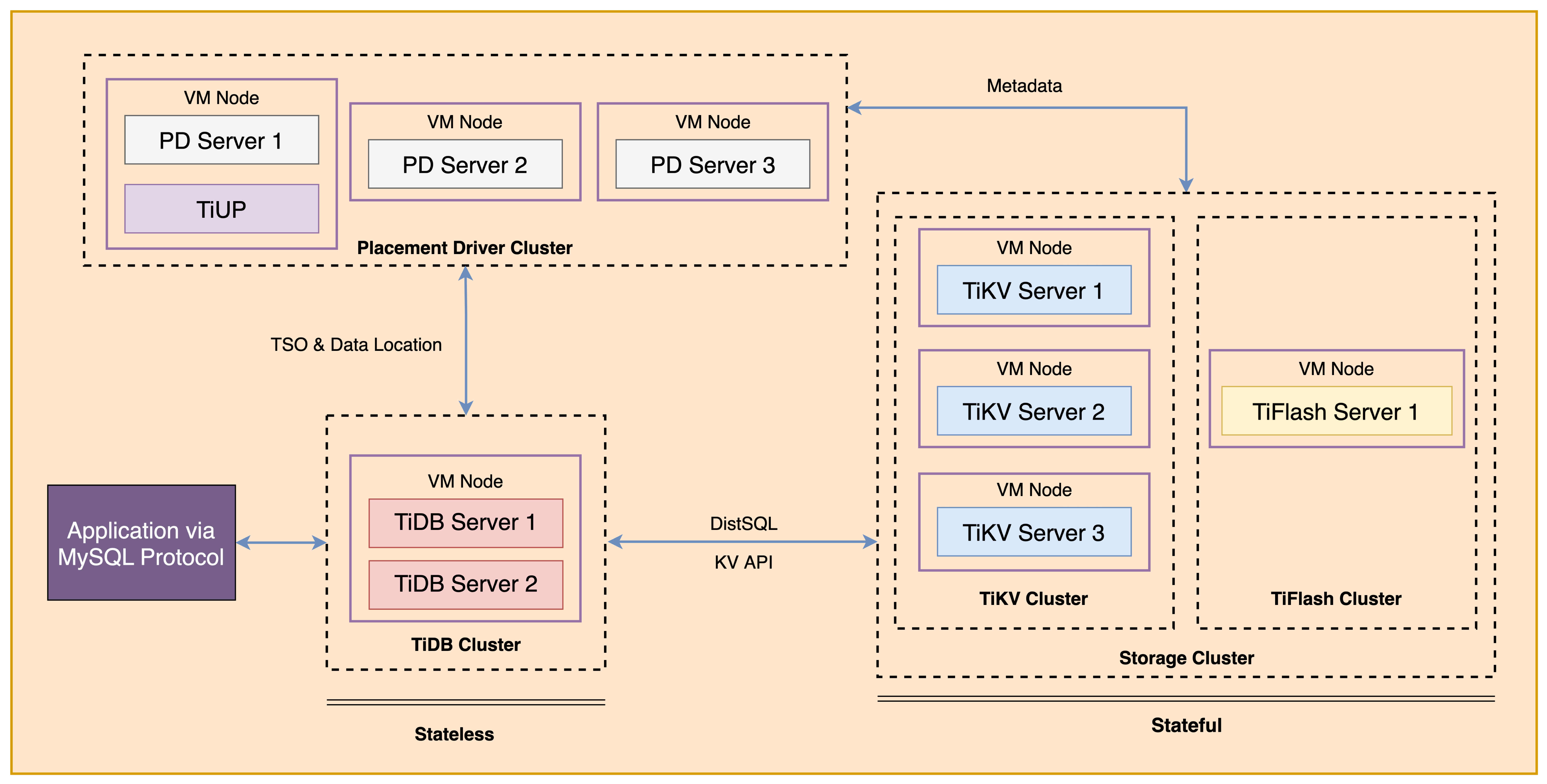
+ 以下はTiDBクラスタのデプロイメントトポロジダイアグラムを示しています
 ### ノート
+ 「演習s 1: TiUPを使用してTiDBクラスタをデプロイする」を完了することは、以降の演習を成功裏に完了するために必要です
+ 多くの手順では、ターミナルウィンドウにコマンドを入力する必要があります。演習の期間中にターミナルウィンドウを起動し、開いておくと便利かもしれません
+ 演習に関して、`IP`、`port`、`username`、`password`、`directory`等、環境が異なる場合があります
+ あなたのターミナルウィンドウの`$`はOSプロンプトです
+ 「`tidb>`」または「`mysql>`」は、ターミナルウィンドウのSQLコマンドプロンプトです
+ これらの演習では、同じネットワークに接続された8つのマシンが必要です。`Role`と`IP Address`(環境変数で表されます)は次の通りです:
`Node Role`と`IP Address`の後にあるイコール記号の後ろの文を1行で素直に書き起こしてください。敬語不要、ですます体での翻訳が必要であり、1行で返答すること。
| :----------------- | :-------------------------------------------------------- |
| `TiDB server 1` | `${HOST_DB1_PRIVATE_IP}, ${HOST_DB1_PUBLIC_IP}` | の日本語訳は以下の通りです。
`TiKV server 1`と`${HOST_KV1_PRIVATE_IP}, ${HOST_KV1_PUBLIC_IP}`は、1つの行動モジュール内で互いに交信する能力を有する。
` の後にある文言「`TiKV server 2`| `${HOST_KV2_PRIVATE_IP}, ${HOST_KV2_PUBLIC_IP}`」を日本語に翻訳すると、「`TiKV server 2` | `${HOST_KV2_PRIVATE_IP}, ${HOST_KV2_PUBLIC_IP}`」となります。
`${HOST_KV3_PRIVATE_IP}, ${HOST_KV3_PUBLIC_IP}`
`PD server 1`と`${HOST_PD1_PRIVATE_IP}, ${HOST_PD1_PUBLIC_IP}`の日本語への翻訳は次の通りです:ですます体で書かれた正しい敬語を使わずに、単にですます体を使用する必要があります。そして、結果は1行のみを返す必要があります。
以降の文を、ですます体で単一の行に変換します。
`${HOST_PD3_PRIVATE_IP}, ${HOST_PD3_PUBLIC_IP}`
`Alertmanager`と`${HOST_MONITOR_PRIVATE_IP}, ${HOST_MONITOR_PUBLIC_IP}`の文を翻訳します。
=`Grafana`=`${HOST_MONITOR_PRIVATE_IP}, ${HOST_MONITOR_PUBLIC_IP}`= 。
`Prometheus`と`${HOST_MONITOR_PRIVATE_IP}, ${HOST_MONITOR_PUBLIC_IP}`です。
### 前提条件
+ あなたは次の文書を読みました
+ [Software and Hardware Recommendations](https://docs.pingcap.com/tidb/stable/hardware-and-software-requirements)
+ [TiDB Environment and System Configuration Check](https://docs.pingcap.com/tidb/stable/check-before-deployment)
+ 与えられた演習環境のユーザーアクセス情報(たとえば、プライベートキー)が与えられています
+ 8台のセットアップ済みマシンへのアクセスが与えられます
+ まず、[このガイド](https://github.com/pingcap/tidb-course-201-lab/blob/master/README_303_v61_en_class_setup_guide_for_student.md)を使用して実験環境に慣れる必要があります
## 演習 1-1: TiUP のインストール
### 概要
+ この演習では、TiUPツールとTiUPクラスタコンポーネントをインストールします。すべてのタスクは`Control Machine`で実行します
### 所要時間
+ この演習には約10分かかるはずです
### タスク
1. `${HOST_PD1_PUBLIC_IP}`上の`Control Machine`で、ユーザー`ec2-user`としてログインします。
2. あなたに割り当てられたノードのIPアドレス情報を確認するには、`hosts-env.sh`ファイルの内容を確認します。
3. TiUPをインストールします。
4. TiUPの環境変数をセットします。
5. TiUPクラスタコンポーネントをインストールします。
### ステップ
1. `ec2-user`さんとして`Control Machine`にログインし、ターミナルプロンプトで以下のコマンドを入力して、(`${HOST_PD1_PUBLIC_IP}`)さんから表示された結果を受け取ります。
```
$ ssh -A ec2-user@
__| __|_ )
_| ( / Amazon Linux 2 AMI
___|\___|___|
https://aws.amazon.com/amazon-linux-2/
```
2. `~ec2-user`ホームディレクトリにとどまり、`hosts-env.sh`ファイルのIPアドレス情報をチェックしてください。出力は異なる可能性があります。
```
$ cd
$ cat hosts-env.sh
export HOST_CM_PRIVATE_IP=172.31.0.106
export HOST_CM_PUBLIC_IP=35.87.210.49
export HOST_PD1_PRIVATE_IP=172.31.0.112
export HOST_PD1_PUBLIC_IP=52.39.111.231
export HOST_PD2_PRIVATE_IP=172.31.0.250
export HOST_PD2_PUBLIC_IP=35.92.79.157
export HOST_PD3_PRIVATE_IP=172.31.0.253
export HOST_PD3_PUBLIC_IP=34.219.222.55
export HOST_DB1_PRIVATE_IP=172.31.0.106
export HOST_DB1_PUBLIC_IP=35.87.210.49
export HOST_DB2_PRIVATE_IP=172.31.0.106
export HOST_DB2_PUBLIC_IP=35.87.210.49
export HOST_KV1_PRIVATE_IP=172.31.0.215
export HOST_KV1_PUBLIC_IP=34.219.231.225
export HOST_KV2_PRIVATE_IP=172.31.0.34
export HOST_KV2_PUBLIC_IP=54.186.50.151
export HOST_KV3_PRIVATE_IP=172.31.0.85
export HOST_KV3_PUBLIC_IP=54.202.12.31
export HOST_TIFLASH1_PRIVATE_IP=172.31.0.45
export HOST_TIFLASH1_PUBLIC_IP=35.91.209.154
export HOST_MONITOR_PRIVATE_IP=172.31.0.253
export HOST_MONITOR_PUBLIC_IP=34.219.222.55
```
3. ターミナル環境でノードのIPアドレス変数を設定します。
```
$ source ./hosts-env.sh
```
4. TiUPをインストールします。ターミナルプロンプトで以下のコマンドを入力して、表示された結果を受け取ります。
```
$ curl --proto '=https' --tlsv1.2 -sSf https://tiup-mirrors.pingcap.com/install.sh | sh
% Total % Received % Xferd Average Speed Time Time Time Current
Dload Upload Total Spent Left Speed
100 7085k 100 7085k 0 0 3221k 0 0:00:02 0:00:02 --:--:-- 3222k
WARN: adding root certificate via internet: https://tiup-mirrors.pingcap.com/root.json
You can revoke this by remove /home/ec2-user/.tiup/bin/7b8e153f2e2d0928.root.json
Successfully set mirror to https://tiup-mirrors.pingcap.com
Detected shell: bash
Shell profile: /home/ec2-user/.bash_profile
/home/ec2-user/.bash_profile has been modified to add tiup to PATH
open a new terminal or source /home/ec2-user/.bash_profile to use it
Installed path: /home/ec2-user/.tiup/bin/tiup
===============================================
Have a try: tiup playground
===============================================
```
5. TiUPの環境変数を設定します。ターミナルプロンプトで、以下のコマンドを入力します。
```
$ source .bash_profile
```
6. TiUP クラスタコンポーネントをインストールしてください。ターミナルプロンプトで以下のコマンドを入力し、表示された結果を受け取ります。
```
$ tiup cluster
The component `cluster` version is not installed; downloading from repository.
download https://tiup-mirrors.pingcap.com/cluster-v1.11.0-linux-amd64.tar.gz 8.44 MiB / 8.44 MiB 100.00% 1.83 MiB/s
Starting component `cluster`: /home/ec2-user/.tiup/components/cluster/v1.11.0/tiup-cluster
Deploy a TiDB cluster for production
```
## 演習 1-2: TiDB クラスタのデプロイメント
### 概要
+ この演習では、`topology.yaml` ファイルを編集し、TiUP を使用して TiDB クラスタをデプロイします。すべてのタスクは `Control Machine` で実行します
### 所要時間
+ この演習には約20分かかるはずです
### タスク
1. クラスタトポロジファイルを作成します。
2. テキストエディタを使用して、`topology.yaml`ファイルを編集します。
3. すべてのマシンに`numactl`をインストールして、その後`Control Machine`に戻ってください。
4. 潜在的なリスクをチェックします。
5. 自動修復を有効にします。
6. TiDBクラスタをデプロイします。
### ステップ
1. `Control Machine`で、クラスタトポロジーのファイルを作成してください。ターミナルプロンプトで以下のコマンドを入力して、表示された結果を受け取ってください。
```
$ tiup cluster template > topology.yaml
tiup is checking updates for component cluster ...
Starting component `cluster`: /home/ec2-user/.tiup/components/cluster/v1.10.1/tiup-cluster template
```
2. テキストエディタを使用して、`topology.yaml`ファイルを編集します。次のような設定を含むように`topology.yaml`ファイルを変更します(IPアドレスは割り当てられた正しいもので置き換えてください。手順から逸れてしまった場合は、`~/eight-nodes-hybrid.yaml`のソリューションファイルを参照してください)。
```
$ vi topology.yaml
```
```
global:
user: "tidb"
ssh_port: 22
deploy_dir: "/tidb-deploy"
data_dir: "/tidb-data"
arch: "amd64"
server_configs:
pd:
replication.location-labels: ["region","zone"]
replication.max-replicas: 3
pd_servers:
- host:
client_port: 2379
peer_port: 2380
config:
server.labels:
region: oregon
zone: az1
- host:
client_port: 2379
peer_port: 2380
config:
server.labels:
region: oregon
zone: az2
- host:
client_port: 2379
peer_port: 2380
config:
server.labels:
region: virginia
zone: az1
tidb_servers:
- host:
port: 4000
status_port: 10080
deploy_dir: /tidb-deploy/tidb-4000
log_dir: /tidb-deploy/tidb-4000/log
- host:
port: 4001
status_port: 10081
deploy_dir: /tidb-deploy/tidb-4001
log_dir: /tidb-deploy/tidb-4001/log
tikv_servers:
- host:
port: 20160
status_port: 20180
config:
server.labels:
region: oregon
zone: az1
- host:
port: 20160
status_port: 20180
config:
server.labels:
region: oregon
zone: az2
- host:
port: 20160
status_port: 20180
config:
server.labels:
region: virginia
zone: az1
tiflash_servers:
- host:
tcp_port: 9000
flash_service_port: 3930
deploy_dir: /tidb-deploy/tiflash-9000
data_dir: /tidb-data/tiflash-9000
log_dir: /tidb-deploy/tiflash-9000/log
monitoring_servers:
- host:
grafana_servers:
- host:
alertmanager_servers:
- host:
```
3. 結果を保存する前に、必ず確認します。
```
$ ssh $HOST_KV1_PRIVATE_IP
...
__| __|_ )
_| ( / Amazon Linux 2 AMI
___|\___|___|
...
$ sudo yum -y install numactl
Determining fastest mirrors
base | 3.6 kB 00:00:00
centosplus | 2.9 kB 00:00:00
dag | 1.9 kB 00:00:00
epel | 4.7 kB 00:00:00
extras | 2.9 kB 00:00:00
updates | 2.9 kB 00:00:00
(1/6): epel/7/x86_64/group_gz | 97 kB 00:00:00
(2/6): epel/7/x86_64/updateinfo | 1.0 MB 00:00:00
(3/6): centosplus/7/x86_64/primary_db | 6.9 MB 00:00:00
(4/6): epel/7/x86_64/primary_db | 7.0 MB 00:00:00
(5/6): extras/7/x86_64/primary_db | 249 kB 00:00:00
(6/6): updates/7/x86_64/primary_db | 17 MB 00:00:00
...
```
4. クラスタ展開の前提条件について、システム設定を確認してください。端末プロンプトで下記のコマンドを入力すると、表示される結果を受け取ります。
```
$ tiup cluster check ./topology.yaml
Node Check Result Message
---- ----- ------ -------
172.31.0.215 exist Fail /tidb-deploy/tikv-20160 already exists
172.31.0.215 exist Fail /tidb-data/tikv-20160 already exists
172.31.0.215 exist Fail /tidb-deploy/tikv-20160/log already exists
172.31.0.215 cpu-governor Warn Unable to determine current CPU frequency governor policy
172.31.0.215 memory Pass memory size is 8192MB
172.31.0.215 command Pass numactl: policy: default
172.31.0.215 timezone Fail invalid character 'S' looking for beginning of value
172.31.0.215 selinux Pass SELinux is disabled
172.31.0.215 thp Pass THP is disabled
172.31.0.215 os-version Pass OS is CentOS Linux 7 (Core) 7.6.1810
172.31.0.215 cpu-cores Pass number of CPU cores / threads: 4
172.31.0.215 disk Fail mount point / does not have 'nodelalloc' option set
172.31.0.215 disk Warn mount point / does not have 'noatime' option set
...
172.31.0.34 cpu-cores Pass number of CPU cores / threads: 4
172.31.0.34 cpu-governor Warn Unable to determine current CPU frequency governor policy
172.31.0.34 command Pass numactl: policy: default
172.31.0.34 disk Warn mount point / does not have 'noatime' option set
172.31.0.34 timezone Pass time zone is the same as the first PD machine: Asia/Shanghai
172.31.0.34 selinux Pass SELinux is disabled
172.31.0.34 thp Pass THP is disabled
172.31.0.34 exist Fail /tidb-deploy/tikv-20160 already exists
172.31.0.34 exist Fail /tidb-data/tikv-20160 already exists
172.31.0.34 exist Fail /tidb-deploy/tikv-20160/log already exists
172.31.0.34 os-version Pass OS is CentOS Linux 7 (Core) 7.6.1810
172.31.0.34 memory Pass memory size is 8192MB
172.31.0.34 disk Fail mount point / does not have 'nodelalloc' option set
```
5. チェックに失敗した場合の自動修復を有効にします。ターミナルプロンプトで以下のコマンドを入力し、表示された結果を受け取ります。
```
$ tiup cluster check ./topology.yaml --apply
tiup is checking updates for component cluster ...
Starting component `cluster`: /home/ec2-user/.tiup/components/cluster/v1.11.0/tiup-cluster check ./topology.yaml --apply --user root -p
Input SSH password:
+ Detect CPU Arch Name
- Detecting node 172.31.0.250 Arch info ... ⠙ Shell: host=172.31.0.250, sudo=false, command=`uname -m`
- Detecting node 172.31.0.112 Arch info ... ⠙ Shell: host=172.31.0.112, sudo=false, command=`uname -m`
+ Detect CPU Arch Name
- Detecting node 172.31.0.253 Arch info ... Done
...
+ Try to apply changes to fix failed checks
- Applying changes on 172.31.0.250 ... Done
- Applying changes on 172.31.0.112 ... Done
- Applying changes on 172.31.0.253 ... Done
- Applying changes on 172.31.0.34 ... Done
- Applying changes on 172.31.0.215 ... Done
- Applying changes on 172.31.0.85 ... Done
- Applying changes on 172.31.0.106 ... Done
- Applying changes on 172.31.0.45 ... Done
```
6. ターミナルプロンプトで以下のコマンドを入力して、表示された結果を受け取ることで、`tidb-test`という名前のTiDBクラスタを展開します。
```
$ tiup cluster deploy tidb-test v6.1.0 ./topology.yaml --yes
tiup is checking updates for component cluster ...
...
Please confirm your topology:
Cluster type: tidb
Cluster name: tidb-test
Cluster version: v6.1.0
Role Host Ports OS/Arch Directories
---- ---- ----- ------- -----------
pd 172.31.0.250 2379/2380 linux/x86_64 /tidb-deploy/pd-2379,/tidb-data/pd-2379
pd 172.31.0.112 2379/2380 linux/x86_64 /tidb-deploy/pd-2379,/tidb-data/pd-2379
pd 172.31.0.253 2379/2380 linux/x86_64 /tidb-deploy/pd-2379,/tidb-data/pd-2379
tikv 172.31.0.34 20160/20180 linux/x86_64 /tidb-deploy/tikv-20160,/tidb-data/tikv-20160
tikv 172.31.0.215 20160/20180 linux/x86_64 /tidb-deploy/tikv-20160,/tidb-data/tikv-20160
tikv 172.31.0.85 20160/20180 linux/x86_64 /tidb-deploy/tikv-20160,/tidb-data/tikv-20160
tidb 172.31.0.106 4000/10080 linux/x86_64 /tidb-deploy/tidb-4000
tiflash 172.31.0.45 9000/8123/3930/20170/20292/8234 linux/x86_64 /tidb-deploy/tiflash-9000,/tidb-data/tiflash-9000
prometheus 172.31.0.250 9090/12020 linux/x86_64 /tidb-deploy/prometheus-9090,/tidb-data/prometheus-9090
grafana 172.31.0.250 3000 linux/x86_64 /tidb-deploy/grafana-3000
alertmanager 172.31.0.250 9093/9094 linux/x86_64 /tidb-deploy/alertmanager-9093,/tidb-data/alertmanager-9093
...
Enabling component blackbox_exporter
Enabling instance 172.31.0.85
Enabling instance 172.31.0.106
Enabling instance 172.31.0.45
Enabling instance 172.31.0.250
Enabling instance 172.31.0.112
Enabling instance 172.31.0.215
Enabling instance 172.31.0.253
Enabling instance 172.31.0.34
Enable 172.31.0.85 success
Enable 172.31.0.215 success
Enable 172.31.0.34 success
Enable 172.31.0.253 success
Enable 172.31.0.106 success
Enable 172.31.0.250 success
Enable 172.31.0.112 success
Enable 172.31.0.45 success
Cluster `tidb-test` deployed successfully, you can start it with command: `tiup cluster start tidb-test --init`
```
## 演習 1-3: デプロイされた TiDB クラスタのステータスを確認する
### 概要
+ この演習では、クラスタの状態を確認し、展開された TiDB クラスタを起動し、TiUP コマンドラインと `TiDB Dashboard` または `Grafana` を使用して TiDB クラスタの実行状態を確認し、ほとんどのタスクは `Control Machine` で完了します
### 所要時間
+ この問題演習は、約15分で完了する予定です
### タスク
1. TiUPによって管理されるクラスタをチェックします。
2. 配置されたTiDBクラスタのステータスを確認します。
3. デプロイされたTiDBクラスタを起動します。
4. TiDB クラスタの実行状態を確認します。
### ステップ
1. `Control Machine`上で、TiUPによって管理されているクラスタを確認してください。ターミナルプロンプトで以下のコマンドを入力し、表示された結果を受け取ってください。
```
$ tiup cluster list
tiup is checking updates for component cluster ...
Starting component `cluster`: /home/ec2-user/.tiup/components/cluster/v1.10.1/tiup-cluster list
Name User Version Path PrivateKey
---- ---- ------- ---- ----------
tidb-test tidb v6.1.0 /home/ec2-user/.tiup/storage/cluster/clusters/tidb-test /home/ec2-user/.tiup/storage/cluster/clusters/tidb-test/ssh/id_rsa
```
2. 以下のコマンドを端末プロンプトで入力し、表示された結果を受け取り、展開状態を確認します。
```
$ tiup cluster display tidb-test
tiup is checking updates for component cluster ...
Starting component `cluster`: /home/ec2-user/.tiup/components/cluster/v1.10.1/tiup-cluster display tidb-test
Cluster type: tidb
Cluster name: tidb-test
Cluster version: v6.1.0
Deploy user: tidb
SSH type: builtin
Grafana URL: http://172.31.0.250:3000
ID Role Host Ports OS/Arch Status Data Dir Deploy Dir
-- ---- ---- ----- ------- ------ -------- ----------
172.31.0.250:9093 alertmanager 172.31.0.250 9093/9094 linux/x86_64 Down /tidb-data/alertmanager-9093 /tidb-deploy/alertmanager-9093
172.31.0.250:3000 grafana 172.31.0.250 3000 linux/x86_64 Down - /tidb-deploy/grafana-3000
172.31.0.112:2379 pd 172.31.0.112 2379/2380 linux/x86_64 Down /tidb-data/pd-2379 /tidb-deploy/pd-2379
172.31.0.250:2379 pd 172.31.0.250 2379/2380 linux/x86_64 Down /tidb-data/pd-2379 /tidb-deploy/pd-2379
172.31.0.253:2379 pd 172.31.0.253 2379/2380 linux/x86_64 Down /tidb-data/pd-2379 /tidb-deploy/pd-2379
172.31.0.250:9090 prometheus 172.31.0.250 9090/12020 linux/x86_64 Down /tidb-data/prometheus-9090 /tidb-deploy/prometheus-9090
172.31.0.106:4000 tidb 172.31.0.106 4000/10080 linux/x86_64 Down - /tidb-deploy/tidb-4000
172.31.0.45:9000 tiflash 172.31.0.45 9000/8123/3930/20170/20292/8234 linux/x86_64 N/A /tidb-data/tiflash-9000 /tidb-deploy/tiflash-9000
172.31.0.215:20160 tikv 172.31.0.215 20160/20180 linux/x86_64 N/A /tidb-data/tikv-20160 /tidb-deploy/tikv-20160
172.31.0.34:20160 tikv 172.31.0.34 20160/20180 linux/x86_64 N/A /tidb-data/tikv-20160 /tidb-deploy/tikv-20160
172.31.0.85:20160 tikv 172.31.0.85 20160/20180 linux/x86_64 N/A /tidb-data/tikv-20160 /tidb-deploy/tikv-20160
Total nodes: 11
```
3. 標準的な起動モード(パスワードが空の `root` ユーザー)で TiDB クラスタを起動します。ターミナルプロンプトで以下のコマンドを入力して、表示される結果を受け取ります。
```
$ tiup cluster start tidb-test
tiup is checking updates for component cluster ...
Starting component `cluster`: /home/ec2-user/.tiup/components/cluster/v1.10.1/tiup-cluster start tidb-test
Starting cluster tidb-test...
...
Starting component blackbox_exporter
Starting instance 172.31.0.106
Starting instance 172.31.0.253
Starting instance 172.31.0.45
Starting instance 172.31.0.34
Starting instance 172.31.0.250
Starting instance 172.31.0.112
Starting instance 172.31.0.215
Starting instance 172.31.0.85
Start 172.31.0.215 success
Start 172.31.0.85 success
Start 172.31.0.34 success
Start 172.31.0.253 success
Start 172.31.0.106 success
Start 172.31.0.45 success
Start 172.31.0.250 success
Start 172.31.0.112 success
+ [ Serial ] - UpdateTopology: cluster=tidb-test
Started cluster `tidb-test` successfully
```
+ 安全な起動モードで TiDB クラスタを開始します。`root` ユーザーのランダムなパスワードが生成されます
```
$ tiup cluster start tidb-test --init
tiup is checking updates for component cluster ...
Starting component `cluster`: /home/ec2-user/.tiup/components/cluster/v1.11.0/tiup-cluster start tidb-test --init
Starting cluster tidb-test...
...
Starting component blackbox_exporter
Starting instance 172.31.0.106
Starting instance 172.31.0.253
Starting instance 172.31.0.45
Starting instance 172.31.0.34
Starting instance 172.31.0.250
Starting instance 172.31.0.112
Starting instance 172.31.0.215
Starting instance 172.31.0.85
Start 172.31.0.85 success
Start 172.31.0.250 success
Start 172.31.0.106 success
Start 172.31.0.215 success
Start 172.31.0.34 success
Start 172.31.0.45 success
Start 172.31.0.112 success
Start 172.31.0.253 success
+ [ Serial ] - UpdateTopology: cluster=tidb-test
Started cluster `tidb-test` successfully
The root password of TiDB database has been changed.
The new password is: 'sB5&t1%n=bz2y4_9g0'.
Copy and record it to somewhere safe, it is only displayed once, and will not be stored.
The generated password can NOT be get and shown again.
```
4. TiUPでクラスタ状態を確認する場合は、ターミナルプロンプトでコマンドを入力して確認します。
```
$ tiup cluster display tidb-test
tiup is checking updates for component cluster ...
Starting component `cluster`: /home/ec2-user/.tiup/components/cluster/v1.10.1/tiup-cluster display tidb-test
Cluster type: tidb
Cluster name: tidb-test
Cluster version: v6.1.0
Deploy user: tidb
SSH type: builtin
Dashboard URL: http://172.31.0.112:2379/dashboard
Grafana URL: http://172.31.0.250:3000
ID Role Host Ports OS/Arch Status Data Dir Deploy Dir
-- ---- ---- ----- ------- ------ -------- ----------
172.31.0.250:9093 alertmanager 172.31.0.250 9093/9094 linux/x86_64 Up /tidb-data/alertmanager-9093 /tidb-deploy/alertmanager-9093
172.31.0.250:3000 grafana 172.31.0.250 3000 linux/x86_64 Up - /tidb-deploy/grafana-3000
172.31.0.112:2379 pd 172.31.0.112 2379/2380 linux/x86_64 Up|UI /tidb-data/pd-2379 /tidb-deploy/pd-2379
172.31.0.250:2379 pd 172.31.0.250 2379/2380 linux/x86_64 Up|L /tidb-data/pd-2379 /tidb-deploy/pd-2379
172.31.0.253:2379 pd 172.31.0.253 2379/2380 linux/x86_64 Up /tidb-data/pd-2379 /tidb-deploy/pd-2379
172.31.0.250:9090 prometheus 172.31.0.250 9090/12020 linux/x86_64 Up /tidb-data/prometheus-9090 /tidb-deploy/prometheus-9090
172.31.0.106:4000 tidb 172.31.0.106 4000/10080 linux/x86_64 Up - /tidb-deploy/tidb-4000
172.31.0.45:9000 tiflash 172.31.0.45 9000/8123/3930/20170/20292/8234 linux/x86_64 Up /tidb-data/tiflash-9000 /tidb-deploy/tiflash-9000
172.31.0.215:20160 tikv 172.31.0.215 20160/20180 linux/x86_64 Up /tidb-data/tikv-20160 /tidb-deploy/tikv-20160
172.31.0.34:20160 tikv 172.31.0.34 20160/20180 linux/x86_64 Up /tidb-data/tikv-20160 /tidb-deploy/tikv-20160
172.31.0.85:20160 tikv 172.31.0.85 20160/20180 linux/x86_64 Up /tidb-data/tikv-20160 /tidb-deploy/tikv-20160
Total nodes: 11
```
5. `TiDB Dashboard`でクラスタのステータスを確認してください。ブラウザを開き、前のステップで表示された`Dashboard URL`に従って`TiDB Dashboard`にログインしてください。表示されるURLにはプライベートIPアドレスが含まれているため、それを対応するパブリックIPアドレスに変更する必要があります。ユーザー名とパスワードはTiDB `root`ユーザーと同じです。ステップ`3`で標準的な起動を選択した場合、パスワードは空です。ホームページにはTiDBクラスタのノード情報が表示されます。
### ノート
+ 「演習s 1: TiUPを使用してTiDBクラスタをデプロイする」を完了することは、以降の演習を成功裏に完了するために必要です
+ 多くの手順では、ターミナルウィンドウにコマンドを入力する必要があります。演習の期間中にターミナルウィンドウを起動し、開いておくと便利かもしれません
+ 演習に関して、`IP`、`port`、`username`、`password`、`directory`等、環境が異なる場合があります
+ あなたのターミナルウィンドウの`$`はOSプロンプトです
+ 「`tidb>`」または「`mysql>`」は、ターミナルウィンドウのSQLコマンドプロンプトです
+ これらの演習では、同じネットワークに接続された8つのマシンが必要です。`Role`と`IP Address`(環境変数で表されます)は次の通りです:
`Node Role`と`IP Address`の後にあるイコール記号の後ろの文を1行で素直に書き起こしてください。敬語不要、ですます体での翻訳が必要であり、1行で返答すること。
| :----------------- | :-------------------------------------------------------- |
| `TiDB server 1` | `${HOST_DB1_PRIVATE_IP}, ${HOST_DB1_PUBLIC_IP}` | の日本語訳は以下の通りです。
`TiKV server 1`と`${HOST_KV1_PRIVATE_IP}, ${HOST_KV1_PUBLIC_IP}`は、1つの行動モジュール内で互いに交信する能力を有する。
` の後にある文言「`TiKV server 2`| `${HOST_KV2_PRIVATE_IP}, ${HOST_KV2_PUBLIC_IP}`」を日本語に翻訳すると、「`TiKV server 2` | `${HOST_KV2_PRIVATE_IP}, ${HOST_KV2_PUBLIC_IP}`」となります。
`${HOST_KV3_PRIVATE_IP}, ${HOST_KV3_PUBLIC_IP}`
`PD server 1`と`${HOST_PD1_PRIVATE_IP}, ${HOST_PD1_PUBLIC_IP}`の日本語への翻訳は次の通りです:ですます体で書かれた正しい敬語を使わずに、単にですます体を使用する必要があります。そして、結果は1行のみを返す必要があります。
以降の文を、ですます体で単一の行に変換します。
`${HOST_PD3_PRIVATE_IP}, ${HOST_PD3_PUBLIC_IP}`
`Alertmanager`と`${HOST_MONITOR_PRIVATE_IP}, ${HOST_MONITOR_PUBLIC_IP}`の文を翻訳します。
=`Grafana`=`${HOST_MONITOR_PRIVATE_IP}, ${HOST_MONITOR_PUBLIC_IP}`= 。
`Prometheus`と`${HOST_MONITOR_PRIVATE_IP}, ${HOST_MONITOR_PUBLIC_IP}`です。
### 前提条件
+ あなたは次の文書を読みました
+ [Software and Hardware Recommendations](https://docs.pingcap.com/tidb/stable/hardware-and-software-requirements)
+ [TiDB Environment and System Configuration Check](https://docs.pingcap.com/tidb/stable/check-before-deployment)
+ 与えられた演習環境のユーザーアクセス情報(たとえば、プライベートキー)が与えられています
+ 8台のセットアップ済みマシンへのアクセスが与えられます
+ まず、[このガイド](https://github.com/pingcap/tidb-course-201-lab/blob/master/README_303_v61_en_class_setup_guide_for_student.md)を使用して実験環境に慣れる必要があります
## 演習 1-1: TiUP のインストール
### 概要
+ この演習では、TiUPツールとTiUPクラスタコンポーネントをインストールします。すべてのタスクは`Control Machine`で実行します
### 所要時間
+ この演習には約10分かかるはずです
### タスク
1. `${HOST_PD1_PUBLIC_IP}`上の`Control Machine`で、ユーザー`ec2-user`としてログインします。
2. あなたに割り当てられたノードのIPアドレス情報を確認するには、`hosts-env.sh`ファイルの内容を確認します。
3. TiUPをインストールします。
4. TiUPの環境変数をセットします。
5. TiUPクラスタコンポーネントをインストールします。
### ステップ
1. `ec2-user`さんとして`Control Machine`にログインし、ターミナルプロンプトで以下のコマンドを入力して、(`${HOST_PD1_PUBLIC_IP}`)さんから表示された結果を受け取ります。
```
$ ssh -A ec2-user@
__| __|_ )
_| ( / Amazon Linux 2 AMI
___|\___|___|
https://aws.amazon.com/amazon-linux-2/
```
2. `~ec2-user`ホームディレクトリにとどまり、`hosts-env.sh`ファイルのIPアドレス情報をチェックしてください。出力は異なる可能性があります。
```
$ cd
$ cat hosts-env.sh
export HOST_CM_PRIVATE_IP=172.31.0.106
export HOST_CM_PUBLIC_IP=35.87.210.49
export HOST_PD1_PRIVATE_IP=172.31.0.112
export HOST_PD1_PUBLIC_IP=52.39.111.231
export HOST_PD2_PRIVATE_IP=172.31.0.250
export HOST_PD2_PUBLIC_IP=35.92.79.157
export HOST_PD3_PRIVATE_IP=172.31.0.253
export HOST_PD3_PUBLIC_IP=34.219.222.55
export HOST_DB1_PRIVATE_IP=172.31.0.106
export HOST_DB1_PUBLIC_IP=35.87.210.49
export HOST_DB2_PRIVATE_IP=172.31.0.106
export HOST_DB2_PUBLIC_IP=35.87.210.49
export HOST_KV1_PRIVATE_IP=172.31.0.215
export HOST_KV1_PUBLIC_IP=34.219.231.225
export HOST_KV2_PRIVATE_IP=172.31.0.34
export HOST_KV2_PUBLIC_IP=54.186.50.151
export HOST_KV3_PRIVATE_IP=172.31.0.85
export HOST_KV3_PUBLIC_IP=54.202.12.31
export HOST_TIFLASH1_PRIVATE_IP=172.31.0.45
export HOST_TIFLASH1_PUBLIC_IP=35.91.209.154
export HOST_MONITOR_PRIVATE_IP=172.31.0.253
export HOST_MONITOR_PUBLIC_IP=34.219.222.55
```
3. ターミナル環境でノードのIPアドレス変数を設定します。
```
$ source ./hosts-env.sh
```
4. TiUPをインストールします。ターミナルプロンプトで以下のコマンドを入力して、表示された結果を受け取ります。
```
$ curl --proto '=https' --tlsv1.2 -sSf https://tiup-mirrors.pingcap.com/install.sh | sh
% Total % Received % Xferd Average Speed Time Time Time Current
Dload Upload Total Spent Left Speed
100 7085k 100 7085k 0 0 3221k 0 0:00:02 0:00:02 --:--:-- 3222k
WARN: adding root certificate via internet: https://tiup-mirrors.pingcap.com/root.json
You can revoke this by remove /home/ec2-user/.tiup/bin/7b8e153f2e2d0928.root.json
Successfully set mirror to https://tiup-mirrors.pingcap.com
Detected shell: bash
Shell profile: /home/ec2-user/.bash_profile
/home/ec2-user/.bash_profile has been modified to add tiup to PATH
open a new terminal or source /home/ec2-user/.bash_profile to use it
Installed path: /home/ec2-user/.tiup/bin/tiup
===============================================
Have a try: tiup playground
===============================================
```
5. TiUPの環境変数を設定します。ターミナルプロンプトで、以下のコマンドを入力します。
```
$ source .bash_profile
```
6. TiUP クラスタコンポーネントをインストールしてください。ターミナルプロンプトで以下のコマンドを入力し、表示された結果を受け取ります。
```
$ tiup cluster
The component `cluster` version is not installed; downloading from repository.
download https://tiup-mirrors.pingcap.com/cluster-v1.11.0-linux-amd64.tar.gz 8.44 MiB / 8.44 MiB 100.00% 1.83 MiB/s
Starting component `cluster`: /home/ec2-user/.tiup/components/cluster/v1.11.0/tiup-cluster
Deploy a TiDB cluster for production
```
## 演習 1-2: TiDB クラスタのデプロイメント
### 概要
+ この演習では、`topology.yaml` ファイルを編集し、TiUP を使用して TiDB クラスタをデプロイします。すべてのタスクは `Control Machine` で実行します
### 所要時間
+ この演習には約20分かかるはずです
### タスク
1. クラスタトポロジファイルを作成します。
2. テキストエディタを使用して、`topology.yaml`ファイルを編集します。
3. すべてのマシンに`numactl`をインストールして、その後`Control Machine`に戻ってください。
4. 潜在的なリスクをチェックします。
5. 自動修復を有効にします。
6. TiDBクラスタをデプロイします。
### ステップ
1. `Control Machine`で、クラスタトポロジーのファイルを作成してください。ターミナルプロンプトで以下のコマンドを入力して、表示された結果を受け取ってください。
```
$ tiup cluster template > topology.yaml
tiup is checking updates for component cluster ...
Starting component `cluster`: /home/ec2-user/.tiup/components/cluster/v1.10.1/tiup-cluster template
```
2. テキストエディタを使用して、`topology.yaml`ファイルを編集します。次のような設定を含むように`topology.yaml`ファイルを変更します(IPアドレスは割り当てられた正しいもので置き換えてください。手順から逸れてしまった場合は、`~/eight-nodes-hybrid.yaml`のソリューションファイルを参照してください)。
```
$ vi topology.yaml
```
```
global:
user: "tidb"
ssh_port: 22
deploy_dir: "/tidb-deploy"
data_dir: "/tidb-data"
arch: "amd64"
server_configs:
pd:
replication.location-labels: ["region","zone"]
replication.max-replicas: 3
pd_servers:
- host:
client_port: 2379
peer_port: 2380
config:
server.labels:
region: oregon
zone: az1
- host:
client_port: 2379
peer_port: 2380
config:
server.labels:
region: oregon
zone: az2
- host:
client_port: 2379
peer_port: 2380
config:
server.labels:
region: virginia
zone: az1
tidb_servers:
- host:
port: 4000
status_port: 10080
deploy_dir: /tidb-deploy/tidb-4000
log_dir: /tidb-deploy/tidb-4000/log
- host:
port: 4001
status_port: 10081
deploy_dir: /tidb-deploy/tidb-4001
log_dir: /tidb-deploy/tidb-4001/log
tikv_servers:
- host:
port: 20160
status_port: 20180
config:
server.labels:
region: oregon
zone: az1
- host:
port: 20160
status_port: 20180
config:
server.labels:
region: oregon
zone: az2
- host:
port: 20160
status_port: 20180
config:
server.labels:
region: virginia
zone: az1
tiflash_servers:
- host:
tcp_port: 9000
flash_service_port: 3930
deploy_dir: /tidb-deploy/tiflash-9000
data_dir: /tidb-data/tiflash-9000
log_dir: /tidb-deploy/tiflash-9000/log
monitoring_servers:
- host:
grafana_servers:
- host:
alertmanager_servers:
- host:
```
3. 結果を保存する前に、必ず確認します。
```
$ ssh $HOST_KV1_PRIVATE_IP
...
__| __|_ )
_| ( / Amazon Linux 2 AMI
___|\___|___|
...
$ sudo yum -y install numactl
Determining fastest mirrors
base | 3.6 kB 00:00:00
centosplus | 2.9 kB 00:00:00
dag | 1.9 kB 00:00:00
epel | 4.7 kB 00:00:00
extras | 2.9 kB 00:00:00
updates | 2.9 kB 00:00:00
(1/6): epel/7/x86_64/group_gz | 97 kB 00:00:00
(2/6): epel/7/x86_64/updateinfo | 1.0 MB 00:00:00
(3/6): centosplus/7/x86_64/primary_db | 6.9 MB 00:00:00
(4/6): epel/7/x86_64/primary_db | 7.0 MB 00:00:00
(5/6): extras/7/x86_64/primary_db | 249 kB 00:00:00
(6/6): updates/7/x86_64/primary_db | 17 MB 00:00:00
...
```
4. クラスタ展開の前提条件について、システム設定を確認してください。端末プロンプトで下記のコマンドを入力すると、表示される結果を受け取ります。
```
$ tiup cluster check ./topology.yaml
Node Check Result Message
---- ----- ------ -------
172.31.0.215 exist Fail /tidb-deploy/tikv-20160 already exists
172.31.0.215 exist Fail /tidb-data/tikv-20160 already exists
172.31.0.215 exist Fail /tidb-deploy/tikv-20160/log already exists
172.31.0.215 cpu-governor Warn Unable to determine current CPU frequency governor policy
172.31.0.215 memory Pass memory size is 8192MB
172.31.0.215 command Pass numactl: policy: default
172.31.0.215 timezone Fail invalid character 'S' looking for beginning of value
172.31.0.215 selinux Pass SELinux is disabled
172.31.0.215 thp Pass THP is disabled
172.31.0.215 os-version Pass OS is CentOS Linux 7 (Core) 7.6.1810
172.31.0.215 cpu-cores Pass number of CPU cores / threads: 4
172.31.0.215 disk Fail mount point / does not have 'nodelalloc' option set
172.31.0.215 disk Warn mount point / does not have 'noatime' option set
...
172.31.0.34 cpu-cores Pass number of CPU cores / threads: 4
172.31.0.34 cpu-governor Warn Unable to determine current CPU frequency governor policy
172.31.0.34 command Pass numactl: policy: default
172.31.0.34 disk Warn mount point / does not have 'noatime' option set
172.31.0.34 timezone Pass time zone is the same as the first PD machine: Asia/Shanghai
172.31.0.34 selinux Pass SELinux is disabled
172.31.0.34 thp Pass THP is disabled
172.31.0.34 exist Fail /tidb-deploy/tikv-20160 already exists
172.31.0.34 exist Fail /tidb-data/tikv-20160 already exists
172.31.0.34 exist Fail /tidb-deploy/tikv-20160/log already exists
172.31.0.34 os-version Pass OS is CentOS Linux 7 (Core) 7.6.1810
172.31.0.34 memory Pass memory size is 8192MB
172.31.0.34 disk Fail mount point / does not have 'nodelalloc' option set
```
5. チェックに失敗した場合の自動修復を有効にします。ターミナルプロンプトで以下のコマンドを入力し、表示された結果を受け取ります。
```
$ tiup cluster check ./topology.yaml --apply
tiup is checking updates for component cluster ...
Starting component `cluster`: /home/ec2-user/.tiup/components/cluster/v1.11.0/tiup-cluster check ./topology.yaml --apply --user root -p
Input SSH password:
+ Detect CPU Arch Name
- Detecting node 172.31.0.250 Arch info ... ⠙ Shell: host=172.31.0.250, sudo=false, command=`uname -m`
- Detecting node 172.31.0.112 Arch info ... ⠙ Shell: host=172.31.0.112, sudo=false, command=`uname -m`
+ Detect CPU Arch Name
- Detecting node 172.31.0.253 Arch info ... Done
...
+ Try to apply changes to fix failed checks
- Applying changes on 172.31.0.250 ... Done
- Applying changes on 172.31.0.112 ... Done
- Applying changes on 172.31.0.253 ... Done
- Applying changes on 172.31.0.34 ... Done
- Applying changes on 172.31.0.215 ... Done
- Applying changes on 172.31.0.85 ... Done
- Applying changes on 172.31.0.106 ... Done
- Applying changes on 172.31.0.45 ... Done
```
6. ターミナルプロンプトで以下のコマンドを入力して、表示された結果を受け取ることで、`tidb-test`という名前のTiDBクラスタを展開します。
```
$ tiup cluster deploy tidb-test v6.1.0 ./topology.yaml --yes
tiup is checking updates for component cluster ...
...
Please confirm your topology:
Cluster type: tidb
Cluster name: tidb-test
Cluster version: v6.1.0
Role Host Ports OS/Arch Directories
---- ---- ----- ------- -----------
pd 172.31.0.250 2379/2380 linux/x86_64 /tidb-deploy/pd-2379,/tidb-data/pd-2379
pd 172.31.0.112 2379/2380 linux/x86_64 /tidb-deploy/pd-2379,/tidb-data/pd-2379
pd 172.31.0.253 2379/2380 linux/x86_64 /tidb-deploy/pd-2379,/tidb-data/pd-2379
tikv 172.31.0.34 20160/20180 linux/x86_64 /tidb-deploy/tikv-20160,/tidb-data/tikv-20160
tikv 172.31.0.215 20160/20180 linux/x86_64 /tidb-deploy/tikv-20160,/tidb-data/tikv-20160
tikv 172.31.0.85 20160/20180 linux/x86_64 /tidb-deploy/tikv-20160,/tidb-data/tikv-20160
tidb 172.31.0.106 4000/10080 linux/x86_64 /tidb-deploy/tidb-4000
tiflash 172.31.0.45 9000/8123/3930/20170/20292/8234 linux/x86_64 /tidb-deploy/tiflash-9000,/tidb-data/tiflash-9000
prometheus 172.31.0.250 9090/12020 linux/x86_64 /tidb-deploy/prometheus-9090,/tidb-data/prometheus-9090
grafana 172.31.0.250 3000 linux/x86_64 /tidb-deploy/grafana-3000
alertmanager 172.31.0.250 9093/9094 linux/x86_64 /tidb-deploy/alertmanager-9093,/tidb-data/alertmanager-9093
...
Enabling component blackbox_exporter
Enabling instance 172.31.0.85
Enabling instance 172.31.0.106
Enabling instance 172.31.0.45
Enabling instance 172.31.0.250
Enabling instance 172.31.0.112
Enabling instance 172.31.0.215
Enabling instance 172.31.0.253
Enabling instance 172.31.0.34
Enable 172.31.0.85 success
Enable 172.31.0.215 success
Enable 172.31.0.34 success
Enable 172.31.0.253 success
Enable 172.31.0.106 success
Enable 172.31.0.250 success
Enable 172.31.0.112 success
Enable 172.31.0.45 success
Cluster `tidb-test` deployed successfully, you can start it with command: `tiup cluster start tidb-test --init`
```
## 演習 1-3: デプロイされた TiDB クラスタのステータスを確認する
### 概要
+ この演習では、クラスタの状態を確認し、展開された TiDB クラスタを起動し、TiUP コマンドラインと `TiDB Dashboard` または `Grafana` を使用して TiDB クラスタの実行状態を確認し、ほとんどのタスクは `Control Machine` で完了します
### 所要時間
+ この問題演習は、約15分で完了する予定です
### タスク
1. TiUPによって管理されるクラスタをチェックします。
2. 配置されたTiDBクラスタのステータスを確認します。
3. デプロイされたTiDBクラスタを起動します。
4. TiDB クラスタの実行状態を確認します。
### ステップ
1. `Control Machine`上で、TiUPによって管理されているクラスタを確認してください。ターミナルプロンプトで以下のコマンドを入力し、表示された結果を受け取ってください。
```
$ tiup cluster list
tiup is checking updates for component cluster ...
Starting component `cluster`: /home/ec2-user/.tiup/components/cluster/v1.10.1/tiup-cluster list
Name User Version Path PrivateKey
---- ---- ------- ---- ----------
tidb-test tidb v6.1.0 /home/ec2-user/.tiup/storage/cluster/clusters/tidb-test /home/ec2-user/.tiup/storage/cluster/clusters/tidb-test/ssh/id_rsa
```
2. 以下のコマンドを端末プロンプトで入力し、表示された結果を受け取り、展開状態を確認します。
```
$ tiup cluster display tidb-test
tiup is checking updates for component cluster ...
Starting component `cluster`: /home/ec2-user/.tiup/components/cluster/v1.10.1/tiup-cluster display tidb-test
Cluster type: tidb
Cluster name: tidb-test
Cluster version: v6.1.0
Deploy user: tidb
SSH type: builtin
Grafana URL: http://172.31.0.250:3000
ID Role Host Ports OS/Arch Status Data Dir Deploy Dir
-- ---- ---- ----- ------- ------ -------- ----------
172.31.0.250:9093 alertmanager 172.31.0.250 9093/9094 linux/x86_64 Down /tidb-data/alertmanager-9093 /tidb-deploy/alertmanager-9093
172.31.0.250:3000 grafana 172.31.0.250 3000 linux/x86_64 Down - /tidb-deploy/grafana-3000
172.31.0.112:2379 pd 172.31.0.112 2379/2380 linux/x86_64 Down /tidb-data/pd-2379 /tidb-deploy/pd-2379
172.31.0.250:2379 pd 172.31.0.250 2379/2380 linux/x86_64 Down /tidb-data/pd-2379 /tidb-deploy/pd-2379
172.31.0.253:2379 pd 172.31.0.253 2379/2380 linux/x86_64 Down /tidb-data/pd-2379 /tidb-deploy/pd-2379
172.31.0.250:9090 prometheus 172.31.0.250 9090/12020 linux/x86_64 Down /tidb-data/prometheus-9090 /tidb-deploy/prometheus-9090
172.31.0.106:4000 tidb 172.31.0.106 4000/10080 linux/x86_64 Down - /tidb-deploy/tidb-4000
172.31.0.45:9000 tiflash 172.31.0.45 9000/8123/3930/20170/20292/8234 linux/x86_64 N/A /tidb-data/tiflash-9000 /tidb-deploy/tiflash-9000
172.31.0.215:20160 tikv 172.31.0.215 20160/20180 linux/x86_64 N/A /tidb-data/tikv-20160 /tidb-deploy/tikv-20160
172.31.0.34:20160 tikv 172.31.0.34 20160/20180 linux/x86_64 N/A /tidb-data/tikv-20160 /tidb-deploy/tikv-20160
172.31.0.85:20160 tikv 172.31.0.85 20160/20180 linux/x86_64 N/A /tidb-data/tikv-20160 /tidb-deploy/tikv-20160
Total nodes: 11
```
3. 標準的な起動モード(パスワードが空の `root` ユーザー)で TiDB クラスタを起動します。ターミナルプロンプトで以下のコマンドを入力して、表示される結果を受け取ります。
```
$ tiup cluster start tidb-test
tiup is checking updates for component cluster ...
Starting component `cluster`: /home/ec2-user/.tiup/components/cluster/v1.10.1/tiup-cluster start tidb-test
Starting cluster tidb-test...
...
Starting component blackbox_exporter
Starting instance 172.31.0.106
Starting instance 172.31.0.253
Starting instance 172.31.0.45
Starting instance 172.31.0.34
Starting instance 172.31.0.250
Starting instance 172.31.0.112
Starting instance 172.31.0.215
Starting instance 172.31.0.85
Start 172.31.0.215 success
Start 172.31.0.85 success
Start 172.31.0.34 success
Start 172.31.0.253 success
Start 172.31.0.106 success
Start 172.31.0.45 success
Start 172.31.0.250 success
Start 172.31.0.112 success
+ [ Serial ] - UpdateTopology: cluster=tidb-test
Started cluster `tidb-test` successfully
```
+ 安全な起動モードで TiDB クラスタを開始します。`root` ユーザーのランダムなパスワードが生成されます
```
$ tiup cluster start tidb-test --init
tiup is checking updates for component cluster ...
Starting component `cluster`: /home/ec2-user/.tiup/components/cluster/v1.11.0/tiup-cluster start tidb-test --init
Starting cluster tidb-test...
...
Starting component blackbox_exporter
Starting instance 172.31.0.106
Starting instance 172.31.0.253
Starting instance 172.31.0.45
Starting instance 172.31.0.34
Starting instance 172.31.0.250
Starting instance 172.31.0.112
Starting instance 172.31.0.215
Starting instance 172.31.0.85
Start 172.31.0.85 success
Start 172.31.0.250 success
Start 172.31.0.106 success
Start 172.31.0.215 success
Start 172.31.0.34 success
Start 172.31.0.45 success
Start 172.31.0.112 success
Start 172.31.0.253 success
+ [ Serial ] - UpdateTopology: cluster=tidb-test
Started cluster `tidb-test` successfully
The root password of TiDB database has been changed.
The new password is: 'sB5&t1%n=bz2y4_9g0'.
Copy and record it to somewhere safe, it is only displayed once, and will not be stored.
The generated password can NOT be get and shown again.
```
4. TiUPでクラスタ状態を確認する場合は、ターミナルプロンプトでコマンドを入力して確認します。
```
$ tiup cluster display tidb-test
tiup is checking updates for component cluster ...
Starting component `cluster`: /home/ec2-user/.tiup/components/cluster/v1.10.1/tiup-cluster display tidb-test
Cluster type: tidb
Cluster name: tidb-test
Cluster version: v6.1.0
Deploy user: tidb
SSH type: builtin
Dashboard URL: http://172.31.0.112:2379/dashboard
Grafana URL: http://172.31.0.250:3000
ID Role Host Ports OS/Arch Status Data Dir Deploy Dir
-- ---- ---- ----- ------- ------ -------- ----------
172.31.0.250:9093 alertmanager 172.31.0.250 9093/9094 linux/x86_64 Up /tidb-data/alertmanager-9093 /tidb-deploy/alertmanager-9093
172.31.0.250:3000 grafana 172.31.0.250 3000 linux/x86_64 Up - /tidb-deploy/grafana-3000
172.31.0.112:2379 pd 172.31.0.112 2379/2380 linux/x86_64 Up|UI /tidb-data/pd-2379 /tidb-deploy/pd-2379
172.31.0.250:2379 pd 172.31.0.250 2379/2380 linux/x86_64 Up|L /tidb-data/pd-2379 /tidb-deploy/pd-2379
172.31.0.253:2379 pd 172.31.0.253 2379/2380 linux/x86_64 Up /tidb-data/pd-2379 /tidb-deploy/pd-2379
172.31.0.250:9090 prometheus 172.31.0.250 9090/12020 linux/x86_64 Up /tidb-data/prometheus-9090 /tidb-deploy/prometheus-9090
172.31.0.106:4000 tidb 172.31.0.106 4000/10080 linux/x86_64 Up - /tidb-deploy/tidb-4000
172.31.0.45:9000 tiflash 172.31.0.45 9000/8123/3930/20170/20292/8234 linux/x86_64 Up /tidb-data/tiflash-9000 /tidb-deploy/tiflash-9000
172.31.0.215:20160 tikv 172.31.0.215 20160/20180 linux/x86_64 Up /tidb-data/tikv-20160 /tidb-deploy/tikv-20160
172.31.0.34:20160 tikv 172.31.0.34 20160/20180 linux/x86_64 Up /tidb-data/tikv-20160 /tidb-deploy/tikv-20160
172.31.0.85:20160 tikv 172.31.0.85 20160/20180 linux/x86_64 Up /tidb-data/tikv-20160 /tidb-deploy/tikv-20160
Total nodes: 11
```
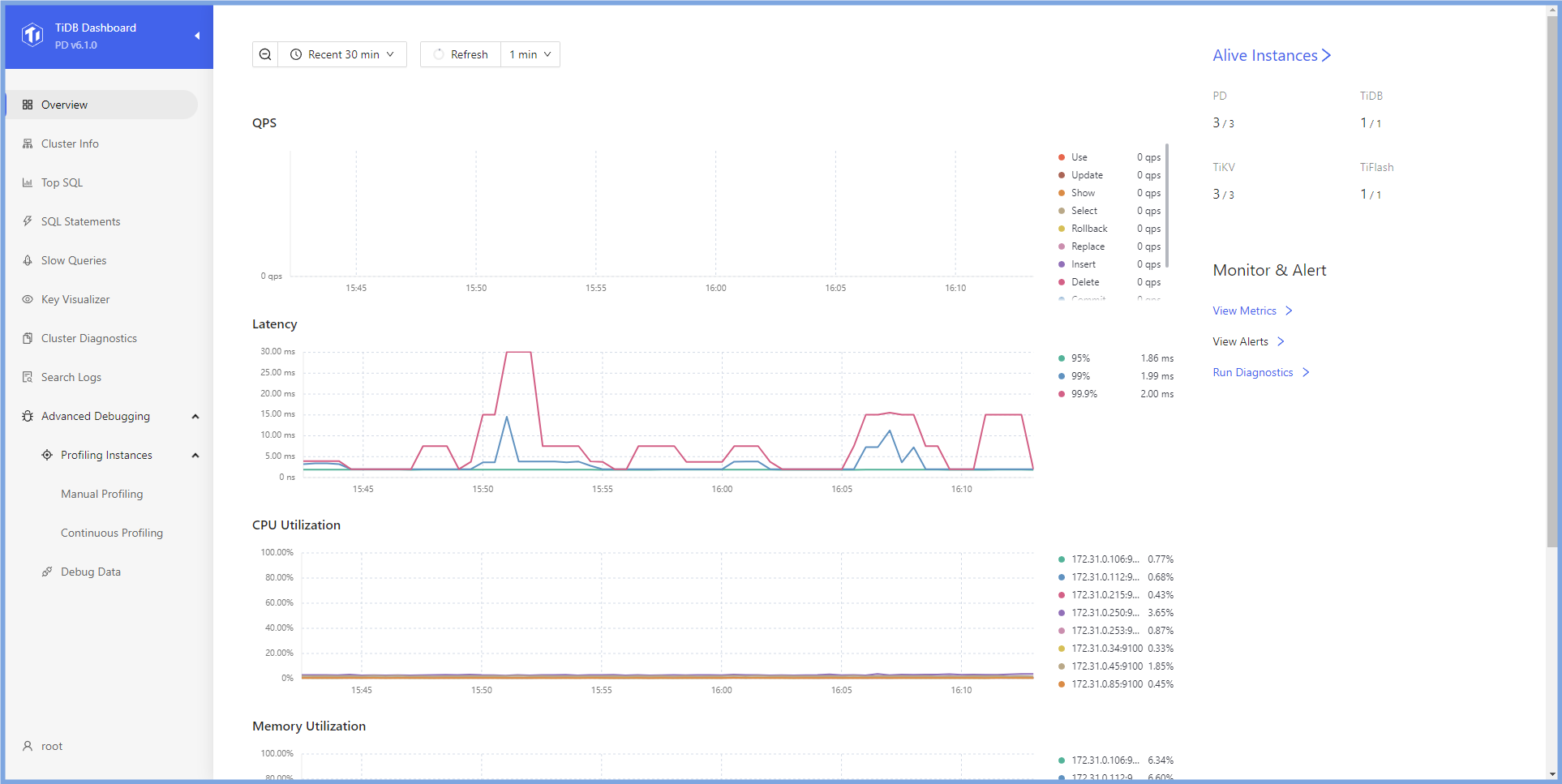
5. `TiDB Dashboard`でクラスタのステータスを確認してください。ブラウザを開き、前のステップで表示された`Dashboard URL`に従って`TiDB Dashboard`にログインしてください。表示されるURLにはプライベートIPアドレスが含まれているため、それを対応するパブリックIPアドレスに変更する必要があります。ユーザー名とパスワードはTiDB `root`ユーザーと同じです。ステップ`3`で標準的な起動を選択した場合、パスワードは空です。ホームページにはTiDBクラスタのノード情報が表示されます。
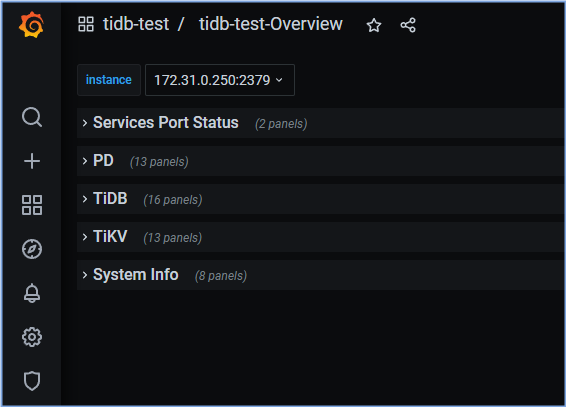
 6. `Grafana`でクラスタステータスを確認し、ブラウザを開いて、前のステップで示された`Grafana URL`に従って`Grafana`にログインします。表示されるURLにはプライベートIPアドレスが含まれているため、それを対応するパブリックIPアドレスに変更する必要があります。デフォルトのユーザー名とパスワードは、両方とも`admin`です。TiDBポートのステータスと負荷モニタリング情報を確認するには、`Overview`をクリックします。
 ## 演習問題 1-4: TiDB サーバーへの接続
### 概要
+ この演習では、TiDB に接続してパスワードを変更します。タスクを任意のノードで実行できますが、`Control Machine` が推奨されています
### 所要時間
+ この演習には約10分間かかります
### タスク
1. TiDBに接続して、パスワードを変更します。
### ステップ
1. TiDBに接続してパスワードを変更してください。もし`root`にパスワードがある場合は`-p`オプションを提供してください。それ以外の場合、`-p`オプションは省略できます。もし`${HOST_DB1_PRIVATE_IP}`の取得方法が分からない場合は、講師に助けを求めてください。
```
$ mysql -h ${HOST_DB1_PRIVATE_IP} --port 4000 -u root
```
```sql
SET PASSWORD for 'root'@'%' = 'tidb';
```
```
mysql> SET PASSWORD for 'root'@'%' = 'tidb';
Query OK, 0 rows affected (0.06 sec)
```
## 演習 1-5:TiDB クラスタの停止
### 概要
+ この演習では、TiDBクラスタを停止する演習をします。すべてのタスクは`Control Machine`で完了します
### 所要時間
+ この課題はおおよそ10分程度で終わるはずです
### タスク
1. TiDBクラスタを停止します。
### ステップ
1. TiDBクラスタを停止してください。ターミナルプロンプトで以下のコマンドを入力し、表示された結果を受け取ってください。
```
$ tiup cluster stop tidb-test
tiup is checking updates for component cluster ...
Starting component `cluster`: /home/ec2-user/.tiup/components/cluster/v1.11.0/tiup-cluster stop tidb-test
Will stop the cluster tidb-test with nodes: , roles: .
Do you want to continue? [y/N]:(default=N) y
+ [ Serial ] - SSHKeySet: privateKey=/home/ec2-user/.tiup/storage/cluster/clusters/tidb-test/ssh/id_rsa, publicKey=/home/ec2-user/.tiup/storage/cluster/clusters/tidb-test/ssh/id_rsa.pub
...
Stopping component blackbox_exporter
Stopping instance 172.31.0.154
Stopping instance 172.31.0.50
Stopping instance 172.31.0.172
Stopping instance 172.31.0.184
Stopping instance 172.31.0.80
Stopping instance 172.31.0.47
Stopping instance 172.31.0.31
Stopping instance 172.31.0.63
Stop 172.31.0.31 success
Stop 172.31.0.154 success
Stop 172.31.0.50 success
Stop 172.31.0.63 success
Stop 172.31.0.184 success
Stop 172.31.0.47 success
Stop 172.31.0.172 success
Stop 172.31.0.80 success
Stopped cluster `tidb-test` successfully
```
## 演習 1-6: 設定ファイルを表示する
### 概要
+ このエクササイズでは、設定ファイルディレクトリのコンテンツを表示します
### 所要時間
+ この演習には約20分間かかるはずです
### タスク
1. `tiup`を使用して、`Control Machine`でクラスタ構成を確認します。
2. `TiDB server 1`で、`TiDB server`設定ファイルディレクトリの内容を表示します。
3. `TiKV server 1`上で、`TiKV server`の設定とデータファイルのディレクトリの内容を表示します。
4. `PD server 1`上で、`PD server`の設定とデータファイルのディレクトリの内容を表示します。
### ステップ
1. `Control Machine`で、設定ファイルディレクトリの内容を表示します。コマンド入力後、結果を受け取り、終了する場合は`:q!`を入力します。
```
$ tiup cluster edit-config tidb-test
global:
user: tidb
ssh_port: 22
ssh_type: builtin
deploy_dir: /tidb-deploy
data_dir: /tidb-data
os: linux arch: amd64
.......
alertmanager_servers:
- host: 172.16.6.157
ssh_port: 22
web_port: 9093
cluster_port: 9094
deploy_dir: /tidb-deploy/alertmanager-9093
data_dir: /tidb-data/alertmanager-9093
arch: amd64
os: linux
```
2. `TiDB server 1`で、`TiDB server`の設定ディレクトリを確認します。もし`ssh`に促された場合は、`yes`を入力します。
```
$ ssh ${HOST_DB1_PRIVATE_IP} ls -l /tidb-deploy/tidb-4000/
total 0
drwxr-xr-x 2 tidb tidb 25 Dec 1 12:37 bin
drwxr-xr-x 2 tidb tidb 23 Dec 1 12:37 conf
drwxr-xr-x 2 tidb tidb 45 Dec 1 12:38 log
drwxr-xr-x 2 tidb tidb 25 Dec 1 12:37 scripts
```
3. `ssh`によって求められた場合は、`yes`を入力します。`TiKV server 1`で、`TiKV server`構成ファイルディレクトリの内容を表示します。
```
$ ssh ${HOST_KV1_PRIVATE_IP} ls -l /tidb-deploy/
total 0
drwxr-xr-x 6 tidb tidb 55 Dec 1 12:37 monitor-9100
drwxr-xr-x 6 tidb tidb 55 Dec 1 12:37 tikv-20160
$ ssh ${HOST_KV1_PRIVATE_IP} ls -l /tidb-deploy/tikv-20160/
total 0
drwxr-xr-x 2 tidb tidb 25 Dec 1 12:37 bin
drwxr-xr-x 2 tidb tidb 23 Dec 1 12:37 conf
drwxr-xr-x 2 tidb tidb 45 Dec 1 12:38 log
drwxr-xr-x 2 tidb tidb 25 Dec 1 12:37 scripts
```
4. `TiKV server 1`上で、`TiKV server`のデータファイルディレクトリの内容を表示します。
```
$ ssh ${HOST_KV1_PRIVATE_IP} ls -l /tidb-data/
total 0
drwxr-xr-x 2 tidb tidb 6 Dec 1 12:37 monitor-9100
drwxr-xr-x 6 tidb tidb 164 Dec 1 12:38 tikv-20160
$ ssh ${HOST_KV1_PRIVATE_IP} ls -l /tidb-data/tikv-20160/
total 1048676
drwxr-xr-x 2 tidb tidb 283 Dec 1 12:39 db
drwxr-xr-x 4 tidb tidb 33 Dec 1 12:38 import
-rw-r--r-- 1 tidb tidb 19175 Dec 1 12:38 last_tikv.toml
-rw-r--r-- 1 tidb tidb 0 Dec 1 12:38 LOCK
-rw-r--r-- 1 tidb tidb 0 Dec 1 12:38 raftdb.info
drwxr-xr-x 2 tidb tidb 82 Dec 1 12:38 raft-engine
-rw-r--r-- 1 tidb tidb 79157 Dec 1 12:48 rocksdb.info
drwxr-xr-x 2 tidb tidb 6 Dec 1 12:39 snap
-rw-r--r-- 1 tidb tidb 1073741824 Dec 1 12:38 space_placeholder_file
```
5. `PD server 1`上で、`PD server`設定ファイルディレクトリの内容を表示します。`ssh`によって要求された場合は、`yes`を入力します。
```
$ ssh ${HOST_PD1_PRIVATE_IP} ls -l /tidb-deploy/
total 0
drwxr-xr-x 6 tidb tidb 55 Dec 1 12:37 monitor-9100
drwxr-xr-x 6 tidb tidb 55 Dec 1 12:37 pd-2379
$ ssh ${HOST_PD1_PRIVATE_IP} ls -l /tidb-deploy/pd-2379/
total 0
drwxr-xr-x 2 tidb tidb 23 Dec 1 12:37 bin
drwxr-xr-x 2 tidb tidb 21 Dec 1 12:37 conf
drwxr-xr-x 2 tidb tidb 41 Dec 1 12:38 log
drwxr-xr-x 2 tidb tidb 23 Dec 1 12:37 scripts
```
6. 」の後ろにある英文「On `PD server 1`, view the contents of the `PD server` data files directory. 」を日本語に翻訳すると、「`PD server 1`上で、`PD server`データファイルディレクトリの内容を表示してください。」となります。
```
$ ssh ${HOST_PD1_PRIVATE_IP} ls -l /tidb-data/
total 0
drwxr-xr-x 2 tidb tidb 6 Dec 1 12:37 monitor-9100
drwxr-xr-x 5 tidb tidb 57 Dec 1 12:38 pd-2379
$ ssh ${HOST_PD1_PRIVATE_IP} ls -l /tidb-data/pd-2379/
total 0
drwxr-xr-x 2 tidb tidb 85 Dec 1 12:38 hot-region
drwx------ 4 tidb tidb 29 Dec 1 12:38 member
drwxr-xr-x 2 tidb tidb 85 Dec 1 12:38 region-meta
```
7. 全ての開いているターミナルウィンドウを閉じてください。
## 演習問題 1-4: TiDB サーバーへの接続
### 概要
+ この演習では、TiDB に接続してパスワードを変更します。タスクを任意のノードで実行できますが、`Control Machine` が推奨されています
### 所要時間
+ この演習には約10分間かかります
### タスク
1. TiDBに接続して、パスワードを変更します。
### ステップ
1. TiDBに接続してパスワードを変更してください。もし`root`にパスワードがある場合は`-p`オプションを提供してください。それ以外の場合、`-p`オプションは省略できます。もし`${HOST_DB1_PRIVATE_IP}`の取得方法が分からない場合は、講師に助けを求めてください。
```
$ mysql -h ${HOST_DB1_PRIVATE_IP} --port 4000 -u root
```
```sql
SET PASSWORD for 'root'@'%' = 'tidb';
```
```
mysql> SET PASSWORD for 'root'@'%' = 'tidb';
Query OK, 0 rows affected (0.06 sec)
```
## 演習 1-5:TiDB クラスタの停止
### 概要
+ この演習では、TiDBクラスタを停止する演習をします。すべてのタスクは`Control Machine`で完了します
### 所要時間
+ この課題はおおよそ10分程度で終わるはずです
### タスク
1. TiDBクラスタを停止します。
### ステップ
1. TiDBクラスタを停止してください。ターミナルプロンプトで以下のコマンドを入力し、表示された結果を受け取ってください。
```
$ tiup cluster stop tidb-test
tiup is checking updates for component cluster ...
Starting component `cluster`: /home/ec2-user/.tiup/components/cluster/v1.11.0/tiup-cluster stop tidb-test
Will stop the cluster tidb-test with nodes: , roles: .
Do you want to continue? [y/N]:(default=N) y
+ [ Serial ] - SSHKeySet: privateKey=/home/ec2-user/.tiup/storage/cluster/clusters/tidb-test/ssh/id_rsa, publicKey=/home/ec2-user/.tiup/storage/cluster/clusters/tidb-test/ssh/id_rsa.pub
...
Stopping component blackbox_exporter
Stopping instance 172.31.0.154
Stopping instance 172.31.0.50
Stopping instance 172.31.0.172
Stopping instance 172.31.0.184
Stopping instance 172.31.0.80
Stopping instance 172.31.0.47
Stopping instance 172.31.0.31
Stopping instance 172.31.0.63
Stop 172.31.0.31 success
Stop 172.31.0.154 success
Stop 172.31.0.50 success
Stop 172.31.0.63 success
Stop 172.31.0.184 success
Stop 172.31.0.47 success
Stop 172.31.0.172 success
Stop 172.31.0.80 success
Stopped cluster `tidb-test` successfully
```
## 演習 1-6: 設定ファイルを表示する
### 概要
+ このエクササイズでは、設定ファイルディレクトリのコンテンツを表示します
### 所要時間
+ この演習には約20分間かかるはずです
### タスク
1. `tiup`を使用して、`Control Machine`でクラスタ構成を確認します。
2. `TiDB server 1`で、`TiDB server`設定ファイルディレクトリの内容を表示します。
3. `TiKV server 1`上で、`TiKV server`の設定とデータファイルのディレクトリの内容を表示します。
4. `PD server 1`上で、`PD server`の設定とデータファイルのディレクトリの内容を表示します。
### ステップ
1. `Control Machine`で、設定ファイルディレクトリの内容を表示します。コマンド入力後、結果を受け取り、終了する場合は`:q!`を入力します。
```
$ tiup cluster edit-config tidb-test
global:
user: tidb
ssh_port: 22
ssh_type: builtin
deploy_dir: /tidb-deploy
data_dir: /tidb-data
os: linux arch: amd64
.......
alertmanager_servers:
- host: 172.16.6.157
ssh_port: 22
web_port: 9093
cluster_port: 9094
deploy_dir: /tidb-deploy/alertmanager-9093
data_dir: /tidb-data/alertmanager-9093
arch: amd64
os: linux
```
2. `TiDB server 1`で、`TiDB server`の設定ディレクトリを確認します。もし`ssh`に促された場合は、`yes`を入力します。
```
$ ssh ${HOST_DB1_PRIVATE_IP} ls -l /tidb-deploy/tidb-4000/
total 0
drwxr-xr-x 2 tidb tidb 25 Dec 1 12:37 bin
drwxr-xr-x 2 tidb tidb 23 Dec 1 12:37 conf
drwxr-xr-x 2 tidb tidb 45 Dec 1 12:38 log
drwxr-xr-x 2 tidb tidb 25 Dec 1 12:37 scripts
```
3. `ssh`によって求められた場合は、`yes`を入力します。`TiKV server 1`で、`TiKV server`構成ファイルディレクトリの内容を表示します。
```
$ ssh ${HOST_KV1_PRIVATE_IP} ls -l /tidb-deploy/
total 0
drwxr-xr-x 6 tidb tidb 55 Dec 1 12:37 monitor-9100
drwxr-xr-x 6 tidb tidb 55 Dec 1 12:37 tikv-20160
$ ssh ${HOST_KV1_PRIVATE_IP} ls -l /tidb-deploy/tikv-20160/
total 0
drwxr-xr-x 2 tidb tidb 25 Dec 1 12:37 bin
drwxr-xr-x 2 tidb tidb 23 Dec 1 12:37 conf
drwxr-xr-x 2 tidb tidb 45 Dec 1 12:38 log
drwxr-xr-x 2 tidb tidb 25 Dec 1 12:37 scripts
```
4. `TiKV server 1`上で、`TiKV server`のデータファイルディレクトリの内容を表示します。
```
$ ssh ${HOST_KV1_PRIVATE_IP} ls -l /tidb-data/
total 0
drwxr-xr-x 2 tidb tidb 6 Dec 1 12:37 monitor-9100
drwxr-xr-x 6 tidb tidb 164 Dec 1 12:38 tikv-20160
$ ssh ${HOST_KV1_PRIVATE_IP} ls -l /tidb-data/tikv-20160/
total 1048676
drwxr-xr-x 2 tidb tidb 283 Dec 1 12:39 db
drwxr-xr-x 4 tidb tidb 33 Dec 1 12:38 import
-rw-r--r-- 1 tidb tidb 19175 Dec 1 12:38 last_tikv.toml
-rw-r--r-- 1 tidb tidb 0 Dec 1 12:38 LOCK
-rw-r--r-- 1 tidb tidb 0 Dec 1 12:38 raftdb.info
drwxr-xr-x 2 tidb tidb 82 Dec 1 12:38 raft-engine
-rw-r--r-- 1 tidb tidb 79157 Dec 1 12:48 rocksdb.info
drwxr-xr-x 2 tidb tidb 6 Dec 1 12:39 snap
-rw-r--r-- 1 tidb tidb 1073741824 Dec 1 12:38 space_placeholder_file
```
5. `PD server 1`上で、`PD server`設定ファイルディレクトリの内容を表示します。`ssh`によって要求された場合は、`yes`を入力します。
```
$ ssh ${HOST_PD1_PRIVATE_IP} ls -l /tidb-deploy/
total 0
drwxr-xr-x 6 tidb tidb 55 Dec 1 12:37 monitor-9100
drwxr-xr-x 6 tidb tidb 55 Dec 1 12:37 pd-2379
$ ssh ${HOST_PD1_PRIVATE_IP} ls -l /tidb-deploy/pd-2379/
total 0
drwxr-xr-x 2 tidb tidb 23 Dec 1 12:37 bin
drwxr-xr-x 2 tidb tidb 21 Dec 1 12:37 conf
drwxr-xr-x 2 tidb tidb 41 Dec 1 12:38 log
drwxr-xr-x 2 tidb tidb 23 Dec 1 12:37 scripts
```
6. 」の後ろにある英文「On `PD server 1`, view the contents of the `PD server` data files directory. 」を日本語に翻訳すると、「`PD server 1`上で、`PD server`データファイルディレクトリの内容を表示してください。」となります。
```
$ ssh ${HOST_PD1_PRIVATE_IP} ls -l /tidb-data/
total 0
drwxr-xr-x 2 tidb tidb 6 Dec 1 12:37 monitor-9100
drwxr-xr-x 5 tidb tidb 57 Dec 1 12:38 pd-2379
$ ssh ${HOST_PD1_PRIVATE_IP} ls -l /tidb-data/pd-2379/
total 0
drwxr-xr-x 2 tidb tidb 85 Dec 1 12:38 hot-region
drwx------ 4 tidb tidb 29 Dec 1 12:38 member
drwxr-xr-x 2 tidb tidb 85 Dec 1 12:38 region-meta
```
7. 全ての開いているターミナルウィンドウを閉じてください。