# 练习 1 : 使用 TiUP 来部署 TiDB 集群
## 练习目的
+ 在这个练习中,您将会用到 TiUP 工具来部署 TiDB 集群, 并且连接到 TiDB 执行 SQL 语句。
## 先决条件
+ 注意,您的实验环境(包括IP,端口号,用户名,密码和目录)可能和本练习不同。
+ 可以连接到实验用虚拟机。
1. 打开终端, 执行以下命令,下载并安装 TiUP 工具。注意 `$` 是终端提示符, 常见的也有可能是 `%`.
+ Linux: 进入 `Terminal`
+ MacOS: 打开 `Terminal.app`
```
$ curl --proto '=https' --tlsv1.2 -sSf https://tiup-mirrors.pingcap.com/install.sh | sh
```
```
$ cd
$ source .bash_profile
```
```
$ tiup cluster
```
2. 执行以下命令,生成集群初始化配置文件. 执行 `vi topology.yaml`,修改配置文件的内容(修改的详细内容请根据您的机器 IP 并参考 https://docs.pingcap.com/zh/tidb/stable/production-deployment-using-tiup).
```
$ tiup cluster template > topology.yaml
```
```
$ vi topology.yaml
```
3. 在执行部署命令前, 首先检查集群存在的潜在风险(如果检查结果中显示缺失: `numactl` 可以执行`yum -y install numactl`安装). 之后运行自动修复,修复集群存在的潜在风险. 最后部署 TiDB 集群.
```
$ tiup cluster check ./topology.yaml --user root -p
```
```
$ tiup cluster check ./topology.yaml --apply --user root -p
```
```
$ tiup cluster deploy tidb-test v6.1.0 ./topology.yaml --user root -p
```
4. 查看 TiUP 管理的集群情况.
```
$ tiup cluster list
```
5. 检查 TiDB 集群情况.
```
$ tiup cluster display tidb-test
```
6. 启动集群
+ 方式 1:安全启动
```
$ tiup cluster start tidb-test --init
```
+ 方式 2:普通启动
```
$ tiup cluster start tidb-test
```
7. 验证集群运行状态.
+ 通过 TiUP 检查集群状态
```
$ tiup cluster display tidb-test
```
+ 通过 TiDB Dashboard 和 Grafana 检查集群状态
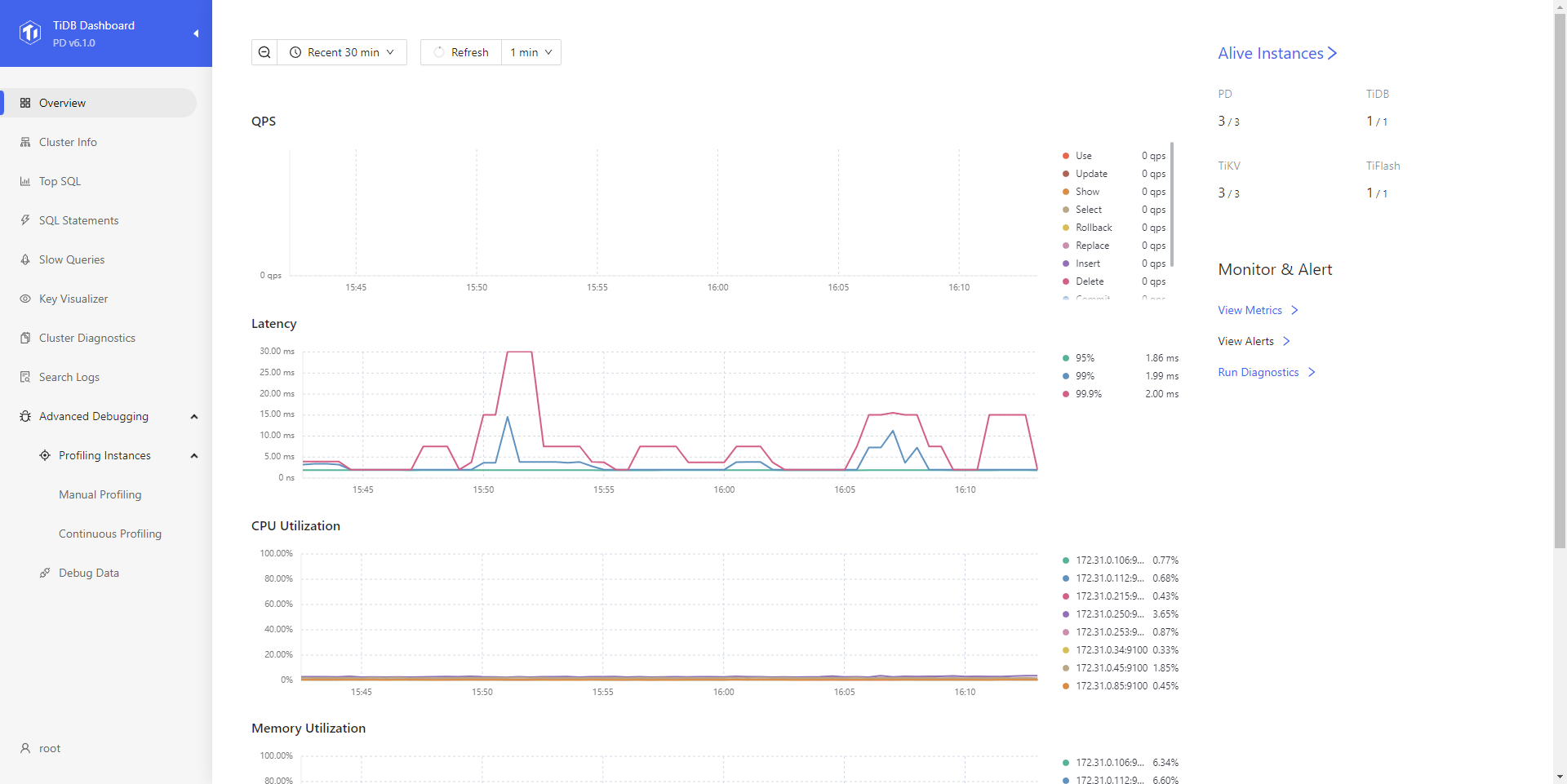
+ 通过 `{pd-ip}:{pd-port}/dashboard` 登录 TiDB Dashboard,登录用户和口令为 TiDB 数据库 root 用户和口令。如果你修改过数据库的 root 密码,则以修改后的密码为准,默认密码为空。在 TiDB Dashboard 主页面显示 TiDB 集群节点信息。
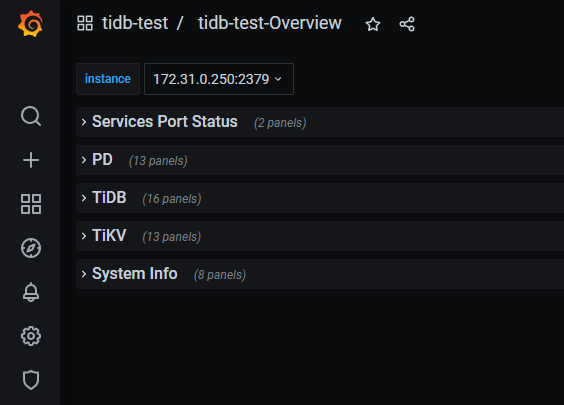
 + 通过 `{Grafana-ip}:3000` 登录 Grafana 监控,默认用户名及密码为 `admin/admin`. 点击 Overview 监控页面检查 TiDB 端口和负载监控信息.
 8. 使用 mysql 客户端连接 TiDB 数据库, 并且修改密码为 "tidb".
```
$ mysql --host 172.31.0.106 --port 4000 -u root -p
```
```sql
> set password for 'root'@'%' = 'tidb';
```
## 步骤 2 输出样例
```
$ tiup cluster template > topology.yaml
tiup is checking updates for component cluster ...
Starting component `cluster`: /root/.tiup/components/cluster/v1.10.1/tiup-cluster template
```
## 步骤 3 检查集群结果输出样例
(因输出过长, 只展示最后结果, 请着重注意 `command` , `thp` 等是否通过. 若未通过, 请执行修复)
```
$ tiup cluster check ./topology.yaml --user root [-p] [-i /home/root/.ssh/gcp_rsa]
Node Check Result Message
---- ----- ------ -------
172.31.0.215 exist Fail /tidb-deploy/tikv-20160 already exists
172.31.0.215 exist Fail /tidb-data/tikv-20160 already exists
172.31.0.215 exist Fail /tidb-deploy/tikv-20160/log already exists
172.31.0.215 cpu-governor Warn Unable to determine current CPU frequency governor policy
172.31.0.215 memory Pass memory size is 8192MB
172.31.0.215 command Pass numactl: policy: default
172.31.0.215 timezone Fail invalid character 'S' looking for beginning of value
172.31.0.215 selinux Pass SELinux is disabled
172.31.0.215 thp Pass THP is disabled
172.31.0.215 os-version Pass OS is CentOS Linux 7 (Core) 7.6.1810
172.31.0.215 cpu-cores Pass number of CPU cores / threads: 4
172.31.0.215 disk Fail mount point / does not have 'nodelalloc' option set
172.31.0.215 disk Warn mount point / does not have 'noatime' option set
172.31.0.85 cpu-governor Warn Unable to determine current CPU frequency governor policy
172.31.0.85 selinux Pass SELinux is disabled
172.31.0.85 thp Pass THP is disabled
172.31.0.85 command Pass numactl: policy: default
172.31.0.85 os-version Pass OS is CentOS Linux 7 (Core) 7.6.1810
172.31.0.85 cpu-cores Pass number of CPU cores / threads: 4
172.31.0.85 memory Pass memory size is 8192MB
172.31.0.85 disk Fail mount point / does not have 'nodelalloc' option set
172.31.0.85 disk Warn mount point / does not have 'noatime' option set
172.31.0.85 timezone Fail invalid character 'S' looking for beginning of value
172.31.0.106 selinux Pass SELinux is disabled
172.31.0.106 thp Pass THP is disabled
172.31.0.106 command Pass numactl: policy: default
172.31.0.106 os-version Pass OS is CentOS Linux 7 (Core) 7.6.1810
172.31.0.106 cpu-cores Pass number of CPU cores / threads: 4
172.31.0.106 cpu-governor Warn Unable to determine current CPU frequency governor policy
172.31.0.106 memory Pass memory size is 8192MB
172.31.0.106 timezone Fail invalid character 'S' looking for beginning of value
172.31.0.45 memory Pass memory size is 8192MB
172.31.0.45 disk Warn mount point / does not have 'noatime' option set
172.31.0.45 selinux Pass SELinux is disabled
172.31.0.45 thp Pass THP is disabled
172.31.0.45 os-version Pass OS is CentOS Linux 7 (Core) 7.6.1810
172.31.0.45 cpu-cores Pass number of CPU cores / threads: 4
172.31.0.45 cpu-governor Warn Unable to determine current CPU frequency governor policy
172.31.0.45 disk Fail mount point / does not have 'nodelalloc' option set
172.31.0.45 timezone Pass time zone is the same as the first PD machine: Asia/Shanghai
172.31.0.45 command Pass numactl: policy: default
172.31.0.250 exist Fail /tidb-deploy/pd-2379/log already exists
172.31.0.250 exist Fail /tidb-deploy/pd-2379 already exists
172.31.0.250 exist Fail /tidb-data/pd-2379 already exists
172.31.0.250 os-version Pass OS is CentOS Linux 7 (Core) 7.6.1810
172.31.0.250 cpu-cores Pass number of CPU cores / threads: 4
172.31.0.250 disk Fail mount point / does not have 'nodelalloc' option set
172.31.0.250 selinux Pass SELinux is disabled
172.31.0.250 command Pass numactl: policy: default
172.31.0.250 cpu-governor Warn Unable to determine current CPU frequency governor policy
172.31.0.250 memory Pass memory size is 8192MB
172.31.0.250 disk Warn mount point / does not have 'noatime' option set
172.31.0.250 thp Pass THP is disabled
172.31.0.112 cpu-governor Warn Unable to determine current CPU frequency governor policy
172.31.0.112 memory Pass memory size is 8192MB
172.31.0.112 disk Warn mount point / does not have 'noatime' option set
172.31.0.112 timezone Pass time zone is the same as the first PD machine: Asia/Shanghai
172.31.0.112 selinux Pass SELinux is disabled
172.31.0.112 thp Pass THP is disabled
172.31.0.112 command Pass numactl: policy: default
172.31.0.112 cpu-cores Pass number of CPU cores / threads: 4
172.31.0.112 os-version Pass OS is CentOS Linux 7 (Core) 7.6.1810
172.31.0.112 disk Fail mount point / does not have 'nodelalloc' option set
172.31.0.112 exist Fail /tidb-deploy/pd-2379 already exists
172.31.0.112 exist Fail /tidb-data/pd-2379 already exists
172.31.0.112 exist Fail /tidb-deploy/pd-2379/log already exists
172.31.0.253 disk Fail mount point / does not have 'nodelalloc' option set
172.31.0.253 command Pass numactl: policy: default
172.31.0.253 cpu-cores Pass number of CPU cores / threads: 4
172.31.0.253 memory Pass memory size is 8192MB
172.31.0.253 cpu-governor Warn Unable to determine current CPU frequency governor policy
172.31.0.253 disk Warn mount point / does not have 'noatime' option set
172.31.0.253 timezone Pass time zone is the same as the first PD machine: Asia/Shanghai
172.31.0.253 selinux Pass SELinux is disabled
172.31.0.253 thp Pass THP is disabled
172.31.0.253 exist Fail /tidb-deploy/pd-2379 already exists
172.31.0.253 exist Fail /tidb-data/pd-2379 already exists
172.31.0.253 exist Fail /tidb-deploy/pd-2379/log already exists
172.31.0.253 os-version Pass OS is CentOS Linux 7 (Core) 7.6.1810
172.31.0.34 cpu-cores Pass number of CPU cores / threads: 4
172.31.0.34 cpu-governor Warn Unable to determine current CPU frequency governor policy
172.31.0.34 command Pass numactl: policy: default
172.31.0.34 disk Warn mount point / does not have 'noatime' option set
172.31.0.34 timezone Pass time zone is the same as the first PD machine: Asia/Shanghai
172.31.0.34 selinux Pass SELinux is disabled
172.31.0.34 thp Pass THP is disabled
172.31.0.34 exist Fail /tidb-deploy/tikv-20160 already exists
172.31.0.34 exist Fail /tidb-data/tikv-20160 already exists
172.31.0.34 exist Fail /tidb-deploy/tikv-20160/log already exists
172.31.0.34 os-version Pass OS is CentOS Linux 7 (Core) 7.6.1810
172.31.0.34 memory Pass memory size is 8192MB
172.31.0.34 disk Fail mount point / does not have 'nodelalloc' option set
```
## 步骤 3 部署 TiDB 集群输出样例
```
$ tiup cluster deploy tidb-test v6.1.0 ./topology.yaml --user root [-p] [-i /home/root/.ssh/gcp_rsa]
tiup is checking updates for component cluster ...
······
Please confirm your topology:
Cluster type: tidb
Cluster name: tidb-test
Cluster version: v6.1.0
Role Host Ports OS/Arch Directories
---- ---- ----- ------- -----------
pd 172.31.0.250 2379/2380 linux/x86_64 /tidb-deploy/pd-2379,/tidb-data/pd-2379
pd 172.31.0.112 2379/2380 linux/x86_64 /tidb-deploy/pd-2379,/tidb-data/pd-2379
pd 172.31.0.253 2379/2380 linux/x86_64 /tidb-deploy/pd-2379,/tidb-data/pd-2379
tikv 172.31.0.34 20160/20180 linux/x86_64 /tidb-deploy/tikv-20160,/tidb-data/tikv-20160
tikv 172.31.0.215 20160/20180 linux/x86_64 /tidb-deploy/tikv-20160,/tidb-data/tikv-20160
tikv 172.31.0.85 20160/20180 linux/x86_64 /tidb-deploy/tikv-20160,/tidb-data/tikv-20160
tidb 172.31.0.106 4000/10080 linux/x86_64 /tidb-deploy/tidb-4000
tiflash 172.31.0.45 9000/8123/3930/20170/20292/8234 linux/x86_64 /tidb-deploy/tiflash-9000,/tidb-data/tiflash-9000
prometheus 172.31.0.250 9090/12020 linux/x86_64 /tidb-deploy/prometheus-9090,/tidb-data/prometheus-9090
grafana 172.31.0.250 3000 linux/x86_64 /tidb-deploy/grafana-3000
alertmanager 172.31.0.250 9093/9094 linux/x86_64 /tidb-deploy/alertmanager-9093,/tidb-data/alertmanager-9093
······
Enabling component blackbox_exporter
Enabling instance 172.31.0.85
Enabling instance 172.31.0.106
Enabling instance 172.31.0.45
Enabling instance 172.31.0.250
Enabling instance 172.31.0.112
Enabling instance 172.31.0.215
Enabling instance 172.31.0.253
Enabling instance 172.31.0.34
Enable 172.31.0.85 success
Enable 172.31.0.215 success
Enable 172.31.0.34 success
Enable 172.31.0.253 success
Enable 172.31.0.106 success
Enable 172.31.0.250 success
Enable 172.31.0.112 success
Enable 172.31.0.45 success
Cluster `tidb-test` deployed successfully, you can start it with command: `tiup cluster start tidb-test --init`
```
## 步骤 4 输出样例
```
$ tiup cluster list
tiup is checking updates for component cluster ...
Starting component `cluster`: /root/.tiup/components/cluster/v1.10.1/tiup-cluster list
Name User Version Path PrivateKey
---- ---- ------- ---- ----------
tidb-test tidb v6.1.0 /root/.tiup/storage/cluster/clusters/tidb-test /root/.tiup/storage/cluster/clusters/tidb-test/ssh/id_rsa
```
## 步骤 5 输出样例
```
$ tiup cluster display tidb-test
tiup is checking updates for component cluster ...
Starting component `cluster`: /root/.tiup/components/cluster/v1.10.1/tiup-cluster display tidb-test
Cluster type: tidb
Cluster name: tidb-test
Cluster version: v6.1.0
Deploy user: tidb
SSH type: builtin
Grafana URL: http://172.31.0.250:3000
ID Role Host Ports OS/Arch Status Data Dir Deploy Dir
-- ---- ---- ----- ------- ------ -------- ----------
172.31.0.250:9093 alertmanager 172.31.0.250 9093/9094 linux/x86_64 Down /tidb-data/alertmanager-9093 /tidb-deploy/alertmanager-9093
172.31.0.250:3000 grafana 172.31.0.250 3000 linux/x86_64 Down - /tidb-deploy/grafana-3000
172.31.0.112:2379 pd 172.31.0.112 2379/2380 linux/x86_64 Down /tidb-data/pd-2379 /tidb-deploy/pd-2379
172.31.0.250:2379 pd 172.31.0.250 2379/2380 linux/x86_64 Down /tidb-data/pd-2379 /tidb-deploy/pd-2379
172.31.0.253:2379 pd 172.31.0.253 2379/2380 linux/x86_64 Down /tidb-data/pd-2379 /tidb-deploy/pd-2379
172.31.0.250:9090 prometheus 172.31.0.250 9090/12020 linux/x86_64 Down /tidb-data/prometheus-9090 /tidb-deploy/prometheus-9090
172.31.0.106:4000 tidb 172.31.0.106 4000/10080 linux/x86_64 Down - /tidb-deploy/tidb-4000
172.31.0.45:9000 tiflash 172.31.0.45 9000/8123/3930/20170/20292/8234 linux/x86_64 N/A /tidb-data/tiflash-9000 /tidb-deploy/tiflash-9000
172.31.0.215:20160 tikv 172.31.0.215 20160/20180 linux/x86_64 N/A /tidb-data/tikv-20160 /tidb-deploy/tikv-20160
172.31.0.34:20160 tikv 172.31.0.34 20160/20180 linux/x86_64 N/A /tidb-data/tikv-20160 /tidb-deploy/tikv-20160
172.31.0.85:20160 tikv 172.31.0.85 20160/20180 linux/x86_64 N/A /tidb-data/tikv-20160 /tidb-deploy/tikv-20160
Total nodes: 11
```
## 步骤 6 输出样例
```
$ tiup cluster start tidb-test
tiup is checking updates for component cluster ...
Starting component `cluster`: /root/.tiup/components/cluster/v1.10.1/tiup-cluster start tidb-test
Starting cluster tidb-test...
......
Starting component blackbox_exporter
Starting instance 172.31.0.106
Starting instance 172.31.0.253
Starting instance 172.31.0.45
Starting instance 172.31.0.34
Starting instance 172.31.0.250
Starting instance 172.31.0.112
Starting instance 172.31.0.215
Starting instance 172.31.0.85
Start 172.31.0.215 success
Start 172.31.0.85 success
Start 172.31.0.34 success
Start 172.31.0.253 success
Start 172.31.0.106 success
Start 172.31.0.45 success
Start 172.31.0.250 success
Start 172.31.0.112 success
+ [ Serial ] - UpdateTopology: cluster=tidb-test
Started cluster `tidb-test` successfully
```
## 步骤 7 输出样例
```
$ tiup cluster display tidb-test
tiup is checking updates for component cluster ...
Starting component `cluster`: /root/.tiup/components/cluster/v1.10.1/tiup-cluster display tidb-test
Cluster type: tidb
Cluster name: tidb-test
Cluster version: v6.1.0
Deploy user: tidb
SSH type: builtin
Dashboard URL: http://172.31.0.112:2379/dashboard
Grafana URL: http://172.31.0.250:3000
ID Role Host Ports OS/Arch Status Data Dir Deploy Dir
-- ---- ---- ----- ------- ------ -------- ----------
172.31.0.250:9093 alertmanager 172.31.0.250 9093/9094 linux/x86_64 Up /tidb-data/alertmanager-9093 /tidb-deploy/alertmanager-9093
172.31.0.250:3000 grafana 172.31.0.250 3000 linux/x86_64 Up - /tidb-deploy/grafana-3000
172.31.0.112:2379 pd 172.31.0.112 2379/2380 linux/x86_64 Up|UI /tidb-data/pd-2379 /tidb-deploy/pd-2379
172.31.0.250:2379 pd 172.31.0.250 2379/2380 linux/x86_64 Up|L /tidb-data/pd-2379 /tidb-deploy/pd-2379
172.31.0.253:2379 pd 172.31.0.253 2379/2380 linux/x86_64 Up /tidb-data/pd-2379 /tidb-deploy/pd-2379
172.31.0.250:9090 prometheus 172.31.0.250 9090/12020 linux/x86_64 Up /tidb-data/prometheus-9090 /tidb-deploy/prometheus-9090
172.31.0.106:4000 tidb 172.31.0.106 4000/10080 linux/x86_64 Up - /tidb-deploy/tidb-4000
172.31.0.45:9000 tiflash 172.31.0.45 9000/8123/3930/20170/20292/8234 linux/x86_64 Up /tidb-data/tiflash-9000 /tidb-deploy/tiflash-9000
172.31.0.215:20160 tikv 172.31.0.215 20160/20180 linux/x86_64 Up /tidb-data/tikv-20160 /tidb-deploy/tikv-20160
172.31.0.34:20160 tikv 172.31.0.34 20160/20180 linux/x86_64 Up /tidb-data/tikv-20160 /tidb-deploy/tikv-20160
172.31.0.85:20160 tikv 172.31.0.85 20160/20180 linux/x86_64 Up /tidb-data/tikv-20160 /tidb-deploy/tikv-20160
Total nodes: 11
```
8. 使用 mysql 客户端连接 TiDB 数据库, 并且修改密码为 "tidb".
```
$ mysql --host 172.31.0.106 --port 4000 -u root -p
```
```sql
> set password for 'root'@'%' = 'tidb';
```
## 步骤 2 输出样例
```
$ tiup cluster template > topology.yaml
tiup is checking updates for component cluster ...
Starting component `cluster`: /root/.tiup/components/cluster/v1.10.1/tiup-cluster template
```
## 步骤 3 检查集群结果输出样例
(因输出过长, 只展示最后结果, 请着重注意 `command` , `thp` 等是否通过. 若未通过, 请执行修复)
```
$ tiup cluster check ./topology.yaml --user root [-p] [-i /home/root/.ssh/gcp_rsa]
Node Check Result Message
---- ----- ------ -------
172.31.0.215 exist Fail /tidb-deploy/tikv-20160 already exists
172.31.0.215 exist Fail /tidb-data/tikv-20160 already exists
172.31.0.215 exist Fail /tidb-deploy/tikv-20160/log already exists
172.31.0.215 cpu-governor Warn Unable to determine current CPU frequency governor policy
172.31.0.215 memory Pass memory size is 8192MB
172.31.0.215 command Pass numactl: policy: default
172.31.0.215 timezone Fail invalid character 'S' looking for beginning of value
172.31.0.215 selinux Pass SELinux is disabled
172.31.0.215 thp Pass THP is disabled
172.31.0.215 os-version Pass OS is CentOS Linux 7 (Core) 7.6.1810
172.31.0.215 cpu-cores Pass number of CPU cores / threads: 4
172.31.0.215 disk Fail mount point / does not have 'nodelalloc' option set
172.31.0.215 disk Warn mount point / does not have 'noatime' option set
172.31.0.85 cpu-governor Warn Unable to determine current CPU frequency governor policy
172.31.0.85 selinux Pass SELinux is disabled
172.31.0.85 thp Pass THP is disabled
172.31.0.85 command Pass numactl: policy: default
172.31.0.85 os-version Pass OS is CentOS Linux 7 (Core) 7.6.1810
172.31.0.85 cpu-cores Pass number of CPU cores / threads: 4
172.31.0.85 memory Pass memory size is 8192MB
172.31.0.85 disk Fail mount point / does not have 'nodelalloc' option set
172.31.0.85 disk Warn mount point / does not have 'noatime' option set
172.31.0.85 timezone Fail invalid character 'S' looking for beginning of value
172.31.0.106 selinux Pass SELinux is disabled
172.31.0.106 thp Pass THP is disabled
172.31.0.106 command Pass numactl: policy: default
172.31.0.106 os-version Pass OS is CentOS Linux 7 (Core) 7.6.1810
172.31.0.106 cpu-cores Pass number of CPU cores / threads: 4
172.31.0.106 cpu-governor Warn Unable to determine current CPU frequency governor policy
172.31.0.106 memory Pass memory size is 8192MB
172.31.0.106 timezone Fail invalid character 'S' looking for beginning of value
172.31.0.45 memory Pass memory size is 8192MB
172.31.0.45 disk Warn mount point / does not have 'noatime' option set
172.31.0.45 selinux Pass SELinux is disabled
172.31.0.45 thp Pass THP is disabled
172.31.0.45 os-version Pass OS is CentOS Linux 7 (Core) 7.6.1810
172.31.0.45 cpu-cores Pass number of CPU cores / threads: 4
172.31.0.45 cpu-governor Warn Unable to determine current CPU frequency governor policy
172.31.0.45 disk Fail mount point / does not have 'nodelalloc' option set
172.31.0.45 timezone Pass time zone is the same as the first PD machine: Asia/Shanghai
172.31.0.45 command Pass numactl: policy: default
172.31.0.250 exist Fail /tidb-deploy/pd-2379/log already exists
172.31.0.250 exist Fail /tidb-deploy/pd-2379 already exists
172.31.0.250 exist Fail /tidb-data/pd-2379 already exists
172.31.0.250 os-version Pass OS is CentOS Linux 7 (Core) 7.6.1810
172.31.0.250 cpu-cores Pass number of CPU cores / threads: 4
172.31.0.250 disk Fail mount point / does not have 'nodelalloc' option set
172.31.0.250 selinux Pass SELinux is disabled
172.31.0.250 command Pass numactl: policy: default
172.31.0.250 cpu-governor Warn Unable to determine current CPU frequency governor policy
172.31.0.250 memory Pass memory size is 8192MB
172.31.0.250 disk Warn mount point / does not have 'noatime' option set
172.31.0.250 thp Pass THP is disabled
172.31.0.112 cpu-governor Warn Unable to determine current CPU frequency governor policy
172.31.0.112 memory Pass memory size is 8192MB
172.31.0.112 disk Warn mount point / does not have 'noatime' option set
172.31.0.112 timezone Pass time zone is the same as the first PD machine: Asia/Shanghai
172.31.0.112 selinux Pass SELinux is disabled
172.31.0.112 thp Pass THP is disabled
172.31.0.112 command Pass numactl: policy: default
172.31.0.112 cpu-cores Pass number of CPU cores / threads: 4
172.31.0.112 os-version Pass OS is CentOS Linux 7 (Core) 7.6.1810
172.31.0.112 disk Fail mount point / does not have 'nodelalloc' option set
172.31.0.112 exist Fail /tidb-deploy/pd-2379 already exists
172.31.0.112 exist Fail /tidb-data/pd-2379 already exists
172.31.0.112 exist Fail /tidb-deploy/pd-2379/log already exists
172.31.0.253 disk Fail mount point / does not have 'nodelalloc' option set
172.31.0.253 command Pass numactl: policy: default
172.31.0.253 cpu-cores Pass number of CPU cores / threads: 4
172.31.0.253 memory Pass memory size is 8192MB
172.31.0.253 cpu-governor Warn Unable to determine current CPU frequency governor policy
172.31.0.253 disk Warn mount point / does not have 'noatime' option set
172.31.0.253 timezone Pass time zone is the same as the first PD machine: Asia/Shanghai
172.31.0.253 selinux Pass SELinux is disabled
172.31.0.253 thp Pass THP is disabled
172.31.0.253 exist Fail /tidb-deploy/pd-2379 already exists
172.31.0.253 exist Fail /tidb-data/pd-2379 already exists
172.31.0.253 exist Fail /tidb-deploy/pd-2379/log already exists
172.31.0.253 os-version Pass OS is CentOS Linux 7 (Core) 7.6.1810
172.31.0.34 cpu-cores Pass number of CPU cores / threads: 4
172.31.0.34 cpu-governor Warn Unable to determine current CPU frequency governor policy
172.31.0.34 command Pass numactl: policy: default
172.31.0.34 disk Warn mount point / does not have 'noatime' option set
172.31.0.34 timezone Pass time zone is the same as the first PD machine: Asia/Shanghai
172.31.0.34 selinux Pass SELinux is disabled
172.31.0.34 thp Pass THP is disabled
172.31.0.34 exist Fail /tidb-deploy/tikv-20160 already exists
172.31.0.34 exist Fail /tidb-data/tikv-20160 already exists
172.31.0.34 exist Fail /tidb-deploy/tikv-20160/log already exists
172.31.0.34 os-version Pass OS is CentOS Linux 7 (Core) 7.6.1810
172.31.0.34 memory Pass memory size is 8192MB
172.31.0.34 disk Fail mount point / does not have 'nodelalloc' option set
```
## 步骤 3 部署 TiDB 集群输出样例
```
$ tiup cluster deploy tidb-test v6.1.0 ./topology.yaml --user root [-p] [-i /home/root/.ssh/gcp_rsa]
tiup is checking updates for component cluster ...
······
Please confirm your topology:
Cluster type: tidb
Cluster name: tidb-test
Cluster version: v6.1.0
Role Host Ports OS/Arch Directories
---- ---- ----- ------- -----------
pd 172.31.0.250 2379/2380 linux/x86_64 /tidb-deploy/pd-2379,/tidb-data/pd-2379
pd 172.31.0.112 2379/2380 linux/x86_64 /tidb-deploy/pd-2379,/tidb-data/pd-2379
pd 172.31.0.253 2379/2380 linux/x86_64 /tidb-deploy/pd-2379,/tidb-data/pd-2379
tikv 172.31.0.34 20160/20180 linux/x86_64 /tidb-deploy/tikv-20160,/tidb-data/tikv-20160
tikv 172.31.0.215 20160/20180 linux/x86_64 /tidb-deploy/tikv-20160,/tidb-data/tikv-20160
tikv 172.31.0.85 20160/20180 linux/x86_64 /tidb-deploy/tikv-20160,/tidb-data/tikv-20160
tidb 172.31.0.106 4000/10080 linux/x86_64 /tidb-deploy/tidb-4000
tiflash 172.31.0.45 9000/8123/3930/20170/20292/8234 linux/x86_64 /tidb-deploy/tiflash-9000,/tidb-data/tiflash-9000
prometheus 172.31.0.250 9090/12020 linux/x86_64 /tidb-deploy/prometheus-9090,/tidb-data/prometheus-9090
grafana 172.31.0.250 3000 linux/x86_64 /tidb-deploy/grafana-3000
alertmanager 172.31.0.250 9093/9094 linux/x86_64 /tidb-deploy/alertmanager-9093,/tidb-data/alertmanager-9093
······
Enabling component blackbox_exporter
Enabling instance 172.31.0.85
Enabling instance 172.31.0.106
Enabling instance 172.31.0.45
Enabling instance 172.31.0.250
Enabling instance 172.31.0.112
Enabling instance 172.31.0.215
Enabling instance 172.31.0.253
Enabling instance 172.31.0.34
Enable 172.31.0.85 success
Enable 172.31.0.215 success
Enable 172.31.0.34 success
Enable 172.31.0.253 success
Enable 172.31.0.106 success
Enable 172.31.0.250 success
Enable 172.31.0.112 success
Enable 172.31.0.45 success
Cluster `tidb-test` deployed successfully, you can start it with command: `tiup cluster start tidb-test --init`
```
## 步骤 4 输出样例
```
$ tiup cluster list
tiup is checking updates for component cluster ...
Starting component `cluster`: /root/.tiup/components/cluster/v1.10.1/tiup-cluster list
Name User Version Path PrivateKey
---- ---- ------- ---- ----------
tidb-test tidb v6.1.0 /root/.tiup/storage/cluster/clusters/tidb-test /root/.tiup/storage/cluster/clusters/tidb-test/ssh/id_rsa
```
## 步骤 5 输出样例
```
$ tiup cluster display tidb-test
tiup is checking updates for component cluster ...
Starting component `cluster`: /root/.tiup/components/cluster/v1.10.1/tiup-cluster display tidb-test
Cluster type: tidb
Cluster name: tidb-test
Cluster version: v6.1.0
Deploy user: tidb
SSH type: builtin
Grafana URL: http://172.31.0.250:3000
ID Role Host Ports OS/Arch Status Data Dir Deploy Dir
-- ---- ---- ----- ------- ------ -------- ----------
172.31.0.250:9093 alertmanager 172.31.0.250 9093/9094 linux/x86_64 Down /tidb-data/alertmanager-9093 /tidb-deploy/alertmanager-9093
172.31.0.250:3000 grafana 172.31.0.250 3000 linux/x86_64 Down - /tidb-deploy/grafana-3000
172.31.0.112:2379 pd 172.31.0.112 2379/2380 linux/x86_64 Down /tidb-data/pd-2379 /tidb-deploy/pd-2379
172.31.0.250:2379 pd 172.31.0.250 2379/2380 linux/x86_64 Down /tidb-data/pd-2379 /tidb-deploy/pd-2379
172.31.0.253:2379 pd 172.31.0.253 2379/2380 linux/x86_64 Down /tidb-data/pd-2379 /tidb-deploy/pd-2379
172.31.0.250:9090 prometheus 172.31.0.250 9090/12020 linux/x86_64 Down /tidb-data/prometheus-9090 /tidb-deploy/prometheus-9090
172.31.0.106:4000 tidb 172.31.0.106 4000/10080 linux/x86_64 Down - /tidb-deploy/tidb-4000
172.31.0.45:9000 tiflash 172.31.0.45 9000/8123/3930/20170/20292/8234 linux/x86_64 N/A /tidb-data/tiflash-9000 /tidb-deploy/tiflash-9000
172.31.0.215:20160 tikv 172.31.0.215 20160/20180 linux/x86_64 N/A /tidb-data/tikv-20160 /tidb-deploy/tikv-20160
172.31.0.34:20160 tikv 172.31.0.34 20160/20180 linux/x86_64 N/A /tidb-data/tikv-20160 /tidb-deploy/tikv-20160
172.31.0.85:20160 tikv 172.31.0.85 20160/20180 linux/x86_64 N/A /tidb-data/tikv-20160 /tidb-deploy/tikv-20160
Total nodes: 11
```
## 步骤 6 输出样例
```
$ tiup cluster start tidb-test
tiup is checking updates for component cluster ...
Starting component `cluster`: /root/.tiup/components/cluster/v1.10.1/tiup-cluster start tidb-test
Starting cluster tidb-test...
......
Starting component blackbox_exporter
Starting instance 172.31.0.106
Starting instance 172.31.0.253
Starting instance 172.31.0.45
Starting instance 172.31.0.34
Starting instance 172.31.0.250
Starting instance 172.31.0.112
Starting instance 172.31.0.215
Starting instance 172.31.0.85
Start 172.31.0.215 success
Start 172.31.0.85 success
Start 172.31.0.34 success
Start 172.31.0.253 success
Start 172.31.0.106 success
Start 172.31.0.45 success
Start 172.31.0.250 success
Start 172.31.0.112 success
+ [ Serial ] - UpdateTopology: cluster=tidb-test
Started cluster `tidb-test` successfully
```
## 步骤 7 输出样例
```
$ tiup cluster display tidb-test
tiup is checking updates for component cluster ...
Starting component `cluster`: /root/.tiup/components/cluster/v1.10.1/tiup-cluster display tidb-test
Cluster type: tidb
Cluster name: tidb-test
Cluster version: v6.1.0
Deploy user: tidb
SSH type: builtin
Dashboard URL: http://172.31.0.112:2379/dashboard
Grafana URL: http://172.31.0.250:3000
ID Role Host Ports OS/Arch Status Data Dir Deploy Dir
-- ---- ---- ----- ------- ------ -------- ----------
172.31.0.250:9093 alertmanager 172.31.0.250 9093/9094 linux/x86_64 Up /tidb-data/alertmanager-9093 /tidb-deploy/alertmanager-9093
172.31.0.250:3000 grafana 172.31.0.250 3000 linux/x86_64 Up - /tidb-deploy/grafana-3000
172.31.0.112:2379 pd 172.31.0.112 2379/2380 linux/x86_64 Up|UI /tidb-data/pd-2379 /tidb-deploy/pd-2379
172.31.0.250:2379 pd 172.31.0.250 2379/2380 linux/x86_64 Up|L /tidb-data/pd-2379 /tidb-deploy/pd-2379
172.31.0.253:2379 pd 172.31.0.253 2379/2380 linux/x86_64 Up /tidb-data/pd-2379 /tidb-deploy/pd-2379
172.31.0.250:9090 prometheus 172.31.0.250 9090/12020 linux/x86_64 Up /tidb-data/prometheus-9090 /tidb-deploy/prometheus-9090
172.31.0.106:4000 tidb 172.31.0.106 4000/10080 linux/x86_64 Up - /tidb-deploy/tidb-4000
172.31.0.45:9000 tiflash 172.31.0.45 9000/8123/3930/20170/20292/8234 linux/x86_64 Up /tidb-data/tiflash-9000 /tidb-deploy/tiflash-9000
172.31.0.215:20160 tikv 172.31.0.215 20160/20180 linux/x86_64 Up /tidb-data/tikv-20160 /tidb-deploy/tikv-20160
172.31.0.34:20160 tikv 172.31.0.34 20160/20180 linux/x86_64 Up /tidb-data/tikv-20160 /tidb-deploy/tikv-20160
172.31.0.85:20160 tikv 172.31.0.85 20160/20180 linux/x86_64 Up /tidb-data/tikv-20160 /tidb-deploy/tikv-20160
Total nodes: 11
```