# **练习-1 : 部署 `TiDB Binlog`**
## 概述
+ 在本练习中,您将用 TiUP 工具为现有的 TiDB 数据库集群扩容出一个 pump 节点和 drainer 节点,为后面的数据同步复制做准备。
## 练习环境要求
+ 1. 注意,您的实验环境(包括IP,端口号,用户名,密码和目录)可能和手册不同。
+ 2. 可以连接到实验用虚拟机。
+ 3. TiDB 数据库提前部署完毕(空)。
+ 4. 清理掉之前的实验数据。
+ 5. 已经部署好一套 MySQL 数据库。
## 拓扑图
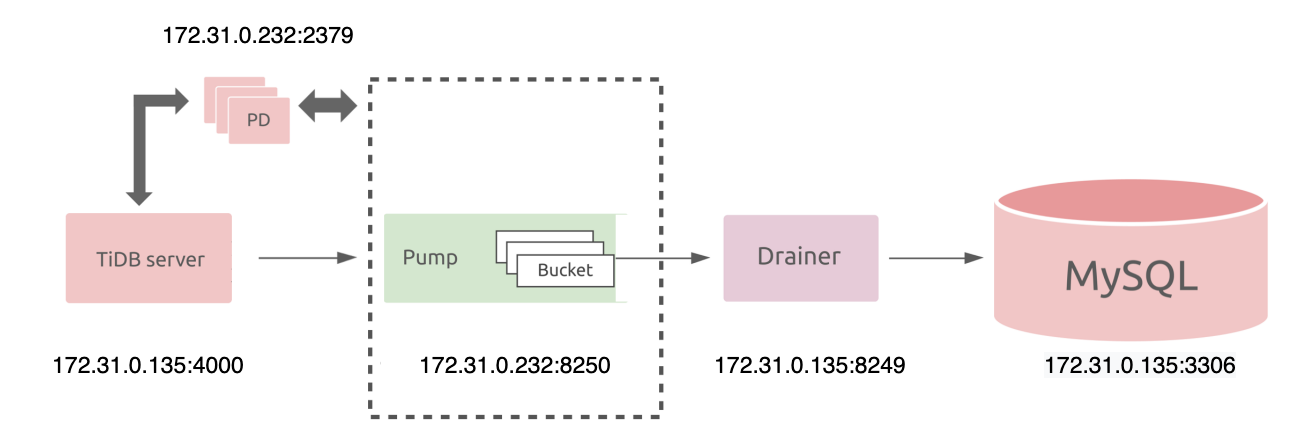 ## 步骤
-----------------------------------------------
#### 1. 编辑扩容文件,并在 MySQL 数据库中创建复制用户。
+ **编辑扩容文件,如下:**
```
# vi scale-out-binlog.yaml
```
```
pump_servers:
- host: 172.31.0.232
drainer_servers:
- host: 172.31.0.135
config:
syncer.db-type: "mysql"
syncer.to.host: "172.31.0.135"
syncer.to.user: "root"
syncer.to.password: "mysql"
syncer.to.port: 3306
```
**参数解释:**
pump_servers:
- host: 172.31.0.232
代表 pump 节点为 172.31.0.232。
drainer_servers:
- host: 172.31.0.135
代表 drainer 节点为 172.31.0.135。
config:
syncer.db-type: "mysql"
syncer.to.host: "172.31.0.135"
syncer.to.user: "root"
syncer.to.password: "mysql"
syncer.to.port: 3306
同时,配置目标数据库(下游)的 MySQL 数据源的 IP 为172.31.0.135 ,端口为 3306,MySQL 的复制用户为 root,密码为 mysql。
+ **在 MySQL 数据库中创建复制用户,并赋予权限,如下:**
```sql
# mysql -h127.0.0.1 -P3306 -uroot -pmysql
```
```sql
mysql> create user 'root'@'172.31.0.135' identified by 'mysql';
Query OK, 0 rows affected (0.00 sec)
mysql> grant all privileges on *.* to 'root'@'172.31.0.135';
Query OK, 0 rows affected (0.00 sec)
```
-----------------------------------------------
#### 2. 准备数据,由于目前 TiDB Binlog 不支持全量复制,所以需要先保证上下游数据一致。
+ **登录到源端(上游) TiDB 数据库,在 test 数据库中创建表 T,如下:**
```
# mysql -h172.31.0.135 -P4000 -uroot -ptidb
```
```sql
mysql> use test
Database changed
mysql> create table T(id int primary key, name varchar(20));
Query OK, 0 rows affected (0.08 sec)
mysql> insert into T values(1,'Tom');
Query OK, 1 row affected (0.00 sec)
mysql> insert into T values(2,'Jack');
Query OK, 1 row affected (0.00 sec)
mysql> insert into T values(3,'Frank');
Query OK, 1 row affected (0.00 sec)
mysql> select * from T;
+----+-------+
| id | name |
+----+-------+
| 1 | Tom |
| 2 | Jack |
| 3 | Frank |
+----+-------+
3 rows in set (0.00 sec)
```
+ **登录到目标端(下游) MySQL 数据库,在 test 数据库中创建表 T,如下:**
```
# mysql -h127.0.0.1 -P3306 -uroot -pmysql
```
```sql
mysql> create database test;
Query OK, 1 row affected (0.00 sec)
mysql> use test;
Database changed
mysql> create table T(id int primary key, name varchar(20));
Query OK, 0 rows affected (0.02 sec)
mysql> insert into T values(1,'Tom');
Query OK, 1 row affected (0.00 sec)
mysql> insert into T values(2,'Jack');
Query OK, 1 row affected (0.00 sec)
mysql> insert into T values(3,'Frank');
Query OK, 1 row affected (0.00 sec)
mysql> select * from T;
+----+-------+
| id | name |
+----+-------+
| 1 | Tom |
| 2 | Jack |
| 3 | Frank |
+----+-------+
3 rows in set (0.00 sec)
```
-----------------------------------------------
#### 3. 使用 tiup 组件对现有 tidb 数据库进行扩容,增加 pump 和 drainer 节点。
+ **使用 tiup 组件对现有 tidb 数据库进行扩容,增加 pump 和 drainer 节点,注意:其中需要输入主机的 root 用户密码和 yes 指令,如下:**
```
tiup cluster scale-out tidb-test scale-out-binlog.yaml -uroot -p
```
+ **扩容结束后,查看 TiDB 数据库集群,如下:**
```
# tiup cluster display tidb-testp
```
+ **可以看到,当前的 TiDB 数据库集群增加了 pump 节点 172.31.0.232:8250 和 drainer 节点 172.31.0.135:8249,并且状态都为 UP。**
-----------------------------------------------
#### 4. 开启 TiDB 数据库的 binlog 日志。
+ **使用tiup cluster edit-config 命令来编辑系统变量 binlog.enable: true 和 binlog.ignore-error: true(需要输入 y),如下:**
```
# tiup cluster edit-config tidb-test
```
```
...
server_configs:
tidb:
binlog.enable: true
binlog.ignore-error: true
...
Please check change highlight above, do you want to apply the change? [y/N]:(default=N) y
Applying changes...
Applied successfully, please use `tiup cluster reload tidb-test [-N ] [-R ]` to reload config.
```
+ **使用命令 tiup cluster reload 来载入新的配置(需要输入 y),如下:**
```
# tiup cluster reload tidb-test
```
```
tiup is checking updates for component cluster ...
Starting component `cluster`: /root/.tiup/components/cluster/v1.10.2/tiup-cluster reload tidb-test
Will reload the cluster tidb-test with restart policy is true, nodes: , roles: .
Do you want to continue? [y/N]:(default=N) y
+ [ Serial ] - SSHKeySet: privateKey=/root/.tiup/storage/cluster/clusters/tidb-test/ssh/id_rsa, publicKey=/root/.tiup/storage/cluster/clusters/tidb-test/ssh/id_rsa.pub
+ [Parallel] - UserSSH: user=tidb, host=172.31.0.79
+ [Parallel] - UserSSH: user=tidb, host=172.31.0.175
+ [Parallel] - UserSSH: user=tidb, host=172.31.0.95
+ [Parallel] - UserSSH: user=tidb, host=172.31.0.233
+ [Parallel] - UserSSH: user=tidb, host=172.31.0.232
...
Starting component blackbox_exporter
Starting instance 172.31.0.233
Starting instance 172.31.0.234
Starting instance 172.31.0.95
Starting instance 172.31.0.135
Starting instance 172.31.0.175
Starting instance 172.31.0.225
Starting instance 172.31.0.79
Starting instance 172.31.0.232
Start 172.31.0.135 success
Start 172.31.0.232 success
Start 172.31.0.234 success
Start 172.31.0.233 success
Start 172.31.0.95 success
Start 172.31.0.225 success
Start 172.31.0.79 success
Start 172.31.0.175 success
Reloaded cluster `tidb-test` successfully
```
-----------------------------------------------
#### 5. 登录到源端(上游)TiDB 数据库查看 TiDB Binlog 是否正常:
+ **查看 binlog 是否已经开启,如下:**
```
# mysql -h172.31.0.135 -P4000 -uroot -ptidb
```
```sql
mysql> show variables like "log_bin";
+---------------+-------+
| Variable_name | Value |
+---------------+-------+
| log_bin | ON |
+---------------+-------+
1 row in set (0.00 sec)
```
+ **查看 pump 节点和 drainer 节点是否正常,如下:**
```
# mysql -h172.31.0.135 -P4000 -uroot -ptidb
```
```sql
mysql> show pump status;
+-------------------+-------------------+--------+--------------------+---------------------+
| NodeID | Address | State | Max_Commit_Ts | Update_Time |
+-------------------+-------------------+--------+--------------------+---------------------+
| 172.31.0.232:8250 | 172.31.0.232:8250 | online | 434154283869929473 | 2022-06-25 22:26:00 |
+-------------------+-------------------+--------+--------------------+---------------------+
1 row in set (0.00 sec)
mysql> show drainer status;
+-------------------+-------------------+--------+--------------------+---------------------+
| NodeID | Address | State | Max_Commit_Ts | Update_Time |
+-------------------+-------------------+--------+--------------------+---------------------+
| 172.31.0.135:8249 | 172.31.0.135:8249 | online | 434154287015395329 | 2022-06-25 22:26:13 |
+-------------------+-------------------+--------+--------------------+---------------------+
1 row in set (0.00 sec)
```
+ **综合上面结果,我们会看到 TiDB 数据库的 Bilog 已经打开, pump 和 drainer 的状态都为 online。:**
-----------------------------------------------
## 输出样例
-----------------------------------------------
#### 步骤 3-使用 tiup 组件对现有 tidb 数据库进行扩容,增加 pump 和 drainer 节点输出参考:
```
tiup cluster scale-out tidb-test scale-out-binlog.yaml -uroot -p
```
```
...
+ Refresh components conifgs
- Generate config pd -> 172.31.0.233:2379 ... Done
- Generate config pd -> 172.31.0.175:2379 ... Done
- Generate config pd -> 172.31.0.232:2379 ... Done
- Generate config tikv -> 172.31.0.234:20160 ... Done
- Generate config tikv -> 172.31.0.79:20160 ... Done
- Generate config tikv -> 172.31.0.95:20160 ... Done
- Generate config pump -> 172.31.0.232:8250 ... Done
- Generate config tidb -> 172.31.0.135:4000 ... Done
- Generate config tiflash -> 172.31.0.225:9000 ... Done
- Generate config drainer -> 172.31.0.135:8249 ... Done
- Generate config prometheus -> 172.31.0.233:9090 ... Done
- Generate config grafana -> 172.31.0.233:3000 ... Done
- Generate config alertmanager -> 172.31.0.233:9093 ... Done
+ Reload prometheus and grafana
- Reload prometheus -> 172.31.0.233:9090 ... Done
- Reload grafana -> 172.31.0.233:3000 ... Done
+ [ Serial ] - UpdateTopology: cluster=tidb-test
Scaled cluster `tidb-test` out successfully
```
-----------------------------------------------
#### 步骤 3-扩容结束后,查看 TiDB 数据库集群输出参考:
```
# tiup cluster display tidb-test
```
```
tiup is checking updates for component cluster ...
Starting component `cluster`: /root/.tiup/components/cluster/v1.10.2/tiup-cluster display tidb-test
Cluster type: tidb
Cluster name: tidb-test
Cluster version: v6.1.0
Deploy user: tidb
SSH type: builtin
Dashboard URL: http://172.31.0.232:2379/dashboard
Grafana URL: http://172.31.0.233:3000
ID Role Host Ports OS/Arch Status Data Dir Deploy Dir
-- ---- ---- ----- ------- ------ -------- ----------
172.31.0.233:9093 alertmanager 172.31.0.233 9093/9094 linux/x86_64 Up /tidb-data/alertmanager-9093 /tidb-deploy/alertmanager-9093
172.31.0.135:8249 drainer 172.31.0.135 8249 linux/x86_64 Up /tidb-data/drainer-8249 /tidb-deploy/drainer-8249
172.31.0.233:3000 grafana 172.31.0.233 3000 linux/x86_64 Up - /tidb-deploy/grafana-3000
172.31.0.175:2379 pd 172.31.0.175 2379/2380 linux/x86_64 Up /tidb-data/pd-2379 /tidb-deploy/pd-2379
172.31.0.232:2379 pd 172.31.0.232 2379/2380 linux/x86_64 Up|L|UI /tidb-data/pd-2379 /tidb-deploy/pd-2379
172.31.0.233:2379 pd 172.31.0.233 2379/2380 linux/x86_64 Up /tidb-data/pd-2379 /tidb-deploy/pd-2379
172.31.0.233:9090 prometheus 172.31.0.233 9090/12020 linux/x86_64 Up /tidb-data/prometheus-9090 /tidb-deploy/prometheus-9090
172.31.0.232:8250 pump 172.31.0.232 8250 linux/x86_64 Up /tidb-data/pump-8250 /tidb-deploy/pump-8250
172.31.0.135:4000 tidb 172.31.0.135 4000/10080 linux/x86_64 Up - /tidb-deploy/tidb-4000
172.31.0.225:9000 tiflash 172.31.0.225 9000/8123/3930/20170/20292/8234 linux/x86_64 Up /tidb-data/tiflash-9000 /tidb-deploy/tiflash-9000
172.31.0.234:20160 tikv 172.31.0.234 20160/20180 linux/x86_64 Up /tidb-data/tikv-20160 /tidb-deploy/tikv-20160
172.31.0.79:20160 tikv 172.31.0.79 20160/20180 linux/x86_64 Up /tidb-data/tikv-20160 /tidb-deploy/tikv-20160
172.31.0.95:20160 tikv 172.31.0.95 20160/20180 linux/x86_64 Up /tidb-data/tikv-20160 /tidb-deploy/tikv-20160
Total nodes: 13
```
-----------------------------------------------
#### 步骤 4-使用命令 tiup cluster reload 来载入新的配置(需要输入 y)输出参考:
```
# tiup cluster reload tidb-test
```
```
tiup is checking updates for component cluster ...
Starting component `cluster`: /root/.tiup/components/cluster/v1.10.2/tiup-cluster reload tidb-test
Will reload the cluster tidb-test with restart policy is true, nodes: , roles: .
Do you want to continue? [y/N]:(default=N) y
+ [ Serial ] - SSHKeySet: privateKey=/root/.tiup/storage/cluster/clusters/tidb-test/ssh/id_rsa, publicKey=/root/.tiup/storage/cluster/clusters/tidb-test/ssh/id_rsa.pub
+ [Parallel] - UserSSH: user=tidb, host=172.31.0.79
+ [Parallel] - UserSSH: user=tidb, host=172.31.0.175
+ [Parallel] - UserSSH: user=tidb, host=172.31.0.95
+ [Parallel] - UserSSH: user=tidb, host=172.31.0.233
+ [Parallel] - UserSSH: user=tidb, host=172.31.0.232
...
Starting component blackbox_exporter
Starting instance 172.31.0.233
Starting instance 172.31.0.234
Starting instance 172.31.0.95
Starting instance 172.31.0.135
Starting instance 172.31.0.175
Starting instance 172.31.0.225
Starting instance 172.31.0.79
Starting instance 172.31.0.232
Start 172.31.0.135 success
Start 172.31.0.232 success
Start 172.31.0.234 success
Start 172.31.0.233 success
Start 172.31.0.95 success
Start 172.31.0.225 success
Start 172.31.0.79 success
Start 172.31.0.175 success
Reloaded cluster `tidb-test` successfully
```
-----------------------------------------------
## 步骤
-----------------------------------------------
#### 1. 编辑扩容文件,并在 MySQL 数据库中创建复制用户。
+ **编辑扩容文件,如下:**
```
# vi scale-out-binlog.yaml
```
```
pump_servers:
- host: 172.31.0.232
drainer_servers:
- host: 172.31.0.135
config:
syncer.db-type: "mysql"
syncer.to.host: "172.31.0.135"
syncer.to.user: "root"
syncer.to.password: "mysql"
syncer.to.port: 3306
```
**参数解释:**
pump_servers:
- host: 172.31.0.232
代表 pump 节点为 172.31.0.232。
drainer_servers:
- host: 172.31.0.135
代表 drainer 节点为 172.31.0.135。
config:
syncer.db-type: "mysql"
syncer.to.host: "172.31.0.135"
syncer.to.user: "root"
syncer.to.password: "mysql"
syncer.to.port: 3306
同时,配置目标数据库(下游)的 MySQL 数据源的 IP 为172.31.0.135 ,端口为 3306,MySQL 的复制用户为 root,密码为 mysql。
+ **在 MySQL 数据库中创建复制用户,并赋予权限,如下:**
```sql
# mysql -h127.0.0.1 -P3306 -uroot -pmysql
```
```sql
mysql> create user 'root'@'172.31.0.135' identified by 'mysql';
Query OK, 0 rows affected (0.00 sec)
mysql> grant all privileges on *.* to 'root'@'172.31.0.135';
Query OK, 0 rows affected (0.00 sec)
```
-----------------------------------------------
#### 2. 准备数据,由于目前 TiDB Binlog 不支持全量复制,所以需要先保证上下游数据一致。
+ **登录到源端(上游) TiDB 数据库,在 test 数据库中创建表 T,如下:**
```
# mysql -h172.31.0.135 -P4000 -uroot -ptidb
```
```sql
mysql> use test
Database changed
mysql> create table T(id int primary key, name varchar(20));
Query OK, 0 rows affected (0.08 sec)
mysql> insert into T values(1,'Tom');
Query OK, 1 row affected (0.00 sec)
mysql> insert into T values(2,'Jack');
Query OK, 1 row affected (0.00 sec)
mysql> insert into T values(3,'Frank');
Query OK, 1 row affected (0.00 sec)
mysql> select * from T;
+----+-------+
| id | name |
+----+-------+
| 1 | Tom |
| 2 | Jack |
| 3 | Frank |
+----+-------+
3 rows in set (0.00 sec)
```
+ **登录到目标端(下游) MySQL 数据库,在 test 数据库中创建表 T,如下:**
```
# mysql -h127.0.0.1 -P3306 -uroot -pmysql
```
```sql
mysql> create database test;
Query OK, 1 row affected (0.00 sec)
mysql> use test;
Database changed
mysql> create table T(id int primary key, name varchar(20));
Query OK, 0 rows affected (0.02 sec)
mysql> insert into T values(1,'Tom');
Query OK, 1 row affected (0.00 sec)
mysql> insert into T values(2,'Jack');
Query OK, 1 row affected (0.00 sec)
mysql> insert into T values(3,'Frank');
Query OK, 1 row affected (0.00 sec)
mysql> select * from T;
+----+-------+
| id | name |
+----+-------+
| 1 | Tom |
| 2 | Jack |
| 3 | Frank |
+----+-------+
3 rows in set (0.00 sec)
```
-----------------------------------------------
#### 3. 使用 tiup 组件对现有 tidb 数据库进行扩容,增加 pump 和 drainer 节点。
+ **使用 tiup 组件对现有 tidb 数据库进行扩容,增加 pump 和 drainer 节点,注意:其中需要输入主机的 root 用户密码和 yes 指令,如下:**
```
tiup cluster scale-out tidb-test scale-out-binlog.yaml -uroot -p
```
+ **扩容结束后,查看 TiDB 数据库集群,如下:**
```
# tiup cluster display tidb-testp
```
+ **可以看到,当前的 TiDB 数据库集群增加了 pump 节点 172.31.0.232:8250 和 drainer 节点 172.31.0.135:8249,并且状态都为 UP。**
-----------------------------------------------
#### 4. 开启 TiDB 数据库的 binlog 日志。
+ **使用tiup cluster edit-config 命令来编辑系统变量 binlog.enable: true 和 binlog.ignore-error: true(需要输入 y),如下:**
```
# tiup cluster edit-config tidb-test
```
```
...
server_configs:
tidb:
binlog.enable: true
binlog.ignore-error: true
...
Please check change highlight above, do you want to apply the change? [y/N]:(default=N) y
Applying changes...
Applied successfully, please use `tiup cluster reload tidb-test [-N ] [-R ]` to reload config.
```
+ **使用命令 tiup cluster reload 来载入新的配置(需要输入 y),如下:**
```
# tiup cluster reload tidb-test
```
```
tiup is checking updates for component cluster ...
Starting component `cluster`: /root/.tiup/components/cluster/v1.10.2/tiup-cluster reload tidb-test
Will reload the cluster tidb-test with restart policy is true, nodes: , roles: .
Do you want to continue? [y/N]:(default=N) y
+ [ Serial ] - SSHKeySet: privateKey=/root/.tiup/storage/cluster/clusters/tidb-test/ssh/id_rsa, publicKey=/root/.tiup/storage/cluster/clusters/tidb-test/ssh/id_rsa.pub
+ [Parallel] - UserSSH: user=tidb, host=172.31.0.79
+ [Parallel] - UserSSH: user=tidb, host=172.31.0.175
+ [Parallel] - UserSSH: user=tidb, host=172.31.0.95
+ [Parallel] - UserSSH: user=tidb, host=172.31.0.233
+ [Parallel] - UserSSH: user=tidb, host=172.31.0.232
...
Starting component blackbox_exporter
Starting instance 172.31.0.233
Starting instance 172.31.0.234
Starting instance 172.31.0.95
Starting instance 172.31.0.135
Starting instance 172.31.0.175
Starting instance 172.31.0.225
Starting instance 172.31.0.79
Starting instance 172.31.0.232
Start 172.31.0.135 success
Start 172.31.0.232 success
Start 172.31.0.234 success
Start 172.31.0.233 success
Start 172.31.0.95 success
Start 172.31.0.225 success
Start 172.31.0.79 success
Start 172.31.0.175 success
Reloaded cluster `tidb-test` successfully
```
-----------------------------------------------
#### 5. 登录到源端(上游)TiDB 数据库查看 TiDB Binlog 是否正常:
+ **查看 binlog 是否已经开启,如下:**
```
# mysql -h172.31.0.135 -P4000 -uroot -ptidb
```
```sql
mysql> show variables like "log_bin";
+---------------+-------+
| Variable_name | Value |
+---------------+-------+
| log_bin | ON |
+---------------+-------+
1 row in set (0.00 sec)
```
+ **查看 pump 节点和 drainer 节点是否正常,如下:**
```
# mysql -h172.31.0.135 -P4000 -uroot -ptidb
```
```sql
mysql> show pump status;
+-------------------+-------------------+--------+--------------------+---------------------+
| NodeID | Address | State | Max_Commit_Ts | Update_Time |
+-------------------+-------------------+--------+--------------------+---------------------+
| 172.31.0.232:8250 | 172.31.0.232:8250 | online | 434154283869929473 | 2022-06-25 22:26:00 |
+-------------------+-------------------+--------+--------------------+---------------------+
1 row in set (0.00 sec)
mysql> show drainer status;
+-------------------+-------------------+--------+--------------------+---------------------+
| NodeID | Address | State | Max_Commit_Ts | Update_Time |
+-------------------+-------------------+--------+--------------------+---------------------+
| 172.31.0.135:8249 | 172.31.0.135:8249 | online | 434154287015395329 | 2022-06-25 22:26:13 |
+-------------------+-------------------+--------+--------------------+---------------------+
1 row in set (0.00 sec)
```
+ **综合上面结果,我们会看到 TiDB 数据库的 Bilog 已经打开, pump 和 drainer 的状态都为 online。:**
-----------------------------------------------
## 输出样例
-----------------------------------------------
#### 步骤 3-使用 tiup 组件对现有 tidb 数据库进行扩容,增加 pump 和 drainer 节点输出参考:
```
tiup cluster scale-out tidb-test scale-out-binlog.yaml -uroot -p
```
```
...
+ Refresh components conifgs
- Generate config pd -> 172.31.0.233:2379 ... Done
- Generate config pd -> 172.31.0.175:2379 ... Done
- Generate config pd -> 172.31.0.232:2379 ... Done
- Generate config tikv -> 172.31.0.234:20160 ... Done
- Generate config tikv -> 172.31.0.79:20160 ... Done
- Generate config tikv -> 172.31.0.95:20160 ... Done
- Generate config pump -> 172.31.0.232:8250 ... Done
- Generate config tidb -> 172.31.0.135:4000 ... Done
- Generate config tiflash -> 172.31.0.225:9000 ... Done
- Generate config drainer -> 172.31.0.135:8249 ... Done
- Generate config prometheus -> 172.31.0.233:9090 ... Done
- Generate config grafana -> 172.31.0.233:3000 ... Done
- Generate config alertmanager -> 172.31.0.233:9093 ... Done
+ Reload prometheus and grafana
- Reload prometheus -> 172.31.0.233:9090 ... Done
- Reload grafana -> 172.31.0.233:3000 ... Done
+ [ Serial ] - UpdateTopology: cluster=tidb-test
Scaled cluster `tidb-test` out successfully
```
-----------------------------------------------
#### 步骤 3-扩容结束后,查看 TiDB 数据库集群输出参考:
```
# tiup cluster display tidb-test
```
```
tiup is checking updates for component cluster ...
Starting component `cluster`: /root/.tiup/components/cluster/v1.10.2/tiup-cluster display tidb-test
Cluster type: tidb
Cluster name: tidb-test
Cluster version: v6.1.0
Deploy user: tidb
SSH type: builtin
Dashboard URL: http://172.31.0.232:2379/dashboard
Grafana URL: http://172.31.0.233:3000
ID Role Host Ports OS/Arch Status Data Dir Deploy Dir
-- ---- ---- ----- ------- ------ -------- ----------
172.31.0.233:9093 alertmanager 172.31.0.233 9093/9094 linux/x86_64 Up /tidb-data/alertmanager-9093 /tidb-deploy/alertmanager-9093
172.31.0.135:8249 drainer 172.31.0.135 8249 linux/x86_64 Up /tidb-data/drainer-8249 /tidb-deploy/drainer-8249
172.31.0.233:3000 grafana 172.31.0.233 3000 linux/x86_64 Up - /tidb-deploy/grafana-3000
172.31.0.175:2379 pd 172.31.0.175 2379/2380 linux/x86_64 Up /tidb-data/pd-2379 /tidb-deploy/pd-2379
172.31.0.232:2379 pd 172.31.0.232 2379/2380 linux/x86_64 Up|L|UI /tidb-data/pd-2379 /tidb-deploy/pd-2379
172.31.0.233:2379 pd 172.31.0.233 2379/2380 linux/x86_64 Up /tidb-data/pd-2379 /tidb-deploy/pd-2379
172.31.0.233:9090 prometheus 172.31.0.233 9090/12020 linux/x86_64 Up /tidb-data/prometheus-9090 /tidb-deploy/prometheus-9090
172.31.0.232:8250 pump 172.31.0.232 8250 linux/x86_64 Up /tidb-data/pump-8250 /tidb-deploy/pump-8250
172.31.0.135:4000 tidb 172.31.0.135 4000/10080 linux/x86_64 Up - /tidb-deploy/tidb-4000
172.31.0.225:9000 tiflash 172.31.0.225 9000/8123/3930/20170/20292/8234 linux/x86_64 Up /tidb-data/tiflash-9000 /tidb-deploy/tiflash-9000
172.31.0.234:20160 tikv 172.31.0.234 20160/20180 linux/x86_64 Up /tidb-data/tikv-20160 /tidb-deploy/tikv-20160
172.31.0.79:20160 tikv 172.31.0.79 20160/20180 linux/x86_64 Up /tidb-data/tikv-20160 /tidb-deploy/tikv-20160
172.31.0.95:20160 tikv 172.31.0.95 20160/20180 linux/x86_64 Up /tidb-data/tikv-20160 /tidb-deploy/tikv-20160
Total nodes: 13
```
-----------------------------------------------
#### 步骤 4-使用命令 tiup cluster reload 来载入新的配置(需要输入 y)输出参考:
```
# tiup cluster reload tidb-test
```
```
tiup is checking updates for component cluster ...
Starting component `cluster`: /root/.tiup/components/cluster/v1.10.2/tiup-cluster reload tidb-test
Will reload the cluster tidb-test with restart policy is true, nodes: , roles: .
Do you want to continue? [y/N]:(default=N) y
+ [ Serial ] - SSHKeySet: privateKey=/root/.tiup/storage/cluster/clusters/tidb-test/ssh/id_rsa, publicKey=/root/.tiup/storage/cluster/clusters/tidb-test/ssh/id_rsa.pub
+ [Parallel] - UserSSH: user=tidb, host=172.31.0.79
+ [Parallel] - UserSSH: user=tidb, host=172.31.0.175
+ [Parallel] - UserSSH: user=tidb, host=172.31.0.95
+ [Parallel] - UserSSH: user=tidb, host=172.31.0.233
+ [Parallel] - UserSSH: user=tidb, host=172.31.0.232
...
Starting component blackbox_exporter
Starting instance 172.31.0.233
Starting instance 172.31.0.234
Starting instance 172.31.0.95
Starting instance 172.31.0.135
Starting instance 172.31.0.175
Starting instance 172.31.0.225
Starting instance 172.31.0.79
Starting instance 172.31.0.232
Start 172.31.0.135 success
Start 172.31.0.232 success
Start 172.31.0.234 success
Start 172.31.0.233 success
Start 172.31.0.95 success
Start 172.31.0.225 success
Start 172.31.0.79 success
Start 172.31.0.175 success
Reloaded cluster `tidb-test` successfully
```
-----------------------------------------------