# **练习-4 : 缩容 `TiDB Binlog` 节点**
## 概述
+ 在本练习中,将对现有的 TiDB Binlog 进行缩容。
## 练习环境要求
+ 1. 注意,您的实验环境(包括IP,端口号,用户名,密码和目录)可能和手册不同。
+ 2. 可以连接到实验用虚拟机。
+ 3. TiDB 数据库提前部署完毕。
+ 4. 清理掉之前的实验数据。
+ 5. 需要完成练习-1。
## 拓扑图
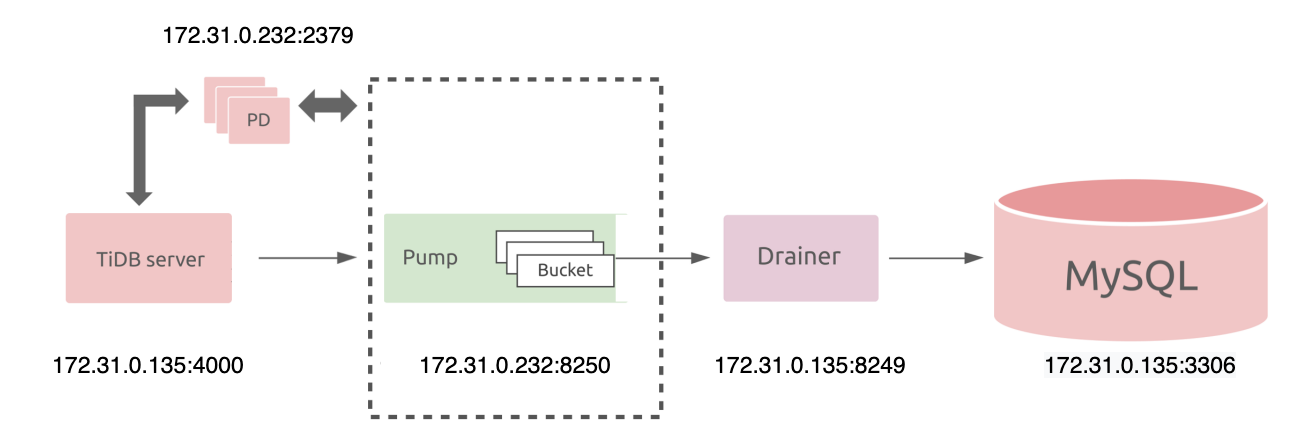 ## 步骤
-----------------------------------------------
#### 1. 关闭 tidb 数据库的 binlog 功能。
+ **使用 tiup cluster edit-config 设置 binlog.enable 和 binlog.ignore-error 为 false(需要输入一次 y),如下:**
```
# tiup cluster edit-config tidb-test
```
```
...
server_configs:
tidb:
binlog.enable: false
binlog.ignore-error: false
...
Please check change highlight above, do you want to apply the change? [y/N]:(default=N) y
Applying changes...
Applied successfully, please use `tiup cluster reload tidb-test [-N ] [-R ]` to reload config.
```
+ **使用 tiup cluster reload 重载参数(需要输入一次 y),如下:**
```
# tiup cluster reload tidb-test
```
-----------------------------------------------
#### 2. 查看 TiDB 数据库集群状态。
+ **查看 TiDB 数据库集群状态,如下:**
```
# tiup cluster display tidb-test
```
-----------------------------------------------
#### 3. 缩容当前集群中的 drainer 节点。
+ **缩容当前集群中的 drainer 节点 172.31.0.135:8249(需要输入两次 y),如下:**
```
# tiup cluster scale-in tidb-test --node 172.31.0.135:8249
```
+ **查看缩容后的集群状态, 如下:**
```
# tiup cluster display tidb-test
```
-----------------------------------------------
#### 4. 缩容当前集群中的 pump 节点。
+ **缩容当前集群中的 pump 节点 172.31.0.232:8250(需要输入两次 y),如下:**
```
# tiup cluster scale-in tidb-test --node 172.31.0.232:8250
```
+ **查看缩容后的集群状态, 如下:**
```
# tiup cluster display tidb-test
```
-----------------------------------------------
#### 5. 使用 tiup cluster prune 命令清理节点。
+ **使用 tiup cluster prune 命令清理节点(需要输入一次 y), 如下:**
```
# tiup cluster prune tidb-test
```
+ **查看集群状态, 如下:**
```
# tiup cluster display tidb-test
```
-----------------------------------------------
## 输出样例
-----------------------------------------------
#### 步骤 1-使用 tiup cluster reload 重载参数(需要输入一次 y)输出参考**
```
# tiup cluster reload tidb-test
```
```
tiup is checking updates for component cluster ...
Starting component `cluster`: /root/.tiup/components/cluster/v1.10.2/tiup-cluster reload tidb-test
Will reload the cluster tidb-test with restart policy is true, nodes: , roles: .
Do you want to continue? [y/N]:(default=N) y
...
Starting component blackbox_exporter
Starting instance 172.31.0.175
Starting instance 172.31.0.232
Starting instance 172.31.0.234
Starting instance 172.31.0.79
Starting instance 172.31.0.95
Starting instance 172.31.0.135
Starting instance 172.31.0.225
Starting instance 172.31.0.233
Start 172.31.0.135 success
Start 172.31.0.233 success
Start 172.31.0.232 success
Start 172.31.0.234 success
Start 172.31.0.225 success
Start 172.31.0.95 success
Start 172.31.0.79 success
Start 172.31.0.175 success
Reloaded cluster `tidb-test` successfully
```
-----------------------------------------------
#### 步骤 2-查看 TiDB 数据库集群状态输出参考:
```
# tiup cluster display tidb-test
```
```
tiup is checking updates for component cluster ...
Starting component `cluster`: /root/.tiup/components/cluster/v1.10.2/tiup-cluster display tidb-test
Cluster type: tidb
Cluster name: tidb-test
Cluster version: v6.1.0
Deploy user: tidb
SSH type: builtin
Dashboard URL: http://172.31.0.232:2379/dashboard
Grafana URL: http://172.31.0.233:3000
ID Role Host Ports OS/Arch Status Data Dir Deploy Dir
-- ---- ---- ----- ------- ------ -------- ----------
172.31.0.233:9093 alertmanager 172.31.0.233 9093/9094 linux/x86_64 Up /tidb-data/alertmanager-9093 /tidb-deploy/alertmanager-9093
172.31.0.135:8249 drainer 172.31.0.135 8249 linux/x86_64 Up /tidb-data/drainer-8249 /tidb-deploy/drainer-8249
172.31.0.233:3000 grafana 172.31.0.233 3000 linux/x86_64 Up - /tidb-deploy/grafana-3000
172.31.0.175:2379 pd 172.31.0.175 2379/2380 linux/x86_64 Up /tidb-data/pd-2379 /tidb-deploy/pd-2379
172.31.0.232:2379 pd 172.31.0.232 2379/2380 linux/x86_64 Up|L|UI /tidb-data/pd-2379 /tidb-deploy/pd-2379
172.31.0.233:2379 pd 172.31.0.233 2379/2380 linux/x86_64 Up /tidb-data/pd-2379 /tidb-deploy/pd-2379
172.31.0.233:9090 prometheus 172.31.0.233 9090/12020 linux/x86_64 Up /tidb-data/prometheus-9090 /tidb-deploy/prometheus-9090
172.31.0.232:8250 pump 172.31.0.232 8250 linux/x86_64 Up /tidb-data/pump-8250 /tidb-deploy/pump-8250
172.31.0.135:4000 tidb 172.31.0.135 4000/10080 linux/x86_64 Up - /tidb-deploy/tidb-4000
172.31.0.225:9000 tiflash 172.31.0.225 9000/8123/3930/20170/20292/8234 linux/x86_64 Up /tidb-data/tiflash-9000 /tidb-deploy/tiflash-9000
172.31.0.234:20160 tikv 172.31.0.234 20160/20180 linux/x86_64 Up /tidb-data/tikv-20160 /tidb-deploy/tikv-20160
172.31.0.79:20160 tikv 172.31.0.79 20160/20180 linux/x86_64 Up /tidb-data/tikv-20160 /tidb-deploy/tikv-20160
172.31.0.95:20160 tikv 172.31.0.95 20160/20180 linux/x86_64 Up /tidb-data/tikv-20160 /tidb-deploy/tikv-20160
Total nodes: 13
```
-----------------------------------------------
#### 步骤 3-缩容当前集群中的 drainer 节点 172.31.0.135:8249(需要输入两次 y)输出参考:
```
# tiup cluster scale-in tidb-test --node 172.31.0.135:8249
```
```
tiup is checking updates for component cluster ...
Starting component `cluster`: /root/.tiup/components/cluster/v1.10.2/tiup-cluster scale-in tidb-test --node 172.31.0.135:8249
This operation will delete the 172.31.0.135:8249 nodes in `tidb-test` and all their data.
Do you want to continue? [y/N]:(default=N) y
The component `[drainer]` will become tombstone, maybe exists in several minutes or hours, after that you can use the prune command to clean it
Do you want to continue? [y/N]:(default=N) y
...
+ Refresh instance configs
- Generate config pd -> 172.31.0.233:2379 ... Done
- Generate config pd -> 172.31.0.175:2379 ... Done
- Generate config pd -> 172.31.0.232:2379 ... Done
- Generate config tikv -> 172.31.0.234:20160 ... Done
- Generate config tikv -> 172.31.0.79:20160 ... Done
- Generate config tikv -> 172.31.0.95:20160 ... Done
- Generate config pump -> 172.31.0.232:8250 ... Done
- Generate config tidb -> 172.31.0.135:4000 ... Done
- Generate config tiflash -> 172.31.0.225:9000 ... Done
- Generate config prometheus -> 172.31.0.233:9090 ... Done
- Generate config grafana -> 172.31.0.233:3000 ... Done
- Generate config alertmanager -> 172.31.0.233:9093 ... Done
+ Reload prometheus and grafana
- Reload prometheus -> 172.31.0.233:9090 ... Done
- Reload grafana -> 172.31.0.233:3000 ... Done
Scaled cluster `tidb-test` in successfully
```
-----------------------------------------------
#### 步骤 3-查看缩容后的集群状态输出参考:
```
# tiup cluster display tidb-test
```
```
tiup is checking updates for component cluster ...
Starting component `cluster`: /root/.tiup/components/cluster/v1.10.2/tiup-cluster display tidb-test
Cluster type: tidb
Cluster name: tidb-test
Cluster version: v6.1.0
Deploy user: tidb
SSH type: builtin
Dashboard URL: http://172.31.0.232:2379/dashboard
Grafana URL: http://172.31.0.233:3000
ID Role Host Ports OS/Arch Status Data Dir Deploy Dir
-- ---- ---- ----- ------- ------ -------- ----------
172.31.0.233:9093 alertmanager 172.31.0.233 9093/9094 linux/x86_64 Up /tidb-data/alertmanager-9093 /tidb-deploy/alertmanager-9093
172.31.0.135:8249 drainer 172.31.0.135 8249 linux/x86_64 Tombstone /tidb-data/drainer-8249 /tidb-deploy/drainer-8249
172.31.0.233:3000 grafana 172.31.0.233 3000 linux/x86_64 Up - /tidb-deploy/grafana-3000
172.31.0.175:2379 pd 172.31.0.175 2379/2380 linux/x86_64 Up /tidb-data/pd-2379 /tidb-deploy/pd-2379
172.31.0.232:2379 pd 172.31.0.232 2379/2380 linux/x86_64 Up|UI /tidb-data/pd-2379 /tidb-deploy/pd-2379
172.31.0.233:2379 pd 172.31.0.233 2379/2380 linux/x86_64 Up|L /tidb-data/pd-2379 /tidb-deploy/pd-2379
172.31.0.233:9090 prometheus 172.31.0.233 9090/12020 linux/x86_64 Up /tidb-data/prometheus-9090 /tidb-deploy/prometheus-9090
172.31.0.232:8250 pump 172.31.0.232 8250 linux/x86_64 Up /tidb-data/pump-8250 /tidb-deploy/pump-8250
172.31.0.135:4000 tidb 172.31.0.135 4000/10080 linux/x86_64 Up - /tidb-deploy/tidb-4000
172.31.0.225:9000 tiflash 172.31.0.225 9000/8123/3930/20170/20292/8234 linux/x86_64 Up /tidb-data/tiflash-9000 /tidb-deploy/tiflash-9000
172.31.0.234:20160 tikv 172.31.0.234 20160/20180 linux/x86_64 Up /tidb-data/tikv-20160 /tidb-deploy/tikv-20160
172.31.0.79:20160 tikv 172.31.0.79 20160/20180 linux/x86_64 Up /tidb-data/tikv-20160 /tidb-deploy/tikv-20160
172.31.0.95:20160 tikv 172.31.0.95 20160/20180 linux/x86_64 Up /tidb-data/tikv-20160 /tidb-deploy/tikv-20160
Total nodes: 13
There are some nodes can be pruned:
Nodes: [172.31.0.135:8249]
You can destroy them with the command: `tiup cluster prune tidb-test`
```
-----------------------------------------------
#### 步骤 4-缩容当前集群中的 drainer 节点 172.31.0.232:8250(需要输入两次 y)输出参考:
```
# tiup cluster scale-in tidb-test --node 172.31.0.232:8250
```
```
tiup is checking updates for component cluster ...
Starting component `cluster`: /root/.tiup/components/cluster/v1.10.2/tiup-cluster scale-in tidb-test --node 172.31.0.232:8250
This operation will delete the 172.31.0.232:8250 nodes in `tidb-test` and all their data.
Do you want to continue? [y/N]:(default=N) y
The component `[pump]` will become tombstone, maybe exists in several minutes or hours, after that you can use the prune command to clean it
Do you want to continue? [y/N]:(default=N) y
...
+ Refresh instance configs
- Generate config pd -> 172.31.0.233:2379 ... Done
- Generate config pd -> 172.31.0.175:2379 ... Done
- Generate config pd -> 172.31.0.232:2379 ... Done
- Generate config tikv -> 172.31.0.234:20160 ... Done
- Generate config tikv -> 172.31.0.79:20160 ... Done
- Generate config tikv -> 172.31.0.95:20160 ... Done
- Generate config tidb -> 172.31.0.135:4000 ... Done
- Generate config tiflash -> 172.31.0.225:9000 ... Done
- Generate config drainer -> 172.31.0.135:8249 ... Done
- Generate config prometheus -> 172.31.0.233:9090 ... Done
- Generate config grafana -> 172.31.0.233:3000 ... Done
- Generate config alertmanager -> 172.31.0.233:9093 ... Done
+ Reload prometheus and grafana
- Reload prometheus -> 172.31.0.233:9090 ... Done
- Reload grafana -> 172.31.0.233:3000 ... Done
Scaled cluster `tidb-test` in successfully
```
-----------------------------------------------
#### 步骤 4-查看缩容后的集群状态输出参考:
```
# tiup cluster display tidb-test
```
```
tiup is checking updates for component cluster ...
Starting component `cluster`: /root/.tiup/components/cluster/v1.10.2/tiup-cluster display tidb-test
Cluster type: tidb
Cluster name: tidb-test
Cluster version: v6.1.0
Deploy user: tidb
SSH type: builtin
Dashboard URL: http://172.31.0.232:2379/dashboard
Grafana URL: http://172.31.0.233:3000
ID Role Host Ports OS/Arch Status Data Dir Deploy Dir
-- ---- ---- ----- ------- ------ -------- ----------
172.31.0.233:9093 alertmanager 172.31.0.233 9093/9094 linux/x86_64 Up /tidb-data/alertmanager-9093 /tidb-deploy/alertmanager-9093
172.31.0.135:8249 drainer 172.31.0.135 8249 linux/x86_64 Tombstone /tidb-data/drainer-8249 /tidb-deploy/drainer-8249
172.31.0.233:3000 grafana 172.31.0.233 3000 linux/x86_64 Up - /tidb-deploy/grafana-3000
172.31.0.175:2379 pd 172.31.0.175 2379/2380 linux/x86_64 Up /tidb-data/pd-2379 /tidb-deploy/pd-2379
172.31.0.232:2379 pd 172.31.0.232 2379/2380 linux/x86_64 Up|UI /tidb-data/pd-2379 /tidb-deploy/pd-2379
172.31.0.233:2379 pd 172.31.0.233 2379/2380 linux/x86_64 Up|L /tidb-data/pd-2379 /tidb-deploy/pd-2379
172.31.0.233:9090 prometheus 172.31.0.233 9090/12020 linux/x86_64 Up /tidb-data/prometheus-9090 /tidb-deploy/prometheus-9090
172.31.0.232:8250 pump 172.31.0.232 8250 linux/x86_64 Tombstone /tidb-data/pump-8250 /tidb-deploy/pump-8250
172.31.0.135:4000 tidb 172.31.0.135 4000/10080 linux/x86_64 Up - /tidb-deploy/tidb-4000
172.31.0.225:9000 tiflash 172.31.0.225 9000/8123/3930/20170/20292/8234 linux/x86_64 Up /tidb-data/tiflash-9000 /tidb-deploy/tiflash-9000
172.31.0.234:20160 tikv 172.31.0.234 20160/20180 linux/x86_64 Up /tidb-data/tikv-20160 /tidb-deploy/tikv-20160
172.31.0.79:20160 tikv 172.31.0.79 20160/20180 linux/x86_64 Up /tidb-data/tikv-20160 /tidb-deploy/tikv-20160
172.31.0.95:20160 tikv 172.31.0.95 20160/20180 linux/x86_64 Up /tidb-data/tikv-20160 /tidb-deploy/tikv-20160
Total nodes: 13
There are some nodes can be pruned:
Nodes: [172.31.0.232:8250 172.31.0.135:8249]
You can destroy them with the command: `tiup cluster prune tidb-test`
```
-----------------------------------------------
#### 步骤 5-使用 tiup cluster prune 命令清理节点(需要输入一次 y)输出参考:
```
# tiup cluster prune tidb-test
```
```
tiup is checking updates for component cluster ...
Starting component `cluster`: /root/.tiup/components/cluster/v1.10.2/tiup-cluster prune tidb-test
+ [ Serial ] - SSHKeySet: privateKey=/root/.tiup/storage/cluster/clusters/tidb-test/ssh/id_rsa, publicKey=/root/.tiup/storage/cluster/clusters/tidb-test/ssh/id_rsa.pub
+ [Parallel] - UserSSH: user=tidb, host=172.31.0.79
+ [Parallel] - UserSSH: user=tidb, host=172.31.0.175
+ [Parallel] - UserSSH: user=tidb, host=172.31.0.95
+ [Parallel] - UserSSH: user=tidb, host=172.31.0.232
+ [Parallel] - UserSSH: user=tidb, host=172.31.0.232
+ [Parallel] - UserSSH: user=tidb, host=172.31.0.135
+ [Parallel] - UserSSH: user=tidb, host=172.31.0.225
+ [Parallel] - UserSSH: user=tidb, host=172.31.0.135
+ [Parallel] - UserSSH: user=tidb, host=172.31.0.233
+ [Parallel] - UserSSH: user=tidb, host=172.31.0.233
+ [Parallel] - UserSSH: user=tidb, host=172.31.0.234
+ [Parallel] - UserSSH: user=tidb, host=172.31.0.233
+ [Parallel] - UserSSH: user=tidb, host=172.31.0.233
+ [ Serial ] - FindTomestoneNodes
Will destroy these nodes: [172.31.0.232:8250 172.31.0.135:8249]
Do you confirm this action? [y/N]:(default=N) y
...
+ Refresh instance configs
- Generate config pd -> 172.31.0.233:2379 ... Done
- Generate config pd -> 172.31.0.175:2379 ... Done
- Generate config pd -> 172.31.0.232:2379 ... Done
- Generate config tikv -> 172.31.0.234:20160 ... Done
- Generate config tikv -> 172.31.0.79:20160 ... Done
- Generate config tikv -> 172.31.0.95:20160 ... Done
- Generate config tidb -> 172.31.0.135:4000 ... Done
- Generate config tiflash -> 172.31.0.225:9000 ... Done
- Generate config prometheus -> 172.31.0.233:9090 ... Done
- Generate config grafana -> 172.31.0.233:3000 ... Done
- Generate config alertmanager -> 172.31.0.233:9093 ... Done
+ Reload prometheus and grafana
- Reload prometheus -> 172.31.0.233:9090 ... Done
- Reload grafana -> 172.31.0.233:3000 ... Done
Destroy success
```
-----------------------------------------------
#### 步骤 5-查看集群状态输出参考:
```
# tiup cluster display tidb-test
```
```
tiup is checking updates for component cluster ...
Starting component `cluster`: /root/.tiup/components/cluster/v1.10.2/tiup-cluster display tidb-test
Cluster type: tidb
Cluster name: tidb-test
Cluster version: v6.1.0
Deploy user: tidb
SSH type: builtin
Dashboard URL: http://172.31.0.232:2379/dashboard
Grafana URL: http://172.31.0.233:3000
ID Role Host Ports OS/Arch Status Data Dir Deploy Dir
-- ---- ---- ----- ------- ------ -------- ----------
172.31.0.233:9093 alertmanager 172.31.0.233 9093/9094 linux/x86_64 Up /tidb-data/alertmanager-9093 /tidb-deploy/alertmanager-9093
172.31.0.233:3000 grafana 172.31.0.233 3000 linux/x86_64 Up - /tidb-deploy/grafana-3000
172.31.0.175:2379 pd 172.31.0.175 2379/2380 linux/x86_64 Up /tidb-data/pd-2379 /tidb-deploy/pd-2379
172.31.0.232:2379 pd 172.31.0.232 2379/2380 linux/x86_64 Up|UI /tidb-data/pd-2379 /tidb-deploy/pd-2379
172.31.0.233:2379 pd 172.31.0.233 2379/2380 linux/x86_64 Up|L /tidb-data/pd-2379 /tidb-deploy/pd-2379
172.31.0.233:9090 prometheus 172.31.0.233 9090/12020 linux/x86_64 Up /tidb-data/prometheus-9090 /tidb-deploy/prometheus-9090
172.31.0.135:4000 tidb 172.31.0.135 4000/10080 linux/x86_64 Up - /tidb-deploy/tidb-4000
172.31.0.225:9000 tiflash 172.31.0.225 9000/8123/3930/20170/20292/8234 linux/x86_64 Up /tidb-data/tiflash-9000 /tidb-deploy/tiflash-9000
172.31.0.234:20160 tikv 172.31.0.234 20160/20180 linux/x86_64 Up /tidb-data/tikv-20160 /tidb-deploy/tikv-20160
172.31.0.79:20160 tikv 172.31.0.79 20160/20180 linux/x86_64 Up /tidb-data/tikv-20160 /tidb-deploy/tikv-20160
172.31.0.95:20160 tikv 172.31.0.95 20160/20180 linux/x86_64 Up /tidb-data/tikv-20160 /tidb-deploy/tikv-20160
Total nodes: 11
```
-----------------------------------------------
## 步骤
-----------------------------------------------
#### 1. 关闭 tidb 数据库的 binlog 功能。
+ **使用 tiup cluster edit-config 设置 binlog.enable 和 binlog.ignore-error 为 false(需要输入一次 y),如下:**
```
# tiup cluster edit-config tidb-test
```
```
...
server_configs:
tidb:
binlog.enable: false
binlog.ignore-error: false
...
Please check change highlight above, do you want to apply the change? [y/N]:(default=N) y
Applying changes...
Applied successfully, please use `tiup cluster reload tidb-test [-N ] [-R ]` to reload config.
```
+ **使用 tiup cluster reload 重载参数(需要输入一次 y),如下:**
```
# tiup cluster reload tidb-test
```
-----------------------------------------------
#### 2. 查看 TiDB 数据库集群状态。
+ **查看 TiDB 数据库集群状态,如下:**
```
# tiup cluster display tidb-test
```
-----------------------------------------------
#### 3. 缩容当前集群中的 drainer 节点。
+ **缩容当前集群中的 drainer 节点 172.31.0.135:8249(需要输入两次 y),如下:**
```
# tiup cluster scale-in tidb-test --node 172.31.0.135:8249
```
+ **查看缩容后的集群状态, 如下:**
```
# tiup cluster display tidb-test
```
-----------------------------------------------
#### 4. 缩容当前集群中的 pump 节点。
+ **缩容当前集群中的 pump 节点 172.31.0.232:8250(需要输入两次 y),如下:**
```
# tiup cluster scale-in tidb-test --node 172.31.0.232:8250
```
+ **查看缩容后的集群状态, 如下:**
```
# tiup cluster display tidb-test
```
-----------------------------------------------
#### 5. 使用 tiup cluster prune 命令清理节点。
+ **使用 tiup cluster prune 命令清理节点(需要输入一次 y), 如下:**
```
# tiup cluster prune tidb-test
```
+ **查看集群状态, 如下:**
```
# tiup cluster display tidb-test
```
-----------------------------------------------
## 输出样例
-----------------------------------------------
#### 步骤 1-使用 tiup cluster reload 重载参数(需要输入一次 y)输出参考**
```
# tiup cluster reload tidb-test
```
```
tiup is checking updates for component cluster ...
Starting component `cluster`: /root/.tiup/components/cluster/v1.10.2/tiup-cluster reload tidb-test
Will reload the cluster tidb-test with restart policy is true, nodes: , roles: .
Do you want to continue? [y/N]:(default=N) y
...
Starting component blackbox_exporter
Starting instance 172.31.0.175
Starting instance 172.31.0.232
Starting instance 172.31.0.234
Starting instance 172.31.0.79
Starting instance 172.31.0.95
Starting instance 172.31.0.135
Starting instance 172.31.0.225
Starting instance 172.31.0.233
Start 172.31.0.135 success
Start 172.31.0.233 success
Start 172.31.0.232 success
Start 172.31.0.234 success
Start 172.31.0.225 success
Start 172.31.0.95 success
Start 172.31.0.79 success
Start 172.31.0.175 success
Reloaded cluster `tidb-test` successfully
```
-----------------------------------------------
#### 步骤 2-查看 TiDB 数据库集群状态输出参考:
```
# tiup cluster display tidb-test
```
```
tiup is checking updates for component cluster ...
Starting component `cluster`: /root/.tiup/components/cluster/v1.10.2/tiup-cluster display tidb-test
Cluster type: tidb
Cluster name: tidb-test
Cluster version: v6.1.0
Deploy user: tidb
SSH type: builtin
Dashboard URL: http://172.31.0.232:2379/dashboard
Grafana URL: http://172.31.0.233:3000
ID Role Host Ports OS/Arch Status Data Dir Deploy Dir
-- ---- ---- ----- ------- ------ -------- ----------
172.31.0.233:9093 alertmanager 172.31.0.233 9093/9094 linux/x86_64 Up /tidb-data/alertmanager-9093 /tidb-deploy/alertmanager-9093
172.31.0.135:8249 drainer 172.31.0.135 8249 linux/x86_64 Up /tidb-data/drainer-8249 /tidb-deploy/drainer-8249
172.31.0.233:3000 grafana 172.31.0.233 3000 linux/x86_64 Up - /tidb-deploy/grafana-3000
172.31.0.175:2379 pd 172.31.0.175 2379/2380 linux/x86_64 Up /tidb-data/pd-2379 /tidb-deploy/pd-2379
172.31.0.232:2379 pd 172.31.0.232 2379/2380 linux/x86_64 Up|L|UI /tidb-data/pd-2379 /tidb-deploy/pd-2379
172.31.0.233:2379 pd 172.31.0.233 2379/2380 linux/x86_64 Up /tidb-data/pd-2379 /tidb-deploy/pd-2379
172.31.0.233:9090 prometheus 172.31.0.233 9090/12020 linux/x86_64 Up /tidb-data/prometheus-9090 /tidb-deploy/prometheus-9090
172.31.0.232:8250 pump 172.31.0.232 8250 linux/x86_64 Up /tidb-data/pump-8250 /tidb-deploy/pump-8250
172.31.0.135:4000 tidb 172.31.0.135 4000/10080 linux/x86_64 Up - /tidb-deploy/tidb-4000
172.31.0.225:9000 tiflash 172.31.0.225 9000/8123/3930/20170/20292/8234 linux/x86_64 Up /tidb-data/tiflash-9000 /tidb-deploy/tiflash-9000
172.31.0.234:20160 tikv 172.31.0.234 20160/20180 linux/x86_64 Up /tidb-data/tikv-20160 /tidb-deploy/tikv-20160
172.31.0.79:20160 tikv 172.31.0.79 20160/20180 linux/x86_64 Up /tidb-data/tikv-20160 /tidb-deploy/tikv-20160
172.31.0.95:20160 tikv 172.31.0.95 20160/20180 linux/x86_64 Up /tidb-data/tikv-20160 /tidb-deploy/tikv-20160
Total nodes: 13
```
-----------------------------------------------
#### 步骤 3-缩容当前集群中的 drainer 节点 172.31.0.135:8249(需要输入两次 y)输出参考:
```
# tiup cluster scale-in tidb-test --node 172.31.0.135:8249
```
```
tiup is checking updates for component cluster ...
Starting component `cluster`: /root/.tiup/components/cluster/v1.10.2/tiup-cluster scale-in tidb-test --node 172.31.0.135:8249
This operation will delete the 172.31.0.135:8249 nodes in `tidb-test` and all their data.
Do you want to continue? [y/N]:(default=N) y
The component `[drainer]` will become tombstone, maybe exists in several minutes or hours, after that you can use the prune command to clean it
Do you want to continue? [y/N]:(default=N) y
...
+ Refresh instance configs
- Generate config pd -> 172.31.0.233:2379 ... Done
- Generate config pd -> 172.31.0.175:2379 ... Done
- Generate config pd -> 172.31.0.232:2379 ... Done
- Generate config tikv -> 172.31.0.234:20160 ... Done
- Generate config tikv -> 172.31.0.79:20160 ... Done
- Generate config tikv -> 172.31.0.95:20160 ... Done
- Generate config pump -> 172.31.0.232:8250 ... Done
- Generate config tidb -> 172.31.0.135:4000 ... Done
- Generate config tiflash -> 172.31.0.225:9000 ... Done
- Generate config prometheus -> 172.31.0.233:9090 ... Done
- Generate config grafana -> 172.31.0.233:3000 ... Done
- Generate config alertmanager -> 172.31.0.233:9093 ... Done
+ Reload prometheus and grafana
- Reload prometheus -> 172.31.0.233:9090 ... Done
- Reload grafana -> 172.31.0.233:3000 ... Done
Scaled cluster `tidb-test` in successfully
```
-----------------------------------------------
#### 步骤 3-查看缩容后的集群状态输出参考:
```
# tiup cluster display tidb-test
```
```
tiup is checking updates for component cluster ...
Starting component `cluster`: /root/.tiup/components/cluster/v1.10.2/tiup-cluster display tidb-test
Cluster type: tidb
Cluster name: tidb-test
Cluster version: v6.1.0
Deploy user: tidb
SSH type: builtin
Dashboard URL: http://172.31.0.232:2379/dashboard
Grafana URL: http://172.31.0.233:3000
ID Role Host Ports OS/Arch Status Data Dir Deploy Dir
-- ---- ---- ----- ------- ------ -------- ----------
172.31.0.233:9093 alertmanager 172.31.0.233 9093/9094 linux/x86_64 Up /tidb-data/alertmanager-9093 /tidb-deploy/alertmanager-9093
172.31.0.135:8249 drainer 172.31.0.135 8249 linux/x86_64 Tombstone /tidb-data/drainer-8249 /tidb-deploy/drainer-8249
172.31.0.233:3000 grafana 172.31.0.233 3000 linux/x86_64 Up - /tidb-deploy/grafana-3000
172.31.0.175:2379 pd 172.31.0.175 2379/2380 linux/x86_64 Up /tidb-data/pd-2379 /tidb-deploy/pd-2379
172.31.0.232:2379 pd 172.31.0.232 2379/2380 linux/x86_64 Up|UI /tidb-data/pd-2379 /tidb-deploy/pd-2379
172.31.0.233:2379 pd 172.31.0.233 2379/2380 linux/x86_64 Up|L /tidb-data/pd-2379 /tidb-deploy/pd-2379
172.31.0.233:9090 prometheus 172.31.0.233 9090/12020 linux/x86_64 Up /tidb-data/prometheus-9090 /tidb-deploy/prometheus-9090
172.31.0.232:8250 pump 172.31.0.232 8250 linux/x86_64 Up /tidb-data/pump-8250 /tidb-deploy/pump-8250
172.31.0.135:4000 tidb 172.31.0.135 4000/10080 linux/x86_64 Up - /tidb-deploy/tidb-4000
172.31.0.225:9000 tiflash 172.31.0.225 9000/8123/3930/20170/20292/8234 linux/x86_64 Up /tidb-data/tiflash-9000 /tidb-deploy/tiflash-9000
172.31.0.234:20160 tikv 172.31.0.234 20160/20180 linux/x86_64 Up /tidb-data/tikv-20160 /tidb-deploy/tikv-20160
172.31.0.79:20160 tikv 172.31.0.79 20160/20180 linux/x86_64 Up /tidb-data/tikv-20160 /tidb-deploy/tikv-20160
172.31.0.95:20160 tikv 172.31.0.95 20160/20180 linux/x86_64 Up /tidb-data/tikv-20160 /tidb-deploy/tikv-20160
Total nodes: 13
There are some nodes can be pruned:
Nodes: [172.31.0.135:8249]
You can destroy them with the command: `tiup cluster prune tidb-test`
```
-----------------------------------------------
#### 步骤 4-缩容当前集群中的 drainer 节点 172.31.0.232:8250(需要输入两次 y)输出参考:
```
# tiup cluster scale-in tidb-test --node 172.31.0.232:8250
```
```
tiup is checking updates for component cluster ...
Starting component `cluster`: /root/.tiup/components/cluster/v1.10.2/tiup-cluster scale-in tidb-test --node 172.31.0.232:8250
This operation will delete the 172.31.0.232:8250 nodes in `tidb-test` and all their data.
Do you want to continue? [y/N]:(default=N) y
The component `[pump]` will become tombstone, maybe exists in several minutes or hours, after that you can use the prune command to clean it
Do you want to continue? [y/N]:(default=N) y
...
+ Refresh instance configs
- Generate config pd -> 172.31.0.233:2379 ... Done
- Generate config pd -> 172.31.0.175:2379 ... Done
- Generate config pd -> 172.31.0.232:2379 ... Done
- Generate config tikv -> 172.31.0.234:20160 ... Done
- Generate config tikv -> 172.31.0.79:20160 ... Done
- Generate config tikv -> 172.31.0.95:20160 ... Done
- Generate config tidb -> 172.31.0.135:4000 ... Done
- Generate config tiflash -> 172.31.0.225:9000 ... Done
- Generate config drainer -> 172.31.0.135:8249 ... Done
- Generate config prometheus -> 172.31.0.233:9090 ... Done
- Generate config grafana -> 172.31.0.233:3000 ... Done
- Generate config alertmanager -> 172.31.0.233:9093 ... Done
+ Reload prometheus and grafana
- Reload prometheus -> 172.31.0.233:9090 ... Done
- Reload grafana -> 172.31.0.233:3000 ... Done
Scaled cluster `tidb-test` in successfully
```
-----------------------------------------------
#### 步骤 4-查看缩容后的集群状态输出参考:
```
# tiup cluster display tidb-test
```
```
tiup is checking updates for component cluster ...
Starting component `cluster`: /root/.tiup/components/cluster/v1.10.2/tiup-cluster display tidb-test
Cluster type: tidb
Cluster name: tidb-test
Cluster version: v6.1.0
Deploy user: tidb
SSH type: builtin
Dashboard URL: http://172.31.0.232:2379/dashboard
Grafana URL: http://172.31.0.233:3000
ID Role Host Ports OS/Arch Status Data Dir Deploy Dir
-- ---- ---- ----- ------- ------ -------- ----------
172.31.0.233:9093 alertmanager 172.31.0.233 9093/9094 linux/x86_64 Up /tidb-data/alertmanager-9093 /tidb-deploy/alertmanager-9093
172.31.0.135:8249 drainer 172.31.0.135 8249 linux/x86_64 Tombstone /tidb-data/drainer-8249 /tidb-deploy/drainer-8249
172.31.0.233:3000 grafana 172.31.0.233 3000 linux/x86_64 Up - /tidb-deploy/grafana-3000
172.31.0.175:2379 pd 172.31.0.175 2379/2380 linux/x86_64 Up /tidb-data/pd-2379 /tidb-deploy/pd-2379
172.31.0.232:2379 pd 172.31.0.232 2379/2380 linux/x86_64 Up|UI /tidb-data/pd-2379 /tidb-deploy/pd-2379
172.31.0.233:2379 pd 172.31.0.233 2379/2380 linux/x86_64 Up|L /tidb-data/pd-2379 /tidb-deploy/pd-2379
172.31.0.233:9090 prometheus 172.31.0.233 9090/12020 linux/x86_64 Up /tidb-data/prometheus-9090 /tidb-deploy/prometheus-9090
172.31.0.232:8250 pump 172.31.0.232 8250 linux/x86_64 Tombstone /tidb-data/pump-8250 /tidb-deploy/pump-8250
172.31.0.135:4000 tidb 172.31.0.135 4000/10080 linux/x86_64 Up - /tidb-deploy/tidb-4000
172.31.0.225:9000 tiflash 172.31.0.225 9000/8123/3930/20170/20292/8234 linux/x86_64 Up /tidb-data/tiflash-9000 /tidb-deploy/tiflash-9000
172.31.0.234:20160 tikv 172.31.0.234 20160/20180 linux/x86_64 Up /tidb-data/tikv-20160 /tidb-deploy/tikv-20160
172.31.0.79:20160 tikv 172.31.0.79 20160/20180 linux/x86_64 Up /tidb-data/tikv-20160 /tidb-deploy/tikv-20160
172.31.0.95:20160 tikv 172.31.0.95 20160/20180 linux/x86_64 Up /tidb-data/tikv-20160 /tidb-deploy/tikv-20160
Total nodes: 13
There are some nodes can be pruned:
Nodes: [172.31.0.232:8250 172.31.0.135:8249]
You can destroy them with the command: `tiup cluster prune tidb-test`
```
-----------------------------------------------
#### 步骤 5-使用 tiup cluster prune 命令清理节点(需要输入一次 y)输出参考:
```
# tiup cluster prune tidb-test
```
```
tiup is checking updates for component cluster ...
Starting component `cluster`: /root/.tiup/components/cluster/v1.10.2/tiup-cluster prune tidb-test
+ [ Serial ] - SSHKeySet: privateKey=/root/.tiup/storage/cluster/clusters/tidb-test/ssh/id_rsa, publicKey=/root/.tiup/storage/cluster/clusters/tidb-test/ssh/id_rsa.pub
+ [Parallel] - UserSSH: user=tidb, host=172.31.0.79
+ [Parallel] - UserSSH: user=tidb, host=172.31.0.175
+ [Parallel] - UserSSH: user=tidb, host=172.31.0.95
+ [Parallel] - UserSSH: user=tidb, host=172.31.0.232
+ [Parallel] - UserSSH: user=tidb, host=172.31.0.232
+ [Parallel] - UserSSH: user=tidb, host=172.31.0.135
+ [Parallel] - UserSSH: user=tidb, host=172.31.0.225
+ [Parallel] - UserSSH: user=tidb, host=172.31.0.135
+ [Parallel] - UserSSH: user=tidb, host=172.31.0.233
+ [Parallel] - UserSSH: user=tidb, host=172.31.0.233
+ [Parallel] - UserSSH: user=tidb, host=172.31.0.234
+ [Parallel] - UserSSH: user=tidb, host=172.31.0.233
+ [Parallel] - UserSSH: user=tidb, host=172.31.0.233
+ [ Serial ] - FindTomestoneNodes
Will destroy these nodes: [172.31.0.232:8250 172.31.0.135:8249]
Do you confirm this action? [y/N]:(default=N) y
...
+ Refresh instance configs
- Generate config pd -> 172.31.0.233:2379 ... Done
- Generate config pd -> 172.31.0.175:2379 ... Done
- Generate config pd -> 172.31.0.232:2379 ... Done
- Generate config tikv -> 172.31.0.234:20160 ... Done
- Generate config tikv -> 172.31.0.79:20160 ... Done
- Generate config tikv -> 172.31.0.95:20160 ... Done
- Generate config tidb -> 172.31.0.135:4000 ... Done
- Generate config tiflash -> 172.31.0.225:9000 ... Done
- Generate config prometheus -> 172.31.0.233:9090 ... Done
- Generate config grafana -> 172.31.0.233:3000 ... Done
- Generate config alertmanager -> 172.31.0.233:9093 ... Done
+ Reload prometheus and grafana
- Reload prometheus -> 172.31.0.233:9090 ... Done
- Reload grafana -> 172.31.0.233:3000 ... Done
Destroy success
```
-----------------------------------------------
#### 步骤 5-查看集群状态输出参考:
```
# tiup cluster display tidb-test
```
```
tiup is checking updates for component cluster ...
Starting component `cluster`: /root/.tiup/components/cluster/v1.10.2/tiup-cluster display tidb-test
Cluster type: tidb
Cluster name: tidb-test
Cluster version: v6.1.0
Deploy user: tidb
SSH type: builtin
Dashboard URL: http://172.31.0.232:2379/dashboard
Grafana URL: http://172.31.0.233:3000
ID Role Host Ports OS/Arch Status Data Dir Deploy Dir
-- ---- ---- ----- ------- ------ -------- ----------
172.31.0.233:9093 alertmanager 172.31.0.233 9093/9094 linux/x86_64 Up /tidb-data/alertmanager-9093 /tidb-deploy/alertmanager-9093
172.31.0.233:3000 grafana 172.31.0.233 3000 linux/x86_64 Up - /tidb-deploy/grafana-3000
172.31.0.175:2379 pd 172.31.0.175 2379/2380 linux/x86_64 Up /tidb-data/pd-2379 /tidb-deploy/pd-2379
172.31.0.232:2379 pd 172.31.0.232 2379/2380 linux/x86_64 Up|UI /tidb-data/pd-2379 /tidb-deploy/pd-2379
172.31.0.233:2379 pd 172.31.0.233 2379/2380 linux/x86_64 Up|L /tidb-data/pd-2379 /tidb-deploy/pd-2379
172.31.0.233:9090 prometheus 172.31.0.233 9090/12020 linux/x86_64 Up /tidb-data/prometheus-9090 /tidb-deploy/prometheus-9090
172.31.0.135:4000 tidb 172.31.0.135 4000/10080 linux/x86_64 Up - /tidb-deploy/tidb-4000
172.31.0.225:9000 tiflash 172.31.0.225 9000/8123/3930/20170/20292/8234 linux/x86_64 Up /tidb-data/tiflash-9000 /tidb-deploy/tiflash-9000
172.31.0.234:20160 tikv 172.31.0.234 20160/20180 linux/x86_64 Up /tidb-data/tikv-20160 /tidb-deploy/tikv-20160
172.31.0.79:20160 tikv 172.31.0.79 20160/20180 linux/x86_64 Up /tidb-data/tikv-20160 /tidb-deploy/tikv-20160
172.31.0.95:20160 tikv 172.31.0.95 20160/20180 linux/x86_64 Up /tidb-data/tikv-20160 /tidb-deploy/tikv-20160
Total nodes: 11
```
-----------------------------------------------