# swag
🌍 *[English](README.md) ∙ [简体中文](README_zh-CN.md)*
 [](https://travis-ci.org/swaggo/swag)
[](https://codecov.io/gh/swaggo/swag)
[](https://goreportcard.com/report/github.com/swaggo/swag)
[](https://codebeat.co/projects/github-com-swaggo-swag-master)
[](https://godoc.org/github.com/swaggo/swag)
[](#backers)
[](#sponsors) [](https://app.fossa.io/projects/git%2Bgithub.com%2Fswaggo%2Fswag?ref=badge_shield)
[](https://github.com/swaggo/swag/releases)
Swag将Go的注释转换为Swagger2.0文档。我们为流行的 [Go Web Framework](#支持的Web框架) 创建了各种插件,这样可以与现有Go项目快速集成(使用Swagger UI)。
## 目录
- [快速开始](#快速开始)
- [支持的Web框架](#支持的web框架)
- [如何与Gin集成](#如何与gin集成)
- [开发现状](#开发现状)
- [声明式注释格式](#声明式注释格式)
- [通用API信息](#通用api信息)
- [API操作](#api操作)
- [安全性](#安全性)
- [样例](#样例)
- [多行的描述](#多行的描述)
- [用户自定义的具有数组类型的结构](#用户自定义的具有数组类型的结构)
- [响应对象中的模型组合](#响应对象中的模型组合)
- [在响应中增加头字段](#在响应中增加头字段)
- [使用多路径参数](#使用多路径参数)
- [结构体的示例值](#结构体的示例值)
- [结构体描述](#结构体描述)
- [使用`swaggertype`标签更改字段类型](#使用`swaggertype`标签更改字段类型)
- [使用`swaggerignore`标签排除字段](#使用swaggerignore标签排除字段)
- [将扩展信息添加到结构字段](#将扩展信息添加到结构字段)
- [对展示的模型重命名](#对展示的模型重命名)
- [如何使用安全性注释](#如何使用安全性注释)
- [项目相关](#项目相关)
## 快速开始
1. 将注释添加到API源代码中,请参阅声明性注释格式。
2. 使用如下命令下载swag:
```bash
go get -u github.com/swaggo/swag/cmd/swag
```
从源码开始构建的话,需要有Go环境(1.9及以上版本)。
或者从github的release页面下载预编译好的二进制文件。
3. 在包含`main.go`文件的项目根目录运行`swag init`。这将会解析注释并生成需要的文件(`docs`文件夹和`docs/docs.go`)。
```bash
swag init
```
确保导入了生成的`docs/docs.go`文件,这样特定的配置文件才会被初始化。如果通用API指数没有写在`main.go`中,可以使用`-g`标识符来告知swag。
```bash
swag init -g http/api.go
```
## swag cli
```bash
swag init -h
NAME:
swag init - Create docs.go
USAGE:
swag init [command options] [arguments...]
OPTIONS:
--generalInfo value, -g value API通用信息所在的go源文件路径,如果是相对路径则基于API解析目录 (默认: "main.go")
--dir value, -d value API解析目录 (默认: "./")
--propertyStrategy value, -p value 结构体字段命名规则,三种:snakecase,camelcase,pascalcase (默认: "camelcase")
--output value, -o value 文件(swagger.json, swagger.yaml and doc.go)输出目录 (默认: "./docs")
--parseVendor 是否解析vendor目录里的go源文件,默认不
--parseDependency 是否解析依赖目录中的go源文件,默认不
--markdownFiles value, --md value 指定API的描述信息所使用的markdown文件所在的目录
--generatedTime 是否输出时间到输出文件docs.go的顶部,默认是
```
## 支持的Web框架
- [gin](http://github.com/swaggo/gin-swagger)
- [echo](http://github.com/swaggo/echo-swagger)
- [buffalo](https://github.com/swaggo/buffalo-swagger)
- [net/http](https://github.com/swaggo/http-swagger)
## 如何与Gin集成
[点击此处](https://github.com/swaggo/swag/tree/master/example/celler)查看示例源代码。
1. 使用`swag init`生成Swagger2.0文档后,导入如下代码包:
```go
import "github.com/swaggo/gin-swagger" // gin-swagger middleware
import "github.com/swaggo/files" // swagger embed files
```
2. 在`main.go`源代码中添加通用的API注释:
```bash
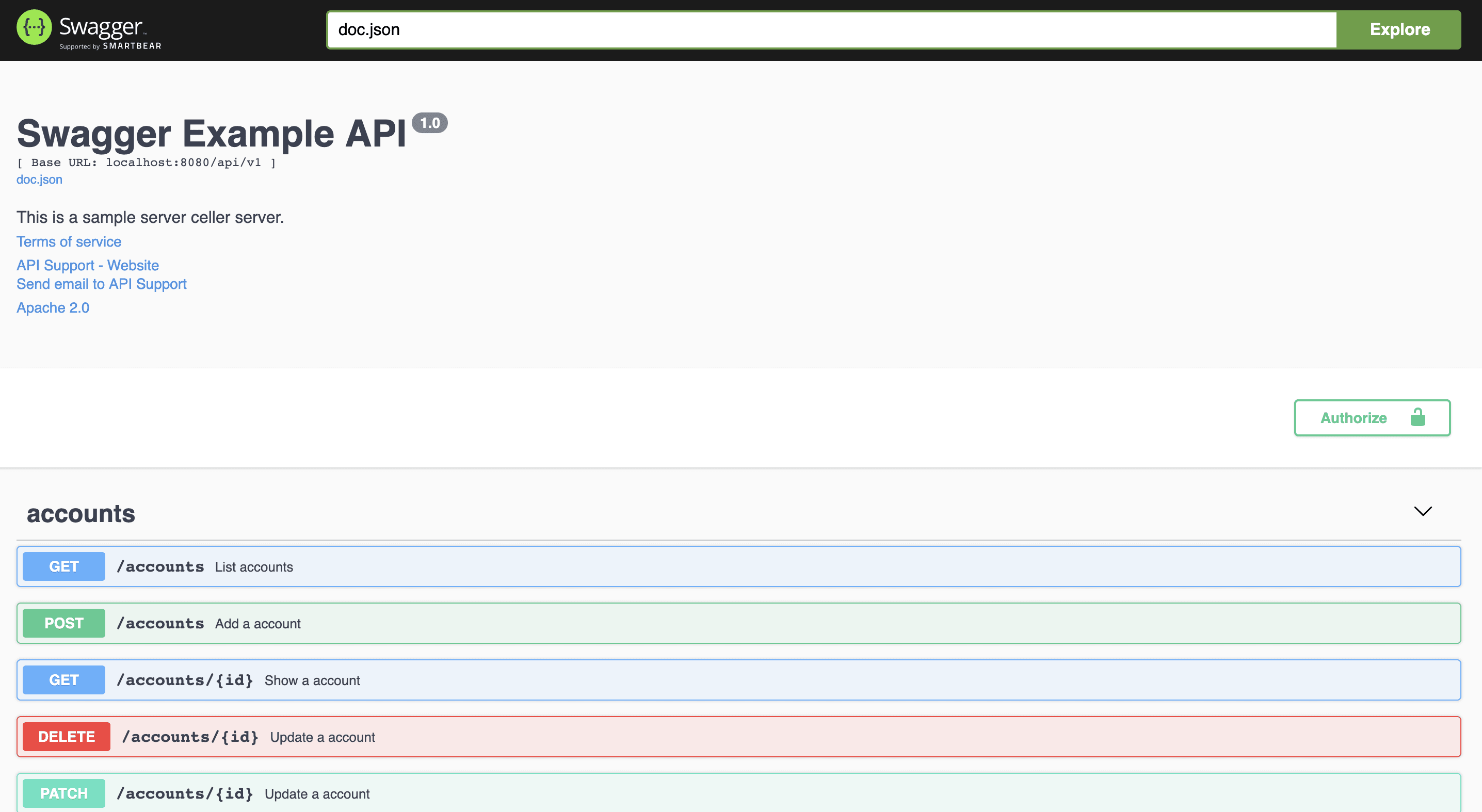
// @title Swagger Example API
// @version 1.0
// @description This is a sample server celler server.
// @termsOfService http://swagger.io/terms/
// @contact.name API Support
// @contact.url http://www.swagger.io/support
// @contact.email support@swagger.io
// @license.name Apache 2.0
// @license.url http://www.apache.org/licenses/LICENSE-2.0.html
// @host localhost:8080
// @BasePath /api/v1
// @query.collection.format multi
// @securityDefinitions.basic BasicAuth
// @securityDefinitions.apikey ApiKeyAuth
// @in header
// @name Authorization
// @securitydefinitions.oauth2.application OAuth2Application
// @tokenUrl https://example.com/oauth/token
// @scope.write Grants write access
// @scope.admin Grants read and write access to administrative information
// @securitydefinitions.oauth2.implicit OAuth2Implicit
// @authorizationurl https://example.com/oauth/authorize
// @scope.write Grants write access
// @scope.admin Grants read and write access to administrative information
// @securitydefinitions.oauth2.password OAuth2Password
// @tokenUrl https://example.com/oauth/token
// @scope.read Grants read access
// @scope.write Grants write access
// @scope.admin Grants read and write access to administrative information
// @securitydefinitions.oauth2.accessCode OAuth2AccessCode
// @tokenUrl https://example.com/oauth/token
// @authorizationurl https://example.com/oauth/authorize
// @scope.admin Grants read and write access to administrative information
// @x-extension-openapi {"example": "value on a json format"}
func main() {
r := gin.Default()
c := controller.NewController()
v1 := r.Group("/api/v1")
{
accounts := v1.Group("/accounts")
{
accounts.GET(":id", c.ShowAccount)
accounts.GET("", c.ListAccounts)
accounts.POST("", c.AddAccount)
accounts.DELETE(":id", c.DeleteAccount)
accounts.PATCH(":id", c.UpdateAccount)
accounts.POST(":id/images", c.UploadAccountImage)
}
//...
}
r.GET("/swagger/*any", ginSwagger.WrapHandler(swaggerFiles.Handler))
r.Run(":8080")
}
//...
```
此外,可以动态设置一些通用的API信息。生成的代码包`docs`导出`SwaggerInfo`变量,使用该变量可以通过编码的方式设置标题、描述、版本、主机和基础路径。使用Gin的示例:
```go
package main
import (
"github.com/gin-gonic/gin"
"github.com/swaggo/files"
"github.com/swaggo/gin-swagger"
"./docs" // docs is generated by Swag CLI, you have to import it.
)
// @contact.name API Support
// @contact.url http://www.swagger.io/support
// @contact.email support@swagger.io
// @license.name Apache 2.0
// @license.url http://www.apache.org/licenses/LICENSE-2.0.html
// @termsOfService http://swagger.io/terms/
func main() {
// programatically set swagger info
docs.SwaggerInfo.Title = "Swagger Example API"
docs.SwaggerInfo.Description = "This is a sample server Petstore server."
docs.SwaggerInfo.Version = "1.0"
docs.SwaggerInfo.Host = "petstore.swagger.io"
docs.SwaggerInfo.BasePath = "/v2"
docs.SwaggerInfo.Schemes = []string{"http", "https"}
r := gin.New()
// use ginSwagger middleware to serve the API docs
r.GET("/swagger/*any", ginSwagger.WrapHandler(swaggerFiles.Handler))
r.Run()
}
```
3. 在`controller`代码中添加API操作注释:
```go
package controller
import (
"fmt"
"net/http"
"strconv"
"github.com/gin-gonic/gin"
"github.com/swaggo/swag/example/celler/httputil"
"github.com/swaggo/swag/example/celler/model"
)
// ShowAccount godoc
// @Summary Show a account
// @Description get string by ID
// @ID get-string-by-int
// @Accept json
// @Produce json
// @Param id path int true "Account ID"
// @Success 200 {object} model.Account
// @Header 200 {string} Token "qwerty"
// @Failure 400 {object} httputil.HTTPError
// @Failure 404 {object} httputil.HTTPError
// @Failure 500 {object} httputil.HTTPError
// @Router /accounts/{id} [get]
func (c *Controller) ShowAccount(ctx *gin.Context) {
id := ctx.Param("id")
aid, err := strconv.Atoi(id)
if err != nil {
httputil.NewError(ctx, http.StatusBadRequest, err)
return
}
account, err := model.AccountOne(aid)
if err != nil {
httputil.NewError(ctx, http.StatusNotFound, err)
return
}
ctx.JSON(http.StatusOK, account)
}
// ListAccounts godoc
// @Summary List accounts
// @Description get accounts
// @Accept json
// @Produce json
// @Param q query string false "name search by q"
// @Success 200 {array} model.Account
// @Header 200 {string} Token "qwerty"
// @Failure 400 {object} httputil.HTTPError
// @Failure 404 {object} httputil.HTTPError
// @Failure 500 {object} httputil.HTTPError
// @Router /accounts [get]
func (c *Controller) ListAccounts(ctx *gin.Context) {
q := ctx.Request.URL.Query().Get("q")
accounts, err := model.AccountsAll(q)
if err != nil {
httputil.NewError(ctx, http.StatusNotFound, err)
return
}
ctx.JSON(http.StatusOK, accounts)
}
//...
```
```bash
swag init
```
4. 运行程序,然后在浏览器中访问 http://localhost:8080/swagger/index.html。将看到Swagger 2.0 Api文档,如下所示:
## 开发现状
[Swagger 2.0 文档](https://swagger.io/docs/specification/2-0/basic-structure/)
- [x] Basic Structure
- [x] API Host and Base Path
- [x] Paths and Operations
- [x] Describing Parameters
- [x] Describing Request Body
- [x] Describing Responses
- [x] MIME Types
- [x] Authentication
- [x] Basic Authentication
- [x] API Keys
- [x] Adding Examples
- [x] File Upload
- [x] Enums
- [x] Grouping Operations With Tags
- [ ] Swagger Extensions
## 声明式注释格式
## 通用API信息
**示例** [`celler/main.go`](https://github.com/swaggo/swag/blob/master/example/celler/main.go)
| 注释 | 说明 | 示例 |
| ----------------------- | ----------------------------------------------------------------------------------------------- | --------------------------------------------------------------- |
| title | **必填** 应用程序的名称。 | // @title Swagger Example API |
| version | **必填** 提供应用程序API的版本。 | // @version 1.0 |
| description | 应用程序的简短描述。 | // @description This is a sample server celler server. |
| tag.name | 标签的名称。 | // @tag.name This is the name of the tag |
| tag.description | 标签的描述。 | // @tag.description Cool Description |
| tag.docs.url | 标签的外部文档的URL。 | // @tag.docs.url https://example.com |
| tag.docs.description | 标签的外部文档说明。 | // @tag.docs.description Best example documentation |
| termsOfService | API的服务条款。 | // @termsOfService http://swagger.io/terms/ |
| contact.name | 公开的API的联系信息。 | // @contact.name API Support |
| contact.url | 联系信息的URL。 必须采用网址格式。 | // @contact.url http://www.swagger.io/support |
| contact.email | 联系人/组织的电子邮件地址。 必须采用电子邮件地址的格式。 | // @contact.email support@swagger.io |
| license.name | **必填** 用于API的许可证名称。 | // @license.name Apache 2.0 |
| license.url | 用于API的许可证的URL。 必须采用网址格式。 | // @license.url http://www.apache.org/licenses/LICENSE-2.0.html |
| host | 运行API的主机(主机名或IP地址)。 | // @host localhost:8080 |
| BasePath | 运行API的基本路径。 | // @BasePath /api/v1 |
| query.collection.format | 请求URI query里数组参数的默认格式:csv,multi,pipes,tsv,ssv。 如果未设置,则默认为csv。 | // @query.collection.format multi |
| schemes | 用空格分隔的请求的传输协议。 | // @schemes http https |
| x-name | 扩展的键必须以x-开头,并且只能使用json值 | // @x-example-key {"key": "value"} |
### 使用Markdown描述
如果文档中的短字符串不足以完整表达,或者需要展示图片,代码示例等类似的内容,则可能需要使用Markdown描述。要使用Markdown描述,请使用一下注释。
| 注释 | 说明 | 示例 |
| ------------------------ | ------------------------------------------------------------------------------------ | --------------------------------------------------------------------------------- |
| title | **必填** 应用程序的名称。 | // @title Swagger Example API |
| version | **必填** 提供应用程序API的版本。 | // @version 1.0 |
| description.markdown | 应用程序的简短描述。 从`api.md`文件中解析。 这是`@description`的替代用法。 | // @description.markdown No value needed, this parses the description from api.md |
| tag.name | 标签的名称。 | // @tag.name This is the name of the tag |
| tag.description.markdown | 标签说明,这是`tag.description`的替代用法。 该描述将从名为`tagname.md的`文件中读取。 | // @tag.description.markdown |
## API操作
Example [celler/controller](https://github.com/swaggo/swag/tree/master/example/celler/controller)
| 注释 | 描述 | |
| -------------------- | ------------------------------------------------------------------------------------------------------- | -------------------------------------------------- |
| description | 操作行为的详细说明。 |
| description.markdown | 应用程序的简短描述。该描述将从名为`endpointname.md`的文件中读取。 | // @description.file endpoint.description.markdown |
| id | 用于标识操作的唯一字符串。在所有API操作中必须唯一。 |
| tags | 每个API操作的标签列表,以逗号分隔。 |
| summary | 该操作的简短摘要。 |
| accept | API可以使用的MIME类型的列表。值必须如“[Mime类型](#mime-types)”中所述。 |
| produce | API可以生成的MIME类型的列表。值必须如“[Mime类型](#mime-types)”中所述。 |
| param | 用空格分隔的参数。`param name`,`param type`,`data type`,`is mandatory?`,`comment` `attribute(optional)` |
| security | 每个API操作的[安全性](#security)。 |
| success | 以空格分隔的成功响应。`return code`,`{param type}`,`data type`,`comment` |
| failure | 以空格分隔的故障响应。`return code`,`{param type}`,`data type`,`comment` |
| header | 以空格分隔的头字段。 `return code`,`{param type}`,`data type`,`comment` |
| router | 以空格分隔的路径定义。 `path`,`[httpMethod]` |
| x-name | 扩展字段必须以`x-`开头,并且只能使用json值。 |
## Mime类型
`swag` g接受所有格式正确的MIME类型, 即使匹配 `*/*`。除此之外,`swag`还接受某些MIME类型的别名,如下所示:
| Alias | MIME Type |
| --------------------- | --------------------------------- |
| json | application/json |
| xml | text/xml |
| plain | text/plain |
| html | text/html |
| mpfd | multipart/form-data |
| x-www-form-urlencoded | application/x-www-form-urlencoded |
| json-api | application/vnd.api+json |
| json-stream | application/x-json-stream |
| octet-stream | application/octet-stream |
| png | image/png |
| jpeg | image/jpeg |
| gif | image/gif |
## 参数类型
- query
- path
- header
- body
- formData
## 数据类型
- string (string)
- integer (int, uint, uint32, uint64)
- number (float32)
- boolean (bool)
- user defined struct
## 安全性
| 注释 | 描述 | 参数 | 示例 |
| -------------------------------------- | --------------------------------------------------------------------------------------------- | --------------------------------- | ------------------------------------------------------------ |
| securitydefinitions.basic | [Basic](https://swagger.io/docs/specification/2-0/authentication/basic-authentication/) auth. | | // @securityDefinitions.basic BasicAuth |
| securitydefinitions.apikey | [API key](https://swagger.io/docs/specification/2-0/authentication/api-keys/) auth. | in, name | // @securityDefinitions.apikey ApiKeyAuth |
| securitydefinitions.oauth2.application | [OAuth2 application](https://swagger.io/docs/specification/authentication/oauth2/) auth. | tokenUrl, scope | // @securitydefinitions.oauth2.application OAuth2Application |
| securitydefinitions.oauth2.implicit | [OAuth2 implicit](https://swagger.io/docs/specification/authentication/oauth2/) auth. | authorizationUrl, scope | // @securitydefinitions.oauth2.implicit OAuth2Implicit |
| securitydefinitions.oauth2.password | [OAuth2 password](https://swagger.io/docs/specification/authentication/oauth2/) auth. | tokenUrl, scope | // @securitydefinitions.oauth2.password OAuth2Password |
| securitydefinitions.oauth2.accessCode | [OAuth2 access code](https://swagger.io/docs/specification/authentication/oauth2/) auth. | tokenUrl, authorizationUrl, scope | // @securitydefinitions.oauth2.accessCode OAuth2AccessCode |
| 参数注释 | 示例 |
| ---------------- | -------------------------------------------------------- |
| in | // @in header |
| name | // @name Authorization |
| tokenUrl | // @tokenUrl https://example.com/oauth/token |
| authorizationurl | // @authorizationurl https://example.com/oauth/authorize |
| scope.hoge | // @scope.write Grants write access |
## 属性
```go
// @Param enumstring query string false "string enums" Enums(A, B, C)
// @Param enumint query int false "int enums" Enums(1, 2, 3)
// @Param enumnumber query number false "int enums" Enums(1.1, 1.2, 1.3)
// @Param string query string false "string valid" minlength(5) maxlength(10)
// @Param int query int false "int valid" mininum(1) maxinum(10)
// @Param default query string false "string default" default(A)
// @Param collection query []string false "string collection" collectionFormat(multi)
```
也适用于结构体字段:
```go
type Foo struct {
Bar string `minLength:"4" maxLength:"16"`
Baz int `minimum:"10" maximum:"20" default:"15"`
Qux []string `enums:"foo,bar,baz"`
}
```
### 当前可用的
| 字段名 | 类型 | 描述 |
| ---------------- | --------- | --------------------------------------------------------------------------------------------------------------------------------------------------------------------------------------------------------------------------------------------------------------------------------------------------------------------------------------------------------------------- |
| default | * | 声明如果未提供任何参数,则服务器将使用的默认参数值,例如,如果请求中的客户端未提供该参数,则用于控制每页结果数的“计数”可能默认为100。 (注意:“default”对于必需的参数没有意义)。参看 https://tools.ietf.org/html/draft-fge-json-schema-validation-00#section-6.2。 与JSON模式不同,此值务必符合此参数的定义[类型](#parameterType)。 |
| maximum | `number` | 参看 https://tools.ietf.org/html/draft-fge-json-schema-validation-00#section-5.1.2. |
| minimum | `number` | 参看 https://tools.ietf.org/html/draft-fge-json-schema-validation-00#section-5.1.3. |
| maxLength | `integer` | 参看 https://tools.ietf.org/html/draft-fge-json-schema-validation-00#section-5.2.1. |
| minLength | `integer` | 参看 https://tools.ietf.org/html/draft-fge-json-schema-validation-00#section-5.2.2. |
| enums | [\*] | 参看 https://tools.ietf.org/html/draft-fge-json-schema-validation-00#section-5.5.1. |
| format | `string` | 上面提到的[类型](#parameterType)的扩展格式。有关更多详细信息,请参见[数据类型格式](https://swagger.io/specification/v2/#dataTypeFormat)。 |
| collectionFormat | `string` | 指定query数组参数的格式。 可能的值为:
[](https://travis-ci.org/swaggo/swag)
[](https://codecov.io/gh/swaggo/swag)
[](https://goreportcard.com/report/github.com/swaggo/swag)
[](https://codebeat.co/projects/github-com-swaggo-swag-master)
[](https://godoc.org/github.com/swaggo/swag)
[](#backers)
[](#sponsors) [](https://app.fossa.io/projects/git%2Bgithub.com%2Fswaggo%2Fswag?ref=badge_shield)
[](https://github.com/swaggo/swag/releases)
Swag将Go的注释转换为Swagger2.0文档。我们为流行的 [Go Web Framework](#支持的Web框架) 创建了各种插件,这样可以与现有Go项目快速集成(使用Swagger UI)。
## 目录
- [快速开始](#快速开始)
- [支持的Web框架](#支持的web框架)
- [如何与Gin集成](#如何与gin集成)
- [开发现状](#开发现状)
- [声明式注释格式](#声明式注释格式)
- [通用API信息](#通用api信息)
- [API操作](#api操作)
- [安全性](#安全性)
- [样例](#样例)
- [多行的描述](#多行的描述)
- [用户自定义的具有数组类型的结构](#用户自定义的具有数组类型的结构)
- [响应对象中的模型组合](#响应对象中的模型组合)
- [在响应中增加头字段](#在响应中增加头字段)
- [使用多路径参数](#使用多路径参数)
- [结构体的示例值](#结构体的示例值)
- [结构体描述](#结构体描述)
- [使用`swaggertype`标签更改字段类型](#使用`swaggertype`标签更改字段类型)
- [使用`swaggerignore`标签排除字段](#使用swaggerignore标签排除字段)
- [将扩展信息添加到结构字段](#将扩展信息添加到结构字段)
- [对展示的模型重命名](#对展示的模型重命名)
- [如何使用安全性注释](#如何使用安全性注释)
- [项目相关](#项目相关)
## 快速开始
1. 将注释添加到API源代码中,请参阅声明性注释格式。
2. 使用如下命令下载swag:
```bash
go get -u github.com/swaggo/swag/cmd/swag
```
从源码开始构建的话,需要有Go环境(1.9及以上版本)。
或者从github的release页面下载预编译好的二进制文件。
3. 在包含`main.go`文件的项目根目录运行`swag init`。这将会解析注释并生成需要的文件(`docs`文件夹和`docs/docs.go`)。
```bash
swag init
```
确保导入了生成的`docs/docs.go`文件,这样特定的配置文件才会被初始化。如果通用API指数没有写在`main.go`中,可以使用`-g`标识符来告知swag。
```bash
swag init -g http/api.go
```
## swag cli
```bash
swag init -h
NAME:
swag init - Create docs.go
USAGE:
swag init [command options] [arguments...]
OPTIONS:
--generalInfo value, -g value API通用信息所在的go源文件路径,如果是相对路径则基于API解析目录 (默认: "main.go")
--dir value, -d value API解析目录 (默认: "./")
--propertyStrategy value, -p value 结构体字段命名规则,三种:snakecase,camelcase,pascalcase (默认: "camelcase")
--output value, -o value 文件(swagger.json, swagger.yaml and doc.go)输出目录 (默认: "./docs")
--parseVendor 是否解析vendor目录里的go源文件,默认不
--parseDependency 是否解析依赖目录中的go源文件,默认不
--markdownFiles value, --md value 指定API的描述信息所使用的markdown文件所在的目录
--generatedTime 是否输出时间到输出文件docs.go的顶部,默认是
```
## 支持的Web框架
- [gin](http://github.com/swaggo/gin-swagger)
- [echo](http://github.com/swaggo/echo-swagger)
- [buffalo](https://github.com/swaggo/buffalo-swagger)
- [net/http](https://github.com/swaggo/http-swagger)
## 如何与Gin集成
[点击此处](https://github.com/swaggo/swag/tree/master/example/celler)查看示例源代码。
1. 使用`swag init`生成Swagger2.0文档后,导入如下代码包:
```go
import "github.com/swaggo/gin-swagger" // gin-swagger middleware
import "github.com/swaggo/files" // swagger embed files
```
2. 在`main.go`源代码中添加通用的API注释:
```bash
// @title Swagger Example API
// @version 1.0
// @description This is a sample server celler server.
// @termsOfService http://swagger.io/terms/
// @contact.name API Support
// @contact.url http://www.swagger.io/support
// @contact.email support@swagger.io
// @license.name Apache 2.0
// @license.url http://www.apache.org/licenses/LICENSE-2.0.html
// @host localhost:8080
// @BasePath /api/v1
// @query.collection.format multi
// @securityDefinitions.basic BasicAuth
// @securityDefinitions.apikey ApiKeyAuth
// @in header
// @name Authorization
// @securitydefinitions.oauth2.application OAuth2Application
// @tokenUrl https://example.com/oauth/token
// @scope.write Grants write access
// @scope.admin Grants read and write access to administrative information
// @securitydefinitions.oauth2.implicit OAuth2Implicit
// @authorizationurl https://example.com/oauth/authorize
// @scope.write Grants write access
// @scope.admin Grants read and write access to administrative information
// @securitydefinitions.oauth2.password OAuth2Password
// @tokenUrl https://example.com/oauth/token
// @scope.read Grants read access
// @scope.write Grants write access
// @scope.admin Grants read and write access to administrative information
// @securitydefinitions.oauth2.accessCode OAuth2AccessCode
// @tokenUrl https://example.com/oauth/token
// @authorizationurl https://example.com/oauth/authorize
// @scope.admin Grants read and write access to administrative information
// @x-extension-openapi {"example": "value on a json format"}
func main() {
r := gin.Default()
c := controller.NewController()
v1 := r.Group("/api/v1")
{
accounts := v1.Group("/accounts")
{
accounts.GET(":id", c.ShowAccount)
accounts.GET("", c.ListAccounts)
accounts.POST("", c.AddAccount)
accounts.DELETE(":id", c.DeleteAccount)
accounts.PATCH(":id", c.UpdateAccount)
accounts.POST(":id/images", c.UploadAccountImage)
}
//...
}
r.GET("/swagger/*any", ginSwagger.WrapHandler(swaggerFiles.Handler))
r.Run(":8080")
}
//...
```
此外,可以动态设置一些通用的API信息。生成的代码包`docs`导出`SwaggerInfo`变量,使用该变量可以通过编码的方式设置标题、描述、版本、主机和基础路径。使用Gin的示例:
```go
package main
import (
"github.com/gin-gonic/gin"
"github.com/swaggo/files"
"github.com/swaggo/gin-swagger"
"./docs" // docs is generated by Swag CLI, you have to import it.
)
// @contact.name API Support
// @contact.url http://www.swagger.io/support
// @contact.email support@swagger.io
// @license.name Apache 2.0
// @license.url http://www.apache.org/licenses/LICENSE-2.0.html
// @termsOfService http://swagger.io/terms/
func main() {
// programatically set swagger info
docs.SwaggerInfo.Title = "Swagger Example API"
docs.SwaggerInfo.Description = "This is a sample server Petstore server."
docs.SwaggerInfo.Version = "1.0"
docs.SwaggerInfo.Host = "petstore.swagger.io"
docs.SwaggerInfo.BasePath = "/v2"
docs.SwaggerInfo.Schemes = []string{"http", "https"}
r := gin.New()
// use ginSwagger middleware to serve the API docs
r.GET("/swagger/*any", ginSwagger.WrapHandler(swaggerFiles.Handler))
r.Run()
}
```
3. 在`controller`代码中添加API操作注释:
```go
package controller
import (
"fmt"
"net/http"
"strconv"
"github.com/gin-gonic/gin"
"github.com/swaggo/swag/example/celler/httputil"
"github.com/swaggo/swag/example/celler/model"
)
// ShowAccount godoc
// @Summary Show a account
// @Description get string by ID
// @ID get-string-by-int
// @Accept json
// @Produce json
// @Param id path int true "Account ID"
// @Success 200 {object} model.Account
// @Header 200 {string} Token "qwerty"
// @Failure 400 {object} httputil.HTTPError
// @Failure 404 {object} httputil.HTTPError
// @Failure 500 {object} httputil.HTTPError
// @Router /accounts/{id} [get]
func (c *Controller) ShowAccount(ctx *gin.Context) {
id := ctx.Param("id")
aid, err := strconv.Atoi(id)
if err != nil {
httputil.NewError(ctx, http.StatusBadRequest, err)
return
}
account, err := model.AccountOne(aid)
if err != nil {
httputil.NewError(ctx, http.StatusNotFound, err)
return
}
ctx.JSON(http.StatusOK, account)
}
// ListAccounts godoc
// @Summary List accounts
// @Description get accounts
// @Accept json
// @Produce json
// @Param q query string false "name search by q"
// @Success 200 {array} model.Account
// @Header 200 {string} Token "qwerty"
// @Failure 400 {object} httputil.HTTPError
// @Failure 404 {object} httputil.HTTPError
// @Failure 500 {object} httputil.HTTPError
// @Router /accounts [get]
func (c *Controller) ListAccounts(ctx *gin.Context) {
q := ctx.Request.URL.Query().Get("q")
accounts, err := model.AccountsAll(q)
if err != nil {
httputil.NewError(ctx, http.StatusNotFound, err)
return
}
ctx.JSON(http.StatusOK, accounts)
}
//...
```
```bash
swag init
```
4. 运行程序,然后在浏览器中访问 http://localhost:8080/swagger/index.html。将看到Swagger 2.0 Api文档,如下所示:

## 开发现状
[Swagger 2.0 文档](https://swagger.io/docs/specification/2-0/basic-structure/)
- [x] Basic Structure
- [x] API Host and Base Path
- [x] Paths and Operations
- [x] Describing Parameters
- [x] Describing Request Body
- [x] Describing Responses
- [x] MIME Types
- [x] Authentication
- [x] Basic Authentication
- [x] API Keys
- [x] Adding Examples
- [x] File Upload
- [x] Enums
- [x] Grouping Operations With Tags
- [ ] Swagger Extensions
## 声明式注释格式
## 通用API信息
**示例** [`celler/main.go`](https://github.com/swaggo/swag/blob/master/example/celler/main.go)
| 注释 | 说明 | 示例 |
| ----------------------- | ----------------------------------------------------------------------------------------------- | --------------------------------------------------------------- |
| title | **必填** 应用程序的名称。 | // @title Swagger Example API |
| version | **必填** 提供应用程序API的版本。 | // @version 1.0 |
| description | 应用程序的简短描述。 | // @description This is a sample server celler server. |
| tag.name | 标签的名称。 | // @tag.name This is the name of the tag |
| tag.description | 标签的描述。 | // @tag.description Cool Description |
| tag.docs.url | 标签的外部文档的URL。 | // @tag.docs.url https://example.com |
| tag.docs.description | 标签的外部文档说明。 | // @tag.docs.description Best example documentation |
| termsOfService | API的服务条款。 | // @termsOfService http://swagger.io/terms/ |
| contact.name | 公开的API的联系信息。 | // @contact.name API Support |
| contact.url | 联系信息的URL。 必须采用网址格式。 | // @contact.url http://www.swagger.io/support |
| contact.email | 联系人/组织的电子邮件地址。 必须采用电子邮件地址的格式。 | // @contact.email support@swagger.io |
| license.name | **必填** 用于API的许可证名称。 | // @license.name Apache 2.0 |
| license.url | 用于API的许可证的URL。 必须采用网址格式。 | // @license.url http://www.apache.org/licenses/LICENSE-2.0.html |
| host | 运行API的主机(主机名或IP地址)。 | // @host localhost:8080 |
| BasePath | 运行API的基本路径。 | // @BasePath /api/v1 |
| query.collection.format | 请求URI query里数组参数的默认格式:csv,multi,pipes,tsv,ssv。 如果未设置,则默认为csv。 | // @query.collection.format multi |
| schemes | 用空格分隔的请求的传输协议。 | // @schemes http https |
| x-name | 扩展的键必须以x-开头,并且只能使用json值 | // @x-example-key {"key": "value"} |
### 使用Markdown描述
如果文档中的短字符串不足以完整表达,或者需要展示图片,代码示例等类似的内容,则可能需要使用Markdown描述。要使用Markdown描述,请使用一下注释。
| 注释 | 说明 | 示例 |
| ------------------------ | ------------------------------------------------------------------------------------ | --------------------------------------------------------------------------------- |
| title | **必填** 应用程序的名称。 | // @title Swagger Example API |
| version | **必填** 提供应用程序API的版本。 | // @version 1.0 |
| description.markdown | 应用程序的简短描述。 从`api.md`文件中解析。 这是`@description`的替代用法。 | // @description.markdown No value needed, this parses the description from api.md |
| tag.name | 标签的名称。 | // @tag.name This is the name of the tag |
| tag.description.markdown | 标签说明,这是`tag.description`的替代用法。 该描述将从名为`tagname.md的`文件中读取。 | // @tag.description.markdown |
## API操作
Example [celler/controller](https://github.com/swaggo/swag/tree/master/example/celler/controller)
| 注释 | 描述 | |
| -------------------- | ------------------------------------------------------------------------------------------------------- | -------------------------------------------------- |
| description | 操作行为的详细说明。 |
| description.markdown | 应用程序的简短描述。该描述将从名为`endpointname.md`的文件中读取。 | // @description.file endpoint.description.markdown |
| id | 用于标识操作的唯一字符串。在所有API操作中必须唯一。 |
| tags | 每个API操作的标签列表,以逗号分隔。 |
| summary | 该操作的简短摘要。 |
| accept | API可以使用的MIME类型的列表。值必须如“[Mime类型](#mime-types)”中所述。 |
| produce | API可以生成的MIME类型的列表。值必须如“[Mime类型](#mime-types)”中所述。 |
| param | 用空格分隔的参数。`param name`,`param type`,`data type`,`is mandatory?`,`comment` `attribute(optional)` |
| security | 每个API操作的[安全性](#security)。 |
| success | 以空格分隔的成功响应。`return code`,`{param type}`,`data type`,`comment` |
| failure | 以空格分隔的故障响应。`return code`,`{param type}`,`data type`,`comment` |
| header | 以空格分隔的头字段。 `return code`,`{param type}`,`data type`,`comment` |
| router | 以空格分隔的路径定义。 `path`,`[httpMethod]` |
| x-name | 扩展字段必须以`x-`开头,并且只能使用json值。 |
## Mime类型
`swag` g接受所有格式正确的MIME类型, 即使匹配 `*/*`。除此之外,`swag`还接受某些MIME类型的别名,如下所示:
| Alias | MIME Type |
| --------------------- | --------------------------------- |
| json | application/json |
| xml | text/xml |
| plain | text/plain |
| html | text/html |
| mpfd | multipart/form-data |
| x-www-form-urlencoded | application/x-www-form-urlencoded |
| json-api | application/vnd.api+json |
| json-stream | application/x-json-stream |
| octet-stream | application/octet-stream |
| png | image/png |
| jpeg | image/jpeg |
| gif | image/gif |
## 参数类型
- query
- path
- header
- body
- formData
## 数据类型
- string (string)
- integer (int, uint, uint32, uint64)
- number (float32)
- boolean (bool)
- user defined struct
## 安全性
| 注释 | 描述 | 参数 | 示例 |
| -------------------------------------- | --------------------------------------------------------------------------------------------- | --------------------------------- | ------------------------------------------------------------ |
| securitydefinitions.basic | [Basic](https://swagger.io/docs/specification/2-0/authentication/basic-authentication/) auth. | | // @securityDefinitions.basic BasicAuth |
| securitydefinitions.apikey | [API key](https://swagger.io/docs/specification/2-0/authentication/api-keys/) auth. | in, name | // @securityDefinitions.apikey ApiKeyAuth |
| securitydefinitions.oauth2.application | [OAuth2 application](https://swagger.io/docs/specification/authentication/oauth2/) auth. | tokenUrl, scope | // @securitydefinitions.oauth2.application OAuth2Application |
| securitydefinitions.oauth2.implicit | [OAuth2 implicit](https://swagger.io/docs/specification/authentication/oauth2/) auth. | authorizationUrl, scope | // @securitydefinitions.oauth2.implicit OAuth2Implicit |
| securitydefinitions.oauth2.password | [OAuth2 password](https://swagger.io/docs/specification/authentication/oauth2/) auth. | tokenUrl, scope | // @securitydefinitions.oauth2.password OAuth2Password |
| securitydefinitions.oauth2.accessCode | [OAuth2 access code](https://swagger.io/docs/specification/authentication/oauth2/) auth. | tokenUrl, authorizationUrl, scope | // @securitydefinitions.oauth2.accessCode OAuth2AccessCode |
| 参数注释 | 示例 |
| ---------------- | -------------------------------------------------------- |
| in | // @in header |
| name | // @name Authorization |
| tokenUrl | // @tokenUrl https://example.com/oauth/token |
| authorizationurl | // @authorizationurl https://example.com/oauth/authorize |
| scope.hoge | // @scope.write Grants write access |
## 属性
```go
// @Param enumstring query string false "string enums" Enums(A, B, C)
// @Param enumint query int false "int enums" Enums(1, 2, 3)
// @Param enumnumber query number false "int enums" Enums(1.1, 1.2, 1.3)
// @Param string query string false "string valid" minlength(5) maxlength(10)
// @Param int query int false "int valid" mininum(1) maxinum(10)
// @Param default query string false "string default" default(A)
// @Param collection query []string false "string collection" collectionFormat(multi)
```
也适用于结构体字段:
```go
type Foo struct {
Bar string `minLength:"4" maxLength:"16"`
Baz int `minimum:"10" maximum:"20" default:"15"`
Qux []string `enums:"foo,bar,baz"`
}
```
### 当前可用的
| 字段名 | 类型 | 描述 |
| ---------------- | --------- | --------------------------------------------------------------------------------------------------------------------------------------------------------------------------------------------------------------------------------------------------------------------------------------------------------------------------------------------------------------------- |
| default | * | 声明如果未提供任何参数,则服务器将使用的默认参数值,例如,如果请求中的客户端未提供该参数,则用于控制每页结果数的“计数”可能默认为100。 (注意:“default”对于必需的参数没有意义)。参看 https://tools.ietf.org/html/draft-fge-json-schema-validation-00#section-6.2。 与JSON模式不同,此值务必符合此参数的定义[类型](#parameterType)。 |
| maximum | `number` | 参看 https://tools.ietf.org/html/draft-fge-json-schema-validation-00#section-5.1.2. |
| minimum | `number` | 参看 https://tools.ietf.org/html/draft-fge-json-schema-validation-00#section-5.1.3. |
| maxLength | `integer` | 参看 https://tools.ietf.org/html/draft-fge-json-schema-validation-00#section-5.2.1. |
| minLength | `integer` | 参看 https://tools.ietf.org/html/draft-fge-json-schema-validation-00#section-5.2.2. |
| enums | [\*] | 参看 https://tools.ietf.org/html/draft-fge-json-schema-validation-00#section-5.5.1. |
| format | `string` | 上面提到的[类型](#parameterType)的扩展格式。有关更多详细信息,请参见[数据类型格式](https://swagger.io/specification/v2/#dataTypeFormat)。 |
| collectionFormat | `string` | 指定query数组参数的格式。 可能的值为: - `csv` - 逗号分隔值 `foo,bar`.
- `ssv` - 空格分隔值 `foo bar`.
- `tsv` - 制表符分隔值 `foo\tbar`.
- `pipes` - 管道符分隔值
foo|bar. - `multi` - 对应于多个参数实例,而不是单个实例 `foo=bar&foo=baz` 的多个值。这仅对“`query`”或“`formData`”中的参数有效。
默认值是 `csv`。 |
### 进一步的
| 字段名 | 类型 | 描述 |
| ----------- | :-------: | ---------------------------------------------------------------------------------- |
| multipleOf | `number` | See https://tools.ietf.org/html/draft-fge-json-schema-validation-00#section-5.1.1. |
| pattern | `string` | See https://tools.ietf.org/html/draft-fge-json-schema-validation-00#section-5.2.3. |
| maxItems | `integer` | See https://tools.ietf.org/html/draft-fge-json-schema-validation-00#section-5.3.2. |
| minItems | `integer` | See https://tools.ietf.org/html/draft-fge-json-schema-validation-00#section-5.3.3. |
| uniqueItems | `boolean` | See https://tools.ietf.org/html/draft-fge-json-schema-validation-00#section-5.3.4. |
## 样例
### 多行的描述
可以在常规api描述或路由定义中添加跨越多行的描述,如下所示:
```go
// @description This is the first line
// @description This is the second line
// @description And so forth.
```
### 用户自定义的具有数组类型的结构
```go
// @Success 200 {array} model.Account <-- This is a user defined struct.
```
```go
package model
type Account struct {
ID int `json:"id" example:"1"`
Name string `json:"name" example:"account name"`
}
```
### 响应对象中的模型组合
```go
// JSONResult的data字段类型将被proto.Order类型替换
@success 200 {object} jsonresult.JSONResult{data=proto.Order} "desc"
```
```go
type JSONResult struct {
Code int `json:"code" `
Message string `json:"message"`
Data interface{} `json:"data"`
}
type Order struct { //in `proto` package
...
}
```
- 还支持对象数组和原始类型作为嵌套响应
```go
@success 200 {object} jsonresult.JSONResult{data=[]proto.Order} "desc"
@success 200 {object} jsonresult.JSONResult{data=string} "desc"
@success 200 {object} jsonresult.JSONResult{data=[]string} "desc"
```
- 替换多个字段的类型。如果某字段不存在,将添加该字段。
```go
@success 200 {object} jsonresult.JSONResult{data1=string,data2=[]string,data3=proto.Order,data4=[]proto.Order} "desc"
```
### 在响应中增加头字段
```go
// @Success 200 {string} string "ok"
// @Header 200 {string} Location "/entity/1"
// @Header 200 {string} Token "qwerty"
```
### 使用多路径参数
```go
/// ...
// @Param group_id path int true "Group ID"
// @Param account_id path int true "Account ID"
// ...
// @Router /examples/groups/{group_id}/accounts/{account_id} [get]
```
### 结构体的示例值
```go
type Account struct {
ID int `json:"id" example:"1"`
Name string `json:"name" example:"account name"`
PhotoUrls []string `json:"photo_urls" example:"http://test/image/1.jpg,http://test/image/2.jpg"`
}
```
### 结构体描述
```go
type Account struct {
// ID this is userid
ID int `json:"id"`
Name string `json:"name"` // This is Name
}
```
### 使用`swaggertype`标签更改字段类型
[#201](https://github.com/swaggo/swag/issues/201#issuecomment-475479409)
```go
type TimestampTime struct {
time.Time
}
///实现encoding.JSON.Marshaler接口
func (t *TimestampTime) MarshalJSON() ([]byte, error) {
bin := make([]byte, 16)
bin = strconv.AppendInt(bin[:0], t.Time.Unix(), 10)
return bin, nil
}
///实现encoding.JSON.Unmarshaler接口
func (t *TimestampTime) UnmarshalJSON(bin []byte) error {
v, err := strconv.ParseInt(string(bin), 10, 64)
if err != nil {
return err
}
t.Time = time.Unix(v, 0)
return nil
}
///
type Account struct {
// 使用`swaggertype`标签将别名类型更改为内置类型integer
ID sql.NullInt64 `json:"id" swaggertype:"integer"`
// 使用`swaggertype`标签更改struct类型为内置类型integer
RegisterTime TimestampTime `json:"register_time" swaggertype:"primitive,integer"`
// Array types can be overridden using "array," format
Coeffs []big.Float `json:"coeffs" swaggertype:"array,number"`
}
```
[#379](https://github.com/swaggo/swag/issues/379)
```go
type CerticateKeyPair struct {
Crt []byte `json:"crt" swaggertype:"string" format:"base64" example:"U3dhZ2dlciByb2Nrcw=="`
Key []byte `json:"key" swaggertype:"string" format:"base64" example:"U3dhZ2dlciByb2Nrcw=="`
}
```
生成的swagger文档如下:
```go
"api.MyBinding": {
"type":"object",
"properties":{
"crt":{
"type":"string",
"format":"base64",
"example":"U3dhZ2dlciByb2Nrcw=="
},
"key":{
"type":"string",
"format":"base64",
"example":"U3dhZ2dlciByb2Nrcw=="
}
}
}
```
### 使用`swaggerignore`标签排除字段
```go
type Account struct {
ID string `json:"id"`
Name string `json:"name"`
Ignored int `swaggerignore:"true"`
}
```
### 将扩展信息添加到结构字段
```go
type Account struct {
ID string `json:"id" extensions:"x-nullable,x-abc=def"` // 扩展字段必须以"x-"开头
}
```
生成swagger文档,如下所示:
```go
"Account": {
"type": "object",
"properties": {
"id": {
"type": "string",
"x-nullable": true,
"x-abc": "def"
}
}
}
```
### 对展示的模型重命名
```go
type Resp struct {
Code int
}//@name Response
```
### 如何使用安全性注释
通用API信息。
```go
// @securityDefinitions.basic BasicAuth
// @securitydefinitions.oauth2.application OAuth2Application
// @tokenUrl https://example.com/oauth/token
// @scope.write Grants write access
// @scope.admin Grants read and write access to administrative information
```
每个API操作。
```go
// @Security ApiKeyAuth
```
使用AND条件。
```go
// @Security ApiKeyAuth
// @Security OAuth2Application[write, admin]
```
## 项目相关
This project was inspired by [yvasiyarov/swagger](https://github.com/yvasiyarov/swagger) but we simplified the usage and added support a variety of [web frameworks](#supported-web-frameworks). Gopher image source is [tenntenn/gopher-stickers](https://github.com/tenntenn/gopher-stickers). It has licenses [creative commons licensing](http://creativecommons.org/licenses/by/3.0/deed.en).
## 贡献者
This project exists thanks to all the people who contribute. [[Contribute](CONTRIBUTING.md)].
 ## 支持者
Thank you to all our backers! 🙏 [[Become a backer](https://opencollective.com/swag#backer)]
## 支持者
Thank you to all our backers! 🙏 [[Become a backer](https://opencollective.com/swag#backer)]
 ## 赞助商
Support this project by becoming a sponsor. Your logo will show up here with a link to your website. [[Become a sponsor](https://opencollective.com/swag#sponsor)]
## 赞助商
Support this project by becoming a sponsor. Your logo will show up here with a link to your website. [[Become a sponsor](https://opencollective.com/swag#sponsor)]




 ## License
[](https://app.fossa.io/projects/git%2Bgithub.com%2Fswaggo%2Fswag?ref=badge_large)
## License
[](https://app.fossa.io/projects/git%2Bgithub.com%2Fswaggo%2Fswag?ref=badge_large)